1
8010A
Operating Manual
8010A
Operating Manual
General description
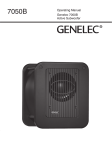
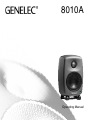
The bi-amplified Genelec 8010A is an extremely
compact two-way active monitoring loudspeaker
designed for professional applications. It contains
drivers, power amplifiers, active crossover filters
and protection circuitry. The MDE™ (Minimum Diffraction Enclosure™) enclosure is made of die-cast
aluminium and shaped to reduce edge diffraction.
Combined with the advanced Directivity Control
WaveguideTM (DCWTM), this design provides excellent frequency balance in difficult acoustic environments. If necessary, the bass response of 8010A
can be extended with a Genelec subwoofer.
Packing contents
Each 8010A is supplied with a mains cable and
this operating manual.
Mounting considerations
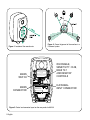
Align the monitors correctly
Always place monitors so that their acoustic axes
converge at ear height at the listening position (see
Figures 1 and 2). Vertical orientation of monitors is
preferred, as it minimises acoustical cancellation
problems around the crossover frequency.
Maintain symmetry
Check that the monitors are placed symmetrically
and at equal distance from the listening position.
If possible, place the monitors so that the listening
position is on the centerline of the room and the
monitors are at an equal distance from the room
centerline.
Active Monitoring System
Minimise reflections
Acoustic reflections from objects close to the monitors, like desks, cabinets, computer monitors etc.
can cause unwanted colouration and blurring of the
sound image. These reflections can be minimised
by placing the monitor away from such surfaces.
Minimum clearances
If the monitor is installed in a restricted space such
as a cabinet or integrated into a wall structure, sufficient cooling for the amplifier and functioning of the
reflex port must be ensured.
A minimum clearance of 2.5 centimeters (1 in)
behind, above and on sides of the monitor must be
found. The space adjacent to the amplifier must either be ventilated or sufficiently large to dissipate
heat so that the ambient temperature does not rise
above 35 degrees Celsius (95°F)
Connections
Connect the mains cables only after you have completed connecting audio signal cabling.
The 8010A has a balanced XLR 10 kOhm audio input connector. It can also be connected to
an unbalanced RCA line level audio source with
a suitable adapter cable your Genelec dealer can
provide. As the 8010A contains amplifiers, no
power amplifier is needed. Never connect 8010A
to the loudspeaker outputs of a power amplifier,
integrated amplifier, or receiver.
When all audio connections are completed, connect the monitors to mains with the supplied mains
cables. They will switch on automatically.
English 1
Figure 2. Correct alignment of the monitors in a
5-channel system.
Figure 1. Location of the acoustic axis
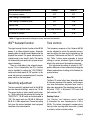
ISS DISABLE,
SENSITIVITY -10 dB,
BASS TILT
AND DESKTOP
CONTROLS
WARNING
MAINS
SWITCH
AVERTISSEMENT
RISQUE DE CHOC ÉLECTRIQUE. NE PAS OUVRIR. NE PAS
EXPOSER À L'EAU OU L'HUMIDITÉ. AUCUN COMPOSANT À
L'INTÉRIEUR REMPLAÇABLE PAR L'UTILISATEUR. ADRESSER
TOUTE RÉPARATION À UN PERSONNEL QUALIFIÉ.
ON
ISS DISABLE
SENSITIVITY -10 dB
DESKTOP CONTROL
BASS TILT -2 dB
BASS TILT -4 dB
MAINS INPUT
50 / 60 Hz 30 W
100 - 240 V~
8010A BI-AMPLIFIED
MONITORING SYSTEM
MADE IN FINLAND www.genelec.com
XLR SIGNAL
INPUT CONNECTOR
2 IN 1
3
+
-
GND
292-8010T
292-8010S
MAINS
CONNECTOR
292-6010W
ELECTRIC SHOCK HAZARD. DO NOT OPEN. DO NOT SUBJECT
TO WATER OR MOISTURE. NO USER SERVICEABLE PARTS
INSIDE. REFER SERVICING TO QUALIFIED PERSONNEL.
Figure 3. Control and connector layout on the rear panel of a 8010A.
2 English
Monitor Mounting Environment
Desktop
Bass Tilt
Flat anechoic response
OFF
OFF
Free standing in a damped room
OFF
OFF
Free standing in a reverberant room
OFF
-2 dB
Near to a wall
Near field on a reflective surface
In a corner or a cabinet
OFF
-4 dB
ON (-4 dB @ 200 Hz)
-2 dB
OFF
-6 dB
Table 1: Suggested tone control settings for various acoustical environments
ISSTM Autostart function
Tone controls
The signal sensing Autostart function of the 8010A
powers it up when playback begins. Automatic
powering down to standby mode happens after the
playback has ended. The power consumption in
standby mode is less than 0.5 watts. The monitor
will automatically and rapidly start up once an input
signal is detected.
There is a slight delay in the automatic powering up. If this is undesirable, the ISSTM function
can be disabled by setting the “ISS DISABLE”
switch on the back panel to “ON” position. In this
mode, the monitor is powered on and off using the
power switch on the back panel.
The frequency response of the Genelec 8010A
can be adjusted to match the acoustic environment by setting the tone control switches on the
rear panel. The controls are “Bass Tilt” and “Desktop”. Table 1 shows some examples of typical
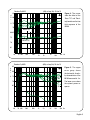
settings in various situations. Figure 4 shows the
effect of the controls on the anechoic response.
Start adjustment by setting all switches to “OFF”
position. Measure or listen systematically through the
different combinations of settings to find the best frequency balance.
Sensitivity adjustment
The input sensitivity (playback level) of the 8010A
has two alternative settings, normal and -10 dB.
The normal setting is factory default and the lower, -10 dB setting can be selected by turning the
“SENSITIVITY -10 dB” switch on the back panel to
“ON”. The output levels are 100 dB @ -6dBu and
90 dB @ -6 dBu respectively. Choose the setting
that gives the desired playback level and good
resolution of the volume control.
Bass Tilt
The Bass Tilt control offers three attenuation levels
for the bass response of the monitor, usually necessary when the monitors are placed near a wall or
other room boundaries. The attenuation levels are -2
dB (switch 1 “ON”), -4 dB (switch 2 “ON”) and -6 dB
(both switches “ON”).
Desktop Control
The “Desktop” low frequency control (switch
3) attenuates the bass frequencies by 4 dB at
200 Hz. This feature is designed to compensate for
the boost often occurring when the monitor is placed
on a table or similar horizontal surface.
English 3
Mounting options
Guarantee
The 8010A offers several mounting options: IsoPod™ (Isolation Positioner/Decoupler™) vibration
insulating table stand allows tilting the monitor
towards the listener. On the rear, there are three
pairs of threaded holes compatible with Omnimount®, VESA, and Sanus brackets. For a full list of
available options, please consult Genelec’s accessories catalogue at www.genelec.com or contact
your Genelec dealer.
This product is guaranteed for a period of two years
against faults in materials or workmanship. Refer to
supplier for full sales and guarantee terms.
Maintenance
No user serviceable parts are to be found inside the
unit. Any maintenance or repair of the 8010A should
only be done by qualified service personnel.
Safety considerations
Although the 8010A has been designed in accordance with international safety standards, the following warnings should be observed to ensure safe operation and to maintain the monitor in safe operating
conditions:
• Servicing and adjustment must only be
performed by qualified service personnel. The
monitor must not be opened.
• Do not expose the monitor to water or
moisture. Do not place any objects filled with
liquid, such as vases, on the monitor or
near it.
• This monitor is capable of producing sound
pressure levels in excess of 85 dB, which may
cause permanent hearing damage.
• Free flow of air behind the monitor is
necessary to maintain sufficient cooling. Do not
obstruct airflow around the monitor.
• T h e a m p l i f i e r i s n o t c o m p l e t e l y
disconnected from the AC mains service unless
the mains power cord is removed from the
amplifier or the mains outlet.
4 English
Compliance to FCC rules
This device complies with part 15 of the FCC Rules. Operation is subject to the following two conditions:
This device may not cause harmful interference, and this device must accept any
interference received, including interference that may cause undesired operation.
Note: This equipment has been tested and found to comply with the limits for a Class
B digital device, pursuant to part 15 of the FCC Rules. These limits are designed to
provide reasonable protection against harmful interference in a residential installation.
This equipment generates, uses and can radiate radio frequency energy and, if not
installed and used in accordance with the instructions, may cause harmful interference to radio communications. However, there is no guarantee that interference will
not occur in a particular installation. If this equipment does cause harmful interference
to radio or television reception, which can be determined by turning the equipment
off and on, the user is encouraged to try to correct the interference by one or more
of the following measures:
•
•
•
•
Reorient or relocate the receiving antenna.
Increase the separation between the equipment and receiver.
Connect the equipment into an outlet on a circuit different from that to which
the receiver is connected.
Consult the dealer or an experienced radio/TV technician for help
Modifications not expressly approved by the manufacturer could void the user’s authority to operate the equipment under FCC rules.
85
d
B 80
r
Genelec Oy 8010
(dBr) vs freq (Hz) 10 Jan 13
A 75
70
Figure 4. The curves
show the effect of the
“Bass Tilt” and “Desktop” controls on the free
field response of the
8010A
BASS TILT
80 65
75
DESKTOP
70
65
40
85
70 100
200
500
1k
Genelec Oy 8010
2k
5k
20k Hz
10k
(dBr) vs freq (Hz) 10 Jan 13
d
B 80
r
0°
A 75
15°
30°
70
45°
65
40
60°
70 100
200
500
1k
2k
5k
10k
Figure 5. The upper
cur ve group shows
the horizontal directivity characteristics of the
8010A measured at 1 m.
The lower curve shows
the system's power response.
20k Hz
English 5
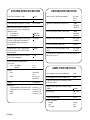
system specifications
Lower cut-off frequency, –3 dB:
< 73 Hz
Upper cut-off frequency, –3 dB:
> 21 kHz
Free field frequency response (± 2.5 dB):
74 Hz–20 kHz
Max. short term sine wave acoustic output on axis in half space, averaged from
100 Hz to 3 kHz
at 1 m distance
at 0.5 distance
> 96 dB SPL
> 102 dB SPL
Maximum long term RMS acoustic output
in same conditions with IEC weighted
noise (limited by driver unit protection
circuit) @ 1 m:
> 91 dB SPL
Maximum peak acoustic output per pair
on top of console, @ 1 m distance with
music material:
> 105 dB
Self generated noise level in free field @
1 m on axis (A-weighted):
< 5 dB
Harmonic distortion at 80 dB SPL @
1 m on axis
Freq: 70…400 Hz
>400 Hz
Drivers:
Bass
Treble
crossover Section
pin 1 gnd,
pin 2 +
pin 3 -
Input level for 100 dB SPL output at 1 m:
-6 dBu
(Sensitivity
-10 dB off)
Level control range relative to max output:
-10 dB
(Sensitivity
-10 dB on)
Desktop control operating range:
0 to –4 dB
@ 200 Hz
Crossover frequency, Bass/Treble:
3.0 kHz
Bass Tilt control operating range in –2 dB
steps:
0 to –6 dB
@ 100 Hz
The ‘CAL’ position is with all tone controls and Sensitivity -10
dB function set to ‘off’
.
<3%
< 0.5 %
AMPLIFIER Section
76 mm (3 in)
cone
19 mm (3/4 in)
metal dome
Weight:
1.5 kg (3.3 lb)
Dimensions:
Height including Iso-Pod™ table stand
Height without Iso-Pod™ table stand
Width
Depth
195 mm (711/16 in)
181 mm (71/8 in)
121 mm (43/4 in)
116 mm (49/16 in)
Bass amplifier power with an 8 Ohm load:
25 W
Treble amplifier power with an 8 Ohm load:
25 W
Long term output power is limited by overload
protection circuitry
Amplifier system distortion at nominal output
THD+N:
.
6 English
Input connector: XLR female 10 kOhm:
< 0.08 %
Mains voltage:
100 - 240
V AC
Voltage operating range:
±10 %
Power consumption
Standby
Idle
Full output
<0.5 W
5W
30 W
International enquiries
Genelec, Olvitie 5
FI 74100, Iisalmi, Finland
Phone +358 17 83881
Fax +358 17 812 267
Email [email protected]
In Sweden
Genelec Sverige
Ellipsvägen 10B
P.O. Box 5521,
S-141 05 Huddinge
Phone +46 8 449 5220
Fax +46 8 708 7071
Email [email protected]
In the USA
Genelec, Inc., 7 Tech Circle
Natick, MA 01760, USA
Phone +1 508 652 0900
Fax +1 508 652 0909
Email [email protected]
In China
Beijing Genelec Audio Co. Ltd
Jianwai SOHO, Building 12,
Room 2605
D-1504, Chaoyang District
Beijing 100022, China
Phone +86 10 8580 2180
Fax +86 10 8580 2181
Email [email protected]
www.genelec.com
Genelec Document D0117R001 Copyright Genelec Oy 1.2014. All data subject to change without prior notice.