1
SOYO G668 Ethernet IP Phone User Guide
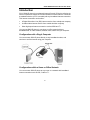
Configuration for PPPoE
This setting is for users using DSL modem without a router. You will need the
username and password from you ISP to setup your IP phone.
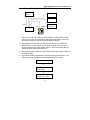
Please make sure you have entered the “networking settings” before
proceeding.
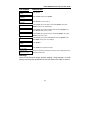
LCD SCREEN
INSTRUCTION
network
settings
Press Speaker
ip type
1 [DHCP]
Press Local IP, then 2, then press Speaker
ip type
2 [PPPoE]
Press Volume+, until you see “pppid”
pppid
ppppin
save settings
Press Local IP, input DSL user’s name, then press Speaker
Press Local IP, input DSL pin, press Speaker, then press Redial until
you see “save settings”
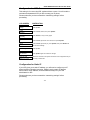
Press Speaker
save
are you sure?
Press Speaker again to confirm the changes
Ready for calls
SOYO, Inc. V1.22
Allow a few seconds for the system to boot the new configuration and you
are ready to make calls
Configuration for Static IP
If your ISP gives you a static IP address, you will need to configure your IP
phone based on following instruction. Please have the static IP address,
subnet mask, router address, and DNS address ready from your web
administrator or ISP.
Please make sure you have entered the “networking settings” before
proceeding.
-12-