1
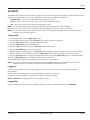
Using the m5000 main menu programming options
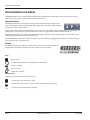
PIN Menu
PIN
Control
A
User
U
Service
S
Admin
A
Random
Emergency
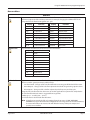
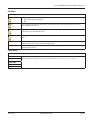
Two options are available:
• ON (requires PIN configuration)
• OFF
Users logged in with this PIN have access to all user levels. Users at this level do not have access to
Service or Admin functions.
Users logged in with this PIN have access to both service and user-level procedures. Users at this level
do not have access to Admin functions.
Users logged in with this PIN have access to all procedures. Users at this level have full access to the
meter.
This function generates a random number which is used when a PIN is lost. This number will be needed
for Badger Meter Tech Support to provide a Master PIN.
Enter the Master PIN received from Badger Meter Technical Support to unlock the meter in case the
Admin PIN has been lost.
Faults Menu
Faults
Preamp
Coil
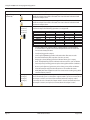
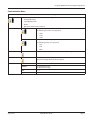
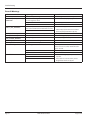
The Faults menu displays the errors and the number of time they have occurred each hour. For an
explanation of the error that has occurred or how to fix it, see "Errors & Warnings" on page 32.
Empty Pipe
Measure Time
Volume Overflow
August 2014
MAG-UM-00219-EN-04
Page 29