1
// K1600 // MIDI Converter
3p
Installation and Setup
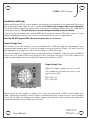
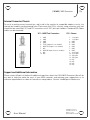
When installing the K1600 in your modular system, pay close attention to the pinout and direction of
the 16-pin power input cable. As +5V is required, the 10-pin style of power cable is not compatible.
The K1600 contains protection against reverse connection, but please double-check the cable before
switching on the unit. The warranty does not cover damage caused by wrong installation.
If you are using the module with another MIDI device using the internal MIDI cable, connect a 10 pin
ribbon cable between the two units. In this case also observe the correct cable direction.
Warning: DO NOT plug the MIDI cable into the power port, or vice versa.
Output Voltage Trim
The voltage trim on the outputs is factory calibrated into a 100K ohm load. But depending on your
setup you might need to adjust it if the scale tuning is wrong with your oscillators. The multi-turn trim
pot supplied on each output can adjust the tuning over a significant range.
To trim the outputs it is required to enter setup mode on both CV outputs. To do this, click the SELECT
switch until all 4 CV/gate LEDs are flashing in unison. Then place the switch into SETUP mode. In this
mode the gate outputs will pulse and the CV outputs will generate +1.000V.
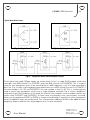
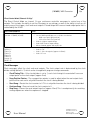
Output Voltage Trim:
Adjust the output voltage trim with a small
flat screwdriver to achieve the correct scale
span with your VCO.
R28 = CV1 trim
R27 = CV2 trim
Fig. 1 - Output Voltage Trim
Adjust the pot for each output as shown in fig. 1 until you read exactly +1.000V on each output. (you
need a high quality voltmeter to do this) Notes should play perfectly in tune across the entire range. If
this is not so, adjust the voltage to be higher (larger scale span) or lower (smaller scale span) until
you arrive at the correct setting for your oscillator.
User Manual
Hardware Version C
Firmware Version 1.0
August 1, 2010
© 2010 Kilpatrick Audio