1
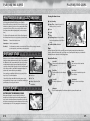
Basic Controls
Sonic Boost
Basic Controls
gF button
When there is Energy remaining on the Ring Energy Gauge (p.15), press the F
g button
to temporarily increase speed beyond the sound barrier. During Sonic Boost, Sonic is
protected by an energy shield that lets him smash enemies and breakable obstacles,
and attracts nearby Rings.
Quick Step
tQ/tE button
While running in 3D, press the tQ or E button to quickly skip to the left or right
while continuing to move in the same direction. Use Quick Step to avoid walls or
obstacles that suddenly obstruct your path.
The same controls are used to switch rails while grinding.
*Please note: Some of these moves must be unlocked during gameplay.
Homing Attack
gF button, during Jump
If a green reticle becomes visible over an enemy or a device, etc. during a jump,
press the gF button to immediately home in and attack. Using the left stick gives you
limited control of the direction of the Homing Attack when there is more than one
possible target.
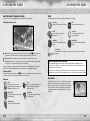
Crouch/Slide
gA button
Press the gA button while stationary to crouch down, allowing Sonic to crawl under
lower surfaces. Alternatively, press the gA button while running to slide straight ahead,
knocking enemies and other smaller obstructions out of the way.
Foot Sweep
gA button during Jump
Press the A
g button during a jump to slam vertically down causing a destructive shockwave.
Sonic Drift
Sometimes you will see one or more button icons appear on devices or in the center of the screen. You
then have a limited amount of time to press the button, or buttons in the correct sequence as displayed
to perform the action correctly. Incorrect entry will at best cost you an advantage, and at worst one of
your lives.
Nighttime Action Stages
Walk
left stick
Use the left stick in all directions to walk around the gamefield. Push the left stick a
little to walk slowly, or all the way to walk a little quicker.
gA button repeatedly
Press the A
g button repeatedly to perform a Foot Sweep. This can be handy for clearing obstacles in your path.
Stomping
Real Time Interaction
Dash
tR button
Hold down the tR button while walking to run at greater speed on all fours.
gA button, while running left/right
Hold the A
g button while running left or right to perform Sonic Drift, enabling you to take tighter corners at
speed.
Lightspeed Dash
gD button
Approach a path of Rings and press the gD button to follow the path while collecting
the Rings in the process, even through mid-air. Use this technique to reach hard to
access areas.
Rotate Camera
right stick
Move the right stick to rotate the camera around the character. In some cases the camera will only
pan, not rotate.
Jump
gS button
Press the gS button to jump. Press again while in mid-air to perform a double-jump
which allows you to jump further and reach high up areas.
8
9