1
Starting the Game
Basic Controls
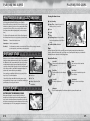
Grab
gA button
Enemies and certain objects can be picked up and manipulated. When the reticle
appears, press the gA button to grab an object. Pressing the gA button again puts
the object down, whereas pressing the S
g ,F
g or D
g button performs a throw or attack.
Depending on your skill level, a variety of attacks can be performed on grabbed enemies.
Pushing the A
g button when you have grabbed an enemy also performs an attack.
Additionally, a number of ledges and poles can be grabbed hold of, enabling Sonic
to climb or swing to an otherwise inaccessible area. Approach a ledge from below
and press the gA button to take hold when the reticle appears. You can then use the left stick Z/X to
shimmy sideways, or C to climb up. While hanging from a ledge or vertical pole, press the gF or gD button
to release your grip, or the gS button to jump by kicking off of it. When swinging from a horizontal bar,
press the gS button at the correct time to swing towards the next bar or a ledge. You can push V while
shimmying along a ledge to hang off of it.
Attack
gF/gD button
Start an attack combo with either the gF button or the gD button to attack enemies.
Starting a combo with the gF button leads to circular attacks, which generally do
damage in a wide area around Sonic. Starting a combo with the gD button leads to
straight attacks which generally do heavier damage to enemies in front of Sonic.
Once you start a combo with the gF or gD buttons, you can mix in the gF, gD, gS and
gA buttons as you please. You can also hold down the gF button or the gD button to
build up a charged attack.
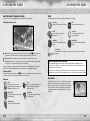
From the Title Screen, press the START button to select a storage
device for the save information. Once selected, the Main Menu will
be displayed as follows:
NEW GAME:
Begin a new game.
CONTINUE:
Continue the game from the last save point (not available the first time you play).
OPTIONS:
Make changes to various game settings (see below).
STORAGE:
Select a storage device to save the game to.
The first time you play Sonic Unleashed™, select New Game to start from the very beginning, and game
information will be saved to the selected storage device. To continue a previously started game from
where you left off, select Continue. Note that if you select New Game after a game has been started,
the existing game information will be overwritten. Games are saved automatically on clearance of stages,
including boss stages.
OPTIONS
Check the possible Command List from the Pause Menu, or alternatively just experiment and explore the
set of possible combat combos on your own! As Sonic gains Experience, he will be able to access a wider
variety of attacks.
Select Options at the Main Menu to make changes to the following settings.
VOICE:
Set the language of character voices.
Guard
SUBTITLES:
Set display of subtitles ON/OFF.
SOUND:
Set the volume for MUSIC and SOUND EFFECTS.
tQ button
During combat, hold down the tQ button to protect yourself from enemy attacks.
It’s no longer effective once the Shield Gauge runs out.
CAMERA CONTROLS:Set the UP/DOWN and LEFT/RIGHT camera controls to NORMAL or REVERSE.
Combine the tQ button with the left stick to guard while on the move. Additionally,
pressing the gS button while guarding will perform a forward roll.
Activate Unleashed Mode
tE button
When the Unleash Gauge is full, push the tE button to enter the Unleashed state.
During this time, Sonic is able to deal much greater damage to enemies, and is
temporarily invincible.
Power-Up Attacks
As Experience is allotted to different skills (p.18), new power-up attacks will become available.
See Skills in the Pause Menu for full details.
10
11