1
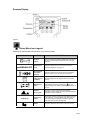
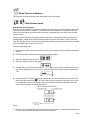
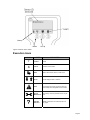
Example Display
Figure 4
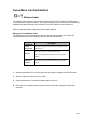
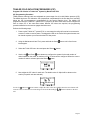
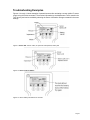
Set-up Menu Icon Legend
Selecting the Setup button commands the Tool into Setup mode.
ICON
psi/BAR/kPa/C/F
STATE
DESCRIPTION
Software
Update
This icon indicates the software update option which allows
the user to download the latest software from a personal
computer.
Measurement
Units
This option allows the user to change the units of the
parameters displayed. See page 10.
Stored Sensor
Information
Retrieval
This option allows the user to refer to sensor information
stored in memory. Up to 100 sensors can be stored.
Delete Sensors
in Memory
This option allows the user to delete all sensors stored in
memory.
This option is used for the Walk-Around Learn process.
Walk-Around
Learn
TRAILER CIP
When Walk-Around Learn is initiated the
icon may
appear indicating a low battery in either the wheel sensor or
the Tool.
Ambient
Sensor Learn
This option is used to activate and store pressure
information from the ambient sensor to adjust the displayed
readings for changes in altitude.
Program CIP
Values
This function is used to program the cold inflation pressures
™
in the TrailerLink system by Bendix CVS. Each axle can
be programmed with a different Cold Inflation Pressure
(CIP) value. Five (5) Axles are supported.
Return
This option allows the user to return to the main window.
Page 8