1
Activating the Scanner Connection
This section describes how to use the Scanner Wedge software on your PC to establish a
connection with your scanner.
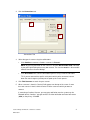
1. Launch the Scanner Wedge program in one of two ways:
•
Click Start > All Programs > Scanner Wedge > Scanner Wedge, or
•
Double-click the Scanner Wedge shortcut on your Desktop.
1
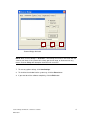
Scanner Wedge Launched
Scanner Wedge for Windows - Software User Guide
DA0118527
3