1
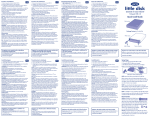
Setup Steps
1. Install the included software. (See User Manual for software description.)
Note:
y
-ra
Blu
UT
W
V.1
.0
l
ua
an
M ateu
er
lis
Uti i Ute
el
nu le D db
Ma nua rhan
Ma utze De U
n
Be nual ha
rs
Ma ruike
b
Ge
Us
Manuals for the LaCie d2 Blu-ray Drive and
each of the included software are separated.
Always retain your original LaCie Utilities
DVD-ROM.
ws
.2
o
r8
ato
Cre s XP
dia dow
2
7
ind
Me
ILI
S
TIE
2. Connect the power supply and turn on the drive.
XXXXXX
LaCie Ltd.
Serial Numb
XXXX
er XXXXX
OFF
ON
POWER SWITCH