1
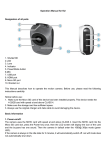
720P 60 video mode: When the camera enters the 720P 60 video mode, press the video key once to start to take videos, then the buzzer will have two sounds and the blue LED will start to flicker; press the video key to stop, then the buzzer will have one sound and the blue LED will change from flickering to being solid on and the figure on the LCD screen will indicate the quantity of the video files. 1080P 30 video mode: In 720P 60 video mode, press the power key shortly to switch to 1080P 30 video mode, then the green LED will be solid on and the buzzer will have one sound and the LCD screen will display 1080P. In preview mode, press the video key once, then the buzzer will have two sounds, the green LED will be on, the camera will start to take videos; press the video key once again to stop, then the buzzer will have one sound and the blue LED will change from flickering to being solid on and the figure on the LCD screen will indicate the quantity of the video files. Image mode: In 1080P 30 video mode, press the power key shortly to switch to single mode, then the red LED will be in solid on, the buzzer will have one sound, the LCD screen will have the icon of 1080P disappear and the icon of image on the upper right corner will appear; in preview mode, press the video key once to take one picture, then the red LED will have a flicker and the buzzer will have one sound. When the camera does not work, the red LED will be in solid on. Burst mode: In image mode, press the power key shortly to switch to burst mode, then the yellow LED will be in solid on (red LED and green LED both are on to create yellow LED), the buzzer will have one sound, the LCD screen will have the icon of burst on the upper right corner; in preview mode, press the video key once to take pictures continuously, with 2s interval; for one picture taken, the yellow LED will have a flicker and the buzzer will have one sound. The figure on the LCD screen will indicate the quantity of the pictures taken. Press the video key once again to stop, then the buzzer will have one sound and the yellow LED will be in solid on. Note: When the space of the internal memory card is full, the screen will display the word “FUL”.