1
Contents
1. Introduction ..............................................................................................5
2. General Information ....................................................................................5
3. Program interface.......................................................................................8
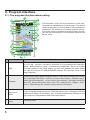
3.1. The program interface when routing...........................................................................8
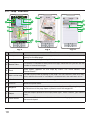
3.2. “Map” interface. .......................................................................................................10
4. Pages ......................................................................................................12
4.1. “Map” page..............................................................................................................12
4.1.1. Map scrolling ..................................................................................................12
4.1.2. Zooming.........................................................................................................12
4.1.3. GPS-cursor ....................................................................................................12
4.1.4. Compass ........................................................................................................13
4.1.4.1. Map rotation..........................................................................................13
4.1.4.2. Day/Night skins .....................................................................................13
4.1.5. Information panels ..........................................................................................14
4.2. “Dashboard” page ....................................................................................................14
4.2.1 Gauges list ......................................................................................................15
4.3. “Satellites” Page.......................................................................................................20
4.4. “Weather” page........................................................................................................21
5. Main menu ................................................................................................22
5.1. Find.........................................................................................................................22
5.2. Route ......................................................................................................................22
5.2.1. STOP .............................................................................................................22
5.2.2. Route editing ..................................................................................................22
5.2.3. Route plan ......................................................................................................22
5.2.4. Show the route................................................................................................23
5.2.5. Detour............................................................................................................23
5.2.6. Route simulation .............................................................................................23
5.2.7. Export ............................................................................................................23
5.2.8. Import ............................................................................................................23
5.3. My Navitel ................................................................................................................24
5.3.1. All products ....................................................................................................24
5.3.2. My products ...................................................................................................25
5.3.3. Update ...........................................................................................................25
5.3.4. Help ..............................................................................................................25
5.4. Settings ...................................................................................................................26
5.4.1. Map ...............................................................................................................26
5.4.1.1. Top of the map ......................................................................................26
5.4.1.2. Automatic zoom.....................................................................................26
5.4.1.3. Visual effects.........................................................................................26
5.4.1.4.Detail level .............................................................................................26
5.4.1.5. Draw models from..................................................................................27
5.4.1.6. Map tilt .................................................................................................27
5.4.1.7. Reset position .......................................................................................27
5.4.2. Other maps ....................................................................................................27
5.4.3. Navigation ......................................................................................................27
5.4.3.1. Vehicle..................................................................................................27
2