1
4.4. “Weather” page
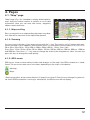
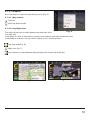
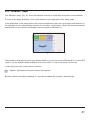
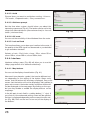
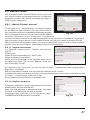
The “Weather” page (Fig. 15) shows the weather forecast for a few days and shows current weather.
To move to the page “Satellites” click on the weather in the upper part of the “Map” page.
In the upper part of the page displays the current temperature, pressure, wind speed and direction. In
the right part of the screen displays forecast for four days, on the button “Back” will launch the default
web browser on your device and displays the home page of GISmeteo.ru.
Fig. 15
The weather is displayed for the city by default which is close to the current GPS position. In case GPS
signal is off, the weather will be displayed for the city, which is close to the center of the map.
In the lower part of the screen there is a button:
- “Update” (update the information about the weather).
Besides manual information updating, it is possible to update the forecasts automatically.
21