1
Occasionally the light output from a single flash may not be sufficient to enable you to
work at the aperture desired. When this happens, simply push the top values button until
the desired f/number appears in the display.
The digital shutter speed display disappears, to be replaced by information on the number
of flashes that have to be fired for the desired f-stop (e.g. F4 = 4 flashes).
The LUNA-STAR F will calculate up to a maximum of 10 flash sequences.
4www.butkus.org
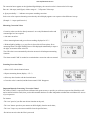
Measurements Outside the Measuring Range
o The LUNA-STAR F will not produce any useful readings outside its measuring range.
o If it is too dark or too bright, an "E" (= error) appears on the left digital display, and
alongside it 54 u '' for too dark, or 56 n " for too bright.
Read-out Outside the Display Range
o If the symbol " U " or "n"', appears on the right or left digital display it means that a
reading has been taken, but its display is outside the meter's display range.
o With " u " actuate values button (
), to enter the display range.
O With " n " actuate values button (
) to enter the display range.
Setting and Measuring Correction Values
(Please refer to "Important Remarks Concerning Correction Values", page 20)
Setting Correction Values
o Select with the function buttons "COR".
(The last valid correction value appears on the display)
o Enter or change the correction value with the values buttons.