1
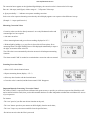
o Select "t" with the function buttons (the last stored value appears on the display).
o Adjust the desired shutter speed with the values buttons.
o Measure by depressing the measuring button M.
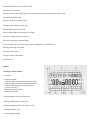
o The measured aperture stop appears on the left-hand digital display (resolution: 1/10th
stops), and additionally as a mark rounded off in the analog aperture scale.
o Select other paired aperture/shutter values with the values buttons.
b) Aperture priority mode
o Select "f" with the function buttons.
o Set the desired aperture with the values buttons.
o Measure by depressing the measuring button M.
o The measured shutter speed appears on the right hand digital display and on the left
hand side of the digital display is the aperture you have selected plus the automatic
correction in 1/10th of stops to adjust for the fixed shutter speed.
o Select other paired aperture/shutter values with the values buttons.
4www.butkus.org
Note: The 1/10th stop values stored from the last measurement appear when the aperture is preset. These are invalid because the
valid 1/10th stops will only appear after the next meter reading is taken.
c) Exposure value EV
o Select "EV" with the function buttons.
o Adjust the desired shutter speed with the values buttons.
o Measure by depressing the measuring button M.
o The measured aperture stop appears on the left-hand digital display (resolution: 1/10th
stops), and additionally as a mark in the analog aperture scale.
o With the value buttons select other paired aperture/shutter speed values corresponding
to this Exposure Value.
d) CINE speed (frames per second)
o Select "t" with the functions buttons.
o Select the desired speed (f.p.s.) with the values buttons. For this purpose go beyond
1/8000ths. After approx. 1 second the meter switches over to CINE speeds. The symbol
appears on the display. Cine speeds are variable between 8 and 64 frames/s.
o Measure by depressing the measuring button M.
o The measured aperture stop appears on the left-hand digital display (resolution: 1/10th stops), and additionally as a mark rounded