1
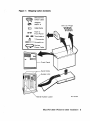
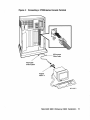
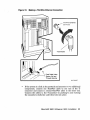
2. Take one end of one of the cords included with the DFA01 modem
(17-00089-01) and plug it into the top jack on the DFA01 cover panel
(modem A). The top jack on the DFA01 cover panel is marked with the
line icon, as shown in Figure 11.
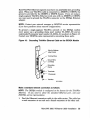
Figure 11: Installing Telephone Cord (Single- and Multi-Line Service)
Wall-Mounted
Modular
Telephone Jack
Line Icon
Modem
A
Modem
B
Telephone Cord
(17-00089-01)
MLO-O00654
3. Connect the other end of the cord to the wall-mounted telephone jack.
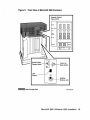
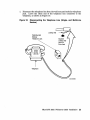
4. To install voice communication on modem A, take the end of the
telephone line that you disconnected from the wall jack in step 1 and
connect it to the second jack from the top of the DFA01 cover panel, as
shown in Figure 12. This jack is marked with the telephone icon.
24 MicroVAX 3800 VAXserver 3800 Installation