1
HANDLING & PERSONAL SAFETY
Buttons
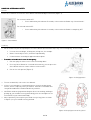
Please take a moment to locate the Chest Button and acknowledge its functions (Figure 1).
For a normal switch OFF:
•
Press and hold my Chest button 5 seconds, release when the Robot says “Gnuck Gnuck”.
For a forced switch OFF:
•
Press and hold my Chest button 9 seconds, release when the Robot is completely OFF.
Figure 1: Chest Button
Handling
•
•
Do not hesitate to pick me up and press the Chest Button (forced switch off) in any case of emergency. These include:
•
If I come close to danger, of being wet, falling over, for example.
•
Before I knock objects over, or behave unpredictably.
•
If I don’t behave according to application description.
Procedure to handle me in case of emergency:
1. Pick me up by the Chest even if I am still moving about.
2. Press my Chest Button for 9 seconds. Alternatively, you can press the
Chest Button twice to remove stiffness of the motors.
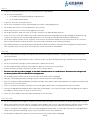
3. Put me in a safe posture (Figure 2).
Figure 2: Sitting posture
•
To turn me back ON, refer to the User Manual.
•
If there is no emergency, I recommend you not to touch me during my
actions, unless I expressly invite you to do so. Otherwise remember that
I may be destabilized if I am disturbed in my activities.
•
CAUTION: avoid carrying and touching me when I am moving, walking or
getting up, you could be severely pinched. My joints are analogous to the
articulations of your own human body.
•
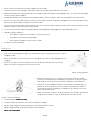
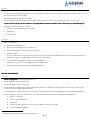
More specifically: Do not place your hands in any of my joints as shown
in Figure 3, as you could be severely pinched.
Figure 3: Keep fingers out of the joints!
2 of 8