1
DRC
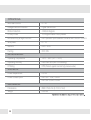
EXPOSURE
DYNAMIC RANGE COMPRESSOR
DRC enables dark areas in images to become more visible without overexposing the
bright areas to create one perfect image. Select from: Off, Low, Middle, or High
NOTE: If WDR or DEFOG are enabled, the DRC settings are set automatically and will not be available
for adjustment.
DEFOG
AGC
0~20
Allows the camera to process a scene that is obscured by fog or weather conditions
and provides a visibly improved image.
AUTO / Manual: Select AUTO to have the WDR and DRC levels adjusted automatically.
Set the DEFOG level from LOW / MIDDLE / HIGH.
AUTO GAIN CONTROL
AGC enhances the picture brightness in low light conditions. A higher level AGC
setting makes the images brighter; however, it could increase the amount of noise.
STARLIGHT
OFF / x2 ~ x64
(Default: X4)
Automatically activates slow shutter function when the image is too dark.
High values are not recommended as they may causes the image to lag.
Starlight menu cannot be controlled if the SHUTTER setting is above 1/60.
3D DNR
3D DIGITAL NOISE REDUCTION
OFF/ LOW/
MID/ HIGH
14
3D-DNR reduces the noise on the screen in low light conditions and
allows for clearer images, even at night.