1
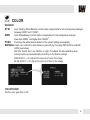
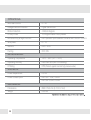
EXPOSURE
BACKLIGHT
OFF
HME
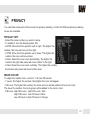
HIGHLIGHT MASKING EXPOSURE
HME allows objects to appear clearly on the screen by
masking extremely bright areas. To setup HME, set the
level and mode. The lower the setting, the darker the
masking areas have to be. Select from: 0 ~ 20.
Mode: Select when to enable HME settings. Select from
All Day (Run HME always), or Night Only (HME is
enabled only in B/W mode).
BLC
BACK LIGHT COMPENSATION
WDR
Wide Dynamic Range
If BLC is selected, adjust the size nad position of the mask:
- H-POS: Move the Zone position left or right. The higher the number,
the zone will move to the right.
- V-POS: Move the Zone position up or down. The higher the number,
the zone will move down.
- H-Size: Reset the zone‘s size horizontally. The higher the number,
the right side panel will move further to the right.
- V-Size: Reset the zone’s size vertically. The higher the number, the
bottom side panel will move further down.
If WDR is selected, adjust the WDR level in the submenu. Select
from Low, Middle, or High (Default).
13