1
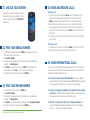
3.1 Unlock Your SCREEN
3.4make and receive calls
To unlock your screen, swipe your finger
across the screen in any direction. If the
screen is dark, simply press PWR/LOCK
to enable it.
To make a call
1. From the main screen, tap the Phone icon at the bottom of the
screen. If the dialpad does not appear on the screen, tap the
Phone tab located in the upper left hand corner of the screen.
2. Enter the phone number you wish to call, including the 3-digit
area code. Entering a 1 before the area code may be necessary in
some areas. To place the call, tap the Phone icon at the bottom of
the screen.
3. To end the call, tap the red bar with the phone icon at the bottom
of the screen.
3.2find your serial number
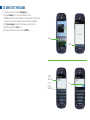
1. From the main screen, press the MENU key located in the lower
left-hand corner of the phone.
2. Tap System settings.
3. Slide your finger upwards along the screen to access additional
options. Tap About phone.
4.Tap Status. Locate the row that says MEID. The number series
that appears next to Dec: is your phone’s Serial Number.
5. To return to the main screen, press the HOME key.
3.3Find Your Phone Number
1. From the main screen, press the MENU key.
2. Tap System settings.
3. Slide your finger upwards along the screen to access additional
options. Tap About phone.
4. Tap Status. Your phone number will appear under My phone number.
5. To return to the main screen, press the HOME key.
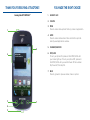
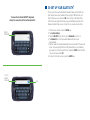
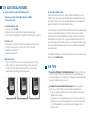
See inside front cover for help locating your phone keys.
To receive a call
1. To answer an incoming call, slide the Phone icon from left to right.
2. To end the call, tap the red bar with the phone icon.
3.5make international calls
You can call over 100 international destinations from your TracFone at
no additional cost. Please wait 2 business days after your TracFone is
Activated to make international calls.
A.From your TracFone, DIAL 1-800-706-3839. If you are in Alaska,
Hawaii and the U.S. Virgin Islands please dial 305-938-5673. We suggest
that you add this number to your contacts for easy dialing.
B.Select your language: 1 for English, 2 for Spanish. Listen to dialing
instructions. After selecting a language, dialing instructions can be
interrupted at any time and you can skip to step C.
C.Dial: 011 + Country Code + City Code + Telephone Number. For
calls to the Bahamas, Bermuda, Canada and Dominican Republic
just dial: 1 + City Code + Telephone Number.