1
Control-M
User Guide
Supporting
Version 7.0.00 of Control-M/Enterprise Manager
Version 7.0.00 of Control-M/Server for UNIX and Microsoft
Windows
Version 7.0.00 of for UNIX and Microsoft Windows
April 2011
www.bmc.com
Contacting BMC Software
You can access the BMC Software website at http://www.bmc.com. From this website, you can obtain information
about the company, its products, corporate offices, special events, and career opportunities.
United States and Canada
Address
BMC SOFTWARE INC
2101 CITYWEST BLVD
HOUSTON TX 77042-2827
USA
Telephone
713 918 8800 or
800 841 2031
Fax
(01) 713 918 8000
Fax
713 918 8000
Outside United States and Canada
Telephone
(01) 713 918 8800
© Copyright 2010 BMC Software, Inc.
BMC, BMC Software, and the BMC Software logo are the exclusive properties of BMC Software, Inc., are registered with the U.S. Patent
and Trademark Office, and may be registered or pending registration in other countries. All other BMC trademarks, service marks, and
logos may be registered or pending registration in the U.S. or in other countries. All other trademarks or registered trademarks are the
property of their respective owners.
Linux is the registered trademark of Linus Torvalds.
Oracle and Java are registered trademarks of Oracle and/or its affiliates. Other names may be trademarks of their respective owners.
UNIX is the registered trademark of The Open Group in the US and other countries.
The information included in this documentation is the proprietary and confidential information of BMC Software, Inc., its affiliates, or
licensors. Your use of this information is subject to the terms and conditions of the applicable End User License agreement for the product
and to the proprietary and restricted rights notices included in the product documentation.
Restricted rights legend
U.S. Government Restricted Rights to Computer Software. UNPUBLISHED -- RIGHTS RESERVED UNDER THE COPYRIGHT LAWS OF
THE UNITED STATES. Use, duplication, or disclosure of any data and computer software by the U.S. Government is subject to
restrictions, as applicable, set forth in FAR Section 52.227-14, DFARS 252.227-7013, DFARS 252.227-7014, DFARS 252.227-7015, and
DFARS 252.227-7025, as amended from time to time. Contractor/Manufacturer is BMC SOFTWARE INC, 2101 CITYWEST BLVD,
HOUSTON TX 77042-2827, USA. Any contract notices should be sent to this address.
Customer support
You can obtain technical support by using the BMC Software Customer Support website or by contacting Customer
Support by telephone or e-mail. To expedite your inquiry, see “Before contacting BMC.”
Support website
You can obtain technical support from BMC 24 hours a day, 7 days a week at http://www.bmc.com/support. From this
website, you can
■
■
■
■
■
■
■
■
read overviews about support services and programs that BMC offers
find the most current information about BMC products
search a database for issues similar to yours and possible solutions
order or download product documentation
download products and maintenance
report an issue or ask a question
subscribe to receive proactive e-mail alerts when new product notices are released
find worldwide BMC support center locations and contact information, including e-mail addresses, fax numbers, and
telephone numbers
Support by telephone or e-mail
In the United States and Canada, if you need technical support and do not have access to the web, call 800 537 1813 or
send an e-mail message to [email protected]. (In the subject line, enter SupID:<yourSupportContractID>,
such as SupID:12345). Outside the United States and Canada, contact your local support center for assistance.
Before contacting BMC
Have the following information available so that Customer Support can begin working on your issue immediately:
■
product information
—
—
—
■
product name
product version (release number)
license number and password (trial or permanent)
operating system and environment information
—
—
—
—
—
machine type
operating system type, version, and service pack or other maintenance level such as PUT or PTF
system hardware configuration
serial numbers
related software (database, application, and communication) including type, version, and service pack or
maintenance level
■
sequence of events leading to the issue
■
commands and options that you used
■
messages received (and the time and date that you received them)
—
—
—
product error messages
messages from the operating system, such as file system full
messages from related software
3
License key and password information
If you have questions about your license key or password, use one of the following methods to get assistance:
■
Send an e-mail message to [email protected].
■
Use the Customer Support website at http://www.bmc.com/support.
4
Control-M User Guide
Contents
About this book
17
Conventions . . . . . . . . . . . . . . . . . . . . . . . . . . . . . . . . . . . . . . . . . . . . . . . . . . . . . . . . . . . . . 18
Syntax statements. . . . . . . . . . . . . . . . . . . . . . . . . . . . . . . . . . . . . . . . . . . . . . . . . . . . . . . . . 18
Chapter 1
Introduction to Control-M/Enterprise Manager
23
Automating your production jobs with Control-M/EM . . . . . . . . . . . . . . . . . . . . . . . . 23
Chapter 2
Working with Control-M/Desktop and Control-M/EM
25
Starting Control-M/Desktop . . . . . . . . . . . . . . . . . . . . . . . . . . . . . . . . . . . . . . . . . . . . . . .
Connecting to a different GUI Server . . . . . . . . . . . . . . . . . . . . . . . . . . . . . . . . . . . . .
Starting Control-M/EM . . . . . . . . . . . . . . . . . . . . . . . . . . . . . . . . . . . . . . . . . . . . . . . . . . .
Understanding the Control-M/Desktop and Control-M/EM layout . . . . . . . . . . . . .
Understanding the flow diagram . . . . . . . . . . . . . . . . . . . . . . . . . . . . . . . . . . . . . . . .
Recognizing job dependencies. . . . . . . . . . . . . . . . . . . . . . . . . . . . . . . . . . . . . . . . . . .
Adjusting the display . . . . . . . . . . . . . . . . . . . . . . . . . . . . . . . . . . . . . . . . . . . . . . . . . . . . .
Returning panes to their original positions . . . . . . . . . . . . . . . . . . . . . . . . . . . . . . . .
Changing the data display format . . . . . . . . . . . . . . . . . . . . . . . . . . . . . . . . . . . . . . .
Displaying dependency names in a node . . . . . . . . . . . . . . . . . . . . . . . . . . . . . . . . .
Focusing on different level nodes (stepping in and stepping out) . . . . . . . . . . . .
Performing other display adjustments. . . . . . . . . . . . . . . . . . . . . . . . . . . . . . . . . . . .
Filtering the jobs displayed in a Control-M/Desktop draft . . . . . . . . . . . . . . . . . .
Arranging the Control-M/Desktop flow diagram display . . . . . . . . . . . . . . . . . .
Changing click and drag in Control-M/Desktop to define dependencies . . . . .
Creating workspaces and loading jobs into Control-M/Desktop . . . . . . . . . . . . . . . .
Navigating in the flow diagram . . . . . . . . . . . . . . . . . . . . . . . . . . . . . . . . . . . . . . . . . . . .
Identifying predecessor and successor jobs . . . . . . . . . . . . . . . . . . . . . . . . . . . . . . . . . .
Printing the flow diagram . . . . . . . . . . . . . . . . . . . . . . . . . . . . . . . . . . . . . . . . . . . . . . . . .
Changing your password . . . . . . . . . . . . . . . . . . . . . . . . . . . . . . . . . . . . . . . . . . . . . . . . . .
Assigning authorizations . . . . . . . . . . . . . . . . . . . . . . . . . . . . . . . . . . . . . . . . . . . . . . . . . .
Authorization facility for limiting access to entities. . . . . . . . . . . . . . . . . . . . . . . . .
Authorizations window . . . . . . . . . . . . . . . . . . . . . . . . . . . . . . . . . . . . . . . . . . . . . . . .
Tabs in the User and Group Authorizations windows . . . . . . . . . . . . . . . . . . . . . .
26
27
27
29
31
34
35
35
36
36
37
37
38
39
40
40
41
42
43
44
45
45
47
50
Chapter 3
73
Defining the production environment
Understanding workspaces . . . . . . . . . . . . . . . . . . . . . . . . . . . . . . . . . . . . . . . . . . . . . 73
5
Chapter 4
Defining how jobs should run
77
Defining job processing definitions and SMART Tables—basic procedure . . . . . . . . 79
Creating and editing jobs . . . . . . . . . . . . . . . . . . . . . . . . . . . . . . . . . . . . . . . . . . . . . . . . . . 83
Assigning a name to the job . . . . . . . . . . . . . . . . . . . . . . . . . . . . . . . . . . . . . . . . . . . . . 84
Identifying the task type and related information . . . . . . . . . . . . . . . . . . . . . . . . . . 84
Defining the job hierarchy . . . . . . . . . . . . . . . . . . . . . . . . . . . . . . . . . . . . . . . . . . . . . . 87
Defining the job’s owner and author . . . . . . . . . . . . . . . . . . . . . . . . . . . . . . . . . . . . . 87
Defining job documentation. . . . . . . . . . . . . . . . . . . . . . . . . . . . . . . . . . . . . . . . . . . . . 87
Defining scheduling criteria for a job—basics . . . . . . . . . . . . . . . . . . . . . . . . . . . . . . 88
Defining scheduling criteria using calendars . . . . . . . . . . . . . . . . . . . . . . . . . . . . . . 94
Defining complex scheduling criteria using rules. . . . . . . . . . . . . . . . . . . . . . . . . . . 95
Limiting scheduling to a particular date range . . . . . . . . . . . . . . . . . . . . . . . . . . . . . 99
Defining cyclic jobs . . . . . . . . . . . . . . . . . . . . . . . . . . . . . . . . . . . . . . . . . . . . . . . . . . . 101
Defining automatic rerun for a job that ends NOT OK . . . . . . . . . . . . . . . . . . . . . 102
Defining jobs that should run on specific nodes . . . . . . . . . . . . . . . . . . . . . . . . . . . 103
Defining jobs that should run on nodes where load balancing has been
implemented . . . . . . . . . . . . . . . . . . . . . . . . . . . . . . . . . . . . . . . . . . . . . . . . . . . . . . 104
Defining a time frame during which jobs can be submitted . . . . . . . . . . . . . . . . . 104
Defining that manual confirmation is required before job submission . . . . . . . . 106
Assigning priorities to jobs and defining and critical jobs. . . . . . . . . . . . . . . . . . . 106
Defining how many days a job can await submission . . . . . . . . . . . . . . . . . . . . . . 108
Defining dependencies for the current job . . . . . . . . . . . . . . . . . . . . . . . . . . . . . . . . 108
Allocating resources for a job . . . . . . . . . . . . . . . . . . . . . . . . . . . . . . . . . . . . . . . . . . . 110
Defining and using variables that are dynamically resolved at runtime . . . . . . 112
Defining postprocessing actions that depend on job processing results . . . . . . . 114
Defining conditional processing under z/OS . . . . . . . . . . . . . . . . . . . . . . . . . . . . . 121
Defining messages to be shouted at the end of job processing . . . . . . . . . . . . . . . 123
Defining how to handle the job’s sysout when the job ends OK . . . . . . . . . . . . . 125
Archiving sysdata (z/OS only) . . . . . . . . . . . . . . . . . . . . . . . . . . . . . . . . . . . . . . . . . 126
Annotating activities . . . . . . . . . . . . . . . . . . . . . . . . . . . . . . . . . . . . . . . . . . . . . . . . . . 126
Creating and editing SMART Tables . . . . . . . . . . . . . . . . . . . . . . . . . . . . . . . . . . . . . . . . 127
Defining general SMART Table information . . . . . . . . . . . . . . . . . . . . . . . . . . . . . . 128
Defining scheduling criteria for a SMART Table . . . . . . . . . . . . . . . . . . . . . . . . . . 129
Defining dependencies, variables, and notifications in the SMART Table . . . . . 132
Defining actions to be performed after all scheduled jobs in the SMART Table
have ended . . . . . . . . . . . . . . . . . . . . . . . . . . . . . . . . . . . . . . . . . . . . . . . . . . . . . . . . 132
Creating and editing Sub-tables. . . . . . . . . . . . . . . . . . . . . . . . . . . . . . . . . . . . . . . . . 134
Creating and editing jobs in a SMART Table . . . . . . . . . . . . . . . . . . . . . . . . . . . . . . . . . 135
Defining scheduling criteria for a job in a SMART Table . . . . . . . . . . . . . . . . . . . 136
Copying RBCs from one SMART Table to another. . . . . . . . . . . . . . . . . . . . . . . . . 138
Modifying dependencies for jobs within a SMART table. . . . . . . . . . . . . . . . . . . . . . . 139
Defining job dependencies by using the flow diagram . . . . . . . . . . . . . . . . . . . . . . . . 140
Defining a condition format . . . . . . . . . . . . . . . . . . . . . . . . . . . . . . . . . . . . . . . . . . . . 141
Chapter 5
Organizing and managing jobs in tables
143
Introduction. . . . . . . . . . . . . . . . . . . . . . . . . . . . . . . . . . . . . . . . . . . . . . . . . . . . . . . . . . . . . 143
Managing tables . . . . . . . . . . . . . . . . . . . . . . . . . . . . . . . . . . . . . . . . . . . . . . . . . . . . . . . . . 144
Managing jobs in tables . . . . . . . . . . . . . . . . . . . . . . . . . . . . . . . . . . . . . . . . . . . . . . . . . . . 150
6
Control-M User Guide
Chapter 6
Comparing jobs
155
Introduction . . . . . . . . . . . . . . . . . . . . . . . . . . . . . . . . . . . . . . . . . . . . . . . . . . . . . . . . . . . . 155
Comparing jobs . . . . . . . . . . . . . . . . . . . . . . . . . . . . . . . . . . . . . . . . . . . . . . . . . . . . . . . . . 155
Chapter 7
Exploring and tracking versions of definition entities
157
Introduction . . . . . . . . . . . . . . . . . . . . . . . . . . . . . . . . . . . . . . . . . . . . . . . . . . . . . . . . . . . .
Exploring versions of definition entities. . . . . . . . . . . . . . . . . . . . . . . . . . . . . . . . . . . . .
Version Manager window . . . . . . . . . . . . . . . . . . . . . . . . . . . . . . . . . . . . . . . . . . . . .
Viewing a job’s history . . . . . . . . . . . . . . . . . . . . . . . . . . . . . . . . . . . . . . . . . . . . . . . .
157
157
158
160
Chapter 8
163
Using predefined calendars to schedule jobs
Introduction . . . . . . . . . . . . . . . . . . . . . . . . . . . . . . . . . . . . . . . . . . . . . . . . . . . . . . . . . . . .
Creating and modifying calendars . . . . . . . . . . . . . . . . . . . . . . . . . . . . . . . . . . . . . . . . .
To define Regular and Relative calendars . . . . . . . . . . . . . . . . . . . . . . . . . . . . . . . .
To define Periodic calendars . . . . . . . . . . . . . . . . . . . . . . . . . . . . . . . . . . . . . . . . . . .
To define Rule-Based calendars . . . . . . . . . . . . . . . . . . . . . . . . . . . . . . . . . . . . . . . .
Managing calendars. . . . . . . . . . . . . . . . . . . . . . . . . . . . . . . . . . . . . . . . . . . . . . . . . . . . . .
Uploading and downloading calendars. . . . . . . . . . . . . . . . . . . . . . . . . . . . . . . . . .
Copying calendars. . . . . . . . . . . . . . . . . . . . . . . . . . . . . . . . . . . . . . . . . . . . . . . . . . . .
Deleting calendars . . . . . . . . . . . . . . . . . . . . . . . . . . . . . . . . . . . . . . . . . . . . . . . . . . . .
Refreshing and unlocking calendars . . . . . . . . . . . . . . . . . . . . . . . . . . . . . . . . . . . .
163
165
165
166
167
168
168
169
169
170
Chapter 9
171
Setting up templates for standardized job and table definition
Defining templates. . . . . . . . . . . . . . . . . . . . . . . . . . . . . . . . . . . . . . . . . . . . . . . . . . . . . . . 172
Adding functions to template fields . . . . . . . . . . . . . . . . . . . . . . . . . . . . . . . . . . . . . 174
Managing templates . . . . . . . . . . . . . . . . . . . . . . . . . . . . . . . . . . . . . . . . . . . . . . . . . . . . . 175
Chapter 10
Creating and updating many jobs at once
177
Introduction . . . . . . . . . . . . . . . . . . . . . . . . . . . . . . . . . . . . . . . . . . . . . . . . . . . . . . . . . . . .
Creating large numbers of jobs . . . . . . . . . . . . . . . . . . . . . . . . . . . . . . . . . . . . . . . . . . . .
Finding and updating many entities at once . . . . . . . . . . . . . . . . . . . . . . . . . . . . . . . . .
Finding and updating jobs and tables . . . . . . . . . . . . . . . . . . . . . . . . . . . . . . . . . . .
Managing updated jobs . . . . . . . . . . . . . . . . . . . . . . . . . . . . . . . . . . . . . . . . . . . . . . .
177
177
178
179
184
Chapter 11
Setting up definitions for periodic statistics collection
185
Introduction . . . . . . . . . . . . . . . . . . . . . . . . . . . . . . . . . . . . . . . . . . . . . . . . . . . . . . . . . . . .
Defining periodic statistics definitions . . . . . . . . . . . . . . . . . . . . . . . . . . . . . . . . . . . . . .
Changing periodic statistics definitions. . . . . . . . . . . . . . . . . . . . . . . . . . . . . . . . . .
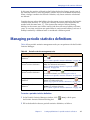
Managing periodic statistics definitions . . . . . . . . . . . . . . . . . . . . . . . . . . . . . . . . . . . .
185
186
186
187
Chapter 12
193
Introduction to moving to production
Moving to production . . . . . . . . . . . . . . . . . . . . . . . . . . . . . . . . . . . . . . . . . . . . . . . . . . . . 193
7
Chapter 13
Putting jobs into production
195
Writing tables to the Control-M/EM database . . . . . . . . . . . . . . . . . . . . . . . . . . . . . . . 195
Uploading tables to the Control-M database . . . . . . . . . . . . . . . . . . . . . . . . . . . . . . . . . 196
Manually scheduling jobs and tables. . . . . . . . . . . . . . . . . . . . . . . . . . . . . . . . . . . . . . . . 198
Downloading tables from Control-M to Control-M/EM . . . . . . . . . . . . . . . . . . . . . . . 200
Chapter 14
Automating job scheduling and maintenance
203
Identifying automation criteria for tables . . . . . . . . . . . . . . . . . . . . . . . . . . . . . . . . . . . . 204
Chapter 15
Identifying data center resources available for Control-M use
205
Introduction. . . . . . . . . . . . . . . . . . . . . . . . . . . . . . . . . . . . . . . . . . . . . . . . . . . . . . . . . . . . . 205
Filtering resources on startup . . . . . . . . . . . . . . . . . . . . . . . . . . . . . . . . . . . . . . . . . . . . . . 207
Allocating control resources . . . . . . . . . . . . . . . . . . . . . . . . . . . . . . . . . . . . . . . . . . . . . . . 207
Viewing the list of jobs and tables that use a control resource . . . . . . . . . . . . . . . 209
Defining quantitative resources . . . . . . . . . . . . . . . . . . . . . . . . . . . . . . . . . . . . . . . . . . . . 209
Chapter 16
Establishing job dependencies across Control-Ms
213
Defining global conditions . . . . . . . . . . . . . . . . . . . . . . . . . . . . . . . . . . . . . . . . . . . . . . . . 213
Deleting global conditions. . . . . . . . . . . . . . . . . . . . . . . . . . . . . . . . . . . . . . . . . . . . . . . . . 215
Global condition logic and examples. . . . . . . . . . . . . . . . . . . . . . . . . . . . . . . . . . . . . . . . 216
Best practices . . . . . . . . . . . . . . . . . . . . . . . . . . . . . . . . . . . . . . . . . . . . . . . . . . . . . . . . . . . . 218
Frequent updates to a global condition (toggles) . . . . . . . . . . . . . . . . . . . . . . . . . . 218
Bi-directional global conditions . . . . . . . . . . . . . . . . . . . . . . . . . . . . . . . . . . . . . . . . . 218
Chapter 17
Introduction to monitoring and intervention
227
Monitoring and intervening in production . . . . . . . . . . . . . . . . . . . . . . . . . . . . . . . . . . 227
Where to go from here . . . . . . . . . . . . . . . . . . . . . . . . . . . . . . . . . . . . . . . . . . . . . . . . . . . . 227
Chapter 18
Ensuring Control-M components are communicating
229
Communicating with the GUI Server— . . . . . . . . . . . . . . . . . . . . . . . . . . . . . . . . . . . . . 229
Automatically reconnecting to the GUI Server . . . . . . . . . . . . . . . . . . . . . . . . . . . . 229
Manually intervening in the reconnection process . . . . . . . . . . . . . . . . . . . . . . . . . 230
Communicating with Control-M/Servers . . . . . . . . . . . . . . . . . . . . . . . . . . . . . . . . . . . 230
Chapter 19
Planning production with Control-M/Forecast
233
Introduction to Control-M/Forecast . . . . . . . . . . . . . . . . . . . . . . . . . . . . . . . . . . . . . . . . 233
Control-M/Forecast integration. . . . . . . . . . . . . . . . . . . . . . . . . . . . . . . . . . . . . . . . . . . . 234
Chapter 20
Selecting jobs to monitor
237
Introduction. . . . . . . . . . . . . . . . . . . . . . . . . . . . . . . . . . . . . . . . . . . . . . . . . . . . . . . . . . . . . 237
Selecting a ViewPoint. . . . . . . . . . . . . . . . . . . . . . . . . . . . . . . . . . . . . . . . . . . . . . . . . . . . . 238
Displaying nodes in their own ViewPoint . . . . . . . . . . . . . . . . . . . . . . . . . . . . . . . . 238
Filtering the ViewPoint display . . . . . . . . . . . . . . . . . . . . . . . . . . . . . . . . . . . . . . . . . . . . 239
Switching filters . . . . . . . . . . . . . . . . . . . . . . . . . . . . . . . . . . . . . . . . . . . . . . . . . . . . . . 239
8
Control-M User Guide
Defining dynamic filters . . . . . . . . . . . . . . . . . . . . . . . . . . . . . . . . . . . . . . . . . . . . . . .
Defining global filters . . . . . . . . . . . . . . . . . . . . . . . . . . . . . . . . . . . . . . . . . . . . . . . . .
Defining ViewPoints . . . . . . . . . . . . . . . . . . . . . . . . . . . . . . . . . . . . . . . . . . . . . . . . . . . . .
Defining the set of jobs to load to memory (collections) . . . . . . . . . . . . . . . . . . . .
Defining the display hierarchy . . . . . . . . . . . . . . . . . . . . . . . . . . . . . . . . . . . . . . . . .
Alternative method for defining ViewPoints — the ViewPoint wizard . . . . . . .
240
242
243
244
245
246
Chapter 21
249
Monitoring and handling alerts
Introduction . . . . . . . . . . . . . . . . . . . . . . . . . . . . . . . . . . . . . . . . . . . . . . . . . . . . . . . . . . . .
Connecting to the Global Alerts Server . . . . . . . . . . . . . . . . . . . . . . . . . . . . . . . . . . . . .
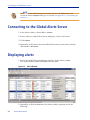
Displaying alerts. . . . . . . . . . . . . . . . . . . . . . . . . . . . . . . . . . . . . . . . . . . . . . . . . . . . . . . . .
Working with alerts . . . . . . . . . . . . . . . . . . . . . . . . . . . . . . . . . . . . . . . . . . . . . . . . . . . . . .
249
250
250
251
Chapter 22
255
Monitoring and intervening in production
Monitoring . . . . . . . . . . . . . . . . . . . . . . . . . . . . . . . . . . . . . . . . . . . . . . . . . . . . . . . . . . . . .
Checking job status summaries by Control-M, application, and group . . . . . . .
Checking job status details. . . . . . . . . . . . . . . . . . . . . . . . . . . . . . . . . . . . . . . . . . . . .
Performing job monitoring actions . . . . . . . . . . . . . . . . . . . . . . . . . . . . . . . . . . . . . .
Checking predecessor and successor job flows. . . . . . . . . . . . . . . . . . . . . . . . . . . .
Intervening . . . . . . . . . . . . . . . . . . . . . . . . . . . . . . . . . . . . . . . . . . . . . . . . . . . . . . . . . . . . .
Viewing and editing the details of a job in the active environment . . . . . . . . . .
Performing manual job intervention . . . . . . . . . . . . . . . . . . . . . . . . . . . . . . . . . . . .
Handling errors that occur when you intervene . . . . . . . . . . . . . . . . . . . . . . . . . .
Manually indicating satisfied conditions. . . . . . . . . . . . . . . . . . . . . . . . . . . . . . . . .
Manually rescheduling jobs in the active environment. . . . . . . . . . . . . . . . . . . . .
Activating third-party applications . . . . . . . . . . . . . . . . . . . . . . . . . . . . . . . . . . . . .
255
256
256
257
258
262
262
265
270
270
272
275
Chapter 23
279
Managing Workloads
Introduction to Workload Management. . . . . . . . . . . . . . . . . . . . . . . . . . . . . . . . . . . . .
Workload Manager . . . . . . . . . . . . . . . . . . . . . . . . . . . . . . . . . . . . . . . . . . . . . . . . . . . . . .
Defining or modifying a Workload . . . . . . . . . . . . . . . . . . . . . . . . . . . . . . . . . . . . .
Definition tabs of the Workload window . . . . . . . . . . . . . . . . . . . . . . . . . . . . . . . .
Defining time periods for Workload Policies . . . . . . . . . . . . . . . . . . . . . . . . . . . . .
Defining prioritization of Workload Policy node mapping enforcement. . . . . .
Monitoring workloads. . . . . . . . . . . . . . . . . . . . . . . . . . . . . . . . . . . . . . . . . . . . . . . . . . . .
279
280
283
284
289
292
293
Chapter 24
297
Control-M Self Service management
Control-M Self Service management overview . . . . . . . . . . . . . . . . . . . . . . . . . . . . . . .
Service definitions . . . . . . . . . . . . . . . . . . . . . . . . . . . . . . . . . . . . . . . . . . . . . . . . . . . . . . .
Creating a service definition . . . . . . . . . . . . . . . . . . . . . . . . . . . . . . . . . . . . . . . . . . .
Editing a service definition . . . . . . . . . . . . . . . . . . . . . . . . . . . . . . . . . . . . . . . . . . . .
Copying a service definition . . . . . . . . . . . . . . . . . . . . . . . . . . . . . . . . . . . . . . . . . . .
Deleting a service definition . . . . . . . . . . . . . . . . . . . . . . . . . . . . . . . . . . . . . . . . . . .
Service rules . . . . . . . . . . . . . . . . . . . . . . . . . . . . . . . . . . . . . . . . . . . . . . . . . . . . . . . . . . . .
Creating a service rule . . . . . . . . . . . . . . . . . . . . . . . . . . . . . . . . . . . . . . . . . . . . . . . .
Editing a service rule. . . . . . . . . . . . . . . . . . . . . . . . . . . . . . . . . . . . . . . . . . . . . . . . . .
Copying a service rule . . . . . . . . . . . . . . . . . . . . . . . . . . . . . . . . . . . . . . . . . . . . . . . .
298
298
299
301
302
303
303
304
307
308
9
Deleting a service rule . . . . . . . . . . . . . . . . . . . . . . . . . . . . . . . . . . . . . . . . . . . . . . . . . 308
Generating services from a rule . . . . . . . . . . . . . . . . . . . . . . . . . . . . . . . . . . . . . . . . . 309
Chapter 25
Service monitoring
311
Service monitoring overview . . . . . . . . . . . . . . . . . . . . . . . . . . . . . . . . . . . . . . . . . . . . . . 312
Monitoring services . . . . . . . . . . . . . . . . . . . . . . . . . . . . . . . . . . . . . . . . . . . . . . . . . . . . . . 312
Chapter 26
Introduction to analyzing and optimizing production
317
Analyzing and optimizing the system . . . . . . . . . . . . . . . . . . . . . . . . . . . . . . . . . . . . . . 317
Chapter 27
Defining and generating reports
319
Introduction. . . . . . . . . . . . . . . . . . . . . . . . . . . . . . . . . . . . . . . . . . . . . . . . . . . . . . . . . . . . . 319
Available report types . . . . . . . . . . . . . . . . . . . . . . . . . . . . . . . . . . . . . . . . . . . . . . . . . . . . 320
Active report types. . . . . . . . . . . . . . . . . . . . . . . . . . . . . . . . . . . . . . . . . . . . . . . . . . . . 320
Definition report types . . . . . . . . . . . . . . . . . . . . . . . . . . . . . . . . . . . . . . . . . . . . . . . . 321
General report types . . . . . . . . . . . . . . . . . . . . . . . . . . . . . . . . . . . . . . . . . . . . . . . . . . 322
BMC Batch Impact Manager report types . . . . . . . . . . . . . . . . . . . . . . . . . . . . . . . . 323
Control-M/Forecast report types . . . . . . . . . . . . . . . . . . . . . . . . . . . . . . . . . . . . . . . 323
Starting the Control-M Reporting Facility . . . . . . . . . . . . . . . . . . . . . . . . . . . . . . . . . . . 325
Generating a report . . . . . . . . . . . . . . . . . . . . . . . . . . . . . . . . . . . . . . . . . . . . . . . . . . . . . . 326
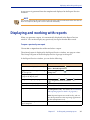
Displaying and working with reports . . . . . . . . . . . . . . . . . . . . . . . . . . . . . . . . . . . . . . . 327
Defining templates and Ad Hoc reports . . . . . . . . . . . . . . . . . . . . . . . . . . . . . . . . . . . . . 328
Creating templates using the Report Wizard . . . . . . . . . . . . . . . . . . . . . . . . . . . . . 330
Generating and exporting reports in batch. . . . . . . . . . . . . . . . . . . . . . . . . . . . . . . . . . . 336
Using command line parameters. . . . . . . . . . . . . . . . . . . . . . . . . . . . . . . . . . . . . . . . 337
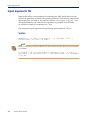
Input arguments file . . . . . . . . . . . . . . . . . . . . . . . . . . . . . . . . . . . . . . . . . . . . . . . . . . 338
Chapter 28
Viewing and playing back archived data
341
Selecting and displaying archived ViewPoints . . . . . . . . . . . . . . . . . . . . . . . . . . . . . . . 342
Playing back archived events . . . . . . . . . . . . . . . . . . . . . . . . . . . . . . . . . . . . . . . . . . . . . . 343
Appendix A
Customizing the interfaces
347
Changing your password . . . . . . . . . . . . . . . . . . . . . . . . . . . . . . . . . . . . . . . . . . . . . . . . . 347
Adjusting list displays . . . . . . . . . . . . . . . . . . . . . . . . . . . . . . . . . . . . . . . . . . . . . . . . . . . . 347
Modifying list displays . . . . . . . . . . . . . . . . . . . . . . . . . . . . . . . . . . . . . . . . . . . . . . . . 348
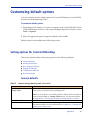
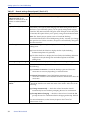
Customizing default options . . . . . . . . . . . . . . . . . . . . . . . . . . . . . . . . . . . . . . . . . . . . . . 351
Setting options for Control-M/Desktop . . . . . . . . . . . . . . . . . . . . . . . . . . . . . . . . . . 351
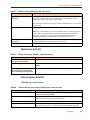
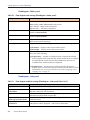
Setting options for Control-M/EM . . . . . . . . . . . . . . . . . . . . . . . . . . . . . . . . . . . . . . 359
Setting options for the Control-M Reporting facility . . . . . . . . . . . . . . . . . . . . . . . 366
Appendix B
Examples for defining jobs
369
Accessing the sample draft . . . . . . . . . . . . . . . . . . . . . . . . . . . . . . . . . . . . . . . . . . . . . . . . 369
Organizing the company’s accounting jobs — the Ex-Accounting application . . . . 370
Handling invoicing needs. . . . . . . . . . . . . . . . . . . . . . . . . . . . . . . . . . . . . . . . . . . . . . 370
Handling payroll processing needs. . . . . . . . . . . . . . . . . . . . . . . . . . . . . . . . . . . . . . 373
10
Control-M User Guide
Organizing the airline company’s flight jobs — the Ex-Flights application . . . . . . .
Handling flight-related communication needs . . . . . . . . . . . . . . . . . . . . . . . . . . . .
Organizing the IT department maintenance jobs — the Ex-ITMaintenance
application . . . . . . . . . . . . . . . . . . . . . . . . . . . . . . . . . . . . . . . . . . . . . . . . . . . . . . . . . . .
Handling IT job backup needs. . . . . . . . . . . . . . . . . . . . . . . . . . . . . . . . . . . . . . . . . .
Handling emergency situations . . . . . . . . . . . . . . . . . . . . . . . . . . . . . . . . . . . . . . . .
Handling component shutdown needs . . . . . . . . . . . . . . . . . . . . . . . . . . . . . . . . . .
375
375
Appendix C
387
Formats, values and functions
377
377
380
383
Pattern-matching strings. . . . . . . . . . . . . . . . . . . . . . . . . . . . . . . . . . . . . . . . . . . . . . . . . . 387
Using SQL wildcards . . . . . . . . . . . . . . . . . . . . . . . . . . . . . . . . . . . . . . . . . . . . . . . . . 390
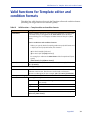
Valid functions for Template editor and condition formats . . . . . . . . . . . . . . . . . . . . 391
Appendix D
Checking job and table processing definition validity
393
Checking the validity of job and table processing definitions . . . . . . . . . . . . . . . . . . 393
Appendix E
Troubleshooting
395
Connectivity problems . . . . . . . . . . . . . . . . . . . . . . . . . . . . . . . . . . . . . . . . . . . . . . . . . . . 395
Reporting Facility connectivity errors . . . . . . . . . . . . . . . . . . . . . . . . . . . . . . . . . . . 398
Index
401
11
12
Control-M User Guide
Figures
Control-M/Desktop displaying a draft . . . . . . . . . . . . . . . . . . . . . . . . . . . . . . . . . . . . . . 29
Control-M/Enterprise Manager displaying a ViewPoint . . . . . . . . . . . . . . . . . . . . . . . 30
Condition node in the flow diagram . . . . . . . . . . . . . . . . . . . . . . . . . . . . . . . . . . . . . . . . 36
Job editing form . . . . . . . . . . . . . . . . . . . . . . . . . . . . . . . . . . . . . . . . . . . . . . . . . . . . . . . . . . 80
Scheduling tab in the job editing form . . . . . . . . . . . . . . . . . . . . . . . . . . . . . . . . . . . . . . . 89
Scheduling tab in the SMART Table editing form . . . . . . . . . . . . . . . . . . . . . . . . . . . . 130
Table Manager . . . . . . . . . . . . . . . . . . . . . . . . . . . . . . . . . . . . . . . . . . . . . . . . . . . . . . . . . . 144
Table Content dialog box . . . . . . . . . . . . . . . . . . . . . . . . . . . . . . . . . . . . . . . . . . . . . . . . . 151
Job Comparison dialog box . . . . . . . . . . . . . . . . . . . . . . . . . . . . . . . . . . . . . . . . . . . . . . . 156
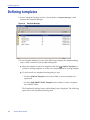
Template Manager . . . . . . . . . . . . . . . . . . . . . . . . . . . . . . . . . . . . . . . . . . . . . . . . . . . . . . 172
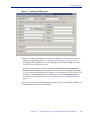
Template job editing form . . . . . . . . . . . . . . . . . . . . . . . . . . . . . . . . . . . . . . . . . . . . . . . . 173
Find and Update window . . . . . . . . . . . . . . . . . . . . . . . . . . . . . . . . . . . . . . . . . . . . . . . . 179
Order/Force Parameters dialog box (in Control-M/Desktop) . . . . . . . . . . . . . . . . . 199
Filter Definition dialog box . . . . . . . . . . . . . . . . . . . . . . . . . . . . . . . . . . . . . . . . . . . . . . . 242
Alerts Window . . . . . . . . . . . . . . . . . . . . . . . . . . . . . . . . . . . . . . . . . . . . . . . . . . . . . . . . . 250
Order/Force dialog box with advanced fields (in Control-M/EM) . . . . . . . . . . . . . 273
Filled in Activate Applications Editor dialog box . . . . . . . . . . . . . . . . . . . . . . . . . . . . 276
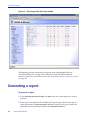
Reporting Facility Start Page window . . . . . . . . . . . . . . . . . . . . . . . . . . . . . . . . . . . . . . 326
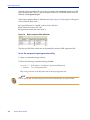
Report template filter definition . . . . . . . . . . . . . . . . . . . . . . . . . . . . . . . . . . . . . . . . . . . 340
Column header pop-up menu for list displays . . . . . . . . . . . . . . . . . . . . . . . . . . . . . . 348
List Display Pop-up Menu . . . . . . . . . . . . . . . . . . . . . . . . . . . . . . . . . . . . . . . . . . . . . . . . 348
13
14
Control-M User Guide
Tables
Node and tree icons . . . . . . . . . . . . . . . . . . . . . . . . . . . . . . . . . . . . . . . . . . . . . . . . . . . . . . 31
Additional icons in Control-M/EM only . . . . . . . . . . . . . . . . . . . . . . . . . . . . . . . . . . . . 32
Job status indicated color . . . . . . . . . . . . . . . . . . . . . . . . . . . . . . . . . . . . . . . . . . . . . . . . . . 32
High-level node status colors - Defaults . . . . . . . . . . . . . . . . . . . . . . . . . . . . . . . . . . . . . 33
Sample node types . . . . . . . . . . . . . . . . . . . . . . . . . . . . . . . . . . . . . . . . . . . . . . . . . . . . . . . 34
Additional display adjustments . . . . . . . . . . . . . . . . . . . . . . . . . . . . . . . . . . . . . . . . . . . . 37
Authorizations window – Users tab fields . . . . . . . . . . . . . . . . . . . . . . . . . . . . . . . . . . . 48
Authorizations window – Groups tab fields . . . . . . . . . . . . . . . . . . . . . . . . . . . . . . . . . . 48
Tab descriptions . . . . . . . . . . . . . . . . . . . . . . . . . . . . . . . . . . . . . . . . . . . . . . . . . . . . . . . . . 50
User Authorizations window – General tab fields . . . . . . . . . . . . . . . . . . . . . . . . . . . . . 51
Group Authorizations window – General tab fields . . . . . . . . . . . . . . . . . . . . . . . . . . . 52
User Authorizations window – Member Of tab fields . . . . . . . . . . . . . . . . . . . . . . . . . 52
Active tab fields and buttons . . . . . . . . . . . . . . . . . . . . . . . . . . . . . . . . . . . . . . . . . . . . . . . 55
Collection selection criteria . . . . . . . . . . . . . . . . . . . . . . . . . . . . . . . . . . . . . . . . . . . . . . . . 56
Valid operators . . . . . . . . . . . . . . . . . . . . . . . . . . . . . . . . . . . . . . . . . . . . . . . . . . . . . . . . . . 57
Owners tab fields . . . . . . . . . . . . . . . . . . . . . . . . . . . . . . . . . . . . . . . . . . . . . . . . . . . . . . . . 59
Privileges tab access levels . . . . . . . . . . . . . . . . . . . . . . . . . . . . . . . . . . . . . . . . . . . . . . . . . 59
Privileges and features . . . . . . . . . . . . . . . . . . . . . . . . . . . . . . . . . . . . . . . . . . . . . . . . . . . . 60
Table tab fields . . . . . . . . . . . . . . . . . . . . . . . . . . . . . . . . . . . . . . . . . . . . . . . . . . . . . . . . . . . 61
Table access levels . . . . . . . . . . . . . . . . . . . . . . . . . . . . . . . . . . . . . . . . . . . . . . . . . . . . . . . . 62
Prerequisite Conditions panel fields . . . . . . . . . . . . . . . . . . . . . . . . . . . . . . . . . . . . . . . . 63
Prerequisite Conditions access levels . . . . . . . . . . . . . . . . . . . . . . . . . . . . . . . . . . . . . . . . 63
Control Resources tab fields . . . . . . . . . . . . . . . . . . . . . . . . . . . . . . . . . . . . . . . . . . . . . . . 65
Control Resources access levels . . . . . . . . . . . . . . . . . . . . . . . . . . . . . . . . . . . . . . . . . . . . 65
Quantitative Resources panel fields . . . . . . . . . . . . . . . . . . . . . . . . . . . . . . . . . . . . . . . . . 65
Quantitative Resources access levels . . . . . . . . . . . . . . . . . . . . . . . . . . . . . . . . . . . . . . . . 66
Global Conditions tab fields . . . . . . . . . . . . . . . . . . . . . . . . . . . . . . . . . . . . . . . . . . . . . . . 66
Global Conditions access levels . . . . . . . . . . . . . . . . . . . . . . . . . . . . . . . . . . . . . . . . . . . . 66
Calendars fields . . . . . . . . . . . . . . . . . . . . . . . . . . . . . . . . . . . . . . . . . . . . . . . . . . . . . . . . . . 67
Access levels . . . . . . . . . . . . . . . . . . . . . . . . . . . . . . . . . . . . . . . . . . . . . . . . . . . . . . . . . . . . . 67
Services permissions . . . . . . . . . . . . . . . . . . . . . . . . . . . . . . . . . . . . . . . . . . . . . . . . . . . . . . 68
Scheduling tab parameters . . . . . . . . . . . . . . . . . . . . . . . . . . . . . . . . . . . . . . . . . . . . . . . . 90
Valid date values for In and Out conditions . . . . . . . . . . . . . . . . . . . . . . . . . . . . . . . . . 109
DO actions . . . . . . . . . . . . . . . . . . . . . . . . . . . . . . . . . . . . . . . . . . . . . . . . . . . . . . . . . . . . . 118
Determining which jobs in a SMART Table get scheduled . . . . . . . . . . . . . . . . . . . . 137
Filter fields – Table Manager . . . . . . . . . . . . . . . . . . . . . . . . . . . . . . . . . . . . . . . . . . . . . . 145
Column descriptions – Table Manager . . . . . . . . . . . . . . . . . . . . . . . . . . . . . . . . . . . . . 145
Command buttons – Table Manager . . . . . . . . . . . . . . . . . . . . . . . . . . . . . . . . . . . . . . . 145
Table management tasks . . . . . . . . . . . . . . . . . . . . . . . . . . . . . . . . . . . . . . . . . . . . . . . . . 147
Job management tasks . . . . . . . . . . . . . . . . . . . . . . . . . . . . . . . . . . . . . . . . . . . . . . . . . . . 150
15
Filter fields – Table Content dialog box . . . . . . . . . . . . . . . . . . . . . . . . . . . . . . . . . . . . . 151
Command buttons – Table Content dialog box . . . . . . . . . . . . . . . . . . . . . . . . . . . . . . 152
Job comparison tasks . . . . . . . . . . . . . . . . . . . . . . . . . . . . . . . . . . . . . . . . . . . . . . . . . . . . . 156
Version Manager management tasks . . . . . . . . . . . . . . . . . . . . . . . . . . . . . . . . . . . . . . . 159
Job version management tasks . . . . . . . . . . . . . . . . . . . . . . . . . . . . . . . . . . . . . . . . . . . . 160
FIND and Update actions . . . . . . . . . . . . . . . . . . . . . . . . . . . . . . . . . . . . . . . . . . . . . . . . . 181
FIND operators . . . . . . . . . . . . . . . . . . . . . . . . . . . . . . . . . . . . . . . . . . . . . . . . . . . . . . . . . 182
Update Operators . . . . . . . . . . . . . . . . . . . . . . . . . . . . . . . . . . . . . . . . . . . . . . . . . . . . . . . 182
Periodic statistics management tasks . . . . . . . . . . . . . . . . . . . . . . . . . . . . . . . . . . . . . . . 187
Communication Status dialog box fields and symbols . . . . . . . . . . . . . . . . . . . . . . . . 231
Where to look for integrated features in Control-M/Desktop . . . . . . . . . . . . . . . . . . 235
Job monitoring actions . . . . . . . . . . . . . . . . . . . . . . . . . . . . . . . . . . . . . . . . . . . . . . . . . . . 257
Fields of the Active tab . . . . . . . . . . . . . . . . . . . . . . . . . . . . . . . . . . . . . . . . . . . . . . . . . . . 263
Job intervention actions . . . . . . . . . . . . . . . . . . . . . . . . . . . . . . . . . . . . . . . . . . . . . . . . . . 266
Bypass options . . . . . . . . . . . . . . . . . . . . . . . . . . . . . . . . . . . . . . . . . . . . . . . . . . . . . . . . . . 267
Workload Manager window . . . . . . . . . . . . . . . . . . . . . . . . . . . . . . . . . . . . . . . . . . . . . . 281
Workload Manager toolbar . . . . . . . . . . . . . . . . . . . . . . . . . . . . . . . . . . . . . . . . . . . . . . . 281
Symbols used to compose pattern-matching strings for workloads . . . . . . . . . . . . . 285
Date and Time Type . . . . . . . . . . . . . . . . . . . . . . . . . . . . . . . . . . . . . . . . . . . . . . . . . . . . . 290
Workload Monitor window columns . . . . . . . . . . . . . . . . . . . . . . . . . . . . . . . . . . . . . . . 293
Additional Workload Monitor columns . . . . . . . . . . . . . . . . . . . . . . . . . . . . . . . . . . . . 294
Service options . . . . . . . . . . . . . . . . . . . . . . . . . . . . . . . . . . . . . . . . . . . . . . . . . . . . . . . . . . 299
New Service Parameter dialog box . . . . . . . . . . . . . . . . . . . . . . . . . . . . . . . . . . . . . . . . . 300
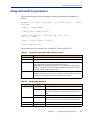
emreportcli report generation utility parameters . . . . . . . . . . . . . . . . . . . . . . . . . . . . . 337
emreportcli parameters . . . . . . . . . . . . . . . . . . . . . . . . . . . . . . . . . . . . . . . . . . . . . . . . . . . 337
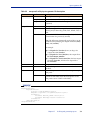
emreportcli utility input arguments file description . . . . . . . . . . . . . . . . . . . . . . . . . . 339
General settings (General panel) . . . . . . . . . . . . . . . . . . . . . . . . . . . . . . . . . . . . . . . . . . . 351
Workspace settings (General – Workspace panel) . . . . . . . . . . . . . . . . . . . . . . . . . . . . 353
General flow diagram settings (Flowdiagram – General panel) . . . . . . . . . . . . . . . . 353
Flow diagram node settings (Flowdiagram - Nodes panel) . . . . . . . . . . . . . . . . . . . . 354
Flow diagram condition settings (Flowdiagram – Links panel) . . . . . . . . . . . . . . . . . 354
Flow diagram color settings (Flowdiagram – Colors panel) . . . . . . . . . . . . . . . . . . . . 356
Diagnostic settings (Diagnostic panel) . . . . . . . . . . . . . . . . . . . . . . . . . . . . . . . . . . . . . . 356
Forecast settings (Forecast panel) . . . . . . . . . . . . . . . . . . . . . . . . . . . . . . . . . . . . . . . . . . 358
General environment settings (Environment General panel) . . . . . . . . . . . . . . . . . . . 360
Environment Display panel default settings . . . . . . . . . . . . . . . . . . . . . . . . . . . . . . . . . 361
Alerts panel . . . . . . . . . . . . . . . . . . . . . . . . . . . . . . . . . . . . . . . . . . . . . . . . . . . . . . . . . . . . . 363
Reconnection panel default settings . . . . . . . . . . . . . . . . . . . . . . . . . . . . . . . . . . . . . . . . 364
Environment panel . . . . . . . . . . . . . . . . . . . . . . . . . . . . . . . . . . . . . . . . . . . . . . . . . . . . . . 366
Viewer Panel . . . . . . . . . . . . . . . . . . . . . . . . . . . . . . . . . . . . . . . . . . . . . . . . . . . . . . . . . . . . 366
Symbols used to compose pattern-matching strings . . . . . . . . . . . . . . . . . . . . . . . . . . 388
Examples of expressions . . . . . . . . . . . . . . . . . . . . . . . . . . . . . . . . . . . . . . . . . . . . . . . . . . 389
Valid functions — Template editor and condition formats . . . . . . . . . . . . . . . . . . . . 391
16
Control-M User Guide
About this book
This book contains procedures that you perform with the Control-M/Enterprise
Manager product, to automate, monitor, and intervene in your production
environment. This book is intended for all users of Control-M/Enterprise Manager
(Control-M/EM).
The book is organized into parts that reflect the logical progression of high-level
tasks. Each part contains the chapters that organize the individual implementation
tasks into related chapters. To use the information in this book most effectively, read
the chapters in the order in which they are presented.
NOTE
■
BMC Software recommends that before you use this book, you become familiar with the
concepts presented in the Control-M Concepts Guide.
■
This book assumes that Control-M is already installed and initially configured. The
installation and configuration tasks are described in the Control-M Installation Guide.
■
This book does not discuss administrative tasks (for example, daily maintenance). Those
tasks are described in the Control-M Administrator Guide.
Like most BMC Software documentation, this book is available in printed and online
formats. Visit the BMC Software Customer Support page at
http://www.bmc.com/support_home to request additional printed books or to view
online books and notices (such as release notes and technical bulletins). Some product
shipments also include the online books on a documentation CD.
NOTE
Online books are formatted as Portable Document Format (PDF) or HTML files. To view,
print, or copy PDF books, use the free Adobe Reader from Adobe Systems. If your product
installation does not install the reader, you can obtain the reader at http://www.adobe.com.
The software also offers online Help. To access Help, press F1 within any product, or
click the Help button in graphical user interfaces (GUIs).
17
Conventions
Conventions
This book uses the following special conventions:
■
All syntax, operating system terms, and literal examples are
presented in this typeface.
■
Variable text in path names, system messages, or syntax is displayed in italic text:
testsys/instance/fileName
■
The symbol => connects items in a menu sequence. For example,
Actions => Confirm instructs you to choose the Confirm command from the Actions
menu.
Syntax statements
The following example shows a sample syntax statement:
COMMAND KEYWORD1 [KEYWORD2 | KEYWORD3] KEYWORD4={YES | NO} fileName...
The following table explains conventions for syntax statements and provides
examples:
Item
Example
Items in italic type represent variables that
you must replace with a name or value. If a
variable is represented by two or more
words, initial capitals distinguish the second
and subsequent words.
alias
Brackets indicate a group of optional items.
Do not type the brackets when you enter the
option. A comma means that you can choose
one or more of the listed options. You must
use a comma to separate the options if you
choose more than one option.
[tableName, columnName, field]
Braces indicate that at least one of the
enclosed items is required. Do not type the
braces when you enter the item.
{DBDName | tableName}
databaseDirectory
serverHostName
[-full, -incremental, -level]
(Unix)
UNLOAD device={disk | tape,
fileName | deviceName}
{-a | -c} (Unix)
18
Control-M User Guide
Syntax statements
Item
Example
A vertical bar means that you can choose
only one of the listed items. In the example,
you would choose either commit or cancel.
{commit | cancel}
An ellipsis indicates that you can repeat the
previous item or items as many times as
necessary.
columnName . . .
{-commit | -cancel} (Unix)
19
Syntax statements
20
Control-M User Guide
Part
1
Getting started
Part 1
This part presents the following topics:
Chapter 2
Working with Control-M/Desktop and Control-M/EM . . . . . . . . . . . . . . . . . . . . . 25
Part 1
21
22
Control-M User Guide
Chapter
1
Introduction to Control-M/Enterprise
Manager
1
This chapter presents the following topic:
Automating your production jobs with Control-M/EM . . . . . . . . . . . . . . . . . . . . . . . . 23
Automating your production jobs with
Control-M/EM
With Control-M/Enterprise Manager, you can automate the scheduling and
processing of your production jobs. Its main GUIs are Control-M/Desktop and the
Control-M/Enterprise Manager window (simply called Control-M/EM).
To automate your production environment, perform the following tasks:
■
Model your production job flow by using job processing definitions
Job processing definitions provide Control-M with the instructions for scheduling,
submitting, and performing post-processing tasks of the jobs in your production
environment. This book describes how to use Control-M/Desktop to create job
processing definitions and other needed entities.
■
Automate job ordering
After job processing definitions have been defined for your production jobs, you
perform several tasks to transition your definitions to production. As part of this
transition, you can use a feature called New Day processing to automate the
ordering of jobs each day.
Chapter 1
Introduction to Control-M/Enterprise Manager
23
Automating your production jobs with Control-M/EM
■
Monitor (and where necessary, intervene in) the processing of your production
jobs
To ensure that everything is running smoothly, you can monitor job processing,
and if problems arise you can intervene effectively. Generally, monitoring by
exception (that is, checking problems or potential problems rather than viewing
the entire system) is the most effective way to monitor your production jobs.
■
Analyze (and optimizing) job processing in your production jobs
After your production jobs have been automated, you can ensure that processing is
maximized by using analysis tools to identify areas that can be improved, such as
resource allocation, workload balancing, and so on.
This book describes how to use the GUIs of Control-M/EM to automate the
scheduling and processing of your production jobs.
Where to go from here
24
■
Continue with Chapter 2, “Working with Control-M/Desktop and
Control-M/EM,” which explains how to start Control-M/Desktop and
Control-M/EM, and provides the details that you need to navigate, understand,
and effectively use these interfaces.
■
For details about defining the entities needed for automating the production
environment, especially job processing definitions, see Part 2, “Defining the
production environment.”
■
For details about how to transition your definitions into production and
automating your production environment, see Part 3, “Moving to production.”
■
For details about monitoring, and when necessary, intervening in, your production
environment after it is automated, see Part 4, “Monitoring and intervening in
production.”
■
For details about helpful tools (including reports) for analyzing and optimizing
your production environment, see Part 5, “Analyzing and optimizing the
production environment.”
Control-M User Guide
Chapter
2
Working with Control-M/Desktop
and Control-M/EM
2
This chapter provides basic information you need to start, understand, navigate, and
manipulate Control-M/Desktop and Control-M/EM features. . . . . . . . . . . . . . . . 26
Starting Control-M/Desktop . . . . . . . . . . . . . . . . . . . . . . . . . . . . . . . . . . . . . . . . . . . . . . . 26
Starting Control-M/EM . . . . . . . . . . . . . . . . . . . . . . . . . . . . . . . . . . . . . . . . . . . . . . . . . . . 27
Understanding the Control-M/Desktop and Control-M/EM layout . . . . . . . . . . . . . 29
Adjusting the display . . . . . . . . . . . . . . . . . . . . . . . . . . . . . . . . . . . . . . . . . . . . . . . . . . . . . 35
Creating workspaces and loading jobs into Control-M/Desktop . . . . . . . . . . . . . . . . 40
Navigating in the flow diagram. . . . . . . . . . . . . . . . . . . . . . . . . . . . . . . . . . . . . . . . . . . . . 41
Identifying predecessor and successor jobs . . . . . . . . . . . . . . . . . . . . . . . . . . . . . . . . . . . 42
Printing the flow diagram. . . . . . . . . . . . . . . . . . . . . . . . . . . . . . . . . . . . . . . . . . . . . . . . . . 43
Changing your password . . . . . . . . . . . . . . . . . . . . . . . . . . . . . . . . . . . . . . . . . . . . . . . . . . 44
Assigning authorizations . . . . . . . . . . . . . . . . . . . . . . . . . . . . . . . . . . . . . . . . . . . . . . . . . . 45
Chapter 2
Working with Control-M/Desktop and Control-M/EM
25
Starting Control-M/Desktop
This chapter provides basic information you need to start, understand, navigate, and
manipulate Control-M/Desktop and Control-M/EM features.
■
Control-M/Desktop enables you to create and edit job processing definitions, one
of the first tasks that you are likely to perform. Control-M/Desktop also enables
you to define other entities such as tables, job templates and calendars. After
defining these entities, you can use Control-M/Desktop to move entities that you
have defined into production.
■
Control-M/EM enables you to monitor and intervene in job processing in the
production environment. The selection of jobs you view is called a ViewPoint.
ViewPoints are discussed in Chapter 20, “Selecting jobs to monitor.”
You should become familiar with the information in this chapter before using
Control-M/Desktop to define job processing definitions (and other entities), and
before using Control-M/EM to monitor and intervene in your production
environment.
Starting Control-M/Desktop
1 Do one of the following:
■
From Control-M/EM GUI, select Tools > Control-M/Desktop and go to step 3.
■
From the Start menu, navigate to BMC Control-M > Control-M Enterprise Manager
> Control-M Desktop.
2 Enter your user name and password, select the Control-M/EM GUI Server to
which you want to connect, and click Login.
If change password fields are displayed, your password is soon due to expire. Fill
in your new password, and then confirm it.
TIP
If the GUI Server to be selected is not listed, contact your Control-M administrator.
The Control-M/Desktop window is displayed.
3 If the Load Jobs dialog box is displayed (which depends on configuration options),
to load jobs from Control-M/EM into Control-M/Desktop:
26
Control-M User Guide
Connecting to a different GUI Server
A Select the jobs and tables to be loaded, and click Load, and confirm if necessary.
If you select a nested Sub-table, all of the associated parent tables will be loaded
as well.
The Load Table Results dialog box displays the results of the load operation.
B Close the Load Table Results dialog box.
NOTE
If tables you select are locked, notify the user named in the Locked by column, or wait until
the tables are unlocked.
Connecting to a different GUI Server
Control-M/Desktop enables you to connect to a different GUI Server at any time. (To
check to which GUI Server you are currently connected, choose
Tools => Connection => Connection Properties.)
To change connection to a different GUI Server
1 In Control-M/Desktop, choose Tools => Connection => Connect with Different
Properties.
2 Enter your user name and password, and select the GUI Server to which you want
to connect.
3 To specify values other than the defaults for host name, port number and Secured
Socket Layer usage, click Advanced, and fill in the details.
4 Click Login.
Starting Control-M/EM
1 Do one of the following:
■
From Control-M/EM GUI, select Tools > Control-M/Enterprise Manager and go to
step 2.
■
From the Start menu, navigate to BMC Control-M > Control-M Enterprise Manager
> Control-M Enterprise Manager GUI.
Chapter 2
Working with Control-M/Desktop and Control-M/EM
27
Starting Control-M/EM
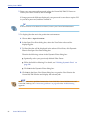
2 Enter your user name and password, select the Control-M/EM GUI Server to
which you want to connect, and click Login.
If change password fields are displayed, your password is soon due to expire. Fill
in your new password, and then confirm it.
TIP
If the GUI Server to be selected is not listed, contact your Control-M administrator.
3 To display jobs that are in the production environment
A Choose File => Open ViewPoint.
B In the Open ViewPoint dialog box, select the ViewPoint to be used for
displaying jobs.
C To filter jobs that will be displayed in the selected ViewPoint, click Dynamic
Filter in the Open ViewPoint dialog box.
Then do the following actions in the Dynamic Filter dialog box:
■
Optionally, select your previously defined Filter Preset.
■
Fill in the fields for filtering. For details, see “Defining dynamic filters” on
page 240.
■
Click OK in the Dynamic Filter dialog box.
D Click OK in the Open ViewPoints dialog box to open the ViewPoint in the
Control-M/EM window and display the selected jobs.
NOTE
To resolve connectivity problems between the Control-M/EM, Control-M/EM server and
Control-M/Desktop, see “Connectivity problems” on page 395 of the Troubleshooting
appendix.
28
Control-M User Guide
Understanding the Control-M/Desktop and Control-M/EM layout
Understanding the Control-M/Desktop and
Control-M/EM layout
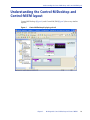
Control-M/Desktop (Figure 1) and Control-M/EM (Figure 2) have very similar
layouts.
Figure 1
Control-M/Desktop displaying a draft
Chapter 2
Working with Control-M/Desktop and Control-M/EM
29
Understanding the Control-M/Desktop and Control-M/EM layout
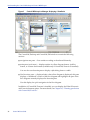
Figure 2
Control-M/Enterprise Manager displaying a ViewPoint
The Control-M/Desktop and Control-M/EM windows contain the following
sections:
■
navigation tree pane — lists entities according to the selected hierarchy
■
main pane (work area) — displays entities in a flow diagram format, a job list
format, or a Gantt chart format (available only if Control-M/Forecast is installed)
You can also use the main pane to display a job editing form or a table.
■
Net Overview pane — displayed only when a flow diagram is displayed, this pane
displays a “thumbnail” version of the flow diagram and highlights the part of the
flow diagram currently displayed in the main pane.
Use this display for quick navigation in the flow diagram.
In addition, if Control-M/Forecast is installed, you can display the What-If Scenario
and Forecast Summary panes. For more details, see Chapter 19, “Planning production
with Control-M/Forecast.”
30
Control-M User Guide
Understanding the flow diagram
In Control-M/Desktop, the title bar identifies the type of workspace in which you are
working (and in the local workspace, the name of the draft). The background color
(customizable) of the panes also indicates the type of workspace.
NOTE
You can customize the display for both Control-M/Desktop and Control-M/EM. For details,
see Appendix A, “Customizing the interfaces.”
Understanding the flow diagram
The flow diagram shows you at a glance information, such as entity type,
relationships, and statuses.
NOTE
Control-M/EM displays a refresh needed icon
in the toolbar if the flow diagram
needs a refresh due to production changes. Click the icon to perform the refresh
In the flow diagram, components of the environment (definition environment or
active environment) are represented by node boxes. The information that is displayed
in a node varies depending on the type of node and on customization options.
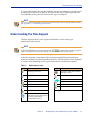
Table 1
Node and tree icons
Symbol Information
Symbol Information
Desktop (root) node
Job under a BMC Batch Impact
Manager service
Control-M
Control-M is disconnected
Application
Condition node
Group
SMART Table
Table
Job in a SMART Table
Job
Locked SMART Table
Locked table
Cyclic job (Note: Cyclic
indicators are also displayed in
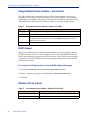
forecasts generated by
Control-M/Forecast.)
Chapter 2
Working with Control-M/Desktop and Control-M/EM
31
Understanding the flow diagram
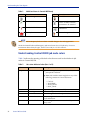
Table 2
Additional icons in Control-M/EM only
Symbol Information
Symbol Information
Job is executing
Job is held
Job ended OK
Job is waiting for a condition,
resource or other execution
requirement to be satisfied
Job ended NOT OK
Job is waiting for a manual
confirmation
Deleted job
Job state changed to unknown
NOTE
Free, Late, and On Request jobs do not show a visible change in the node appearance.
Nodes for Started Tasks and Emergency jobs are relevant for z/OS jobs only. For more
information about these job types, see the Control-M for z/OS User Manual.
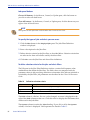
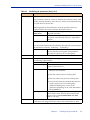
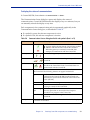
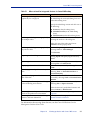
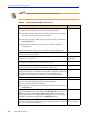
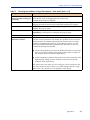
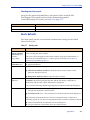
Understanding Control-M/EM job node colors
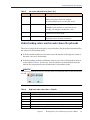
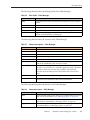
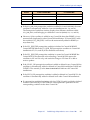
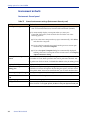
Table 3 indicates the meaning of default colors that are used in the title bar in job
nodes in Control-M/EM.
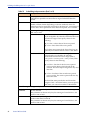
Table 3
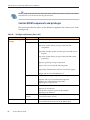
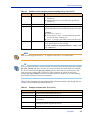
Job status indicated color (Part 1 of 2)
Color
Status
Gray
Wait Condition
Meaning
■
Job is waiting for the specified date, time, or In
prerequisite condition.
■
Note: Jobs with this status might have any of the
following statuses in Control-M/Server:
—
—
—
—
32
CYCLIC
WAITTIME
WAIT_ODAT
POST_ODAT
Green
Ended OK
Job processing finished successfully.
Yellow
Executing
Job is executing.
Blue
Wait Resource
Job is waiting for Control or Quantitative resources.
Blue
Wait Nodes
Job is waiting for nodes resources to become available
for job submission.
Blue
Wait Workload
Job is waiting due to restrictions enforced by workload
policy rules.
Control-M User Guide
Understanding the flow diagram
Table 3
Job status indicated color (Part 2 of 2)
Color
Status
Meaning
Pink
Wait User
Job is waiting for user confirmation.
Note: Jobs with this status are assigned
WAITCONFIRM status in Control-M/Server.
Red
Ended Not OK
Job processing finished unsuccessfully.
Example: Agent platform on which the job was
running was changed to disabled by a user.
White
Unknown
Communication with the Agent platform or agentless
remote host was interrupted.
Purple
Not in AJF
Job is not in the Active Jobs file. This status is
displayed only in archived ViewPoints.
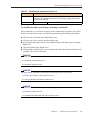
Understanding colors used in nodes above the job node
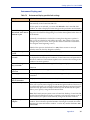
The color of a high-level node (that is, any node above the job node) is determined by
the status of its descendant nodes:
■
If all descendant nodes have the same status, the title bar of the high-level node is
the same color as its descendants.
■
If the descendant nodes have different statuses, the color of the high-level node is
as described in Table 4. In this case, vertical color bars at the bottom of the node
indicate the proportional status distributions of descendant nodes.
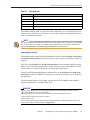
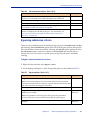
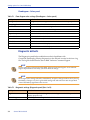
EXAMPLE
The following application node has some jobs that have Ended OK and some that have Ended
Not OK.
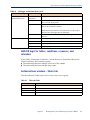
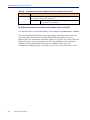
Table 4
High-level node status colors - Defaults
Color
Description
White
At least one job has a status of Unknown.
Red
At least one job has a status of Ended Not OK.
Pink
At least one job has a status of Wait User.
Blue
At least one job has a status of Wait Resources, Wait Nodes or Wait Workload.
Yellow
At least one job currently has a status of Executing.
Green
All jobs have the status Ended OK.
Chapter 2
Working with Control-M/Desktop and Control-M/EM
33
Recognizing job dependencies
NOTE
Emergency jobs are not considered when determining the basic color of a node.
The node color of a SMART Table is determined by both the status of the jobs in the table and
the SMART Table itself. The status is indicated by the color of the clock image in the SMART
Table icon (
). The title bar display color is the color representing the greatest degree of
urgency.
Examples
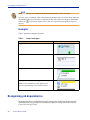
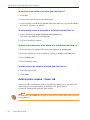
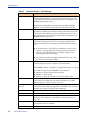
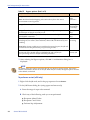
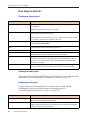
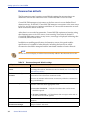
Table 5 presents examples of nodes.
Table 5
Sample node types
Node type
Sample node
Application
SMART Table
Regular job
Cyclic job (currently executing)
(Note: Cyclic indicators are also displayed in
forecasts generated by Control-M/Forecast.)
Recognizing job dependencies
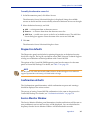
Job dependencies are established through prerequisite conditions (In prerequisite
conditions and Out prerequisite conditions) in job processing definitions (see the
Control-M Concepts Guide).
34
Control-M User Guide
Adjusting the display
Job dependencies in the flow diagram are represented by lines and arrows connecting
job nodes, for example . (These lines can even indicate dependencies between jobs
in different Control-Ms.) The direction of arrows at the ends of the lines indicates the
flow direction (predecessor and successor relationship) of the connected nodes.
Dotted lines between two jobs indicates a conditional link between the two jobs (for
example, optional In conditions defined using OR logic).
An arrow without a connecting line at the top or bottom of a node indicates one of the
following condition types:
■
Arrow at the top — a manual In prerequisite condition. This condition does not get
added automatically by another job, but rather must be added manually (see
“Manually indicating satisfied conditions” on page 270).
■
Arrow at the bottom — The Out prerequisite condition has no corresponding In
condition or job dependent upon the condition.
In Control-M/EM, the connecting lines between conditions are
■
■
green —condition exists (active)
black — condition does not exist yet (inactive)
Adjusting the display
You can adjust the Control-M/Desktop and Control-M/EM display.
Returning panes to their original positions
You can adjust and move panes in the window by clicking and dragging.
To return panes to their original positions
Choose View => Dockable Windows => Reset to Default Layout.
Chapter 2
Working with Control-M/Desktop and Control-M/EM
35
Changing the data display format
Changing the data display format
You can choose from the following the data display formats:
■
■
■
flow diagram
list
Gantt chart (available only if Control-M/Forecast is installed)
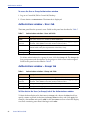
To change the data display formats
Choose View => Flowdiagram, View => Job List, or View => Gantt.
For more details about the Gantt chart, see Chapter 19, “Planning production with
Control-M/Forecast.”
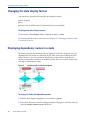
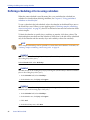
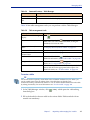
Displaying dependency names in a node
By default prerequisite conditions are not displayed in the flow diagram; only the
dependencies they define are indicated, by the lines and arrows running between
nodes. However, you can customize the defaults so that the flow diagram also
displays prerequisite conditions as condition nodes. This view is most useful when
viewing a small number of jobs.
Figure 3
Condition node in the flow diagram
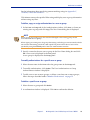
To display (or hide) job dependency nodes
1 With the flow diagram displayed, choose Tools => Options.
2 Select the Links pane in the Flowdiagram Options dialog box, and then select (or
clear) the Display condition nodes check-box.
36
Control-M User Guide
Focusing on different level nodes (stepping in and stepping out)
TIP
To see dependency names for a particular node, you do not need to display dependency name
nodes in the flow diagram. Instead, click a top or bottom arrow of the connecting line between
nodes to flash the dependency names.
Focusing on different level nodes (stepping in and stepping
out)
You can choose to view only one particular hierarchy node level in the definition
environment — for example, you might want to view only Control-M nodes.
Changing to a higher level (for example, from Job level to Group level), is called
stepping out; changing to a lower level (for example, from Group level to Job level), is
called stepping in.
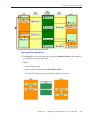
To change the display to different node level in the flow diagram
In the pop-up menu for the entity, choose
■
Step In — to display a lower node level
■
Step Out — to display a higher node level
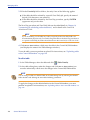
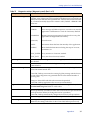
Performing other display adjustments
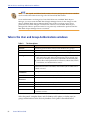
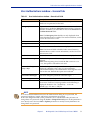
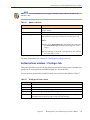
Table 6 describes a number of other display adjustments you can perform:
Table 6
Additional display adjustments (Part 1 of 2)
Adjustment
Step
to display or hide sub-nodes Choose Collapse or Expand from the selected node’s pop-up
(expand or collapse the
menu. (You can select multiple nodes and then perform a
display)
single Expand or Collapse operation.)
Tip: This operation is not available when condition nodes are
displayed. In this case, use the Step In (or Step Out) operation
to display different hierarchy levels.
to display a node’s job
processing definition (or
SMART Table)
Double-click the node in the navigation tree or the flow
diagram.
Chapter 2
Working with Control-M/Desktop and Control-M/EM
37
Filtering the jobs displayed in a Control-M/Desktop draft
Table 6
Additional display adjustments (Part 2 of 2)
Adjustment
Step
(Control-M/Desktop only)
to change the hierarchical
arrangement of displayed
data, between application
hierarchy and table
hierarchy
In Control-M/Desktop, choose View => Hierarchy and then
choose either the Application/Group/Table/Job hierarchy or
the Data Center/Table/Job hierarchy.
(In the List format in
Control-M/Desktop only) to
alternate views between a
hierarchy view and a job list
view
Note: If you change the hierarchy when displaying data in list
format, the components that are displayed depend on the
node you select in the navigation tree
1. With the List format displayed in Control-M/Desktop,
select Job List or Hierarchy List in the selection field in the
Control-M/Desktop toolbar.
2. To display different components in the hierarchy list or
the job list, select appropriate node in the navigation tree.
Note: For an item selected in the tree view, the
■
hierarchy view shows all Control-Ms, applications,
groups, number of Sub-tables and jobs, in hierarchical
order
■
job list view shows all related jobs and Sub-tables, in no
hierarchical order
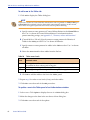
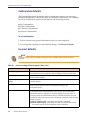
Filtering the jobs displayed in a Control-M/Desktop draft
By default, all the jobs in the current draft are displayed, but Control-M/Desktop
enables you to filter which job are displayed.
To filter jobs displayed in the draft
1 In Control-M/Desktop, choose View => Filter.
2 In the Filter dialog box, define selection criteria for the filter. An AND relationship
applies to multiple criteria; a job must satisfy all specified criteria to match.
When defining criteria, consider the following points:
38
■
Most fields correspond to fields in the job editing form. For a description of the
fields, see the Control-M Parameter Guide.
■
Certain fields correspond to values for Control-M parameters (for example,
August is a value for parameter MONTHS). To specify such criteria, set the value
to true (for example, August = true).
Control-M User Guide
Arranging the Control-M/Desktop flow diagram display
■
The LIKE operator treats ∗ and ? characters in the value as wildcards; the =
operator treats ∗ and ? characters in the value as literals.
3 In the Action area, select how the criteria should be applied to the draft:
■
Only jobs matching the specified criteria should currently be included in the
filter (Set Matching jobs to be the current filter). This option is especially useful
when no other criteria are currently applied or you want to override previously
applied criteria.
■
Jobs matching the new criteria should be added to or removed from the current
filter. These options are especially useful for adjustments when other criteria are
currently applied criteria. The Remove matching jobs from the current filter option
is also useful for defining criteria for exclusion rather than inclusion.
■
The full draft should be displayed (that is, the filter should be nullified).
TIP
Because the relationship between multiple criteria specified in the dialog box is AND, to
create criteria using an implied OR relationship, do the following steps:
1. Define the first criterion or first set of AND criteria, and select Set Matching jobs to be the
current filter.
2. Then, define an OR criterion (or set of criteria, if they have an AND relationship between
them), and select Add matching jobs to the current filter. This set is added to the filter
(implying an OR relationship between it and the previous set). Repeat this step as needed.
4 Click OK to filter the draft according to the specified criteria.
Draft filters are not saved for future use. When you close the draft, the filter definition
is lost.
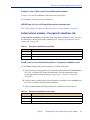
Arranging the Control-M/Desktop flow diagram display
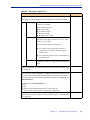
In Control-M/Desktop, after you have performed many changes to the flow diagram,
(for example, adding or modifying job dependencies), you might want to have
Control-M/Desktop rearrange the flow diagram to more neatly display the job flow.
To arrange the display
In Control-M/Desktop, right-click anywhere in flow diagram (except on a job node),
and select Arrange All from the menu.
Chapter 2
Working with Control-M/Desktop and Control-M/EM
39
Changing click and drag in Control-M/Desktop to define dependencies
Changing click and drag in Control-M/Desktop to define
dependencies
Normally, you click and drag the mouse to select items. In Control-M/Desktop,
however, you can also click and drag between nodes in the flow diagram to establish
dependencies. Therefore, before performing a click and drag, you must let
Control-M/Desktop know your purpose, by selecting the appropriate node.
To set the mode of click and drag so that it performs node selection or
dependency definition
Do one of the following actions:
■
To set the flow diagram to Selection mode (so you can select multiple nodes), click
.
■
To set the flow diagram to Definition mode (so you can create dependencies), click
.
NOTE
Definition mode is the default mode when Control-M/Desktop is started.
Creating workspaces and loading jobs into
Control-M/Desktop
In Control-M/Desktop, you need to create a workspace or draft in order to load jobs
and tables. You can create and open multiple workspaces on the Control-M/Desktop
in online, local, or forecast modes. For more information, see “Connecting to a
different GUI Server” on page 27.
To create workspaces or drafts
Do one of the following:
40
■
To create an Online workspace, choose File => New => Online Workspace.
■
To create a local workspace, choose File => New => Local Workspace.
■
To open an existing draft in the local workspace, choose File => Open.
Control-M User Guide
Navigating in the flow diagram
To load jobs into your workspace
1 Choose File => Load jobs from Control-M/EM.
2 In the Load Jobs dialog box, select the tables and jobs, and click Load. Confirm the
load if necessary.
When loading a nested Sub-table, all associated parent tables will be loaded as
well.
3 When the list of loaded job is displayed, close it.
Navigating in the flow diagram
You can select multiple nodes, but only one of them can be your current (focused)
node. You can navigate among the multiple selected nodes to make a different one
your focused node.
To navigate to, and display, a node in the flow diagram
Click the corresponding node in the navigation tree or net overview.
To navigate to a predecessor or successor node
1 In the flow diagram or navigation tree, display the pop-up menu for the node and
select Branch Menus. Then select Predecessor or Successor.
2 In the submenu, select the target node (job, group, or condition), which is then
selected and displayed as the current node.
To find jobs in the flow diagram that conform to specific criteria
1 In Control-M/Desktop or Control-M/EM, select Edit => Find Jobs.
2 In the Find Jobs dialog box, fill in the criteria (you can specify pattern-matching
strings in certain fields). An AND relationship applies to multiple criteria; a job
must satisfy all specified criteria to match.
3 To save the specified Find criteria for future use, choose Presets => Save and assign
a name in the Save Preset dialog box, and click OK.
Chapter 2
Working with Control-M/Desktop and Control-M/EM
41
Identifying predecessor and successor jobs
4 In Control-M/Desktop, click Select All to select all nodes matching the criteria, or
click Find Next to select the first node that matches the criteria, and click Find Next
again to select the next node that matches the criteria. In Control-M/EM, click Find
to select all nodes matching the criteria.
To change the focus (navigate among multiple selected nodes)
Click the appropriate navigation button
(First),
(Last), or use the View => Toggle Selection menu.
(Previous),
(Next), or
Identifying predecessor and successor jobs
Using the Network Neighborhood feature, you can identify predecessor and
successor jobs of a selected job. In Control-M/EM, this feature also generates a list of
jobs and displays their details, and you can perform other operations on the list.
NOTE
To navigate directly to a predecessor or successor node without generating detail lists, use the
branch menus options. For details, see “To navigate to a predecessor or successor node” on
page 41.
To list predecessor or successor jobs and their details
1 In the flow diagram, expand all relevant group nodes so all jobs to be included are
visible. Ensure that Condition nodes are not displayed.
2 In the flow diagram or the navigation tree, select the relevant job or SMART Table
node.
3 In the View menu, choose Neighborhood.
4 In the Network Neighborhood dialog box, specify the following information:
■
In the Direction field, select the node relationship:
— To identify nodes branching in all directions from the selected node, select
Radial.
— To identify the predecessor nodes of the selected node, select Predecessor.
— To identify the nodes dependent on the selected node, select Dependent.
— To identify the predecessor and dependent nodes above and below the
selected node, select Direct Relationship.
42
Control-M User Guide
Printing the flow diagram
In the Radius field, specify the number of nested node levels (not number of
nodes) to branch out from the selected node. Valid values: 1-99999.
■
5 Click Find to select the applicable job nodes in the flow diagram. (The number of
applicable job nodes is listed in the dialog box.)
In Control-M/EM, a display area opens at the bottom of the dialog box and
displays the list of those jobs and their details.
TIP
If the details display area does not open in Control-M/EM, click Details (which alternately
displays and hides this display area).
6 Either close the dialog box or do one of the following:
■
In Control-M/Desktop, to save the data in a report, click Save Report and fill in
the details.
■
While the Network Neighborhood details list is displayed in Control-M/EM,
you can perform the following tasks on that list.
Task
How to
display or hide an item count at the
bottom of the Details list
Click Item Count in the pop-up menu for any job
listing.
locate a listed job in the flow diagram
Click Find in the pop-up menu for the job listing.
open the Job Editing form for a listed job
Double-click the job listing.
export the details of the listed jobs to a
comma-delimited (CSV) file
Click Export to File in the pop-up menu for the
job listing.
create (and view) a text report containing Click Create Report to save this information as a
the details about the listed jobs
file. (To open the saved report in your default
text editor, click Show Report.)
display the listed jobs in their own
ViewPoint
Click Open ViewPoint. For information on
these ViewPoints, see “Properties of ViewPoints
based on dependent jobs” on page 261.
Printing the flow diagram
BMC Software recommends that you perform a Print Preview before printing the
flow diagram. When previewing a printout, the following hints might be useful:
■
Marks on the rulers at the left and top areas of the Print Preview window, which
are designed to help you locate nodes, indicate relative distance (not inches or
centimeters).
Chapter 2
Working with Control-M/Desktop and Control-M/EM
43
Changing your password
■
Columns are labeled alphabetically from left to right, beginning with A. Rows are
labeled numerically from top to bottom, beginning with 0.
■
Pages are labeled as follows:
— Alphabetic labels indicate the horizontal sequencing.
— Numeric labels indicate the vertical sequencing,
EXAMPLE
■
■
B.A corresponds to the first column on the second page horizontally.
3.2 corresponds to the second row on the third page vertically.
■
You can include the rulers in the printout.
■
You can include an index of displayed nodes (only when rulers are also printed).
■
You can print the entire flow diagram or a selected page range.
Changing your password
When your password is soon due to expire, the login dialog box of the Control-M
windows (Control-M/Desktop, Control-M/EM, Control-M Reporting Facility, and
Control-M Configuration Manager) will display fields that enable you to change your
password.
To change your password at any other time, you must issue the request through the
Control-M/EM or Control-M/Desktop windows.
Password changes made in one application window (for example Control-M/EM)
automatically apply to the other application windows.
To change your password
1 If the change password fields are not already displayed, in the Control-M/EM or
Control-M/Desktop window, choose Tools => Change Password.
2 Fill in your current and new passwords, and then confirm the new password.
3 Click OK.
NOTE
Alternatively, you can change passwords using the User Authorizations window, but this is
generally not recommended unless you are changing other password criteria, or changing the
passwords for other users. For more information, see the Control-M Administrator Guide.
44
Control-M User Guide
Assigning authorizations
Assigning authorizations
Control-M/EM contains a security mechanism called the Authorization facility. Using
the Authorization facility, the Control-M/EM administrator can limit the entities that
a user is authorized to view or change. For example, a user can be limited to
modifying resources and jobs that relate to a specific Control-M installation.
Authorization facility for limiting access to entities
Access to the following entities and actions can be limited:
■
Jobs that the user can view or modify. This affects usage of all windows that rely
on access to information originating in the active environment. For example,
limiting the view to jobs from a single Control-M installation limits the view in the
Control-M/EM ViewPoint window.
■
Control resources, quantitative resources, global conditions, and prerequisite
conditions that the user can view or change. This does not relate to resources and
conditions displayed in the Job Details window. For example, a user may see that a
job is waiting for a prerequisite condition in the Job Details window, but not be
authorized to create this condition using the Prerequisite Condition window.
■
Calendars and tables that the user can view or modify. Limiting access to tables
also determines which tables and jobs the user can order or force.
■
ViewPoint components that the user can use or modify.
■
Administrative responsibilities (such as Control-M definitions and User
Authorizations) and Command Line Interface (cli) utility privileges.
Control-M/EM security can be defined at the user level and group level. Users can be
associated with multiple groups.
The following sections provide an overview for assigning authorizations to users. For
more information, see the descriptions of the respective tabs in “Tabs in the User and
Group Authorizations windows” on page 50.
Chapter 2
Working with Control-M/Desktop and Control-M/EM
45
Authorization facility for limiting access to entities
Log on procedure
User names are authenticated in Control-M/EM according to the
AuthenticationMethod system parameter and the DirectoryServiceAuth system
parameter settings. These parameters determine whether Control-M/EM uses
internal or external authentication. For more information about the
DirectoryServiceAuth system parameter, see the Control-M Administrator Guide.
— If the AuthenticationMethod system parameter is null, the internal
Control-M/EM authentication is used.
— If the AuthenticationMethod system parameter has a value, the specified
external authentication plug-in is used.
— If the DirectoryServiceAuth system parameter is set to On, the
AuthenticationMethod system parameter is ignored. The log on procedure must
authenticate the identifiers of the user against external LDAP directories. Users
who are not defined in the Control-M/EM Authorization Facility must belong
to groups in the LDAP directory. These LDAP groups must be associated with
Control-M/EM authorization groups through the Control-M/EM
Authorization Facility.
Control-M/Forecast security
Control-M/Forecast conforms to all Control-M/EM security rules and definitions so
you can view only the scheduling components for which you are authorized.
Forecast reports can be run only by the Control-M/EM administrator.
Tables, Calendars, Resources, Conditions, and Owners
A user has an authorization if that authorization is granted to any group of which the
user is a member. Authorizations specified for a user in the panels of the User
Authorizations window are in addition to or supersede the authorizations specified
for that user in the panels of the Group Authorizations window.
EXAMPLE
User JimA belongs to group Acct. Group Acct has Browse authority for all tables. JimA has
Update authority for Control-M Figaro and Marius tables. In addition, JimA has Update
authority for jobs on Control-M Figaro and Marius in which Bob is the Owner and the
NodeID or Group is Finance. JimA can update tables for Figaro and Marius that have jobs
whose Owner is Bob and Node ID or Group field is Finance, but can only view tables for
other Control-M installations.
46
Control-M User Guide
Authorizations window
Privileges
Privilege authorizations include:
■ access to the Control-M Configuration Manager and its features, Alerts, and
Archived ViewPoints data
■ usage of the cli utility
■ ability to define Collections, Hierarchies, Filters, ViewPoints, and Authorizations
By default, a user has the highest authorization defined for any group of which he is a
member. However, group authorizations for a user are superseded by authorizations
specified in the Privileges panel of the User Authorizations window with any Access
Level other than Default.
EXAMPLE
User JimA belongs to group Staff. Group Staff has Update authority for all Collections,
Hierarchies, Filters, and ViewPoints but only Browse authority for Authorization definitions,
Communication, Alerts, and Archived ViewPoints. JimA is defined with Default authority
for all definitions and Update authority for Communication. JimA can create and modify
ViewPoints as well as add, modify, and delete Control-M installations from the
Control-M/EM database.
Tasks that may require both Control-M and Control-M/EM
Authorizations
Many operations require authorizations in both Control-M/EM and Control-M. For
example, to Hold a job, the user must be authorized in Control-M/EM to access that
job and authorized in Control-M to Hold jobs for the job owner. For more
information, see the Control-M Administrator Guide.
Authorizations window
The Authorization window has separate panels for users and groups. The Users
panel enables you to add, modify, copy, or delete a user whose authorizations can be
configured. The Groups panel enables you to add, modify, copy, or delete a group
whose authorizations apply to members of the group.
NOTE
Control-M/EM users with Full access can add, modify, copy, or delete user and group
authorizations. Users with Browse access can view authorizations. For more information, see
Table 17 on page 59.
Chapter 2
Working with Control-M/Desktop and Control-M/EM
47
Authorizations window
To access the User or Group Authorizations window
1. Log on to Control-M/EM or Control-M/Desktop.
2. Choose Tools => Authorizations. The Users tab is displayed.
Authorizations window – Users tab
The Users panel lists the system’s users. Fields in this panel are described in Table 7.
Table 7
Authorizations window – Users tab fields
Field
Description
Filter
Select this check box to enable the User Name filter.
User Name
text box
Specify a user name or pattern (for example, adm*). Click Apply to apply
the filter. Click Clear to erase the contents of the text box.
Name
Control-M/EM logon name of the user to whom the authorization refers.
Names listed satisfy the requirements of the filter, if any.
Full Name
Full name of the user.
Description
Description of the user.
To define authorizations for a group of users, click the Groups tab. The Groups tab
lists group names and descriptions of the groups to which users can be assigned.
Fields in this panel are described in Table 8.
Authorizations window – Groups tab
Table 8
Authorizations window – Groups tab fields
Field
Description
Filter
Select this check box to enable the Group Name filter.
Group Name
text box
Specify a group name or pattern (for example, adm*). Click Apply to apply
the filter. Click Clear to erase the contents of the text box.
Name
Group name. Groups listed satisfy the filter requirements, if any.
Description
Description of the group.
To filter data in the Users (or Groups) tab of the Authorizations window
To limit the data displayed in the Users (or Groups) tab, choose the Filter check box,
specify a name or pattern in the User (or Group) Name text box, and click Apply. For
example, choose Filter and specify adm* in the User Name text box to limit the display
to records containing user names that begin with adm...
48
Control-M User Guide
Authorizations window
See the information about specifying pattern-matching strings in Appendix C,
“Formats, values and functions.”
Click Clear to remove the specified filter string and display user or group information
without using any filter.
To define, copy, or assign authorizations to a user or group
1 In the Users or Groups tab of the Authorizations window, click New, or choose an
existing user or group and click Copy. The New Name dialog box is displayed.
NOTE
When copying an existing group, the users that belonged to the existing group are not
associated with the new group.
When copying an existing user, the groups the existing user belongs to are associated with the
new user but the existing password is not copied. The password for the new user can be
specified by using the General panel of the User Authorizations window.
2 Specify a name for the new user or group in the New Name dialog box and click
OK. A new user is displayed in the User panel.
A new group is displayed in the Group panel.
To modify authorizations for a specific user or group
1 Select the user name in the Users tab or the group name in the Groups tab.
2 To modify authorizations, click Update. The User Authorizations or Group
Authorizations window is displayed.
3 To add a user to one or more groups, or delete a user from one or more groups,
follow the steps described under “Member Of tab actions” on page 52.
To delete a specific user or group
1 Select the user or group and click Delete.
2 A confirmation window is displayed. Click OK to confirm the deletion.
Chapter 2
Working with Control-M/Desktop and Control-M/EM
49
Tabs in the User and Group Authorizations windows
NOTE
New, modified, copied, and deleted authorizations of a user (and groups the user is a member
of) do not take effect until the user logs off of all Control-M/EM sessions.
If user authorizations are changed in Control-M/EM at sites with BMC Batch Impact
Manager, you must restart the BMC Batch Impact Manager Server for the changes to take
effect in the BMC Batch Impact Manager Web Client. If this is not done, a user whose
permissions have been changed or revoked can continue to use the BMC Batch Impact
Manager Web Client to perform actions he was previously authorized to perform until the
BMC Batch Impact Manager Server is restarted.
Tabs in the User and Group Authorizations windows
Table 9
Tab descriptions
Tab
Purpose
General
Provides logon data about users (or lists members of a group).
Member Of
[User Authorizations window] Matches users with groups.
Active
Jobs a user (or member) can access and actions he can perform.
Privileges
■
■
Whether the Control-M Configuration Manager can be accessed
and used, Alerts and Archived Viewpoints can be viewed, and
the user (or member) can use the Command Line Interface (cli).
Actions that can be performed on Collections, Hierarchies, Filters,
ViewPoints, and Authorization screens.
Tables
Tables a user (or member) can access in Control-M/Desktop,
authorization levels for the tables, and whether jobs or tables can be
ordered or forced.
Prerequisite
Conditions
Prerequisite conditions that a user (or member) can access.
Control Resources
Control resources that a user (or member) can access.
Quantitative
Resources
Quantitative resources that a user (or member) can access.
Global Conditions
Global conditions that a user (or member) can access.
Calendars
Calendars that a user (or member) can access.
Owners
Jobs in tables that a user can access.
Services
Authorizes a user to view services, perform job actions, order, hold,
and release services.
Select the panels, complete them, and click OK to add, update, or delete user (or
group) authorizations in the Security database. Each panel is described below.
50
Control-M User Guide
Tabs in the User and Group Authorizations windows
User Authorizations window – General tab
Table 10
User Authorizations window – General tab fields
Field
Description
User name
Name of user to whom authorization refers. Required. Note:
Blanks are not permitted in this field.
Emergency User
To provide a user with the ability to circumvent external
authentication, enable the Emergency User checkbox. When this
checkbox is enabled, you must enter a value in the Password and
Confirm Password fields.
Note: The Emergency User checkbox is only displayed when
external authentication is enabled. For more information, see the
Control-M Administrator Guide.
Full Name
Full name of the user.
Description
Description of the user.
Password
Password of the user. The value is not displayed.
Note: The Password field is disabled when Active Directory
authentication is used. For more information, see the Control-M
Administrator Guide.
Confirm Password
Password confirmation field. The value is not displayed.
Password never expires
If selected, the password does not expire automatically. Default:
Selected.
Note: When migrating from Control-M/EM version 6.0.xx or
6.1.xx, this option is selected for each user.
Password will expire
every n days
If selected, the password expiration date is computed and
displayed. n defaults to the value of system parameter
PasswordLifetimeDays. The administrator can change the value
of n for this user. Default: this option is not selected.
User must change
password at next login
If this check box is selected, the current password expires and the
user must change the password at the next logon.
Password expiration date Date when password expires. Read-only field.
Lock account
Select to manually lock the account. Clear to manually unlock
the account. If selected, a message similar to the following is
displayed: Account was locked by: user on:
mm/dd/yyyy hh:mm:ss AM|PM
NOTE
If a Control-M/EM administrator uses the Authorization dialog to set a password, the
password complexity, length, and history requirements are ignored.
If the UserChangePassword system parameter is set to 1 (its default value), all users can
change their own password using the Tools=> Change Password option. If this parameter is
set to 0, only users who have Full or Update permission to modify security definitions can
change their own password.
Chapter 2
Working with Control-M/Desktop and Control-M/EM
51
Tabs in the User and Group Authorizations windows
Group Authorizations window – General tab
This tab describes the Authorization group and lists each member of the group.
Generally, each member of a group has the same authorizations to view or modify
entities that are assigned to the group. Authorizations defined for a specific user are
either additional authorizations or take precedence over group authorizations.
Table 11
Group Authorizations window – General tab fields
Field
Description
Group name
Identifying name for the group.
Description
Description of the group.
Name
User IDs of users who are members of this group. This field cannot be
modified. To add or delete a user, use the Member Of panel in the User
Authorizations window.
Full Name
Full name of the user. This field cannot be modified.
LDAP Groups
The log on procedure must authenticate the identifiers of the user against external
LDAP directories. Users who are not defined in the Control-M/EM Authorization
Facility must belong to groups in the LDAP directory. These LDAP groups must be
associated with Control-M/EM authorization groups through the Control-M/EM
Authorization Facility.
To associate an LDAP group with a Control-M/EM authorization group
1 Select the LDAP Groups tab in the Group Authorizations window.
2 Define a name for the group in the field below LDAP Groups Reference.
3 Click OK.
Member Of tab actions
Table 12
52
User Authorizations window – Member Of tab fields
Field
Description
Not A Member of
List of groups of which the user is not a member.
Member of
List of groups of which the user is a member.
Control-M User Guide
Tabs in the User and Group Authorizations windows
To add a user to a group
1 Select the group in the Not A Member of list.
2 Click Add. The group name is added to the Member of list and deleted from the Not
A Member of list.
3 Click OK.
To add a user to multiple groups
1 While holding down the Ctrl key, select each group from the Not A Member of list.
2 Click Add. The selected group names are added to the Member of list and deleted
from the Not A Member of list.
3 Click OK.
To remove a user from one or more groups
1 Select the group or groups from the Member of list.
2 Click Remove. The selected group names are added to the Not A Member of list and
deleted from the Member of list.
3 Click OK.
NOTE
All of the tabs displayed and described below are included in both the User Authorizations
window and the Group Authorizations window.
Authorizations window – Active tab
The Active tab for both Group Authorizations and User Authorizations contains the
following filters:
■
Displayed Jobs filter - determines what jobs in the active environment the user or
group members can see when opening a ViewPoint in Control-M/EM.
■
Job Actions filter - determines what actions the user or group members can
perform on the displayed jobs.
For all User and Group Authorizations defined in Control-M/EM version 6.3.01, the
authorizations work as follows:
Chapter 2
Working with Control-M/Desktop and Control-M/EM
53
Tabs in the User and Group Authorizations windows
Users can see jobs permitted by User Authorization filtering criteria and jobs
permitted by Group Authorization criteria for any group to which the user belongs.
However, the jobs actions permitted by any of those filters apply only to the jobs
permitted by that filter. Therefore, the user might be able to perform certain actions
on some jobs but not other jobs.
EXAMPLE
User Bob has permission to see jobs starting with a*, and is authorized to perform Free and
Hold actions with regard to those jobs.
User Bob belongs to the Tech Support group. Members of this group have permission to see
jobs starting with b*, and are authorized to perform Rerun and Confirm actions with regard to
those jobs.
User Bob also belongs to the DBA group. Members of this group have permission to see jobs
starting with c*, and are authorized to use the Log and Documentation browse features and
perform Confirm actions with regard to those jobs.
When Bob logs on to Control-M/EM, he will see all jobs starting with the letter a, b, and c. On
the group of jobs starting with the letter a he will be able to perform Hold and Free actions. On
jobs starting with the letter b he can perform Rerun and Confirm actions. On jobs starting with
the letter c he can view the Log and Documentation and perform Confirm actions.
■
Users and Groups migrated from Control-M/EM version 6.2.01
Users can see all jobs permitted by the User Authorizations, and can perform on
those job any authorization permitted by either the User Authorization or the
Group Authorization to which the user belongs.
EXAMPLE
User Bob has permission to see jobs starting with a*, and is authorized to perform Free and
Hold actions with regard to those jobs.
User Bob also belongs to the DBA group. Members of this group are authorized to use the Log
and Documentation browse features.
When user Bob logs on to Control-M/EM, he will see all jobs starting with the letter a and will
be able to Free, Hold, and view the Log and Documentation.
■
Users and Groups migrated from Control-M/EM version 6.2.01
Users can see all jobs permitted by the User Authorizations, and can perform on
those job any authorization permitted by either the User Authorization or the
Group Authorization to which the user belongs.
54
Control-M User Guide
Tabs in the User and Group Authorizations windows
EXAMPLE
User Bob has permission to see jobs starting with a*, and is authorized to perform Free and
Hold actions with regard to those jobs.
User Bob also belongs to the DBA group. Members of this group are authorized to use the Log
and Documentation browse features.
When user Bob logs on to Control-M/EM, he will see all jobs starting with the letter a and will
be able to Free, Hold, and view the Log and Documentation.
■
Users and Groups from a combination of Control-M/EM version 6.2.01 and
Control-M/EM version 6.3.01
The job actions of a migrated group that does not yet have job filtering criteria
defined will apply as they did in Control-M/EM version 6.2.01. However, if after
migration you define a job filter for this group, the job actions allowed by this group
will only apply to jobs allowed by this group.
NOTE
BMC Software recommends that you not use this option.
When displaying the Active tab for a new user or group, all of the Job Actions are
unselected by default.
Table 13
Active tab fields and buttons
Field or button
Description
Jobs Filter
This check box is only displayed for groups. When selected, this check
box enables the use of the Filter button to define filters for groups.
Note: This check box is disabled for group definitions that were
migrated from Control-M/EM version 6.2.01 and earlier.
Filter
Button that displays the Jobs Filter Definitions window. Jobs filter
definitions that are relevant to alerts are used to automatically define
the Alerts filter.
Browse actions
Active job data the user can view: Properties, Documentation, Log,
Statistics, View sysout list, View JCL, view Why text.
Control actions
Control actions the user can perform:
Hold, Free, Confirm, Rerun, React, Restart, Kill, Bypass.
Update actions
Update actions the user can perform:
Delete, Undelete, Force OK, Edit Properties, Edit JCL.
Chapter 2
Working with Control-M/Desktop and Control-M/EM
55
Tabs in the User and Group Authorizations windows
Jobs panel buttons
Choose All buttons – In the Browse, Control, or Update pane, click the button on
your left to select all check boxes.
Clear All buttons – In the Browse, Control, or Update pane, click the button on your
right to clear all check boxes.
NOTE
Descriptions of each job action can be found in the Control-M User Guide.
To specify the types of jobs and alerts you can access
1 Click the Filter button in the Displayed Jobs pane. The Jobs Filter Definition
window is displayed.
2 Enter a description for the Jobs filter.
3 Define selection criteria for the Jobs filter, as described below. Selection criteria that
are relevant for alerts will also be used by the Alerts filter.
4 Click OK to save the Jobs filter and Alerts filter definitions.
To define selection criteria for the jobs and alerts filters
The Edit pane in the Jobs Filter Definition window contains field-operator-value
combinations that define the Jobs filter. The field values are compared with the
parameter values in job processing definitions to determine if the jobs are included or
excluded by the Jobs filter. Job parameters are described in the Control-M Parameter
Guide.
Table 14
Collection selection criteria
Column
Description
Field
Field to be checked in the job processing definition.
Operator
Relational operator to be applied to the specified value.
Value
Value that determines whether a criteria is satisfied.
The Field column is a list box. If a row can be changed, an arrow is displayed to the
right of the Field column on that row. Click this arrow to display the field names that
can be used in the Jobs filter.
The Operator column is under the Value heading. If you click a cell in the Operator
column, a list box is displayed. Valid operators are listed in Table 15.
56
Control-M User Guide
Tabs in the User and Group Authorizations windows
Table 15
Valid operators
Operator
Description
=
Value in the job must equal the value in the table.
LIKE
Use of wild card * in the value field.
>
Value in the job must be greater than the value in the table.
<
Value in the job must be less than the value in the table.
!=
Value in the job must not equal the value in the table.
The Value column is used to specify the value of the field. You can manually enter a
value or, for some fields, you can select a value from a list that is displayed when you
click a cell inside the column.
NOTE
Use the arrow keys or the vertical scroll bar to move through values in a list box. Use the Tab
key to skip to the next column in the table. Each completed row in the table is added to the
appropriate Include in or Exclude from Jobs Filter list described below.
Applying the criteria
The middle section of the Jobs Filter Definition window contains Include in Jobs Filter
and Exclude from Jobs Filter lists that are used to specify how the selection criteria are
applied.
Each line in the Include in or Exclude from Jobs Filter list can include multiple criteria.
There is an AND relationship between all the criteria on a line. Only jobs that satisfy
all the criteria on a line are included or excluded by the Jobs filter.
There is an OR relationship between separate lines in the Include in or Exclude from
Jobs Filter list. Jobs that fulfill the criteria on any one line are included or excluded by
the Jobs filter.
The first example below (with single criteria) and second example (with multiple
criteria) illustrate how to define a Jobs filter.
EXAMPLE
The Jobs filter definition includes jobs that meet both of the following inclusion criteria:
■ The job Member name must end with e.
■ The job must run on a Control-M installation whose name begins with o.
or that meet the following inclusion criteria:
■ The job is cyclic.
Even if a job meets the preceding inclusion criteria, the filter excludes the job if it runs on a
Control-M installation whose name is omega-ctm3.
Chapter 2
Working with Control-M/Desktop and Control-M/EM
57
Tabs in the User and Group Authorizations windows
To add a line in the Include in or Exclude from Jobs Filter list
1 Click Add.
2 Create criteria for this line as described above.
3 Click anywhere outside the last editable field in the table row, or press the Tab key,
until a new Edit line is displayed.
To add or modify criteria in the Include in or Exclude from Jobs Filter list
1 Select a line from the Include in/Exclude from Jobs Filter list.
The criteria are displayed in the Edit pane.
2 Add to or modify the criteria.
To delete criteria from a line in the Include In or Exclude From Jobs Filter list
1 Select the line to be changed. The criteria are displayed in the Edit pane.
2 Select the criterion you want to delete by clicking its number in the Edit pane.
3 Press the Delete key.
4 Press the Tab key twice.
To delete a line in the Include in or Exclude from Jobs Filter list
1 Select the line to delete.
2 Click Delete.
Authorizations window - Owner tab
The Owner tab is an additional filter to the table that enables you to grant the user
authorization to create and update job definitions for specific jobs in
Control-M/Desktop and using the XML utilities.
NOTE
The definitions in the Owner tab only apply to users who have at least the Update access level
in the Tables tab.
58
Control-M User Guide
Tabs in the User and Group Authorizations windows
NOTE
The definitions in the Owner tab do not apply to SMART Tables, rather to the jobs in the
SMART Table.
Table 16
Owners tab fields
Field
Description
Control-M
The Control-M server on which the job the user is allowed to
modify resides.
Owner
Owner (user ID) on whose behalf the job is executed.
Node ID/Group
The computers on which the user has authority to change
jobs. Node ID or group on which you want the job to run.
Notes:
■
The <local> Node ID/Group value should be used when
the Node ID/Group field in the job editing form is left
empty.
■
The Node ID/Group field is not applied to jobs running
on Control-M for z/OS.
For more information, see Chapter 4, “Defining how jobs should run.”
Authorizations window – Privileges tab
This panel specifies access levels that determine the actions that a user or member of a
group can or cannot perform on different parts of Control-M/EM.
Actions that are permitted or denied for each access level are described in Table 17.
Table 17
Privileges tab access levels
Access Level
Description
None
Denies access to the component.
Browse
Can view and refresh the component.
Update
Permits adding and modifying Control-M information.
Full
Permits adding, modifying, and deleting Control-M information.
Default
[Valid for user authorizations. Not valid for group authorizations.] Inherits
the permissions from the group to which the user belongs.
Chapter 2
Working with Control-M/Desktop and Control-M/EM
59
Tabs in the User and Group Authorizations windows
TIP
To change the access level for one of the row items, click the row in the Access Level column
and select the access level from the drop-down menu.
Control-M/EM components and privileges
This section describes the effects of the definitions applied to the various rows of the
Privileges tab.
Table 18
Privileges and features (Part 1 of 2)
Control-M/EM privilege
Feature
Control-M Configuration Logon
Manager
Configuration
Operation
Description
The ability to log on to the CCM.
The ability to
■
create, update, delete, and get Control-M/EM
components
■
enable, disable, update, and manage Control-M/Server
requests
■
create, update, delete, and get Control-M/EM system
parameters
■
view agent logs and get components
■
use CTL on a Control-M/EM component
■
perform administrative tasks for Control-M/Agents
■
get and set Control-M debug level
The ability to manage components, including:
■
■
■
Database
Start and stop Control-M/EM components.
Recycle Control-M/EM components.
Set ignore request levels.
The ability to
■
■
■
remove old requests
check the amount of space in the database
enlarge the database
Control-M/Server The ability to create, update, view, and delete user and group
Security
Control-M security records.
Control-M/EM Security
60
Authorizations
Control-M User Guide
The ability to access the Authorizations window in
Control-M/EM GUI and Control-M/EM Desktop.
Tabs in the User and Group Authorizations windows
Table 18
Privileges and features (Part 2 of 2)
Control-M/EM privilege
Feature
Description
Monitoring and
Administration tools
Archived
viewpoints
Actions that can be performed on archived viewpoints.
CLI
The ability to use the CLI utility. For more information, see
the Control-M Utility Guide.
Alerts
Specifies whether Alerts can be monitored and the actions
that can be performed on them.
Note: Relevant parameters of the Jobs filter are also used to
filter the Alert messages that are displayed.
ViewPoint Manager
BIM
The ability to access BMC Batch Impact Manager and its
features.
Collections
The ability to perform actions on Collection definitions.
Hierarchies
The ability to perform actions on Hierarchy definitions.
Filters
The ability to perform actions on Filter definitions.
Viewpoints
The ability to perform actions on ViewPoint definitions.
AND/OR logic for tables, conditions, resources, and
calendars
In the Tables, Prerequisite Conditions, Control Resources, Quantitative Resources,
Global Conditions, and Calendars panels:
■ The relationship between multiple values on a line is AND.
■ The relationship between multiple lines is OR.
Authorizations window – Tables tab
This tab authorizes Tables and a level of access for a user or group.
Table 19
Table tab fields
Field
Definition
Control-M
Control-M installations whose tables can be accessed.
Library
[Control-M for z/OS] Libraries from which tables can be accessed.
Table
Tables that can be accessed.
Access Level
Level of access as described in Table access levels.
Chapter 2
Working with Control-M/Desktop and Control-M/EM
61
Tabs in the User and Group Authorizations windows
To add a row to the Tables tab
1 Click Add to display the Tables dialog box.
NOTE
In previous versions of Control-M/EM, authorization was not granted if a Table, Library, or
Control-M field was blank. Values in these fields were treated as prefixes. In this version,
these values are regular expressions that can be used for pattern-matching.
A Specify names or name patterns of Control-M installations in the Control-M text
box. Use * to denote all Control-M installations. For information about
pattern-matching strings, see Appendix C, “Formats, values and functions.”
B [Control-M for z/OS only] Specify names or name patterns for libraries of
Tables in the Library text box. Use * to denote all libraries.
C Specify names or name patterns for tables in the Table text box. Use * to denote
all tables.
D Select the Access Level for these tables from the list box:
Table 20
Access
Level
Table access levels
Permitted actions
Browse
Viewing tables in Control-M/Desktop. Default: Cannot order or force jobs. Can
be modified to allow ordering and forcing jobs.
Update
Modifying and adding tables. Ordering and forcing jobs.
Full
Modifying, adding, and deleting tables. Ordering and forcing jobs.
E Click OK to add the tables to the list in the Tables panel.
2 Repeat step 1 for other access levels (if any) and other tables.
3 Click OK to save the result of the Add procedure.
To update a row in the Tables panel of an Authorizations window
1 Select a row. Click Update to display that row in a Tables dialog box.
2 Make the changes to the data in the text boxes of that dialog box.
3 Click OK to save the result of the update.
62
Control-M User Guide
Tabs in the User and Group Authorizations windows
To delete a row in Tables panel of an Authorizations window
1 Select a row and click Delete to delete that row from the list.
2 Click OK to save the result of the deletion.
AND/OR logic for User and Group Authorizations window panels
See “AND/OR logic for tables, conditions, resources, and calendars” on page 61.
Authorizations window – Prerequisite Conditions tab
The Prerequisite Conditions tab specifies the prerequisite conditions a user can access.
For information about prerequisite conditions, see “Defining dependencies for the
current job” on page 108.
Table 21
Prerequisite Conditions panel fields
Field
Description
Control-M
Control-M installations whose prerequisite conditions can be accessed
Condition
Prerequisite conditions that can be accessed.
Access Level
Browse, Update, and Full access levels, as described in Table 22.
To add a row to a User/Group Authorizations – Prerequisite Conditions panel
1 Click Add to display the New Prerequisite Condition dialog box.
A Specify names or name patterns of Control-M installations in the Control-M text
box. Use * to denote all Control-M installations. See the information about
specifying pattern-matching strings in Appendix C, “Formats, values and
functions.”
B Specify names or name patterns for prerequisite conditions in the Condition text
box. Use * to denote all prerequisite conditions.
C Select the Access Level for these prerequisite conditions from the list box:
Table 22
Prerequisite Conditions access levels
Access Level
Permitted Actions
Browse
Viewing the prerequisite conditions only.
Update
Modifying the prerequisite conditions and adding new ones.
Full
Modifying and deleting prerequisite conditions and adding new ones.
Chapter 2
Working with Control-M/Desktop and Control-M/EM
63
Tabs in the User and Group Authorizations windows
D Click OK to add the defined prerequisite conditions to the list in the Prerequisite
Conditions panel of the User (or Group) Authorizations window.
NOTE
Use * to denote all Control-M installations or prerequisite conditions.
E Repeat step 1 for other access levels (if any) and other prerequisite conditions.
2 Click OK to save the result of the Add procedure.
To update a row in a User/Group Authorizations – Prerequisite Conditions panel
1 Select a row. Click Update to display that row in a Prerequisite Conditions dialog
box.
2 Make the changes to the data in the text boxes of that dialog box.
3 Click OK to save the result of the update.
4 Click OK to save the result of the update.
To delete a row in an Authorizations window Prerequisite Conditions panel
1 Select a row and click Delete to delete that row from the list.
2 Click OK to save the result of the deletion.
NOTE
The steps for setting authorization levels for control resources, quantitative resources, and
calendars are similar to the preceding steps for setting authorization levels for prerequisite
conditions.
Example
To authorize a user to modify prerequisite conditions that start with the letter C or D:
1 Click Add in the Prerequisite Conditions panel.
2 In the New Prerequisite Condition dialog box, specify CTM1 in the Control-M text
box, type C* in the Conditions text box, and choose Update in the Access Level list
box. Click OK.
3 Click Add again in the Prerequisite Conditions panel.
64
Control-M User Guide
Tabs in the User and Group Authorizations windows
4 In the New Prerequisite Condition dialog box, specify CTM2 in the Control-M text
box, type D* in the Conditions text box, and choose Update in the Access Level list
box. Click OK.
5 Click OK in the User Authorizations window.
Authorizations window – Control Resources tab
The Control Resources tab specifies the control resources a user can access. For
information about control resources, see Chapter 15, “Identifying data center
resources available for Control-M use.”
Table 23
Control Resources tab fields
Field
Description
Control-M
Control-M installations whose resources can be accessed.
Resource
Control resources the user can access.
Access Level
Access level for control resources as described in Table 24.
To set authorization levels for control resources
Follow the steps described under “To add a row to a User/Group Authorizations –
Prerequisite Conditions panel” on page 63. Steps relating to the Condition text box or
field should be applied to the (control) Resource text box or field.
Table 24
Control Resources access levels
Access Level
Permitted Actions
Browse
Viewing the specified control resources only.
Update
Modifying the specified control resources and adding new ones.
Full
Modifying and deleting the specified resources and adding new ones.
Authorizations window – Quantitative Resources tab
The Quantitative Resources panel specifies the quantitative resources a user can access.
For information about quantitative resources, see Chapter 15, “Identifying data center
resources available for Control-M use.”
Table 25
Quantitative Resources panel fields
Field
Description
Control-M
Control-M installations whose resources can be accessed.
Resource
Quantitative resources the user can access.
Access Level
Authorization level for the resources as described in Table 26.
Chapter 2
Working with Control-M/Desktop and Control-M/EM
65
Tabs in the User and Group Authorizations windows
To set authorization levels for quantitative resources
Follow the steps described under “To add a row to a User/Group Authorizations –
Prerequisite Conditions panel” on page 63. Steps relating to the Condition text box or
field should be applied to the (quantitative) Resource text box or field.
Table 26
Quantitative Resources access levels
Access Level
Permitted Actions
Browse
Viewing the specified quantitative resources only.
Update
Modifying the specified quantitative resources and adding new ones.
Full
Modifying and deleting the specified resources and adding new ones.
User Authorizations window – Global Conditions tab
The Global Conditions tab specifies the global conditions a user can access. For
information about global conditions, see Chapter 16, “Establishing job dependencies
across Control-Ms.”
Table 27
Global Conditions tab fields
Field
Description
Prefix
Prefix for global conditions the user can access.
Access Level
Authorization level for global conditions.
To set authorization levels for global conditions
Follow the steps described under “To add a row to a User/Group Authorizations –
Prerequisite Conditions panel” on page 63. Steps relating to the Control-M text box
and field are omitted because global conditions are relevant to all Control-M
installations. Steps relating to the Condition text box or field should be applied to the
(global conditions) Prefix text box or field.
Table 28
66
Global Conditions access levels
Access level
Permitted actions
Browse
Viewing the global conditions only.
Update
Modifying the global conditions and adding new ones.
Full
Modifying and deleting global conditions and adding new ones.
Control-M User Guide
Tabs in the User and Group Authorizations windows
Authorizations window – Calendars tab
Table 29
Calendars fields
Field
Description
Control-M
Control-M installations whose calendars can be accessed.
Calendar
Calendars the user can access.
Access Level
Access level described in Table 30.
For information about Calendars, see Chapter 8, “Using predefined calendars to
schedule jobs.”
To set authorizations for calendars
Follow the steps described under “To add a row to a User/Group Authorizations –
Prerequisite Conditions panel” on page 63. Steps relating to the Condition text box or
field should be applied to the Calendar text box or field.
Table 30
Access levels
Access Level
Description
Browse
Permits viewing specified Calendars in Control-M/Desktop only.
Update
Permits modifying specified Calendars in Control-M/Desktop and adding
new ones.
Full
Permits modifying and deleting specified Calendars in Control-M/Desktop
and adding new ones.
Authorizations window - Services tab
The services tab in the Authorizations window enables you to determine service
permissions for each user.
To add a service permission:
1 Double-click a user.
The User Authorizations: <user> window appears.
2 Click the Services tab and then click
.
The User Authorizations: Services dialog box appears.
3 In the Service field, type the names or name patterns for services.
You can use * to denote all services.
Chapter 2
Working with Control-M/Desktop and Control-M/EM
67
Tabs in the User and Group Authorizations windows
4 In the Active area, select all the permissions that apply to this user, as described in
Table 31.
Table 31
Services permissions
Permission
Description
Drill Down to view jobs
Enables the user to view jobs in Control-M Self Service and
Control-M/EM GUI.
To enable this permission, you need to select at least a
Browse access level from the Active tab, as described in
“Authorizations window – Active tab” on page 53.
Run orderable services
Enables the user to order a service in Control-M Self Service.
To enable this permission, you need to associate this user to
the owner of the service in the Owner tab, as described in
“Authorizations window - Owner tab” on page 58.
Hold
Enables the user to hold a service, which stops the service
from running.
To enable this permission and other job actions, you need to
select the required permissions for this user from the Active
tab, as described in “Authorizations window – Active tab” on
page 53.
Release
Enables the user to release a service, which frees it from
being held and is available to run again.
To enable this permission and other job actions, you need to
select the required permissions for this user from the Active
tab, as described in “Authorizations window – Active tab” on
page 53.
View orderable services that
were started by other users
Enables the user to view services that were ordered by other
users
NOTE
When you add a service user authorization, the user automatically receives permission to
view non-orderable services and orderable services that the user ordered.
5 In the Definition area, select one of the following access levels for each service in
the Service Definition Manager:
68
■
None: Disables the user from viewing, adding, editing, and deleting services in
the Self Service Definition Manager
■
Browse: Enables the user to view services in the Self Service Definition Manager
Control-M User Guide
Tabs in the User and Group Authorizations windows
■
Update: Enables the user to add and edit services in the Self Service Definition
Manager
■
Full: Enables the user to add, edit, and delete services in the Self Service
Definition Manager
6 Click OK.
The new service permission appears in the Authorizations window.
7 Click OK.
To edit a service permission:
1 Double-click a user.
The User Authorizations: < user> window appears.
2 Click the Services tab.
3 Select the service permission that you want to edit and click
.
4 Edit the required fields, as described in Table 31.
5 Click OK.
The updated service permission appears in the User Authorizations: <user>.
6 Click OK.
To delete a service permission:
1 Double-click a user.
The User Authorizations: < user> window appears.
2 Click the Services tab.
3 Select the service permission that you want to delete and click
.
The service permission is deleted.
Chapter 2
Working with Control-M/Desktop and Control-M/EM
69
Tabs in the User and Group Authorizations windows
70
Control-M User Guide
Part
2
Defining the production
environment
Part 2
This part presents the following topics:
Chapter 3
Defining the production environment . . . . . . . . . . . . . . . . . . . . . . . . . . . . . . . . . . . . . 73
Chapter 4
Defining how jobs should run . . . . . . . . . . . . . . . . . . . . . . . . . . . . . . . . . . . . . . . . . . . . 77
Chapter 5
Organizing and managing jobs in tables . . . . . . . . . . . . . . . . . . . . . . . . . . . . . . . . . . 143
Chapter 8
Using predefined calendars to schedule jobs . . . . . . . . . . . . . . . . . . . . . . . . . . . . . . 163
Chapter 9
Setting up templates for standardized job and table definition . . . . . . . . . . . . . . . 171
Chapter 10
Creating and updating many jobs at once. . . . . . . . . . . . . . . . . . . . . . . . . . . . . . . . . 177
Chapter 23
Managing Workloads . . . . . . . . . . . . . . . . . . . . . . . . . . . . . . . . . . . . . . . . . . . . . . . . . . 279
Chapter 11
Setting up definitions for periodic statistics collection . . . . . . . . . . . . . . . . . . . . . . 185
Part 2
71
72
Control-M User Guide
Chapter
3
Defining the production
environment
3
Your largest and most fundamental task when you define the production
environment is defining appropriate job processing definitions, which Control-M
uses to control job processing and handling. This book describes how to define job
processing definitions by using Control-M/Desktop (you can also define job
processing definitions by using batch job creation utilities).
To define job processing definitions, you should be familiar with the concept of
workspaces.
Understanding workspaces
When you define job processing definitions in Control-M/Desktop, you can work in
one of the following workspaces:
■
Local workspace —enables you to work locally. You can load jobs from the
Control-M/EM database into your local workspace, in which case you are granted
exclusive access over the jobs. When you save your work, the definitions are saved
in XML file format or an internal draft file that you can later reopen in the local
workspace. XML format is the default file type.
For changes to be used in production, they must be written to the Control-M/EM
database and uploaded to the Control-M database.
■
Online workspace — enables you to work on the Control-M/EM database. When
you load jobs from Control-M/EM into an online workspace, you are granted
shared access over the jobs. When you perform a save, the work is saved directly in
the Control-M/EM database. To be used in production, changes must be uploaded
to the Control-M database.
Chapter 3
Defining the production environment
73
Understanding workspaces
NOTE
■
In Control-M/Desktop, you can also use an interface called the Table Manager to directly
access and modify jobs in the Control-M/EM database. In this case, you are not working
in a workspace.
■
If the Forecast add-on is installed, you can work in a special purpose workspace called the
Forecast workspace.
Regardless of which workspace you are working in when you start
Control-M/Desktop, you can change workspaces (or activate the Table Manager) at
any time.
Where to go from here
NOTE
These guidelines assume that you are already familiar with the information in Part 1 of this
book. If you are not, review the instructions for starting and navigating in
Control-M/Desktop in Chapter 2 before continuing with this part of the book.
Review the following list, and proceed to the appropriate .
■
To define or update jobs, and place them into the appropriate databases, proceed
to Chapter 4, “Defining how jobs should run.”
Chapter 4, “Defining how jobs should run” is the most important chapter in this
part of the book. It provides the instructions and examples for defining job
processing definitions online in the job editing form and for defining SMART
Tables online in the table editing form. Regardless of whether you are defining jobs
online or in batch, or defining individual jobs or large numbers of jobs at once, this
chapter is very useful.
— Decide whether the job or jobs belong to a service (BMC Batch Impact Manager)
and make the necessary definitions. (See Chapter 25, “Service monitoring.”)
— When you define schedules in job processing definitions, you can reference a
calendar to simplify scheduling definition. For information on defining
calendars, refer to Chapter 8, “Using predefined calendars to schedule jobs.”
— When you create a job processing definition, you can assign to it an existing
template containing predefined values. To define a new template, see Chapter 9,
“Setting up templates for standardized job and table definition.”
— You do not need to create and update job processing definitions individually.
For instructions on how to automatically create or update large numbers of job
processing definitions, refer to Chapter 10, “Creating and updating many jobs at
once.”
74
Control-M User Guide
Understanding workspaces
■
To manage your jobs and tables (copy, delete, and so on), refer to Chapter 5,
“Organizing and managing jobs in tables.”
When you have finished defining job processing definitions, remember that you still
must do the following steps to automate the production environment:
■
To define security requirements as needed, see the Control-M Administrator
Guide.
■
To move to production (move jobs to production, automate job scheduling, and
define resources and global conditions to the data center), see Part 3, “Moving to
production.”
■
To check that the jobs work as intended, see Part 4, “Monitoring and intervening
in production.”
■
To analyze and optimize production, see Part 5, “Analyzing and optimizing the
production environment.”
Chapter 3
Defining the production environment
75
Understanding workspaces
76
Control-M User Guide
Chapter
4
4
Defining how jobs should run
This chapter presents the following topics:
Defining job processing definitions and SMART Tables—basic procedure . . . . . . . . 79
Creating and editing jobs . . . . . . . . . . . . . . . . . . . . . . . . . . . . . . . . . . . . . . . . . . . . . . . . . . 83
Assigning a name to the job . . . . . . . . . . . . . . . . . . . . . . . . . . . . . . . . . . . . . . . . . . . . . . . . 84
Assigning a name to the job . . . . . . . . . . . . . . . . . . . . . . . . . . . . . . . . . . . . . . . . . . . . . . . . 84
Assigning a name to the job . . . . . . . . . . . . . . . . . . . . . . . . . . . . . . . . . . . . . . . . . . . . . 84
Identifying the task type and related information . . . . . . . . . . . . . . . . . . . . . . . . . . 84
Defining the job hierarchy . . . . . . . . . . . . . . . . . . . . . . . . . . . . . . . . . . . . . . . . . . . . . . 87
Defining the job’s owner and author . . . . . . . . . . . . . . . . . . . . . . . . . . . . . . . . . . . . . 87
Defining job documentation . . . . . . . . . . . . . . . . . . . . . . . . . . . . . . . . . . . . . . . . . . . . 87
Defining scheduling criteria for a job—basics. . . . . . . . . . . . . . . . . . . . . . . . . . . . . . 88
Defining scheduling criteria for a job—basics. . . . . . . . . . . . . . . . . . . . . . . . . . . . . . 88
Defining scheduling criteria for a job—basics . . . . . . . . . . . . . . . . . . . . . . . . . . . . . . . . . 88
Defining scheduling criteria for a job—basics . . . . . . . . . . . . . . . . . . . . . . . . . . . . . . . . . 88
Defining scheduling criteria for a job—basics . . . . . . . . . . . . . . . . . . . . . . . . . . . . . . . . . 88
Defining scheduling criteria for a job—basics. . . . . . . . . . . . . . . . . . . . . . . . . . . . . . 88
Defining scheduling criteria using calendars . . . . . . . . . . . . . . . . . . . . . . . . . . . . . . 94
Defining complex scheduling criteria using rules . . . . . . . . . . . . . . . . . . . . . . . . . . 95
Limiting scheduling to a particular date range. . . . . . . . . . . . . . . . . . . . . . . . . . . . . 99
Defining cyclic jobs . . . . . . . . . . . . . . . . . . . . . . . . . . . . . . . . . . . . . . . . . . . . . . . . . . . . . . 101
Defining cyclic jobs . . . . . . . . . . . . . . . . . . . . . . . . . . . . . . . . . . . . . . . . . . . . . . . . . . . . . . 101
Defining cyclic jobs . . . . . . . . . . . . . . . . . . . . . . . . . . . . . . . . . . . . . . . . . . . . . . . . . . . 101
Defining automatic rerun for a job that ends NOT OK . . . . . . . . . . . . . . . . . . . . . 102
Defining jobs that should run on specific nodes. . . . . . . . . . . . . . . . . . . . . . . . . . . 103
Defining jobs that should run on nodes where load balancing has been
implemented . . . . . . . . . . . . . . . . . . . . . . . . . . . . . . . . . . . . . . . . . . . . . . . . . . . . . . 104
Defining a time frame during which jobs can be submitted . . . . . . . . . . . . . . . . . 104
Defining that manual confirmation is required before job submission. . . . . . . . 106
Assigning priorities to jobs and defining and critical jobs . . . . . . . . . . . . . . . . . . 106
Defining how many days a job can await submission . . . . . . . . . . . . . . . . . . . . . . 108
Defining dependencies for the current job . . . . . . . . . . . . . . . . . . . . . . . . . . . . . . . 108
Defining dependencies for the current job . . . . . . . . . . . . . . . . . . . . . . . . . . . . . . . 108
Defining dependencies for the current job . . . . . . . . . . . . . . . . . . . . . . . . . . . . . . . . . . . 108
Allocating resources for a job . . . . . . . . . . . . . . . . . . . . . . . . . . . . . . . . . . . . . . . . . . . . . . 110
Defining and using variables that are dynamically resolved at runtime . . . . . . 112
Chapter 4
Defining how jobs should run
77
Defining and using variables that are dynamically resolved at runtime . . . . . . 112
Defining and using variables that are dynamically resolved at runtime . . . . . . . . . . 112
Defining postprocessing actions that depend on job processing results . . . . . . . . . . 114
Defining postprocessing actions that depend on job processing results . . . . . . . 114
Defining conditional processing under z/OS . . . . . . . . . . . . . . . . . . . . . . . . . . . . . . . . 121
Defining messages to be shouted at the end of job processing . . . . . . . . . . . . . . . . . . 123
Defining messages to be shouted at the end of job processing . . . . . . . . . . . . . . . 123
Defining how to handle the job’s sysout when the job ends OK . . . . . . . . . . . . . 125
Archiving sysdata (z/OS only) . . . . . . . . . . . . . . . . . . . . . . . . . . . . . . . . . . . . . . . . . 126
Annotating activities . . . . . . . . . . . . . . . . . . . . . . . . . . . . . . . . . . . . . . . . . . . . . . . . . . 126
Creating and editing SMART Tables . . . . . . . . . . . . . . . . . . . . . . . . . . . . . . . . . . . . . . . . 127
Defining general SMART Table information . . . . . . . . . . . . . . . . . . . . . . . . . . . . . . . . . 128
Defining scheduling criteria for a SMART Table. . . . . . . . . . . . . . . . . . . . . . . . . . . . . . 129
Defining dependencies, variables, and notifications in the SMART Table . . . . . . . . 132
Defining dependencies, variables, and notifications in the SMART Table . . . . . . . . 132
Defining actions to be performed after all scheduled jobs in the SMART Table have
ended . . . . . . . . . . . . . . . . . . . . . . . . . . . . . . . . . . . . . . . . . . . . . . . . . . . . . . . . . . . . . . . . 132
Defining actions to be performed after all scheduled jobs in the SMART Table have
ended . . . . . . . . . . . . . . . . . . . . . . . . . . . . . . . . . . . . . . . . . . . . . . . . . . . . . . . . . . . . . . . . 132
Defining actions to be performed after all scheduled jobs in the SMART Table have
ended . . . . . . . . . . . . . . . . . . . . . . . . . . . . . . . . . . . . . . . . . . . . . . . . . . . . . . . . . . . . . . . . 132
Defining actions to be performed after all scheduled jobs in the SMART Table have
ended . . . . . . . . . . . . . . . . . . . . . . . . . . . . . . . . . . . . . . . . . . . . . . . . . . . . . . . . . . . . . . . . 132
Creating and editing Sub-tables. . . . . . . . . . . . . . . . . . . . . . . . . . . . . . . . . . . . . . . . . 134
Creating and editing jobs in a SMART Table . . . . . . . . . . . . . . . . . . . . . . . . . . . . . . . . . 135
Defining scheduling criteria for a job in a SMART Table . . . . . . . . . . . . . . . . . . . 136
Copying RBCs from one SMART Table to another. . . . . . . . . . . . . . . . . . . . . . . . . 138
Modifying dependencies for jobs within a SMART table. . . . . . . . . . . . . . . . . . . . . . . 139
Defining job dependencies by using the flow diagram . . . . . . . . . . . . . . . . . . . . . . . . 140
Defining a condition format . . . . . . . . . . . . . . . . . . . . . . . . . . . . . . . . . . . . . . . . . . . . 141
This chapter provides tips, and examples, on how to define individual job processing
definitions.
A SMART Table is different than a job processing definition in that a SMART Table is
really an extended set of table definition parameters that defines how to process its
jobs as a unified group.
Nevertheless, the procedure for defining job processing definitions and the procedure
for defining SMART tables are quite similar, and they are described together.
78
Control-M User Guide
Defining job processing definitions and SMART Tables—basic procedure
Defining job processing definitions and
SMART Tables—basic procedure
In Control-M/Desktop, you create and modify
■
■
jobs processing definitions using the job editing form
SMART Tables using the table editing form
To define a job or SMART Table
1 In Control-M/Desktop, do one of the following actions:
■
To modify an existing job or table, double-click the job or table in the flow
diagram, navigation tree or list display.
TIP
An easy way to find a job is to choose Edit => Find Jobs.
■
To create a new job processing definition, choose Edit => New Job.
■
To create a new table, choose Edit => New Table.
NOTE
You must be working in a local workspace to create a SMART table, and you must
create the SMART table before you create any job processing definitions in the SMART
Table.
Newly created jobs can be associated with an existing SMART Tables and the SMART
Table will be loaded from the database. If the job is associated with a Sub-table, then all
of the Sub-table’s parent table entities, without their content, will also be loaded to the
draft or XML file.
The job editing form (or table editing form) opens.
Chapter 4
Defining how jobs should run
79
Defining job processing definitions and SMART Tables—basic procedure
Figure 4
Job editing form
2 If you are creating a new job (or SMART table), do the following steps:
A In the Apply Template field in the toolbar, select the template to be applied.
(Optional. You can select the value <No Template>.)
The product is supplied with a default job and default SMART Table template
for each platform. Only job templates are listed in the job editing form and only
SMART table templates are listed in the table editing form. Icons indicate
whether templates are job templates or SMART Table templates. You can
modify the templates or define others. For details, see Chapter 9, “Setting up
templates for standardized job and table definition.”
TIP
You can use a SMART Table template not only for defining SMART Tables, but also for
defining jobs in a SMART Table.
NOTE
Which template types are displayed in the template list can be customized. For details,
see the customization option “List all templates” on page 352 in Appendix A,
“Customizing the interfaces.”
80
Control-M User Guide
Defining job processing definitions and SMART Tables—basic procedure
B In the Control-M field, select the Control-M that will control the job.
C If you are creating a table:
■
Select whether the table will be a SMART Table with an extended set of table
definition parameters by clicking the SMART check-box at the top of the
window. For more information about SMART Tables see “Creating and
editing SMART Tables” on page 127.
If you are creating a job:
■
in the Job type field, select the type of job.
NOTE
Starting with Control-M/EM 6.3.01, Job Type replaces the following parameters:
Application Node Group (but not Node Group or Node ID/Group), Form Name,
Application type, Application version and CM version.
The default value is OS. Select this value except in the following situations:
■
For mission critical jobs, if the BMC Batch Impact Manager product is
installed, select BIM.
■
For external application jobs, such as SAP or Oracle E-Business Suite, select
the appropriate job type, but first ensure that the relevant Control Module is
installed, and the appropriate application form has been imported.
To import Application forms, choose Tools => Import Application Form and
browse to and select the form. For details, see the relevant Control Module
administrator guide.
3 Edit the definition (as appropriate), as described in “Creating and editing jobs” on
page 83.
NOTE
If you selected a Job Type value other than OS, a tab related to the particular job type is
automatically added as the second tab in the job editing form. For instructions on filling in
this additional tab, see the following:
■
■
For a BIM tab, see the Control-M Business Service Management Solution User Guide.
For an external application tab, see the appropriate Control Module administrator
guide.
Chapter 4
Defining how jobs should run
81
Defining job processing definitions and SMART Tables—basic procedure
TIP
To be able to use this job definition as a basis for creating other jobs, click Save as Template
before proceeding.
4 Save the definition by clicking Save, Save & Close or Save & Order at the top of the
editing form. If the Audit Annotation function was activated, the Audit Annotation
window or an action confirmation prompt appears.
When saving the definition, consider the following:
■
If you save the job while working in an Online workspace or working through
the Table manager, the new or modified job processing definition is saved
directly in the Control-M/EM database. To use the job in production, you must
perform an upload to the Control-M/Server database.
■
If you save the job while working in a Local workspace, the new or modified job
processing definition is saved in an XML file format or as an internal draft file.
To use the job in production, you must write the job (actually, its table) to the
Control-M/EM database and upload the table to the Control-M/Server
database.
■
If you order or force the job, a dialog box is displayed that enables you to upload
(and write) the job as part of the order/force request. Fill in the dialog box as
described in “Manually scheduling jobs and tables” on page 198.
5 If an action confirmation prompt is displayed:
■
click OK to complete the action or Cancel to cancel the changes.
If the Audit Annotation window appears:
■
enter a purpose for performing this action in the Subject field and a
justification or descriptive note in the Description field. Click OK.
NOTE
The system administrator can configure which actions require annotation. Therefore, the
Audit Annotation window does not necessarily appear after creating/editing jobs or tables.
See “Annotating activities” on page 126 for details about auditing and annotation.
For details about writing and loading tables and jobs, see Chapter 13, “Putting jobs
into production.”
This product comes with a draft containing sample job processing definitions. For
an explanation of how and why these job processing definitions were defined the
way they were, see Appendix B, “Examples for defining jobs.”
82
Control-M User Guide
Creating and editing jobs
Creating and editing jobs
This section describes the following topics:
Assigning a name to the job
Identifying the task type and related information
Defining the job hierarchy
Defining the job’s owner and author
Defining job documentation
Defining scheduling criteria for a job—basics
Defining scheduling criteria using calendars
Defining complex scheduling criteria using rules
Limiting scheduling to a particular date range
Defining cyclic jobs
Defining automatic rerun for a job that ends NOT OK
Defining jobs that should run on specific nodes
Defining jobs that should run on nodes where load balancing has been
implemented
Defining a time frame during which jobs can be submitted
Defining that manual confirmation is required before job submission
Assigning priorities to jobs and defining and critical jobs
Defining how many days a job can await submission
Defining dependencies for the current job
Allocating resources for a job
Defining and using variables that are dynamically resolved at runtime
Defining postprocessing actions that depend on job processing results
Defining conditional processing under z/OS
Defining messages to be shouted at the end of job processing
Defining how to handle the job’s sysout when the job ends OK
Archiving sysdata (z/OS only)
Annotating activities
The job editing form and table editing form consist of a series of tabs, each providing
a set of parameters for defining job and table processing definitions.
NOTE
■
A red asterisk indicates required fields.
■
The fields displayed in the job editing form might vary according to the type of job (z/OS,
group, and so on).
■
To sequentially undo entries, click Ctrl+z. To sequentially redo undone entries, click
Ctrl+y. This feature works even when the page with the entry is not currently displayed.
■
Most fields are self-explanatory and not explained here. For a detailed description of the
job editing form fields, see the Control-M Parameter Guide.
Chapter 4
Defining how jobs should run
83
Assigning a name to the job
Assigning a name to the job
In the General tab, in the Job Name field, you must assign a name to each job
processing definition. This name (along with the file name parameter) appears in
various job definition and job tracking displays, enabling you to identify the job. You
also use this name when ordering or forcing jobs.
NOTE
When creating a table, the Table field in the General Tab of the table editing form defines the
name of the table the same as the Job Name field defines the name of the job in the job
editing form. The following should be considered:
■
■
Table names cannot contain the character “/” in its name.
Names for tables and Sub-tables may be up to 64 characters, with the exception of
Control-M for z/OS tables which may be up to 8 characters.
Identifying the task type and related information
You must identify the type of task this job processing definition performs. Different
task types require different accompanying information, so depending on the task
type select, certain fields displayed in the tab might change to accommodate the
information required. (Task types and their accompanying fields might also vary
somewhat according to platform.) This section describes how to fill in task type and
related information for UNIX and Windows platforms. For more details, or for
information relating to other platforms, see the Control-M Parameter Guide.
To identify the type of task the job performs, and related information
1 In the General tab, select the task type appropriate to the job, in the Task Type field:
84
■
If the job processing definition provides Control-M with information for
submitting a job for execution as a background process, and instructions for
performing postprocessing following job execution, select Job. This applies to
most production batch jobs submitted under Control-M.
■
If the job processing definition provides Control-M with instructions for
running an executable (.exe) file, select Detached.
■
If the job processing definition provides Control-M with an operating system
command to be executed as a job (that is, so that Control-M will track and
analyze the results and perform postprocessing), select Command. You can also
use Command-type jobs to run certain Control-M/Server utilities.
Control-M User Guide
Identifying the task type and related information
■
If the job processing definition instructs Control-M to analyze the results of jobs
not submitted under Control-M (for example the job is submitted under an
external application such as SAP), select External.
■
If the job processing definitions is not responsible for execution of a job or
operating system command, but merely instructs Control-M to perform
postprocessing actions such Shout or adding Out conditions, select Dummy.
This task type is useful if you want these postprocessing instructions to be
performed as a result of the outcome of other jobs, or as a result of a change of
status in the system.
2 Fill in the accompanying fields that are specific to the task type:
■
If the task type is Job or Detached, do one of the following:
■
specify a job script or executable file by doing the following:
— in the File Name field, specify the job script or executable file
— in the Path field, specify the full path to the job script or executable file
■
embed a job script by doing the following:
— select Embedded Script, click Edit, and type in a script or load it from a file
— in the File Name field, specify the job script’s logical name
■
If the task type is Command
— in the Command field, specify the operating system command
■
For task type Dummy, no accompanying fields in this section are required.
TIP
By default, the File Name value is displayed in the flow diagram job node. For Command
and Dummy jobs, to display the job name in the job node, copy the job name to the File
Name field. (Alternatively, you can change the job node display defaults.)
Chapter 4
Defining how jobs should run
85
Identifying the task type and related information
EXAMPLE
The CalcExpenses.bat batch job, which calculates the expenses incurred by the company on
the current day, should be scheduled, submitted, and monitored by Control-M, which should
also perform any required postprocessing.
Fill in the task type and related information, as follows:
1. In the Job Name field, specify CalcExpenses.
2. In the Task Type field, select Job.
3. In the File Name field, specify CalcExpenses.bat.
4. In the Path field, specify C:\Prod\Acct\Calc.
EXAMPLE
Control-M should be responsible for the scheduling, submission, and postprocessing for the
SystemStatus.exe executable job, which determines those external applications that are up
and those that are down.
Fill in the task type and related information, as follows:
1. In the Job Name field, specify SystemStatus.
2. In the Task Type field, select Detached.
3. In the File Name field, specify SystemStatus.exe.
4. In the Path field, specify C:\System\Maint\.
EXAMPLE
Control-M should use an operating system command to backup daily transactions; it should
also monitor the results and perform post-processing if needed:
Fill in the task type and related information for the BkpDailyTrans job, as follows:
1. In the Job Name field, specify BkpDailyTrans.
2. In the Task Type field, select Command.
3. In the Command field, specify Copy D:\Data\Transactions\Daily%%ODATE.txt E:\.
4. (Optionally, in the File Name field, specify BkpDailyTrans so the name appears in the
flow diagram job node.)
86
Control-M User Guide
Defining the job hierarchy
EXAMPLE
In the event of an emergency that requires evacuation of the site, the site manager submits the
Evacuation Alert emergency job, which shouts a message to all personnel to shut down their
machines and leave the building.
Fill in the task type and related information, as follows:
1. In the Job Name field, specify EvacuationAlert.
2. In the Task Type field, select Dummy.
3. (Optionally, in the File Name field, specify EvacuationAlert so the name appears in the
flow diagram job node.)
Defining the job hierarchy
In the General tab, select the following hierarchy information for each job processing
definition: table, application and group. (For information regarding this hierarchy
information, see the Control-M Concepts Guide.)
NOTE
If the table, application or group does not yet exist, type the information in and
Control-M/Desktop will automatically create the items.
Defining the job’s owner and author
For security and authorization reasons, you must specify in the General tab an owner
and author for each job processing definition:
■
■
The author is the person who defines the job.
The owner is the User ID associated with the job—that is, for whom the job is
executed.
Defining job documentation
BMC Software recommends that you provide a brief description of the job definition
in the Description field in the General tab. This information will appear in displays,
such as job nodes, enabling you to know at a glance what the job does.
Chapter 4
Defining how jobs should run
87
Defining scheduling criteria for a job—basics
In the Documentation field, you can create a documentation file in order to provide
details about the job. For example, you might want to document the purpose of the
job, under what conditions it should run, necessary prerequisites, whom to notify if
there are problems, and so on. The file path can be up to 255 characters and the file
name up to 64 characters.
The documentation file path can also be a URL, using one of the following prefixes:
http://, https://, and ftp://. By clicking View to the right of the Documentation field,
you can view the documentation specified.
Defining scheduling criteria for a job—basics
TIP
If Control-M/Forecast is installed, you can graphically display when and how often jobs will
be scheduled by clicking Forecast.
Define the schedule for job or SMART Table in the Scheduling tab.
Starting with Control-M/EM 7.0.00 Fix Pack 1 the editing form for jobs, tables, and
templates has a unified interface. Through the Scheduling tab for each of these
entities, you can apply Rule-Based Calendars (RBC). (For more information about
RBCs, see Chapter 8, “Using predefined calendars to schedule jobs.”).
The job scheduling definition is a combination of the job scheduling parameters and
the RBCs (see Figure 5 on page 89). The Scheduling tab in job templates is identical to
the Scheduling tab for jobs.
The SMART table definition includes the RBCs that can be applied to all the jobs and
sub-tables included in the SMART table (see Figure 6 on page 130). The Scheduling
tab in SMART table templates is identical to the Scheduling tab for SMART tables.
88
Control-M User Guide
Defining scheduling criteria for a job—basics
Figure 5
Scheduling tab in the job editing form
The following table describes the parameters in the Scheduling tab.
Chapter 4
Defining how jobs should run
89
Defining scheduling criteria for a job—basics
Table 32
Scheduling tab parameters (Part 1 of 4)
Parameter
Definition of
Job’s
Scheduling
Description
■
Set the criteria for the job scheduling using the parameters, calendar,
and text box in the tab.
■
Set the relationship between the job scheduling criteria and the
selected Control-M level RBCs by choosing either And or Or. This
relationship setting is only applicable for jobs; it is not applicable for
SMART tables.
Note: Control-M level Ruled-Based Calendars can only be used with
Control-M Servers version 7.0.00 or later.
Ruled-Based
Calendars
Name
(dynamically
displayed
depending if
RBCs are
supported)
List of names of the selected Control-M level Ruled-Based Calendars that
applied to this job. Add a calendar to the list using the Select Rule-Based
Calendar button, which opens the Select Rule-Based Calendar window,
where the following options are available:
■
■
All Parent - Inherits all the RBCs from the direct parent table. (If an
RBC is added to the parent table, it is automatically associated with
the job.) Default.
Specific - Only the RBCs selected from the list are associated with the
job.
Note: In a SMART Sub-table the Select Rule-Based Calendar window
only lists RBCs which are defined in the Sub-table’s parent table.
Use the Remove button to remove calendars from the list.
Note: Control-M level Ruled-Based Calendars can only be used with
Control-M Servers version 7.0.00 or later.
Month Days
A calendar and text box used to indicate the days of each month on which
the job should be scheduled.
Month Days
check-boxes
Each day of the month is (1—31) is indicated by a
check-box.
text box
Indicates the selected month days and rules. You can
also specify values directly in the box, separated by
commas.
Calendar
Name of a user-defined calendar for use with the
Month Days parameter to indicate a set of working
days.
For more information, see Chapter 8, “Using
predefined calendars to schedule jobs.”
In various Control-M and Control-M/EM utilities,
this parameter is also known as DCAL and
DAYCAL.
And / Or
90
Control-M User Guide
Logical connector establishing the relationship between Month Day
values and Week Day values.
Defining scheduling criteria for a job—basics
Table 32
Scheduling tab parameters (Part 2 of 4)
Parameter
Description
Week Days
Day(s) of the week on which to schedule the job.
This parameter consists of a series of check-boxes for the days of the week
(Sunday through Saturday), and a text box. Values can be specified using
the check-boxes or the text box.
Note: Regardless of which method is used, the specified values are
displayed both in the text box and the check-boxes above it.
Weekday
check-boxes
Each day (Sunday through Saturday) is indicated by
a separate check-box.
text box
Indicates the selected week days and rules. You can
also specify values directly in the box, separated by
commas.
Example
1,2,3,4,5 would schedule the job on Monday through Friday (assuming the
site standard is 0=Sunday, 1=Monday, ... 6=Saturday).
Calendar
Name of a user-defined, week-based calendar
(WCAL calendar) used together with parameter
Week Days to specify a set of working days.
Months
Months in which to order the job.
Conf Calendar
Calendar used to confirm job scheduling dates. This parameter consists of
the following subparameters:
name
Name of the calendar.
Shift
When to schedule the job if the date is not confirmed.
(Option) Valid values are:
by n days
Maxwait
■
Ignore Job. Do not shift the job to a different date.
The job is not scheduled.
■
Next Day. Shift to the next working date.
■
Prev Day. Shift to the previous working date.
■
No Confcal. Tentatively schedule the job for the
current day (even if not a working day).
Additional shifting may or may not be
performed, depending on the value indicated in
the by n days box.
The number of working days that a job can be
shifted. Values from -62 to 62 can be entered. This
function is also called Extended Shift and Shift
Num. [z/OS only]
Maximum number of days job can wait for execution after order date.
Valid value is an integer between 0 and 99, where 99 indicates no limit.
Chapter 4
Defining how jobs should run
91
Defining scheduling criteria for a job—basics
Table 32
Scheduling tab parameters (Part 3 of 4)
Parameter
Description
Retro
(Only applicable to Table-level RBCs.) Indicates whether the job will be
scheduled for possible execution after its original scheduled date has
passed.
Dates
Dates on which to order the job. Valid values are 4-character dates, in
mmdd or ddmm format (depending on the site standard). Dates are
inserted into the list separately, followed by the Enter key. A maximum of
twelve dates can be specified. If more dates are required, use a calendar.
Active
Date range during which the job or SMART Table can be ordered or the
RBC can be used.
From – To
Select From to define an active range (during which
the job is eligible to be ordered) sandwiched between
two inactive ranges. Then specify values for the
following:
■
■
from date—earliest date of the active period.
to date—latest date of the active period.
The To date cannot precede the From date. You can
optionally leave the From date or the To date blank.
Until – And From
Select Until to define an inactive range (between
which the job is not eligible to be ordered)
sandwiched between two active ranges (that is:
active-period1 > inactive-period > active-period2). Then
specify values for the following:
■
until date—last date of the first active period
(active-period1) during which the job can be
ordered. The inactive period begins the day after
this date.
■
to date—first date of the second active period
(active-period2). The inactive period ends the day
before this date.
The Until date must precede the And From date.
Using the Until – And From format, you must specify
both dates; you cannot leave either of them blank.
The following fields appear only for Control-M for z/OS jobs.
92
Statistics
Calendar
Name of the Control-M periodic calendar in which statistics relating to the
job are collected.
This parameter is relevant only for jobs running in Control-M for z/OS
version 6.2.00 or later.
SAC
Whether to adjust the logical date for a job converted from a scheduling
product other than Control-M.
This parameter is relevant only for jobs running in Control-M for z/OS
version 6.2.00 or later.
Control-M User Guide
Defining scheduling criteria for a job—basics
Table 32
Scheduling tab parameters (Part 4 of 4)
Parameter
Description
PDS
Schedule the job only when the number of tracks in the partitioned dataset
falls below the specified minimum. This parameter is generally used for
jobs that clean the PDS.
Minimum
Minimum number of clean tracks.
To schedule the job on specific days, week days, and months
Most commonly, you will want to specify some combination of months, days of the
month, and days of the week. You do this by performing the following as needed:
■
■
■
■
■
Click the days of month in the Month Days area
Click the days of the week in the Week Days area
Set the relationship between the selected Month days and Week days by clicking
And or Or.
Click the months in the Month area.
Additionally or alternatively, you can specify specific dates (months and days, for
example, 08/09) in the date area.
EXAMPLE
The job should be scheduled every day.
1. Click All in the Month Days area.
2. Click All in the Months area.
EXAMPLE
The job should be scheduled on the first day following the end of each quarter.
1. Click 1 in the calendar in the Month Days area.
2. Click Apr, Jul, Oct, and Jan in the Month area.
EXAMPLE
The job should be scheduled every Monday through Friday.
1. Click All in the Months area.
2. Click Mon, Tue, Wed, Thu, Fri in the Week Days area.
Chapter 4
Defining how jobs should run
93
Defining scheduling criteria using calendars
Defining scheduling criteria using calendars
When the same schedule is used by many jobs, you can define the schedule in a
calendar. For details about defining calendars, see Chapter 8, “Using predefined
calendars to schedule jobs.”
To use a calendar in the jobs schedule, select the calendar in the Month Days area or
the Week Days area. Unless you are applying rules (“Defining complex scheduling
criteria using rules” on page 95), there is no difference between those selection fields
or their impact.
To limit the calendar to specific days, weekdays or months, click those values. The
relationship between them and the calendar is AND (that is, the job will be scheduled
only if the calendar and the months, days and weekdays values are satisfied).
NOTE
More complex relationships can be specified for various dates and calendars. For details, see
“Defining complex scheduling criteria using rules” on page 95.
EXAMPLE
Schedule the job on all working days of the year. (The Workdays calendar schedules jobs on
all working days of the year.)
In the Calendar field, select Workdays.
EXAMPLE
Schedule the job on all working days in July and August. (The Workdays calendar schedules
jobs on all working days of the year.)
1. In the Calendar field, select Workdays.
2. In the Months area, click July and August.
EXAMPLE
Schedule the job on all working Mondays in July and August. (The Workdays calendar
schedules jobs on all working days of the year.)
1. In the Calendar field, select Workdays.
2. In the Months area, click July and August.
3. Click And.
4. In the Week Days area, click Mon.
94
Control-M User Guide
Defining complex scheduling criteria using rules
Defining complex scheduling criteria using rules
Sometimes required values cannot simply be specified as absolute values, as the
following situations illustrate:
■
To schedule a job on the last day of the month, clicking 31 in the Month Days area
will not work because there are months with 30 days or less.
■
You are using a defined calendar, but want to exclude certain days that appear in
the calendar.
In such cases, using Rules can be helpful. You can specify Rules by clicking Rules in
the appropriate (Month Days and/or Week Days) area.
To define complex scheduling criteria using rules
1 To apply rules, click Rules in the appropriate area.
2 In the displayed dialog box, click the appropriate tab.
3 Select or fill in the values, as follows:
■
In the Month Days and/or Week Days tab, click the days (you can select
multiple values), and then click the rule format button.
■
In the Regular Rules tab, fill in the numeric values only (for example, specify 3,
not L3 or +3) in the rule’s entry field. Separate multiple values by commas.
■
In the Periodic Rules tab, fill in the numeric value and period only (for example,
3b) in the rule’s entry field. Separate multiple values by commas.
4 Fill in other regular scheduling data.
5 If you specified Month Day rules that are relative to a calendar, fill in the calendar
name in the Month Day area; If you specified Week Day rules that are relative to a
calendar, fill in the calendar name in the Week Day area.
Chapter 4
Defining how jobs should run
95
Defining complex scheduling criteria using rules
EXAMPLE
Schedule the job on the last day of the month.
1. Click Rules in the Month Days area.
2. In the Regular Rules tab, in the field under the label Order the job on the n-th calendar
days counting from the end of the month (Ln), enter 1.
3. Click OK.
The results will be as follows:
■
■
■
In a month with 31 days, the job will be ordered on the 31st day of the month.
In a month with 30 days, the job will be ordered on the 30th day of the month.
In a month with 28 days, the job will be ordered on the 28th day of the month.
EXAMPLE
Schedule the job on the last day of the month if that day falls on a workday (Monday - Friday).
If the last day is a weekend, shift the scheduling to closest preceding workday.
1. Click Rules in the Month Days area.
2. In the Regular Rules tab, in the field under the label Order the job on the n-th calendar
days counting from the end of the month (Ln), enter 1.
3. Click OK.
4. Between the Month Days area and the Week Days area, click And.
5. In the Week Days area, select Mon, Tue, Wed, Thu, and Fri.
6. Click Rules in the Week Days area, and in the Week Days tab of the Special Week Rules
dialog box, select Saturday and Sunday and click <n.
7. Click OK.
96
Control-M User Guide
Defining complex scheduling criteria using rules
EXAMPLE
Schedule the job on the 5th and 10th days from the end of the month.
1. Click Rules in the Month Days area.
2. In the Regular Rules tab, in the field under the label Order the job on the n-th calendar
days counting from the end of the month (Ln), enter 10,5.
3. Click OK.
The results will be as follows:
■
■
■
In a month with 31 days, the job will be ordered on the 22nd and 27th day of the months.
In a month with 30 days, the job will be ordered on the 21st and the 26th day of the month.
In a month with 28 days, the job will be ordered on the 19th and 24th day of the month.
EXAMPLE
Schedule the job on the 1st and 15th day of the month even when they do not appear in the
calendar, and to ensure that the job will not be scheduled on the 10th and 25th day of the
month even when they appear in the calendar, do the following in the Special Month Days
tab.
1. Click Rules in the Month Days area.
2. In the Month Days tab
A. Click 1 and Ctrl 15 in the tab’s calendar.
B. Click +n.
C. Click 10 and Ctrl 25 in the tab’s calendar.
D. Click -n.
E. Click OK.
3. In the Month Days area, specify the calendar name.
The job will be ordered on every day marked as a working day in the calendar, except on the
10th and 25th; it will also be ordered on the 1st and 15th of the month even if they are not
working days in the calendar.
Chapter 4
Defining how jobs should run
97
Defining complex scheduling criteria using rules
EXAMPLE
Schedule the job on the all days in the calendar except those that fall on Wednesday.
1. Click Rules in the Week Days area.
2. In the Week Days tab, click Wednesday, and then click -n.
3. Click OK.
The job will be scheduled on all dates in the calendar unless the date falls on a Wednesday.
EXAMPLE
Schedule the job on the 5th and 10th days of period A, and ensure that the job will not run on
the 5th and 10th days of period B.
1. Click Rules in the Month Days area.
2. In the Periodic Rules tab
A. In the field under the label Order the job on the n-th day of period i from the
beginning of the period, enter 5A, 10A.
B. In the field under the label Don’t order the job on the n-th day of period i from the
beginning of the period, enter 5B, 10B.
C. Click OK.
98
Control-M User Guide
Limiting scheduling to a particular date range
Limiting scheduling to a particular date range
You can specify a date range during which a job or SMART Table is eligible to be
scheduled if other scheduling criteria are satisfied.
This range can be expressed in either of two formats:
■
An active period during which a job can be scheduled, sandwiched between two
inactive periods:
(inactive-period1 > active-period > inactive-period2)
■
An inactive period during which a job cannot be scheduled, sandwiched between
two active periods:
(active-period1 > inactive-period > active-period2)
NOTE
The Active parameter appears as a single parameter with several subparameters in the job
editing form and the table editing form. In all other Control-M components, the Active
parameter appears as two separate parameters that function together — the Active From Date
parameter, and the Active To Date parameter. Despite this difference in appearance, which is
only a user interface issue, the processing functionality remains the same in all Control-M
components.
To define an active date range during which the job can be scheduled
1 In the Active field, select From.
2 In the field immediately after From, select the earliest date the job can be scheduled.
3 In the To field, select the latest date the job can be scheduled.
NOTE
Optionally, you can leave either the From value blank (for no lower limit), or the To value
blank (for no upper limit).
EXAMPLE
Limit the dates that the job can be scheduled to: August 6th, 7th, 8th, 9th, 10th, and 11th.
1. In the Active field, select From.
2. For the From value, select August 6 on the calendar.
3. For the To value, select August 11 on the calendar.
Chapter 4
Defining how jobs should run
99
Limiting scheduling to a particular date range
To define an inactive date range during which the job cannot be scheduled
1 In the Active field, select Until.
2 For the Until value, select the last date of the first active period (active-period1)
during which the job can be scheduled. The inactive period begins the day after
this date.
3 For the And From value, select the first date of the second active period
(active-period2). The inactive period ends the day before this date. This date must be
later than the Until value.
NOTE
When specifying a date range using the Until – And From format, you must specify both
values.
EXAMPLE
Do not allow the job to be ordered on: August 6th, 7th, 8th, 9th, 10th, and 11th.
1. In the Active field, select Until.
2. For the Until value, select August 5 on the calendar.
3. For the And From value, select August 12 on the calendar.
100
Control-M User Guide
Defining cyclic jobs
Defining cyclic jobs
A cyclic job can be defined using one of the following methods:
■
fixed interval - job runs are separated by the specified interval
■
variable interval sequence - job runs are separated according to the specified
sequence of intervals
■
specific job rerun times - job runs are according to the specified job start times
To define a cyclic job
1 In the Rerun Information area of the Execution tab, select Cyclic Job and click Set.
2 In the Cyclic Job Run Times dialog box, do one of the following:
■
Specify the rerun intervals between job runs, either
— by selecting the rerun interval and the measurement unit
— or by entering an interval sequence
and then select whether the cycle should be measured from the start, end or
target (scheduling) time of the current instance.
■
Enter specific times for the job runs and select a lateness tolerance.
For jobs running in Control-M for z/OS specified times can be defined with
days offset. For example, if the specified times were:
13:00, 15:00, 14:00+1, 17:00+2,
then 13:00 and 15:00 would be submitted at those times on the day of order,
14:00+1 would be submitted at 14:00 on the next order day and 17:00+2 would
be submitted at 17:00 two days after the order day.
3 Select the maximum number of reruns.
NOTE
■
If Cyclic Job is not selected, the job is not affected by the values and rerun descriptions
that are displayed in the Rerun Information area.
■
Control-M/Server sorts the times entered in Specific Times and runs the job starting
from NewDay time (or Order time) according to chronological order, until the next New
Day time.
Chapter 4
Defining how jobs should run
101
Defining automatic rerun for a job that ends NOT OK
TIP
■
To provide logic to stop a cyclic job (for example, if the job ends not OK), create the
relevant On statement followed by a Do Stop-cyclic statement in the Steps tab.
■
You can use the Maxwait parameter in the Execution tab for cyclic jobs as well as
non-cyclic jobs, to determine the maximum number of days the job can remain in the
Active Jobs file after its ODAT has passed, if the job has not yet been submitted.
EXAMPLE
A job that updates flight times for an airline should cycle through every 3 minutes from the
end of the previous run. If for some reason it fails, it should trigger an alternative flight update
program, shout a message to the administrator, and stop running.
1. In the Execution panel
■
■
■
Click Cyclic Job and Set.
Select the following rerun cycle: Rerun every 3 minutes from job’s end.
Select 99 as the maximum reruns value.
2. In the Steps panel, do the following:
A. Define the following On Statement: stmt=* code=notok.
B. Define the following Do statements:
■
■
■
Do Force Job Table=flight Job Name=AltUpdate Date=ODAT
Do Shout To=Admin Urgn= Very Urgent Msg = Failure in flight update job
Do Stop cyclic
Defining automatic rerun for a job that ends NOT OK
Defining automatic rerun for a job that ends not OK requires that you specify the
necessary rerun parameters in the Execution tab, and the On-Do conditional logic to
trigger the automatic rerun in the Steps tab.
To automatically rerun a job that ends notok
1 In the Rerun area of the Execution tab, select
102
■
the rerun interval, the measurement unit, and whether the rerun should be
measured from the start, end or target (scheduling) time of the current instance
■
the maximum number of reruns (0 -99)
Control-M User Guide
Defining jobs that should run on specific nodes
2 In the Steps pane, select/specify
On Statement stmt=* code=Notok
Do Rerun
■
■
NOTE
The maximum reruns value applies only to automatic reruns triggered by the On-Do
statements. Reruns that you manually request from Control-M/EM are not counted toward
this total.
EXAMPLE
A job that ends not OK should be rerun once. If it still fails, it should trigger an alternative job
and shout a message to the administrator.
1. In the Execution panel, do the following:
A. Select the following rerun cycle: Rerun every 1 minutes from job’s end.
B. Select 1 as the maximum reruns value.
2. In the Steps panel, do the following:
A. Define On Statement: stmt=* code=notok.
B. Define Do statement: Rerun.
C. Define On Statement: stmt=rerun code=*rerun*error*.
D. Define the following Do statements:
■
■
Do Force Job Table=table1 Job=AltJob Date=ODAT
Do Shout To=Admin Urgn= Urgent Msg = Rerun JobX failed. Alternate job forced
Defining jobs that should run on specific nodes
Normally, Control-M/Server can submit a job on any computer having a
Control-M/Agent or designated as a remote host for that server.
To have a job submitted on a specific computer
In the Node ID/Group field in the Execution tab, select the node ID of that computer.
Chapter 4
Defining how jobs should run
103
Defining jobs that should run on nodes where load balancing has been implemented
NOTE
For application type jobs only: If the Node IDs do not appear in the selection list, click Load;
then select the node ID.
EXAMPLE
A job should only be submitted by the Control-M/Agent resident on the pqrs3693 host
machine.
In the Node ID/Group field in the Execution tab, select the pqrs3693 node ID.
Defining jobs that should run on nodes where load balancing
has been implemented
If your site has implemented load balancing, you can define the job to run on a node
in a specified load balancing group. Control-M/Server will then select the node in
that group according to the load balancing algorithm.
To have a job submitted on a node in a load balancing group
In the Node ID/Group field in the Execution tab, select the group. (If the groups do not
appear in the selection list, click Load; then select the group.)
EXAMPLE
A job must only be submitted on a node belonging to the UNIX_Group load balancing group.
In the Node ID/Group field in the Execution tab, select group UNIX_Group.
Defining a time frame during which jobs can be submitted
To limit the time frame during which Control-M can submit a job, define the time
frame in the Activity Period area of the Execution tab.
To define a time frame during which jobs can be submitted
1 To define the earliest time that a job can be submitted, specify the time (in hhmm
format) in the Submit between field in the Execution tab.
2 To define the latest time that a job can be submitted, specify the time (in hhmm
format) in the (time) to field.
104
Control-M User Guide
Defining a time frame during which jobs can be submitted
3 To link the time frame to a time zone other than the Control-M/Server’s time zone
(for example, to the Control-M/Agent’s time zone), select the time zone in the
Time Zone field. The time zone selection list provides both geographic name
abbreviations and Greenwich Mean Time (GMT) offsets.
NOTE
To ensure that if Control-M did not submit the job before New Day processing for the next
day began, it submits the job as soon as possible afterward, specify > instead of a time value
in the (time) to field.
EXAMPLE
The job should be submitted after 6:00 PM.
In the Execution tab, specify 1800 in the Submit between field.
EXAMPLE
The job should be submitted before 10:00 PM in Sydney, Australia.
In the Execution tab, specify 2200 in the (time) to field, and select SYD (GMT + 10:00) in the
Time Zone field.
EXAMPLE
The job should be submitted between 6:00 PM and 10:00 PM.
In the Execution tab, specify 1800 in the Submit between field, and specify 2200 in the (time)
to field.
EXAMPLE
The job should be submitted after 6:00 PM. If it is not submitted before New Day processing
the next day, is should be submitted as soon as possible after that New Day processing.
In the Execution tab, specify 1800 in the Submit between field, and specify > in the (time) to
field.
Chapter 4
Defining how jobs should run
105
Defining that manual confirmation is required before job submission
Defining that manual confirmation is required before job
submission
Submission of a job might depend on a “non-automated” condition be satisfied. For
example
■
■
■
a backup job might require that you load a storage medium into a drive
a job might require that you first activate an particular external application
a scheduled job should not be submitted until you have loaded a data file from an
external source
To define that a job requires manual confirmation before submission
Check the Wait for confirmation check box in the Execution tab. (To actually confirm
the job after it has been ordered, right-click the job node in Control-M/EM, and select
Confirm.)
TIP
In the job’s documentation file, or the Description field in the General tab, you might mention
the condition that should be satisfied before someone confirms the job.
EXAMPLE
The BkpDailyTrans backup job requires that an empty CD be mounted as the backup
medium.
1. In the Execution tab, check Wait for confirmation.
2. (Optionally, write in the Description field in the General tab: Mount empty CD before
confirming backup.)
Assigning priorities to jobs and defining and critical jobs
You can assign priorities to jobs by specifying 2-character alphabetic or numeric
values as follows (where AA is the lowest priority and 99 is the highest priority):
AA-A9 ... ZA-Z9, 0A-0Z, 01-09, 1A-19 ... 9A-99
You can indicate that a job is a critical job by specifying an ∗ symbol in the Priority
field and clicking the Critical field.
Priority and critical logic works as follows:
106
Control-M User Guide
Assigning priorities to jobs and defining and critical jobs
■
If available resources are sufficient to submit a lower priority job or higher priority
job but not both, they will be used for the higher priority job.
■
If available resources are sufficient to submit a lower priority job but not a higher
priority job, the lower priority job will be submitted.
■
If available resources are sufficient to submit a lower priority job but not a critical
job, the resources will be held until all resources required by the critical job are
available, and then the critical job will be submitted.
EXAMPLE
The TransUpd01 and TransSumm01 jobs each require 35% of the CPU, but TransUpd01 is a
much higher priority job.
1. In the Priority field in the Execution tab of TransUpd01, define a priority of 06.
2. In the Priority field in the Execution tab of TransSumm01, define a priority of X4.
If there are only enough resources for one of the jobs to run, TransUpd01 will run first.
EXAMPLE
The TransUpd01 job requires 35% of the CPU, the TransSumm01 job requires only 15% of the
CPU, but TransUpd01 is a much higher priority job than TransSumm01.
1. In the Priority field in the Execution tab of TransUpd01, define a priority of 06.
2. In the Priority field in the Execution tab of TransSumm01, define a priority of X4.
If only 20% of the CPU is available, TransSumm01 will be submitted before TransUpd01.
EXAMPLE
The TransUpd01 job requires 35% of the CPU, the TransSumm01 job requires only 15% of the
CPU, but TransUpd01 is a critical job.
1. In the Priority field in the Execution tab of TransUpd01, define a priority of *, and then click
Critical.
2. In the Priority field in the Execution tab of TransSumm01, define a priority of X4.
If only 20% of the CPU is available, Control-M reserves that CPU until another 15% of the
CPU is free, and then submits TransUpd01.
Chapter 4
Defining how jobs should run
107
Defining how many days a job can await submission
Defining how many days a job can await submission
It can happen that a scheduled job does not get submitted on the day it is scheduled,
for example if its submission criteria have not been satisfied. Using the Maxwait
parameter in the Execution tab, you can define the maximum number of days that
such a job can remain in the Active Jobs file awaiting submission.
To define how long a not submitted job should remain active
In the Maxwait field in the AJF Retention area of the Execution panel, select the
maximum number of days the job can remain active.
EXAMPLE
If the ABC job is not submitted on the day it is scheduled, it should remain active until it is
submitted, up to a maximum of 3 days, at which time, if it has not been submitted, it should be
cleaned during New Day processing.
Set Maxwait to 3.
Defining dependencies for the current job
You define dependencies between jobs by means of In prerequisite conditions and
Out prerequisite conditions that you define in the Conditions tab.
■
By defining an In prerequisite condition, you establish the requirement that the
condition must exist in the active environment before the job can be submitted.
■
By defining an Out prerequisite condition, you establish that the condition is
added to (or deleted from) the active environment when the job ends.
The most basic usage of prerequisite conditions to establish dependencies is as
follows:
■
In a predecessor job, define an Out prerequisite condition to be added to the active
environment when the job ends OK.
■
In the successor job, define this same condition as an In prerequisite condition.
NOTE
Alternatively, you can create job dependencies by simply clicking and dragging between job
nodes in the flow diagram. This will automatically generate the In and Out prerequisite
conditions.
108
Control-M User Guide
Defining dependencies for the current job
TIP
If an In prerequisite condition in a successor job is no longer needed after the successor job
runs, you can have the successor job delete that condition by define it as an Out prerequisite
condition to be deleted. This is especially useful if the job might be run more than once (for
example, cyclic or rerun jobs). It also helps eliminate clutter from the active environment even
before New Day processing is run the following day.
To define prerequisite conditions
1 To define In prerequisite conditions, do the following in the In condition area of
the Conditions tab:
A Specify the name and date of each required condition. The most common date
value is ODAT, which resolves to the job’s original scheduling date. Dates must
be 4-characters. Table 33 lists the complete set of valid dates that can be
specified for an In and Out condition.
B If you are defining multiple In prerequisite conditions, select the relationship
between the conditions in the list box. If the relationship is complex (that is, a
combination of And and Or), select Set relationship manually, which adds
columns that let you specify a relationship parameter and parentheses on each
line; fill in these columns as needed. You cannot nest parentheses.
You can use the buttons above the area to add, delete, copy or move conditions.
2 To define Out prerequisite conditions, do the following in the Out condition area
of the Conditions tab: For each condition, specify the condition name and date (see
Table 33), and in the Effect column, indicate whether the job should add (+) or
delete (-) the condition when the job ends.
You can use the buttons above the area to add, delete, copy or move conditions.
Table 33
Valid date values for In and Out conditions (Part 1 of 2)
Date Value
Description
date
4-digit date in mmdd or ddmm format, depending on the site standard.
offset
+ or - followed by a number from 0 through 999, indicating the number of
days in the future (+), or in the past (-), relative to the actual order date.
This value is valid only for jobs running in Control-M for z/OS version 6.2.00
or later.
ODAT
Original scheduling date of the job.
PREV
Previous scheduling date of the job.
NEXT
Next scheduling date of the job.
Chapter 4
Defining how jobs should run
109
Allocating resources for a job
Table 33
Valid date values for In and Out conditions (Part 2 of 2)
Date Value
Description
STAT
The condition is not date-dependent.
Note: This value is valid only for Control-M/Server version 6.0.01 and above,
and for Control-M for z/OS.
**** or $$$$
Any scheduling date.
EXAMPLE
Job1 and Job2 are predecessors of Job3. Define the necessary conditions in the Conditions tab
for Job1, Job2, and Job3, as follows:
■
In Job1, define that the job should add a Job1-EndedOK Out condition.
■
In Job2, define that the job should add a Job2-EndedOK Out condition.
■
In Job3, define Job1-EndedOK and Job2-EndedOK In conditions (that is, that these
conditions must exist before the job is submitted).
■
If the Job1-EndedOK and Job2-Ended OK conditions are no longer needed after Job3
successfully ends, remove them from the active environment after Job3 ends by defining
them as Out conditions to be deleted in Job3 (when defining the Out condition, select - in
the Effect column).
■
If Job3 is a predecessor job to another job, define that it should add a Job3-EndedOK Out
condition, which can then be specified as an In condition in a successor job of Job3.
TIP
After defining job dependencies, you can use the loopdetecttool utility to detect loops in
conditions. For details, see the Control-M Utility Guide.
Allocating resources for a job
To ensure that a job is not submitted for execution before required resources are
available, you identify available resources to the system in Control-M/EM (for
details, see Chapter 15, “Identifying data center resources available for Control-M
use”), and then define the resources required by the job here in the Resources tab.
Resources can be of one of two types:
■
110
Quantitative Resources — these are resource definitions for which you specify in
Control-M/EM an overall quantity available to the Control-M, and the amount
required by the job in the Resource tab. Examples of quantitative resources you
might define are CPU (%), RAM (MB), Hard Disk (GB), and Tape Drives (# ).
Control-M User Guide
Allocating resources for a job
■
Control Resources — these are resource definitions for which you specify the type
of control the jobs needs (Exclusive or Shared). They are often used to represent
files or databases.
Use the buttons above the areas to add lines, delete, copy or move resources.
EXAMPLE
Quantitative Resource Usage
A job will use 56% of the processing capacity of the CPU, and 12 Gb of the hard disk.
■
In Control-M/EM, choose Tools =>Quantitative Resources and define the following
quantitative resources and their total quantities in the Control-M/Server (if not already
defined):
— CPU (%)
— Hard Disk (Gb)
■
In the Resources tab in the job editing form for the job, define the following resources and
their required usage values:
— A quantitative resource called CPU (%) with a required usage value of 56.
— A quantitative resource called Hard Disk with a required usage value of 12.
EXAMPLE
Control Resource Usage
A job requires exclusive control of the Employees Weekly Timesheets file.
■
In Control-M/EM, choose Tools =>Control Resources and allocate a control resource
called Employees Weekly Timesheets.
■
In the Resources panel of the job editing form, specify that the job requires exclusive
control over the Employees Weekly Timesheets file.
While the resource (the file) is currently in use by another job, this job will not be submitted.
While this job is currently running, another job that needs the resource will not be submitted.
Chapter 4
Defining how jobs should run
111
Defining and using variables that are dynamically resolved at runtime
Defining and using variables that are dynamically resolved at
runtime
By specifying AutoEdit variables in job scripts and job processing definitions, you can
eliminate the need to change the scripts and job processing definitions before job
submission. For example, if a job ID run date must appear in a file name, you can use
an AutoEdit variable to represent the ID or date. AutoEdit variables are resolved at
time of job submission, during job execution, or immediately following job execution
(depending on the variable).
NOTE
When AutoEdit variables are used in post processing, as part of On or Do statements, they are
re-evaluated.
AutoEdit terms are prefixed by the %% symbol. Predefined AutoEdit terms include
system variables, functions and operators.
You can also define user-defined AutoEdit variables using the Set tab or (or Do Set
Var statements in the Steps tab) in the job editing form. Definition of user-defined
variables requires that you specify the following elements:
■
variable name — this is a user-assigned name that must have a valid AutoEdit
prefix. The most common prefixes are
— %% for local variables
— %%/ for global variables
■
value — this is an expression or formula used for determining the value to be
assigned during job processing. This expression or formula can be made up any
combination of literals, constants, and AutoEdit system variables, functions
operators, and user defined variables.
Besides using AutoEdit terms in the job script, you can use them in several places in
the job editing form, including
■
■
■
Shout and Do Shout statements
Sysout and Do Sysout statements
Do Mail statements
For detailed instructions regarding the AutoEdit facility components and usage, see
the Control-M Parameter Guide, and for mainframe Control-M users, see the Control-M for
z/OS User Guide.
112
Control-M User Guide
Defining and using variables that are dynamically resolved at runtime
NOTE
Application-specific job parameters may not be specified in AutoEdit variables. The names of
application-specific job parameters are prefixed by two percent signs, the application’s
abbreviation and a hyphen (for example, %%SAPR3- for SAP, %%OAP- for Oracle E-Business
Suite).
To define and assign values to user-defined AutoEdit variables for use in job
scripts
1 Do one of the following:
■
To define and assign a value to an AutoEdit variable unconditionally, display the
Set tab.
■
To define an assign a value to an AutoEdit variable if conditional criteria are
satisfied
— display the Steps tab
— define the condition criteria in an On statement
— click Do and select Set-var as the Do statement
2 In the Var Name field (or the name= field of a Do Set-var statement), specify the
name to be assigned to the variable. Ensure that you prefix the name with a valid
AutoEdit prefix.
3 In the Value field, specify the expression or formula to be used to assign the value
to the variable. This formula can consist of any combination of literals, constants,
AutoEdit system variables, user-defined variables, functions, operators and
relationship indicators. For more information, see the Control-M Parameter Guide,
and for mainframe Control-M users, see the Control-M for z/OS User Guide.
EXAMPLE
The job script must access a file called BranchTrans with the current date as a suffix (for
example, BranchTrans_061025).
Specify in the job script the file name BranchTrans_%%Odate.
Chapter 4
Defining how jobs should run
113
Defining postprocessing actions that depend on job processing results
EXAMPLE
A user-defined variable for the day before yesterday is needed in the job script.
In the Set tab, define the user-defined variable as follows:
1. In the Var name field, specify TwoDaysAgo.
2. In the Value field, specify %%Day %%Minus 2.
Note: %%Day is a system variable; %%Minus is an operator.
EXAMPLE
If the job ends Not OK, shout an appropriate message containing the completion code.
In the Step tab, define the following:
■
■
On Statement stmt=* code=NOTOK
Do Shout To=EM Urgn =Very Urgent Msg=Job %%JOBID ended NOTOK. Completion
code: %%COMPSTAT
EXAMPLE
To distinguish between SYSOUT iterations of a cyclic job, rename the SYSOUT file with a
counter.
1. To track the number of iterations in a cyclic job, define the following user-defined variable
in the Set tab:
■
■
Var name= %%counter
Value = %%counter %%plus 1
2. To rename the SYSOUT, in the PostProc tab, do the following:
A. In the Sysout Handling field, select Copy.
B. In the displayed File Name field, specify %%JOBNAME.SYSOUT.%%counter.
Defining postprocessing actions that depend on job
processing results
To define postprocessing actions that are conditional upon the job processing results,
you use the Steps tab to define On statements and accompanying Do statements:
114
Control-M User Guide
Defining postprocessing actions that depend on job processing results
■
On statements—identify the job processing results that will determine if the
accompanying conditional (Do) actions are to be performed.
■
Do statements—identify the actions to perform when the On statement criteria are
satisfied.
NOTE
You fill in On statements differently for z/OS jobs than for other jobs. For details on filling in
On statements for z/OS jobs, see “Defining conditional processing under z/OS” on page 121.
To define conditional postprocessing actions
1 In the Steps panel of the job editing form, click the arrow below the On/Do
heading and select On. Before performing the next step, note the following points:
■
To fill in On criteria, you supply two values:
— statement
— code
■
You can define On criteria that depend on values returned from any of the
following:
— job SYSOUT — processed by the agent
— job completion code —processed by the server
— job completion status — processed by the server
NOTE
The Step Codes grid rows can be displayed in Compact or Expanded format. To adjust the
format do the following:
1. Click Tools => Options.
2. In the General section check the Use compact Step Codes grid box to compact the rows in
the grid or uncheck to display in expanded format.
2 In the displayed On statement, fill in the stmt= and code= values:
■
To make the processing conditional on a particular completion code, fill in the
fields as follows:
— In the stmt= field, specify *.
— In the code= field, specify a string in the COMPSTAT operator completioncode
format:
Chapter 4
Defining how jobs should run
115
Defining postprocessing actions that depend on job processing results
Valid values for operator are: =, EQ, <. LT, >, GT, ! (not equal to), or NE. If you
specify EQ, LT, GT, or NE, you must place a blank before and after the value.
Valid values for completioncode are either a literal completion code, or the
value Even or Odd (which are satisfied by any even or odd completion codes).
■
To make the processing conditional on a particular completion status, fill in the
fields as follows:
— In the stmt= field, specify *.
— In the code= field, specify one of the following completion statuses:
OK
NOTOK
JLOST (the Do statements are performed if the job’s SYSOUT cannot be
found due to disappeared jobs)
■
To make the processing conditional on a particular result from the SYSOUT, fill
in the fields as follows:
— In the stmt= field, specify the job script statement (as formatted by the control
module).
— In the code= field, specify the operating system response (as formatted by the
control module).
NOTE
■
On statements that depend on the job SYSOUT are checked against statements
passed from the SYSOUT by the relevant Control Module, and therefore must be in
the same format as the statements passed by the Control Module.
— For information on how control modules format the job script and operating
system responses, see the appropriate Control Module Administrator Guide.
— For formatting instructions for job types designated as OS (the default), and for a
description of the logic used to determine if On criteria are satisfied, see the
description of the On parameters in the Control-M Parameter Guide. Also, see the
following example.
116
■
You can use *, ?, and $ wildcards. (In Chinese, Japanese and Korean character sets:
The ? and $ wildcards are not supported. The * wildcard is supported only as a
standalone value or as a suffix to another value; it cannot be embedded in, or act as
a prefix to, another value.)
■
You cannot use AutoEdit variables.
Control-M User Guide
Defining postprocessing actions that depend on job processing results
EXAMPLE
Defining On statements relating to the SYSOUT
A job script requests (among other things) that the operating system run the following
commands (which it does):
pwd
ls
(this is request to run a Dir command on the specified directory)
(this is a request to list the files in found in the Dir request)
The job’s SYSOUT contains the following results from these requests.
+pwd
/data/wrkfle
+ls
file1
file2
dir1
dir2
To define the On criteria, you must know the format of the SYSOUT data as formatted
and returned by the Control Module. The data is formatted as follows:
■
■
■
■
■
data returned by the Control Module
statement= pwd code=/data/wrkfle
statement=ls code= file1
statement=ls code=file2
statement=ls code=dir1
statement=ls code=dir2
Assume that the On statement is satisfied if the ls request returns a value beginning with
the prefix dir. Define the following On (and Do) statements in the Steps tab:
On statement stmt= ls code=dir*
Do ...
3 Press Enter.
4 To add more On statements repeat the process. The relationship between multiple
On statements in the same On-Do block is And (they must all be satisfied).
5 After defining the On statement(s) in the On-Do block, define the Do actions as
follows:
A Click the arrow below the On/Do heading and select Do.
B Select the Do action, and then fill in the values for the displayed fields. Table 34
lists possible Do actions and where useful, the parameters that can activate
those actions. For a brief explanation of Do actions, and where useful, the
parameters that can activate those actions, see Table 34. For a complete
explanation of the Do statement parameters, see the Control-M Parameter Guide.
Chapter 4
Defining how jobs should run
117
Defining postprocessing actions that depend on job processing results
C Repeat this process to define as many Do actions as needed. The relationship
between them is AND (if the ON criteria are satisfied, all the Do actions in that
block are performed).
You can define as many On-Do blocks as needed. Use the buttons above the areas
to add lines, delete, copy or move On or Do statements.
Table 34
DO actions (Part 1 of 2)
Desired Action
Parameter
To set the job’s completion status to OK regardless of the job’s completion Do OK
status. (This statement has no subparameters.)
To set the job’s completion status to NOTOK regardless of the job’s
completion status. (No subparameters.)
Do NOTOK
To cause the job to be rerun according to the parameters specified in the
Rerun parameter. No subparameters.
Do Rerun
To stop the cyclic job from running.
Do Stop Cyclic
Do Set-Var
To assign a value to an AutoEdit variable. You must specify the name of
the variable, and the value to which the variable should be set. Note: This
parameter is also called Do AutoEdit or similar in various Control-M
products (and the Control-M Parameter Guide).
Valid values can either be a constant value or a resolvable AutoEdit
expression. Note: Do not specify any application-specific job parameters
(which are also prefixed by two percent signs, as well as the application’s
abbreviation and a hyphen; for example, %%SAPR3- for SAP, %%OAPfor Oracle E-Business Suite). For more information about AutoEdit
expressions, see the Control-M Parameter Guide.
To send (“shout”) a message to a destination. You must specify a
destination, degree of urgency, and the message text as subparameters.
Do Shout
To force a job or a complete table to be ordered under Control-M
regardless of the scheduling criteria.
Do Force-job
You must specify as subparameters the name of the table (to be forced or
containing the job to be forced), the scheduling date to use, (and for z/OS,
the library containing the table).
118
Control-M User Guide
Defining postprocessing actions that depend on job processing results
Table 34
DO actions (Part 2 of 2)
Desired Action
Parameter
To specify how the job’s output should be handled.
Do Sysout
The following subparameter fields are displayed for this DO statement:
option
SYSOUT option code (list box). The following
options are available:
■
■
■
■
■
PRM
FROM
C Change job class.
F Copy output.
D Delete output.
N Move output.
R Release for Printer.
Relevant SYSOUT data. The appropriate value
depends on the option code above. For use with
codes F, C or N. (Text)
■
For option F, specify the file name.
■
For option C, specify the New class (one
character) or * to indicate the jobs original
MSGCLASS.
■
For option N, specify the new destination (up
to 8 characters).
From class. Limits the SYSOUT handling
operation to SYSOUTs originating in the specified
class.
To add or delete a prerequisite condition. You must specify as
Do Condition
subparameters the condition name and date, and whether to add or delete
the condition.
To e-mail a message. Under the Parameters heading you must specify as Do Mail
subparameters the To=, Subject=, and Msg= fields. These details can also
be entered in the Mail dialog box (displayed by clicking the arrow in the
Details field) along with the following additional fields: Cc:, Urgency:, and
Attach SYSOUT:.
Valid values for Attach SYSOUT: are:
■ Yes
■ No
■ Default (This subparameter takes its value from the
ADD_SYSOUT_TO_EMAIL configuration parameter)
To open or close a Remedy ticket. You must specify as subparameters a
Do Remedy
problem summary, description, and the problem urgency. AutoEdit terms
are supported.
Chapter 4
Defining how jobs should run
119
Defining postprocessing actions that depend on job processing results
EXAMPLE
If the word “error” appears anywhere in the SYSOUT, shout to the Administrator.
On Statement stmt= * code= *error*
Do Shout To= Admin Urgency: Very Urgent Msg= Potential error in Job %%jobid
EXAMPLE
Any even completion code should cause the job to end OK.
On Statement stmt= * code= COMPSTAT EQ Even
Do OK
EXAMPLE
If the job ends NOTOK, add a condition that triggers a job that now becomes necessary.
On Statement stmt= * code= NOTOK
Do Condition Name=JobX_NotOK Date= odat sign= +
EXAMPLE
Set the status of the job to NOTOK if the SYSOUT indicates that the password directory is not
found. In such a case, the SYSOUT of the UNIX job might contain the following:
cp /etc/passwd /tmp
cp /etc/passwdx /tmp
cp: /etc/passwdx: No such file or directory
cp /etc/passwd /usr/kvm/xyzzy
cp: /usr/kvm/xyzzy: Permission denied
exit 12
On Statement stmt= cp/etc/passwdx/tmp code= cp*no*file
Do NOTOK
EXAMPLE
Rerun the job if the SYSOUT indicates that a particular file to be copied was not found:
On Statement stmt= copy job411.dat code= File not found
Do Rerun
120
Control-M User Guide
Defining conditional processing under z/OS
Defining conditional processing under z/OS
When defining On statements for jobs running under z/OS, you specify the
particular start and end procedure and program step to be checked for a particular
code result. Optionally, you can define and name step ranges, and then reference the
step ranges by specifying their names (preceded by an asterisk) in On statements.
1 To define a step range, in the Step Range area of the Steps panel, do the following:
A Specify a name for the step range.
B Fill in the start program and procedure step and the end program and
procedure step.
C Repeat for as many step ranges as you want to define.
2 To define On statements (other than On Sysout), do the following:
A Click under the On/Do header, and select On.
B Click under the Type header and select Statement.
C Specify the program step. Alternatively you can specify
■
■
■
*step_range_name
ANYSTEP (code criteria can be satisfied in any step)
+EVERY (code criteria must be satisfied in every step)
D Specify the procedure step. Alternatively you can specify
■
■
(blank)
+EVERY (code criteria must be satisfied in every step)
E Specify the codes that will satisfy the On step criteria. You can precede them
with relational operators <, >, or N (not). Most codes will be in one of the
following formats:
■
■
■
■
Cnnnn - step condition code, where nnnn is a 4-digit value.
Sxxx—Step system abend code where xxx is a 3-character hex value.
Unnnn—Step user abend code, where nnnn is a 4-digit value.
Keyword value such as JLOST, JNRUN, and JFAIL, OK, and NOTOK.
For for information, and rules regarding usage, see the description of the On
statement in the Control-M Parameter Guide.
Chapter 4
Defining how jobs should run
121
Defining conditional processing under z/OS
NOTE
The N qualifier indicates that the DO statements must not be performed if the specified
condition exists. It does not indicate that the DO statements must be performed if the
specified condition does not exist.
3 To define an On Sysout statement, do the following:
A Click under the On/Do header, and select On.
B Click under the Type header and select Sysout.
C In the Sysout= field, specify a string or pattern to check for in the SYSOUT
(blanks are invalid characters).
D Specify the From column and To columns of the SYSOUT to be checked for the
string or pattern.
4 To define additional On Statements in the block, specify an And or Or relationship
between the current statement and the new statement to be defined. A new On
statement for you to fill in will be automatically opened.
5 When the On block is as it should be, fill in the Do actions as follows:
A Click under the On/Do heading, and select Do.
B Click under the Type header, and select the Do statement.
C Fill in the displayed fields. For a complete explanation of the Do statement
parameters, see the Control-M Parameter Guide.
D Repeat as necessary.
EXAMPLE
If Step1 ends with a condition code of C0004, and Step 5 ends with system abend code S0C4,
perform the indicated Shout.
On Statement PGMST= Step1 PROCST=
Codes=C0004
AND
On Statement PGMST= Step5 PROCST=
Codes=S0C4
Do Shout
To=emuser
Urgn=Regular
Msg= Backup operations ...
122
Control-M User Guide
Defining messages to be shouted at the end of job processing
Defining messages to be shouted at the end of job processing
NOTE
Shout statements in Control-M for z/OS allows additional values beyond those described
below. For details, see the Control-M for z/OS User Guide or the Control-M Parameter Guide.
1 In the PostProc tab, click When and select the situation in which Control-M should
shout the message, and if necessary, specify the accompanying parameters in the
Param field. Use the following table as a guide.
Situation
When option
Parameters
The job completion status is ended OK OK
(none)
The job completion status is NOTOK
NOTOK
(none)
The job completion status is RERUN
RERUN
(none)
The job has not been or cannot be
submitted by the specified time
Late Sub
time in hhmm format (from 0000 through 2359).
The job does not finish executing by the Late time
specified time
time in hhmm format (from 0000 through 2359).
The job’s elapsed runtime is outside of
a specified limit
According to the format specified, Shout the
message if the elapsed runtime is
Exectime
■
>n—is greater than n minutes (1-999).
■
<n— is less than n minutes (1-999).
■
+n—exceeds the job’s average execution time by
at least n minutes (1-999).
■
-n—is less than the job’s average execution time
by at least n minutes (1 – 999).
■
+n%—exceeds the job’s average execution time
by at least n% (1 – 900)
■
-n%—is at least n% less than its average
execution time. (1 – 999).
You can specify more than one parameter in a Shout
When Exectime statement.
Chapter 4
Defining how jobs should run
123
Defining messages to be shouted at the end of job processing
2 In the To field, specify the Shout destination in the Control-M. Valid values are
■
■
■
■
■
■
user ID
user e-mail
a specific terminal
system console
alerts window (specify EM as the To destination)
Control-M log
3 Select the message urgency (regular, urgent or very urgent).
4 Specify the message (1 -255 characters).
5 Repeat these steps as necessary to shout as many messages needed in different
situations. You can use the buttons above the Shout area to add, delete, copy or
move shout statements up and down.
NOTE
Shout When Late Sub applies only if the job is not submittable (that is, if a runtime criterion
such as an in condition or quantitative resource is not satisfied) at the specified time.
However, if a job is ordered after the specified time but starts running immediately because it
meets all runtime criteria, the Late Sub parameter doesn't apply.
EXAMPLE
If the BackupAllSystems job ends not OK, shout an alert indicating the job’s completion code.
In the PostProc tab, do the following:
1. In the When field, select NOTOK.
2. In the To field, specify EM.
3. In the Urgency field, select Urgent.
4. In the Message field, specify Backup failed. Completion code=%%COMPSTAT.
124
Control-M User Guide
Defining how to handle the job’s sysout when the job ends OK
EXAMPLE
Other jobs depend on the CalcExpenses job being executed in a timely fashion. If the
CalcExpenses job does not finish executing by 8:00 PM, shout an appropriate very urgent
message to the Administrator.
In the PostProc tab, do the following:
1. In the When field, select Late Time.
2. In the Param field, specify 2000.
3. In the To field, specify Admin.
4. In the Urgency field, select Very Urgent.
5. In the Message field, specify Job CalcExpenses not completed by 8:00 PM.
EXAMPLE
If the CalcSalary job executes in less that half its average execution time, there might be a
problem with the data being used. Shout a message to the Payrol234 user Id.
In the PostProc tab, do the following:
1. In the When field, select Exectime.
2. In the Param field, specify -50%.
3. In the To field, specify Payrol234.
4. In the Urgency field, select Urgent.
5. In the Message field, specify Job CalcSalary completed quickly. Check data and results.
Defining how to handle the job’s sysout when the job ends OK
1 In the PostProc tab, in the Sysout Handling field, select required handling.
2 For the following SYSOUT handling, specify the require parameters in the
displayed field, as follows:
■
■
■
For sysout being copied, specify the full path and name for the target file.
For sysout being moved, specify the full path for the target destination.
For sysout being printed (released), specify the target printer.
Chapter 4
Defining how jobs should run
125
Archiving sysdata (z/OS only)
EXAMPLE
If the job ends OK, print the SYSOUT on the EWH14 printer.
In the PostProc tab, do the following:
1. In the Sysout Handling field, select Release.
2. In the displayed Printer Name field, specify EWH14.
Archiving sysdata (z/OS only)
You can archive the job’s SYSDATA to a common data set. If you do, you can
(optionally) specify how many days, and for how many job runs, to retain the
archived SYSDATA.
To archive the job’s sysdata to a common data set
1 In the Archiving area of the PostProc tab, click in the SYS DB.
2 Optionally, specify one or both of the following types of retention criteria:
■
■
number of days (00–99) to retain archived SYSDATA
number of job runs (000–999) for which to retain the SYSDATA.
EXAMPLE
Archive the SYSDATA and retain it for 30 days.
In the PostProc tab, do the following:
1. Click SYS DB.
2. Specify 30 in the Max Days to retain archived SYSdata field.
Annotating activities
When a user performs any action that affects the Control-M/Enterprise
Manager/Enterprise Manager environment the Audit Annotation prompt window is
displayed prior to saving or completing the action.
The user must enter a purpose for performing this action in the Subject field and a
justification or descriptive note in the Description field. Recent activities and
descriptions can be selected using the drop-down menus in these fields.
126
Control-M User Guide
Creating and editing SMART Tables
When using the Command Line Interface utility or the XML utility, annotation details
can be provided by special command line flags. For details see the Control-M Utility
Guide.
If a bulk operation (for example, writing a table with multiple jobs) is being
performed, the user will be prompted to provide a single annotation which will be
applied to each item in the entire operation.
The subject and description information provided by the user is saved with the audit
report and can be viewed using the Reporting facility. For more information see
“Generating a report” on page 326.
Which activities require annotation is defined by the system administrator using the
Control-M Configuration Manager. For details see the Control-M Administrator Guide.
Creating and editing SMART Tables
This section contains the following topics:
Defining general SMART Table information
Defining scheduling criteria for a SMART Table
Defining dependencies, variables, and notifications in the SMART Table
Defining actions to be performed after all scheduled jobs in the SMART Table have
ended
Creating and editing Sub-tables
Modifying dependencies for jobs within a SMART table
When creating a SMART Table, in addition to defining the basic set of table definition
parameters (Control-M and table name), you must define the extended set of table
definition parameters that determine how the table will handle its jobs as a unified
unit.
SMART Tables can also contain nested Sub-tables. These Sub-tables inherit
scheduling criteria from their parent tables. The highest SMART Table in a nested
hierarchy is referred to as the outermost table.
In many ways, you interface with a SMART Table as you do job processing
definitions. For example, you can edit or browse the SMART Table definition much as
you would a job processing definition and many actions you can perform on job
processing definitions can also be performed on SMART Tables.
You define SMART Table parameters in a form called the table editing form. This
form is very similar to the job editing form used for defining job processing
definitions, and the definition tasks are also very similar.
Chapter 4
Defining how jobs should run
127
Defining general SMART Table information
NOTE
■
Because most details of the table editing form are similar to the details of the job editing
form, instructions for those details are not repeated here. Instead, see “Creating and
editing jobs” on page 83.
■
The Scheduling tab of the table editing form provides additional scheduling functionality
compared to what is found in the job editing form.
■
This section describes details that are unique or different for the SMART Table.
Fill in the criteria as you would for a job, but keep in mind that the SMART Table will
apply its scheduling criteria to all the scheduled jobs as a whole.
Defining general SMART Table information
When filling in the General tab of the table editing form, the following require special
consideration:
■
■
■
Specifying the table type
Specifying a SMART Table name
Ignoring prerequisite conditions if the predecessor jobs that set them are
unscheduled
Specifying the table type
Specify whether a table is a SMART Table. By clicking the SMART check-box at the
top of the General tab in the Table Editing Form, the table can be defined with an
extended set of table definition parameters and can include Sub-tables.
If you are defining a table and enter a value in a field that is only available in a
SMART Table a confirmation message will be displayed. The message asks you to
confirm that the table will become a SMART Table. If you do not confirm then any
definitions that are only available for SMART Tables will be lost.
Tables can be changed from SMART to simple in Control-M/Enterprise Manager,
and vice versa, at any time. If an existing SMART table is changed to a table without
SMART attributes, then some of the SMART table’s data will be lost. If a SMART has
nested Sub-tables associated with it, it cannot be changed.
Specifying a SMART Table name
Specify the name of the SMART Table in the Table field. The name you assign to the
SMART Table appears in the SMART Table node in the flow diagram and in the Job
List window.
128
Control-M User Guide
Defining scheduling criteria for a SMART Table
SMART Tables also have a Job Name or MEM Name field depending on if it is a
distributed system table or CONTOL-M for z/OS table. A new SMART Table will
generally have the same value in both the Table and Job/MEM name fields. In these
cases the Job/MEM name value is hidden.
Ignoring prerequisite conditions if the predecessor jobs that set them are
unscheduled
If predecessor jobs in a SMART Table are not scheduled on a day that successor jobs
are scheduled, the conditions required by the successor jobs cannot be satisfied, and
by default the successor jobs are not submitted. However, you can override this
default. To instruct Control-M to ignore prerequisite condition requirements if the
predecessor jobs that set them are not scheduled, in the Adjust Condition field in the
Execution tab of the table editing form, select Yes. (The default is No — required
conditions are not ignored.)
Defining scheduling criteria for a SMART Table
The Scheduling tab of the SMART Table editing form is similar to the Scheduling tab
of the job editing form, but in addition it enables you to define multiple Table-level
and select Control-M level RBCs. These are sets of scheduling criteria that can be
associated with jobs and Sub-tables in the SMART Table.
NOTE
Control-M level RBCs are applicable when using Control-M Server version 7.0.00 and later.
A SMART Table is ordered when its RBCs have been calculated and the scheduling
criteria has been met. A row is added in the Active Jobs file for the table. The contents
of the SMART table, jobs and Sub-tables, then pass the order procedure. A job’s
scheduling criteria is calculated as well as its AND/OR relationship with the SMART
table or Sub-table it belongs to. The RBCs of a Sub-table are calculated and if the
scheduling criteria is met a row is added in the Active Jobs file for the Sub-table and
its contents is ordered.
The Scheduling tab must contain at least one set of scheduling criteria that can be
associated to the job processing definitions in the SMART Table (you can define
multiple sets of scheduling criteria). To each set of scheduling criteria that you define
in a SMART Table, you assign a unique name in the RBC name list.
You can then associate any of these sets of scheduling criteria to a job or nested
Sub-table in the SMART Table by:
■
selecting the RBC name in the job processing definition’s Scheduling tab
Chapter 4
Defining how jobs should run
129
Defining scheduling criteria for a SMART Table
■
selecting the RBC name in the Scheduling tab of the Sub-table editing form.
NOTE
When the same or similar RBCs are used in different SMART Tables, you can copy them from
one SMART Table to another rather than defining them manually. For details, see “Copying
RBCs from one SMART Table to another” on page 138.
Figure 6
Scheduling tab in the SMART Table editing form
The procedures for defining Table-level RBCs and selecting Control-M level RBCs are
similar whether the RBCs are being associated with a template, job, or SMART Table.
Control-M level RBCs are only supported by Control-M Servers version 7.0.00 or
later.
To define Table-level RBCs in a SMART Table:
1 In the left side of the Scheduling tab, click on the Create local Rule-Based Calendar
button, and type a name in the high-lighted row in the RBC name list. The name
can later be used to identify the set of scheduling criteria.
2 Fill in the scheduling criteria as you would for any job, as described in “Defining
scheduling criteria for a job—basics” on page 88.
130
Control-M User Guide
Defining scheduling criteria for a SMART Table
3 To define additional RBCs, repeat the above process.
NOTE
■
■
For z/OS groups, only uppercase letters are allowed in RBC names.
RBC names for groups on non-z/OS platforms are case sensitive.
To select Control-M level RBCs in a SMART Table:
1 In the left side of the Scheduling tab, click on the Select Rule-Based Calendar button.
The Select RBC window opens.
2 In the Select RBC window select one of the following options:
■
All Parent - All RBCs of the direct parent are associated with the SMART Table.
Default.
■
Specific - Only the RBCs selected from the list are associated to the job or table.
3 Click OK.
TIP
For Control-M/Forecast users only:
Using the Calendars Forecast and Table Forecast buttons, you can graphically display when
and how often jobs in the SMART Table will be scheduled for submission based on the
defined RBCs criteria.
EXAMPLE
In the SMART Table, create RBCs that will enable some jobs to be scheduled on workdays,
others on the first day of each month, and others on the first day of the new quarter.
In the Scheduling tab of the SMART Table editing form, do the following:
1. Click on the Create local Rule-Based Calendar button and type Daily in the high-lighted
row in the RBC name list.
2. In the Month Days area, select All; click And as the connector; and in the Week Days area,
click Mon, Tue, Wed, Thu, and Fri; in the Months area click All.
3. Click on Create local Rule-Based Calendar and enter Monthly.
4. In the Month Days area, click 1; in the Months area click All.
5. Click on Create local Rule-Based Calendar and enter Quarterly.
6. In the Month Days area, click 1; in the Months area click Jan, Apr, Jul, and Oct.
Chapter 4
Defining how jobs should run
131
Defining dependencies, variables, and notifications in the SMART Table
Defining dependencies, variables, and notifications in the
SMART Table
Fill in the SMART Table parameters as you would for a job, but keep in mind that the
SMART table will apply these criteria to all scheduled jobs as a whole.
When defining Shout notifications, be aware that
■
in the table editing form, you define Shout notifications in the Shouts tab; but in
the job editing form, you define Shout notifications in the PostProc tab
■
the format of the Shout statements, and the procedure for defining the Shouts, are
the same in both locations
EXAMPLE
A number of jobs belong to a SMART Table which is called CalcsGrp. No jobs in this table
should be executed until the BranchSumm job (in a different table) has ended OK.
Furthermore, the jobs should not be submitted unless they have Shared control of the
BranchSummTots file and exclusive control over the TransUpd file.
Note: This is a z/OS example; the Resources tab is only available for SMART Tables in z/OS.
1. In the Conditions tab of the BranchSumm job processing definition, define the following
Out prerequisite condition (to be added): BranchSumm-EndedOK ODAT +.
2. In the Conditions tab of CalcGrp, add BranchSumm-EndedOK ODAT as an In
prerequisite condition.
3. In the Resources tab of CalcGrp, define Shared control over the control resource
BranchSummTots.dat and exclusive control over the control resource TransUpd.dat.
Defining actions to be performed after all scheduled jobs in
the SMART Table have ended
Control-M performs post-processing defined in a SMART Table only after all jobs
that were ordered in the table have ended or timed out. At this time, Control-M
assigns the group of jobs in the table a completion status, and the post-processing
actions specified for that group completion status are performed.
132
■
If one or more jobs ended with errors (NOTOK), Control-M assigns the table a
status of Not OK.
■
If all jobs in the group ended successfully, Control-M assigns the table a status of
OK.
Control-M User Guide
Defining actions to be performed after all scheduled jobs in the SMART Table have ended
If a table is reactivated because jobs in the table were rerun or new jobs were ordered
into that table after the group of jobs finished, Control-M re-evaluates the completion
status of the table of jobs when the new jobs are completed, and performs
post-processing for the table according to the new completion status.
NOTE
If there are no jobs submitted in a table (for example, due to basic scheduling criteria), the
completion status of the group is OK. Post-processing actions for a table completion status
OK are performed.
You fill in the post-processing criteria as you would Steps criteria for a job, only
instead of filling in a regular On statement, you fill in an On Table-end statement,
which applies the criteria to the results of the SMART Table processing as a whole
(for details, see “Defining postprocessing actions that depend on job processing
results” on page 114).
1 In the On Table-end block, select whether the post-processing actions you will
specify should be performed if the processing of the SMART Table ends OK or
NOTOK:
■
■
OK — all jobs in the table ended ok.
NOTOK — at least one job in the table ended not OK.
2 In the On Table-end block, select the post-processing (Do) actions that Control-M
should perform.
3 Repeat the process for another On Table-end block if necessary (that is, one block
if the table ends OK and one block if the table ends NOTOK).
EXAMPLE
The salary check-printing job is located in a regular table. It should not be run unless all
scheduled jobs in the table containing the SMART Table Payroll ended OK.
In the PostProc tab of the SMART Table Payroll, do the following
1. Click On/Do and select On; then select type OK.
2. Click On/Do and select Do; then select Condition.
3. Define the condition as follows: Name=PayrollTable-EndedOK Date=ODAT Sign=+.
(Alternatively, you can specify the condition as an Out condition in the Conditions tab).
Chapter 4
Defining how jobs should run
133
Creating and editing Sub-tables
Creating and editing Sub-tables
Sub-tables are used for jobs whose processing can be treated as a single unit. They are
defined within a SMART table which is referred to as the Sub-table’s parent. The
Sub-table inherits any RBCs which are defined in the Sub-table’s direct parent. The
user can select which of these RBCs will affect the Sub-tables submission. A Sub-table
can be empty or can contain jobs and other Sub-tables.
The following items should be considered when creating nested Sub-tables:
■
The number of nested Sub-table levels within a outermost SMART Table is
limited to 9, for a hierarchy limitation totaling 10 including the outermost table.
■
Nesting Sub-tables can only be done when working with Control-M Server
version 7.0.00 and later.
■
The name of a Sub-Table must be unique in its same level of hierarchy, which
means that you cannot create a Sub-Table “X” under parent table “a/b/c” and
then create another Sub-Table “X” under the same parent table “a/b/c”.
To create a Sub-table
1 From any Control-M Desktop view:
A Right-click on an existing SMART Table in the hierarchy.
B Select Add Table to Table in the displayed menu. The Sub-table editing form is
displayed.
From the Table Manager:
A Select Tools => Table Manager or click
in Control-M/Desktop. The Table
Manger window is displayed.
B Click an existing SMART Table in the Table list in the window. The Table
Content window is displayed.
C Click the New Sub-table icon on the Table Content window toolbar to add a
Sub-table at this level of the nested hierarchy or click on another SMART Table
in the displayed list to open its contents. The Sub-table editing form is
displayed.
2 Enter the Sub-table’s general definitions in the General tab.
Notice the Parent Table field in the Hierarchy section of the general tab. This is the
name of the SMART Table and any Sub-tables in the Sub-table’s hierarchy.
134
Control-M User Guide
Creating and editing jobs in a SMART Table
3 In the RBCs area in the Scheduling tab, click on the Select Rule-Based Calendar
button to open the Select Rule-Based Calendar window. The listed of RBCs are
defined for the parent table and can be inherited by the Sub-table. Select from the
following options:
— All Parent- this option associates all RBCs from the direct SMART Table parent
to the Sub-table.
— Specific - this option allows you to select from the list of all the RBCs defined in
the Sub-table’s direct SMART Table parent.
A Sub-table can only select from RBCs which are defined in its direct parent table.
A Sub-table cannot define RBCs of its own. By default, a Sub-table is associated
with all of its parent table’s RBCs. In case a Sub-table is not associated with RBCs,
the Sub-table will not be ordered and users must force its submission.
TIP
For Control-M/Forecast users only:
By using the Table Forecast button, you can graphically display the plan for the Sub-table
according to the RBCs selected. The scheduling plan for the jobs in the table are not displayed.
4 Fill in the Sub-table’s parameters as you would for a job. Keep in mind that the
Sub-table will apply these criteria to all scheduled jobs as a whole.
5 Click Save or Save & Close.
Creating and editing jobs in a SMART Table
After you have defined the SMART Table, you can define the table’s job processing
definitions, using the job editing form.
New jobs can be created within the table by doing the following steps:
1 From any view in the Control-M Desktop, right-click on the table.
2 Select Add Job to Table from the drop-down menu. The job editing form is
displayed.
3 Define the job’s attributes and processing definitions.
Chapter 4
Defining how jobs should run
135
Defining scheduling criteria for a job in a SMART Table
NOTE
■
In addition to the criteria you define for the SMART Table as a whole, you define
individual criteria for the particular job processing definition.
■
Most parameters in job processing definitions in a SMART Table are the same as those in
job processing definitions in regular tables. For instructions, refer to “Assigning a name to
the job” on page 84.
■
This section describes details that are unique or different for the job processing definitions
in SMART Tables.
Defining scheduling criteria for a job in a SMART Table
When defining scheduling criteria in a job processing definition, you can define
individual scheduling criteria and can associate previously defined RBCs with the
job.
You can set the relationship between the individual job scheduling criteria and the
selected Control-M level RBCs by selecting either And or Or.
NOTE
When All is selected in the Select Rule-Based Calendar window for a Sub-table, the RBCs
that affect the Sub-table are determined by the Control-M when the Sub-table is submitted.
The asterisk wild card “*” will be evaluated only then as well.
Determining whether jobs in a SMART Table will be
scheduled
Before jobs in a SMART Table can be scheduled, at least one RBC in the SMART Table
must be satisfied (or the job cannot be scheduled). If at least one RBC in the SMART
Table is satisfied, job scheduling depends on the following logic (where the
relationship between the job scheduling criteria and the selected Control-M level
RBCs is determined by selecting either And or Or):
136
■
If the job’s basic scheduling criteria are satisfied, and Or is selected, the job is
scheduled.
■
If the job’s basic scheduling criteria are satisfied, And is selected, and any of its
RBC criteria are satisfied, the job is scheduled.
■
If the job’s basic scheduling criteria are satisfied, And is selected, and none of its
RBC criteria are satisfied, the job is not scheduled.
Control-M User Guide
Defining scheduling criteria for a job in a SMART Table
■
If the job’s basic scheduling criteria are not satisfied, Or is selected, and any of its
RBC criteria are satisfied, the job is scheduled.
■
If the job’s basic scheduling criteria are not satisfied, Or is selected, and none of its
RBC criteria are satisfied, the job is not scheduled.
■
If the job’s basic scheduling criteria are not satisfied, and And is selected, the job is
not scheduled.
Table 35 on page 137 summarizes the SMART Table logic. (An * in a column indicates
that the item has no impact on the scheduling decision for that row.)
Table 35
Determining which jobs in a SMART Table get scheduled
Job’s basic
RBC in the SMART Table scheduling criteria
Selected
relationship
between job
scheduling &
RBCs
Selected Control-M RBC
Scheduling result
none satisfied
*
*
*
job not scheduled
at least one satisfied
satisfied
Or
*
job scheduled
And
at least one satisfied
job scheduled
And
none satisfied
job not scheduled
Or
at least one satisfied
job scheduled
Or
none satisfied
job not scheduled
And
*
job not scheduled
not satisfied
EXAMPLE
Schedule a job in a SMART Table only if the criteria in the Monthly RBC are satisfied, and the
day of the week is a Monday, Tuesday Wednesday Thursday or Friday.
In the Scheduling tab:
1. In the Week Days area, click Mon, Tue, Wed, Thu, and Fri.
2. In the RBCs Relationship area, click and.
3. Click Select Rule-Based Calendar and in the displayed dialog box, select Monthly, click
the right arrow, and click OK.
Chapter 4
Defining how jobs should run
137
Copying RBCs from one SMART Table to another
EXAMPLE
Schedule a job in a SMART Table when either the criteria in the Quarterly RBC are satisfied,
or on any Saturday that is the 15th day of the month.
In the Scheduling tab:
1. In the Month Days area, click 15.
2. In the Months area, click All.
3. Between the Month Days area and the Week Days area, click And.
4. In the Week Days area, click Sat.
5. In the RBC Relationship area, click or.
6. Click Select Rule-Based Calendar and in the displayed dialog box, select Quarterly, click
the right arrow, and click OK.
Copying RBCs from one SMART Table to another
1 From the Control-M/Desktop window, choose Edit => Copy Rule-Based Calendars,
which opens the Copy Rule-Based Calendars dialog box.
NOTE
The Copy RBCs option is enabled only when at least two SMART Tables, each containing
at least one RBC, exist in Control-M/Desktop.
2 In the Copy Rule-Based Calendars dialog box, do the following:
A In the From area of the dialog box, choose the source data center and source
SMART Table from which to copy the RBCs, which displays the list of available
RBCs in the SMART Table.
B In the To area of the dialog box, choose the target data center and target SMART
Table to which to copy the RBCs.
C In the From area, select the RBCs to be copied and click the right arrow, to add
the selected RBCs to the list of RBCs in the To area.
3 Click OK, to save the current list of RBCs in the To area.
138
Control-M User Guide
Modifying dependencies for jobs within a SMART table
Modifying dependencies for jobs within a
SMART table
This procedure describes how to modify dependencies for jobs within a SMART
table, which ensures that each orderable service is a unique entity, and not dependent
on conditions from another service.
NOTE
Note the following:
■
You only need to do this procedure if you created services per SMART table, as described
in Chapter 24, “Control-M Self Service management.”
■
If you order a service with jobs that have dependencies, the service runs when the
dependency is met. If you order another service that has the same job dependencies as the
first, the service runs automatically because it is associated with the job dependency from
the first service. This procedure prevents this problem by creating unique service entities
that are not associated to other services.
To modify dependencies for jobs within a SMART table:
1 Edit a job with a dependency in a SMART table, as described in “Defining
dependencies for the current job” on page 108.
2 For each dependency, add the following suffix:
■
Control-M for Distributed Systems
■
■
■
<INCondition>_%%GROUP_ORDID (version 6.4.01 and lower)
<INCondition>_%%TBALE_ID (version 7.0.00 and higher)
Control-M for z/OS
■
■
<INCondition>_%%GRID (version 6.4.01 and lower)
<INCondition>_%%TBID (version 7.0.00 and higher)
Chapter 4
Defining how jobs should run
139
Defining job dependencies by using the flow diagram
Defining job dependencies by using the flow
diagram
You can create or redefine job dependencies simply by clicking and dragging
between jobs in the flow diagram. (This capability is especially useful after you have
used the Mass Create feature to create multiple jobs.) Control-M/Desktop uses a
default condition format to automatically define the In and Out conditions needed to
create the dependency.
You can modify the default condition format. For details, see “Defining a condition
format” on page 141.
NOTE
■
■
To use this feature, you must be working in your local workspace.
This feature cannot be used to create Do conditions.
To create a job dependency
1 If you are not yet in Definition mode in Control-M/Desktop, click
to enter
Definition mode.
2 In the flow diagram, click the predecessor job node and drag the mouse to the
successor job node.
Control-M/Desktop automatically adds the required Out prerequisite condition to
the predecessor job scheduling definition, and In prerequisite conditions to the
successor job scheduling definition, and uses In and Out connectors, and dependency
lines, to indicate the dependencies in the flow diagram.
TIP
You can customize Control-M/Desktop such that when you create dependencies using this
procedure, Control-M/Desktop will automatically create the Out condition needed by the
successor job to delete the condition from the Conditions file after the job has successfully run.
For details, see the Flowdiagram-Links panel for Control-M/Desktop in Appendix A,
“Customizing the interfaces.”.
To delete a dependency between jobs
1 Right-click the dependency line of the condition that you want to delete, and in the
displayed pop-up menu click Delete Dependency.
2 In the Delete Dependency dialog box, select the name of the condition to be deleted
and the names of the jobs from which to delete the condition.
140
Control-M User Guide
Defining a condition format
3 Click OK.
NOTE
In the Flowdiagram - Links panel of the Options dialog box, you can customize whether the
Delete Dependency dialog box will delete only In Conditions, delete both In and Out
Conditions, or prompt for the type of condition to delete. For details, Appendix A,
“Customizing the interfaces.”
Defining a condition format
You can change the default dependency format used for creating job dependencies
when you drag between job nodes in the Control-M/Desktop flow diagram.
Condition format definitions use functions. An example of a condition format is
{MemName}-TO-{ToJob{MemName}}, which is the default condition format.
To define a Condition Format
1 In the Control-M/Desktop window, choose Tools => Options and select the
Flowdiagram => Links page.
2 In the Condition Format field, select the format for the condition.
3 Click OK.
EXAMPLE
Format of the automatically generated conditions should be jobname-ENDED-OK.
1. In Control-M/Desktop, select Tools => Options.
2. In the Options dialog box tree diagram, click Flowdiagram => Links.
3. Select {Job Name}-ENDED-OK.
4. Click OK.
Chapter 4
Defining how jobs should run
141
Defining a condition format
142
Control-M User Guide
Chapter
5
Organizing and managing jobs in
tables
5
This chapter presents the following topics:
Managing tables . . . . . . . . . . . . . . . . . . . . . . . . . . . . . . . . . . . . . . . . . . . . . . . . . . . . . . . . . 144
Managing jobs in tables. . . . . . . . . . . . . . . . . . . . . . . . . . . . . . . . . . . . . . . . . . . . . . . . . . . 150
Introduction
You can manage tables and jobs from the
■
Control-M/Desktop window (that is, the flow diagram or list display, and the
navigation tree)
■
Table Manager (and its Table Content window) available in Control-M/Desktop
You can choose either method at any time. Factors that might affect your choice are
■
where you are currently working
■
whether you want to work in your workspace (use the Control-M/Desktop
window) or directly in the Control-M/EM database (choose the Table Manager)
■
the task you want to perform
Chapter 5
Organizing and managing jobs in tables
143
Managing tables
NOTE
The following tasks are described elsewhere in this book:
■
To move jobs and tables to production or to manually schedule jobs, see Chapter 13,
“Putting jobs into production.”
■
If Control-M/Forecast is installed, to generate a schedule forecast for tables (that is,
graphically the scheduling criteria of the jobs in the table), see the Control-M Business
Service Management Solution User Guide.
Managing tables
To display the Table manager, select Tools => Table Manager or click
Control-M/Desktop.
Figure 7
144
Table Manager
Control-M User Guide
in
Managing tables
The following table describes the filtering fields of the Table Manager.
Table 36
Filter fields – Table Manager
Field
Description
Filter
When selected, this check-box indicates that the filter criteria should be
applied.
Control-M
List tables only for the specified Control-M installation.
Table
List the specified tables only.
Library
[For z/OS users] List tables for the specified library only.
Modified
Toggles between display of only Modified (÷) tables, tables that have
not been modified (blank), or both (gray).
The following table describes the columns of the Table Manager.
Table 37
Column descriptions – Table Manager
Column
Description
Table
Name of the table (1-20 characters, case sensitive).
Control-M
Name of the Control-M.
Library
[For z/OS users] Name of the library in which the table is located.
Platform
Type of Control-M platform.
Version
Version of Control-M.
Locked by
Name of the Control-M/EM user currently modifying the table. A
table can be modified by only one user at a time.
User Daily
Identifier used to assign the table to a specific User Daily Job (1-10
characters, case-sensitive). If “SYSTEM” (uppercase only) is specified,
the table is ordered by the New Day procedure. The New Day
procedure and User Daily Jobs are described in the Control-M User
Guide.
Modified
Yes indicates that the table has been updated but not yet uploaded.
Last Upload
Time (24 hour format) of last upload of the table to the
Control-M/Server database in the indicated installation.
The following table describes the buttons of the Table Manager.
Table 38
Command buttons – Table Manager
Button
Description
New
Opens the table editing form dialog box to enable definition of a new
table. For more information, see “Managing tables” on page 144.
Table Details
Displays a window from which you can modify the selected table.
This window is described in “Managing tables” on page 144.
Copy
Opens the Copy Table dialog box to enable the copying of a table. For
more information, see “Managing tables” on page 144.
Chapter 5
Organizing and managing jobs in tables
145
Managing tables
Table 38
Command buttons – Table Manager
Button
Description
Download
Copies the selected table from the Control-M/Server database to the
Control-M/EM database. Download is a background process. You
can perform other actions during transmission. On completion, the
Modified field changes to No.
To download a table that is not displayed in the Table Manager
window, create the table and then download the table normally.
Force Upload
Copies the selected table to the specified Control-M/Server database,
regardless of whether a more recent version of the table exists in the
Control-M/Server database. Upload is a background process. you
can perform other actions during transmission. On completion, the
Modified field changes to No.
Upload
Copies the selected table to the specified Control-M/Server database.
Upload is a background process. You can perform other actions
during transmission. On completion, the Modified field changes to
No.
Order
■
If the table in the Control-M/Server database is a more recent
version, a message appears indicating that the Upload is not
allowed. This restriction can be overridden using the Force
Upload option (described below).
■
To upload or download multiple tables, hold down the <Ctrl>
key and select the required tables.
Orders or force the selected table. (SMART Tables can also be ordered
from the Order/Force Jobs window in Control-M/EM.)
When Order is clicked, a dialog box is displayed in which you specify
■
■
■
■
146
Order date. Specify either ODAT or a specific date.
Whether to upload the job before ordering
Whether to force the job
Whether to place the ordered or forced job in Hold status.
Delete (R + L)
Deletes the table from both the Control-M/EM and
Control-M/Server databases. For more information, see “Table
Synchronization” in the Control-M User Guide.
Force Delete
(R + L)
Deletes the table from both the Control-M/EM and
Control-M/Server databases, regardless of whether a later version of
the table exists in the Control-M/Server database.
Local Delete
Deletes the table from the Control-M/EM database only.
Remote Delete
Deletes the table from the Control-M/Server database only.
Table Content
Displays the list of jobs in the selected table, in the Table Content
dialog box. This dialog box is described in “Managing tables” on
page 144.
Forecast
Provides a scheduling forecast for the selected table (if
Control-M/Forecast is installed).
Unlock
Unlocks the selected table to enable modification by a different user.
Control-M User Guide
Managing tables
Table 38
Command buttons – Table Manager
Button
Description
Refresh
Refreshes the status of the tables in the window.
Select All /Unselect
All
Selects or unselects all tables displayed in the window.
Table 39 lists table management tasks you can perform with the Table Manager.
Table 39
Table management tasks
Task to perform
How to perform it
to refresh the Table Manager
display
Click
to unlock a locked table
Select the table and click
. (You must be authorized.)
Note: When you select an unlocked table, clicking the
(modified) icon locks the table.
to display the list of jobs in a
table
Double-click the table name. For additional details, see
“To display the list of jobs in a table” on page 151.
to create a table
See “To create a table” on page 147.
to establish a new table as a
SMART Table
See “To create a table” on page 147.
to edit a table
Select the table and click
(Table Details). For
additional information, see “To edit a table” on page 148.
to copy a table
Select the table and click
(Copy). For additional
details, see “To copy a table” on page 149.
to delete tables
Select the table(s), click the selection arrow by the Delete
button, and choose the appropriate Delete option. For
additional details, see “To delete tables” on page 149.
.
To create a table
TIP
You do not need to explicitly create tables without SMART attributes for jobs. When you
specify a table name in the job editing form, if the table does not already exist,
Control-M/Desktop automatically creates it. You can define SMART attributes for the table
by editing it manually. For more information see “To edit a table” on page 148.
1 In the Table Manager window, click
(New), which opens the table editing
form dialog box.
2 Fill in the details for the new table in the various fields. Fields marked with an
asterisk are mandatory.
Chapter 5
Organizing and managing jobs in tables
147
Managing tables
3 Fill in the User daily field as follows, but only if one of the following applies:
■
■
If the table should be ordered by a specific User Daily job, specify the name of
the job (1-10 characters, case sensitive).
If the table should be ordered by the New Day procedure, specify SYSTEM
(uppercase only) as the value.
The New Day procedure and User Daily Jobs are described briefly in Chapter 14,
“Automating job scheduling and maintenance,” and in detail in the Control-M
Administrator Guide.
NOTE
If you are defining a z/OS table, any value you specify in the User daily field is for
documentation purposes only. To actually assign the table to the New Day procedure or
to a specific User Daily job, follow the instructions in the Control-M for z/OS User Guide.
4 Click Save or Save & Close, which saves the table in the Control-M/EM database
(and displays the name in the Table Manager window).
To use the table, you must perform an upload. For instructions, see “Uploading tables
to the Control-M database” on page 196.
To edit a table
1 In the Table Manager, select the table and click
(Table Details).
2 In the table editing form, make the changes and click Save or Save & Close (you
must be authorized), which saves the changes in the Control-M/EM database.
NOTE
You can change a table to a SMART Table in the table editing form by selecting the SMART
Table checkbox and defining the extended scheduling parameters.
To apply the changes to the table definition in the Control-M database, you must
perform an upload. For instructions, see “Uploading tables to the Control-M database” on
page 196.
148
Control-M User Guide
Managing tables
WARNING
■
If you modify a table associated with more than one User Daily and then upload it to
Control-M, that table is removed from all User Dailies except the one it is associated with
in Control-M/EM.
■
To modify the extended set of table parameters for a SMART Table, you must do so in the
Scheduling tab of the table editing form. For instructions, see “Defining scheduling
criteria for a job—basics” on page 88.
To copy a table
1 In the Table Manager, select the table to be copied, and click
(Copy).
2 In the Copy Table dialog box, specify a name for the new table in the Name field,
modify the other criteria as needed, and click Save or Save & Close, which saves the
table in the Control-M/EM database.
NOTE
If you specify a different target Control-M, it must have the same platform and version as
the original table’s Control-M.
To use the table, you must perform an upload. For instructions, see “Uploading tables
to the Control-M database” on page 196.
To delete tables
In the Table Manager, select the table, click the selection arrow by the Delete button,
and then choose the appropriate Delete option, as follows:
■
To delete the tables from both the Control-M/EM database and the Control-M
database, click Delete (R + L). (This option is the default if you click Delete without
selecting a Delete option.)
■
If the deletion fails, click Force Delete (R + L), which can often successfully perform
a deletion in a non-serious error situation.
■
To delete the tables from the Control-M/EM database only, click Local Delete.
■
To delete the tables from the Control-M database only, click Remote Delete.
Chapter 5
Organizing and managing jobs in tables
149
Managing jobs in tables
Managing jobs in tables
You can perform many job management tasks in the job editing form, Tree view,
Flow diagram and the Table Content dialog box. Table 40 lists common job
management tasks.
Table 40
Job management tasks
Task to perform
How to perform it
display the list of jobs and
Sub-tables in the Table Content
dialog box
Double-click the table name in the Table Manager. For
additional details, see “To display the list of jobs in a table”
on page 151.
edit the details of a job or
Sub-table
Select the job or Sub-table from any view of the Table
Content dialog and click Edit; alternatively, for jobs only
(not Sub-tables), in the flow diagram, double-click the job’s
node. For additional details, see “To display the details of
a job or SMART Table” on page 152.
move a job
Either redefine the relevant parameter (for example,
Control-M) in the job editing form, or in the tree view
drag the job to its new location in the navigation tree. For
additional details, see “To move a job to a different
Control-M, table, application, or group” on page 153.
delete jobs from a table
In the flow diagram, navigation tree, list display, or Table
Content dialog box, select the jobs, and click Delete. For
additional details, see “To delete jobs from a table” on
page 153.
browse a job
In the flow diagram, navigation tree, list display, or Table
Content dialog box, select the jobs, and click Browse.
copy a job
In the Flow Diagram, select the source job, and choose Edit
=> Copy Job.
A copy of the job, with a unique identification number, is
added to the Flow Diagram. Note: This feature is only
available in your local workspace.
to display the list of versions of
a job
Select the job in the list and click
(Show History).
From the Job History window you can manage the
versions of the deleted jobs as follows:
■
■
■
■
viewing the job properties
comparing versions
restoring previous versions of jobs
restoring and editing jobs
See “Exploring versions of definition entities” on page 157
for a description of the job history dialog box.
150
Control-M User Guide
Managing jobs in tables
To display the list of jobs in a table
1 Display the Table Manager by choosing Tools => Table Manager in
Control-M/Desktop.
2 In the Table Manager, double-click the table name. The Table Content dialog box is
displayed with a list of jobs in the selected table.
SMART Tables may contain Sub-tables which will also be displayed in the list of
jobs. The contents of a Sub-table can be viewed by clicking on the Sub-table in the
list.
Figure 8
Table Content dialog box
The columns in the Table Content dialog box display job definition parameters. For
parameter descriptions, see the Control-M Parameter Guide.
3 To filter the list of jobs, click the Filter List check-box, specify values in the fields at
the top of the Table Content dialog box, and click Apply. (To remove filter criteria
from the fields, click Clear.)
The following table describes the filtering fields of the Table Content dialog box.
Table 41
Filter fields – Table Content dialog box
Field
Description
Job Name
Name of the job.
Mem Name
Name of a file containing a job script.
Chapter 5
Organizing and managing jobs in tables
151
Managing jobs in tables
Table 41
Filter fields – Table Content dialog box
Field
Description
Mem Lib
Name of a library/directory in which a job script is located.
Group
Name of a group of jobs.
Application
Name of an application. Used to supply a descriptive name to a set of
related groups of jobs.
The following table describes the buttons of the Table Content dialog box.
Table 42
Command buttons – Table Content dialog box
Element
Description
Clear
Clears filter criteria from the filter fields.
Apply
Applies the specified filter.
New
Opens a new job editing form (for an undefined job). It can also create a
table if the table defined in the Table field does not exist. Unavailable if the
table is locked or if the user is not authorized to open a job in the table.
Update (View)
Displays the currently selected job in the job editing form for update. (If the
table is currently locked, or the user is not authorized to update the table or
its jobs, the button says View, and opens the job for viewing only.)
Delete
Deletes the currently selected job definition or table. Unavailable if the
table is locked or the user is not authorized to delete the table or its jobs.
NOTE
■
If updates are not permitted (for example, the table is locked or you do not have
authorization), the phrase [Read Only] appears in the title bar.
■
Pattern-matching special characters can be used for filtering. For details, see
“Pattern-matching strings” on page 387.
■
The filter fields and the columns in the Table Content dialog box represent job definition
parameters. For parameter descriptions, see the Control-M Parameter Guide.
To display the details of a job or SMART Table
Do one of the following actions:
152
■
If you are working in the Table Manager, select the job in the Table Content dialog
box and click Edit. (If the Table Content dialog box is not already displayed for the
table, display it by double-clicking the table that contains the job whose definition
you want to display.)
■
If you are working in the Control-M/Desktop window (for jobs only, not for
tables), double-click the job’s node in the flow diagram or navigation tree.
Control-M User Guide
Managing jobs in tables
The job or table editing form opens. For instructions on filling in the job or table
editing form, see “Creating and editing jobs” on page 83.
NOTE
If the job processing definition cannot be updated (for example, the table is locked or you do
not have authorization), the Table Content dialog box contains a Browse button instead of an
Edit button.
To move a job to a different Control-M, table, application, or group
Perform one of the following actions:
■
In the job editing form for the job, redefine the relevant parameter (for example,
Control-M).
■
In Control-M/Desktop, display the appropriate hierarchy, and in the navigation
tree, drag the job to the new location.
To delete jobs from a table
In the flow diagram, navigation tree, list display, or Table Content window, select the
jobs and click Delete.
NOTE
■
Deleting a job deletes it from the draft or XML file, and therefore from any
Control-M/Desktop panes in which it is displayed.
■
The job will be deleted from the database when you write the table back to the
Control-M/EM database.
■
If you delete a table, all jobs in the table are deleted automatically. If a table is locked for
editing in the local workspace and is then deleted, it will be unlocked.
■
If you delete a job from the flow diagram, to avoid cutting the connection between the
deleted job’s predecessor and successor jobs, set the appropriate option in the
Flowdiagram - Links panel.
Important: This option works only when you are deleting a job from the flow diagram in a
Local workspace, and only if you delete one job at a time. For details, see the description
of the customization option “Automatically inherit job’s conditions if deleted” on
page 355.
Chapter 5
Organizing and managing jobs in tables
153
Managing jobs in tables
154
Control-M User Guide
Chapter
6
6
Comparing jobs
This chapter presents the following topics:
Introduction . . . . . . . . . . . . . . . . . . . . . . . . . . . . . . . . . . . . . . . . . . . . . . . . . . . . . . . . . . . . 155
Comparing jobs . . . . . . . . . . . . . . . . . . . . . . . . . . . . . . . . . . . . . . . . . . . . . . . . . . . . . . . . . 155
Introduction
You can compare different jobs from the
■
Control-M/Desktop window (that is, the flow diagram or list display, and the
navigation tree)
■
Table Content window available from the Table manager in Control-M/Desktop
You can choose either method at any time. Factors that might affect your choice are
■
where you are currently working
■
whether you want to work in your workspace (use the Control-M/Desktop
window) or directly in the Control-M/EM database (choose the Table Manager)
Comparing jobs
The Job Comparison window enables you to compare jobs and generate comparison
reports. Table 43 lists common job comparison tasks.
Chapter 6
Comparing jobs
155
Comparing jobs
To display a list of differences between two jobs
1 Select two jobs in Control-M/Desktop.
2 Choose Actions => Compare.
The Job Comparison window opens (see Figure 9). The tasks that can be performed
with Job Comparison window are described in Table 43.
Figure 9
Table 43
Job Comparison dialog box
Job comparison tasks
Task to perform
How to perform it
to navigate to rows describing
differences
Click on the Previous Difference or Next Difference arrows
icons.
to export a report describing the Click
(Export).
differences between the two job
versions
Select the destination folder and the type of document
(HTML, text, or XML) for the report.
to search for a string in the field Type in the string and click
values
to display only the rows that
Select Only show changes.
contain differences between the
jobs
156
Control-M User Guide
(Find Next).
Chapter
7
Exploring and tracking versions of
definition entities
7
This chapter presents the following topics:
Exploring versions of definition entities. . . . . . . . . . . . . . . . . . . . . . . . . . . . . . . . . . . . . 157
Version Manager window . . . . . . . . . . . . . . . . . . . . . . . . . . . . . . . . . . . . . . . . . . . . . . . . 158
Viewing a job’s history . . . . . . . . . . . . . . . . . . . . . . . . . . . . . . . . . . . . . . . . . . . . . . . . . . . 160
Introduction
You can explore versions of items from Control-M/Desktop tree view, Table Content
and flow diagram, as well as the Version Manager window and the Table Content
window from the Table Manager.
Depending on where you are working may determine which method is best for you.
The Control-M/Desktop Version Manager only directly affects the local workspace,
whereas operations that are performed through the Table Manager and online
workspace immediately affect the Product Short database.
Exploring versions of definition entities
This section describes how to explore definition entity versions using the Version
Manager and Job History windows.
Chapter 7
Exploring and tracking versions of definition entities
157
Version Manager window
Version Manager window
In the Version Manager window, you can view job and table definitions for a
specified date and time that corresponds to your specified filter criteria. A list of the
matched definitions appear, indicating the changes made to the item since the
specified date and time.
Each definition entity can be reviewed from the job or table editing form and then
selected for a restore operation. Multiple entities can be selected when performing the
restore operation.
NOTE
A restore action can only be applied in a local workspace and does not affect the
database until a write action is performed.
To display a list of item versions on a specific date and time using a filter
criteria
1 Select Tools => Version Manager in Control-M/Desktop.
2 In the top of the window, specify the date and time changes were made to the
version, since the specified date and time you want listed. Jobs and tables which
meet the specified criteria will be displayed with any indication of change
compared to the entity’s present status.
3 To limit the scope of the job and tables listed by using a filter criteria, define values
for the following definitions:
■
■
■
Control-M - all tables and jobs for this Control-M
Table - the table and its list of jobs
additional information - click Additional to define additional filter criteria
NOTE
In addition to the filter criteria defined in Step 3, you can use the Change Type buttons to
further limit the scope of the filter. All items which match the filter criteria and the selected
change type are listed. Change Type buttons include:
158
■
Unchanged items - items which have not changed since the specified date
■
Modified items - items which have been modified since the specified date, including
modifications which would affect the items inclusion or removal from the filtered list
■
New items - items which have been created since the specified date, including items
which may have been created after the specified date and later modified or deleted
■
Deleted items - items which have been deleted since the specified date
Control-M User Guide
Version Manager window
4 Click Apply. A list of definition entities appears.
Review or restore items in the filtered list by performing one of the tasks described in
Table 44.
Table 44
Version Manager management tasks
Task to perform
How to perform it
to view the properties of a
definition entity
Double-click the selected definition entity in the list or
click the Properties button.
Note: You cannot edit the definition entity from this view.
to display the list of versions of
a definition entity
Select the definition entity in the list and click Show
History.
From the Job History window you can manage the
versions of the definition entities as follows:
■
■
■
■
viewing the definition entity properties
comparing versions
restoring definition entities
editing and restoring definition entities
For more information, see “Exploring versions of
definition entities” on page 157.
to restore one or more entities
Select one or more definition entities in the list and click
Restore.
Note: Definition Entities are only restored locally in the
Control-M/Desktop. You must then write the table
containing the job or Sub-table to the Control-M/EM
database in order to restore it in the database.
to edit and restore a definition
entity version
Select the definition entity in the list and click Edit &
Restore.
The job or table editing form opens so that you can edit
and restore its version.
to export the list of definition
entities
Right-click in the list area and click Export to File. The list
is saved as a .csv file.
to print the list of definition
entities
Right-click in the list area and click Print.
to display the number of
definition entities in the list
Right-click in the list area and select Item Count. The
number of definition entities in the list is displayed in the
status area below the horizontal scroll bar.
to compare currently monitored Select a definition entity and click Compare to current. The
Versions Comparisons dialog box is displayed side by
version of a definition entity
with its current active version
side.
Chapter 7
Exploring and tracking versions of definition entities
159
Viewing a job’s history
Viewing a job’s history
The Job History dialog box enables you to view previous versions of the selected job
that were written to (saved in) the Definition file in the Control-M/EM database.
Table 45 lists common job version management tasks.
To display the list of versions of a job
1 Select a job in Control-M/Desktop.
2 Choose Actions => Show History.
The Job History dialog box opens. The tasks that can be performed with Job
History dialog box are described in Table 45.
Table 45
Job version management tasks (Part 1 of 2)
Task to perform
How to perform it
to display the details of a job
version
Select a job version in the list and click Properties.
The job or table editing form opens. Note: The details
cannot be edited from this view.
compare two versions of a job
In the Job History dialog box, select two job versions, and
click Compare.
The differences between the versions are marked with an
icon and rows are highlighted.
Tip: While the Version Comparison window is open, you
can select any of the available versions for comparison,
without closing and reopening the Version Comparison
window.
Click either one of Down Arrow icons, located at the right
top corners of the Value in Version X columns, and select
a version from the menu.
to replace a current job with a
previous version of the job
Select required previous version in the list and click
Restore.
Note: If you are working in the Online workspace or in the
Table Content dialog box from the Table Manager, the job
is restored in the Control-M/EM database. If you are
working in the Local workspace, the job is only restored
locally in the Control-M/Desktop. You must then write
the table containing the job to the Control-M/EM database
in order to restore it in the database.
160
Control-M User Guide
Viewing a job’s history
Table 45
Job version management tasks (Part 2 of 2)
Task to perform
How to perform it
to edit a previous version of the Select the job in the list and click Edit & Restore.
job and replace the current job
with the edited version
The job editing form opens so that you can edit the
previous version and replace the current version with the
edited version.
to refresh the job versions list
Click
to export the list of job versions
Right-click in the list area and click Export to File. The list
is saved as a .csv file.
to print the list of job versions
Right-click in the list area and click Print.
to display the number of job
versions in the list
Right-click in the list area and select Item Count. The
number of job versions in the list is displayed in the status
area below the horizontal scroll bar.
Chapter 7
.
Exploring and tracking versions of definition entities
161
Viewing a job’s history
162
Control-M User Guide
Chapter
8
Using predefined calendars to
schedule jobs
8
This section presents the following topics:
Creating and modifying calendars . . . . . . . . . . . . . . . . . . . . . . . . . . . . . . . . . . . . . . . . .
To define Regular and Relative calendars . . . . . . . . . . . . . . . . . . . . . . . . . . . . . . . .
To define Periodic calendars . . . . . . . . . . . . . . . . . . . . . . . . . . . . . . . . . . . . . . . . . . .
To define Rule-Based calendars . . . . . . . . . . . . . . . . . . . . . . . . . . . . . . . . . . . . . . . .
Managing calendars. . . . . . . . . . . . . . . . . . . . . . . . . . . . . . . . . . . . . . . . . . . . . . . . . . . . . .
Uploading and downloading calendars. . . . . . . . . . . . . . . . . . . . . . . . . . . . . . . . . .
Copying calendars. . . . . . . . . . . . . . . . . . . . . . . . . . . . . . . . . . . . . . . . . . . . . . . . . . . .
Deleting calendars . . . . . . . . . . . . . . . . . . . . . . . . . . . . . . . . . . . . . . . . . . . . . . . . . . . .
Refreshing and unlocking calendars . . . . . . . . . . . . . . . . . . . . . . . . . . . . . . . . . . . .
........................................................................
165
165
166
167
168
168
169
169
170
170
Introduction
You can define and use calendars to simplify how you define job scheduling criteria.
Calendars enable you to define a set of scheduling criteria once in a calendar
definition and then apply those criteria to job schedules by specifying the calendar
name in the job processing definitions. This feature saves you from having to define
those sets of criteria individually in each job.
You create, modify, and manage calendars by using the Calendar Manager dialog
box, which you access from Control-M/Desktop. This dialog box accesses the
Control-M/EM database. Before a calendar can be used for scheduling, it must also
be uploaded to the appropriate Control-M/Server database.
Chapter 8
Using predefined calendars to schedule jobs
163
Introduction
The Calendar definition facility supports the following types of calendars:
■
Regular calendars, which use dates as they appear in regular calendars.
■
Periodic calendars, which divide the year into working periods instead of the
standard twelve months. Periods can be nonconsecutive, of varying length, and
overlapping. No single period can exceed 255 days.
■
Relative calendars (Control-M for z/OS only), which provide alternate scheduling
dates for situations where the specified dates are not scheduled in a calendar. In a
Relative calendar, the specified date has + or - to indicate that if the marked date is
scheduled, schedule it in the calendar. If the marekd date is not scheduled,
schedule the closest next date (+) or the closest previous date (-).
You can use Relative calendars to combine calendars through the Control-M
IOABLCAL utility. For details, see the Control-M for z/OS User Guide.
■
Rule-based calendars, which are specified with rules, independent of specific
years. These calendars can apply to scheduling over several years since they do not
have to be redefined for each year. There are two types of Rule-based calendars:
table level (local) and Control-M level. Table level rule-based calendars can be
created in a SMART Table and apply to that table and all its children tables.
Control-M level Rule-based calendars can be created with the Calendar Manager
and applied to any job or SMART Table that is connected to the specific Control-M
on which the Rule-based calendar was defined.
Each calendar you create is defined for a specific year (except Rule-based calendars)
and on a specific Control-M, but you can copy calendar definitions to other years and
to other Control-Ms.
To see the effect of a calendar on a job’s schedule plan, use Control-M/Forecast. For
details, see Chapter 19, “Planning production with Control-M/Forecast.”(If ControlM/Forecast is not licensed at your site, you can use the CTMRPLN utility to produce
a report that indicates when jobs in a selected calendar are scheduled to run. For more
information, see the Control-M Administrator Guide and the Control-M for z/OS User
Manual.)
164
Control-M User Guide
Creating and modifying calendars
Creating and modifying calendars
1 In Control-M/Desktop, display the Calendar Manager by choosing Tools =>
Calendar Manager or by clicking
, which opens the Calendar Manager dialog box
to display the list of calendars that exist in the Control-M/EM database.
2 To modify an existing calendar, select the calendar in the Calendar Manager dialog
box, and click
(Edit). To create a new calendar, do the following:
A In the Calendar Manager dialog box, click
(New).
B In the displayed Calendar dialog box, select the Control-M in which the calendar
will be defined, enter a name for the calendar, and select the type of calendar
(Regular/Relative, Periodic, or Rule-based).
3 Continue with one of the following procedures, depending on your choice in step
B:
■
■
■
To define Regular and Relative calendars
To define Periodic calendars
To define Rule-Based calendars
To define Regular and Relative calendars
1 (Optional) Fill in a free text description that will appear in the Calendar Manager.
2 Define the year for the calendar by doing one of the following:
■
Use the year that is displayed.
■
Select a different year.
■
Define a different year that is not listed. Click New and select a year from the
New Year dialog box and click OK.
3 Select the required days or use the following short cuts:
■
To select multiple days, select a date and drag over the required days.
■
To clear currently selected dates, click the appropriate date.
■
To apply the same set of dates to all the months:
Chapter 8
Using predefined calendars to schedule jobs
165
To define Periodic calendars
A. Click Advanced.
B. In the displayed Advanced Dates Selection dialog box, select the dates by
clicking any combination of specific dates, column and row headers, and
days of the week.
C. Click OK.
4 In Control-M for z/OS only, if a date in the calendar is not scheduled, schedule the
closest scheduled date in the calendar instead:
■
Right-click the date and select + to schedule the date if it is scheduled, or the
closest next date, if it is not scheduled.
■
Right-click the date and select - to schedule the date if it is scheduled, or the
closest previous date, if it is not scheduled.
■
To clear the +/- on a date, right-click a date, and select the blank.
5 To add an additional year to the calendar, with the same settings, click Copy. In the
New Year dialog box select the additional year and click OK.
6 When you have finished defining the calendar, click Apply to save the calendar
changes in the Control-M/EM database.
To use the calendar, you must perform an upload.
To define Periodic calendars
1 Perform step 1 and step 2 in the procedure for defining Regular and Relative
calendars.
2 In the Periods toolbar, identify the period:
■
Select the identifier from the list.
■
For Control-M for z/OS only, in the text box, enter a special character. Only
valid characters can be entered.
3 Select the dates for which you want to provide the same period identifier or use the
short cuts described in step 3 in the procedure for defining Regular and Relative
calendars.
4 Continue with step 5 to the end of the procedure for defining Regular and Relative
calendars.
166
Control-M User Guide
To define Rule-Based calendars
To define Rule-Based calendars
1 Specify the scheduling criteria for Rule-Based calendar in the Rule Based Calendar
Definition dialog box.
Since the use inferface is like the one used for defining scheduling criteria for jobs
and SMART Tables, for more details see “Defining scheduling criteria for a job—
basics” on page 88 and “Defining scheduling criteria for a SMART Table” on
page 129.
2 Click OK.
EXAMPLE
To schedule a job on each Wednesday in March, in the calendar for March, do the following:
1. Select the first Wednesday of the month, and drag over the other Wednesdays in the
month.
2. Click Save.
EXAMPLE
To schedule a job on each Tuesday in every month, do the following:
1. Click Advanced.
2. In the Advanced Dates Selection dialog box, click the Tue check-box, and then click OK.
3. Click Save.
EXAMPLE
To schedule a job on first and fifteenth day in every month except April, do the following:
1. Click Advanced.
2. In the Advanced Dates Selection dialog box, click calendar days 1 and 15, and then click
OK.
3. In the calendar, in April, click (off) calendar days 1 and 15.
4. Click Save.
Chapter 8
Using predefined calendars to schedule jobs
167
Managing calendars
Managing calendars
This section describes how to upload and download calendars, how to copy or delete
them, and several other calendar management tasks.
Uploading and downloading calendars
NOTE
Upload and download are background processes; during these processes, you can perform
other actions.
You must upload calendars from the Control-M/EM database to the
Control-M/Server database, to use them for job scheduling,
To upload updated calendars to the Control-M/Server database
In the Calendar Manager dialog box, select the calendar, and click
.
TIP
If the Control-M/Server database contains a more recent version of the calendar you are
trying to upload, an “Already Updated” error is issued and the upload is prevented. To
force the upload in this case, click
(Force Upload).
To download calendars from the Control-M/Server database to the
Control-M/EM database
In the Calendar Manager dialog box, select the calendar, and click
(Download).
TIP
To download a calendar that is not displayed in the Calendar Manager dialog box, create
an empty calendar with the same name and save it; then download the calendar normally.
(The downloaded version will overwrite the empty version.)
168
Control-M User Guide
Copying calendars
Copying calendars
Instead of creating new calendars from beginning to end, you can copy and modify
existing calendars. Although calendars are defined on a particular Control-M, you
can copy them to other Control-Ms.
NOTE
When copying a calendar, if you specify a different target Control-M, it must be the same
platform and version as the source calendar’s Control-M.
To copy a calendar
1 In the Calendar Manager dialog box, select the calendar and click
(Copy).
2 In the displayed Copy Calendar dialog box, select the Control-M to which the
calendar will be copied, and enter a name for the new copy of the calendar.
3 Click OK, which saves the copy of the calendar in the Control-M/EM database,
and displays the new calendar name in the Calendar Manager.
Deleting calendars
In the Calendar Manager dialog box, select the calendars and click the appropriate
button option, as follows:
■
To delete the calendars from both the Control-M/EM database and the
Control-M/Server database, click the Delete button or click Delete (R + L). (This is
the default if you click Delete without selecting a Delete option.)
■
If the delete fails, click Force Delete (R + L), which can often successfully perform a
delete in a non-serious error situation.
■
To delete the calendars from the Control-M/Server database only, click Remote
Delete.
■
To delete the calendars from the Control-M/EM database only, click Local Delete.
Chapter 8
Using predefined calendars to schedule jobs
169
Refreshing and unlocking calendars
Refreshing and unlocking calendars
If you have the required permissions, you can also refresh the calendar display, and
unlock locked calendars. (Calendars are locked automatically while they are being
edited, and you should exercise great caution before unlocking them. For example,
you might need to unlock a calendar that was being edited when a crash occurred.)
To refresh or unlock calendars
In the Calendar Manager, click
(Refresh).
To unlock calendars
In the Calendar Manager, select the calendars and click
170
Control-M User Guide
(Unlock).
Chapter
9
Setting up templates for
standardized job and table definition
9
This chapter presents the following topics:
Defining templates. . . . . . . . . . . . . . . . . . . . . . . . . . . . . . . . . . . . . . . . . . . . . . . . . . . . . . . 172
Adding functions to template fields . . . . . . . . . . . . . . . . . . . . . . . . . . . . . . . . . . . . . 174
Managing templates . . . . . . . . . . . . . . . . . . . . . . . . . . . . . . . . . . . . . . . . . . . . . . . . . . . . . 175
Different jobs will often have the same values for many parameters. To make the
process of defining such jobs easier, you can define the common values in a template,
and use the template to place those values into the job processing definitions.
Templates can be useful whether you are creating job processing definitions one at a
time or creating large numbers of job processing definitions, all at the same time.
You can also define SMART Table templates. SMART Table templates can be used
not only for creating SMART Tables, but for defining jobs within the SMART Table as
well by applying the SMART Table template on a specific job or table.
You can also define Rule-Based Calendars for templates.
Templates are platform-specific. The product comes with sample job and SMART
Table templates for supported platforms, which you can use as a basis for developing
your own templates.
Chapter 9
Setting up templates for standardized job and table definition
171
Defining templates
Defining templates
1 In the Control-M/Desktop window, choose Tools => Template Manager, which
displays the Template Manager.
Figure 10
Template Manager
2 In the Template Manager, do one of the following to display the template editing
form, which is similar to a job or table editing form:
■
Select the template in the list of templates and click
(Update Template) to
modify an existing template, or create a new template from an existing template.
■
To create an all new template from beginning to end:
— Click the Add Job Template icon on the toolbar to create a template for a
regular job.
— Click the Add SMART Table Template on the toolbar to create a template
for a SMART Table.
The Template job editing form or table editing form is displayed. The following
figure shows the Template job editing form.
172
Control-M User Guide
Defining templates
Figure 11
Template job editing form
3 Fill in or modify the template. For instruction and hints, see the instructions for
filling in the job editing form in “Creating and editing jobs” on page 83. (For a
description of the parameters of in Job Editing Form, and their usage and values,
see the Control-M Parameter Guide.)
In most free text fields (exceptions include Control Resource Name, Quantitative
Resource Name, AutoEdit var, and Steps, which are located in the appropriate tabs),
you can insert predefined functions instead of, or in addition to, literal values. (For
example, in the Job Name field, you might insert the function jbl{counter}). For
instructions on inserting functions, see “Adding functions to template fields” on
page 174.
4 When you have finished defining the template, save it by clicking Save, Save As, or
Save and Close at the top of the template.
Chapter 9
Setting up templates for standardized job and table definition
173
Adding functions to template fields
Adding functions to template fields
When defining values in template fields, you can add functions that get resolved
when the template is used to create job processing definitions. For example, when
using a template to create many jobs beginning with the same name, you can add a
counter function after the name prefix in the template’s Job Name field, to ensure that
each job is created with a unique name.
To insert functions into a field
1 Place the cursor in the field and click Insert Function on the toolbar at the top of the
template.
2 In the Insert Function dialog box, click Insert Function.
3 In the displayed list, perform one of the following actions (to perform several of
the following actions, select just one and perform it, and then continue with the
remaining steps, which will have you cycle through this step again):
■
To use the value from another field
— select {Field Name}
— in the displayed From source list, select the field whose value should be used
in the field.
■
To insert a counter
— select {Counter}
■
To insert a substring
— select {Substr}
— in the displayed From source list, select the source from which the substring
should be taken
— select the number of characters that should be taken from the source for the
substring, and the character position from which to begin taking the
substring extract
174
Control-M User Guide
Managing templates
■
To add or subtract a value to a numeric function
— select {+} or {-}
— select the source of the value
— select the quantity to be added or subtracted
4 If a green check-mark is displayed to the right of the Insert Function dialog box,
click it.
5 To add more functions, repeat the process beginning with Step 2.
6 To add a literal value before or after the function, position the cursor in the correct
position and specify the value.
7 When finished, click OK in the Insert Function dialog box.
TIP
If you clicked OK in the Insert Function dialog box, and functions you selected did not
appear, you might have forgotten to click the green check-mark. Specify each missing function
again and ensure you click the green check-mark. Then click OK again.
For a list description of available functions, see Table 83 on page 391.
EXAMPLE
The template should add the following values to jobs (along with other values not included in
the example):
■
■
a job name of APXYn, where n is incremented by 1
a file name of jobname.bat
In the following template fields, define the following indicated values and functions:
■
■
In the Job Name field: APXY{Counter}
In the File Name field: {Job Name}.bat
Managing templates
This section explains how to copy and delete templates.
Chapter 9
Setting up templates for standardized job and table definition
175
Managing templates
To copy a template locally
1 In the Template Manager, select the template to be copied and click
(Copy
Template).
2 Enter a new name for the template, and click OK.
To copy a template to another computer
Templates are stored as .xml files under <InstallationDirectory>\Data\Templates. You
can transfer them to any computer that has the same operating system and version.
To delete a template
In the Template Manager, select the template and click
176
Control-M User Guide
(Delete Template).
Chapter
10
Creating and updating many jobs at
once
10
This chapter presents the following topics:
Introduction . . . . . . . . . . . . . . . . . . . . . . . . . . . . . . . . . . . . . . . . . . . . . . . . . . . . . . . . . . . .
Creating large numbers of jobs . . . . . . . . . . . . . . . . . . . . . . . . . . . . . . . . . . . . . . . . . . . .
Finding and updating many entities at once . . . . . . . . . . . . . . . . . . . . . . . . . . . . . . . . .
Finding and updating jobs and tables . . . . . . . . . . . . . . . . . . . . . . . . . . . . . . . . . . .
Managing updated jobs . . . . . . . . . . . . . . . . . . . . . . . . . . . . . . . . . . . . . . . . . . . . . . .
177
177
178
179
184
Introduction
Through the Mass Create feature of Control-M/Desktop, you can automatically
create large numbers of job processing definitions through a single request.
Although you must later provide these jobs their unique values individually in the
Job Editing form, this technique saves you from having to enter the common values
for these jobs individually.
You can use the Find and Update feature of Control-M/Desktop to perform updates
on large numbers of existing job processing definitions.
Creating large numbers of jobs
This section describes how to use the Mass Create feature to create large numbers of
jobs with similar parameters.
Chapter 10
Creating and updating many jobs at once
177
Finding and updating many entities at once
To create multiple jobs with similar parameters
NOTE
To use the Mass Create feature, you must be working in your local workspace.
1 In the Control-M/Desktop window, choose Tools => Mass Create or click
.
2 In the Mass Create dialog box, choose the number of jobs to create and select the
template to be used for creating the new job processing definitions. (To create a
new template or edit an existing template, click Edit Template. For details about
editing templates, see Chapter 9, “Setting up templates for standardized job and
table definition.”)
TIP
Instead of creating all jobs in a table with a single request, you can use several requests and
modify the template before each request. The resulting jobs might then require less cleanup
after you have created them.
3 Click OK.
4 After you have performed mass job creation, you can create dependencies between
the jobs by clicking and dragging on job nodes in the flow diagram.
Finding and updating many entities at once
The Control-M/Desktop Find and Update feature can find jobs and update fields and
values in jobs and tables.
Using the Find and Update feature, you can:
■
search for job processing definitions tables with various values in any field,
including application form fields and list fields such as On/Do statements
■
update, add, or remove any of the job processing definition and table fields
NOTE
The Update button is only enabled when working in a Local workspace and can not be used
for Online workspaces and Forecast workspaces.
In Forecast workspaces, conducting a search is limited to certain fields, because only part of
the job is loaded from the Forecast Server.
178
Control-M User Guide
Finding and updating jobs and tables
Finding and updating jobs and tables
To find and update jobs and tables
1 In Control-M/Desktop, choose Edit => Find and Update.
Figure 12
Find and Update window
2 In the Find grid area of the Find and Update window, choose or fill in the
following information:
■
■
■
field in the job or table processing definition to be searched and possibly
updated
an operator
a search value
Chapter 10
Creating and updating many jobs at once
179
Finding and updating jobs and tables
NOTE
When supported application forms are installed, applications fields can be selected from
the Forms submenu. You must restart Control-M/Desktop after installing an application
panel.
3 To add additional search criteria expressions, click
or Insert, and repeat step 2
for each expression. An AND relationship applies to multiple criteria expressions;
a job must satisfy all specified criteria to match. To delete search criteria
expressions, select the expression and click
or Delete.
4 To save the specified Find and Update criteria for future use, choose Presets =>
Save and specify a name in the Save Preset dialog box, and click OK.
5 Click Find. Jobs that match the criteria in the Find grid are displayed in the Results
grid area.
6 In the Update grid area, choose or fill in the following information:
■
■
■
■
■
one of the following update actions:
— Update - value of field is changed regardless of the previous value
— Update where - value of field is changed depending on the previous value
— Add - a new item is added to a list field such as In conditions
— Remove - an item is removed from a list field such as In conditions
field in the job or group processing definition to be updated
an operator
a search value
an assign function or replacement value, if the search value is found
NOTE
When updating a table to become a SMART Table, a Rule-Based Calendar must be defined or
the table entity will be marked as invalid. See “Defining scheduling criteria for a SMART
Table” on page 129.
7 To add additional search criteria expressions, click
, and repeat step 6 for each
expression. There is a sequential relationship between the expressions. To change
the order of the expressions click on the up and down arrow icons. To delete
criteria expressions, select the expression and click
.
8 Click Update to perform the update.
The tables that follow provide a description of the search criteria used in finding and
updating jobs and tables.
180
Control-M User Guide
Finding and updating jobs and tables
Table 46
FIND and Update actions
Expression Type Description
Find
Evaluate simple fields such as Job Name and Application, according to the find
operator and find value selected. For example: Find Control-M like “ABC*”
Find any
Specifies list fields such as In Conditions and Shouts and updates or evaluates as
specified in the sub-expressions of this complex expression.
Example 1:
“Find any Control Resource” matches to any job that has at least one control
resource defined.
Example 2:
“Find any Control Resource where Name like C*, D*” matches to any job that
contains at least one control resource that starts with the letter C or D.
Update
Update simple or sub-fields as defined (not conditional).
Update where
Conditional updates of simple fields or sub-fields.
For example:
“Update where Application starts with the letter A replace substring A with xyz,”
updates application fields that start with the letter A and replaces every occurrence
of the letter with the substring xyz.
Add
Adds a new complex field into a list field.
For example:
Add In Condition:
■
■
Set Name like “incondition1”
Set Date like “ODAT”
Add a new in condition to all jobs found (according to the rest of the criteria) and
set the sub-fields as defined.
Remove
Removes a complex field from a list field.
For example:
Remove Shout:
■
Where To like “EM”
Removes all shouts to destination EM from all jobs found according to the rest of
the criteria.
Chapter 10
Creating and updating many jobs at once
181
Finding and updating jobs and tables
Table 47
FIND operators
Operator
Description
like
Enhances regular expressions supported. For more information, see
“Pattern-matching strings” on page 387. It is supported by the like operator in all
other windows (for example, viewpoint collection definition, and alert filter).
not like
The opposite of “like”.
is (exactly)
The field value is equal to the value provided (exact match, no wildcards or
regular expressions).
is not (exactly)
The field value is not equal to the value provided.
starts with
The field value starts with the value provided. Pattern-matching rules apply.
Special characters such as ‘*’ are not processed as literals unless there is a
backslash.
■
■
■
DESCRIPTION Starts with “abc*”
Matches DESCRIPTION values “abcd”, “abc888”, and “abc*”
The DESCRIPTION that starts with “abc\*”, matches only DESCRIPTION
values “abc*999”, “abc*ddd” etc.
ends with
The field value ends with the value provided. Pattern-matching rules apply.
contains
The field value contains the substring (exact or pattern) provided.
Pattern-matching rules apply.
doesn’t contain
The field value does not contain the substring (exact or pattern) provided.
Pattern-matching rules apply.
is empty
The field has no value (NULL or empty string).
is not empty
The field has ANY value.
< or < = or > or > = Used for numeric or lexicographic comparison.
Table 48
Update Operators (Part 1 of 2)
Action
Description
assign
Assigns the value as is (no functions, place holders or regular expressions).
If the field contains several values (a list field, such as scheduling Dates field),
you can add or modify values in the list, by providing comma-separated values.
If only one value is specified, only the first value in the list field is updated.
For example, to add three scheduling dates to the list use:
Update “Dates” assign “0909,0807,0221”
182
Control-M User Guide
Finding and updating jobs and tables
Table 48
Update Operators (Part 2 of 2)
Action
Description
assign function
Table 83 on page 391 describes special functions that you can use to specify
complex assign function values using the Insert Function dialog box.
Additionally, the '*' character is a special place holder of the previous field value
(or a part of it).
Examples:
■
Set the job’s
MEMLIB FROM ‘/home/user1/*’ TO ‘/home2/user3/*’
■
Update where Out Condition Name like “*” assign function
“*@HHMMSS”.
The condition name is evaluated and set by Control-M at runtime, enabling
users for example to create unique condition names in cyclic jobs. The
character ‘*’ has a special meaning and can save the previous field value.
■
Update Application assign function to new{Application}.
clear
Clears the field value. Fields that are assigned with a predefined set of values
reset to the default value.
replace substring
Replace all occurrences of the substring specified in FROM field with the one
specified in the TO field (which may be empty).
For example,
If the field contains several values (a list field, such as the “SAP R3:Variant
Name” field), you can replace a substring like “VAR1” with another string
“VAR2” in all cell values using the following statement:
Update “SAP R3:Variant Name” replace substring “VAR1” “VAR2”
replace expression Regular expressions search and replace support (can use references to
numbered groups).
For example,
Update Application replaces expression (.*)account(.*) with \2account\1
In this example, if the Application's original value was GLOBALaccount45, the
update is set to 45accountGLOBAL.
If the field contains several values (a list field, such as the “AFT::File Path on
Host 1” field), the assign operator allows you to modify the whole list at once,
using comma-separated values. However, you can set all cell values with the
same “test” value like this:
Update “AFT::File Path on Host 1” replace expression “.*” “test”
Chapter 10
Creating and updating many jobs at once
183
Managing updated jobs
Managing updated jobs
When processing update expressions, if the conditions of a particular expression is
not met, the expression is skipped and the next expression is evaluated.
However, if a particular update expression fails (for example, if the specified change
is not supported) the job will not be updated for any of the other expressions and the
update process will skip to the next job. In the list of results, the job is marked as
“skipped”.
To correct a job with a validation error
1 In the Results grid area, click Validate...
2 In the Validity Checks dialog box, double-click a validation error. The job editing
form opens and the invalid field value is highlighted.
3 Enter the correct value and click Save and Close.
To rollback updates
1 Select the jobs in the Results grid area that you want to rollback.
2 Click Rollback Updates.
To highlight a job in the Desktop
1 Ensure that the Select in View toggle button appears pressed.
2 Select the job in the Results grid area that you want to highlight. You can then view
it highlighted in the Flow diagram, Gantt view, or List view.
184
Control-M User Guide
Chapter
11
Setting up definitions for periodic
statistics collection
11
This chapter presents the following topics:
Introduction . . . . . . . . . . . . . . . . . . . . . . . . . . . . . . . . . . . . . . . . . . . . . . . . . . . . . . . . . . . .
Defining periodic statistics definitions . . . . . . . . . . . . . . . . . . . . . . . . . . . . . . . . . . . . . .
Changing periodic statistics definitions. . . . . . . . . . . . . . . . . . . . . . . . . . . . . . . . . .
Managing periodic statistics definitions. . . . . . . . . . . . . . . . . . . . . . . . . . . . . . . . . . . . .
185
186
186
187
Introduction
If for a specific job or set of jobs there is usually a variation in statistic values for
different periods during the week, month, or year, there is a great advantage in
collecting the statistics separately for each distinct period. Statistics which are
collected separately for each period are called periodic statistics, and are managed
using the Periodic Statistics Manager.
EXAMPLE
If the average runtime of a job during work days is different than during weekends there is an
advantage of collecting statistics for this job separately for work days and for weekend
periods. The average runtimes will then be much more accurate for each period.
This section describes how to collect periodic statistics using the Periodic Statistics
Manager.
Chapter 11
Setting up definitions for periodic statistics collection
185
Defining periodic statistics definitions
Defining periodic statistics definitions
A periodic statistics definition determines the periods according to which statistics
are collected for a specific job or set of jobs. These periods are defined in a Periodic
Calendar, using the Calendar Manager. The periodic statistics definition relates the
desired Periodic Calendar to a job or set of jobs.
To relate a Periodic Calendar to a job or set of jobs do the following:
■
Use the Calendar Manager, available in Control-M/Desktop, to find or create an
appropriate Periodic Calendar.
■
Use the Periodic Statistics Manager, available in Control-M/Desktop, to create a
periodic statistics definition.
To display the Calendar Manager, select Tools => Calendar Manager. For details about
defining and using Periodic Calendars, see Chapter 8, “Using predefined calendars to
schedule jobs.”
To display the Periodic Statistics Manager, select Tools => Periodic Statistics Manager.
A list of periodic statistics definitions are displayed in the Periodic Statistics Manager.
The user must arrange the periodic statistics definitions in order of precedence, so
that if a job is included in two or more periodic statistics definitions, the definition
with the greater precedence (higher up on the list) is applied to the job. By default,
new definitions are added to the bottom of list as they are created. Since the order of
the definitions is important, the list cannot be sorted.
NOTE
A statistics calendar that is defined in an MVS job takes precedence over a Periodic Calendar
that is related to the job through the Periodic Statistics Manager.
Changing periodic statistics definitions
The following use cases involve changing the periodic statistics definitions.
Consider the case where periodic statistics are collected for the following two
periods: weekends (defined as period A) and weekdays (defined as period B).
Initially, Friday is considered a weekday, but after a few weeks have passed, it is
decided to consider Friday as part of the weekend. To reflect this change, all Fridays
in the Periodic Calendar are marked with "A’s" instead of a "B’s".
186
Control-M User Guide
Managing periodic statistics definitions
In this case, the statistics collected on the Fridays before the change, remain part of
the weekday statistics, since the periodic statistics are not recalculated retroactively.
When a change is made in the Periodic Calendar, only future statistics calculations
are affected.
Consider the case where the holidays for the current year are marked in the Periodic
Calendar with the letter "G". In this case, holidays for future years should also be
marked with the same letter, "G". This ensures that statistics collected during
holidays in the current year will be used for jobs that will run on holidays of future
years. If, over time, more than one period letter is used to mark holidays, each set of
holidays marked by a different letter is considered a different period.
Managing periodic statistics definitions
Table 49 lists periodic statistics management tasks you can perform with the Periodic
Statistics Manager.
Table 49
Periodic statistics management tasks
Task to perform
How to perform it
to create a periodic statistics
definition
Click
(New). For additional details,
see “To create a periodic statistics definition” on page 187.
to change the basic details of a
periodic statistics definition
Select the periodic statistics definition and click
(Edit). For additional information,
see “To change the basic details of a periodic statistics
definition” on page 188.
to change the precedence of a
periodic statistics definition
Click
(Move Up) and
(Move Down).
For additional details, see “To change the order of
precedence of a periodic statistics definition” on page 188.
to copy a periodic statistics
definition
Select the periodic statistics definition and click
(Copy). For additional details,
see “To copy a periodic statistics definition” on page 189.
to delete a periodic statistics
definition
Select the periodic statistics definition(s), click
(Delete). For additional details,
see “To delete a periodic statistics definition” on page 189.
To create a periodic statistics definition
1 In the Periodic Statistics Manager window, click
(New), which opens
the Periodic Statistics Definition dialog box.
2 Fill in the details for the new periodic statistics definition, as follows:
Chapter 11
Setting up definitions for periodic statistics collection
187
Managing periodic statistics definitions
A Specify a name and enter a description for the periodic statistics definition.
B Choose an appropriate Periodic Calendar by specifying the name of the
Control-M where the calendar is defined and the name of the Periodic Calendar.
NOTE
Although the Periodic Calendar might be defined for a particular Control-M server, the
Periodic Statistics Manager ensures that the new periodic statistics definition is applied
globally to all jobs included in the definition, regardless of which Control-M server runs
the job.
C Fill in the job filter criteria. The fields of the job filter support regular
expressions. Statistics are collected for jobs matching these criteria according to
the periods of the Periodic Calendar specified in the previous section.
3 Click OK. The Periodic Statistics Definition dialog box closes, putting the new
periodic statistics definition into the temporary Periodic Statistics Manager buffer.
You can now repeat the procedure from Step 1, creating additional periodic
statistics definitions.
4 Click OK or Apply in the Periodic Statistics Manager window to save the newly
created periodic statistics definitions.
NOTE
Before saving the new periodic statistics definitions, you can arrange the order of their
precedence using the Move Up and Move Down arrow buttons.
To change the basic details of a periodic statistics definition
1 In the Periodic Statistics Manager, select the periodic statistics definition in the list
and click
(Edit).
2 In the Periodic Statistics Definition dialog box, make the changes and click OK.
3 Click OK or Apply in the Periodic Statistics Manager window to save the edited
periodic statistics definition.
To change the order of precedence of a periodic statistics definition
1 In the Periodic Statistics Manager, select the periodic statistics definition in the list
and click the Move Up and Move Down arrow buttons, as needed, to move the
definition to the required position in the list.
2 Repeat Step 1 for any periodic statistics definition that you want to reposition.
188
Control-M User Guide
Managing periodic statistics definitions
3 Click OK or Apply in the Periodic Statistics Manager window to save the new order
of precedence for the periodic statistics definitions.
To copy a periodic statistics definition
1 In the Periodic Statistics Manager, select the periodic statistics definition to be
copied, and click
(Copy).
2 In the Copy Periodic Statistics Definition dialog box, specify a name for the new
periodic statistics definition in the Name field, modify the other criteria as needed,
and click OK.
3 Click OK or Apply in the Periodic Statistics Manager window to save the edited
periodic statistics definition.
To delete a periodic statistics definition
1 In the Periodic Statistics Manager, select the periodic statistics definition, click
(Delete).
2 Click OK or Apply in the Periodic Statistics Manager window to save the change.
Chapter 11
Setting up definitions for periodic statistics collection
189
Managing periodic statistics definitions
190
Control-M User Guide
Part
3
Moving to production
Part 3
This part presents the following topics:
Chapter 12
Introduction to moving to production . . . . . . . . . . . . . . . . . . . . . . . . . . . . . . . . . . . . 193
Chapter 13
Putting jobs into production . . . . . . . . . . . . . . . . . . . . . . . . . . . . . . . . . . . . . . . . . . . . 195
Chapter 14
Automating job scheduling and maintenance . . . . . . . . . . . . . . . . . . . . . . . . . . . . . 203
Chapter 15
Identifying data center resources available for Control-M use . . . . . . . . . . . . . . . 205
Chapter 16
Establishing job dependencies across Control-Ms . . . . . . . . . . . . . . . . . . . . . . . . . . 213
Part 3
191
192
Control-M User Guide
Chapter
12
Introduction to moving to
production
12
This chapter presents the following topics:
Moving to production . . . . . . . . . . . . . . . . . . . . . . . . . . . . . . . . . . . . . . . . . . . . . . . . . . . . 193
Moving to production
After you have defined tables and jobs, to move to production you must perform the
following tasks:
■
■
■
■
Move the jobs to production
Automate job scheduling by using New Day processing
Define resources to Control-M
Define global conditions to establish job dependencies globally
Where to go from here
■
■
■
■
To move jobs into production, see Chapter 13, “Putting jobs into production.”
To automate job scheduling, see Chapter 14, “Automating job scheduling and
maintenance.”
To define resources to Control-Ms, see Chapter 15, “Identifying data center
resources available for Control-M use.”
To define global conditions, see Chapter 16, “Establishing job dependencies across
Control-Ms.”
Chapter 12
Introduction to moving to production
193
Moving to production
194
Control-M User Guide
Chapter
13
13
Putting jobs into production
This chapter presents the following topics:
Writing tables to the Control-M/EM database . . . . . . . . . . . . . . . . . . . . . . . . . . . . . . .
Uploading tables to the Control-M database . . . . . . . . . . . . . . . . . . . . . . . . . . . . . . . . .
Manually scheduling jobs and tables . . . . . . . . . . . . . . . . . . . . . . . . . . . . . . . . . . . . . . .
Downloading tables from Control-M to Control-M/EM. . . . . . . . . . . . . . . . . . . . . . .
195
196
198
200
After you have finished defining or modifying job processing definitions, to use them
you must ensure that the tables that contain them are written to the Control-M/EM
database and loaded to the appropriate Control-M database.
Writing tables to the Control-M/EM database
If you are working in an online workspace or using the Table manager, when you
save your work, the Control-M/EM database is directly updated, so there is no need
to perform a write operation.
A write operation is only relevant when you are working in a local workspace.
To write a table to the Control-M/EM database
1 From your local workspace in Control-M/Desktop, do one of the following:
■
To write multiple tables:
1. Choose File => Write to Control-M/EM.
2. In the displayed Write to Control-M/EM dialog box, select the tables and
click Write. (To filter the display, select the filtering criteria and click Apply.)
■
To write an individual table, do the following:
Chapter 13
Putting jobs into production
195
Uploading tables to the Control-M database
1. If the Control-M hierarchy is not displayed, choose View => Hierarchy => Data
Center/Table/Job.
2. In the flow diagram or navigation tree, right-click the table node, and in the
pop-up menu choose Write.
2 If the Confirm Write Tables dialog box is displayed, it means that the tables listed
in the dialog box (that you are trying to write) already exist in the Control-M/EM
database and are unlocked. If you continue the write operation on those tables, you
will overwrite the existing version.
Click the check box next to the tables that you want to overwrite, and click Write.
Depending on how system parameters are set, after you click Write in the Confirm
Write Tables dialog box, Control-M/Desktop might prompt for an additional
confirmation.
WARNING
BMC Software recommends that you not overwrite any tables unless you are certain that you
are not overwriting any important data.
The results of the Write operation are displayed in the Write Tables Results dialog
box.
NOTE
This operation does not upload to the Control-M database. To use the changes in production,
you must still perform an upload.
Uploading tables to the Control-M database
The upload operation copies the tables from the Control-M/EM database to the
Control-M database. Therefore, you must ensure that your changes are first saved in,
or written to, the Control-M/EM database before you upload them to the Control-M
database.
By default, you perform write and upload operations separately. However, by
changing the default setting of the Write before upload (in local workspace) option in
the General panel of the Control-M/Desktop Options dialog box, you can ensure that
whenever you perform an upload, a write operation is automatically performed first.
(This option lets you to perform both a write and an upload using a single upload
request.) For details, see the option description in Table 67 on page 351.
196
Control-M User Guide
Uploading tables to the Control-M database
You can upload a table from either the Table manager or the flow diagram. (If you
happen to be Saving and Ordering a job in the job editing form, you can also upload
the job’s table as part of the Save and Order request. For details, see “Manually
scheduling jobs and tables” on page 198.)
To upload tables to the Control-M database
From one of the following locations, upload the table to the Control-M database:
■
From a workspace (online or local), do the following:
1. If the Control-M hierarchy is not displayed, choose View => Hierarchy => Data
Center/Table/Job.
2. In the flow diagram or navigation tree, right-click the table node, and in the
pop-up menu choose Upload.
3. If you are prompted for confirmation, confirm.
■
From the Table manager, do the following:
1. Select the table(s) to be uploaded.
2. Click
. If you are prompted for confirmation, confirm.
Control-M/Desktop uploads the table to the Control-M database. (If you are working
in a local workspace, and you adjusted the Write before upload (in local workspace)
option in the General panel of the Control-M/Desktop Options dialog box
appropriately, Control-M/Desktop automatically writes the table to the
Control-M/EM database before uploading it to the Control-M database.)
TIP
If the Control-M database contains a more recent version of the table you are trying to upload,
an “Already Updated” error is issued and the upload is prevented. To force the upload in this
case, click Force Upload.
Chapter 13
Putting jobs into production
197
Manually scheduling jobs and tables
Manually scheduling jobs and tables
Ideally, the process of job and table ordering should be automated at your site (for
details, see Chapter 14, “Automating job scheduling and maintenance”). However,
you can manually order or force jobs or tables from Control-M/Desktop at any time.
NOTE
■
When you order or force a table, what you really order (or force) are the jobs in the table
and any nested Sub-tables.
■
When you manually order or force tables or a job in Control-M/Desktop, the Order/Force
dialog box lets you automatically place the tables into the production databases (the
Control-M/EM database and the Control-M database).
■
The status of ordered tables, jobs and Sub-tables is set to WAIT_SCHEDULING.
■
You can order or force tables and jobs from Control-M/EM. However, the dialog box and
process are different. For details, see “Manually rescheduling jobs in the active
environment” on page 272.
To order or force tables or a job
1 Perform one of the following:
■
To order or force a SMART Table, right-click on the SMART Table in the tree
view or flow diagram.
■
To order or force a job or SMART Table, click Order in the action menu.
■
To order or force a job, SMART Table, or Sub-table, display the job editing form
or table editing form and then click Save and Order in the toolbar at the top of
the form.
NOTE
Sub-tables cannot be ordered, they can only be forced into other tables using the Order/Force
Into Table option. For details see “Manually rescheduling jobs in the active environment” on
page 272.
■
To order or force tables from the Control-M/Desktop window, do the following:
A. If the Control-M hierarchy is not displayed, choose View => Hierarchy => Data
Center/Table/Job.
B. In the flow diagram or navigation tree, select the tables by right-clicking the
table icon, and in the pop-up menu choose Order.
198
Control-M User Guide
Manually scheduling jobs and tables
C. If you are prompted for confirmation, confirm.
■
To order or force tables from the Table manager, do the following:
A. Select the tables.
B. Click
.
C. If you are prompted for confirmation, confirm.
The Order/Force Parameters dialog box is displayed.
Figure 13
Order/Force Parameters dialog box (in Control-M/Desktop)
2 Fill in the Order/Force Parameters dialog box, as follows:
■
If you are ordering (rather than forcing), to specify a different date than ODAT
(the default), click the button by the date selection field and select the date.
NOTE
If you are ordering a table under Control-M for z/OS version 6.2.00 or later, to ensure
that the jobs do not run before the Odate, check the Wait for Odate to run check-box. (If
this box is not checked, the job runs as soon as its execution criteria are satisfied.)
■
To place the table into the Control-M database before ordering, click Upload
Table before ordering.
TIP
■
If you are working in the Control-M/EM database (that is, in Online mode or the
Table manager), you should update the Control-M/EM database by performing a
Save before you perform an upload.
■
If you are working in local mode, when you request an Upload, Control-M/EM
automatically writes the table to the Control-M/EM database before performing the
upload (default). This makes it unnecessary for you to manually perform the Write.
Chapter 13
Putting jobs into production
199
Downloading tables from Control-M to Control-M/EM
WARNING
If you modified the job or table but did not upload the changes, the version of the tables
and jobs currently residing in the Control-M database will be ordered or forced. In this
case
■
the modifications are not reflected in the job order
■
if you saved the modifications in Online mode, the Control-M/EM database and
Control-M database will not be synchronized; an error message will be issued
■
To force the table, click Force (Ignore scheduling criteria).
■
To order or force a job so that it is automatically put on hold as soon as it starts
to run, click Order/Force with Hold. This enables you to customize an individual
run of a job using AutoEdit variables. (This feature is available only for versions
6.2.01 and later of Control-M.)
3 Click Order, which displays the progress of the order or force action in the Action
Report.
4 Click Close at any time to close the Action Report.
The table is first written to the Control-M/EM database, and then uploaded to the
Control-M/Server. It is then ordered if its scheduling criteria are satisfied or forced
into the active environment. The table’s status is set to Executing.
When a job that is associated with a SMART or Sub-table is forced into an existing
table or Sub-table that has already completed, the status of all parent tables is set to
Executing if possible. If it is not possible due to scheduling criteria the job will remain
in WAIT_SCHEDULING status. For more information see “Manually rescheduling jobs
in the active environment” on page 272.
Downloading tables from Control-M to
Control-M/EM
It is usually not necessary to download tables from Control-M to Control-M/EM,
because a table in Control-M is not normally more current than the same table in
Control-M/EM. Nevertheless, there might be instances when you want to perform a
download. For example, if someone incorrectly modified the table and wrote the
changes to Control-M/EM, you might want to overwrite the incorrect Control-M/EM
version with the version from Control-M.
200
Control-M User Guide
Downloading tables from Control-M to Control-M/EM
To download tables from Control-M to Control-M/EM
Download the table from one of the following locations:
■
In the Control-M/Desktop window, do the following:
1. If the Control-M hierarchy is not displayed, choose View => Hierarchy => Data
Center/Table/Job.
2. In the flow diagram or navigation tree, right-click the table icon, and in the
pop-up menu choose Download.
3. If you are prompted for confirmation, confirm.
■
From the Table Manager, do the following:
1. Select the tables to be downloaded.
2. Click
(Download).
3. If you are prompted for confirmation, confirm.
TIP
To download a table that is not displayed in the Table Manager window, create the table
and then download the table normally.
Chapter 13
Putting jobs into production
201
Downloading tables from Control-M to Control-M/EM
202
Control-M User Guide
Chapter
14
Automating job scheduling and
maintenance
14
Identifying automation criteria for tables. . . . . . . . . . . . . . . . . . . . . . . . . . . . . . . . . . . . 204
After job processing definitions have been defined for your production jobs, you can
automate daily job ordering (and daily maintenance) through a feature called New
Day processing. At the same (site-defined) time each day (called New Day time),
Control-M automatically runs a procedure called the New Day procedure. A site can
set the same or a different New Day time for each Control-M.
The New Day procedure contains instructions for running a number of maintenance
and cleanup utilities that, among other things, archive the previous day’s processing,
and remove the previous day’s jobs and conditions.
The New Day procedure is also responsible for placing jobs that should be ordered
that day into a file called the Active Jobs file. Control-M automatically submits jobs in
the Active Jobs file when their submission criteria are satisfied.
■
The New Day procedure can directly order jobs that need scheduling to the Active
Jobs file (a method sometimes suitable for small data centers).
■
The New Day procedure can order special jobs called User Daily jobs, which, in
turn, order jobs that need scheduling (a method more suited for large data centers).
Each User Daily job scans tables specifically assigned to it, looking for jobs that
should be scheduled that day, and orders them to the Active Jobs file.
SMART Tables are ordered only if the scheduling criteria of at least one Rule-Based
Calendar in the table is satisfied. Whether individual jobs in the SMART Table are
ordered depends on the relationship between the individual job scheduling criteria
and the selected Control-M level Rule-Based Calendars, which is set by selecting
either And or Or (see “Determining whether jobs in a SMART Table will be
scheduled” on page 136), and on the values of job-specific basic scheduling
parameters.
Chapter 14
Automating job scheduling and maintenance
203
Identifying automation criteria for tables
For instructions on defining the New Day procedure and User Daily jobs, see the
Control-M Administrator Guide for the particular Control-M platform.
Identifying automation criteria for tables
For a table to be automatically ordered during New Day Processing, it must be
assigned to the New Day procedure or a User Daily job.
To assign or reassign a table to the New Day procedure or a User Daily job
1 Display the Table Manager window by choosing Tools => Table Manager in
Control-M/Desktop. To filter the list of tables, use the fields at the top of the Table
Manager.
2 In the Table Manager, select the table and click
(Table Details).
3 Edit the User daily field as follows (you must have authorization):
■
If the table should be ordered by a specific User Daily job, specify the name of
the job (1-10 characters, case sensitive).
■
If the table should be ordered by the New Day procedure, specify the value
SYSTEM (uppercase only).
4 Click Save or Save & Close save the changes in the Control-M/EM database.
5 To upload the changes to the Control-M, select the table in the Table Manager and
click
.
WARNING
If you modify a table associated in Control-M with more than one User daily and then upload
it to Control-M, the table is removed from all User Dailies except the one it is associated with it
in Control-M/EM.
204
Control-M User Guide
Chapter
15
Identifying data center resources
available for Control-M use
15
This chapter presents the following topics:
Introduction . . . . . . . . . . . . . . . . . . . . . . . . . . . . . . . . . . . . . . . . . . . . . . . . . . . . . . . . . . . .
Filtering resources on startup. . . . . . . . . . . . . . . . . . . . . . . . . . . . . . . . . . . . . . . . . . . . . .
Allocating control resources . . . . . . . . . . . . . . . . . . . . . . . . . . . . . . . . . . . . . . . . . . . . . . .
Viewing the list of jobs and tables that use a control resource . . . . . . . . . . . . . . .
Defining quantitative resources . . . . . . . . . . . . . . . . . . . . . . . . . . . . . . . . . . . . . . . .
Defining quantitative resources . . . . . . . . . . . . . . . . . . . . . . . . . . . . . . . . . . . . . . . .
Defining quantitative resources . . . . . . . . . . . . . . . . . . . . . . . . . . . . . . . . . . . . . . . .
Defining quantitative resources . . . . . . . . . . . . . . . . . . . . . . . . . . . . . . . . . . . . . . . . . . . .
....................................................................
....................................................................
....................................................................
205
207
207
209
209
209
209
209
212
212
212
Introduction
To ensure Control-M does not submit a job unless all resources that the job requires
are available, Control-M provides a feature for specifying resource requirements.
Resources are logical constructs that can be of one of the following types:
■
Control resources — these are resource requirements generally characterized by
the control that a job needs over them: exclusive or shared. Data information
resources, such as files, tables, and databases, are frequently control resources.
■
Quantitative resources — these are resources requirements that are generally
quantified. Physical resources, such an quantity of memory, percentage of CPU,
megabytes of storage, or number of tape drives, are frequently quantitative
resources.
Chapter 15
Identifying data center resources available for Control-M use
205
Introduction
The success of this feature requires that the following be specified for each resource:
■
The resource must be associated with a specific Control-M that tracks the
availability of the resource in the data center. This chapter describes how you
perform this task in Control-M/EM.
■
You must specify the resource usage requirement in the job processing definition
of the job requiring the resource. You perform this task in Control-M/Desktop. For
details, see “Allocating resources for a job” on page 110.
The following example illustrates control resource usage.
EXAMPLE
A job called DeductCharges requires exclusive control of a file called AcctBalance. To enable
Control-M to handle this correctly, do the following:
■
In the job processing definition of DeductCharges, specify exclusive control of a control
resource called AcctBalance.
■
Using the Control Resources dialog box in Control-M/EM, allocate the control resource,
AcctBalance, to Control-M.
Control-M will only submit DeductCharges if AcctBalance is not being used by another job.
If another job also requires AcctBalance, it will not be submitted as long as DeductCharges is
running.
The following example illustrates quantitative resource usage.
EXAMPLE
Control-M has three tape drives available. A job called BKP_Tallies requires one tape drive.
To enable Control-M to handle this correctly, do the following:
■
In the job processing definition of job BKP_Tallies, specify that the quantity, 1, of a
quantitative resource, TapeDr, is required.
■
Using the Quantitative Resources dialog box in Control-M/EM, define a quantitative
resource, TapeDr, having a total quantity of 3, to Control-M.
Whenever a job using TapeDr is submitted, Control-M drops the currently available quantity
of the resource by the quantity the job uses, until the job ends. Control-M will only submit
BKP_Tallies if there is at least one TapeDr available.
206
Control-M User Guide
Filtering resources on startup
Filtering resources on startup
You can filter resources on startup before they are loaded from the database. This is
recommended when working with a large amount of resources. In the status bar you
can view the filter criteria.
To filter resources on startup:
1 Choose Options=> Show ‘Refresh Filter’ on startup.
2 In the Refresh Filter dialog box, fill in the data that defines the resource and click
OK.
To change the filter:
1 Choose View=>Refresh Filter.
2 In the Refresh Filter dialog box, fill in the data that defines the resource and click
OK.
Allocating control resources
You allocate, release, and view control resources in your production environment
using the Control Resources window.
NOTE
You can filter resources on startup before they are loaded from the database. This is
recommended when working with a large amount of resources. For more information on
filtering resources on startup, see “Filtering resources on startup” on page 207.
To allocate or release a control resource
1 In the Control-M/EM GUI, choose Tools => Control Resources, which displays the
Control Resources window.
2 In the Control Resources window, do the following as needed:
■
To quickly filter, choose View => Filter Row, and enter the filter criteria.
■
To filter the displayed data, click on the right top corner of a column header and
select the appropriate filtering option.
Chapter 15
Identifying data center resources available for Control-M use
207
Allocating control resources
■
To create an advanced filter, right-click on any column header and choose Filter
Editor. Use the Filter Builder to enter the appropriate filtering criteria and the
relationships between them.
The following information is useful for understanding the filtering criteria:
— Type — Types of control:
■
■
■
Exclusive — resources “owned” exclusively by one job
Shared — resources shared by a number of jobs
Requested — resources requested by a critical job (a Requested entry exists for
each job that requests the resource needed by a critical job)
— RBA — (For z/OS only) Relative Byte Address, a unique identifier.
— Priority — it contains the priority (indicated by one character, 0-9/A-Z) of the
critical path job waiting for exclusive control of the resource. The field only
appears in entries of critical path jobs waiting for a resource. In all other
entries the field is blank.
— Counter —indicates the number of jobs currently using the resource. (This
value is not relevant for requested resources. The value is always 1 for
exclusive resources.)
3 To allocate a control resource do the following:
A In the Control Resources window, choose Actions => Add.
B In the displayed Control Resource dialog box, fill in the data to associate the
control resource with a Control-M data center, specify the type of control, and
click OK.
4 To release a control resource, select it and choose Actions => Delete.
NOTE
You can delete a Shared control resource only if
208
■
no jobs “own” the resource, that is, the Counter field is 0 for all resource table entries
for the resource
■
no jobs are requesting the resource, that is, there are no table entries for this resource
with a Requested resource type
Control-M User Guide
Viewing the list of jobs and tables that use a control resource
Viewing the list of jobs and tables that use a control resource
You can view a list of jobs and SMART Tables for which a selected control resource is
specified. This list might help identify potential sources of resource contention. For
example, if too many jobs require exclusive control of a resource, you might want to
see if it is possible to give some of the jobs shared control.
Because the list of control resources only displays resources in use at the time of the
last update, only jobs and tables that use those resources are in the list. From the
displayed list of jobs, you can display a job in the job editing form.
To view the job list for a resource
1 If the Control Resources window is not displayed, choose Tools => Control
Resources in the Control-M/EM GUI, and set the filtering criteria in the Control
Resources window (see “To allocate or release a control resource” for details).
2 In the Control Resources window, select the resource and click View Jobs, which
displays the View Jobs dialog box.
3 To edit a job (or SMART Table) in the list (optional), double-click the job, which
displays the job editing form or table editing form for the selected item.
NOTE
If you do not have authorization to view job details, the job or table editing form is not
displayed; only the RBA value is displayed.
Defining quantitative resources
You create, delete, and view quantitative resources in your production environment
by using the Quantitative Resources window.
NOTE
You can filter resources on startup before they are loaded from the database. This is
recommended when working with a large amount of resources. For more information on
filtering resources on startup, see “Filtering resources on startup” on page 207.
Chapter 15
Identifying data center resources available for Control-M use
209
Defining quantitative resources
To create or delete a quantitative resource
1 In the Control-M/EM GUI, choose Tools => Quantitative Resources, which displays
the Quantitative Resources window.
2 In the Quantitative Resources window, do the following as needed:
■
To quickly filter, choose View => Filter Row, and enter the filter criteria.
■
To filter the displayed data, click on the right top corner of a column header and
select the appropriate filtering option.
■
To create an advanced filter, right-click on any column header and choose Filter
Editor. Use the Filter Builder to enter the appropriate filtering criteria and the
relationships between them.
The following information is useful for understanding the filtering criteria:
— Type — type of quantitative resource entries to display:
210
■
Defined— displays all defined resources. General information about the
resource. Only one definition entity exists per resource. This entity is added
by the user to define a new quantitative resource.
■
In Use —displays only resources being used by a job (an In Use flag exists for
each Control-M job that is currently using the resource).
Control-M User Guide
Defining quantitative resources
■
Required —displays only resources requested by a critical job (a
Required flag exists for each critical job that requests the resource).
— Resource — note that quantitative resources used for load balancing have the
resource_name@node_ID name format. In this format, node_ID specifies the
Agent platform on which the resource is located. If a critical job to be
submitted by the load balancing mechanism is waiting for available
resources, the required resources are displayed in this window using the
resource_name@ format.)
— Quantity — for an entry whose type is Defined, this column indicates the
number of units of the resource that are currently available. For In Use and
Required entries, this column indicates the number of units of the resource
currently used by the job specified by its RBA.
— Maximum —for an entry whose type is Defined, this column indicates the
maximum quantity of the resource existing in the Control-M installation. For
In Use and Required entries, the value in this column is 0.
— Priority — for an entry whose type is Defined, this field is not applicable. For
entries with a type of In Use or Required, Y or N indicates whether the job
identified in RBA is critical.
— RBA — (for z/OS only) this field displays the Relative Byte Address, a
unique identifier. For an entry whose type is Defined or Required, RBA is not
applicable. For In Use entries, this column contains the RBA of the z/OS job
using the resource.
3 To create a quantitative resource
A In the Quantitative Resources window, choose Actions => Add.
B In the displayed Quantitative Resource dialog box, fill in the data that defines
the quantitative resource.
C Click OK.
4 To delete a quantitative resource, select it and choose Actions => Delete.
NOTE
You can delete a quantitative resource only if
■
no jobs “own” the resource, that is, the Counter field is 0 for all resource table entries
for the resource
■
no jobs are requesting the resource, that is, there are no table entries for this resource
with a Requested resource type
Chapter 15
Identifying data center resources available for Control-M use
211
Defining quantitative resources
212
Control-M User Guide
Chapter
16
Establishing job dependencies
across Control-Ms
16
This chapter presents the following topics:
Defining global conditions . . . . . . . . . . . . . . . . . . . . . . . . . . . . . . . . . . . . . . . . . . . . . . . .
Deleting global conditions . . . . . . . . . . . . . . . . . . . . . . . . . . . . . . . . . . . . . . . . . . . . . . . .
Global condition logic and examples . . . . . . . . . . . . . . . . . . . . . . . . . . . . . . . . . . . . . . .
Best practices. . . . . . . . . . . . . . . . . . . . . . . . . . . . . . . . . . . . . . . . . . . . . . . . . . . . . . . . . . . .
Frequent updates to a global condition (toggles) . . . . . . . . . . . . . . . . . . . . . . . . . .
Bi-directional global conditions. . . . . . . . . . . . . . . . . . . . . . . . . . . . . . . . . . . . . . . . .
213
215
216
218
218
218
Normally, prerequisite conditions used to establish job dependencies are local — that
is, they apply only on the particular Control-M in which they are defined. This
chapter explains how you can define global prerequisite conditions to establish job
dependencies across different Control-Ms. You establish these dependencies by
defining condition name prefixes that will indicate that a condition is global.
Defining global conditions
Global conditions are special case prerequisite conditions that create dependencies
between jobs running on different Control-M servers. (For example, you can specify
that jobs in Control-M servers in Rome and Paris begin executing only after
successful completion of a job in Sydney.)
Global conditions are like normal prerequisite conditions except that their names
begins with a prefix that identifies the condition as a global condition. When you
define global conditions, what you actually define are the following:
■
prefixes (up to 255 characters long) that indicate that a condition is a global
condition
Chapter 16
Establishing job dependencies across Control-Ms
213
Defining global conditions
■
From and To Control-M servers for which the global condition prefix is relevant
When Control-M/EM detects the addition or deletion of a global condition in a
From Control-M, it automatically adds or deletes the same global condition in the
designated To Control-M installations.
TIP
By appropriately designating the same Control-M installations as both From and To
Control-Ms, you can create “bi-directional” flows (as opposed to From/To flows). In this case,
addition or deletion of a global condition in any such installation will always result in the
automatic addition or deletion of the global condition in the opposite direction. For Best
Practices implementation tips, see “Bi-directional global conditions” on page 218.
You define and manage global conditions in the Global Conditions dialog box, which
you display from either Control-M/Desktop or Control-M/EM. After a global
condition is defined, you can handle it (for example, view or delete it) like a
non-global prerequisite condition, from the Prerequisite Conditions dialog box.
To define and manage global conditions, you need appropriate security permissions.
To create or modify a global condition definition
1 In Control-M/EM or Control-M/Desktop, choose Tools => Global Conditions,
which opens the Global Conditions Prefixes dialog box.
2 To refresh the display, click Refresh.
3 To filter the display, click the Filter check-box, fill in the filtering criteria in the
fields at the top of the dialog box, and click Apply.
4 To add (or modify) a global condition definition, do the following steps:
A Click New (or select the condition and click Update).
B In the displayed Add New Global Condition dialog box, fill in or modify the
definition, as follows:
■
■
214
Specify the global condition prefix.
Specify the From and To Control-Ms for which the global prefix will apply by
selecting the Control-Ms and clicking Add or Remove.
Control-M User Guide
Deleting global conditions
WARNING
■
When filling in the Prefix text box, be careful about specifying special characters,
such as asterisks, as prefix indicator. Special characters in this field are treated as
text characters, not wildcards, and unless you intend them as literals, they might
cause undesired results. For example, if you specify glo* instead of glo as a global
prefix, glo*-job1_started will be a global condition, but not glo-job1_started.
■
Even truncated strings of the global condition prefixes must be unique or
unpredictable results might occur. For example, do not define both a DA prefix and
a DAY prefix because DA is a substring of DAY and therefore not unique.
If your site is planning on adding a new Control-M installation, you can add
that Control-M to global condition definitions even though it is not yet
functional and does not yet appear in the Control-M selection lists.
C To add an anticipated Control-M installation to a global condition definition, do
the following:
■
Click Add New Control-M in the From or To area.
■
In the New Control-M Name dialog box, enter the name of the new
Control-M and click OK.
D Click OK.
NOTE
■
Changes made using the Global Conditions dialog box (for example, defining a new
prefix) only affect conditions that are created or deleted after the change was saved.
■
Although you can create any combination of global condition prefixes, BMC Software
recommends that you
— limit the global condition prefixes to very specific, less general prefixes that do not
match large numbers of conditions.
— refrain from defining prefixes that encompass a large number of Control-Ms in the
From and To fields.
The more general the prefix, the more stress is added to the system. This can slow down
other requests and data transmissions. For more information about implementing global
conditions efficiently, see “Best practices” on page 218.
Deleting global conditions
Select the condition in the Global Conditions dialog box, and click Delete.
Chapter 16
Establishing job dependencies across Control-Ms
215
Global condition logic and examples
Global condition logic and examples
When sending a global condition with an ODAT date reference to Control-Ms in
different time zones, a problem can arise when target Control-M installations have an
earlier current working date than the source Control-M (as a result of the time zone
changes). Such a situation can be problematic due to the following:
■
A global condition with ODAT as its date reference is assigned a date according to
the Control-M that triggers its creation.
■
During New Day processing cleanup, when Control-M detects an already existing
condition having the new working date (month and day), it logically assumes that
the condition is a holdover from the previous year because the production jobs that
might create this condition during the new working date have not yet been run,
and it deletes the condition.
EXAMPLE
Assume the following:
■
■
■
New day processing in both Rome and San Francisco runs at 6:00 AM local time.
At 8:00 AM in Rome, a job creates Global Condition: Glo1-RecReady with an ODAT date
and sends it to San Francisco.
At 9:00 AM in San Francisco, a job requiring that condition awaits submission.
The following occurs at new day in Rome on August 4th.
■
August 4th at 6:00 AM in Rome — new day processing runs.
■
August 4th at 8:00 AM in Rome — Global condition Glo1-RecReady is added with the date
0804. This global condition is then sent to San Francisco with a date of 0804 (the date the
condition was created). However, the current working date and time in San Francisco
when it receives the global condition is August 3rd, 23:00.
■
August 4th 6:00 AM in San Francisco — New Day processing runs. During maintenance, it
assumes that the Glo1-RecReady condition dated 0804 was added last year (because jobs
that might have added the condition today did not run yet), and it deletes the condition.
■
August 4th at 9:00 AM in San Francisco— a job in San Francisco waiting for the condition
Glo1-RecReady dated 0804 is not submitted because the condition is already deleted.
In the event of a temporary communication failure between Control-M/EM and a
Control-M installation, global conditions are accumulated and transmitted when
communication is resumed.
Examples
The following examples illustrate how global conditions behave in a complex
Control-M network. They are based on information the following table.
216
Control-M User Guide
Global condition logic and examples
Prefix
GL1
From Control-Ms
To Control-Ms
ROME
NY,LA,SF
GLALL
*
PARIS,SYDNEY
GLNY
NY
*
HQ,CENTER1
HQ,CENTER1
GL2WAY
■
If the GL1_JOB_END prerequisite condition is added in Control-M ROME, the same
condition is automatically added in Control-M installations NY, LA, and SF.
The Prerequisite Conditions window displays four different conditions called
GL1_JOB_END, each belonging to a different Control-M (ROME, NY, LA, and SF).
■
However, if this condition is added in any Control-M other than ROME, it is not
automatically duplicated in other Control-M installations. If Control-M NY adds
the condition GL1_JOB_END, it will not be automatically added in ROME (or
anywhere else).
■
If the GL1_JOB_END prerequisite condition is deleted in Control-M ROME,
Control-M/EM deletes the GL1_JOB_END prerequisite condition in Control-M
installations NY, LA, and SF (if the condition exists there).
■
If the GL1_JOB_END prerequisite condition is created in Control-M ROME but
Control-M SF is disconnected or downloading, Control-M/EM creates this
condition in NY and LA only, and sends the change to SF when SF is able to
receive updates.
■
If the GLALL_OK prerequisite condition is added or deleted in any Control-M, the
condition is automatically added or deleted in Control-M installations PARIS and
SYDNEY. The asterisk (*) in the From Control-M field indicates all Control-M
installations.
■
If the GLNY_OK prerequisite condition is added or deleted in Control-M NY, the
condition is automatically added or deleted in all other Control-M installations.
■
If a prerequisite condition beginning with the GL2WAY prefix is added or deleted
in either Control-M HQ or CENTER1, the same operation is performed on the
corresponding condition in the other Control-M.
Chapter 16
Establishing job dependencies across Control-Ms
217
Best practices
Best practices
This section provides recommendations for implementing global conditions between
different Control-M installations.
Frequent updates to a global condition (toggles)
If the status of a global condition frequently changes (is added and deleted) within a
short period of time, the Global Conditions server might become overloaded and the
global conditions might not be distributed correctly.
To prevent this problem, find a balance for Global Conditions server processing by
setting appropriate values using Global Conditions Server Parameters options from
the root menu. These parameters define how the Global Conditions server should
handle frequent updates to global conditions. For details, see the following menu
options in the Control-M Administrator Guide:
■
■
■
Delete Time For Sent Conditions
Method for Handling Conflicting Conditions
The Mode for Handling Conflicting Conditions
Bi-directional global conditions
Global conditions can be “bi-directional,” meaning that if a global condition is added
or deleted in one of several Control-M installations, it is automatically added to or
deleted from the others.
However, the definition of bi-directional global conditions generates additional
overhead and puts additional stress on system processing, particularly in the Global
Conditions server. This can slow down other requests and data transmissions. For
this reason, BMC Software recommends that you avoid implementing bi-directional
global conditions.
You can achieve the benefits of bi-directional global conditions using regular,
one-way global conditions. This more efficient alternative involves
218
■
definition of additional “dummy” jobs for maintaining (adding and deleting)
global conditions
■
definition of two global condition prefixes (instead of one), each representing a
direction between the Control-M installations
Control-M User Guide
Bi-directional global conditions
■
definition of two extra “dummy” global conditions for triggering the maintenance
functions performed by the two “dummy” jobs
A sample implementation is provided below, first using bi-directional global
conditions and then by simulating the use of bi-directional global conditions.
Sample scenario
A set of jobs can only run if the company’s intranet is up and running at all sites.
Therefore, all sites (Control-M installations) have cyclic jobs that, at regular intervals,
check intranet status and update the status using global conditions. If a particular
intranet site in the company is down, a job deletes the global conditions that indicate
that the intranet is up and running.
In this scenario, the company has two sites:
■
■
one Control-M installation exists in Seattle
another exists in London
In Seattle, a job called CheckS checks and updates conditions starting with the
Intranet prefix (such as IntranetS-Up and IntranetL-Up). In London, a job named
CheckL performs the same function. Addition and deletion of conditions with the
Intranet prefix in either location should always occur in both locations.
Using bi-directional global conditions (not recommended)
The following representation of the Global Conditions window illustrates a basic and
intuitive way to define bi-directional global conditions.
Prefix
From Control-Ms
To Control-Ms
Intranet
Seattle, London
London, Seattle
This definition specifies that addition and deletion of a condition that begins with the
characters Intranet in either the Seattle or London site automatically generates the
same update at the other site. This is a valid definition for bi-directional global
conditions, but is not efficient.
Chapter 16
Establishing job dependencies across Control-Ms
219
Bi-directional global conditions
Using regular global conditions (recommended)
For more efficient distribution and processing of global conditions, define jobs and
global condition prefixes as follows.
The setup
In this scenario, you would create the following job processing definitions:
Jobs
Purpose
CheckS
In Seattle, this job checks intranet status and updates global conditions
starting with the prefixes defined below.
This job updates two global conditions (instead of one, Intranet, as was done
in the sample above) with each global condition representing one direction.
CheckS updates conditions with an West2East prefix. Updates to these
conditions are passed towards the East to London.
CheckL
In London, checks intranet status and updates global conditions starting with
the prefixes defined below.
This job updates two global conditions (instead of one, Intranet, as was done
in the sample above) with each global condition representing one direction.
CheckL updates conditions with an East2West prefix. Updates to these
conditions are passed towards the West to Seattle.
MaintainS
“Dummy” job processing definition in Seattle for removing global conditions
that are no longer necessary; serves administrative and maintenance purposes
only. MaintainS tracks, and deletes, unnecessary conditions by updating
“dummy” global conditions.
MaintainL
“Dummy” job processing definition in London for removing global conditions
that are no longer necessary; serves administrative and maintenance purposes
only. MaintainL tracks, and deletes, unnecessary conditions by updating
“dummy” global conditions.
Define the following job global condition prefixes:
Prefix
From Control-Ms
To Control-Ms
East2West
Seattle
London
West2East
London
Seattle
Processing flow: an overview
The following figure provides an overview of the processing flow of jobs defined
when implementing the recommended practice for simulating bi-directional global
conditions. Each phase in the processing flow is numbered and described in detail
under “Processing flow: step-by-step” on page 221.
220
Control-M User Guide
Bi-directional global conditions
Processing flow: step-by-step
1 The CheckS cyclic job in Seattle runs when the East2West-Maint global condition
is created (the first time, manually).
This job
— checks intranet status
— creates a global condition named West2East-Check
The Global Conditions server passes this condition to London.
Chapter 16
Establishing job dependencies across Control-Ms
221
Bi-directional global conditions
2 The CheckL job is triggered by the creation of the West2East-Check In condition.
This job
— checks intranet status
— creates the East2West-Check condition
— deletes the West2East-Check condition locally (meaning, at the local Control-M
installation only), because West2East is a one-way prefix
3 The MaintS job, which waited for the creation of its East2West-Check In
condition, runs and
— creates the West2East-Maint condition
— deletes the East2West-Check condition locally
— deletes the West2East-Check condition in both Seattle and London
Because this condition was already deleted by CheckL in London, processing is
minimal.
222
Control-M User Guide
Bi-directional global conditions
4 The MaintL job, which waited for the creation of its West2East-Maint In condition,
runs and
— adds the East2West-Maint condition, which will trigger the CheckS job in
Seattle
— deletes the West2East-Maint condition locally
— deletes the East2West-Check condition in both Seattle and London
Again, because this condition was already deleted in Seattle, processing is
minimal.
5 The cycle begins again. The CheckS job is again triggered by its In condition,
East2West-Maint (this time, not manually).
When the CheckS job runs, it
— checks intranet status
— recreates the West2East-Check condition, which will trigger the CheckL job in
London
— deletes the East2West-Maint condition locally
— deletes the West2East-Maint condition in both Seattle and London, with
minimal effect on processing
Chapter 16
Establishing job dependencies across Control-Ms
223
Bi-directional global conditions
6 The CheckL job is again triggered by its West2East-Check In condition, and the
cycle continues.
When the CheckL job runs, it
— checks intranet status
— recreates the East2West-Check condition.
— deletes the West2East-Check condition locally
— deletes the East2West-Maint condition in both Seattle and London, with
minimal effect on processing
7 The cycle is repeated beginning with Step 3 on page 222.
224
Control-M User Guide
Part
4
Monitoring and intervening in
production
Part 4
This part presents the following topics:
Chapter 17
Introduction to monitoring and intervention . . . . . . . . . . . . . . . . . . . . . . . . . . . . . . 227
Chapter 18
Ensuring Control-M components are communicating . . . . . . . . . . . . . . . . . . . . . . 229
Chapter 19
Planning production with Control-M/Forecast . . . . . . . . . . . . . . . . . . . . . . . . . . . . 233
Chapter 20
Selecting jobs to monitor . . . . . . . . . . . . . . . . . . . . . . . . . . . . . . . . . . . . . . . . . . . . . . . 237
Chapter 21
Monitoring and handling alerts . . . . . . . . . . . . . . . . . . . . . . . . . . . . . . . . . . . . . . . . . 249
Chapter 22
Monitoring and intervening in production . . . . . . . . . . . . . . . . . . . . . . . . . . . . . . . . 255
Chapter 24
Control-M Self Service management . . . . . . . . . . . . . . . . . . . . . . . . . . . . . . . . . . . . . 297
Chapter 25
Service monitoring . . . . . . . . . . . . . . . . . . . . . . . . . . . . . . . . . . . . . . . . . . . . . . . . . . . . 311
Part 4
225
226
Control-M User Guide
Chapter
17
Introduction to monitoring and
intervention
17
This chapter presents the following topics:
Monitoring and intervening in production . . . . . . . . . . . . . . . . . . . . . . . . . . . . . . . . . . 227
Where to go from here. . . . . . . . . . . . . . . . . . . . . . . . . . . . . . . . . . . . . . . . . . . . . . . . . . . . 227
Monitoring and intervening in production
After you have implemented job scheduling under Control-M, your next task is to
ensure that Control-M is up and running, and that jobs are processing as required.
Ideally, no intervention should be required, but if intervention becomes necessary,
you want to know about it. Because of the sheer number of jobs running in your
production environment, you will want to manage the environment by exception;
that is, focus on and monitor special critical processes, and potentially problematic
situations indicated by user complaints or error messages.
The information provided in this part of the book enables you to perform critical user
tasks — monitoring the processing of the jobs in your production environment and
intervening and handling problems and issues as necessary.
Where to go from here
NOTE
These guidelines assume that you are already familiar with the information in Part 1 of this
book. If you are not, review the instructions for starting and navigating in Control-M/EM in
Chapter 2, “Working with Control-M/Desktop and Control-M/EM” before continuing with
this part of the book.
Chapter 17
Introduction to monitoring and intervention
227
Where to go from here
Monitoring the production environment and handling or intervening in problems is
the subject of the chapters in this part of the book. After familiarizing yourself with
the preceding material in this introductory chapter, review the following list, and
after you have reviewed this list, proceed to the appropriate chapters.
228
■
To check if Control-M is up and that communication exists between components,
see Chapter 18, “Ensuring Control-M components are communicating.”
■
To select or filter the jobs that you want to monitor, see Chapter 20, “Selecting jobs
to monitor.”
■
To check or handle alerts, see Chapter 21, “Monitoring and handling alerts.” An
alert is a message indicating that a problem or exception has occurred for a job.
Alerts are sent to the Alerts window.
■
To check job status summaries and job status details, and perform other
monitoring function see “Monitoring” on page 255 (in Chapter 22, “Monitoring
and intervening in production”).
■
To perform bypasses or immediate fixes, see “Intervening” on page 262 (in
Chapter 22, “Monitoring and intervening in production”).
■
To handle batch service management problems, see Chapter 25, “Service
monitoring.”
■
To perform root cause analysis or other analyses in the production environment,
see the introductory chapter to Part 5 of this book (Chapter 26, “Introduction to
analyzing and optimizing production”).
Control-M User Guide
Chapter
18
Ensuring Control-M components are
communicating
18
This chapter presents the following topics:
Communicating with the GUI Server— . . . . . . . . . . . . . . . . . . . . . . . . . . . . . . . . . . . . .
Automatically reconnecting to the GUI Server . . . . . . . . . . . . . . . . . . . . . . . . . . . .
Manually intervening in the reconnection process . . . . . . . . . . . . . . . . . . . . . . . .
Communicating with Control-M/Servers . . . . . . . . . . . . . . . . . . . . . . . . . . . . . . . . . . .
229
229
230
230
This chapter describes how to view the communication status between
Control-M/EM components and Control-M installations. It also includes instructions
for maintaining this communication.
Communicating with the GUI Server—
Control-M/EM must be constantly connected to the GUI Server. The GUI Server
handles communication between each Control-M/EM GUI and other Control-M/EM
components.
Automatically reconnecting to the GUI Server
As part of Control-M/EM customization (using Tools => Options), you normally
designate alternative GUI servers in case of GUI Server failure.
If the connection to the GUI Server fails, Control-M/EM displays the
Control-M/Enterprise Manager — Reconnect dialog box, and attempts to reestablish
connection with an alternate server, beginning with the first designated alternate
server. (Depending on site defaults, you might first be prompted to click Connect.)
Chapter 18
Ensuring Control-M components are communicating
229
Manually intervening in the reconnection process
The Control-M/EM — Reconnect dialog box indicates reconnection progress:
■
If reconnect with an alternate server is successful, the Control-M/EM GUI
continues to function, restoring ViewPoints as desired. The Control-M/EM GUI –
Reconnect dialog box closes and a message in the status bar indicates that a
communication problem was resolved.
■
If Control-M/EM cannot establish a connection with any of the alternate servers, it
attempts reconnection with the servers at regular (user-defined) intervals, until the
maximum number of allowed retries has been attempted. If a connection still
cannot be established, Control-M/EM displays a message notifying you that it is
about to shut down.
Manually intervening in the reconnection process
When the Control-M/Enterprise Manager GUI – Reconnect dialog box is displayed,
you can
■
stop the reconnection process (for example if you are terminating Control-M/EM),
by clicking Stop
■
close the dialog box and terminate Control-M/EM, by clicking Exit Application
■
display more reconnection process details and options, by clicking Advanced
In the advanced display (that is, if you clicked Advanced), to redefine the
customization options, first click Stop, then click Settings. This displays the
appropriate Options panel for redefining the settings.
NOTE
This information is intended for the typical Control-M/EM user. If more complicated
communication issues arise, contact your Control-M/EM administrator.
Communicating with Control-M/Servers
Control-M/Enterprise Manager (Control-M/EM) depends on a constant flow of
information from Control-M/Servers to present you with an up-to-date picture of the
status of jobs. Operator requests and global conditions are transmitted back and forth
between Control-M/EM and the Control-M server.
The Communication Status dialog box displays the status of communication between
each Control-M/Server and the Control-M/EM workstation.
230
Control-M User Guide
Communicating with Control-M/Servers
To display the status of communications
In Control-M/EM, choose Tools => Communication => Status.
The Communication Status dialog box opens and displays the status of
communications. Control-M/EM refreshes the display every two minutes, but you
can manually refresh the display at any time.
Each component in the communication path is represented graphically in the
Communication Status dialog box, as described in Table 50.
■
■
If a symbol is green, the relevant component is active.
If a symbol is red, the relevant component is inactive.
Table 50
Communication Status dialog box fields and symbols (Part 1 of 2)
Field
Icon or Value and Description
Control-M name
Each Control-M/Server has a color-coded indicator:
■ A green check indicates that the Control-M is enabled.
■ A Red X indicates that the Control-M is disabled.
When the gateway is restarted, Control-M/EM
attempts to communicate with the Control-M.
Gateway
Control-M/EM gateway connection to the Control-M.
Communication
Communication route between the gateway and the
Control-M.
Synchronization
Synchronization of the active environment with the Active
Jobs file in the Control-M. If red, Control-M/EM is not
synchronized with the Control-M.
Network Status
Status of communication between the Control-M/EM workstation and
the Control-M. The following statuses can appear in this field:
Up
The Control-M is connected and available. (Note: Data
displayed in the Control-M/EM ViewPoint might not
necessarily be synchronized with data in the Control-M
Active Jobs file.)
Reconnecting The workstation is trying to reconnect to the Control-M.
Initial
The Active environment is not yet loaded. The workstation
is trying to connect to the Control-M.
Formatting
AJF
The Active Jobs file cannot be accessed because either the
New Day procedure or Active Jobs File Compress
procedure is in progress at the Control-M.
Downloading The workstation is receiving a download from the
Control-M.
Last Update
Time the last message was sent from a Control-M. This field is displayed
in 24-hour clock format.
Chapter 18
Ensuring Control-M components are communicating
231
Communicating with Control-M/Servers
Table 50
Communication Status dialog box fields and symbols (Part 2 of 2)
Field
Icon or Value and Description
Remarks
If the Synchronization symbol is not green, this field displays the reason.
For example, one possible reasons is
Loading Jobs The Control-M/EM Server is loading jobs from the
Control-M/Server database.
To display communication and other information about Control-Ms
In Control-M/EM or Control-M/Desktop, choose Tools => Communication => Details.
The Control-M Details dialog box opens and displays data about each Control-M,
including status information. Control-M/EM refreshes the display every two
minutes, but you can manually refresh the display at any time. You can also filter the
display. However, you cannot update the data. (An updatable version called the
Communication Administration dialog box is available in the Control-M
Configuration Manager facility. For details, see the Control-M Administrator Guide.)
232
Control-M User Guide
Chapter
19
Planning production with
Control-M/Forecast
19
This chapter presents the following topics:
Introduction to Control-M/Forecast . . . . . . . . . . . . . . . . . . . . . . . . . . . . . . . . . . . . . . . . 233
Control-M/Forecast integration . . . . . . . . . . . . . . . . . . . . . . . . . . . . . . . . . . . . . . . . . . . 234
Introduction to Control-M/Forecast
Control-M/Forecast adds forecasting capabilities to the Control-M suite, letting you
estimate your scheduling environment behavior with respect to specific dates in the
future. Both graphic and tabular representations of the forecast provide the future
dates on which a given job or a table is predicted to be submitted. In addition,
Control-M/Forecast generates an estimate of the full production flow for a given
future date, as an enterprise-wide view.
Control-M/Forecast is provided as an add-on to a pre-installed
Control-M/Enterprise Manager implementation. The product is integrated as options
to the Control-M/EM GUI, maintaining the same look and feel.
Control-M/Forecast bases its projections on the data center’s new day procedures
and user dailies. Control-M/Forecast analyzes tables, user daily jobs, calendars, job
dependencies (in and out conditions), time execution windows, Control-M time zone
settings, resources and priorities in the Control-M/EM database and, based on
existing statistics, estimates how jobs will run on specific days.
For detailed information about Control-M/Forecast, see the Control-M Business
Service Management Solution User Guide.
Chapter 19
Planning production with Control-M/Forecast
233
Control-M/Forecast integration
Control-M/Forecast integration
Control-M/Forecast features are available directly within Control-M/Desktop.
Additional options, buttons, dialog boxes, and menu commands appear after
Control-M/Forecast is installed. Table 51 lists these options and their locations.
Additional capabilities and tools provided with Control-M/Forecast include
■
Schedule forecast from the job editing form, table editing form and Table Manager
in Control-M/Desktop
The graphical display of the dates on which scheduling definitions are predicted to
be submitted can be used as a tool for validating new and existing scheduling
definitions. Forecasts are available for jobs, SMART Tables, and Rule-Based
Calendars.
■
Identify late critical batch services in the forecast, when used with BMC Batch
Impact Manager.
■
Use What-If scenarios to forecast the effects of potential changes to the scheduling
environment.
■
Additional reports in Control-M/EM
Historical reports can help you identify trends of your production environments.
You can, for example, learn and understand why your enterprise has missed SLAs.
These reports can help you identify and correct main bottlenecks before there is a
negative impact on production. For information about forecast related reports see
“Control-M/Forecast report types” on page 323.
Control-M/Forecast estimates rely on historical data, fine-tuned by the user.
You can use the util utility to import and export history and forecast information. For
details, see the description of the utility in the Control-M Utility Guide.
234
Control-M User Guide
Control-M/Forecast integration
Table 51
Where to look for integrated features in Control-M/Desktop
Feature
Location
validating scheduling definitions
graphically for a single job
the Schedule Forecast window, accessed from
the Scheduling tab in the job editing form and
in the table editing form
Specify the scheduling criteria and click one of
the following:
■
■
■
validating scheduling criteria graphically
for multiple nodes
Forecast (in the job editing form)
Calendar Forecast (in the table editing
form)
Table Forecast (in the table editing form)
the Schedule Forecast window, accessed by
selecting the nodes in a flow diagram
Right-click one of the nodes and choose
Forecast from the pop-up menu.
validating scheduling criteria graphically
for jobs in a table
the Scheduling Manager window, accessed by
selecting Tools => Table Manager
Click Forecast.
exporting the scheduling criteria
the Choose Export Type dialog box, accessed by
clicking Export and specifying the necessary
details.
generating a forecast
the Load Forecast dialog box, accessed by
selecting File => Load Forecast
displaying a Gantt chart of the forecast
the Gantt view, accessed by choosing View =>
Gantt.
identifying potential problems in the job
flow
the Forecast Summary window, accessed by
choosing View => Dockable Windows =>
Forecast Summary
quickly identifying critical batch services
that will be late
the Forecast Service Monitor window,
accessed by choosing Tools => Forecast Service
Monitor
forecasting the effects of potential changes
to the scheduling environment
apply a What-If Scenario to a forecast, by
choosing File => Open=>Scenario
Select the name of a pre-defined scenario and
choose Actions => Run Forecast.
generating historical reports to identify
trends of the production environment
See “Control-M/Forecast report types” on
page 323.
increasing forecast accuracy by refining
statistics collection definitions
See Chapter 11, “Setting up definitions for
periodic statistics collection.”
For information about using these features, see the Control-M Business Service
Management Solution User Guide.
Chapter 19
Planning production with Control-M/Forecast
235
Control-M/Forecast integration
236
Control-M User Guide
Chapter
20
20
Selecting jobs to monitor
Introduction . . . . . . . . . . . . . . . . . . . . . . . . . . . . . . . . . . . . . . . . . . . . . . . . . . . . . . . . . . . .
Selecting a ViewPoint . . . . . . . . . . . . . . . . . . . . . . . . . . . . . . . . . . . . . . . . . . . . . . . . . . . .
Displaying nodes in their own ViewPoint. . . . . . . . . . . . . . . . . . . . . . . . . . . . . . . .
Filtering the ViewPoint display . . . . . . . . . . . . . . . . . . . . . . . . . . . . . . . . . . . . . . . . . . . .
Switching filters . . . . . . . . . . . . . . . . . . . . . . . . . . . . . . . . . . . . . . . . . . . . . . . . . . . . . .
Defining dynamic filters . . . . . . . . . . . . . . . . . . . . . . . . . . . . . . . . . . . . . . . . . . . . . . .
Defining global filters . . . . . . . . . . . . . . . . . . . . . . . . . . . . . . . . . . . . . . . . . . . . . . . . .
Defining ViewPoints . . . . . . . . . . . . . . . . . . . . . . . . . . . . . . . . . . . . . . . . . . . . . . . . . . . . .
Defining the set of jobs to load to memory (collections) . . . . . . . . . . . . . . . . . . . .
Defining the display hierarchy . . . . . . . . . . . . . . . . . . . . . . . . . . . . . . . . . . . . . . . . .
Alternative method for defining ViewPoints — the ViewPoint wizard . . . . . . .
237
238
238
239
239
240
242
243
244
245
246
Introduction
Job processing problems are the exception, not the rule, and it is the exceptions that
you want to monitor. By limiting the active environment jobs that you load and
display in the Control-M/Enterprise Manager window to those jobs that appear
problematic, you simplify job monitoring and significantly reduce processing
overhead. The mechanisms described in this chapter provide this functionality:
■
ViewPoints — a ViewPoint consists of a number of referenced subcomponents
whose combined criteria determine which jobs will be selected and loaded into
memory, how the jobs will be filtered, and the hierarchy that will be used to
display those jobs. ViewPoints consist of the following subcomponents:
— Collection — selects which jobs are loaded from the active environment into
memory, based on parameter values in the job processing definition. Reducing
the number of jobs loaded to memory decreases system overhead and clutter.
— Global Filter — determines which loaded jobs are displayed in the ViewPoint.
Filtering can be very useful for managing by exception. For example, you can
filter to display only those jobs that ended Not OK and jobs in a Wait status.
Though they do not reduce system overhead, filters do reduce screen clutter,
Chapter 20
Selecting jobs to monitor
237
Selecting a ViewPoint
enabling you to focus on jobs that really require monitoring. Each ViewPoint
has an associated Global filter, but while a ViewPoint is displayed, you can
select a different Global filter to alter which jobs are displayed in the current
ViewPoints session. Once defined, Global filters are available site-wide.
— Hierarchy definition — defines the hierarchical structure used to display jobs.
Control-M/EM comes with a set of predefined ViewPoints, but you can define
your own ViewPoints.
■
Dynamic filters — a Dynamic filter can be used to further filter which loaded jobs
get displayed in the ViewPoint. Like Global filters, dynamic filters do not reduce
system overhead, but they do reduce screen clutter, and facilitate monitoring by
exception. Dynamic filters are defined locally on an on-need basis, and can be
saved for reuse.
Selecting a ViewPoint
You can open multiple ViewPoints at the same time in separate windows.
To display an existing ViewPoint
1 In the Control-M/Enterprise Manager window, choose File => Open Viewpoint or
click
.
2 In the Open ViewPoint dialog box, select the ViewPoint and click OK.
Displaying nodes in their own ViewPoint
Select the nodes in the ViewPoint, and choose View => View Selection.
A new, special ViewPoint opens, displaying the selected nodes.
When you display selected nodes in their own special ViewPoint, the ViewPoint is
similar to regular ViewPoints, but because it is based on a fixed set of nodes
■
■
238
you cannot filter the ViewPoint
you can not remove jobs from, or add jobs to, the ViewPoint
Control-M User Guide
Filtering the ViewPoint display
Filtering the ViewPoint display
Two types of filters can be used to filter the display, Global filters and dynamic filters.
These filters differ in several ways, including how they are defined. For details, see
■
■
■
Switching filters
Defining dynamic filters
Defining global filters
Switching filters
This section describes how to switch global filters and how to filter with dynamic
filters.
To switch global filters
In the Filter list box in the ViewPoint toolbar, select the global filter name.
The selected filter replaces the assigned filter in the current session only; the
ViewPoint’s permanent filter assignment remains unchanged.
To filter with a dynamic filter
1 Depending on your current location, perform one of the following:
■
If the Open ViewPoint dialog box is currently displayed (that is, you are in the
process of opening a ViewPoint), after you select the ViewPoint click Dynamic
Filter.
■
If the ViewPoint is currently displayed, choose <Dynamic Filter> in the Filter list
box.
The Dynamic Filter Definition dialog box displays the last-used dynamic filtering
criteria.
2 To use a different dynamic filter, select the name of the filter in the Filter Presets
field and click OK. To create a new dynamic filter or edit the displayed filter
definition, follow the instructions in “Defining dynamic filters” on page 240.
Chapter 20
Selecting jobs to monitor
239
Defining dynamic filters
TIP
After you have defined a dynamic filter for a ViewPoint, if you click Dynamic Filter when
opening the Open ViewPoint dialog box, this dynamic filter definition is redisplayed (until
you clear this filter definition), even if you subsequently selected a different filter from the
filter selection list.
To clear the dynamic filter definition, click Clear in the Dynamic Filter dialog box.
Defining dynamic filters
A dynamic filter is a filter that you define locally as you need it. You can then discard
it or save it for reuse.
To define a dynamic filter
1 If the Dynamic Filter Definition dialog box is not currently displayed, display it by
performing one of the following tasks (whichever is appropriate):
■
If the Select ViewPoint dialog box is currently displayed (that is, you are in the
process of opening a ViewPoint), after you select the ViewPoint, click Dynamic
Filter.
■
If the ViewPoint is currently displayed, select <Dynamic Filter> in the Filter list
box.
The Dynamic Filter Definition dialog box displays the last-used dynamic filtering
criteria.
2 To edit an existing filter, select it in the Filter Presets field and click OK. To create a
new filter, specify a name for it in the Filter Presets field.
3 Fill in filtering criteria.
TIP
To clear displayed criteria, click Clear at the bottom of the dialog box.
Consider the following when filling in filtering criteria:
■
240
Most fields are self-explanatory. If you need a description of the fields that
correspond to fields in the job editing form, see the Control-M Parameter Guide.
Control-M User Guide
Defining dynamic filters
■
The LIKE operator is used for all text fields except the Odate, Start Time, and End
Time parameters. For Odate From, Start Time From, and End Time From, the >=
operator is used. For Odate To, Start Time To, and End Time To the <= operator is
used.
■
For Odate From and Odate To, use the YYMMDD format. For Start Time (From
and To) and End Time (From and To), use the YYYYMMDDhhmmss format.
■
Fields can contain several criteria separated by commas (for example, Control-M
= A*,B*).
■
The Job Status and TaskType fields each have a button (
) that, when clicked,
opens an appropriate dialog box (with relevant check boxes):
— You can select all check boxes, by clicking
— You can clear all check boxes by clicking
.
.
NOTE
■
If you do not select any check-boxes, all options are loaded.
■
Do not select both Emergency and Critical, or no jobs will be displayed.
■
Task type for z/OS jobs can correspond to the following fields of UNIX jobs: Task Type,
Cyclic and Emergency. To correctly filter on certain task types for z/OS jobs, specify the
desired states (for example, Cyclic or Critical) along with the desired task type. For
example, to filter for Cyclic Jobs, select Cyclic Only in the main dialog box and Job in the
Task Type dialog box.
■
For BMC Batch Impact Manager users: Check the Included in Business Service
check box to filter on jobs belong to a critical batch service.
4 To save this definition for later reuse, click
.
To save with a different name, type the new name in the Filter Presets field before
clicking .
NOTE
■
Dynamic filter definitions are stored locally. The default storage location is under the user
profile directory (which can be configured differently using the Environment-General
panel of the Options dialog box), and each definition is stored in its own file. Only users
with access to the computer on which a filter is saved can access and use that filter.
Chapter 20
Selecting jobs to monitor
241
Defining global filters
Defining global filters
A global filter is a filter definition, accessible by all users, that determines which jobs
are displayed in the ViewPoint.
To define a global filter
1 In Control-M/Enterprise Manager, choose Tools => ViewPoint Manager.
2 Perform one of the following actions:
■
To edit an existing global filter definition, select the filter name under the Filters
node and click Edit.
■
To create a new global filter definition, select the Filters node and click New.
Then, in the Filter dialog box, enter a name for the filter and click OK. (Filter
names are not case sensitive.)
The Filter Definition dialog box is displayed.
Figure 14
Filter Definition dialog box
3 In the Filter Definition dialog box, do the following:
242
Control-M User Guide
Defining ViewPoints
A Optionally, define a description for the filter.
B Define the filtering criteria:
■
To add a set of criteria, select or specify a field name, relational operator, and
a value (for example, CTM Name = ctmp1). Then add it to the Include or
Exclude criteria area.
■
To modify an already added set of criteria, select it in the Include or Exclude
area and then edit it in the Edit area.
■
To delete a set of criteria, select it in the Include or Exclude area and click
delete.
4 Click OK.
NOTE
You can define up to four sets of filtering criteria in a filter. Multiple criteria combine using a
Boolean OR relationship—all jobs that satisfy at least one of the Include or Exclude criteria are
included or excluded accordingly.
Defining ViewPoints
A ViewPoint builds a view of the active environment by retrieving and displaying
data according to the criteria defined in the ViewPoint’s collection, hierarchy, and
global filter definitions.
■
■
■
Collections determine the jobs to be loaded into memory.
Global filters determine which jobs to display.
Hierarchies determine the hierarchical structure in which to display jobs.
EXAMPLE
An example hierarchy is: Control-M, application, group
Control-M/EM is supplied with a number of predefined ViewPoints, but you can
create or modify definitions.
To define a ViewPoint
NOTE
If your new ViewPoint definition will require new collection, global filter or hierarchy
definitions, create them before defining the ViewPoint; you cannot create them while defining
the ViewPoint.
Chapter 20
Selecting jobs to monitor
243
Defining the set of jobs to load to memory (collections)
1 In Control-M/Enterprise Manager, choose Tools => ViewPoint Manager.
2 In the ViewPoint Manager dialog box, do one of the following:
■
To create a new ViewPoint definition, select the ViewPoints node and click New.
Then, in the ViewPoint dialog box that opens, enter a name for the ViewPoint.
■
To edit an existing ViewPoint definition, select the definition under the
ViewPoints node and click Edit.
3 In the ViewPoint Properties dialog box, do the following:
A Enter a description for the ViewPoint (optional).
B Select a collection for the ViewPoint. To edit the selected collection, click Edit,
and follow the relevant steps in the procedure “Defining the set of jobs to load to
memory (collections)” on page 244.
C Select a global filter for the ViewPoint. To edit the selected filter, click Edit, and
follow the relevant steps in the procedure “To define a global filter” on
page 242.
D Select a Hierarchy definition for the ViewPoint. To edit the selected Hierarchy,
click Edit, and follow the relevant steps in the procedure “To define a hierarchy”
on page 246.
E After selecting the hierarchy, select the Initial Level of the Hierarchy to display
when the ViewPoint is opened.
By default, the highest hierarchy level nodes are displayed in when the
ViewPoint is opened.
F Click OK.
Defining the set of jobs to load to memory (collections)
A collection defines criteria that determine which jobs in the enterprise are loaded
into memory. Jobs are selected when the values in their job processing definitions
match the criteria specified in the collection definition.
To define a collection
1 In Control-M/Enterprise Manager, choose Tools => ViewPoint Manager.
2 In the ViewPoint Manager dialog box, do one of the following:
244
Control-M User Guide
Defining the display hierarchy
■
To edit an existing collection definition, select the collection name under the
Collections node and click Edit.
■
To create a new global filter definition, select the Collections node and click New.
Then, in the Collection dialog box, enter a name for the collection. (Collection
names are not case sensitive.)
3 In the Collection Definition dialog box define sets of criteria that should be used to
include or exclude matching jobs, as follows:
A In the Edit area, select a Field in the first column, a relational operator in the
second column, and select or specify a value in the third column.
B Click Add next to the Include or Exclude area, depending on how the criteria
should be applied.
When filling in the selection criteria, keep in mind the following:
■
Many fields correspond to fields in the job editing form. If you need a
description of the fields, see the Control-M Parameter Guide.
■
The LIKE operator treats * and ? characters specified in the value as
wildcards; the = operator treats * and ? characters specified in the value as
literals.
■
For each field, you can specify several criteria separated by commas (for
example, CTM Name= A*,B*). The implied relationship is OR.
NOTE
■
■
Do not select both Emergency and Critical, or no jobs will be displayed.
Task type for z/OS jobs can correspond to the following fields of UNIX jobs: Task Type,
Cyclic and Emergency. To correctly filter on certain task types for z/OS jobs, specify the
desired states (for example, Cyclic or Critical) along with the desired task type. For
example, to filter for Cyclic Jobs, select Cyclic Only in the main dialog box and Job in the
Task Type dialog box.
4 To delete an entry, select it and click Delete.
5 When done, click OK.
Defining the display hierarchy
A hierarchy determines how selected jobs are displayed. The default hierarchy is:
Control-M – Application – Group Name. You can define other hierarchies in the
Hierarchy Definition dialog box.
Chapter 20
Selecting jobs to monitor
245
Alternative method for defining ViewPoints — the ViewPoint wizard
To define a hierarchy
1 In Control-M/Enterprise Manager, choose Tools => ViewPoint Manager.
2 Perform one of the following:
■
To edit an existing hierarchy definition, select the filter name under the
Hierarchies node and click Edit.
■
To create a new hierarchy definition, select the Hierarchies node and click New.
Then, in the Hierarchy dialog box, enter a name for the hierarchy. (Hierarchy
names are not case sensitive.)
3 In the Hierarchy Definition dialog box:
A Optionally, define a description for the hierarchy.
B Select criteria for each level of the hierarchy. You can define up to four hierarchy
levels.
4 Click OK.
TIP
■
■
To return to the default hierarchy, click Default Levels.
To clear fields and reset levels, click Reset Levels.
Alternative method for defining ViewPoints — the ViewPoint
wizard
As an alternative to defining ViewPoints, hierarchies and filters from the ViewPoint
Manager, you can define ViewPoints (and their accompanying hierarchies and filters)
using the ViewPoint Wizard.
To define a ViewPoint using the ViewPoint wizard
In Control-M/EM, choose File => New ViewPoint or click
displayed ViewPoint Wizard pages.
and work through the
Most wizard pages are self-explanatory. For general details regarding the definition
of collections, global filters and hierarchies, see “Defining the set of jobs to load to
memory (collections)” on page 244, and “Defining the display hierarchy” on page 245
respectively.
246
Control-M User Guide
Alternative method for defining ViewPoints — the ViewPoint wizard
NOTE
When defining hierarchies and global filters using the ViewPoint wizard
■
if you define a new hierarchy but do not specify a name for it, the name defaults to the
ViewPoint name with Hier appended to it
■
if you are define a new global filter but do not specify a name for it, the name defaults to
the ViewPoint name with Filt appended to it
Chapter 20
Selecting jobs to monitor
247
Alternative method for defining ViewPoints — the ViewPoint wizard
248
Control-M User Guide
Chapter
21
21
Monitoring and handling alerts
This chapter presents the following topics:
Introduction . . . . . . . . . . . . . . . . . . . . . . . . . . . . . . . . . . . . . . . . . . . . . . . . . . . . . . . . . . . .
Connecting to the Global Alerts Server . . . . . . . . . . . . . . . . . . . . . . . . . . . . . . . . . . . . .
Displaying alerts. . . . . . . . . . . . . . . . . . . . . . . . . . . . . . . . . . . . . . . . . . . . . . . . . . . . . . . . .
Working with alerts . . . . . . . . . . . . . . . . . . . . . . . . . . . . . . . . . . . . . . . . . . . . . . . . . . . . . .
249
250
250
251
Introduction
An important way to monitor your production environment is to monitor alerts. An
alert is a message that indicates that a problem or exception has occurred for a job.
Alerts are monitored and handled from the Alerts window, which must be connected
to a Global Alerts Server (GAS).
Alerts can originate from any of the following:
■
Shout facility — a job processing definition can include instructions in the Shout or
Do Shout parameter to send a message to the Alerts window.
■
Jobs ending not ok — two system parameters, AlertOnAbend and DownCreAlerts,
can automatically generate alerts when a job terminates with an Ended not OK
status.
■
A communication breakdown (for example, between Control-M and
Control-M/EM) will generate an alert.
■
BMC Batch Impact Manager, which can be used to relay messages of special
importance. For more information, see the Control-M Business Service Management
Solution User Guide.
You can only view alerts for those jobs that you are authorized to view.
Chapter 21
Monitoring and handling alerts
249
Connecting to the Global Alerts Server
NOTE
You can customize default settings for the alerts feature in the Alerts panel of the
Control-M/EM GUI Options dialog box. For details, see Appendix A, “Customizing the
interfaces.”
Connecting to the Global Alerts Server
1 In the Alerts window, choose File => Connect.
2 In the Connect to Global Alerts Server dialog box, select a GAS server.
3 Click Connect.
4 Optionally, to disconnect from the Global Alerts Server, in the Alerts window,
choose File => Disconnect.
Displaying alerts
1 In the Control-M/Enterprise Manager window, choose View => Alerts.
The Alerts window opens and displays the alert data.
Figure 15
Alerts Window
2 Optionally, to filter information in the Alerts window, perform one of the
following:
250
Control-M User Guide
Working with alerts
■
Click on the right top corner of a column header and select a filtering option.
■
Right-click on any column header and choose Filter Editor. Use the Filter Builder
to enter advanced filtering criteria.
3 To set display preferences (for example, always displaying the Alerts window on
top), choose the appropriate option in View menu.
Working with alerts
The Alerts window is used to view the alert’s status and severity (urgency) according
to the Shout – Urgency parameter in the job processing definition.
Alerts first appear in the Alerts window with a status of Not Noticed. As you examine
and work with the alerts, you can change their status. Alerts that are being handled
are indented and grayed.
The Alerts facility enables you to attach notes to alerts. For example, you might want
to attach a note indicating the name of the person assigned to handle the alert.
You can also open an alert into a local ViewPoint, which can help you examine and
analyze the job that prompted the alert and its work environment. This can help you
trace the cause of the problem and troubleshoot it. You can open multiple local
ViewPoints.
NOTE
To perform the actions explained below you must be connected to the relevant Gateway (for
example, to update the alert status and severity).
To display alerts with severity identifying colors
In the Alerts window, choose View => Color Scheme => Old Scheme.
To display the details of a particular alert (opening the Alert Details dialog box)
either:
■
In the Alerts window, select the alert and choose Actions => Properties.
■
Double-click on the alert information.
Chapter 21
Monitoring and handling alerts
251
Working with alerts
To change the status of an alert
In the Actions menu of the Alerts window, choose the appropriate status as follows:
■
To indicate that you’ve noticed but not necessarily handled the alert, choose
Notice. (To change the status back to Not Noticed, choose Unnotice.)
■
To indicate that you’ve handled the alert, choose Handle. (To change the status
from Handled to Unhandled, choose Unhandle.)
To change the urgency of an alert
1 In the Alerts window, select the alert and choose Actions => Properties.
2 In the Alert Details dialog box, select the urgency in the Severity field and click OK.
To find and focus on the job that produced the alert in the Flow Diagram
In the Alerts window, select the alert and choose Actions => Find Job.
The relevant node is displayed and selected in the Control-M/Enterprise Manager
ViewPoint window.
To add a note to an alert
1 In the Alerts window, select the alert and choose Actions => Properties.
2 In the Alert Details dialog box, type the note in the Note field click OK.
To export the list of alerts to a csv file
In the Alerts window, choose File => Export. In the displayed dialog box, provide a
path, file name, and a file type of .csv, and click Save.
To print the list of alerts
In the Alerts window, choose File => Print. Then, in the Print dialog box, provide the
print details and click Print.
To open an alert into a Local ViewPoint
In the Alerts window, select the alert and choose Actions => Properties => Open into
Viewpoint.
252
Control-M User Guide
Working with alerts
A new ViewPoint is displayed in the GUI. This ViewPoint contains the job node of the
job that prompted the selected alert. In addition, job nodes of jobs that depend on or
are predecessors for the job are also shown in this ViewPoint.
NOTE
■
You cannot use this function for an alert with an empty Order ID.
■
If the job that prompted the selected alert is no longer in the Control-M/EM
environment, an empty ViewPoint is displayed.
■
Depending on the setting of the option Open into Local View area, certain nodes might
not be displayed in the ViewPoint. For details and instructions on changing the setting,
see the description in Table 77 on page 363.
Chapter 21
Monitoring and handling alerts
253
Working with alerts
254
Control-M User Guide
Chapter
22
Monitoring and intervening in
production
22
This chapters presents the following topics:
Monitoring . . . . . . . . . . . . . . . . . . . . . . . . . . . . . . . . . . . . . . . . . . . . . . . . . . . . . . . . . . . . .
Checking job status summaries by Control-M, application, and group . . . . . . .
Checking job status details. . . . . . . . . . . . . . . . . . . . . . . . . . . . . . . . . . . . . . . . . . . . .
Performing job monitoring actions . . . . . . . . . . . . . . . . . . . . . . . . . . . . . . . . . . . . . .
Checking predecessor and successor job flows. . . . . . . . . . . . . . . . . . . . . . . . . . . .
Intervening . . . . . . . . . . . . . . . . . . . . . . . . . . . . . . . . . . . . . . . . . . . . . . . . . . . . . . . . . . . . .
Viewing and editing the details of a job in the active environment . . . . . . . . . .
Performing manual job intervention . . . . . . . . . . . . . . . . . . . . . . . . . . . . . . . . . . . .
Handling errors that occur when you intervene . . . . . . . . . . . . . . . . . . . . . . . . . .
Manually indicating satisfied conditions. . . . . . . . . . . . . . . . . . . . . . . . . . . . . . . . .
Manually rescheduling jobs in the active environment. . . . . . . . . . . . . . . . . . . . .
Activating third-party applications . . . . . . . . . . . . . . . . . . . . . . . . . . . . . . . . . . . . .
255
256
256
257
258
262
262
265
270
270
272
275
Control-M/EM provides you a number of ways to monitor job processing in the
active environment, and a number of ways to manually intervene in the job
processing.
Monitoring
Control-M/EM provides a number of methods for monitoring job processing. For
example
■
The Alerts facility can indicate problems in the Alerts window. For details, see
Chapter 21, “Monitoring and handling alerts.”
■
Shout statements defined in job processing definitions can notify you (for example
through the console or through email) of job processing statuses or problems.
Chapter 22
Monitoring and intervening in production
255
Checking job status summaries by Control-M, application, and group
■
SNMP traps defined in DO SNMP statements in job processing definitions can
indicate problems to other applications. For details, see the Control-M Administrator
Guide.
■
You can use the Service Monitor window to monitor the overall processing flow of
jobs that constitute critical batch services. If you have the BMC Business Impact
Manager add-on installed, you can monitor critical jobs for mission critical
operations. For details, see Chapter 25, “Service monitoring.”
This section describes various methods for monitoring job processing from the
Control-M/Enterprise Manager window.
Checking job status summaries by Control-M, application, and
group
For selected high level nodes, such as Control-M, application, or group, you can
display status summaries for the jobs in that node.
To see a summary of job statuses in a high-level node
In the Control-M/EM window, right-click the node in the flow diagram or navigation
tree, and in the pop-up menu, choose Status Summary.
The General tab of the Status Summary dialog box displays, color-coded by status,
the number and percentage of jobs in the node with the status. It also displays totals
and the number of tables and Sub-tables included in the totals.
If you selected a Control-M/Server node, an additional panel (Control-M) provides
basic details about the Control-M, and the following communication information:
■
Sync — indicates if the current display is synchronized with the Control-M Active Jobs
file.
■
Refresh needed — indicates if the Refresh Needed button in the Control-M/EM window
should be clicked to display recently forced or ordered jobs.
Checking job status details
To help you analyze jobs and manage job flows, you can display and modify the
processing details of jobs in the active environment. You can also modify certain
details for that job run. For instructions and additional information, see “Viewing and
editing the details of a job in the active environment” on page 262.
256
Control-M User Guide
Performing job monitoring actions
Performing job monitoring actions
You can perform various job monitoring actions on jobs displayed in the
Control-M/EM ViewPoint. Regardless of the action, the process for performing the
action is basically the same.
NOTE
To perform job actions, you must have appropriate authorizations in Control-M/EM and the
relevant Control-M.
To perform a job monitoring action
Right-click the job node in Control-M/EM, and in the pop-up menu, choose the
action option. The pop-up menu lists both monitoring and intervention actions.
Table 52 on page 257 summarizes the monitoring actions you can perform on jobs in
the active jobs file.
Control-M/EM accesses and updates the relevant Control-M server database.
NOTE
Actions are disabled when communication is not synchronized.
Table 52
Job monitoring actions (Part 1 of 2)
Action
Option
identify the maximum runtime for a series of jobs and list the dependent
job nodes in the longest path. For details, see “To display the details of a
Critical Path dependency” on page 259.
Critical Path
view the job’s documentation.
Documentation
for a selected job, identify the predecessor jobs that failed to run OK. This Enhanced Why
feature can help you determine why a selected job or SMART Table failed
to run as expected. For details, see “To display the details of a job’s
predecessors that failed” on page 260.
view log messages for the job in the Job Log dialog box.
Log
identify the predecessor or successor jobs of a selected job. For details, see Neighborhood
“Identifying predecessor and successor jobs” on page 42.
view statistics of the job’s latest runs.
Statistics
view the job’s JCL or job script statements.
View JCL/Script
Chapter 22
Monitoring and intervening in production
257
Checking predecessor and successor job flows
Table 52
Job monitoring actions (Part 2 of 2)
Action
Option
view the job’s SYSOUTs. In the displayed dialog box, select the SYSOUT
to view, and click OK.
View Sysout List
Note: For z/OS, this option is available only if Control-M/Restart is
installed in the Control-M.
Note: If the SYSOUT size exceeds the size limit defined for the Control-M
during installation, the SYSOUT cannot be viewed.
view why the job has not yet been executed (and intervene as needed).
Results are displayed in the Why dialog box. For instructions, see
“To view why a job has not begun execution and to intervene if
necessary” on page 269
Why
Checking predecessor and successor job flows
In Control-M/EM, you can identify and gather details about the following
predecessor and successor job situations:
■
Predecessor and successor jobs of a job (Neighborhood)—For details, “Identifying
predecessor and successor jobs” on page 42.
■
Identify the maximum runtime for a series of jobs and list the dependent job nodes
in the longest path. (Critical path)—described in this section.
■
Predecessor jobs (of a selected job) that failed to run OK (Enhanced Why)—
described in this section.
After you have generated the list of jobs and displayed their details, you can perform
a number of other operations (for example, exporting the list).
NOTE
To navigate directly to a predecessor or successor node without generating detail lists, do the
following:
1. In the job node’s pop-up menu, choose Branch Menus and then Predecessor or Successor.
2. In the submenu, select the target node.
258
Control-M User Guide
Checking predecessor and successor job flows
To display the details of a Critical Path dependency
1 In the flow diagram, expand all relevant group nodes so all jobs to be included in
the critical path are visible.
2 Select the first and last nodes in the path in the flow diagram. The last node should
be a descendant of the first node, but not immediately below it.
3 In the Analysis menu, select Critical Path.
4 In the Critical Path dialog box
■
in the Use area, select the measure to be used to calculate the critical path —
Average Runtime or Last Runtime
■
you can specify an Overlapping Tolerance, in seconds
This represents the maximum time, in seconds, that the end of one job can
overlap the start of the subsequent job, which impacts critical path calculation.
NOTE
Jobs that do not have runtime statistics have an expected runtime of 0, and are not
factored into the critical path calculation.
5 Click Find Path.
The number of nodes in the path and the total runtime for the path are displayed in
the dialog box.
The number of job nodes in the critical path is listed in the dialog box, and those job
nodes are selected in the flow diagram. A display area opens at the bottom of the
dialog box and displays the Details list, which is a list of those jobs and their details
(for example, current status, order ID, RBA). For a summary of actions you can
perform in the dependency Details list, see “Working with predecessor and successor
job details (Details list)” on page 261.
TIP
If the details display area does not open, click Details, which alternately displays or hides this
display area.
Chapter 22
Monitoring and intervening in production
259
Checking predecessor and successor job flows
To display the details of a job’s predecessors that failed
1 In the flow diagram or the navigation tree, select the relevant job or SMART Table
node.
Ensure that the selected job or SMART Table has In conditions and is in Wait status
(that is, it has not yet run).
2 In the Analysis menu, select Enhanced Why.
3 In the Enhanced Why dialog box, click the appropriate button.
■
To display all predecessor jobs and SMART Tables that did not end or did not
end OK, click With path.
■
To display the oldest predecessor job or SMART Table that did not end or did
not end OK, click the Without path button.
The predecessor jobs that failed to run OK are highlighted in the flow diagram.
4 Click Find.
The number of predecessor jobs that failed to run OK is listed in the dialog box, and
those predecessor jobs are selected in the flow diagram. A display area opens at the
bottom of the dialog box and displays the Details list, which is a list of those jobs and
their details (for example, current status, order ID, RBA). For a summary of actions
you can perform in the dependency Details list, see “Working with predecessor and
successor job details (Details list)” on page 261.
TIP
If the details display area does not open, click Details, which alternately displays or hides this
display area.
260
Control-M User Guide
Checking predecessor and successor job flows
Working with predecessor and successor job details
(Details list)
While the Details list is displayed in a Critical Path or Enhanced Why dialog box, you
can perform the following tasks on that list:
Task
How to
display or hide an Item Count Click Item Count in the pop-up menu for any job listing.
at the bottom of the Details
list
locate a listed job in the flow
diagram
Click Find in the pop-up menu for the job listing.
open the job editing form for
a listed job
Double-click the job listing.
export the details of the listed Click Export to File in the pop-up menu for the job listing.
jobs to a comma-delimited
(CSV) file
create (and view) a text report Click Create Report to save this information as a file. (To
containing the details about
open the saved report in your default text editor, click Show
the listed jobs
Report.)
display the listed jobs in their Click Open ViewPoint. For more information, see
“Properties of ViewPoints based on dependent jobs.”
own ViewPoint
Properties of ViewPoints based on dependent jobs
When you display the jobs listed in the Detail list in their own ViewPoint, the
ViewPoint has the following special properties:
■
(For Neighborhood dependencies) The job on which the Neighborhood action was
performed is highlighted.
■
You cannot change the filter on the new ViewPoint.
■
Changes made to the original ViewPoint are reflected in the new ViewPoint (but in
the case of Enhanced Why, the Enhanced Why search is not recalculated).
■
Deletion of a job in the original ViewPoint is reflected in the new ViewPoint, but
— for Neighborhood dependencies, jobs are not added to this ViewPoint
— for Enhanced Why dependencies, jobs that are connected to the deleted job are
not deleted
■
Additional Neighborhood, Enhanced Why, and Critical Path functionality is
enabled in the new ViewPoint.
Chapter 22
Monitoring and intervening in production
261
Intervening
■
The Refresh Needed button functions as in any ViewPoint, but in the case of
Neighborhood dependencies no jobs can be added to or deleted from the new
ViewPoint.
■
The hierarchy of the new ViewPoint is inherited from the original ViewPoint.
Intervening
The Control-M/Enterprise Manager window provides you a number of ways to
intervene in job processing if necessary.
Viewing and editing the details of a job in the active
environment
When a job processing definition is ordered or forced (through New Day processing
or manually), a modified copy of the original definition is placed in the active jobs
file. To help you analyze jobs and manage job flows in Control-M/EM, you can
display and modify the processing details of the job in the active environment.
To display (and update) the details of a job in the active environment
1 In Control-M/EM, place the job processing definition in Held status by
right-clicking the node and choosing Hold. (You can skip this step if you will only
be viewing, but not updating, the details).
Smart Tables and Sub-tables can also be placed in Held status and all jobs
belonging to the table will be held.
NOTE
To update details, you must perform a Hold on the job in the active environment before
opening the job editing form, and Free the job when you have finished the updates.
2 Double-click the job node.
The job editing form displays the job processing definition. The Active tab displays
details unique to the job order in the active environment.
3 Edit the job processing definition as needed. For an explanation of how to edit the
job processing definition, see Chapter 4, “Defining how jobs should run.” Keep in
mind the following points:
262
Control-M User Guide
Viewing and editing the details of a job in the active environment
■
You are working on a copy of the original. Any changes you make apply only to
the current copy you are editing. They do not apply to the original or to any
other copies that might appear in the active jobs file.
■
Not all pages or parameters that appear in the original appear in the active jobs
file copy. For example, because the job is already scheduled, the Scheduling tab
parameters are unnecessary and this tab does not appear.
■
Conversely, after a job is scheduled, certain required parameters are generated
during job processing. These do not appear in the job editing form that you
define in Control-M/Desktop, but are displayed in a panel in the job editing
form that is unique to Control-M/EM—the Active tab. Furthermore, some
variables and AutoEdit parameters might display their resolved values.
■
Changing certain parameters will not provide any benefit. Be cautious and be
sure of the benefit before deciding to edit parameters. You might find it useful to
edit parameters in the Active, Set, Step, or PostProc pages if a job is not being
submitted or if there is a need for modified post-processing. It might also be
useful to edit parameters before a rerun or cyclic run.
■
Table 53 describes parameters in the Active tab, many of which are unique to
copies of the job processing definition in the active environment. For tips in
modifying job details, see “Creating and editing jobs” on page 83. For a detailed
description of the fields displayed in the job editing form, see the Control-M
Parameter Guide.
4 Click Save.
5 Right-click the node and choose Free to free the job.
To order or force the job (again), see “To order or force jobs” on page 272.
Table 53
Section
Fields of the Active tab (Part 1 of 3)
Field
Job Details Order ID
Job ID
Run Time
Description
Unique job order ID in Control-M.
ID assigned to the job by the operating system.
Current Status Status of the job, such as Ended OK.
Held
Indicates if the job is held.
Deleted
Indicates if the job is deleted.
Restarted
z/OS only: Indicates if the job has been restarted.
Order Date
Original scheduling date of the job.
Next Time:
(Date / Time)
Indicates the next expected submission date and time for the
job, for rerun or cyclic jobs that use the Interval option. For
z/OS jobs, only the time is specified.
Rerun counter Number of times the job has been rerun.
Chapter 22
Monitoring and intervening in production
263
Viewing and editing the details of a job in the active environment
Table 53
Fields of the Active tab (Part 2 of 3)
Section
Field
Additional Sysout search
Info
count
Description
z/OS only: Number of times Control-M has looked for the job.
NJE Node
z/OS only: Node ID of the NJE terminal.
NJE
z/OS only: 1 indicates that the job was sent for execution to a
computer that is connected to Control-M through NJE (the
node does not share a spool with Control-M).
Logical
Partition
z/OS only: For Control-M for z/OS version 6.2.00 and later:
Logical partition where the job is running.
Must end by
z/OS only: Time by which the job must finish executing.
+ num Days – The day by which the job must finish
executing.
The + num Days subparameter is relevant only for jobs
running in Control-M for z/OS version 6.2.00 or later.
Elapse
z/OS only: Length of time (in minutes) that the job is expected
to run.
Due In
z/OS only: Time at which the job must start executing.
+ num Days – The day on which the job must start
executing.
The + num Days subparameter is relevant only for jobs
running in Control-M for z/OS version 6.2.00 or later.
264
Control-M User Guide
Job Name
z/OS only: Name of the job.
Start Time
Date and time the job began executing.
End Time
Date and time the job finished executing.
Average
Run Time
Average time (in hhmmss format) for the job to run, based on
the last successful runs of the job.
Standard
Deviation
Standard deviation from the average runtime. This statistic is
compiled from the last successful runs of the job.
From Step
z/OS only with Control-M/Restart: Step from which to rerun
the job.
From Proc
z/OS only with Control-M/Restart: Procedure step from which
to rerun the job.
To Step
z/OS only with Control-M/Restart: Step until which to rerun
the job.
To Proc
z/OS only with Control-M/Restart: Procedure step until which
to rerun the job.
Highest RC
z/OS only: The highest return code from among all the steps of
the job in Cnnnn format. This value includes both the steps
ended NOTOK and the steps ended OK. If any steps ended
abnormally, the first ABEND Code, either in Sxxx or Uxxxx
format, is saved as the highest return code.
See the Control-M Parameter Guide for further information
about return codes for z/OS jobs.
Performing manual job intervention
Table 53
Section
Fields of the Active tab (Part 3 of 3)
Field
Description
Highest RC
Step
z/OS only: The name of the job step that generated the highest
return code (Highest RC described above).
Highest RC
Proc
z/OS only: The name of the job procedure step that generated
the highest return code (Highest RC described above).
Highest
MEMNAME
z/OS only: For SMART Tables only. The name of the job
member that generated the highest return code from among all
jobs of the SMART Table (i.e. jobs within a SMART or
Sub-table).
Failure RC
z/OS only: The highest return code in the job execution from
among the steps that ended NOTOK because of high return
codes. The abended step(s) and steps that ended OK are not
considered for the resolution of this variable. For jobs ended
OK, this variable resolves to blanks.
See the Control-M Parameter Guide for further information
about return codes for z/OS jobs.
Failure RC
Step
z/OS only: Job Step name which generated the Failure Return
Code (Highest RC described above)
Failure RC
Proc
z/OS only: Job Procedure Step name which generated the
Failure Return Code (Failure RC described above).
Rule Based
Calendar
Name of RBC that ordered job.
Performing manual job intervention
You can perform various intervention actions on jobs displayed in the Control-M/EM
ViewPoint. Regardless of the action, the process for performing the action is basically
the same.
NOTE
To perform job actions, you must have appropriate authorizations in Control-M/EM and the
relevant Control-M.
To perform an intervention action on a job
Right-click the job node in Control-M/EM, and in the pop-up menu, choose the
action option. The pop-up menu lists both monitoring and intervention actions.
Table 54 on page 266 summarizes the intervention actions you can perform on jobs in
the active jobs file.
Control-M/EM accesses and updates the relevant Control-M server database.
Chapter 22
Monitoring and intervening in production
265
Performing manual job intervention
NOTE
Actions are disabled when communication is not synchronized.
Table 54
Job intervention actions (Part 1 of 2)
Intervention
Menu option
hold (stop processing) the job. You must hold the job before you update
its details in the job editing form in the active jobs file. Note:
Hold
■
If the job has not started to execute, Hold prevents it from executing
even after all submission criteria are satisfied.
■
If the job is executing, Hold stops its execution but the job maintains
its Executing status.
■
If the job has completed executing, while it is Held it cannot be
manually rerun.
The job remains in this state until you release it using the Free option.
free (resume the processing of) the job. If you held a job, you must free it
before processing can resume.
Free
activate third-party applications. For details, see “Activating third-party
applications” on page 275.
Activate
Application
specify criteria and resources to be ignored. For instructions, see
“To bypass selected submission criteria” on page 267.
Bypass
confirm that Control-M should process a job that requires manual
confirmation (that is, the job has a Wait User (pink) status).
Confirm
Delete
delete the job. (This action does not physically delete the job; it only
changes the job status to Deleted. The job remains visible in the active jobs
file until the next cleanup of the Active Jobs file by the New Day
procedure or manual request. Until then, you can undelete the job.)
undelete a deleted job that still appears in the active jobs file.
Undelete
edit the job’s JCL or job script statements. Note:
Edit JCL/Script
■ You cannot edit lines that contain over 200 characters.
■ You cannot edit scripts for SAP jobs.
■ To edit a job script in UNIX, you must be identified in the computer’s
/etc/passwd file.
change the job’s status to Ended OK (and the color of the job node to
green.) Available for jobs with a status of Ended Not OK or for jobs in a
Wait status (such as Wait Time or Wait Cond). Note: For jobs running
under Control-M for z/OS, Force OK always performs post- processing,
regardless of the default setting in the CTMPARM member.
Force OK
change the job status to Ended OK without performing the
Force OK – no
postprocessing actions of the job. [Only for jobs running under Control-M Post Processing
for z/OS version 6.2.00 and later.]
266
Control-M User Guide
Performing manual job intervention
Table 54
Job intervention actions (Part 2 of 2)
Intervention
Menu option
terminate the job and its associated processes. Note: Killing a specific
instance of a cyclic job does not affect subsequent runs of that job.
Kill
reactivate postprocessing for the selected job. [z/OS only]
React
rerun the job.
Rerun
restart the job using Control-M/Restart. [z/OS only] For instructions, see Restart
“To perform a restart (z/OS only)” on page 268.
view why the job has not yet been executed, and intervene as needed.
Results are displayed in the Why dialog box. For instructions, see
“To view why a job has not begun execution and to intervene if
necessary” on page 269.
Why
Bypassing submission criteria
There are two extended options in the Bypass pop up menu, Pre-Submission and Skip
Job. Selecting the Pre-Submission option selects all of the bypass options and runs the
job when all other criteria are satisfied. Selecting the Skip Job option applies all of the
Pre-Submission options (with the exception of In Condition) and runs the job as a
dummy job. You can use this as a quick option to skip the job when it should be
running.
To bypass selected submission criteria
1 Right-click the job node, select Bypass > Select.
2 In the displayed dialog box, check all required options as described in Table 55.
Table 55
Bypass options (Part 1 of 2)
The job should run...
Check option
... regardless of the Time From, Time Until and Next Time parameter values. Time Limit
Note: The Time Limit bypass does not include the Time zone parameter.
That means that jobs that are waiting for a specific date will still wait for that
date, even if the Time Limit bypass is checked.
... even if prerequisite IN conditions are not satisfied.
IN Conditions
... regardless of whether Quantitative resources specified in the job
definition are available.
Quantitative
Resources
Note: The Quantitative resource bypass also ignores the quantitative
resource restrictions in the workload entities that the job belongs to.
... regardless of whether control resources specified in the job definition are
available
Chapter 22
Control
Resources
Monitoring and intervening in production
267
Performing manual job intervention
Table 55
Bypass options (Part 2 of 2)
The job should run...
Check option
... regardless of the restrictions set by the workload entities.
Workload and
Node
restrictions
Note: Workload Nodes Mapping rules enforced on jobs in the Active
environment are not bypassed.
... regardless of the job’s SCHENV statement.
Scheduling
Environment
(z/OS only)
... regardless of whether other jobs using the same Pipe as that specified in
the definition of this job are ready to run.
Pipes (z/OS
only)
... even if Control-M is in Quiesce mode, either as a result of QUIESTIME or Quiesce (z/OS
QUIESQRES commands.
only)
... without any of the jobs post-processing actions being performed,
including On/Do actions, Out conditions, Shouts OK/NOTOK and Sysout
handling.
Post
Processing
Note: When forcing a job that is set with Post Processing bypass, the job will
end OK and will not perform the post processing actions.
... as a dummy job when the pre-submission criteria of the job are satisfied,
and the job status should change to ENDED OK, and only the job
post-processing actions in the job should be performed
Run as
Dummy Job
3 After selecting the Bypass options, click OK. A confirmation dialog box is
displayed.
NOTE
By default, all bypass options are unchecked. If you check any bypass option, that setting
remains valid for the current run of the job. When the job is rerun, all bypass options are reset
to the default, unchecked.
To perform a restart (z/OS only)
1 Right-click the job node, and in the pop-up menu choose Restart.
2 In the Job Restart dialog box (using uppercase letters only)
A Enter the range of steps to be restarted.
B Check any of the following tasks you want performed:
■
■
■
268
Recapture Abend Codes
Recapture Cond Codes
Perform Step Adjustment
Control-M User Guide
Performing manual job intervention
C If desired, specify the name of the member in the Control-R PARM library that
contains processing defaults to be applied to the job.
D Click OK.
To view why a job has not begun execution and to intervene if necessary
1 Right-click the job node, and in the pop-up menu choose Why.
The Why dialog box opens displaying the reasons why the job did not run, for
example, unavailable required resources or missing conditions.
2 If a prerequisite condition required by the job is missing, to add it do the following:
A Click on the line that identifies the missing condition
B If the Why dialog box shows a prerequisite condition with a date value of **** or
$$$$, you can change it to a specific date.
C Click Add Condition.
D If a confirmation is required, confirm the addition.
NOTE
If a NOT-Condition exists that prevents a job from running, click Remove Condition.
NOTE
You must be authorized to add or remove conditions.
Chapter 22
Monitoring and intervening in production
269
Handling errors that occur when you intervene
Handling errors that occur when you intervene
When you perform job actions, the Action Report window automatically opens and
displays the status of the requested actions. If errors occur, these appear in the
window. You can also manually request display of the Action Report window.
To display job action messages
1 In the Control-M/Enterprise Manager window, choose
View => Output Windows => Action Report.
Messages remain in the window until you clear them or until the maximum
number of messages allowed has been reached. (The maximum is customizable.
For details, see “Environment Display panel” on page 361.)
2 After reviewing the errors, click one of the following action choices:
■
Hide — closes the Action Report window, but Control-M/EM continues to
record all messages that are issued.
■
Clear —erases all messages displayed in the Action Report window, leaving the
window open.
Manually indicating satisfied conditions
Most commonly, prerequisite conditions are used to create job dependencies - that is,
a predecessor job creates a prerequisite condition upon completion that is required
for a successor job to be submitted.
But not all prerequisite conditions are added by jobs. When Control-M must know
the status of something outside its control, you can add a manual condition to notify
Control-M of the status.
For example, a backup job might require that a tape be physically loaded on a tape
drive before the job can be submitted. To handle this, you can define in the job
processing definition an In prerequisite condition (such as Tape Loaded) that is not
added by another job, but rather, manually, by the operator, after physically loading
the tape drive.
You can manually add and delete prerequisite conditions using the Prerequisite
Conditions window.
270
Control-M User Guide
Manually indicating satisfied conditions
You create, delete, and view prerequisite conditions in your production environment
using the Prerequisite Conditions window.
NOTE
You can filter conditions on startup before they are loaded from the database. This is
recommended when working with a large amount of conditions. For more information on
filtering conditions on startup, see “Filtering prerequisite conditions on startup” on page 272.
To create or delete a prerequisite condition
1 In the Control-M/EM GUI, choose Tools => Prerequisite Conditions, which displays
the Prerequisite Conditions window.
2 In the Prerequisite Conditions window, do the following as needed:
■
To quickly filter, choose View => Filter Row, and enter the filter criteria.
■
To filter the displayed data, click on the right top corner of a column header and
select the appropriate filtering option.
■
To create an advanced filter, right-click on any column header and choose Filter
Editor. Use the Filter Builder to enter the appropriate filtering criteria and the
relationships between them.
The following information is useful for understanding the filtering criteria:
■
■
■
Name — the condition name
Order Date — specify the date for the condition. Valid values: specific date in
mm/dd format or STAT- any date
Control-M
3 To create a prerequisite condition do the following:
A In the Prerequisite Conditions window, choose Actions => Add.
B In the displayed Prerequisite Condition dialog box, fill in the data that defines
the prerequisite condition, and click OK.
4 To delete a prerequisite condition, select it and choose Actions => Delete.
NOTE
Addition and deletion of prerequisite conditions in one Control-M might affect prerequisite
conditions in other Control-M installations (if the conditions are global). For details, see
“Defining global conditions” on page 213.
Chapter 22
Monitoring and intervening in production
271
Manually rescheduling jobs in the active environment
Filtering prerequisite conditions on startup
You can filter prerequisite conditions on startup before they are loaded from the
database. This is recommended when working with a large amount of conditions. In
the status bar you can view the filter criteria.
To filter conditions on startup:
1 Choose Options=> Show ‘Refresh Filter’ on startup.
2 In the Refresh Filter dialog box, fill in the data that defines the condition and click
OK.
To change the filter:
1 Choose View=> Refresh Filter.
2 In the Refresh Filter dialog box, fill in the data that defines the condition and click
OK.
Manually rescheduling jobs in the active environment
Ideally, the process of ordering jobs or SMART Tables into the Active Jobs file should
be automated through use of the New Day procedure or User Daily jobs. However
you can manually reorder or force jobs SMART Tables appearing in the Active Jobs
file as the need arises. To order or force jobs and SMART Tables, you must have the
appropriate privileges.
To order or force jobs
1 In the Control-M/Enterprise Manager window, select Tools => Order/Force, or click
.
The Order/Force Jobs dialog box is displayed.
NOTE
You can also order or force jobs using the cli command line utility (described in the
Control-M Utility Guide). And you can order or force jobs from the definition environment
using the Order/Force dialog box of Control-M/Desktop (for details, see “Manually
scheduling jobs and tables” on page 198).
2 In the Order/Force Jobs dialog box, select the Control-M and optionally the table
name. (For z/OS, select also a Library name.)
272
Control-M User Guide
Manually rescheduling jobs in the active environment
TIP
Several jobs or SMART Tables can be ordered/forced using the asterisk wildcard character in
the table name or job name fields. For example:
■
■
■
Specifying “UD1*” in the Table name will order/force 1 outermost table that matches this
prefix.
Specifying “UD1/*” in the Table name will order/force 1 outermost table: “UD1”
Specifying “UD1/Job*” will order/force all jobs and/or Sub-tables whose name begins
with “Job.”
The dialog box displays the list of jobs, SMART Tables (Figure 16 on page 273) and
Sub-tables. Double-clicking on a job displays the job editing form and
double-clicking on a Sub-table displays the Sub-table’s content in the list and the
Sub-table’s name with a / character in the Table field.
3 To order or force specific jobs in the table, select the jobs, or type a job name or
mask. (To order or force all the jobs in the SMART Table, skip this step.)
NOTE
If the tables or jobs do not appear in the dialog box because they were created in Control-M
after the last update between Control-M and the Control-M/EM database, type the names
in the appropriate (job or table) text box.
Figure 16
Order/Force dialog box with advanced fields (in Control-M/EM)
Chapter 22
Monitoring and intervening in production
273
Manually rescheduling jobs in the active environment
4 To provide additional, optional order/force instructions, click Advanced and then
select the options to be used, as follows:
■
By default, SMART Tables and jobs are ordered or forced using the current
ordering date (ODAT). To specify a different date, select the date in the ODATE
area.
■
To ensure that the jobs are not submitted before the Odate, select Wait for Odate
to run. Otherwise, Control-M will submit the jobs as soon as their execution
criteria are satisfied. (Wait for Odate to run applies to jobs or tables submitted
under Control-M for z/OS version 6.2.00 or later, or under Control-M/Server
version 6.3.00 or later.)
■
To have the ordered or forced jobs or Sub-tables automatically placed in Hold
status as soon as they start to run, click Order/Force with Hold.
■
If you are ordering jobs and/or Sub-tables without ordering the table itself, click
Order/Force into Table, and select the appropriate table pointer:
— To place jobs and/or Sub-tables into a table in the active jobs file, click New.
— To add jobs and/or Sub-tables to the table that was most recently ordered,
click Recent. You can use this option only if you are forcing, not ordering, jobs
and/or Sub-tables.
— To force jobs and/or Sub-tables without adding them to a table, click Stand
Alone. You can use this option only if you are forcing, not ordering, jobs
and/or Sub-tables.
— To select a SMART Table, click Select. Then click the displayed ellipsis (...),
and in the displayed Select Active Group dialog box, select the SMART Table
to which to add the jobs. You can use this option only if you are forcing, not
ordering, jobs.
If you chose Recent or Selected, to add jobs and/or Sub-tables to the SMART
Table, even if jobs and/or Sub-tables with the same name already exist in the
table, click Duplicate.
5 Click Order or Force.
274
Control-M User Guide
Activating third-party applications
Activating third-party applications
The Applications Activation feature enables you to insert job processing parameters
from a Control-M job or SMART Table into a command line used to activate a
third-party program. To use this feature, you must perform the steps described in this
section:
1. Create an Activate Application definition.
2. Use the definition you created to activate the application.
After you have created an Activate Application definition, you can reuse it as needed
to active the application.
To create an Activate Application definition
1 In the Control-M/EM window, choose Tools => Activate Applications Editor.
NOTE
You can only define an Activate Application definition from an Administrator account.
2 Perform one of the following actions in the Activate Applications Editor:
■
To create a new Application Activation definition, click New (
) and in the
entry field that opens in the Applications area, specify a unique name for the
Application Activation definition.
■
To modify an existing Application Activation definition, select the definition in
the Applications window.
3 Fill in (or modify) values for the definition, as follows:
A In the Program field, browse to and supply the full path and name of the
application to run.
B In the Initial Dir field, browse to and supply the full path of the working
directory. If not specified, the default is the Program directory.
C In the Parameters field, select parameters, flags or switches (including job
processing parameters) to be passed on the command line to the program at
runtime.
Chapter 22
Monitoring and intervening in production
275
Activating third-party applications
NOTE
■
Inserted job processing parameters appear in red; literal values appear in black.
■
When you insert a parameter after a path, a space is automatically inserted between
the path and the variable. You should manually delete this space if it is not needed.
■
The same parameter can be inserted multiple times.
■
You can use the up and down arrows in the dialog box to change the positioning of
listed applications, and the delete button to delete listed applications.
When you click OK or Apply, changes made to all definitions in the current session (not
just the changes made to the currently selected definition) are accepted.
4 Click OK.
5 To rename an Application Activation definition, double-click it, edit the name, and
press Enter.
Figure 17 displays an example of a filled in Activate Applications Editor dialog box.
Figure 17
Filled in Activate Applications Editor dialog box
To run an application using an Application Activation definition
1 In Control-M/EM, right-click a job or SMART Table node in the flow diagram or
navigation tree, and in the pop-up menu, choose Activate Application.
2 In the displayed list, select the appropriate Application Activation definition.
The program runs, using the command line and table parameters specified in your
definition.
276
Control-M User Guide
Activating third-party applications
NOTE
The Control-M on which the selected job was run does not need to be operational.
Chapter 22
Monitoring and intervening in production
277
Activating third-party applications
278
Control-M User Guide
Chapter
23
23
Managing Workloads
This chapter presents the following topics:
Introduction to Workload Management. . . . . . . . . . . . . . . . . . . . . . . . . . . . . . . . . . . . .
Workload Manager . . . . . . . . . . . . . . . . . . . . . . . . . . . . . . . . . . . . . . . . . . . . . . . . . . . . . .
Defining or modifying a Workload . . . . . . . . . . . . . . . . . . . . . . . . . . . . . . . . . . . . .
Definition tabs of the Workload window . . . . . . . . . . . . . . . . . . . . . . . . . . . . . . . .
Defining time periods for Workload Policies . . . . . . . . . . . . . . . . . . . . . . . . . . . . .
Defining prioritization of Workload Policy node mapping enforcement. . . . . .
Monitoring workloads. . . . . . . . . . . . . . . . . . . . . . . . . . . . . . . . . . . . . . . . . . . . . . . . . . . .
279
280
283
284
289
292
293
Introduction to Workload Management
Control-M’s Workload Management and Nodes Management features help you to
better control, manage and balance the workload on Control-M resources and nodes.
This is done in three primary areas:
■
■
■
Limiting resources available to groups of jobs in the active environment
Routing groups of jobs to execute on specific resources
Defining a resource’s availability in the dynamic environment according to specific
times
With Control-M’s Workload Management you can divide any or all of the jobs in the
Control-M active environment into smaller groups of jobs. These groups of jobs are
called Workloads. Jobs are grouped together according to shared general attributes in
their job definitions. This is done by defining a job attribute filter for a Workload
which associates any job with those attributes in the active environment with that
Workload. Jobs can be associated with more than one Workload.
Managing Workloads is done by defining rules called a Workload Policy. A
Workload Policy enforces its rules on all jobs associated with the Workload. In this
way you can quickly affect large numbers of jobs processing definitions without
manually changing the jobs’ definitions individually.
Chapter 23
Managing Workloads
279
23
Workload Policy rules can limit the resources that the jobs associated with a
Workload can consume and specific times can be defined for when these rules
enforced. This prevents a Workload from taking control of all available resources and
preventing other jobs from running.
A Workload Policy can route certain jobs associated with a Workload to a specific
node. This allows you to change the execution node defined for certain jobs in the
active environment and re-route groups of jobs without actually affecting the jobs’
definitions.
With Nodes Management, the load on any node machine or node group can be
controlled. You can limit the usage of a node and the specific times when those
limitations will be applied. A node’s participation in a node group can also be defined
for specific times. This helps you control the nodes available to the jobs in the active
environment. Nodes Management is performed using the Control-M Configuration
Manager’s Node Manager option. For more information, see the Control-M
Administrator Guide.
The following is a list of actions that can performed using the Control-M/EM GUI
and Desktop:
■
Define a new Workload. See “Filter” on page 284.
■
Limiting the Workload’s quantitative resource consumption. See “Resources” on
page 286.
■
Limiting the number of jobs associated with the Workload which can be
concurrently running on a specific Control-M. See “Running jobs” on page 287.
■
Routing a group of jobs associated with the Workload to a new node. See “Nodes
Mapping” on page 287.
■
Defining specific time periods when a Workload Policy’s resource limitations and
concurrently running jobs limitations are applied to the Workload’s jobs. See
“Defining time periods for Workload Policies” on page 289.
■
Monitoring the status of jobs within a Workload. See “Monitoring workloads” on
page 293.
Workload Manager
The Workload Manager window displays a list of Workloads, their internal order and
their details. Workloads can also be defined, modified, or copied using the Workload
Manager (See “Defining or modifying a Workload” on page 283).
280
Control-M User Guide
23
In the Control-M/Enterprise Manager GUI or Control-M/Desktop, click Tools =>
Workload Management=> Workload Manager to display the Workload Manager
window.
See the following table for the column names and definitions.
Table 56
Workload Manager window
Column Name
Description
State
This indicates the state of the workload.
Select either:
■ Active
■ Inactive
Order No.
This indicates the order in which Workload Policy nodes mapping
rules are enforced on job’s execution definitions.
Once a job’s execution definitions have been affected by a Workload
Policy they cannot be changed by subsequent Workloads in the
ordered list.
See “Defining prioritization of Workload Policy node mapping
enforcement” on page 292.
Name
This is the workload’s name.
Last Update
This indicates the last update of a workload or its creation date if it is a
new workload. The displayed date is based on the local settings of the
machine.
Description
This is a free text description of the workload entered by the user.
Use the Workload Manager toolbar buttons to perform the following actions:
Table 57
Workload Manager toolbar
Toolbar button
Action
Copy
Copies an existing workload. A new name must be defined for the
new workload.
Print
Prints the workload list.
This action is available to all users, including those with only browse
authorization.
Export
Exports the data in the list to an Excel file.
This action is available to all users, including those with only browse
authorization.
New
Creates a new workload. Clicking this button opens the workload
definition properties window.
Full authorization is required to perform this action.
Chapter 23
Managing Workloads
281
23
Table 57
Workload Manager toolbar
Toolbar button
Action
Properties
Opens the workload properties window for update or browse. This
action is enabled when one, and only one, workload in the list is
selected.
This action is available to all users, including those with only browse
authorization.
Delete
Deletes existing workloads. This action is enabled when at least one
workload in the list is selected.
Multiple Workloads can be selected and deleted at the same time. Full
authorization is required to perform this action.
Move Up Workload
Defines a higher priority for the selected workload over other
workloads on the list.
Full authorization is required to perform this action.
Note: Workload list must be sorted by Order No. for this option to be
available.
Move Down
Workload
Defines a lower priority for the selected workload below other
workloads on the list.
Full authorization is required to perform this action.
Note: Workload list must be sorted by Order No. for this option to be
available.
Open into Viewpoint In the Control-M/Enterprise Manager GUI, opens a viewpoint with
the default hierarchy (Control-M => Application => Group => Jobs)
and the filter according to the workload attributes.
282
Control-M User Guide
23
Table 57
Workload Manager toolbar
Toolbar button
Action
Synchronization
status
Opens the Synchronization Status window. This window displays a
list of all Control-Ms, version 7.0.00 and higher, and their
synchronization status. If a Control-M is not synchronized, then the
Message column in this window will give a description of the
problem.
The Control-M/Enterprise Manager propagates workload
information to the Control-Ms. Each Control-M has one of the
following synchronization statuses:
■
■
■
■
Synchronized - the relevant Control-M is synchronized with
the Control-M/Enterprise Manager. All relevant workload
settings were sent to the Control-M and are confirmed
In Process - the Control-M/Enterprise Manager sent the
relevant workload settings to the relevant Control-M and is
awaiting confirmation. There has not been a time-out for
reception of this confirmation
Not Synchronized - the Control-M/Enterprise Manager sent
the relevant workload settings to the relevant Control-M, but
did not receive a confirmation from the Control-M before
reaching a time-out
Not connected - workload settings were planned to be sent to
the Control-M, but it is not connected to the
Control-M/Enterprise Manager Gateway.
At the bottom of the Workload Manager window a visual notification
for the aggregated workload synchronization status will appear. The
displayed status is that of the Control-M with the most severe status.
After clicking Apply or OK the Action Report window will be
displayed with a list of all Control-M/Enterprise Managers, version
7.0.00 and higher, and their statuses.
Open Workload
Monitor
Opens the Workload Monitor window.
Refresh
Refreshes the information in the list of Workloads.
Defining or modifying a Workload
To create or modify a workload:
1 In the Workload Manager window:
■
■
Click Actions => New Workload to define a new Workload.
Select a workload and right-click, then select Workload Properties to modify an
existing Workload.
Chapter 23
Managing Workloads
283
23
The Workload window is displayed.
2 Define the Workload’s name, state and description. Once a Workload’s name is
defined it cannot be modified.
3 Define or modify the Workload’s rules in one or all of the following tabs:
■
■
■
■
Filter - See “Filter” on page 284
Resources - See “Resources” on page 286
Running Jobs - See “Running jobs” on page 287
Nodes Mapping - See “Nodes Mapping” on page 287
Defining limitations and nodes mapping is optional for a Workload.
4 To save all of the definitions and/or modifications made to the Workload and
close the Workload Window click OK at the bottom of the Workload Manager
window. The Control-M/Enterprise Manager GUI Server saves the data in the
database.
NOTE
Control-M Server can reject the update if the data was being updated from an additional
interface in parallel. The user can force the update or cancel.
Definition tabs of the Workload window
The following section describes the tabs in the Workload window and how they are
used to define a Workload Policy.
Filter
Jobs are included in a workload if they contain the attributes defined in the
workload’s filter. Enter a value or select a value from the drop-down menu for the
following filter attributes:
■
■
■
■
■
■
■
284
Job Name/Mem Name (Mem Name is for z/OS jobs only)
Control-M
Application
Group
Table
Job Type
Node ID/Group
Control-M User Guide
23
Each attribute filter is optional, but at least one attribute must be defined to establish
a pattern for filtering the workload’s jobs. You can also use prefixes and suffixes as
pattern-matching strings. Jobs that match the pattern string will become part of the
workload. For example, if there are 3 jobs entitled Job1, Job2, and Job3, then setting
the filter to Job* will include all three jobs.
Table 58 describes the symbols that can be used in a workload filter.
Table 58
Symbols used to compose pattern-matching strings for workloads
Symbol
Name
Usage
*
Asterisk wildcard
Denotes any number of characters (including no
characters). This can be inserted in place of a string or in
the middle of the pattern-matching string in the place of
any number of characters.
Note: If one or more of the filter criteria fields is not
needed, it is more efficient to leave the field blank than to
use the "*" character. However, at least 1 filter field must
contain a value.
?
Question mark
wildcard
Denotes any single character. This can be inserted in
place of any number of characters.
,
Comma
Used to separate pattern-matching strings, enabling the
user to specify more than one string (the comma
represents a Boolean OR).
Example
(host01, host02, host03)
Note: “,” is evaluated literally in collection and filter
definition fields.
character
Character
Any character, other than one of the above, denotes the
specific character.
Note: In case-sensitive fields, Control-M/Desktop
differentiates between uppercase and lowercase
characters (for example, “a” and “A” are regarded as two
different characters).
\specialchar
Escape character
Denotes the literal value of the special character. The
special characters are the symbols described in this table.
Examples
■ To specify \, type \\.
■ If you specify \. then "." has the meaning of period
and not the same meaning as ?.
■ Use "\" to escape ! only where ! is the first character.
To save the definitions or modifications proceed to step 4 on page 284. To continue
defining or modifying a workload select a tab and continue.
Chapter 23
Managing Workloads
285
23
Resources
In the Resources tab the user can define the quantitative resource units available to the
jobs associated with the Workload.
EXAMPLE
For example, if a quantitative resource is defined as having 10 units, the Workload Policy can
limit the resources units available to the jobs associated with the Workload to 5.
In this example the Workload’s jobs can continue to consume up to 5 resource units and then
the remaining jobs will be in Wait Node status until units are available.
This will prevent the Workload’s jobs from taking control of all available resource units. The 5
additional resource units, up to 10, are available to other jobs.
NOTE
If a specific job associated with a Workload requires a number of quantitative resource units
greater than that limited by the Workload Policy rules, the job will not be submitted.
To limit the quantitative resources available to the jobs associated with a
Workload:
1 Click Add for a new quantitative resource definition or double-click a definition
from the list to modify an existing one. The Quantitative Resource - Period Definition
window is displayed.
2 Enter the name of the Control-M or select one from the drop-down menu in the
Control-M field.
3 Enter a resource name or select one from the drop-down menu in the Name field.
The listed resources in the drop-down menu are the ones defined for the selected
Control-M in step B.
4 Enter a number in the Quantity field to limit the number of resource instances
available to the jobs in the workload.
5 Define the date and time that the Workload Policy limitations will be enforced. See
“Defining time periods for Workload Policies” on page 289.
6 Click OK.
7 To save the definitions or modifications proceed to step 4 on page 284. To continue
defining or modifying a workload select a tab and continue.
286
Control-M User Guide
23
Running jobs
In the Running Jobs tab you can limit the number of jobs associated with the
Workload that are running concurrently on a specific Control-M. Time and date
periods can be defined for when these limitations are applied.
To define limitations for running jobs:
1 Click the Add button for a new running jobs definition or double-click a definition
from the list to modify an existing one.
NOTE
You can copy existing definitions to create a new running jobs by selecting a definition from
the list and clicking Copy.
The Number of Running Jobs - Period Definition window is displayed.
2 Enter the name of the Control-M or select one from the drop-down menu in the
Control-M field.
The user can also select <On Each> to limit the number of jobs on all Control-Ms
defined in the filter.
3 Define the maximum number of jobs that can run simultaneously in the Number of
running jobs field.
4 Define the date and time that the Workload Policy limitations will be enforced. See
“Defining time periods for Workload Policies” on page 289.
5 Click OK.
6 To save the definitions or modifications proceed to step 4 on page 284. To continue
defining or modifying a workload select a tab and continue.
Nodes Mapping
A job may be defined with a specific node ID/Group on which the job will be
executed. This is defined in the Execution tab of the job editing form.
In the Nodes Mapping tab of the Workload window you can map a specific node
ID/Group that is defined for jobs in the Workload to another node ID/Group.
Chapter 23
Managing Workloads
287
23
When a job is associated with a Workload and the Nodes Mapping rules affect the
jobs execution node ID/Group, the job’s execution node ID/Group definition is
actually changed. The change is applied immediately to the job’s execution definition
unless the job is currently running, in which case the change is applied once the job
has finished.
An icon indicating that the execution node has been changed is displayed next to the
node ID/Group field in the Execution tab of the job’s job editing form.
EXAMPLE
The job DailyReport_1 is defined to be printed every afternoon on a machine designated as
node ID ReportServer_A.
ReportServer_A needs to be switched off for maintenance.
Another server, ReportServer_B, is available to perform the same functionality.
DailyReport_1 is associated with a Workload. The Nodes Mapping rules for the Workload
route all associated jobs which are defined to execute on node ID ReportServer_A to be
executed on node ID ReportServer_B.
Therefore, DailyReport_1, which has node ReportServer_A defined as the execution node,
will be routed to execute on node ReportServer_B.
If the Workload is deleted after it has had an affect on a job’s node mapping, then the
job’s execution node ID/Group will return to its originally defined value. The
original value is saved and can be viewed in the job’s log.
If the job’s execution node definition is manually changed after it has been affected by
the Workload Policy, the Nodes Mapping rules will no longer affect the job’s
execution node ID/Group.
Once a job’s execution node ID/Group has been affected by a Workload’s Nodes
Mapping rules it cannot be affected subsequently by another Workload. This means
that if a job belongs to more than one Workload, then the nodes mapping of the first
Workload to affect the job will be enforced.
You can define the order in which Workload Entities’ rules are given prioritization in
the Workload Manager window. See “Defining prioritization of Workload Policy
node mapping enforcement” on page 292.
To map node groups or node IDs:
1 Click the Add button for a new Node Groups/Node IDs mapping definition.
2 Enter the name of the Control-M or select one from the drop-down menu in the
Control-M column.
288
Control-M User Guide
23
3 Enter the name of the node group or ID, or select one from the drop-down menu of
the Node Groups/Node IDs field.
4 Enter the name of the node group or ID, or select one from the drop-down menu of
the Map To field.
The node group or ID defined in the Node Groups/Node IDs column will be mapped
to node group or ID defined in the Map To column.
NOTE
The Node Groups/Node IDs field lists all node groups and IDs defined by the selected
Control-M in the drop-down menu. If a Control-M has not been selected or nodes groups
have not been defined for this Control-M, the list will be blank.
5 Click OK.
6 To save the definitions or modifications proceed to step 4 on page 284. To continue
defining or modifying a workload select a tab and continue.
Defining time periods for Workload Policies
You can define date and time periods when the limitations defined for quantitative
resources and concurrently running jobs will be applied.
You define these periods by using a combination of date type and time type. A type
can be a specific, periodic or range of dates and times.
All dates are according to the Control-M’s logical date.
To define a time and date period
1 In the Resources or Running Jobs tab of the Workload window, click New. The
Quantitative Resource/Number of Running Jobs - Period Definition window is
displayed.
2 Define a Control-M in the Control-M field or select one from the drop-down menu.
3 For the Resources tab:
A Enter or select the name of the quantitative resource in the Name field.
B Define the quantity of resource instances available to the workload in the
Quantity field.
Chapter 23
Managing Workloads
289
23
For the Running Jobs tab:
A Define the maximum number of running jobs in the Number of running jobs
field.
4 See the following table for descriptions and steps for defining date type and time
type combinations for the period definition. A preview of the period definition is
displayed in the Preview field at the bottom of the window. Time type is defined in
increments of 15 minutes.
Table 59
Date and Time Type
Date Type Option
Defining Date and Time
All Days
Selecting All Days in the Date Type field defines all days in
the calendar.
In the Time Type select either:
■
■
All Hours - 24 hours per selected day
Between - From and To fields appear to define the
range of hours.
The period is defined as all calendar days during the defined
hours.
Every (periodic day of the
week)
Selecting this option displays a list of the days of the week
with a check box next to each and the Time section at the
bottom of the screen.
1. Select the check box next to the desired day in the Date
section.
2. In the Time Type select either:
■
■
All Hours - 24 hours per selected day
Between - From and To fields appear to define the
range of hours.
The period is defined as each selected day during the defined
hours.
290
Control-M User Guide
23
Table 59
Date and Time Type
Date Type Option
Defining Date and Time
Between (specific days in
the calendar)
Selecting this option displays a From and To fields for date
and time.
1. Edit the date in the From and To fields or select a date
from the calendar by clicking the drop down arrow next
to the fields.
2. In the Time Type select either:
■
■
All Hours - 24 hours per selected day
Between - From and To fields appear to define the
range of hours.
The period is defined from a start date to an ending date,
during the defined hours for each of the days in the range.
Between (specific date and Selecting this option displays a From and To fields for date
and time.
time)
1. In the From and To field edit the date or select a day from
the calendar by clicking the button to the right of the field.
2. Edit the hours and AM/PM in the From and To fields.
The period is defined from the start date and time until the
end date and time.
Chapter 23
Managing Workloads
291
23
Table 59
Date and Time Type
Date Type Option
Defining Date and Time
Every Week Between (day Selecting this option displays a From and To fields for day of
of the week and times)
the week and time of day.
1. Select a day of the week from the drop down menu.
2. Edit or scroll the hour and AM/PM.
The period is defined as a range starting from a day of the
week and time to an end day of the week and time.
On (specific days in
calendar)
Selecting this option displays a date list and time type field.
1. Click the drop down arrow in the Days field.
2. Select a day from the calendar. The selected day is
displayed in the Days field.
3. Click Add to list. The date is added to the list on the right
of the window. To remove a date select the date and click
the delete button.
4. In the Time Type select either:
■
■
All Hours - 24 hours per selected day
Between - From and To fields appear to define the
range of hours.
The period is defined as all selected dates in the list between
the hours defined.
5 Click OK. The defined period will be displayed in the Period column of the
Resources or Running Jobs tabs.
Defining prioritization of Workload Policy node mapping
enforcement
You can define an internal order to Workload Entities. Workload Policy Nodes
Mapping rules are evaluated in this order and may therefore directly affect the
execution of jobs. Resource and running jobs limitations are not affected by this order.
If a job is associated with more than one Workload, and those Workload Entities have
conflicting Nodes Mapping rules, the Nodes Mapping rule of the first Workload to
affect the job is the one enforced. Once this rule is enforced on a job, subsequent
mapping rules of other Workload Entities will not affect the job’s execution
definition.
292
Control-M User Guide
23
To define the priority order the workload list:
1 In the Workload Manager window, sort the list of workloads by the Order No.
column.
2 Select a Workload in the list by clicking on its row. The row is highlighted.
NOTE
Only active workloads can be given a priority order in the list. Inactive workloads do not have
a priority status.
3 Click the up or down arrows on the Workload Manager toolbar to move the
workload to the desired order on the list.
4 Click OK or Apply.
5 Confirm by clicking OK when prompted.
Monitoring workloads
The Workload Monitor enables the user to see the current status of jobs from the
workload perspective.
To display the Workload Monitor from the Control-M/Enterprise Manager GUI or
Control-M/Desktop click Tools=>Workload Management=>Workload Monitor. The
Workload Monitor window appears with a list of workloads in the active
environment.
The following table lists the columns in the Workload Monitor window with its
description.
Table 60
Workload Monitor window columns
Column Name
Description
Name
Indicates the workload’s name.
Wait Nodes
Indicates the number of jobs waiting for nodes resources due
to one of the following reasons:
■
■
■
agent or execution host is unavailable
node currently has its max number of jobs running
node has reached its max CPU usage restrictions
Chapter 23
Managing Workloads
293
23
Table 60
Workload Monitor window columns
Column Name
Description
Wait Workloads
Indicates the number of jobs waiting due to restrictions on
the maximum number of jobs running concurrently in the
workload policy.
Running Jobs
Indicates the number of jobs that are currently running
simultaneously.
At the bottom of the Workload Monitor window a table row is displayed. The
columns in this row show the number of jobs according to the column definition for
all jobs in the Active Jobs File. The column totals do not count jobs twice. That means
that if a job appears in more than one workload it will only be counted once in the
total column.
In addition to the above default columns displayed in the Workload Monitor
window, customized columns can be added to the primary list of workloads and
table row at the bottom of the window.
To add or remove columns from the Workload Monitor display:
1 Right-click on any column name in the Workload Monitor window. To add
summary columns, right-click on a column name at the bottom of the screen.
2 Select Column Chooser. The Customization window appears with a list of column
names.
3 Add or remove a column by dragging and dropping the column in the order of
your choice in the Workload Monitor window or to the Customization window.
The following table describes the additional Workload Monitor columns.
Table 61
294
Additional Workload Monitor columns
Column name
Description
Ended OK
Indicates the number of jobs that ended OK.
Ended Not OK
Indicates the number of jobs that ended Not OK.
Total Waiting
Indicates the total number of waiting jobs, including all jobs
in:
■ Wait Resources
■ Wait Nodes
■ Wait Workload
Wait User
Indicates the number of jobs in Wait User status.
Wait Condition
Indicates the number of jobs in Wait Condition status.
Description
This is the description of the workload as defined in the
Workload Manager window.
Total
This is the total number of jobs in the workload(s).
Control-M User Guide
23
To view the properties of a workload:
1 Select the Workload by clicking on the workload’s row.
2 Select Actions => Workload Properties. The Workload window appears in Read
Only format.
To view the jobs in a specific workload:
1 Select the workload in the Workload Monitor window in The Control-M/EM GUI.
The list of jobs cannot be viewed from the Control-M Desktop.
2 Click File=>Open into viewpoint. The workload is displayed in the Tree view and
flow diagram.
Chapter 23
Managing Workloads
295
23
296
Control-M User Guide
Chapter
24
24
Control-M Self Service management
Control-M Self Service management overview . . . . . . . . . . . . . . . . . . . . . . . . . . . . . . . 298
Service definitions . . . . . . . . . . . . . . . . . . . . . . . . . . . . . . . . . . . . . . . . . . . . . . . . . . . . . . . 298
Service rules . . . . . . . . . . . . . . . . . . . . . . . . . . . . . . . . . . . . . . . . . . . . . . . . . . . . . . . . . . . . 303
Chapter 24
Control-M Self Service management
297
Control-M Self Service management overview
Control-M Self Service management overview
Control-M Self Service is a web-based application that enables you to view your
services, which are containers of jobs, and analyze those services and jobs that are
problematic. After you have determined what the problems are, you can resolve them
by performing various service and job actions.
Before you can view services in Control-M Self Service, you need to create services in
the Service Definition Manager, which enables you to model the production
environment for your end users.
The Service Definition Manager enables you to create, edit, and delete the following
entities:
■
Service definitions: A service is a group of one or more jobs that are aggregated
based on job filtering criteria, ODAT, SMART table, or a job, as described in
“Service definitions” on page 298.
■
Service Rules: A service rule is a service generation definition that enables you to
manually or automatically generate services, as described in “Service rules” on
page 303.
Service definitions
A service is a group of one or more jobs that are aggregated based on job filtering
criteria, ODAT, SMART table, or a job.
You can create a service definition, which enables the service to appear in Control-M
Self Service when a job that belongs to the service appears in the AJF.
The following procedures describe how to create, edit, copy, and delete service
definitions:
■
■
■
■
298
“Creating a service definition” on page 299
“Editing a service definition” on page 301
“Copying a service definition” on page 302
“Deleting a service definition” on page 303
Control-M User Guide
Creating a service definition
Creating a service definition
This procedure describes how to create a service definition, which enables the service
to appear in Control-M Self Service when a job that belongs to the service appears in
the AJF.
Before You Begin
Successful completion of “Starting Control-M/Desktop” on page 26
To create a service definition:
1 From the Tools menu, select Service Definition Manager.
The Service Definition Manager window appears.
2 From the Add New Service Rule dropdown list, select Add New Service Definition.
The Service Definition dialog box appears.
3 In the Name and Description fields, type the name and description of the service.
4 Select one of the following options, as described in Table 62.
Table 62
Service options
Option
Description
Service based on filter
Determines which jobs are part of a service based on
the selected filters. For a detailed description of these
filters, see the Control-M Parameters Guide.
Service per ODAT based on
filter
Creates a separate service instance for all jobs that matches
the selected filters and have different ODAT values.
Service per SMART Table
Creates a separate service instance for every instance of a
SMART table, defined in the Filter tab, that enters the AJF.
To group jobs to a SMART table, see “Creating and editing
SMART Tables” on page 127.
To ensure that each orderable service is a unique entity,
and not dependent on conditions from another service,
see “Modifying dependencies for jobs within a SMART
table” on page 139.
Chapter 24
Control-M Self Service management
299
Creating a service definition
Table 62
Service options
Option
Description
Service per job
Creates a separate service instance for every instance of
a job, defined in the Filter tab, that enters the AJF.
Orderable
Enables Control-M Self Service users to order this service.
This feature is enabled only if you select Service per SMART
Table or Service per job. For these service types, a specific
SMART table or job is ordered when the service is ordered.
If you select this option, the Orderable Parameters tab
appears. If you want to define parameters for this service, go
to step 5, otherwise, continue with step 7.
5 Click the Orderable Parameters tab and then click
.
The New Service Parameter dialog box appears.
6 Type or select the required values, as described in Table 63, and then click OK.
Orderable parameters can be used to send AutoEdit parameters to the SMART
table or job of the service when a service is ordered by a Control-M Self Service
user.
Table 63
New Service Parameter dialog box
Field
Description
Name
Defines the AutoEdit name of the service parameter
Display Name
Defines the display name of the AutoEdit that appears for the
Control-M Self Service end user when ordering a service
Type
Determines whether the AutoEdit is a string, integer, Yes/No
or is a enumerated value
Required
Determines whether a Control-M Self Service user must enter
a value for this service parameter
Validation
Determines the possible values based on the selected
parameter type:
Note: For enumerated fields, possible values must be
separated by a comma. For Yes/No fields, the value
determines the AutoEdit value that is used when the user
selected Yes or No when ordering the service.
Default Value
Shows the default value of the AutoEdit, as defined in the job
or SMART table definition
7 Click the Filter tab.
8 Select the jobs that you want to attach to this service by doing one of the following:
300
Control-M User Guide
Editing a service definition
■
If you selected Service based on filter or Service per ODAT based on filter, type or
select the required values, as described in the Control-M Parameters Guide, or
click Advanced Filtering, and go to step 9.
■
If you selected Service per SMART Table or Service per job, type or select the
required values, as described in the Control-M Parameters Guide, and go to step
10.
9 To add a filter, which includes or excludes jobs, do the following in the Including
Filters or Excluding Filters area:
A In the Field column, select a job attribute.
B In the Operator column, select the operator that you want to use.
C In the Value column, type a value for the job attribute.
D Repeat step A through step C as necessary.
E If you want to add another group of fields which, when met, can include more
fields, even if the other group of fields do not meet the conditions, click
.
NOTE
Jobs that match the excluding filter are not included in the service, even if they match
the including filter. The service only includes jobs that match the including filter, but
don't match the excluding filter.
10 Click OK.
The service definition is created and added to the Service Definition Manager.
Editing a service definition
This procedure describes how to edit a service definition.
Before You Begin
Successful completion of “Starting Control-M/Desktop” on page 26
Chapter 24
Control-M Self Service management
301
Copying a service definition
To edit a service definition:
1 From the Tools menu, select Service Definition Manager.
The Service Definition Manager window appears.
2 Select the service definition that you want to edit and click
.
The Service Definition dialog box appears.
3 Edit the required fields in the General tab, Filter tab and/or the Orderable
Parameters tab, as described in “Creating a service definition” on page 299.
4 Click OK.
Copying a service definition
This procedure describes how to copy a service definition in the Service Definition
Manager so you can use it as a template.
Before You Begin
Successful completion of “Starting Control-M/Desktop” on page 26
To copy a service definition:
1 From the Tools menu, select Service Definition Manager.
The Service Definition Manager window appears.
2 Select the service definition that you want to copy and click
.
The Service Definition dialog box appears.
3 In the Name field, type a new name for this service.
You can also update other fields, as described in “Creating a service definition” on
page 299.
4 Click OK.
302
Control-M User Guide
Deleting a service definition
Deleting a service definition
This procedure describes how to delete a service definition from the Service
Definition Manager.
Before You Begin
Successful completion of “Starting Control-M/Desktop” on page 26
To delete a service definition:
1 From the Tools menu, select Service Definition Manager.
The Service Definition Manager window appears.
2 Select the service definition that you want to delete.
3 Click
.
A confirmation message appears.
4 Click Yes.
The service definition is deleted.
Service rules
A service rule is a service definition that enables you to manually or automatically
generate services based on filtering and grouping criteria.
There are two types of service rules:
■
Active rule: Inspects the jobs in the AJF automatically and generates service
definitions that will appear in Control-M Self Service. This reduces the
maintenance of creating multiple service definitions individually.
For example, you can define an active rule that creates a service for all jobs that
belong to APP_Sales and GRP_Eur. Every time a new job enters the AJF and
matches the rule, a new service instance automatically appears in Control-M Self
Service. This relieves you from creating a new service definition every time new
application or groups that match the rule appear in the AJF, such as APP_Sales1,
APP_Sales2, or GRP_Eur_North, GRP_Eur_South.
Chapter 24
Control-M Self Service management
303
Creating a service rule
■
Manual rule: Enables you to inspect job definitions manually before you generate
the service definitions. This allows you to determine which service definitions to
generate for display in Control-M Self Service.
The following procedures describes how to create, edit, copy, and delete service rules
and generate service definitions from the Service Rule wizard:
■
■
■
■
■
“Creating a service rule” on page 304
“Editing a service rule” on page 307
“Copying a service rule” on page 308
“Deleting a service rule” on page 308
“Generating services from a rule” on page 309
Creating a service rule
This procedure describes how to create a service rule, which enables you to manually
or automatically generate services for jobs.
Before You Begin
Successful completion of “Starting Control-M/Desktop” on page 26
To create a service rule:
1 From the Tools menu, select Service Definition Manager.
The Service Definition Manager window appears.
2 Click Add New Service Rule.
The Service Rule wizard appears.
3 In the Name and Description fields, type the name and description of the service
rule.
4 Do one of the following:
304
■
If you want Control-M/EM server to automatically generate services by
inspecting the jobs in the AJF, leave the Active checkbox selected, and click Next.
■
If you want to manually create services for job definitions, unselect the Active
checkbox, and click Next.
Control-M User Guide
Creating a service rule
The Selection window appears.
5 Apply filters on jobs that are relevant for the service rule, and then click Next.
For a detailed description of these fields, see the Control-M Parameters Guide. If you
want more job filters, select More.
The Grouping window appears.
6 Select one of the following:
■
Group jobs to services according to: Determines which jobs are part of a service
based on the selected fields. For a detailed description of these fields, see the
Control-M Parameters Guide.
For each grouping field, you can determine whether the grouping is according
to the entire value of the field, or according to the first or last letters of the field's
value.
EXAMPLE
If you group by the first 3 letters of the Application field, jobs with Application
BACKUP01 and BACKUP02 will be in the same service, but jobs with Application
BATCH_JOBS will be in a different service.
■
Generate service per SMART Table: Generates a separate service instance for
every SMART table that enters the AJF that matches your filtering criteria.
■
Generate service per job: Generates a separate service instance for every job that
enters the AJF that matches your filtering criteria.
7 Click Next.
The Properties window appears.
8 Define a format for service name and description of the generated service
definitions.
The maximum character length for the service name is 200 and 400 for the
description.
You can use field placeholders which are replaced by actual job attributes in the
generated services.
Chapter 24
Control-M Self Service management
305
Creating a service rule
EXAMPLE
The format name Service for {Application} in {Group} might create a service named
Service for app1 in group1 that contains jobs with Application=app1 and
Group=group1
NOTE
If you group according to the first or last letters of the field's value, the placeholder is
replaced by the first or last letter.
In the first example of this procedure, Service for {Application} is replaced with Service
for BAC and Service for BAT for the two generated services.
9 Do one or more of the following:
■
To enable Control-M Self Service users to order the generated services, select the
Orderable checkbox.
This option is only enabled if you selected Generate service per SMART Table or
Generate service per job in the Grouping window and the Active checkbox is not
selected in the General window.
■
To automatically add orderable parameters to the generated orderable services,
select the Add automatically orderable parameters to each service.
The generated parameters are taken from the AutoEdits of a service's SMART
Table or job definition. This option is only enabled if the Orderable checkbox is
selected.
■
To generate a separate service instance for each ODAT, select Service Instance
Per ODAT.
This option is only enabled if you selected Group jobs to services according to in
the Grouping window.
10 Do one of the following:
■
If the Active checkbox in the General window is not selected and you want to
manually create service definitions from the service rule, see “Generating
services from a rule” on page 309.
■
If the Active checkbox in the General window is selected and you want to
automatically create service definitions from the service rule, click Finish.
The service definitions are automatically created. When a job that belongs to a
service rule enters the AJF, the service appears in Control-M Self Service.
306
Control-M User Guide
Editing a service rule
NOTE
Services that are automatically generated for active rules are maintained by the ControlM/EM server and do not appear in the Service Definition Manager window. They are
only visible in Control-M Self Service.
■
To review the possible services, click Next.
The Review Services window appears.
11 View the jobs in each service by clicking View Jobs, and do one of the following:
■
To view jobs of the selected service that are in the active environment, select
Active.
■
To view jobs of the selected services that are not in the active environment,
select Definition.
12 Click Finish.
The service rule is saved and appears in the Service Definition Manager.
Editing a service rule
This procedure describes how to edit a service rule.
Before You Begin
Successful completion of “Starting Control-M/Desktop” on page 26
To edit a service rule:
1 From the Tools menu, select Service Definition Manager.
The Service Definition Manager window appears.
2 Select the service rule that you want to edit and click
.
The Service Rule wizard appears.
3 Edit the required fields in the General, Selection, Grouping, and Properties
windows, as described in “Creating a service rule” on page 304.
4 From the Properties window, click Finish.
Chapter 24
Control-M Self Service management
307
Copying a service rule
Copying a service rule
This procedure describes how to copy a service rule in the Service Definition
Manager so you can use it as a template.
Before You Begin
Successful completion of “Starting Control-M/Desktop” on page 26
To copy a service rule:
1 From the Tools menu, select Service Definition Manager.
The Service Definition Manager window appears.
2 Select the service rule that you want to copy and click
.
The Service Rule wizard appears.
3 In the Name field, type a new name for this service rule.
4 Click Next and update the required fields in the Selection, Grouping, and Properties
windows, as described in “Creating a service rule” on page 304.
5 From the Properties window, click Finish.
Deleting a service rule
This procedure describes how to delete a service rule from the Service Definition
Manager.
Before You Begin
Successful completion of “Starting Control-M/Desktop” on page 26
To delete a service rule:
1 From the Tools menu, select Service Definition Manager.
The Service Definition Manager window appears.
2 Select the service rule that you want to delete.
308
Control-M User Guide
Generating services from a rule
3 Click
.
A confirmation message appears.
4 Click Yes.
The service rule is deleted.
Generating services from a rule
This procedure describes how to manually generate services from a rule that was
previously created.
Before You Begin
Successful completion of “Starting Control-M/Desktop” on page 26
To generate service from a rule:
1 From the Tools menu, select Service Definition Manager.
The Service Definition Manager window appears.
2 Select a rule that contains the services you want to generate and from the Actions
menu, click Generate Services From Rule.
The Generate Services - Service Rule <serviceRule> window appears.
3 Select the service definitions that you want to generate and click Generate.
The service definitions are created and appear in the Service Definition Manager.
Chapter 24
Control-M Self Service management
309
Generating services from a rule
310
Control-M User Guide
Chapter
25
25
Service monitoring
Service monitoring overview . . . . . . . . . . . . . . . . . . . . . . . . . . . . . . . . . . . . . . . . . . . . . . 312
Monitoring services . . . . . . . . . . . . . . . . . . . . . . . . . . . . . . . . . . . . . . . . . . . . . . . . . . . . . . 312
Chapter 25
Service monitoring
311
Service monitoring overview
Service monitoring overview
The Service Monitor in the Control-M/EM GUI enables you to view the following
service types:
■
Services: Enables you to view service logs, open services in a viewpoint, and create
service notes.
■
BMC Batch Impact Manager services: Enables you to open Batch Impact Manager job
editing forms, open services in a viewpoint, view problematic jobs, view service
logs, create service notes, update service deadlines, find Batch Impact Manager
jobs, and create service assumptions.
For more information about BMC Batch Impact Manager, see the Control-M Business
Service Management Solution User Guide.
To monitor a service, see “Monitoring services” on page 312.
Monitoring services
This procedure describes how to monitor services and Batch Impact Manager services
in the Service Monitor.
NOTE
The word Disconnected in the title bar indicate when the BMC Batch Impact Manager Server
or the Self Service Server is down. When one of the servers are down, you cannot use this
window to track services.
To monitor services from Control-M/EM:
1 Select Tools > Service Monitor from Control-M/EM.
The Service Monitor window is displayed, showing services, their status, and other
relevant information such as their estimated completion times, and the number of
jobs in the service that have already completed.
2 You can perform the following functions by right-clicking on the selected service:
NOTE
The default refresh interval for refreshing the Service Monitor window is one minute.
This default can be modified by changing the Automatic Refresh parameter in the
Service Monitor Window panel under Tools => Options.
312
Control-M User Guide
Monitoring services
■
Open all the jobs of the service in a new flow diagram by selecting Service =>
Open Business Service ViewPoint.
■
View all problematic jobs in a service that have failed or ended late by selecting
Service => View Problematic jobs (BMC Batch Impact Manger only).
■
View the log of the service by selecting Service => Service Log. The log provides
information about changes in the service’s status and the reasons for the
respective changes. You can select an entry and view the details for the entry,
using the Service Details window.
■
Add free text information about the service by selecting Service => Service Notes.
For example, you can mark the service that it is handled by operator A.
■
Jump to the BMC Batch Impact Manager job that defines the service in the
currently-open flow diagram by selecting the service and selecting Service =>
Find Job (BMC Batch Impact Manger only).
■
Update the deadline for a service by selecting the service and selecting Service
=> Update Deadline (BMC Batch Impact Manger only)
■
■
Open one of the following in read-only mode by selecting Service => Properties:
■
Job editing form of the BMC Batch Impact Manager job
■
Service definition (If the service was created from a Live rule, the rule
definition appears).
View or modify a service assumption by selecting Service => Service
Assumptions. For more details about service assumptions, see the Control-M
Business Service Management Solution User Guide (BMC Batch Impact Manger only).
Chapter 25
Service monitoring
313
Monitoring services
314
Control-M User Guide
Part
5
Analyzing and optimizing the
production environment
Part 5
This part presents the following topics:
Chapter 26
Introduction to analyzing and optimizing production . . . . . . . . . . . . . . . . . . . . . . 317
Chapter 27
Defining and generating reports . . . . . . . . . . . . . . . . . . . . . . . . . . . . . . . . . . . . . . . . . 319
Chapter 28
Viewing and playing back archived data . . . . . . . . . . . . . . . . . . . . . . . . . . . . . . . . . 341
Part 5
315
316
Control-M User Guide
Chapter
26
Introduction to analyzing and
optimizing production
26
This chapter presents the following topics:
Analyzing and optimizing the system . . . . . . . . . . . . . . . . . . . . . . . . . . . . . . . . . . . . . . 317
Analyzing and optimizing the system
After Control-M job scheduling has been implemented, you can analyze the system
for problems such as bottlenecks (tasks running over their deadlines), resource
shortages, poor workload balancing, and so on. Through analysis, you can identify
the root causes of problems, and determine the potential impact of implementing
changes, such as adding applications or changing resources.
Performing analyses can not only help you eliminate problems, they can help you
optimize the system. The information provided in this part of the book deals with the
task of analyzing and optimizing the system.
Where to go from here
Several tools are available to help you analyze your production environment.
■
To generate reports about various aspects of the production environment, see
Chapter 27, “Defining and generating reports.”.
■
To archive each day’s processing events and then review them as needed, see
Chapter 28, “Viewing and playing back archived data.”
■
To determine the likely impact of potential changes to the system (for example,
adding or deleting applications or resources), see Chapter 19, “Planning
production with Control-M/Forecast.”
Chapter 26
Introduction to analyzing and optimizing production
317
Analyzing and optimizing the system
318
Control-M User Guide
Chapter
27
27
Defining and generating reports
This chapter presents the following topics:
Introduction . . . . . . . . . . . . . . . . . . . . . . . . . . . . . . . . . . . . . . . . . . . . . . . . . . . . . . . . . . . . 319
Available report types . . . . . . . . . . . . . . . . . . . . . . . . . . . . . . . . . . . . . . . . . . . . . . . . . . . . 320
Active report types . . . . . . . . . . . . . . . . . . . . . . . . . . . . . . . . . . . . . . . . . . . . . . . . . . . 320
Definition report types . . . . . . . . . . . . . . . . . . . . . . . . . . . . . . . . . . . . . . . . . . . . . . . . 321
General report types . . . . . . . . . . . . . . . . . . . . . . . . . . . . . . . . . . . . . . . . . . . . . . . . . . 322
BMC Batch Impact Manager report types . . . . . . . . . . . . . . . . . . . . . . . . . . . . . . . . 323
Control-M/Forecast report types . . . . . . . . . . . . . . . . . . . . . . . . . . . . . . . . . . . . . . . 323
Starting the Control-M Reporting Facility . . . . . . . . . . . . . . . . . . . . . . . . . . . . . . . . . . . 325
Generating a report . . . . . . . . . . . . . . . . . . . . . . . . . . . . . . . . . . . . . . . . . . . . . . . . . . . . . . 326
Displaying and working with reports. . . . . . . . . . . . . . . . . . . . . . . . . . . . . . . . . . . . . . . 327
Defining templates and Ad Hoc reports. . . . . . . . . . . . . . . . . . . . . . . . . . . . . . . . . . . . . 328
5Most fields on most panels are self-explanatory. For information on using the
Report Wizard see “Creating templates using the Report Wizard” on page 330.
330
Generating and exporting reports in batch . . . . . . . . . . . . . . . . . . . . . . . . . . . . . . . . . . 336
Using command line parameters . . . . . . . . . . . . . . . . . . . . . . . . . . . . . . . . . . . . . . . 337
Input arguments file . . . . . . . . . . . . . . . . . . . . . . . . . . . . . . . . . . . . . . . . . . . . . . . . . . 338
Introduction
The Control-M Reporting facility enables you to define templates that you can use to
generate reports that provide you with important information about your Control-M
installation. The reporting facility uses the Crystal Report application to produce
reports. Report files and report template files are saved locally as .rpt files.
You can include variables in report templates, and then supply the values for the
variables when the report is generated. The report will then vary depending to the
values you supply. (You supply the dynamic values using pop-up dialogs if you are
working online, or in an Command Line Attributes/Arguments File if you are
generating the reports in batch.)
Chapter 27
Defining and generating reports
319
Available report types
NOTE
You can customize Control-M Reporting facility defaults. For details, see Appendix A,
“Customizing the interfaces.”
Available report types
Report types are categorized as follows:
■
■
■
■
■
General — included in this category are the Alerts report and Audit report
Definition — data for the report are taken from the Definition environment
Active — data for the report are taken from the Active environment
BIM — reports for sites operating BMC Batch Impact Manager
Forecast — reports for sites operating Control-M/Forecast
For convenience, there is also an All category that lists all report types.
Available report types are described in this topic, grouped by category.
NOTE
■
Several sample report templates are provided with the Control-M Reporting facility
during installation. When you generate sample outputs using these templates, you might
in some cases be prompted to supply input parameter values.
■
In addition to the reports described in this topic, some reports (for example, the Forecast
Analysis set of reports, including the Workload report and the Trend Analysis report) are
available only if you purchased other BMC Software products, such as
Control-M/Forecast. (Only administrators can run Control-M/Forecast reports). For
details, see “Control-M/Forecast report types” on page 323.
Active report types
■
320
Active Jobs report — lists all jobs and job details determined by selection and
display criteria. It also includes a count of the number of jobs contained in the
report. Note that multiple jobs having the same name can be in the same or
different tables.
Control-M User Guide
Definition report types
■
Prerequisite Conditions report — lists conditions according to selection and
display criteria. This report is also called the Conditions report. The report is
similar to the information displayed when Tools => Prerequisite Conditions is
accessed from Control-M/EM or Control-M/Desktop.
■
Control Resources report — lists control resources and their attributes according to
selection and display criteria. The information in the report is similar to the
information displayed when Tools => Control Resources is accessed from
Control-M/EM or Control-M/Desktop.
■
Quantitative Resources report — lists quantitative resources and their attributes
according to selection and display criteria. The report is similar to the information
displayed when Tools => Quantitative Resources is accessed from Control-M/EM or
Control-M/Desktop.
■
Active Links report — shows the links (dependencies) defined between all jobs or
between selected jobs, as determined by selection and display criteria. Global
conditions are also included in this report. For example, you can list all the
dependencies and global conditions that are defined in a specific data center, or
only those defined between two groups.
■
Active Manual report — performs validity checks and lists the In conditions in
each active job that do not also appear as added OUT conditions in another active
job. Although such conditions normally reflect manual conditions, they can also
reflect omitted Out conditions, or misspelled In or Out conditions.
Definition report types
■
Job Definitions report — lists all jobs and job details determined by selection and
display criteria. It also includes a count of the number of jobs contained in the
report. Note that in the case of multiple jobs, these can be from the same or
different tables or SMART Tables.
■
Table Definitions report — lists all tables and table details determined by selection
and display criteria.
■
Links Definition report — shows the links (dependencies) defined between all jobs
or between selected jobs, as determined by selection and display criteria. Global
conditions are also included in this report. For example, you can list all the
dependencies and global conditions that are defined in a specific data center, or
only those defined between two groups.
■
Manual Definitions report — performs validity checks and lists any IN condition
that is not defined as an OUT condition of another job. Though manual conditions
normally have no corresponding OUT conditions, the listed conditions might
nevertheless reveal omissions and spelling errors.
Chapter 27
Defining and generating reports
321
General report types
General report types
■
Alerts report — lists alerts sent to the Alerts window.
■
Audit report — lists the results of auditing Control-M/EM server for operations of
a selected audit type. For example, changes in job and calendar definitions can be
tracked.
■
Users Authorization report — enables you to generate a report that lists the
security definitions of a specific user or group. When you generate a report for a
specific user, it lists the groups that user belongs to. The report lists security
definitions for each user (and group) for the following items:
— Job actions
— Service actions
— Service definitions
— Privileges
— Displayed Jobs and Tables
— Job owners
— Scheduling Tables
— Calendars
— Global conditions
— Prerequisite conditions
— Control resources
— Quantitative rerouces
■
Workload Distribution report — for each day, for each Control-M/Server, the
report lists and includes the following counts from the day’s data: total number of
jobs, their breakdown by task type, node ID and application type, and the number
of executions. The current day’s figures are not included in the report.
■
Extreme Peak Usage report — for a user-specified period, the report provides
(according to the user request) one of the following sets of figures:
— highest number of tasks and executions that occurred on a single day on a single
Control-M/Server during that period, and their breakdown by task type, node
ID and application type.
— lowest number of tasks and executions that occurred on a single day on a single
Control-M/Server during that period, and their breakdown by task type, node
ID and application type.
— the average number of tasks and executions to occur during that period, and
their breakdown by task type, node ID and application type.
322
Control-M User Guide
BMC Batch Impact Manager report types
The report also includes summaries for the whole environment for the period,
including the number of tasks and executions, by Control-M/Server.
■
Managed Servers report — for a specified time period, the report lists all
computers that are either hosting the various Control-M products software or are
being used as computers for executing Control-M jobs.
For each host, the report provides details of the computer’s number of CPUs, CPU
type, OS type and version. Additionally, a summary is included in the report
which counts the number of hosts for each combination of number of CPUs plus
CPU type.
NOTE
The summary in the Managed Servers report shows all hosts that are relevant to the
specified time frame, so multiple details per host may be shown for multiple reports each
one having a time frame that is part of a whole period.
BMC Batch Impact Manager report types
■
SLA Analysis report — for a specified service, for a specified period of time, this
report displays the number of executions that ended as follows: ended on time,
ended late, or did not complete execution.
■
History report — for a specified period of time, this report details which services
executed, when they executed, and the execution completion status.
■
Detailed Business Service report — for a specific service execution, this report
provides a summary that includes the service name, date, completion status and
related job details.
■
Service–Jobs report — for a selected BIM service, this report lists its associated jobs
in the Active environment. (This BIM report is an Active report type.)
■
Jobs–Service report — for a selected job, this report lists its associated BIM services
in the Active environment. (This BIM report is an Active report type.)
Control-M/Forecast report types
The following reports, which are useful for evaluating trends, are available in the
Forecast Analysis section. These reports are available to administrators only.
■
Workload report — lists the total number and names of jobs that ran during a
specific time frame. The output is produced in both graphic and table formats.
Chapter 27
Defining and generating reports
323
Control-M/Forecast report types
324
■
Trend Analysis report — lists the number of jobs that started during a specific time
period in history, such as the first week of every month, or the last day of every
week.
■
Jobs Execution report — lists the jobs with information, such as start time, end
time, and average run time. You can group job execution information by time
segment.
Control-M User Guide
Starting the Control-M Reporting Facility
Starting the Control-M Reporting Facility
Though you can generate reports in batch, it is much more common to work online,
in the Control-M Reporting Facility window.
To start the Control-M Reporting Facility:
1 Do one of the following:
■
From Control-M/Desktop or Control-M/EM GUI, select Tools > Control-M
Reporting Facility and go to step 2.
■
From the Start menu, navigate to BMC Control-M > Control-M Enterprise Manager
> Control-M Reporting Facility.
2 Enter your user name and password, and click Login.
The Control-M Reporting facility window opens, displaying the Reporting Facility
Start Page.
See Figure 18 on page 326.
TIP
In the left pane of the Reporting Facility Start Page you can filter the reports which are listed
by the following criteria:
■
■
■
■
Favorite report types
Recently used report types
All defined report types
Filter by reports category/type
Chapter 27
Defining and generating reports
325
Generating a report
Figure 18
Reporting Facility Start Page window
The Reporting Facility automatically connects to the same database that the
Control-M/EM server is using and to different Control-M/EM installations.
However, if there are connectivity issues see “Reporting Facility connectivity errors”
on page 398.
Generating a report
To generate a report
1 In the Reporting Facility Start Page click Run in the row of the report you wish to
generate.
2 If the report was defined with variables that require input values at the time of
report generation, the Enter Parameter dialog box opens. In this case, specify the
parameter for each parameter listed in the Parameter Fields area.
326
Control-M User Guide
Displaying and working with reports
A new report is generated from the template and displayed in the Report Preview
Window.
NOTE
An asterisk following the report name in the tab in the task bar indicates that the data has not
been saved (that is, the report is new or has been refreshed).
Displaying and working with reports
When you generate a report, it is automatically displayed in the Report Preview
window. You can also display any previously run report that has been saved.
To open a previously run report
Choose File => Open from the toolbar and select a report.
The selected report is displayed in the Report Preview window, one page at a time.
The Group Tree pane at the left displays the list of groups in the report.
In the Report Preview window, you can do the following:
Task
How to
refresh the data displayed in the report Click the Refresh button ( ), or choose
Edit => Refresh Report Data
toggle between showing and hiding
the Group Tree
Click the toggle button (
Group Tree
) or choose View =>
jump to the display for a particular
group in the Report pane
Click its name in the Group tree.
navigate through report pages
Click the First (
), Back (
), Next (
(
) navigation buttons as needed.
go to a specific report page
Choose Edit => Go To.
perform a text search
Choose Edit => Find.
export the report
Choose File => Export. (Alternatively, you can use
the emreportcli utility. For details, see “Generating
and exporting reports in batch” on page 336.)
), and Last
Note: Exported reports are saved locally, and can
later be imported into other reporting applications
or data manipulation tools.
save your current report definition in a Choose File => Save As Template.
report template
Chapter 27
Defining and generating reports
327
Defining templates and Ad Hoc reports
Defining templates and Ad Hoc reports
You define templates and ad hoc reports using the Report Wizard. The Control-M
Reporting facility supplies a fixed, pre-defined set of report types (for example, Alerts
and Audit reports), and each template or report that you define must be of one of
these pre-defined types. When defining templates and reports, consider the
following:
■
If you expect to run the report only once, you can create the report definition
without defining a template. This is called an Ad Hoc report. “To create an Ad hoc
report” on page 329.
■
If you expect to generate the report more than once, you can define a report
template. See “To create a report template” on page 329.
■
If you plan to use different source data criteria (for example, a different source
Control-M, or different filtering criteria) whenever you regenerate the report, you
can
— define dynamic parameters that enable you to specify the desired sources at
runtime, or
— define a different report template for each data source (so that runtime input is
not required).
TIP
The Reporting Facility Start Page has several icons aligned in the rows of the various report
types. You can perform the following tasks by selecting a reports row using the icons:
■
■
■
■
■
328
Run a report using the Run icon.
Edit a template using the Edit icon.
Delete a template using the Delete icon.
Copy a template using the Copy icon.
Indicate a template as a favorite by clicking the star icon in the Favorite column.
Control-M User Guide
Defining templates and Ad Hoc reports
To create an Ad hoc report
1 In the Reporting Facility Start Page, choose File => New => Ad Hoc.
The New Ad Hoc dialog box opens. The left pane displays several report
categories representing different types of data environments (for example, Active
or Definition environment). The right pane displays the report types available for a
particular category. The report type display varies according to the selected
category. For a brief description of available report types, see “Available report
types” on page 320.
2 In the left pane of the New Ad Hoc dialog box, select the appropriate category
(select All Reports to display all report types in the right pane). Then, in the right
pane, select the report type.
3 Fill in the fields of the Report Wizard panels. Most fields on most panels are
self-explanatory. For information on using the Report Wizard see “Creating
templates using the Report Wizard” on page 330.
4 When you have finished defining the report, if you decide you want to save it as a
template, click the appropriate field in the Report Details panel and specify a name
for the template.
To create a report template
1 Do one of the following:
— Click File => New => Template
— Click the New Template
icon on the toolbar
— Click the Add
icon next to one of the report types. Go to step 3.
The New Template dialog box opens. The left pane displays several report
categories representing different types of data environments (for example, Active
or Definition environment). The right pane displays the report types available for
a particular category. The report type display varies according to the selected
category.
For a brief description of available report types, see “Available report types” on
page 320.
2 In the left pane of the New Template dialog box, select the appropriate category
(select All Reports to display all report types in the right pane). Then, in the right
pane, select the report type.
3 Enter a name for the report (template) that you are creating and click OK.
Chapter 27
Defining and generating reports
329
Creating templates using the Report Wizard
The first panel of the Report Wizard (the General panel) is displayed.
4 Fill in (or modify) the fields of the Report Wizard panels.
5 Most fields on most panels are self-explanatory. For information on using the
Report Wizard see “Creating templates using the Report Wizard” on page 330.
Creating templates using the Report Wizard
The following section describes the panels of the Report Wizard and how to use the
wizard to create a template. To begin creating a template or Ad Hoc report, see
“To create a report template” on page 329 or “To create an Ad hoc report” on
page 329.
Topics in this section include:
■
■
■
■
■
■
■
■
■
“General panel” on page 330
“Data Source panel” on page 331
“Filter panel” on page 331
“Fields panel” on page 333
“Grouping panel” on page 333
“Summaries panel” on page 334
“Sorting panel” on page 334
“Style panel” on page 334
“Report Details panel” on page 335
Several Report Wizard panels contain unique fields for certain reports. The following
sections describe these fields:
■
■
■
“Data Source panel for the Active Links report” on page 335
“Filter panel for the Links Definition report” on page 335
“Filter panel for the Audit report” on page 336
General panel
The General panel is used for defining general information about the report.
To fill in the General panel
Specify a report title, author, and a general description. When filling in the
description, press Ctrl + Enter to move to the next line in the description area.
Both the title and general description will appear at the beginning of the report.
330
Control-M User Guide
Creating templates using the Report Wizard
Data Source panel
The Data Source panel is used for defining from where (which Control-Ms) the report
data is taken. This panel is only displayed for Active report types.
NOTE
The Data Source panel for the Active Links report has special features. For details, see Data
Source panel for the Active Links report.
To fill in the Data Source panel
1 From the source list of Control-Ms on the left, select the name of the source
Control-M, and click the right arrow to move it to the target list. Repeat as needed.
(You can remove a Control-M from the target list by selecting it and clicking the
left arrow.)
2 To add a mask
A Select the Control-M in the target list and click Add Mask.
The Add Mask dialog box is displayed.
B Specify the Control-M name mask using * and ? wildcards.
3 Repeat Steps 1 and 2 for each Control-M to be added as a data source.
4 Select from which network the report data will be loaded:
■
■
■
Current Active network
Latest Archived Network
Archived Network from the selected date
Filter panel
The Filter panel is used to specify the filtering criteria for which data are retrieved.
NOTE
The Filter panel for the Links Definition report has special features. For details, see Filter panel
for the Links Definition report.
The Filter panel for the Audit report also has special features. For details, see Filter panel for
the Audit report.
Chapter 27
Defining and generating reports
331
Creating templates using the Report Wizard
To fill in the Filter panel
1 In the Field Name field, select the field that you want to use for filtering. You can
specify the same field name on more than one line.
2 In the Operator field, select the operator (for example, = or >) to be used with the
value specified in the next substep.
NOTE
The LIKE and = operators work the same, except that
■ the = operator treats * and ? characters specified in the value as literals
■ the LIKE operator treats * and ? characters specified in the value as wildcards
3 If the value to be used for filtering on the field should be dynamically specified
when the report is run, click Param.
In this case, the Value/Param Name field defines the parameter name to be used to
prompt you for a value at run time. And by default (that is, if no previous
Value/Param Name was set as the default), the Value/Param Name field value will
automatically be set to the Field Name (for example, Odate).
You can modify the value in the Value/Param Name field.
4 If you did not click Param, specify in the Value/Param Name field the value to be
used for filtering the field. The Value/Param Name field allows you to specify * and
? wildcards, the ! symbol for Not logic, and the , symbol for Or logic.
Example
Jobname LIKE A*,B*
Application LIKE !APPL*
Explanation: Retrieve all jobs whose jobname begins with A or B, but whose
application names do not start with APPL.
NOTE
If you specify wildcard or special logic symbols in the Value/Param Name field, you must set
the operator to LIKE (or these symbols will be treated as literals).
5 Click Fix for any entries that you want to appear in the panel the next time you
create a new report or template of this type.
6 Repeat steps 1 through 5 for each field that should be used for filtering. And logic is
assumed between multiple lines (fields).
332
Control-M User Guide
Creating templates using the Report Wizard
Fields panel
The Fields panel is used to define which report fields will appear in the report.
To define the fields to be in the report
1 Select the field in the source (left) list box, and click the right arrow to copy it to the
defining (right) list box. (To remove a field from the report, select it in the right list
box, and click the left arrow.)
2 Repeat step 1 for each field that should appear in the report.
TIP
To move a field up or down (that is, to re-sequence fields) in the target list, select the field (in
the target list), and click the up or down arrow above the list or drag the field.
Grouping panel
The Group By panel is used to define by which fields the report rows will be grouped.
Group By criteria should not be confused with Sort criteria (defined in the next
panel). Group By criteria provide the following functionality:
■
Group By criteria create branches and sub-branches in a navigation tree.
■
Group By criteria supersede Sort criteria. That is, data are first organized according
to Group By criteria, and only then, within the lowest group, are they sorted
according to Sort criteria.
To define Grouping criteria
1 Select the field in the source (left) list box, and click the right arrow to copy it to the
target (right) list box. (To remove a Grouping criterion, select it in the right list box,
and click the left arrow.)
2 Repeat Step 1 for each field that should be used for grouping.
NOTE
The Grouping panel defines a grouping hierarchy. A Grouping field lower down in the target
list is a subgroup of a Grouping field higher up in the target list.
Chapter 27
Defining and generating reports
333
Creating templates using the Report Wizard
TIP
To move a field up or down (that is, to re-sequence the fields) in the target list, select the field
(in the target list), and click the up or down arrow above the list.
Summaries panel
The Summaries panel is used to define if a group defined in the Grouping panel will
display a summary of all records in that group in the report. The summary will
appear in the summary field and a graph can also be displayed in the report. If a
group has not been selected all fields in the Summaries panel will be disabled.
1 In the Summary by field, Summary for group and Summaries Function fields, select a
value from the drop down menu.
2 To display the summaries in a chart click the Show Chart box and select the type of
chart you want displayed in the report.
3 Define a title for the chart (optional).
4 Click Next to continue to the next panel or Finish to display report.
Sorting panel
The Sort panel is used to define by which columns the report will be sorted. You can
specify up to three sort fields in ascending or descending order.
1 In the Sort By field, select the field to sort on, and click whether the sort should be
in ascending or descending order.
2 Optionally, repeat the process for the second and third sort fields.
Style panel
Predefined report styles are provided with the product. The Style panel is used to
select in which style the report will be displayed. When you select a style, it appears
in a preview area in the panel, enabling you to determine whether you want to keep
your selection or select a different style.
Select the style and check the results in the Preview area. Change the selection if you
do not like the results.
334
Control-M User Guide
Creating templates using the Report Wizard
Report Details panel
The Report Details panel provides a summary of your report definition.
(The Report Details panel has different fields at the bottom if you are defining a
report definition instead of a report template.)
1 To run the report immediately upon exiting the Report Wizard, click the Yes
selection button near the bottom of the panel.
NOTE
The Yes or No value you choose is saved and used as a default the next time you edit a
template in the Report Wizard.
2 Click Finish.
The template is defined and saved. You can use it whenever you want to run the
report.
Data Source panel for the Active Links report
The Data Source panel for the Active Links report has a check box called Produce
Global Links Report. If this box is checked, the Control-M list areas appear twice;
otherwise, they appear once.
1 To produce a Global Links report
A Ensure this check box is checked.
B In the top list, indicate the source Control-Ms.
C In the bottom list, indicate the target Control-Ms.
In this case, the output is generated according to the Global Links definition.
2 If you do not want to produce a Global Links report, ensure that this check box is
not checked.
3 Fill in the rest of this panel.
Filter panel for the Links Definition report
The Filter panel for the Links Definition report has a Produce Global Links Report
check box.
Chapter 27
Defining and generating reports
335
Generating and exporting reports in batch
To produce a Global Links report
1 Ensure that the Produce Global Links Report check box is checked.
2 Fill in the rest of this panel.
Filter panel for the Audit report
The Filter panel for the Audit report contains special fields, Audit Type and Audit
Operation.
1 In the Audit Type field, select which type of Audit data should be retrieved, or
select <All> if all Audit types should be included.
2 In the Audit Operation field, select for which type of Audit operation data should
be retrieved, or select <All> if all operations of the selected Audit type should be
included.
The available list of operations changes according to the selected Audit type. The
list of Field Names changes according to the selected operation. If Audit Type <All>
is selected, the Audit Operation field is disabled.
3 Fill in the rest of this panel.
Generating and exporting reports in batch
The emreportcli command line utility generates reports in a selected format. This
utility runs only on Microsoft Windows in batch mode.
NOTE
You must specify Control-M/EM server login information when you invoke this utility.
Either of the two following options can be used to activate the emreportcli utility:
■
■
336
Parameters can be entered as command line parameters
An input arguments file can be generated with XML specifications
Control-M User Guide
Using command line parameters
Using command line parameters
The emreportcli utility can be activated by entering command line parameters as
follows:
emreportcli {-u <user> -p <password> | -pf <password file>} -s <server
host name>
-template
<templateName>
[-template_path <template path>]
-output_file_type EXCEL | EXCEL_DO | DOC | PDF | HTML |
XML | CSV | TABBED
-output_file_path <output file path>
[-param <name>=<value>]…
The parameters in this command are described in Table 64 and Table 65..
Table 64
emreportcli report generation utility parameters
Parameter
Description
emUser
Control-M/Enterprise Manager user name.
emPass
Control-M/Enterprise Manager user password.
passwordFilename Flat file containing an unencrypted username and password in the
following format: user=username password=password
Note: If both -U and -pf are specified, an error message is generated. If
neither is specified, an online prompt is issued for the Control-M/EM
database owner name and password.
emServer
Table 65
Element
Host name of the Control-M/EM Server.
Note: To address a GUI Server when multiple GUI Servers exist, set this
parameter to the logical name of the relevant GUI Server.
emreportcli parameters
Attribute
OutputFile
Description
The report output file.
type
Specifies the type of the output file, such as EXCEL,
EXCEL_DO (for data only), PDF, DOC, HTML, TXT, or
XML.
file path
Specifies the full filename of the output file.
Param
Specifies the mane and value for each parameter in the
form name=value. Wildcard can be used for text fields.
Template
Specifies the name of the template.
path
Specifies the folder in which the template file is located.
Chapter 27
Defining and generating reports
337
Input arguments file
Input arguments file
Input for the utility is an arguments file containing the XML specifications for the
report to be generated, including all required parameters. The following sample XML
arguments file is provided at em_home\Data\Reporting\sample_args.xml. A list
of required elements and values for the arguments is provided in the DTD file:
em_home\Data\Reporting\emreportcli.dtd.
The emreportcli input arguments file parameters are described in Table 66.
Syntax
emreportcli {-u <user> -p <password> | -pf <password file>} -s
<server name> -arg <XML file name>
NOTE
If you are using only a client installation you must include the ‘bin’ directory in the file path.
For example:
c:\Program Files\<Instance Name>\bin\emreportcli.exe {-u <user> -p
<password> | -pf <password file>} -s <GUI Server Name> -arg <arguments
file>.xml}
338
Control-M User Guide
Input arguments file
Table 66
emreportcli utility input arguments file description
Element
Attribute
SourceFile
Description
The template used to generate the report.
templateName
specifies the name of the template
templatePath
specifies the folder where the template file is located
(Optional)
OutputFile
The report output file.
type
specifies the type of the output file, such as EXCEL,
EXCEL_DO (for data only), PDF, DOC, HTML, TXT, or
XML
filePath
specifies the full filename of the output file (which will
be overwritten if it previously existed)
Note: The following dynamically resolved keys can be
included when specifying the filepath attribute: {date},
{time}, and {counter}.
For example
■
■
■
For filepath=D:\Test.doc (that is, no key), the
output file is: D:\Test.doc.
For filepath=D:\Test-{date}.doc, the output file is
D:\Test-May22, 2008.doc.
For filepath=D:\Test{counter}.doc, the first output
file is D:\Test1.doc, and the next output file is
D:\Test2.doc.
Parameters
The parameter list.
Parameter
An individual parameter, whose name and value is
specified.
name
name of the parameter as defined in the report template
filter panel
value
value of the report parameter (wildcard characters can
be used for text fields when the field operator in the
filter panel is set to "LIKE" for the fields)
EXAMPLE
<!DOCTYPE ReportDefinitions SYSTEM "emreportcli.dtd">
<ReportDefinitions>
<ReportDefinition>
<SourceFile templateName="alerts3"/>
<OutputFile type="PDF" filepath="D:\MyAlerts3.pdf"/>
<Parameters>
<Parameter name="MY_PARAM" value="job*"/>
<Parameter name="Application" value="a*"/>
</Parameters>
</ReportDefinition>
</ReportDefinitions>
Chapter 27
Defining and generating reports
339
Input arguments file
With the input arguments file in the above example, the emreportcli generates a PDF
report based on the “alerts3“ report template and saves it in the D:\ folder with the
filename called MyAlerts3.pdf.
If the report template filter is defined as shown in Figure 19, the output of the report
will contain all alerts with a
■
■
■
Control-M name of "ctm640" or that starts with "mvs"
Job Name that starts with "job"
Application name that starts with "a"
Figure 19
Report template filter definition
The last two field filter values are set dynamically from the XML arguments file.
To use the emreportcli report generation utility
1 Open a command prompt window.
2 Enter the following command and press Enter.
emreportcli [{(-U emUser -P emPass) | -pf passwordFilename}]
-s emServer -arg xmlArgumentsFile
The xmlArgumentsFile is the full path name of the input arguments file.
NOTE
You can specify the user name and password on the command line, in a password file.
340
Control-M User Guide
Chapter
28
Viewing and playing back archived
data
28
This chapter presents the following topics:
Selecting and displaying archived ViewPoints . . . . . . . . . . . . . . . . . . . . . . . . . . . . . . . 342
Playing back archived events . . . . . . . . . . . . . . . . . . . . . . . . . . . . . . . . . . . . . . . . . . . . . . 343
The Active Net consists of the data, conditions, and resources of jobs that occur in the
Active Jobs file of a data center during the current day.
NOTE
In this context, the term “day” refers to the period between runs of the New Day procedure on
a Control-M/Server. Each run begins a new day.
At the beginning of each day, Control-M/EM automatically archives the previous
day’s Active Net from each data center. These Archived Nets include the recording of
job changes, which can be played back much like a video recording.
The Archived ViewPoints and Playback features enable you to review the
information stored in Archived Nets, as follows:
■
Archived ViewPoint provides a static display of the jobs at the end of a day.
■
Playback provides a simulation (much like a recording) of production
environment events — the jobs that ran and their status changes, during a day.
This information can help you review, track, and analyze problems of previous days.
For example, the system manager might use these features every morning to review
the previous night’s events.
Users must have authorization to use these features.
Chapter 28
Viewing and playing back archived data
341
Selecting and displaying archived ViewPoints
Selecting and displaying archived ViewPoints
To Select and display archived ViewPoints
1 In the Control-M/EM GUI, select File => Open Archived ViewPoint, which displays
the Nets list.
NOTE
In the Archived Net listings, the Start Time and End Time values are taken from the
computer where the Gateway ran. Their date values can differ from the listed Date value —
for example, due to time zone or New Day procedure differences.
2 Select the Control-M server, and then select a Net from the Nets list, and click Next,
which displays the list of available ViewPoints.
3 Select the ViewPoint to be displayed.
4 To filter the jobs that will be displayed in the archived ViewPoint, click Dynamic
Filter. For information on Dynamic Filtering, see “Defining dynamic filters” on
page 240.
5 Click Finish.The selected archived ViewPoint is displayed in the Control-M/EM
GUI.
Many functions available for regular ViewPoints are available for archived
ViewPoints.
NOTE
342
■
If the total number of Archived jobs in the GUI server exceeds the value specified in the
LimitArchiveJobsInMem system parameter, the ViewPoint will not be displayed. For
more information, see the Control-M Administrator Guide.
■
Only one Archived Net can be opened at a time in the Archive ViewPoint window.
However more than one ViewPoint showing information from the same Archived Net
can be displayed at one time, using the View => View Selection and Neighborhood
=> Open ViewPoint options.
■
SYSOUT and Log functions are available only if there is communication between
Control-M/EM and the respective Control-M/Servers. For z/OS, the functions are
only available for jobs running under Control-M for z/OS version 6.2.00 or later.
SYSOUT will be available for other Control-M jobs in Control-M 6.2.00 or later.
Control-M User Guide
Playing back archived events
Playing back archived events
The Playback feature provides a toolbar for playing back production events in the
displayed archived ViewPoint. It enables you to review events from a specific time,
second by second, or from event to event, at the speed you require.
To use the Playback feature
1 If the archived ViewPoint is not displayed, select and display it. For instructions,
see “To Select and display archived ViewPoints” on page 342.
2 In the Control-M/EM GUI, click
or choose Tools => Playback, which adds the
playback toolbar to the Control-M/EM GUI window.
3 Select the playback speed by selecting the number of units and the unit type
(number of units/step) in the Speed combo-box fields.
4 Click Play (
).
To intervene in the playback, you can use the other buttons and the slide control.
You can also enter a specific time in the Time Display, and click Go.
NOTE
■
If the Alerts window opens during Playback, it displays alerts from the current
production environment and not from the archive that is currently being played back.
This ensures that the user is always notified when an alert occurs even while the user is
using the Playback Facility.
■
Hold, Free, Delete, Undelete, and Zoom and Save changes are not displayed in
playback because they are not saved in the playback recording.
■
During playback, jobs not yet ordered to the Active Jobs file have the status Not in AJF.
This status is relevant to archived jobs in Playback only.
Chapter 28
Viewing and playing back archived data
343
Playing back archived events
344
Control-M User Guide
Part
6
Appendixes
Part 6
This part presents the following topics:
Appendix A
Customizing the interfaces. . . . . . . . . . . . . . . . . . . . . . . . . . . . . . . . . . . . . . . . . . . . . . 347
Appendix B
Examples for defining jobs. . . . . . . . . . . . . . . . . . . . . . . . . . . . . . . . . . . . . . . . . . . . . . 369
Appendix C
Formats, values and functions. . . . . . . . . . . . . . . . . . . . . . . . . . . . . . . . . . . . . . . . . . . 387
Appendix D
Checking job and table processing definition validity . . . . . . . . . . . . . . . . . . . . . . 393
Appendix E
Troubleshooting. . . . . . . . . . . . . . . . . . . . . . . . . . . . . . . . . . . . . . . . . . . . . . . . . . . . . . . 395
Part 6
345
346
Control-M User Guide
Appendix
A
A
Customizing the interfaces
This appendix presents the following topics:
Changing your password . . . . . . . . . . . . . . . . . . . . . . . . . . . . . . . . . . . . . . . . . . . . . . . . .
Adjusting list displays. . . . . . . . . . . . . . . . . . . . . . . . . . . . . . . . . . . . . . . . . . . . . . . . . . . .
Modifying list displays . . . . . . . . . . . . . . . . . . . . . . . . . . . . . . . . . . . . . . . . . . . . . . . .
Customizing default options . . . . . . . . . . . . . . . . . . . . . . . . . . . . . . . . . . . . . . . . . . . . . .
Setting options for Control-M/Desktop . . . . . . . . . . . . . . . . . . . . . . . . . . . . . . . . .
Setting options for Control-M/EM . . . . . . . . . . . . . . . . . . . . . . . . . . . . . . . . . . . . . .
Setting options for the Control-M Reporting facility . . . . . . . . . . . . . . . . . . . . . . .
347
347
348
351
351
359
366
Changing your password
To change your password for the Control-M/EM GUI, Control-M/Desktop or
Control-M Reporting facility window
While displaying the window, choose Tools => Change Password, and in the Change
Password dialog box, fill in your current and new password details and click OK.
Password changes made in one application window (for example Control-M/EM)
automatically apply to the other application windows.
Adjusting list displays
Certain dialog boxes display lists of items (for example, lists of Control-M definitions
or lists of prerequisite conditions) from which you can make a selection. Many list
displays contain an Item counter at the bottom that indicates the number of items
appearing in the list.
Appendix A
347
Modifying list displays
You can modify many list displays, and perform other tasks in list displays. Two
pop-up menus enable the various modification and other tasks:
■
■
Column header pop-up menu
List display pop-up menu
To display the column header pop-up menu
Right-click in the header of the column in the list display.
Figure 20
Column header pop-up menu for list displays
This menu is used for performing most modifications. Changes made are saved and
re-displayed the next time the list is displayed.
To display the list display pop-up menu
Click anywhere in the list display except the column header.
Figure 21
List Display Pop-up Menu
Modifying list displays
The following modifications can be made to list displays:
■
■
■
■
■
■
Toggle the Item Counter on and off
Sort the list according the values in a column
Remove a column from the list
Add fields to the list display
Resize a column’s width
Reorder columns
Toggling the item counter is performed from the list display pop-up menu. The other
modifications are performed from the columns headers or the column header pop-up
menu.
348
Control-M User Guide
Modifying list displays
NOTE
Not all list displays can be modified, and not all modifications are possible in modifiable
list displays. Furthermore, some modifications require Administrator permissions.
To display or hide the item count in a list display
Click Item Count in the list display pop-up menu.
To sort the list according to the values in a column
Perform one of the following:
■
Right-click the column header. Select Sort Ascending or Sort Descending.
-or-
■
Click the column header.
The selected column initially sorts in ascending order (default). Once the column is
already being used as the sort column, each click of the column header toggles
between ascending and descending sort.
An alphabetic sort is performed, except the Last Update column is sorted by date. The
date format is determined by the locale setting of the computer. For information
about how to change the date format, see the manual of your operating system.
To add a field to the display
1 Right-click the column header. Select the Field Chooser option.
The Field Chooser menu is displayed with the appropriate fields.
Appendix A
349
Modifying list displays
2 Click and drag the field from the Field Chooser menu to the wanted location in the
column header of the list.
To remove a field from the display
Perform one of the following:
■
Right-click the column header and select Remove This Column.
■
Right-click the column header and select the Field Chooser menu. Then drag the
header from the list to the Field Chooser.
To rearrange the fields in the display
Click and drag (right or left) the column header of the field to be moved.
To resize a column in the display according to its best fit
Perform one of the following:
■
Right-click the column header of the column to be adjusted and select Best Fit.
■
Double-click the header’s right border.
The column width is adjusted to fit the longest value in the column.
Performing other tasks in the list display
You can perform the following tasks from the List Display pop-up menu, which is
displayed by right-clicking anywhere in the list display (except the column header).
■
■
Save the contents of the list display to a CSV file
Print the contents of the list display
To save the contents of a list display to a CSV file
Select Export to File in the pop-up menu of the list display, and perform the save in
the Export to File dialog box.
.csv files are comma-delimited and can be used in applications such as Microsoft
Excel.
To print the contents of a list display
Select the Print option in the pop-up menu of the list display.
350
Control-M User Guide
Customizing default options
Customizing default options
You can customize various default options for Control-M/Desktop, Control-M/EM,
and the Control-M Reporting facility.
To customize default options
1 Depending on the window you want to customize, in the Control-M/EM GUI, the
Control-M/Desktop window, or the Control-M Reporting Facility window, choose
Tools => Options.
2 Select the appropriate panel, change the defaults, and click Ok.
Default options are described in the following sections.
Setting options for Control-M/Desktop
This section presents tables with setting options for the following defaults:
■
■
■
■
■
■
General defaults
Workspace defaults
Flow diagram defaults
Diagnostic defaults
Confirmation defaults
Forecast defaults
General defaults
Table 67
General settings (General panel) (Part 1 of 3)
Field/option
Default to be set
Click Always check the
validity of jobs
Control-M/Desktop should automatically check the validity of parameter
values as they are entered in the job editing form.
Note: If set to No (that is, not clicked), perform validity checks on all jobs in
a draft using the Tools => Validity Checks option. For more information,
see Appendix D, “Checking job and table processing definition validity.”
Display Tool Tips
Display a tool tip whenever Control-M/Desktop is started.
{Counter}
Default number of jobs to be created using the Mass Job Create and Find
and Update facilities. For more information, see Chapter 10, “Creating and
updating many jobs at once.”
Appendix A
351
Setting options for Control-M/Desktop
Table 67
General settings (General panel) (Part 2 of 3)
Field/option
Default to be set
Click Enable Undo, and in the
Undo Size field, set the
number of actions that can be
undone or redone (Default:
100).
Enable actions performed in the Job Editing form to be undone or redone.
Display Time Synonym
Normally, time parameters (examples: Time from, Time until, Shout Late
time) allow you to specify times ranging from 00:00 through 23:59 hours.
However, if you check this option, you can specify time periods ranging
from New Day time until New Day-plus-23:59. Example: If New Day time
is 7:00 AM, this option allows you to specify a range from 07:00 until 30:59.
Note: The Time Synonym option exists in Control-M/Desktop,
Control-M/EM and the Control-M Reporting facility. Anytime you change
this option in one of these windows, the option is automatically changed in
the other windows.
List all templates
Determine the type of templates displayed in the template list box in the job
editing form.
■
Leave the check box blank to display the list of job scheduling
definition templates only (default).
■
Click the check box to display the list of both job scheduling definition
templates in the job editing form and table templates in the table
editing form.
Use compact Step Codes grid
On/Do lines will be displayed in a single row in the Step Codes grid.
Connection Mode
How Control-M/Desktop should connect to Control-M/EM. Select one of
the following:
Resolve job’s Author field
conflict
■
Automatic Connection. Control-M/Desktop opens and closes the
connection as necessary depending on selected actions.
■
Manual Connection. Control-M/Desktop maintains an open
connection with the Control-M/EM GUI Server until the user closes the
connection.
How to handle situations where the name of the user performing a Write to
Control-M/EM does not match the name of the Author. Select one of the
following:
■
Change Automatically — check this value if the author should
automatically be reset without prompting the user for confirmation.
■
Prompt Before Changing — check this value to have Control-M/EM
prompt the user for confirmation before changing authorship. Default.
For more information, see the Security chapter in the Control-M
Administrator Guide.
352
Control-M User Guide
Setting options for Control-M/Desktop
Table 67
General settings (General panel) (Part 3 of 3)
Field/option
Default to be set
Keep table locked (in local
workspace)
Keeps the table locked after writing the table to Control-M/EM Server in
the local workspace. This prevents other users from editing the table
between the write actions of the original user.
The default is unchecked, meaning the table is unlocked once a write action
is performed.
Default Start Day of the Week First day of the week for use in the Week Days field in the job editing form.
Note: This is the default value used for all data centers. A Start Day of the
Week can also be specified for each Control-M using the Control-M
Definition window. The value in the Control-M definition window
overrides the default value specified in the Options dialog box.
Write before upload (in local
workspace)
Automatically updates the Control-M/EM database before updating the
Control-M database when you perform an upload.
Help Language
Click Use local language.
Workspace defaults
Table 68
Workspace settings (General – Workspace panel)
Field/option
Default to be set
Open ‘Load Jobs’ dialog when
opening a new workspace
Open the Load Jobs dialog box when you start Control-M/Desktop.
Default Workspace
Default workspace when you start Control-M/Desktop: Local or
Online.
Local Workspace Background
Online Workspace Background
Forecast Workspace Background
Color settings.
Flow diagram defaults
Flowdiagram – General panel
Table 69
General flow diagram settings (Flowdiagram – General panel)
Field/option
Default to be set
Graph Placement
Placement of parent job node in the flow diagram (right, middle, left).
Default: Parent in the Middle.
Click Maximize Downward Flow
Flow diagram should be displayed as much as possible in vertical
alignment rather than in horizontal alignment.
Click Minimize Graph Width
Flow diagram should accommodate the available screen space.
Start Zoom Level
Default magnification percentage of nodes displayed in Flow Diagram
view when viewing a new network.Valid values are 10 through 400.
Appendix A
353
Setting options for Control-M/Desktop
Flowdiagram – Nodes panel
Table 70
Flow diagram node settings (Flowdiagram - Nodes panel)
Field/option
Default to be set
Node Title
Information to be displayed in the title bar of the node. Default: MemName
Note: If JOB_NAME/MEMNAME is selected for:
■ z/OS jobs —Mem Name is displayed
■ other jobs — Job Name is displayed
First Field
Information to be displayed in the first field of the node body.
Default: Control-M Name
Second Field
Information to be displayed in the second field of the node body.
Default: Control-M Name
Wrap field text in node
Information in the job node should wrap to the next line. If not selected, the
fields are truncated if necessary.
Node shape
Shape for nodes in the Flow Diagram. Select one of the following:
■
■
Double Click on item to:
Rounded — displays nodes with rounded corners.
Rectangle — displays nodes with square corners.
Function to be performed if a node is double-clicked in the Flow Diagram.
Select one of the following.
■
Expand-item — Expand or Collapse function. Expands the selected
node to display levels lower than the current selected node, or collapses
the selected node to hide all lower levels. Note: This option is not
available when condition nodes are displayed.
■
StepInto-Item — Step In function. Changes the Flow Diagram to
display nodes one level lower than the current selected node. For more
information, see “Focusing on different level nodes (stepping in and
stepping out)” on page 37.
Flowdiagram – Links panel
Table 71
Flow diagram condition settings (Flowdiagram – Links panel) (Part 1 of 2)
Field/option
Default to be set
Display Condition nodes
Condition nodes should be displayed in the Flow Diagram.
Display Do-Conditions (as
dotted links)
Conditions created using the Do Condition parameter should be displayed.
The link is indicated with dotted lines.
Display links behind nodes
When selected, displays the connecting lines (that represent the conditional
links between jobs) behind the job nodes.
Display Out Conditions with
minus sign (as dotted links)
Out Conditions that get deleted should be displayed. The link is indicated
with dotted lines.
Display Optional In
Condition as
How optional In conditions (for example, two In conditions separated by an
OR operator) will be displayed —with solid or dotted lines.
354
Control-M User Guide
Setting options for Control-M/Desktop
Table 71
Flow diagram condition settings (Flowdiagram – Links panel) (Part 2 of 2)
Field/option
Default to be set
Add Out condition with
minus sign when creating job
dependency
Automatically create Out conditions to delete the In conditions that you
automatically create by dragging between nodes in the
Control-M/Desktop flow diagram.
Condition format
Default condition format to be used when you create job dependencies by
dragging between job nodes in the Control-M/Desktop flow diagram.
Delete only IN cond
Delete the In condition when Delete Dependency is selected from a
condition line pop-up menu.
Delete IN, OUT conds
Delete both the In condition and the Out condition when Delete
Dependency is selected from a condition line pop-up menu.
Ask what to delete
Display the Delete Dependency dialog box. Default.
Automatically inherit job’s
conditions if deleted
By default, when you delete a job from the flow diagram, you effectively
sever the connection between the deleted job’s predecessor and successor
jobs (because the In condition required by the successor job is no longer
created by the deleted job). However, by checking this option, you can
ensure that Control-M/Desktop maintains the connection. In this case,
Control-M/Desktop automatically
■
removes the dependency between the deleted job and its successor (by
removing the Out condition of the deleted job and the In condition of
the successor job that created the dependency).
■
creates a dependency between the predecessor and successor jobs of the
deleted job (by adding as an In condition in the successor the Out
condition of the predecessor).
This option works only when you are working in a Local workspace, and
only if you delete one job at a time. If you delete multiple jobs in a single
delete action, the connection is lost regardless of the setting.
Appendix A
355
Setting options for Control-M/Desktop
Flowdiagram – Colors panel
Table 72
Flow diagram color settings (Flowdiagram – Colors panel)
Field/option
Default to be set
(background)
Background color settings are found in the General-Workspace panel.
Group/Application
Color for all level nodes in the hierarchy.
Connector
Color for In/Out condition triangles.
Frames
Color for frames of nodes in Flow Diagram view and in Net Overview.
Condition Nodes
Color for condition nodes.
Dependency
Color for links (unselected).
Selected link
Color for a link that has been selected.
Focused Node
Color of the currently focused node.
Node Title
Color for the node title.
First Field
Color for the first field displayed in the node.
Second Field
Color for the second field displayed in the node.
Diagnostic defaults
The Diagnostics panel helps troubleshoot technical problems with
Control-M/Desktop by printing diagnostics at the selected severity levels into a log
file. The log file should then be sent to BMC Software Customer Support.
NOTE
Use this panel only when instructed by BMC Software Customer Support. Your technical
support representative will notify you which fields to change.
NOTE
The changes to the settings take effect immediately, except for changes made to the Cyclic Log
File field(s). Changes to Cyclic Log File field settings take affect the next time the specified
Control-M/Desktop application files are run.
Table 73
Diagnostic settings (Diagnostic panel) (Part 1 of 2)
Field/option
Default to be set
Log File Name
Full name and path of the log file to which diagnostics should be printed. For
display purposes only.
Enable Diag
Print diagnostics to a log file. Default: Selected.
356
Control-M User Guide
Setting options for Control-M/Desktop
Table 73
Diagnostic settings (Diagnostic panel) (Part 2 of 2)
Field/option
Default to be set
Use Minimum Diag Level
Diagnostic Level. Print all diagnostics to the log at the selected diagnostic level
or higher, even if diagnostic levels specified in the Diagnostic Levels fields (see
below) are lower than the value specified here. Values can be selected from the
list, or entered manually (keyword or numeric code). Default: 1 ERROR. Valid
values are:
0 SEVERE
Only severe issues (crashes).
1 ERROR
Error messages (CORBA exceptions, errors that can cause the
application to malfunction or crash at a later time). Default.
2 WARNING
Warning messages (unexpected events that do not stop the
application but might limit functionality.
3 (General)
General events.
4 INFO
Information about the basic functionality of the application.
5 DEBUG
More detailed information including the steps of an event,
parameters, etc.
6 FNC_ENTER
Every entrance to a function/method.
7 FNC_EXIT
Every exit from a function/method.
Cyclic Log File
(When checked) Print diagnostics to a set of log files (instead of one). Default:
Not checked.
Number of Files
Maximum number of files to which diagnostics are printed. Valid values:
1-300. Default: 1.
Number of Messages Per
File
Maximum number of messages that can be written to each cyclic log file. Valid
values: 200-10000. Default: 200.
Control-M/Desktop overwrites the existing log files (starting with the first in
the set) if more diagnostics are generated than fit in the defined number of
cyclic log files.
Changes to these fields take affect the next time the specified
Control-M/Desktop application files are run (not immediately).
Diagnostic Levels
Individual diagnostic level settings for each file or context (procedure). See the
Use Minimum Diag Level field for valid values.
Contexts tab
Generate diagnostics on a procedural basis, at the level specified next to each
context (procedure). Procedures listed in the Contexts tab can span several files
or sub-procedures. When you change the level of a procedure,
Control-M/Desktop automatically changes the level of any sub-procedures.
Files tab
Generate diagnostics on a file basis at the level specified next to each file name.
Save settings for next runs
Save diagnostic settings as a default for future Control-M/Desktop sessions.
Otherwise, the settings take effect for this Control-M/Desktop session only.
Appendix A
357
Setting options for Control-M/Desktop
Confirmation defaults
The Confirmations panel determines which confirmation requests and warnings
should be displayed for various job, table, and calendar actions before you complete
an action. Confirmation options are divided into the following sections:
■
■
■
■
Job Confirmations
Table Confirmations
Calendar Confirmations
General Confirmations
To set confirmations
1 Select or deselect the general confirmations that you want displayed.
2 To reassign the originally provided default settings, click Restore Defaults.
Forecast defaults
NOTE
The Forecast panel and its defaults settings are only available if the Forecast facility is
installed.
Table 74
Forecast settings (Forecast panel) (Part 1 of 2)
Field/option
Default to be set
Color Settings
Color of job nodes in the Forecast flow diagram. You can select the color for
executed jobs, non-executed jobs, and the display of the execution time.
Start Day of the Week
Day of the week on which a business week starts in the Forecast multiple
nodes calendar display.
Maximum Jobs per Forecast
Action
Maximum number of jobs to be included in the Forecast multiple nodes
calendar display.
Display execution time
Time reference to be used when displaying the execution time in the job
node or Gantt chart: local time or the time according to the
Control-M/Server.
Business Service Critical Path
The critical path consists of the jobs in the Business Service that have the
most impact on the completion time of the service. The critical path is
indicated in the flow diagram by special markings on the job nodes. If
Forecast predicts that the Business Service will be delayed, the user can
examine the jobs in the critical path to determine what factors are delaying
the jobs. Options:
■ Show complete path – The entire critical path is indicated.
■ Show until first gap – Only the part of the critical path that has the
most direct impact on the completion time is indicated.
358
Control-M User Guide
Setting options for Control-M/EM
Table 74
Forecast settings (Forecast panel) (Part 2 of 2)
Field/option
Default to be set
Show Control-M New Day
indicators in Gantt view
Display red vertical lines in the Gantt chart that indicate the beginning of
the New Day for each Control-M.
Automatic ‘Run Forecast' on
scenario update
Automatically run a forecast when the What-If scenario is changed.
Show 'What-If Scenario
Window' on new What-If
Automatically open the What-If Scenario window when a new What-If
event is created.
Setting options for Control-M/EM
This section presents tables with setting options for the following defaults:
■
■
■
■
■
■
■
Environment defaults
Flow diagram defaults
Alerts defaults
Reconnection defaults
Diagnostics defaults
Confirmation defaults
Service Monitor Window
Appendix A
359
Setting options for Control-M/EM
Environment defaults
Environment General panel
Table 75
General environment settings (Environment General panel)
Field/option
Auto Open Viewpoint
Enable JEF Undo up to n
actions
Default to be set
■
To display an empty Control-M/Enterprise Manager window when you
start a Control-M/EM session, leave the field unchecked. (Default.)
■
To automatically display a viewpoint when you start your
Control-M/EM session, click the check-box and select one of the
following options:
■
To have the same viewpoint always open automatically, click Select,
and select the viewpoint.
■
To have the last-opened viewpoint from the previous session open
automatically, click Last Viewpoint.
■
To have the Open Viewpoint dialog box automatically displayed,
enabling selection of a viewpoint for the current session, click Display
“Open ViewPoint” dialog.
To enable Undo (or Redo) in the job editing form, click the option and select
the number of Undo/Redo operations that can be performed. Default: 100.
(To perform an Undo or Redo, click Ctrl+Z or Ctrl+Y in the job editing form.)
Display Tool Tips
Display a tool tip whenever Control-M/EM is started.
Do not receive updates while If someone else updates a job processing definition while you are editing it,
editing jobs
by default you receive the updates. By checking this option, will not receive
such updates. BMC Software recommends that you do NOT check this box.
Use compact Step Codes grid The Step Codes grid of the job editing form is displayed in a compact format.
Browse and select in Preset
path
Default location for filter presets.
Help Language
Click Use local language.
Viewpoint
If there is only one Sysout for a job, then it will open automatically when the
job has finished. Click Open Sysout, if there is only one Sysout for the job.
360
Control-M User Guide
Setting options for Control-M/EM
Environment Display panel
Table 76
Environment Display panel default settings
Field/option
Default to be set
Reload active net
When selected, enables information from Control-M to be updated
automatically in the Control-M/EM GUI.
(If this option is not selected, you must click Refresh in the Control-M/EM
window, in order to display the latest changes in the production environment.)
Rebuild Flowdiagram
Minimum number (n) of job changes (reloads or removals) that causes the flow
when reload active net for diagram to be rebuilt from beginning to end rather than updated when the user
minimum n jobs
clicks Refresh.
(Normally, when Refresh is clicked, the existing flow diagram is updated —
that is, jobs are reloaded or unloaded as necessary. But if there are too many
changes, this process is slow, and it quicker and more efficient to rebuild the
flow diagram from beginning to end.)
Default: This option is checked and n is 100 (if there are 100 or more job
reloads/removals, the flow diagram is rebuilt.)
Arrange All every n
seconds
How often to automatically refresh the flow diagram.
Reload resources list every Enables automatic update of the status of resources in the Active environment
n seconds
as displayed in the Prerequisite Conditions, Control Resources and Quantitative
Resources windows. The automatic update occurs at intervals according to the
number of seconds specified.
Redraw Flowdiagram
every n seconds
Sets the time interval for refreshing the Flowdiagram display.
Default: 5
Display status colors in
Tree View
Display the colors indicating job status in the Navigation Tree.
Hide empty tables
Do not display a table or Sub-table in the flow diagram if no jobs in the table are
scheduled.
Display SMART Tables
count in Status Bar
Display the SMART Table count, after the job count, in the status bar.
Display Time Synonym
Normally, time parameters (examples: Time from, Time until, Shout Late time)
allow you to specify times ranging from 00:00 through 23:59 hours. However, if
you check this option, you can specify time periods ranging from New Day time
until New Day-plus-23:59. Example: If New Day time is 7:00 AM, this option
allows you to specify a range from 07:00 until 30:59.
Note: The Time Synonym option exists in Control-M/Desktop, Control-M/EM
and the Control-M Reporting facility. Anytime you change this option in one of
these windows, the option is automatically changed in the other windows.
Display n last Jobs Actions Maximum number of job and table actions to be displayed in the Action Report
in Report
window. If more than the specified number of messages are issued, the oldest
messages are removed from the window. n can be any number from 10 to 999.
Default: 200
Appendix A
361
Setting options for Control-M/EM
Flow diagram defaults
Flowdiagram General panel
Field/option
Default to be set
Smooth display
When selected, prevents flickering of the display during navigation in the
flow diagram.
Note: Selecting this option slows navigation.
Enable tooltip in low zoom
When selected, enables the node title to be displayed as a tool tip (when the
mouse pointer remains on the node).
Note: This option is relevant only for zoom of 40% or lower. With a zoom
50% or higher, node titles are visible in the node.
Graph Placement
Placement of parent job node in the flow diagram (right, middle, left).
Default: Parent in the Middle.
Click Maximize Downward
Flow
Flow diagram should be displayed as much as possible in vertical
alignment rather than in horizontal alignment.
Click Minimize Graph Width
Flow diagram should accommodate the available screen space.
Display n nodes in pack
Indicates the number of nodes to display in each stack in the Net Overview.
Default: 10 (This is also the minimum value for this field).
Display n nodes in separator
In high-level nodes, the number of jobs in the node are displayed in a
Histogram in the bottom of the node. This option defines the number of
jobs to count as a unit for each level of the Histogram. The default (and
minimum) value is 10.
Start Zoom Level
Default magnification percentage of nodes displayed in Flow Diagram
view when viewing a new network.Valid values are 10 through 400.
Flowdiagram Nodes panel
The options of the Control-M/EM Flowdiagram Nodes panel are the same as for the
same panel in Control-M/Desktop. For details, see Table 70 on page 354.
Flowdiagram Links panel
Except for the options described below, the options of the Control-M/EM
Flowdiagram Links panel are found in the corresponding panel in
Control-M/Desktop. For details, see Table 71 on page 354.
Field/option
Default to be set
Display links behind nodes
When selected, displays the connecting lines (that represent the conditional
links between jobs) behind the job nodes.
Show links between jobs
When selected, displays job dependencies as lines between jobs in the flow
diagram. These dependencies are determined by IN and OUT conditions
defined in job processing definitions.
362
Control-M User Guide
Setting options for Control-M/EM
Flowdiagram Colors panel
Except for the options described below, the options of the Control-M/EM
Flowdiagram Colors panel are found in the corresponding panel in
Control-M/Desktop. For details, see Table 72 on page 356.
Field/option
Default to be set
Sets
Color for all level nodes in the hierarchy.
Archived Background
Background color for archived ViewPoints.
Alerts defaults
The Alerts panel contains several default communication settings for the Global
Alerts Server (GAS).
Table 77
Alerts panel
Field/option
Default to be set
Click Automatically
connect to Global
Alerts Server and
select the
server_name
Control-M/EM should automatically connect to the selected Global Alerts Server
New Alert
Notification area
How Control-M/EM should handle notification when it receives a new alerts. Click
the appropriate button:
Open into Local
View area
when accessing the Alerts window.
(The server can be changed from the Alerts window using the Communication =>
Disconnect and Communication => Connect option. For details, see Chapter 21,
“Monitoring and handling alerts.”)
■
None - Do not provide any special notification.
■
Flash Alerts window on task bar - Flash the Alerts window button on the
Microsoft Windows task bar.
■
Bring Alerts window to front - Open the Alerts window.
In the Alerts window, if you select an alert and choose Actions => Open into
Viewpoint, the job that prompted the alert and the jobs having a dependency
relationship with that job, will be displayed in a Viewpoint.
You can set the following defaults regarding this ViewPoint and the jobs it displays:
■
Use radius of n nodes - The level of dependencies for which jobs should be
selected and displayed in the ViewPoint.
■
ViewPoint Name name - The ViewPoint into which the jobs should be displayed.
BMC Software recommends that you choose a viewpoint having a collection of
containing all jobs. If you choose a viewpoint that does not have a collection of all jobs
■
■
nodes not included in the collection will not be displayed.
non-pin collections will probably have poor response time.
Appendix A
363
Setting options for Control-M/EM
Reconnection defaults
The Reconnection panel contains several default settings for reconnecting to an
alternative server if the connection to the Control-M/EM GUI server is lost.
Control-M/EM attempts to (re)connect to the first server in a user-defined list of
alternate servers. If this fails, Control-M/EM attempts to reconnect to the next server
in the list, and this process continues until there is a successful reconnection or until
there are no more servers in the list.
After there is a successful reconnection, Control-M/EM continues to function using
that alternate server as its GUI server, even restoring ViewPoints if desired. If
Control-M/EM cannot connect to any server, a message is displayed indicating that
Control-M/EM will shut down.
In addition to enabling specification of alternative servers, this panel enables
specification of a number of other defaults, including the intervals at which
reconnection should be attempted and the maximum number of retries allowed.
NOTE
Servers whose icons display in red have been manually added to the Alternate Servers list.
Table 78
Reconnection panel default settings
Field/option
Default to be set
Alternative Servers / Select
Servers
List the alternative servers. Click the Select Servers button to add, delete,
and change the order of, alternate servers. For details, see “To modify the
alternative server list.”
Check Automatically
Control-M/EM should try to reconnect automatically without user
intervention. This is known as Automatic mode.
reconnect
(The user can monitor and intervene as necessary while the connection is
being reestablished.)
Restore xxx viewpoints
(If clicked) Control-M/EM should open the selected ViewPoints during
reconnect. Click and select appropriate value:
■
Last active ViewPoint — Only the ViewPoint that was last active
should be opened.
■
All open ViewPoints— All ViewPoints that were open at the time of
the disconnect should be opened.
Max reconnection retries nn
Maximum number of reconnection attempts Control-M/EM should make.
Default: 5.
Wait nn seconds between
reconnection attempts
Number of seconds Control-M/EM should wait between reconnection
attempts. Default: 5 seconds.
364
Control-M User Guide
Setting options for Control-M/EM
To modify the alternative server list
1 In the Reconnection panel, click Select Servers.
The Alternative Server Selection dialog box is displayed, listing the available
servers on the left and the servers already selected as alternate servers on the right.
2 Select the desired server(s), and click
■
■
■
Add — to designate them as alternate servers.
Remove — to remove them from the alternate server list.
Add New — to add a new server to the list of available servers. The Add New
Server dialog box appears. Enter the name of the server and click OK.
3 Click OK.
The Alternative Server Selection dialog box closes.
Diagnostics defaults
The Diagnostics panel sets defaults for printing diagnostics at the desired severity
levels into a log file. The log file can then be sent to BMC Software Technical Support
to help you troubleshoot technical problems with Control-M/EM.
The options of the Control-M/EM Diagnostics panel are the same as for the same
panel in Control-M/Desktop. For details, see Table 73 on page 356.
NOTE
Use this panel only when instructed by BMC Software Technical Support. Your technical
support representative will notify you which fields to change.
Confirmation defaults
The Confirmations panel determines which confirmation requests and warnings
should be displayed for various actions.
The process of setting Control-M/EM confirmations is the same as the process for
Control-M/Desktop. For details, see “Confirmation defaults” on page 358.
Service Monitor Window
The Service Monitor Window panel determines whether notifications will be sent on
new problematic services and how they will be displayed. You can also define the
frequency that the Service Monitor Window will be refreshed in seconds.
Appendix A
365
Setting options for the Control-M Reporting facility
Setting options for the Control-M Reporting facility
This section presents tables with setting options for the following defaults:
■
■
■
Environment defaults
Viewer defaults
Confirmation defaults
Environment defaults
The Environment panel contains several display default settings for the Control-M
Reporting facility Preview window.
Table 79
Environment panel
Field/option
Default to be set
Display Report Tabs
Tabs for each open report (and the Start Page) are displayed in the task
bar at the bottom of the screen (default).
(If not checked, tabs are not displayed, but you can toggle between
open reports through the Window menu option.)
Use flat buttons
Tab appearance:
■ when checked, tabs appear as separate areas on a flat bar.
■ when not checked (default), tabs are raised and distinct.
Display Report Icons
Display report icons (
Close Report on Double Click
Double-clicking the report tab closes the report. (Depending on other
options, a confirmation prompt might be displayed.)
Display full path in tooltips
Full report path will be displayed in a tooltip when you pass the cursor
over the tab.
Display Report
Text to appear in the tab. Valid values:
■ Filename — name of the report file
■ Title — report title (might be abbreviated)
) in the report tabs in the taskbar.
Viewer defaults
The Viewer panel contains several display default settings for the Control-M
Reporting facility Preview window.
Table 80
Viewer Panel (Part 1 of 2)
Field/option
Default to be set
Display Border
Display a border around the report.
Display Background
Edge
Display a background edge between the frame and the top of the page of the
report
366
Control-M User Guide
Setting options for the Control-M Reporting facility
Table 80
Viewer Panel (Part 2 of 2)
Field/option
Default to be set
Conceal Last Shown
Fields if Truncated
(Upon Generation)
Do not display a truncated rightmost field in the viewer (if the rightmost field
would appear truncated, conceal it).
Zoom Factor: n%
Default Zoom Level when viewing reports. Select any one of the following levels:
■ set a fixed percentage zoom
■ page width fills the screen (it might be necessary to scroll the length of the
page)
■ full page is displayed in the screen
Fit Page Width
Fit Whole Page
Confirmation defaults
The Confirmations panel determines which confirmation requests and warnings
should be displayed for various actions. Confirmation options are divided into the
following sections:
■
■
■
Report Confirmations
Template Confirmations
Other Confirmations
The process of setting Control-M/EM confirmations is the same as the process for
Control-M/Desktop. For details, see “Confirmation defaults” on page 358.
Appendix A
367
Setting options for the Control-M Reporting facility
368
Control-M User Guide
B
Appendix
B
Examples for defining jobs
This appendix presents the following topics:
Accessing the sample draft . . . . . . . . . . . . . . . . . . . . . . . . . . . . . . . . . . . . . . . . . . . . . . . .
Organizing the company’s accounting jobs — the Ex-Accounting application . . . .
Handling invoicing needs . . . . . . . . . . . . . . . . . . . . . . . . . . . . . . . . . . . . . . . . . . . . .
Handling payroll processing needs . . . . . . . . . . . . . . . . . . . . . . . . . . . . . . . . . . . . .
Organizing the airline company’s flight jobs — the Ex-Flights application . . . . . . .
Handling flight-related communication needs . . . . . . . . . . . . . . . . . . . . . . . . . . . .
Organizing the IT department maintenance jobs — the Ex-ITMaintenance
application . . . . . . . . . . . . . . . . . . . . . . . . . . . . . . . . . . . . . . . . . . . . . . . . . . . . . . . . . . .
Handling IT job backup needs. . . . . . . . . . . . . . . . . . . . . . . . . . . . . . . . . . . . . . . . . .
Handling emergency situations . . . . . . . . . . . . . . . . . . . . . . . . . . . . . . . . . . . . . . . .
Handling component shutdown needs . . . . . . . . . . . . . . . . . . . . . . . . . . . . . . . . . .
369
370
370
373
375
375
377
377
380
383
This appendix describes the job processing definitions in a sample draft that comes
with this product.
Accessing the sample draft
Control-M/EM comes with several drafts that you can open in Control-M/Desktop.
Each draft is located in a subdirectory of the BMC Software\Control-M EM
7.0.00\Default directory:
■
Demo.drf—located in the \Samples subdirectory
■
Control-M Server Utilities.drf—located in the \Samples subdirectory
■
EXAMPLES.drf—located in the \Samples\User Guide Examples subdirectory
This appendix examines the jobs in the EXAMPLES.drf draft.
Appendix B
369
Organizing the company’s accounting jobs — the Ex-Accounting application
When working with this draft, remember that although the jobs are organized into
applications and groups, they represent only a small sample of the jobs one might
expect to find in such applications, and the only purpose of these jobs is to highlight
certain job definition tasks.
Documentation (.txt) files located in the same subdirectory as the draft file describe
the jobs in the draft. (The name and path of a job’s documentation file appear in the
Doc File and Doc Path fields in the General tab of the job editing form.)
To open the EXAMPLES draft
In Control-M/Desktop, click File => Open, browse to
BMC Software\Control-M EM 7.0.00\Default\Samples\User Guide Examples
and select EXAMPLES.drf.
BMC Software recommends that you choose the View => Hierarchy =>
Application/Group/Job hierarchy, when working with these examples.
Organizing the company’s accounting jobs —
the Ex-Accounting application
The accounting requirements of the company collectively fall into an application
called Ex-Accounting. These accounting requirements, in turn, fall into the following
functional groups: Invoicing (Ex-Invoicing) and Payroll (Ex-Payroll).
■
■
Ex-Invoicing—contains invoice jobs
Ex-Payroll—contains payroll jobs
Handling invoicing needs
To handle its invoicing needs, the company must process several types of information
on a daily basis. The company runs a set of batch jobs each day, each job responsible
for a particular type of information. The following list indicates the types of
information, and the jobs that process the information:
■
■
■
■
370
calculate the day’s revenues—CalcRevenue job
calculate the day’s expenses—CalcExpenses job
calculate the day’s profits—CalcProfits job
determine which customer invoices should be billed that day—DueInvoices job
Control-M User Guide
Handling invoicing needs
This appendix examines the job processing definitions that automate the processing
of these jobs. (Because of the dependency relationship that exists among the first three
job, those jobs are explained together.)
Defining jobs to calculate revenue, expenses and profits
The CalcRevenue, CalcExpenses, and CalcProfit jobs run daily.
The CalcProfit job requires the revenue and expense information generated by the
CalcRevenue and CalcExpenses jobs, and therefore can run only after these jobs end.
All three jobs generate a printout of the processing results, and therefore require an
available printer.
Defining the job type and other general information about the jobs
For each of these batch jobs, the General tab defines the following information:
■
■
The Tasktype is Job.
The File Name and Path fields identify the file name and location of the batch job.
These are required fields for the Job tasktype.
Defining the jobs so that they are scheduled daily
The jobs are scheduled every day. In the Scheduling tab, the following values are
selected:
■
■
■
all values of the Month-Days area (done by clicking ALL)
all values of the Week-Days area (done by clicking ALL)
the relational connector is Or, but And would also work
Ensuring that CalcProfits runs only after CalcRevenue and CalcExpenses have
ended successfully
CalcRevenue and CalcExpenses can run in any order but both of those jobs must end
successfully before CalcProfits can run. The Conditions tabs of these jobs are filled in
as follows:
■
Both CalcRevenue and CalcExpenses have no predecessor jobs and therefore have
no In prerequisite conditions.
Appendix B
371
Handling invoicing needs
■
When each job, CalcRevenue and CalcExpenses, ends successfully, it adds an Out
prerequisite condition (ExCalcRevenuOK and ExCalcExpensesOK, respectively).
The date definition for these conditions is the keyword, ODAT, which ensures that
the condition is added to the system with the original scheduling date of the job.
The + symbol in the Effect column instructs Control-M to add (rather than delete)
the condition.
■
To ensure CalcProfits runs only after both CalcRevenue and CalcExpenses have
successfully ended, CalcProfits has ExCalcRevenuOK and ExCalcExpensesOK
defined as In prerequisite conditions. To ensure that these In prerequisite
conditions are only satisfied by Out prerequisite conditions from the same day,
they are assigned a date value of ODAT, which resolves to the original scheduling
date. To ensure that both conditions are satisfied, an AND relationship value is
selected in the field above the In Conditions work area.
■
No job other than CalcProfits has CalcRevenue and CalcExpenses as predecessor
jobs. To increase system efficiency, after CalcProfits ends successfully, it deletes the
ExCalcRevenuOK and ExCalcExpensesOK prerequisite conditions from the
system by defining them as Out prerequisite conditions with a - symbol in the
Effect column (to instruct Control-M to delete, rather than add, the conditions). To
ensure that only the conditions from that date are deleted, the Out prerequisite
conditions are defined with an ODAT date value.
■
In case another job has CalcProfits as a predecessor job, after CalcProfits ends
successfully, it adds ExCalcProfitsOK as an Out prerequisite condition, with ODAT
as the date reference, and a + symbol in the Effect column.
Ensuring that the printer required by each of the jobs is available before the
job is submitted
Each of these jobs prints out a report of the data it processes (revenues, expenses, or
profits). To ensure that the printer required for printing the reports is available, the
Resources tab in each of the jobs indicates that the job requires exclusive control of the
printer (in this case, Printer1). The job is not submitted unless the printer is available.
Defining a job that prints invoices that become due
The DueInvoices batch job prints out the list of customers whose invoices have
become due.
Defining the job type and other general information about the job
The General tab defines the following information:
■
■
372
The Tasktype is Job.
The File Name and Path fields identify the file name and location of the batch job.
These are required fields for the Job tasktype.
Control-M User Guide
Handling payroll processing needs
Defining the job so that it is scheduled daily
The job is scheduled every day. In the Scheduling tab, the following values are
selected:
■
■
■
all values of the Month-Days area (done by clicking ALL)
all values of the Week-Days area (done by clicking ALL)
the relational connector is Or, but And would also work
Ensuring that the printer required by the job is available before job submission
The job prints out a report of the due invoices. To ensure that the printer required for
printing the report is available, the Resources tab indicates that the job requires
exclusive control of the printer (in this case, Printer1). The job is not submitted unless
the printer is available.
Handling payroll processing needs
The company runs a batch job (CalcSalaries) that calculates the salaries to be paid to
employees for the month just ended. After these calculations are completed, the
company can run a paycheck printing job to print the pay checks. (The sample draft
does not contain the job processing definition for the check printing job, but does
contain the salary calculating job, described in this appendix).
Defining a job to calculate salaries
This batch job calculates employees salaries for the month just ended.
■
It should run once a month, on the first day of each month.
■
The job should only run after all employees have submitted their time sheets.
■
Because of the confidential nature of information being processed, the job should
only run on a Accounting Node node group.
■
The job must run by a certain time to ensure that there is time for a different job
(not in the draft) to print the pay checks.
Appendix B
373
Handling payroll processing needs
Defining the job type and other general information about the job
The General tab defines the following information:
■
■
The Tasktype is Job.
The File Name and Path fields identify the file name and location of the batch job.
These are required fields for the Job tasktype.
Defining the job so that it is scheduled on the first day of each month
The job is scheduled on the first day of every month. In the Scheduling tab, the
following values are selected:
■
■
day 1 in the Month Days area
all months in the Months area (done by clicking ALL)
Ensuring confidentiality by running the job on a particular node ID
Because of the confidential nature of data being processed, the Execution tab specifies
that the job should only run on the Accounting Node Node ID/Group, which
identifies a computer that is reserved for Accounting processing and physically
located in a restricted area.
Ensuring that the job runs in time for pay checks to be printed
The Execution tab specifies that the job can only be submitted between the hours of
1:00 and 3:00 AM. This ensures that the pay check printing job which follows will
have plenty of time to print the pay checks before they are needed.
Ensuring that the job is not submitted until all time sheets have been
submitted
To ensure that the job is not submitted until all time sheets have been submitted, the
Conditions tab contains the EX_TimeSheetSubmitted In prerequisite condition.
This condition is actually a manual condition; that is, it is not added by another job,
but is instead added manually by the authorized manager from accounting only after
all time sheets have been submitted. (The manager adds the condition using the Why
dialog box in Control-M/EM.)
374
Control-M User Guide
Organizing the airline company’s flight jobs — the Ex-Flights application
Ensuring that the jobs that depend on successful completion of this job can run
after the jobs ends ok.
In case other jobs depend on this job, after the job ends successfully, it adds the
Ex_CalcSalariesOK Out prerequisite condition. The date definition for this conditions
is the keyword, ODAT, which ensures that the condition is added to the system with
the original scheduling date of the job. The + symbol in the Effect column instructs
Control-M to add (rather than delete) the condition.
In addition, this job shouts a message to the appropriate location indicating that the
pay checks can now be printed. This action is defined in the PostProc tab.
Organizing the airline company’s flight jobs —
the Ex-Flights application
The primary objective of this airline company is to keep its airline routes functioning
according to schedule, its seats booked, and its airplanes flying. The IT jobs that help
the company meet its goals fall collectively into an application called Ex-Flights.
Though, in reality, jobs in this application would fall into several groups, for
simplicity the sample draft contains one group (Ex-Communication, which contains
communication jobs), and this group contains one job.
Handling flight-related communication needs
The airline company runs a number of communication jobs. The sample contains one
job, UpdateFlightTimes, which updates flight departure and arrival times.
Defining a job that updates flight departure and arrival
times
The UpdateFlightTimes job runs a program that distributes updated departure and
arrival times to the airline company's travel agents and associated airport monitors
and Internet sites.
This batch job should run repeatedly throughout the day (at one minute intervals
from the start of the previous iteration).
Appendix B
375
Handling flight-related communication needs
Defining the job type and other general information about the job
The General tab defines the following:
■
■
The Tasktype is Job.
The File Name and Path fields identify the file name and location of the batch job.
These are required fields for the Job tasktype.
Defining the job so that it is scheduled daily
The job is scheduled every day. In the Scheduling tab, the following values are
selected:
■
■
■
all values of the Month-Days area (done by clicking ALL)
all values of the Week-Days area (done by clicking ALL)
the relational connector is Or, but And would also work
Ensuring that the job cycles through every minute (from the start of the
previous iteration)
In the Execution tab, click Cyclic job, and define the cycle interval as every one
minute from the start of the job.
Defining special handling if the job does not cycle through successfully
It is critical that the job run every minute, and if there is a problem, it is critical that
notification be sent to the main monitor. The Steps tab contains the following
definitions:
■
If the job status is NOTOK (On stmt = *, Codes = NOTOK) do the following:
— Stop the job (Do StopCyclic).
— Shout a very urgent message, “Flight Updates,” to the main monitor.
Providing notification that the job processed successfully
Whenever the job ends successfully, a success message with the job’s runtime is
shouted to the main monitor. The Shout message, Flights updated and distributed at
%%TIME, is defined with a regular urgency in the PostProc tab. (The %%TIME
AutoEdit variable resolves to the jobs runtime.)
376
Control-M User Guide
Organizing the IT department maintenance jobs — the Ex-ITMaintenance application
Organizing the IT department maintenance
jobs — the Ex-ITMaintenance application
The IT department runs a number of maintenance jobs of different types, that are
collectively organized into the Ex-ITMaintenance application. Most of the jobs in the
sample draft perform tasks that must be performed in extreme emergencies (fire,
floods, tornado watch, and so on). The draft also contains a job for routine,
non-emergency backups.
During an extreme emergency, it is imperative that emergency procedures be
immediately implemented to get employees to safety, get the system backed up, and
to shut down Control-M components. The sequencing of these jobs is important, and
this, in turn, affects the groupings of these jobs.
Jobs in this application fall into the following groups:
■
jobs to perform backup, in both non-emergency and emergency situations—
Ex-Backups
■
jobs to initiate emergency procedures in an extreme emergency—
Ex-EmergencyProc
■
job to shut down Control-M components after the emergency procedures have
been implemented—Ex-ComponentStopping
Handling IT job backup needs
The Ex-Backup group contains two jobs, one that performs a standard backup of
company data under normal circumstances, and another that performs a full backup
in an extreme emergency.
Defining a standard backup job
The Backup job executes an operating system command (“copy”) to back up certain
files from a directory to one of two tape drives. It should be scheduled every day.
Defining an operating system command job, and other general information
about the job
The General tab defines the following:
■
The Tasktype is Command.
Appendix B
377
Handling IT job backup needs
■
The Command field contains the Copy command to be executed. This is a required
field for the Command tasktype.
■
File Name is an optional field for Command-type jobs. Any value specified in this
field appears as the job name in the job node in the flow diagram. Instead of
leaving this field blank, BMC Software recommends that you specify the name of
the job in this field. In this example, the job name (Backup) has been placed in the
field.
Defining the job so that it is scheduled daily
The job is scheduled every day. In the Scheduling tab, the following values are
selected:
■
■
■
all values of the Month-Days area (done by clicking ALL)
all values of the Week-Days area (done by clicking ALL)
the relational connector is Or, but And would also work
Ensuring that required tape drives are available before job submission
Depending on the files being backed-up, this job copies the files to one of two tape
drives. To ensure that these tape drives are available, the Resources tab indicates that
two tape drives are required (as Quantitative resources). The job is not submitted
unless the drives are available and reserved for the job.
Defining an emergency backup job
The BackupAllSystems job is executed only in extreme emergencies. It is not
scheduled to run but is instead manually forced when needed. Because this critical
batch job can be very damaging to the company if misused, only the CIO can force it.
The job requires a large number of tape drives, has no predecessor jobs, and must
complete the emergency backups before other jobs can shut down all systems. Once
submitted, this job the highest priority.
Defining the job type and other general information about the job
The General tab defines the following:
378
■
The Tasktype is Job.
■
The File Name and Path fields identify the file name and location of the batch job.
These are required fields for the Job tasktype.
■
Because this jobs is intended only for an extreme emergency, the Chief Information
Officer is identified as the author.
Control-M User Guide
Handling IT job backup needs
Defining the job scheduling
As already noted, this job is not scheduled. Rather, it is manually forced if needed.
Therefore, it has no parameters defined in the Scheduling tab.
Ensuring that the job is treated with the highest priority
Because of the critical and urgent nature of this job, the Execution tab defines the jobs
as critical, and assigns it the highest priority (99).
Ensuring that the job has the required tape drives available
BackUpAllSystems must back up all systems to tape. It requires 50 available tape
drives before it run. These are defined as quantitative resources in the Resources tab.
Ensuring that successor jobs can run
BackUpAllSystems is a predecessor job to at least one other job. To establish the
dependency between this job and its successor jobs, the following prerequisite
conditions are defined (either can be used by the successor jobs):
■
An appropriate Out prerequisite condition is defined in the Conditions tab. The
date defined for this Out prerequisite condition is the keyword, ODAT, to ensure
that the condition is added to the system with the working date the job was forced.
The + symbol in the Effect column instructs Control-M to add the condition.
■
An additional prerequisite condition is defined in the Steps tab as follows:
— An On statement (stmt= *** codes=OK) is defined to instruct Control-M that the
accompanying Do statement is performed if the job ends OK.
— A Do statement adds a condition with a date value of ODAT, indicating that the
job’s task has been completed. The + symbol in the parameter column indicates
that the condition is added (rather than deleted).
NOTE
This condition could have alternatively been defined as Out prerequisite conditions in the
Conditions tab.
Shouting appropriate notification when the job ends
After this job has ended successfully (that is, completed the backups), it shouts a very
urgent notification to the CIO indicating that the task is completed. This Shout action
is defined in the job’s PostProc tab.
Appendix B
379
Handling emergency situations
Handling emergency situations
In the event of an emergency procedure, several tasks must be performed as a
prelude to complete shutdown of the entire system.
■
All users must log out and leave the office. The AllUsersLogOut job runs a
program that instructs all employees to do this immediately.
■
All data centers must be informed that this data center can no longer function. The
SetUpEmergencyGlobalCondition job performs this task by running a program
that sends out a global condition to this effect.
■
An emergency backup of all systems must be performed. (This is performed by the
BackupAllSystems job in the Ex-Backup group.)
Only after these tasks are completed can systems be stopped. The jobs that stop the
systems belong to a different group in this application.
To simplify defining dependencies for these predecessor and successor jobs, and to
simplify dependency definition changes that might be needed in the future (such as
adding an additional predecessor job), an intermediate job, ShutDownAllSystems, is
defined in the Ex-EmergencyProcs group. ShutDownAllSystems is defined as the
successor job to the above jobs, and the predecessor job to the jobs in the
Ex-ComponentStopping group that shut down Control-M/EM components.
Defining jobs to initiate user logout and notify other data
centers that this data center has an emergency shutdown
The AllUsersLogOut and SetUpEmergencyGlobalCondition batch jobs are not
scheduled to run; they are irregular, emergency jobs. To execute, these jobs must be
manually forced. If misused, these jobs can be exceedingly damaging to the company.
Therefore, only the CEO or someone with similar permissions can actually force these
jobs. And to ensure that the CEO does not erroneously do so, these jobs require
confirmation before submission.
Once submitted, these jobs are more critical than any other jobs. They are therefore
defined as critical jobs having the highest priority.
Defining the job type and other general information about the jobs
The General tab defines the following:
380
■
The Tasktype is Job.
■
The File Name and Path fields identify the file name and location of the batch job.
These are required fields for the Job tasktype.
Control-M User Guide
Handling emergency situations
■
Because of the potential for harm from these jobs if inappropriately run, the
Author fields identify the following authors (only the person named in the Author
field can automate these jobs by having the New Day Procedure run them):
— For the AllUsersLogOut job—the CEO
— For the SetUpEmergencyGlobalCondition job—the CIO
Defining the job scheduling
As already noted, these jobs are not scheduled. Rather, they are manually forced if
needed. Therefore, they have no parameters defined in the Scheduling tab.
Ensuring that the jobs are treated with the highest priority
Because of the critical and urgent nature of these jobs, the Execution tab defines these
jobs as critical, and assigns them the highest priority (99).
Ensuring that these jobs are not accidentally run
Because of the potential for harm from these jobs if inappropriately run, these jobs
require manual confirmation before they can execute. Manual confirmation is defined
by checking the Wait for Confirmation box in the Execution tab.
Ensuring that successor jobs can run
These jobs are predecessor jobs to at least one other job. To establish the dependency
between these jobs and their successor jobs, the following prerequisite conditions are
defined for each job (either condition can be used by the successor jobs):
■
An appropriate Out prerequisite condition is defined in the Conditions tab of each
of the jobs. The date defined for this Out prerequisite condition is the keyword,
ODAT, to ensure that the condition is added to the system with the working date
the job was forced. The + symbol in the Effect column instructs Control-M to add
the condition.
■
An additional prerequisite condition is defined in the Steps tab as follows:
— An On statement (stmt= *** codes=OK) is defined to instruct Control-M that the
accompanying Do statement is performed if the job ends OK.
— A Do statement adds a condition with a date value of ODAT, indicating that the
job’s task has been completed. The + symbol in the parameter column indicates
that the condition is added (rather than deleted).
Appendix B
381
Handling emergency situations
NOTE
This condition could have alternatively been defined as Out prerequisite conditions in the
Conditions tab.
Implementing the purpose of the AllUsersLogOut job
The purpose of the AllUsersLogOut job is to notify all users to log out and go home. It
does this by shouting a very urgent notification message to this effect to all users. This
shout action is defined in the job’s PostProc tab.
Initiating the shut down of all systems
The ShutDownAllSystems batch job runs a program that (through the setting of an
Out prerequisite condition) enables another set of jobs to shut down Control-M/EM
components. ShutDownAllSystems can only run after its predecessor jobs have
ended successfully.
Defining the job type and other general information about the job
The General tab defines the following:
■
The Tasktype is Job.
■
The File Name and Path fields identify the file name and location of the batch job.
These are required fields for the Job tasktype.
■
Because of the potential for harm from this job if inappropriately run, the CIO is
defined as the Author. (Only the person named in the Author field can automate
this job by having the New Day Procedure run it.)
Defining the job scheduling
This jobs is not scheduled. Rather, it is manually forced if needed. Therefore, it has no
parameters defined in the Scheduling tab.
Ensuring that the job is treated with the highest priority
Because of the critical and urgent nature of this jobs, the Execution tab defines it as
critical, and assigns it the highest priority (99).
382
Control-M User Guide
Handling component shutdown needs
Ensuring that this job does not run until its predecessor jobs have ended
ShutDownAllSystems initiates system shut down. It must not run until:
■
■
■
all users have logged out (initiated by the AllUsersLogOut job)
all system files have been backed up (initiated by the BackUpAllSystems job)
all other data centers have been notified of the shut down (initiated by the
SetUpEmergencyGlobalCondition job)
To ensure that it runs only after all its (above-mentioned) predecessor jobs have
ended successfully, ShutDownAllSystems contains the following definitions:
■
its Conditions tab contains In prerequisite conditions that match the conditions
defined in Do Condition statements in the predecessor jobs. These In prerequisite
conditions are assigned a date value of ODAT.
■
the field above the In Conditions work area in the Conditions tab defines an AND
relationship between the In prerequisite conditions.
Ensuring that successor jobs can run
This job is a predecessor job to most of the shut down jobs in the
Ex-ComponentStopping group. To enable the successor jobs to run, after
ShutDownAllSystems adds the following Out prerequisite conditions (with a date of
ODAT and a + symbol in the Effects column) after it ends successfully:
■
ShutDownAllSystems-ENDED—this condition defines this jobs as a predecessor
job for the remaining jobs in this table (this Out prerequisite condition is defined as
an In prerequisite condition for those jobs).
■
EX_ShutDownAll—this condition serves as an indicator that this job ended for any
other jobs that might need to know.
Handling component shutdown needs
The Ex-ComponentStopping group contains jobs that are used to shut down (stop)
Control-M components. Normally, shut down of components is not required.
However, situations can arise that require component shutdown. These situations can
range from extreme emergencies (as handled in this sample draft) to minor
malfunctions, repairs, or maintenance.
Each job in this group shuts down a single component. With the exception of the job
that shuts down the gateway, which must run last, the jobs in this group can run in
any order or sequence.
Appendix B
383
Handling component shutdown needs
Defining jobs that stop the GAS, GCS, and GUI servers and
CMS and BIM
These jobs should run only after ShutDownAllSystems (in the Ex-EmergencyProcs
group) has ended successfully. As their names indicate
■
■
■
■
■
GASStopped—stops the Global Alerts Server.
GCSStopped—stops the Global Conditions Server.
GUIServerStopped—stops the GUI Server.
CMSStopped—stops the Configuration Management Server.
BIMStopped—stops the Batch Impact Manager Server.
Defining jobs that implement operating system commands, and other general
information about the jobs
Each of these jobs issues an operating system shutdown command. For each of these
jobs, the General tab defines the following:
■
The Tasktype is Command.
■
The Command field contains the following operating system Stop command to be
executed: ctl -u emuser -p empass -C component -all -cmd stop, where
component is the relevant Control-M component (GAS, GCS, and so on). This is a
required field for the Command tasktype.
■
File Name is an optional field for Command-type jobs. Any value specified in this
field appears as the job name in the job node in the flow diagram. Instead of
leaving this field blank, BMC Software recommends that you specify the name of
the job in this field (as has been done in these sample jobs).
Ensuring that these jobs will not run until their predecessor job has ended
Each of these jobs has ShutDownAllSystems-ENDED defined as an In prerequisite
condition in its Conditions tab. (This condition is only added after
ShutDownAllSystems has ended successfully.) The In prerequisite conditions are
assigned a date value of ODAT.
384
Control-M User Guide
Handling component shutdown needs
Ensuring that successor jobs can run
After each of these jobs ends successfully, it adds two Out prerequisite conditions (for
example, EX_GCSStopped and EX_GCSStopped-ENDED), either of which can be
used by successor jobs. The date definition for these conditions is the keyword,
ODAT, which ensures that the condition is added to the system with the original
scheduling date of the job. The + symbol in the Effect column instructs Control-M to
add (rather than delete) the condition. (The successor job, GatewayStopped, uses the
name-ENDED condition.)
Defining a job that stops the gateway
The GatewayStopped job stops the Gateway. It should only be run after the other
components have been stopped.
Defining the job to implement an operating system command, and other
general information about the job
Like its predecessor jobs, this job issues an operating system Stop command. The
General tab defines the following:
■
The Tasktype is Command.
■
The Command field contains the following operating system Stop command to be
executed: ctl -u emuser -p empass -C Gateway -all -cmd stop. This is a required field
for the Command tasktype.
■
File Name is an optional field for Command-type jobs. Any value specified in this
field appears as the job name in the job node in the flow diagram. Instead of
leaving this field blank, BMC Software recommends that you specify the name of
the job in this field (as has been done in this sample job).
Ensuring that this job will not run until all its predecessor jobs have ended
To ensure that it runs only after all its predecessor jobs have ended successfully,
GatewayStopped contains the following definitions:
■
its Conditions tab contains In prerequisite conditions that match an Out
prerequisite condition (the name-ENDED condition) defined in the Conditions tab
of each of its predecessor jobs. These In prerequisite conditions are assigned a date
value of ODAT.
■
the field above the In Conditions work area in the Conditions tab defines an AND
relationship between the In prerequisite conditions.
Appendix B
385
Handling component shutdown needs
Ensuring that successor jobs can run
After GatewayStopped ends successfully, it adds the Out prerequisite condition
EX_GatewayStopped (with a date of ODAT and a + in the Effects column) that can be
used as an In prerequisite condition by other jobs.
386
Control-M User Guide
C
Appendix
C
Formats, values and functions
This appendix presents the following topics:
Pattern-matching strings. . . . . . . . . . . . . . . . . . . . . . . . . . . . . . . . . . . . . . . . . . . . . . . . . . 387
Using SQL wildcards . . . . . . . . . . . . . . . . . . . . . . . . . . . . . . . . . . . . . . . . . . . . . . . . . 390
Valid functions for Template editor and condition formats . . . . . . . . . . . . . . . . . . . . 391
This chapter provides the following format rules, valid values, and functions:
■
Pattern matching strings — these can be used in fields that support wildcards.
■
Valid functions - these can be used in the Template editor (discussed in Chapter 9,
“Setting up templates for standardized job and table definition”) and in Condition
formats (discussed in “Defining dependencies for the current job” on page 108.)
Pattern-matching strings
Fields used to select data (for example, in the Table Manager window), accept
pattern-matching strings, or expressions, as input. Using these strings, the user can
select many different entities by specifying a relatively simple combination of
characters and symbols.
NOTE
The use of complex expressions tends to reduce performance.
Table 81 describes the symbols used to compose pattern-matching strings.
Appendix C
387
Pattern-matching strings
Table 81
Symbols used to compose pattern-matching strings (Part 1 of 2)
Symbol
Name
Usage
*
Asterisk wildcard
Denotes any number of characters (including no
characters). This can be inserted in place of a string.
Note: If one or more filter criteria fields are not needed, it
is more efficient to leave the field blank than to use the
"*" character. However, at least one filter criteria field
must have a value.
? or .
Question mark
Denotes any single character. This can be inserted in
wildcard, or period place of any number of characters.
!
Exclamation
Denotes all possibilities that do not match the pattern
that immediately follows the ! character. This can be
specified to exclude the pattern immediately following
the ! from the result.
Where a pattern begins with !, the escape character
backslash “\“ can be used to escape the ! and either
include or exclude the pattern (required only where ! is
the first character). For example, to include occurrences
of “!wip”, use the pattern “\!wip”, whereas “!\!wip”
excludes “!wip”.
Note:
! must be the first character of the string, for example, in
the expression (first!,!one) the exclamation is part of the
string “first!”, but is used to exclude the string “one”.
■
[]
Brackets
Denotes different possibilities for a single character. The
brackets enclose a string of possible values. In addition,
the following symbols can be used within the brackets:
■
■
, or |
Comma or pipe
! is evaluated literally in collection and filter
definition fields.
– denotes a range of characters.
^ used as the first character in the brackets to denote
"not".
Used to separate pattern-matching strings, enabling the
user to specify more than one string (the comma
represents a Boolean OR).
Example
(host01, host02, host03)
Note: “,” is evaluated literally in collection and filter
definition fields.
character
388
Control-M User Guide
Character
Any character, other than one of the above, denotes the
specific character.
Note: In case-sensitive fields, Control-M/Desktop
differentiates between uppercase and lowercase
characters (for example, “a” and “A” are regarded as two
different characters).
Pattern-matching strings
Table 81
Symbols used to compose pattern-matching strings (Part 2 of 2)
Symbol
Name
Usage
^
Anchor (start)
■
■
Denotes "not" when used as the first character in
brackets [ ].
Denotes the start of a word when not specified in
brackets [ ].
$
Anchor (end)
Denotes the end of a word.
\specialchar
Escape character
Denotes the literal value of the special character. The
special characters are the symbols described in this table.
Examples
■ To specify \, type \\.
■ If you specify \. then "." has the meaning of period
and not the same meaning as ?.
■ Use "\" to escape ! only where ! is the first character.
+
Plus
Used with \ (described above) to denote the literal value
of the special character. For example,
<CYCLIC_INTERVAL_SEQUENCE FROM="\+60M\,\+3H"
TO="+30M,+6H" />
NOTE
XML term files support the use of "," to separate values and "!" to exclude values.
TIP
If you use special characters, such as asterisk, as a literal part of the object name (for example,
glo*-job1_started), and when you filter you want to include only these objects (for example,
you do not want to include glo-job1_started), specify \ before the special character in the
filter prefix (for example, glo\*). Otherwise, objects without the special character (for
example, glo-job1_started) will also be included. (Wherever possible, try to avoid defining
object names with special characters as literals.)
Table 82 lists examples of expressions used to select data centers. Specifying any one
of them would include data center DALLAS.
Table 82
Examples of expressions (Part 1 of 2)
Pattern
Includes...
DALLAS, NY, LA
The three data centers DALLAS, NY, LA.
D*S
All data centers whose name starts with D and ends with S.
D????S
All data centers whose name starts with D, ends with S and consists of
six characters.
D*ALL?S
All data centers whose name starts with D and ends with five letters
matching the pattern signified by ALL?S.
!NY
All data centers except for NY.
Appendix C
389
Using SQL wildcards
Table 82
Examples of expressions (Part 2 of 2)
Pattern
Includes...
LA,!NY,D*S
Data centers LA and DALLAS, excluding NY.
DALLAS,TEXAS\* The data centers DALLAS and TEXAS*.
D[ABC]*
All data centers whose name starts with D and whose second letter is
A, B or C.
D[A-E]????
All data centers whose name starts with D, whose second letter is in the
range of A-E and whose name consists of six characters.
D[^B-Z]*
All data centers whose name starts with D and whose second letter is
not in the range of B-Z.
NY,D*S
Data center NY and all data centers matching the pattern signified by
D*S.
Using SQL wildcards
The SQL wildcards
■
■
% denotes any or no character
_ denotes any one character
These wildcard characters, when used in ViewPoint collections and filter definitions,
are evaluated as literal % and _ characters, (not as wildcards).
390
Control-M User Guide
Valid functions for Template editor and condition formats
Valid functions for Template editor and
condition formats
This table lists valid functions for use in the Template editor and condition formats
(including the assign function in Find and Update).
Table 83
Valid functions — Template editor and condition formats
Function
Description
{Field Name}
Name of a field in the job or group processing definition. Use the name
of the field exactly as it appears in the From source list in the Insert
Function dialog box. For example, the Mem Name of this job is {Mem
Name}.
Note for conditions and condition formats:
Where you specify both a FromJob (predecessor job) field name and
a ToJob (successor job) field name, the format is
■
■
For the FromJob: {fieldname}
For the ToJob: {ToJob[fieldname]}
For example, to indicate the Mem Name of the FromJob and ToJob,
specify
{Mem Name}-{ToJob[Mem Name]}.
{Counter}
Incremental number to be inserted in the value (for example, This job is
Job # {Counter}).
{+ | -{numerical field| function},quantity to add or subtract}
Indicates an amount to increment or decrement a number in the
condition name format. This function can be used to reference a
previous or subsequent job (for example, Job# {-{Counter},1}-ENDED).
{Substr position.length,{fieldname | function}}
Substring from a specified field or function.
position
Offset of the substring within the field/function
(zero-based)
length
Number of characters
fieldname
Name of the field
function
Name of the function
For example, to indicate the first two characters of Mem Name, specify
{Substr 0.2,{Mem Name}}.
Appendix C
391
Valid functions for Template editor and condition formats
392
Control-M User Guide
D
Appendix
Checking job and table processing
definition validity
D
This appendix presents the following topic:
Checking the validity of job and table processing definitions . . . . . . . . . . . . . . . . . . 393
Checking the validity of job and table
processing definitions
NOTE
By default, the validity of job and table processing definitions is automatically checked when
you save the definitions, and this procedure is not necessary. Use this procedure only if you
changed the default so that the job or table processing definition validity is not automatically
checked.
Though generally not recommended, you can change the default so that the validity
of job and table processing definitions that you define in your local workspace is not
checked. For example, you might want to create a template (see Chapter 9, “Setting
up templates for standardized job and table definition”) or perform a mass job create
(see Chapter 10, “Creating and updating many jobs at once”) that will not pass
validity checks until you later manually add more details. (To change the default
setting of the automatic validity checker, use the General options panel of
Control-M/Desktop, which you can access by choosing Tools => Options.)
If you changed the default, you should perform the validity checks (as described in
this section) before writing, uploading or ordering the jobs or tables, or you might
corrupt your database. (And when you are ready, ensure that you set the default back
to automatic validity checking.)
Appendix D
393
Checking the validity of job and table processing definitions
To check the validity of the jobs and tables in a draft
In Control-M/Desktop, open the draft and choose Tools => Validity Checks.
Control-M/Desktop checks the validity of all job processing definitions in the draft
and displays the errors in the Validity Checks Error Messages dialog box.
To correct the errors found during a validity check
Use one of the following methods to correct errors found during a validity check:
394
■
Double-click the job or table name in the Validity Checks Error Messages dialog
box to open the job or table editing form for the job or table. Make the necessary
corrections and then click OK to save the changes to the job or table processing
definition.
■
If many jobs or tables have the same error(s), use the Find and Update facility to
make the corrections. For more information, see “Finding and updating many
entities at once” on page 178.
Control-M User Guide
Appendix
E
E
Troubleshooting
This appendix presents the following topics:
Connectivity problems . . . . . . . . . . . . . . . . . . . . . . . . . . . . . . . . . . . . . . . . . . . . . . . . . . . 395
Reporting Facility connectivity errors . . . . . . . . . . . . . . . . . . . . . . . . . . . . . . . . . . . 398
Connectivity problems
This section provides information on how to troubleshoot problems connecting the
Control-M/EM server to Control-M/EM and Control-M/Desktop.
The Control-M/EM GUI and Control-M/Desktop use a callback connection method
for several actions such as Upload Table and Open ViewPoint.
Control-M/EM uses a single XML CORBA configuration file, called config.xml that
defines CORBA configuration data for all CORBA components (clients and servers
included). During installation, the file is configured with default values for the
components. Sometimes, when the client machine has more than one IP address, the
default configuration does not provide optimum performance, resulting in a failure.
If the callback connection fails during login, the Connectivity Failure window is
displayed, warning the user about the connectivity failure. Ignoring this warning
message may result in a failure to open a ViewPoint or upload or order a table from
the Control-M/EM server.
The Connectivity Failure window indicates that the Control-M/EM server is not
connected to Control-M/EM GUI client and Control-M/Desktop. The Connectivity
Failure window enables the user to resolve the problem either automatically or
manually.
During the automatic resolution, all available IP addresses are scanned, the best IP
address (with the shortest response time) is identified, and the CORBA configuration
file is modified accordingly.
Appendix E
395
Connectivity problems
Alternately, the user can manually resolve the connectivity problem, by specifying
connection configurations and testing them.
To automatically resolve a connectivity problem
1 Click Repair to allow for automatic identification of available IP addresses.
The connectivity problem is automatically resolved by using the IP address
displayed in the window.
NOTE
If the automatic resolution failed, use the manual resolution procedure described below,
ensuring that the Use bidirectional communication check box is selected.
2 Click Close.
NOTE
The configuration changes affect the entire installation, including client and server processes
that were running while the changes were made. You should restart every running
Control-M/EM application, such as the Control-M/EM GUI client, Control-M/EM GUI
server, Control-M/Desktop, GAS server, Control-M/Forecast server, BMC Batch Impact
Manager server, and CMS server.
To manually resolve a connectivity problem
1 Click Advanced to open the Troubleshoot Connectivity window.
2 In the Troubleshoot Connectivity window, temporarily clear the Use bidirectional
communication check box for this procedure.
396
Control-M User Guide
Connectivity problems
NOTE
The Use bidirectional communication check box at the bottom of the window reflects the
value of the -BiDirPolicy parameter in the CORBA configuration file. By default, all
Control-M/EM processes use bidirectional communication.
When testing the accessibility of the hostname or IP address of the client, it is important
that you clear the Use bidirectional communication check box. This would force the server
to resolve the client’s address and initiate a connection back to it. After the correct
hostname or IP address is identified, reselect the Use bidirectional communication check
box.
If the Control-M/EM GUI server cannot initiate a connection to client computers (for
example, because of a firewall rule blocking ports for outgoing connections on the server
side, or blocking ports for incoming connections on the client side) – all configuration
options will fail when the bidirectional check box is cleared. In this situation, ensure that
the Use bidirectional communication check box is selected.
3 Select one of the following:
■
Use Specific IP Address - select an IP address from the list of all enabled
network interfaces on the computer.
■
Use IP Address matching Specific mask - specify an IP mask.
This option is recommended when using VPN connections, since the IP
addresses may change dynamically. By using an IP mask, you avoid the need of
reconfiguring CORBA each time you reconnect. (For example, at runtime the
subnet mask “137.72.114.0” will prefer the IP address “137.72.114.142” to
“192.168.241.3”.) In the configuration file, the mask is set in the –PreferIPMask
parameter, and the hostname_in_ior value is $IP (which is evaluated at
runtime). If this option is selected, the “$IP” characters are displayed in the
Troubleshoot Connectivity window; accidently deleting them prevents the
mask from being evaluated at runtime.
■
Use Virtual Hostname or IP Address - set a virtual hostname (for example, on a
cluster machine), a known hostname, or a fixed IP address.
■
Default - the current default hostname or IP address is specified in brackets.
In the CORBA configuration file, the value of the
–ORBDottedDecimalAddresses parameter determines whether the default is an
IP address (value = 1) or a hostname address (value = 0).
4 Click Test. The configuration specified for the client is tested for its connectivity
with the Control-M/EM server. A check mark indicates connectivity.
5 Select the Use bidirectional communication check box.
Appendix E
397
Reporting Facility connectivity errors
6 Click OK to change the CORBA configuration file according to the specified
configuration. (Note: The configuration file is changed even if the configuration
failed the connectivity test.)
NOTE
■
The configuration changes affect the entire installation, including client and server
processes that were running while the changes were made. You should restart every
running Control-M/EM application, such as the Control-M/EM GUI client,
Control-M/EM GUI server, Control-M/Desktop, GAS server, Control-M/Forecast
server, BMC Batch Impact Manager server, and CMS server.
■
Accessing Troubleshoot Connectivity window using
Tools=>Connection=>Troubleshoot Connectivity and changing the configuration
requires restarting the Control-M/EM GUI client or reconnecting to the Control-M/EM
GUI server.
Reporting Facility connectivity errors
You can manually set the hostname and port using the Control-M Configuration
Manager.
To manually resolve Reporting Facility connectivity errors
1 In Control-M Configuration Manager, select Database => Location.
2 In the Database Hostname & Port dialog box, specify the database host and port
values.
3 Click OK.
Connectivity issues
The Reporting Facility cannot connect to the Control-M/EM database under the
following circumstances:
■
Control-M/EM fails to retrieve the database hostname and port when trying to
connect. This failure occurs more often for Sybase users. The following error
message is displayed:
EM-75002E Failed to retrieve database host and port.
■
398
Control-M/EM retrieves the incorrect database hostname and port. This most
often occurs when working with a failover database server in Oracle. The
following error message is displayed:
Control-M User Guide
Reporting Facility connectivity errors
EM-75003E The Reporting Facility is unable to connect to the
database. Either the database:
— is not running
— OLEDB driver is not installed or registered
Check the log file for more information.
The hostname and port used to try to connect to the database are provided
following the error message.
Both scenarios require manually resetting the hostname and port using the Control-M
Configuration Manager.
Appendix E
399
Reporting Facility connectivity errors
400
Control-M User Guide
A B C D E F G H I J K L M N O P Q R S T U V W X Y Z
Index
Symbols
! pattern-matching symbol 388
$ pattern-matching symbol 389
% SQL wildcard 390
%% for local variables 112
%%/ for global variables 112
* pattern-matching symbol 285, 388
, pattern-matching symbol 285, 388
. pattern-matching symbol 388
.rpt report files 319
? pattern-matching symbol 285, 388
^ pattern-matching symbol 389
_ SQL wildcard 390
| pattern-matching symbol 388
A
Access Level field
Calendars panel 67
Control Resources panel 65
Global Conditions panel 66
Prerequisite Conditions panel 63
Quantitative Resources panel 65
Table panel 61
ad hoc reports 328
adding
user to a group 53
user to multiple groups 53
adjusting the display 35
alarms. See alerts
alerts
displaying 250
filtering 56
job to stop Global Alerts Server 384
managing 251
overview of 249
setting defaults for 363
AND/OR logic
tables, conditions, resources, calendars 61
archiving data
displaying archived ViewPoints 342
job SYSDATA 126
overview of 341
playing back archived events 343
using New Day procedure 203
arranging the flow diagram display 39
assigning
authorizations 49
Authorization facility 45
authorization rules 46
authorizations
modifying 49
Authorizations window
Calendars panel 67
Control Resources panel 65
filtering 48
Groups panel 48
how to access 48
Jobs panel 53
Prerequisite Conditions panel 63
Privileges panel 59
Quantitative Resources panel 65
Users panel 48
AutoEdit variables 112
automatically reconnecting to server 229
automating daily job order 203
B
backups
daily transactions, example 86
sample scenario 377
BIMStopped job 384
BMC Batch Impact Manager
stopping server 384
BMC Batch Impact Manager (BIM)
reports 323
BMC Software, contacting 2
Browse access level
Calendars panel 67
communication 59
control resources 65
Global Conditions panel 66
Prerequisite Conditions panel 63
Quantitative Resources panel 66
Tables panel 62
Browse actions
Jobs panel 55
Business Service Critical Path 358
401
A B C D E F G H I J K L M N O P Q R S T U V W X Y Z
C
Calendar field
Calendars panel 67
calendars
creating and editing 165–167
managing 168–170
overview of 163
Calendars panel
Authorizations window 67
changing
passwords 347
workspaces 40
changing password 44
Clear All buttons
Jobs panel 56
CMSStopped job 384
collapsing the display 37
Collections
Include In or Exclude From criteria 58
selection operators 57
colors
of high-level nodes 33
of title bar 32
Communication Status dialog box 231
communication, between components 229
Condition field
Prerequisite Conditions panel 63
conditions
changing default format 141
defining prerequisite jobs 109
conditions See also global conditions
Confirm Password field
User Authorizations window 51
connecting
automatically reconnecting 229
CONTROL-M/Desktop to a different GUI Server 27
modes of 352
Control actions
Jobs panel 55
control resources
overview of 205
Control Resources panel
Authorizations window 65
Control-M field
Calendars panel 67
Control Resources panel 65
Prerequisite Conditions panel 63
Quantitative Resources panel 65
Table panel 61
CONTROL-M IOABLCAL utility 164
Control-M level Rule-Based Calendars 129
CONTROL-M New Day indicators 359
CONTROL-M/Desktop
adjusting the display 35
arranging the flow diagram display 39
connecting to a different GUI Server 27
402
Control-M User Guide
customizing 347
filtering jobs 38
loading jobs 40
starting 26
CONTROL-M/EM
adjusting the display 35
customizing 347
starting 27
CONTROL-M/Server time 358
conventions, documentation 18
Copy Tags option disabled 138
copying
existing user or group 49
copying scheduling tags 138
Critical Path 358
Crystal Reports application, use of 319
CSV file, exporting 43
CTMRPLN utility 164
customer support 3
customizing the GUIs 347
cyclic jobs, defining 101
D
date range for job ordering 99
Default access level
communication 59
defining
new user or group 49
definition mode 40
deleting
calendars 169
global condition 215
job dependencies 140
prerequisite conditions 271
quantitative resource 210
tables 147
templates 176
user or group 49
dependencies. See job dependencies
dependency names, displaying 36
Description field
Authorizations window 48
Group Authorizations window 52
User Authorizations window 51
Diagnostics panel 356
Display execution time 358
displaying
dependency names in a node 36
job processing definition 37
nodes 37
DO action parameters 118
documentation information 17, 18
downloading
calendars 168
tables 200
A B C D E F G H I J K L M N O P Q R S T U V W X Y Z
dynamically filtering ViewPoint display 240
E
electronic documentation 17
emergency
backup, sample scenario 378
notification job 380
situations, handling 380
emreportcli report utility 336
emreportcli.dtd file 338
end of job shout messages 123
errors
displaying during job intervention 270
NOTOK job status 132
setting diagnostic defaults 356
events, playing back archived 343
exceptions
See also alerts
monitoring 237
Exclude From
Jobs Filter criteria 57
Exclude from Jobs Filter pane
Jobs Filter Definition window 57
excluding. See filtering
expanding the display 37
exporting
alerts list to CSV file 252
batch reports 336
job list to CSV file 43
reports in Report Preview window 327
F
files
.rpt report and template 319
CSV file, exporting 43
emreportcli.dtd 338
log file 356
template XML files 176
Filter field
Authorizations window 48
Jobs panel 55
filtering
alerts 56
Authorizations window 48
jobs 56, 57
jobs and alerts 56
jobs in CONTROL-M/Desktop 38
pattern-matching symbols available for 387
SQL wildcards available for 390
ViewPoint display 239
finding jobs 41
flow diagram
arranging the display in CONTROL-M/Desktop 39
changing formats 36
defining dependencies 40
format 36
job dependency indicators 34
navigating 41
printing 43
understanding 31
focusing on node levels 37
forecasts
overview of 233
Full access level
Calendars panel 67
communication 59
control resources 65
Global Conditions panel 66
Prerequisite Conditions panel 63
Quantitative Resources panel 66
Tables panel 62
Full Name field
Authorizations window 48
Group Authorizations window 52
User Authorizations window 51
G
Gantt chart 36, 358
Gantt chart format 30
Gantt view 359
GAS. See Global Alerts Server
GASStopped job 384
gateway, stopping 385
GCSStopped job 384
General panel
User Authorizations window 49, 51
Global Alerts Server (GAS)
connecting to 250
setting defaults 363
stopping 384
global conditions
defining 214
examples 216
in Active Links report 321
in Link Definition report 321
overview of 213
SetUpEmergencyGlobalCondition job 380
unexpected results warning 215
Global Conditions panel
User Authorizations window 66
Group Authorizations
description 45
General panel 52
Privileges panel 47, 59
Resources and Calendars panel 63, 65
Group Authorizations window
panels 50
Group name field
403
A B C D E F G H I J K L M N O P Q R S T U V W X Y Z
Authorizations window 48
Group Authorizations window 52
Groups panel
Authorizations window 48
GUIServerStopped job 384
H
Help, online 17
hiding nodes 37
hierarchy view 38
historical data. See archiving data
I
icons, described 31
Include In
Jobs Filter criteria 57
Include in Jobs Filter
Jobs Filter Definition window 57
J
JCL
editing 266
viewing 257
job dependencies
across CONTROL-Ms 213
defining prerequisite conditions 270
defining with flow diagram 140
detecting loops in conditions 110
recognizing 34
Job History window 150
job list view 38
job node colors 32
job versions
managing 157–??
jobs
See also job dependencies
See also scheduling jobs
allocating resources for 110
comparing 155–??
defining postprocessing actions 114
defining predecessor 42
defining prerequisite conditions 109
defining successor 42
defining variables for 112
displaying action messages 270
filtering 56
issuing end of job messages 123
load balancing 104
manual intervention 265
restarting z/OS 268
sample jobs 369
SYSOUT handling 125
404
Control-M User Guide
validating changed job definitions 393
z/OS conditional processing 121
Jobs Execution report 324
Jobs filter 57
Jobs Filter Definition window 56
Jobs panel
Authorizations window 53
buttons 56
L
Library field
Table panel 61
LIKE operator 57
list format 36
load balancing, running jobs on specific nodes 104
loading jobs, CONTROL-M/Desktop 40
local time 358
Lock account field
User Authorizations window 51
locked
calendars 170
tables 147
tables during upload 27
log file, creating with Diagnostics panel 356
loopdetecttool utility 110
M
main pane 30
managing job versions 150
Member of field
User Authorizations window 52
Member Of panel
actions 52
messages
See also errors
issuing at end of job 123
writing to log file 356
modifying
group authorizations 49
user authorizations 49
monitoring
alerts 249
exceptions 237
N
Name field
Authorizations window 48
Group Authorizations window 52
navigating flow diagram 41
navigation tree pane 30
Net Overview pane 30
network neighborhood 42
A B C D E F G H I J K L M N O P Q R S T U V W X Y Z
New Day procedure, scheduling jobs with 203
nodes in flow diagram
hiding 37
icons 31
level focusing 37
None access level
communication 59
Not A Member of field
User Authorizations window 52
notifications in SMART Tables, defining 132
O
online Help 17
operators
list box 57
P
pane repositioning 35
password
new users 49
password changing 44
password expiration date
User Authorizations window 51
Password field
User Authorizations window 51
Password never expires field
User Authorizations window 51
passwords, changing 347
pattern-matching symbols 387
Periodic calendars 164
playing back archived events 343
predecessor jobs 42
predicting scheduling needs. See forecasts
Prefix field
Global Conditions panel 66
Prefix text box, special characters warning 215
prerequisite conditions
defining 109
security 63, 65
Prerequisite Conditions panel
Authorizations window 63
printing
diagnostics 356
flow diagram 43
lists of alerts 252
privilege authorizations 47
Privileges panel
Authorizations window 59
superseded authorizations 47
problems. See troubleshooting
product support 3
Q
quantitative resources
See also resources
defining 209
overview of 205
Quantitative Resources panel
Authorizations window 65
R
recognizing job dependencies 34
Regular calendars 164
related documentation 17
Relative calendars 164
releasing
control resources 207
remove user from a group
Member Of panel action 53
reports
batch 336
BMC Batch Impact Manager 323
changing Reporting facility password 347
creating one-time 329
CTMRPLN calendar utility 164
generating 326
Job Action Report 270
Jobs Execution 324
overview of 319
starting Reporting facility 325
templates for 328
Trend Analysis 324
types of 320
Workload 323
repositioning panes 35
rescheduling jobs manually 272
Resource field
Control Resources panel 65
Quantitative Resources panel 65
resources
allocating job 110
defining quantitative 209
defining requirements for 205
listing jobs and tables that use 209
security 63, 65
Rule-Based calendars 164
rules, authorization 46
S
scheduling groups
creating and editing ??–133
scheduling jobs
defining criteria for 88–??
manually 198
405
A B C D E F G H I J K L M N O P Q R S T U V W X Y Z
manually rescheduling 272
using calendars 163
with New Day procedure 203
scheduling needs, predicting. See forecasts
script
editing a job’s 266
viewing a job’s 257
security
authorization facility 45
privileges panel 59
resources 63, 65
Resources and Calendars panel 63, 65
Select All buttons
Jobs panel 56
selection mode 40
shout messages at end of job 123
shutting down all systems, sample scenario 382
SMART Tables
copying tags between groups 138
creating and editing 127–??
defining variables in 132
finding 179
managing 150–153
special characters
in filtering and pattern-matching 387
Prefix text box warning 215
SQL wildcards for filtering 390
starting
CONTROL-M/Desktop 26
CONTROL-M/EM 27
stepping in and out in flow diagram 37
stopping
BIM 384
Configuration Management Server 384
cyclic jobs 118
gateway 385
Global Alerts Server 384
Global Conditions Server 384
GUI server 384
successor jobs 42
support, customer 3
symbols in filtering and pattern-matching 387
syntax statement conventions 18
SYSDATA, archiving 126
SYSOUT handling 125
T
Table field
Table panel 61
Table-level Rule-Based Calendars 129
tables
automation criteria 204
creating and editing ??–138
managing 144–149
security 63
406
Control-M User Guide
technical support 3
Template editor, functions 391
templates
for job definition 171–176
for reports 328
functions in Template editor 391
temporarily filtering ViewPoint display 240
title bar color indicators 32
tree icons 31
Trend Analysis report 324
troubleshooting
Copy Tags option disabled 138
job order changes ignored 200
locked calendars 170
locked tables 147
locked tables during upload 27
no jobs displayed in ViewPoint 245
nodes not displayed in ViewPoint 253
performance and general global conditions 215
tables removed from user daily 149
unexpected results with global conditions 215
using Diagnostics panel 356
z/OS table not assigned to user daily 148
U
unlocking
calendars 170
tables 147
tables during upload 27
Update access level
Calendars panel 67
communication 59
control resources 65
Global Conditions panel 66
Prerequisite Conditions panel 63
Quantitative Resources panel 66
Tables panel 62
Update actions
Jobs panel 55
uploading
calendars 168
tables 196
user authorizations
description 45
Privileges panel 59
Resources and Calendars panel 63, 65
User Authorizations window
General panel 51
Global Conditioins panel 66
Member Of panel 52
user dailies
assigning a table to 204
defined 203
scheduling with New Day procedure 203
table removed when uploading 149
A B C D E F G H I J K L M N O P Q R S T U V W X Y Z
User name field
User Authorizations window 51
User name text box
Authorizations window 48
UserChangePassword system parameter 51
Users panel
Authorizations window 48
util utility 234
utilities
CTMRPLN 164
emreportcli 336
loopdetecttool 110
util 234
V
validating changed job definitions 393
Value field
Jobs Filter Definition window 56
variables
defining and using for job processing 112
in report templates 319
in SMART Tables 132
ViewPoint window 45
ViewPoints
defining 243
displaying archived data 342
displaying on start up 360
dynamically filtering display 240
filtering 239
opening an alert in 252
overview of 237
properties when displaying jobs 261
setting color of archived 363
ViewPoint wizard 246
W
What-If scenario 359
wildcards in filtering and pattern-matching 387
wizard, ViewPoint 246
Workload report 323
workspaces
changing 40
setting defaults for 353
407
A B C D E F G H I J K L M N O P Q R S T U V W X Y Z
408
Control-M User Guide
Notes
*200335*
*200335*
*200335*
*200335*
*200335*