1
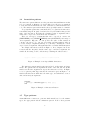
aspect myAspect
properties
counter = 0;
end
patterns
callAdd : call(add);
end
methods
function increment(this)
this.counter = this.counter + 1;
end
end
actions
actCall : after callAdd : (name)
this.increment();
disp(['calling ', name]);
end
end
end
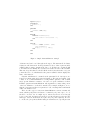
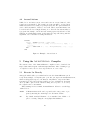
Figure 1: Simple AspectMatlab example
declaration and can be used throughout the aspect. The methods block defines
a function called increment. In the patterns block, we define a pattern,called
callAdd, that we want to match in the base code. In this case, we match calls
to the function add. Finally, the actions block defines an action called actCall.
This action specifies that we should call the method increment after every join
point in the base code which matches the pattern callAdd. It then displays the
name of the function.
Patterns, which must be contained in the patterns block of an aspect, are
formed by a unique name and a pattern designator. The pattern designator can
consist of one of AspectMatlab ’s several primitive patterns, each of which
target specific Matlab constructs, or it can be a logical combination of them.
Primitive patterns in AspectMatlab take arguments to restrict what portion
of the base Matlab code should be matched. For example, in Figure 1, we see
that the call pattern takes as a parameter ‘add’, meaning that it will match
calls to the function add.
There are three types of actions in AspectMatlab , before, around, and
after, which specify when, in relation to a matched join point, a piece of code
should be executed. As one might expect, before actions are woven directly
before a join point, and after actions are woven directly after a join point. The
third type of action, around actions, replace the join point completely. In order
to execute the join point itself when using an around action, a special proceed
2