1
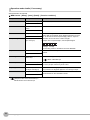
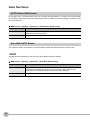
Image adjustment (if necessary)
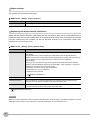
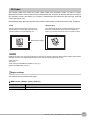
The following items can be changed and set to the image of the measurement target.
X MENU mode - [Setup] - [Item] - [Img Adj]
Item
Description
Select Camera
For details, refer to Chapter 3 "Image Adjustment" of the ZFX User's Manual.
Color filter
Filtering
BGS level
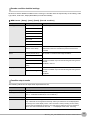
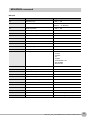
Operation mode details (if necessary)
Set items below as required.
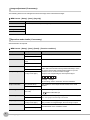
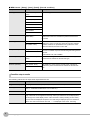
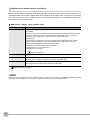
X MENU mode - [Setup] - [Item] - [Detail] - [Function condition]
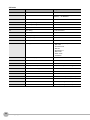
Setup Item
Setting Value
Description
Verification func.
OFF (default value)
When set to ON, verification with the master data is executed.
ON
Verified master data
All master data (default
value)
Selects the model to be used for verification.
Master data 0 to 31
Partial verification
OFF (default value)
ON
Compared digit
1 to 1024 (default value
first digit:1 last digit:1)
The number of digits in the read results to be verified with the
master data can be limited. When [Partial verification] is set to
ON, set the first and last compared digit positions. Up to 32
characters can be set as the number of digits.
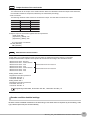
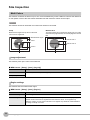
Example: First compared digit 2, last compared digit 6
OM R O N 2 0 0 8
2nd digit
6th digit
The text string used for verification becomes "MRON2".
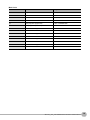
Output characters
OFF (default value)
ON
Error string
Max. 20 digits (default
value: NG)
Sets whether or not to output the read results on the serial
interface.
Sets the text string to be output when a read error occurs.
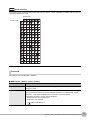
ASCII code table p.3
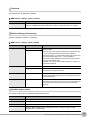
Partial output
OFF (default value)
ON
Output digit
1 to 1024 (default value
first digit:1 last digit:1)
Sets the first and last digit positions to output. If the read text
string contains non-targeted digits, the error string is output.
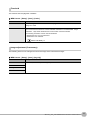
Measurement control
OFF
Sets whether or not to control the next measurement item to be
executed based on the verification results.
ON (default value)
4
Sets whether or not to specify a range in the read data to output
from when [Output characters] is set to ON.
ZFX-C1_/C2_-CD Additional Functions Instructions