1
WARNING
This product is for indoor use only.
Not for use in wet locations.
Unplug unit before removing waste
material or performing any cleaning or
maintenance services.
SET-UP AND USE
1. Make sure the Power Switch is in the center “OFF” position.
2. Set your Label Dispenser in place and plug the cord from the Power
Supply Module into the Power Input Jack on the rear of the Unit.
3. Connect the Power Supply Module to a suitable AC power source.
4. Place your roll of labels on the Label Roll Holder & slide the Roll
Edge Guide(s) to the width of your label web. The Label Web can
be positioned from side to side as required to ensure that the label
lines up with the reflective sensor.
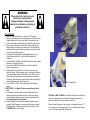
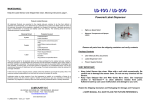
5. Thread the label web between the Stripper Bar and the round
Guide Rod directly above it. See the Label Threading Path
illustration.
6. Pull the label web UNDER the round Web Guide and slide the width
adjusters to the width of the web.
7. Loop the web UNDER the Wire Bail on the Take-Up Shaft as
shown in the illustration.
8. Slightly loosen the Label Sensor Lock Knob, until you can just
rotate the Sensor. Point the sensor up so it is pointing at the bottom
of the Stripper Bar. Place the Power Switch in the “LOW” position.
Slowly rotate the Sensor down until the label begins to advance.
Continue to rotate the Sensor slowly until the desired label length is
protruding. Retighten the Lock Knob securely.
9. Use the “HIGH” or “LOW” Switch setting to select the desired
speed.
10. IMPORTANT – Pull labels UP when removing them not to the
side.
11. If excess dust or dirt accumulates on the Label Sensor Eye the
Dispenser may not sense labels correctly. Use a cloth or paper
towel dampened with water to gently clean the Label Sensor. Do
not use any chemicals on the sensor.
12. Optional Flanges for the inside and outside of the label roll are
available. These Flanges are recommended for narrow or loosely
wound labels that may have a tendency to fall off the roll. Order
FLANGES-LD. Set of two Flanges.
Label Threading Path
OPTIONAL LABEL COUNTER: The optional Label Counter will add one
count to the displayed number for each label that is dispensed. This
Option is available only factory installed in new Units.
When the Label Dispenser is first turned on, it may display a count of “1”
or the number from the previous count. You can reset the Label Counter
to zero (“0”) by pressing the “R” Reset Button.