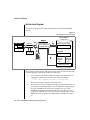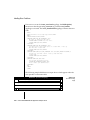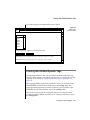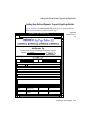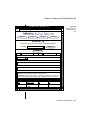
1
Informix Web DataBlade Module Application Developer’s Guide Version 4.0 August 1999 Part No. 000-5474 Published by INFORMIX Press Informix Corporation 4100 Bohannon Drive Menlo Park, CA 94025-1032 © 1999 Informix Corporation. All rights reserved. The following are trademarks of Informix Corporation or its affiliates: Answers OnLineTM; CBT StoreTM; C-ISAM; Client SDKTM; ContentBaseTM; Cyber PlanetTM; DataBlade; Data DirectorTM; Decision FrontierTM; Dynamic Scalable ArchitectureTM; Dynamic ServerTM; Dynamic ServerTM, Developer EditionTM; Dynamic ServerTM with Advanced Decision Support OptionTM; Dynamic ServerTM with Extended Parallel OptionTM; Dynamic ServerTM with MetaCube ROLAP Option; Dynamic ServerTM with Universal Data OptionTM; Dynamic ServerTM with Web Integration OptionTM; Dynamic ServerTM, Workgroup EditionTM; FastStartTM; 4GL for ToolBusTM; If you can imagine it, you can manage itSM; Illustra; INFORMIX; Informix Data Warehouse Solutions... Turning Data Into Business AdvantageTM; INFORMIX-Enterprise Gateway with DRDA; Informix Enterprise MerchantTM; INFORMIX-4GL; Informix-JWorksTM; InformixLink; Informix Session ProxyTM; InfoShelfTM; InterforumTM; I-SPYTM; MediazationTM; MetaCube; NewEraTM; ON-BarTM; OnLine Dynamic ServerTM; OnLine for NetWare; OnLine/Secure Dynamic ServerTM; OpenCase; ORCATM; Regency Support; Solution Design LabsSM; Solution Design ProgramSM; SuperView; Universal Database ComponentsTM; Universal Web ConnectTM; ViewPoint; VisionaryTM; Web Integration SuiteTM. The Informix logo is registered with the United States Patent and Trademark Office. The DataBlade logo is registered with the United States Patent and Trademark Office. Documentation Team: Karen Byers, Cal Collier, Sandra Farkas, Inge Halilovic, Angela Maguire, Mark Mears, Geraldine Murphy, Juliet Shackell, Martin Siegenthaler, Frank Symonds, Carol Trese, Clyanne Tuuri, Phil Vuncanon, Willow Williams, Oakland Editing and Production team GOVERNMENT LICENSE RIGHTS Software and documentation acquired by or for the US Government are provided with rights as follows: (1) if for civilian agency use, with rights as restricted by vendor’s standard license, as prescribed in FAR 12.212; (2) if for Dept. of Defense use, with rights as restricted by vendor’s standard license, unless superseded by a negotiated vendor license, as prescribed in DFARS 227.7202. Any whole or partial reproduction of software or documentation marked with this legend must reproduce this legend. ii Informix Web DataBlade Module Application Developer’s Guide Table of Contents Table of Contents Introduction In This Introduction . . . . . . About This Manual . . . . . . . Organization of This Manual . . Types of Users . . . . . . . Software Dependencies . . . . Assumptions About Your Locale. Documentation Conventions . . . Typographical Conventions . . Icon Conventions . . . . . . Screen-Illustration Conventions . Additional Documentation . . . . Printed Documentation . . . . On-Line Documentation . . . Informix Welcomes Your Comments . Chapter 1 . . . . . . . . . . . . . . . . . . . . . . . . . . . . . . . . . . . . . . . . . . . . . . . . . . . . . . . . . . . . . . . . . . . . . . . . . . . . . . . . . . . . . . . . . . . . . . . . . . . . . . . . . . . . . . . . . . . . . . . . . . . . . . . . . . . . . . . . . . . . . . . . . . . . . . . . . . 3 3 4 5 5 5 6 7 8 10 10 10 12 13 . . . . . . . . . . . . . . . . . . . . . . . . . . . . . . . . . . . . . . . . . . . . . . . . . . . . . . . . . . . . . . . . . . . . . . . . . . . . . . . . . . . . . . . . . . . . . . . . . . . 1-3 1-3 1-4 1-4 1-5 1-5 1-6 1-8 1-9 Overview In This Chapter . . . . . . . . What Is the Web DataBlade Module? Product Architecture . . . . . . Webdriver . . . . . . . . The WebExplode() Function . . Tags and Attributes . . . . . Architecture Diagram . . . . Product Features . . . . . . . Before You Begin . . . . . . . Chapter 2 Web DataBlade Module Tutorial In This Chapter . . . . . . . . . . . . . . . . Overview of the Process . . . . . . . . . . . . . Creating an Application with APB . . . . . . . . . Step 1: Add a Project . . . . . . . . . . . . Step 2: Create User-Defined Dynamic Tags . . . . . Step 3: Create the First AppPage of Your Application . Step 4: Create the Second AppPage of Your Application Step 5: Create the Third AppPage of Your Application . Step 6: Invoke the Application . . . . . . . . . Chapter 3 . . . . . . . . . . . . . . . . . . . . . . . . . . . 2-3 2-3 2-4 2-4 2-5 2-8 2-11 2-13 2-14 . . . . . . . . . . . . . . . . . . . . . . . . . . . . . . . . . . . . . . . . . . . . . . . . 3-3 3-3 3-5 3-5 3-8 3-9 3-10 3-11 3-11 3-12 3-12 3-14 In This Chapter . . . . . . . . . . . . . . . . Overview of AppPage Builder . . . . . . . . . . Registering AppPage Builder in Your Database . . . . . Invoking AppPage Builder . . . . . . . . . . . . Using the URL Prefix Specially Created to Invoke APB. Using Any URL Prefix . . . . . . . . . . . . Creating Web Applications in AppPage Builder . . . . Multimedia Content. . . . . . . . . . . . . Administration Features . . . . . . . . . . . Adding an Extension . . . . . . . . . . . . . . . . . . . . . . . . . . . . . . . . . . . . . . . . . . 4-3 4-3 4-3 4-5 4-5 4-6 4-7 4-8 4-9 4-10 Basics of AppPage Development In This Chapter . . . . . . . . . . . . AppPage Elements . . . . . . . . . . Where AppPage Objects Are Stored . . . . . The wbExtensions Table . . . . . . . Adding a New Extension to the wbBinaries Table How to Invoke AppPages . . . . . . . . Using MIpath and MIextension . . . . . How to Link AppPages . . . . . . . . . Linking AppPages with the ANCHOR Tag . Linking AppPages with the FORM Tag . . Example of Using FORM Tag Links . . . How to Retrieve Large Objects . . . . . . Chapter 4 iv . . . . . . . . . . . . . . . . . . . . . . . . . . . . . . . . . . . . Using AppPage Builder Informix Web DataBlade Module Application Developer’s Guide Chapter 5 Using Variables in AppPages In This Chapter . . . . . . . . . . . . . . . . . . Web DataBlade Module Variables . . . . . . . . . . . . User-Defined Variables . . . . . . . . . . . . . . Vector Variables. . . . . . . . . . . . . . . . . Web DataBlade Module System Variables . . . . . . . . Web Server and Web Browser Variables . . . . . . . . Session Variables . . . . . . . . . . . . . . . . How Session Management Assigns an ID to a Browser Instance Setting Session Variables . . . . . . . . . . . . . Examples of Using Session Variables . . . . . . . . . Error Handling with the MI_DRIVER_ERROR Variable . . . . Chapter 6 5-3 5-3 5-4 5-4 5-8 5-8 5-11 5-11 5-13 5-14 5-17 Using Tags in AppPages In This Chapter . . . . . . . . . . . . . . AppPage Tags . . . . . . . . . . . . . . . MISQL Tag . . . . . . . . . . . . . . . . Using System Variables to Format the SQL Results WINSTART Attribute. . . . . . . . . . . WINSIZE Attribute . . . . . . . . . . . RESULTS Attribute . . . . . . . . . . . DATASET Attribute . . . . . . . . . . . MIVAR Tag . . . . . . . . . . . . . . . NAME Attribute . . . . . . . . . . . . DEFAULT Attribute . . . . . . . . . . . COND Attribute . . . . . . . . . . . . ERR Attribute . . . . . . . . . . . . . MIBLOCK Tag . . . . . . . . . . . . . . ERR Attribute . . . . . . . . . . . . . COND Attribute . . . . . . . . . . . . Loop Processing . . . . . . . . . . . . MIELSE Tag . . . . . . . . . . . . . . . MIERROR Tag . . . . . . . . . . . . . . TAG Attribute . . . . . . . . . . . . . ERR Attribute . . . . . . . . . . . . . Creating a Generic Error Handler . . . . . . Creating a Specific Error Handler . . . . . . Handling Error Conditions . . . . . . . . . Processing Errors with Webdriver . . . . . . . . . . . . . . . . . . . . . . . . . . . . . . . . . . . . . . . . . . . . . . . . . . . . . . . . . . . . . . . . . . . . . . . . . . . . . . . . . . . . . . . . . . . . . . . . . . . . . . . . . . 6-3 6-3 6-4 6-6 6-13 6-14 6-14 6-16 6-16 6-17 6-18 6-19 6-19 6-19 6-21 6-21 6-22 6-28 6-29 6-31 6-32 6-32 6-33 6-34 6-37 Table of Contents v Special Characters in AppPage Tags . . . . . . . . . . . Special HTML Characters . . . . . . . . . . . . . . Special Formatting Characters . . . . . . . . . . . . Chapter 7 Using Advanced AppPage Tags In This Chapter . . . . . . . . . . MIFUNC Tag . . . . . . . . . . FUNCTION Attribute . . . . . . DLL Attribute . . . . . . . . . INTERNAL Attribute . . . . . . MIDEFERRED Tag . . . . . . . . defer. Prefix. . . . . . . . . . MIEXEC Tag . . . . . . . . . . . SERVICE Attribute . . . . . . . Using the MIEXEC Tag in an AppPage Examples of Using the MIEXEC Tag . Sample Perl Program SERVE.pl . . . Chapter 8 . . . . . . . . . . . . . . . . . . . . . . . . . . . . . . . . . . . . . . . . . . . . . . . . . . . . . . . . . . . . . . . . . . . . . . . . . . . . . . . . . . . . . . . . . . . . . . . . . . . . . . . . . . . . . . . . . . . 8-3 8-3 8-10 8-10 8-11 8-13 8-18 . . . . . . . . . 9-3 9-3 9-4 9-5 9-7 9-8 9-9 9-11 9-14 Using Dynamic Tags in AppPages In This Chapter . . . . . . . . . What Are Dynamic Tags? . . . . . Specifying Dynamic Tags in AppPages Where Dynamic Tags Are Stored . . . Dynamic Tag WebExplode() Variables . Using System Dynamic Tags . . . . CHECKBOXLIST. . . . . . . RADIOLIST . . . . . . . . SELECTLIST . . . . . . . . vi 7-3 7-3 7-4 7-5 7-5 7-7 7-8 7-9 7-10 7-11 7-13 7-15 Using Variable-Processing Functions in AppPages In This Chapter . . . . . . . . . . . . . . . . . . Variable-Processing Functions . . . . . . . . . . . . . Using Variable Expressions in AppPages . . . . . . . . . Using Arithmetic Functions in Variable Expressions. . . . Using SEPARATE and REPLACE in Variable Expressions . . Using Variable Expressions to Format Output Conditionally. Special Characters in Variable Expressions . . . . . . . . Chapter 9 6-39 6-39 6-40 Informix Web DataBlade Module Application Developer’s Guide . . . . . . . . . . . . . . . . . . . . . . . . . . . . . . . . . . . . . . . . . . . . . . . . . . . . . . . . . . . . . . . . . . . . . . . . . . . . . . . . . Creating User-Defined Dynamic Tags . . . . . . . . . Adding User-Defined Dynamic Tags with AppPage Builder Example of a Creating a User-Defined Dynamic Tag . . . Special Characters in Dynamic Tags . . . . . . . . . Chapter 10 . . . . 9-17 9-19 9-20 9-22 . . . . . . . . . . . . . . . . . . . . . . . . . . . . . . . . . . . . . . . . 10-3 10-3 10-4 10-6 10-8 In This Chapter . . . . . . . . . . . . . . . . . . The HTML Data Type . . . . . . . . . . . . . . . . Functions That Use or Return the HTML Data Type . . . . . Example of Using an HTML Data Type . . . . . . . . . . 11-3 11-3 11-4 11-5 Using UDR Tags in AppPages In This Chapter . . . . . . . . . . What Is a User-Defined Routine (UDR) Tag? Where Are UDR Tags Stored? . . . . . Specifying a UDR Tag in an AppPage . . Creating a UDR Tag . . . . . . . . . Chapter 11 Chapter 12 Using the HTML Data Type Using DataBlade Module Functions in AppPages In This Chapter . . . WebExplode() . . WebLint() . . . . WebRelease() . . WebUnHTML() . . WebURLDecode() . WebURLEncode() . FileToHTML() . . WebRmtShutdown() Chapter 13 . . . . . . . . . . . . . . . . . . . . . . . . . . . . . . . . . . . . . . . . . . . . . . . . . . . . . . . . . . . . . . . . . . . . . . . . . . . . . . . . . . . . . . . . . . . . . . . . . . . . . . . . . . . . . . . . . . . . . . . . . . . . . . . . . . . . . . . 12-3 12-4 12-7 12-10 12-11 12-12 12-14 12-15 12-18 . . . . . . . . . . . . . . . . . . . . . . . . . . . . . . . . . . . . . . . . . . . . . . . . . . . . . . . . . . . . . . . . . . . . . . . . . . . . . . . . . . . . . . . . . . . . . . . . . . . . . . . . . . . . . . 13-3 13-3 13-3 13-4 13-7 13-7 13-9 13-11 13-12 13-14 Using Other Webdriver Features In This Chapter . . . . . . . Adding HTTP Headers to AppPages Retrieving Non-HTML Pages . Using Cookies . . . . . . Uploading Client Files . . . . . Setting the Directory . . . . Example . . . . . . . . Passing Image Map Coordinates . IMG Tag . . . . . . . . FORM Tag . . . . . . . Table of Contents vii Two-Pass Query Processing Chapter 14 . . . . . . . . . . . . . . 13-15 . . . . . . . . . . . . . . . . Using DataBlade Module API Functions in AppPages In This Chapter . . . . . . . . . . The Web DataBlade Module API Functions WebHtmlToBuf() . . . . . . . . WebBufToHtml() . . . . . . . . . . . . . . . . . . . . . . . . Appendix A Debugging Web DataBlade Module Applications Appendix B AppPage Builder Schema Appendix C Web DataBlade Module Variables Glossary Index viii Informix Web DataBlade Module Application Developer’s Guide . . . . 14-3 14-3 14-5 14-8 Introduction Introduction In This Introduction . . . . . . . . . . . . . . . . . . 3 About This Manual . . . . . . . Organization of This Manual . . Types of Users . . . . . . . Software Dependencies . . . . Assumptions About Your Locale . . . . . . . . . . . . . . . . . . . . . . . . . . . . . . . . . . . . . . . . . . . . . . . . . . . . . . . . . . . . . 3 4 5 5 5 Documentation Conventions . . Typographical Conventions . Case-Sensitive Text . . . Case-Insensitive Text . . Icon Conventions . . . . . Comment Icons . . . . Platform Icons . . . . . Screen-Illustration Conventions . . . . . . . . . . . . . . . . . . . . . . . . . . . . . . . . . . . . . . . . . . . . . . . . . . . . . . . . . . . . . . . . . . . . . . . . . . . . . . . . . . . . . . . . . . . . . . . . 6 7 7 8 8 9 9 10 Additional Documentation . . . . . . . . Printed Documentation . . . . . . . . On-Line Documentation. . . . . . . . Release Notes and Documentation Notes On-Line Manuals . . . . . . . . . . . . . . . . . . . . . . . . . . . . . . . . . . . . . . . . . . . . . . . . . 10 10 12 12 13 Informix Welcomes Your Comments . . . . . . . . . 13 . . . . . . . . . . . . 2 Informix Web DataBlade Module Application Developer’s Guide In This Introduction This chapter introduces the Informix Web DataBlade Module Application Developer’s Guide. Read this chapter for an overview of the information provided in this manual and for an understanding of the conventions used throughout. About This Manual The Informix Web DataBlade Module Application Developer’s Guide explains how to use the Informix Web DataBlade module to create Web applications that dynamically retrieve data from a database managed by Informix Dynamic Server 2000. The manual provides information about the features provided by the Web DataBlade module to assist you in developing Web-enabled database applications. These features include tags specific to the Web DataBlade module, variable-processing functions, a special HTML data type to store application pages, DataBlade module functions, and so on. To use this manual, you or the database administrator must have previously performed certain administrative tasks, such as installing the Web DataBlade module on your database server, registering the DataBlade module in a database, and configuring Webdriver for your database. For more information on performing these administrative tasks, refer to the Informix Web DataBlade Module Administrator’s Guide. This section discusses the organization of the manual, the intended audience, and the associated software products that you must have to develop applications using the Web DataBlade module. Introduction 3 Organization of This Manual Organization of This Manual This manual includes the following chapters: 4 ■ Chapter 1, “Overview,” provides an overview of the architecture and features of the Web DataBlade module. ■ Chapter 2, “Web DataBlade Module Tutorial,” describes the process of creating a Web-enabled database application using the Informix Web DataBlade module and AppPage Builder (APB). ■ Chapter 3, “Basics of AppPage Development,” describes the basic elements of AppPages, the HTML pages that make up your Webenabled database application. These basic elements include how to invoke an AppPage, how to link one AppPage to another, and how to retrieve large objects currently stored in a database table into an AppPage. ■ Chapter 4, “Using AppPage Builder,” describes how to create and maintain Web DataBlade module applications using AppPage Builder. ■ Chapter 5, “Using Variables in AppPages,” describes how to use Web DataBlade module variables to create Web-enabled applications. ■ Chapter 6, “Using Tags in AppPages,” describes how to use Web DataBlade module tags to create Web-enabled applications. ■ Chapter 7, “Using Advanced AppPage Tags,” describes the AppPage tags and attributes that are used for specialized processing and critical optimization features of your Web application. ■ Chapter 8, “Using Variable-Processing Functions in AppPages,” describes how to use variable-processing functions to create variable expressions within AppPages. ■ Chapter 9, “Using Dynamic Tags in AppPages,” describes how to use dynamic tags to share AppPage segments among multiple AppPages. ■ Chapter 10, “Using UDR Tags in AppPages,”describes how to directly invoke a UDR in a AppPage without using the SQL statement EXECUTE FUNCTION. ■ Chapter 11, “Using the HTML Data Type,” describes the HTML data type that you use to store the AppPages that make up your Webenabled database application. Informix Web DataBlade Module Application Developer’s Guide Types of Users ■ Chapter 12, “Using DataBlade Module Functions in AppPages,” describes the WebExplode() function and additional server functions you can use to simplify AppPage design. ■ Chapter 13, “Using Other Webdriver Features,” describes Webdriver features, including adding HTTP headers to your AppPages, uploading client files, and passing image map coordinates. ■ Chapter 14, “Using DataBlade Module API Functions in AppPages,” describes the Informix Web DataBlade module API routines. ■ Appendix A, “Debugging Web DataBlade Module Applications,” describes debugging techniques for the Web DataBlade module. ■ Appendix B, “AppPage Builder Schema,” describes the schema for AppPage Builder. ■ Appendix C, “Web DataBlade Module Variables,” lists all Webdriver and WebExplode() function variables. A glossary of relevant terms follows the chapters, and an index directs you to areas of particular interest. Types of Users This guide is written for Web application designers who are familiar with HTML (including tables and forms), SQL, and database installation and system administration. Software Dependencies To use the Informix Web DataBlade module, you must use Informix Dynamic Server 2000 as your database server. Check the release notes for specific version compatibility. The release notes also list the Web servers that have been certified for this release of the Web DataBlade module. Assumptions About Your Locale Informix products can support many languages, cultures, and code sets. All culture-specific information is brought together in a single environment, called a GLS (Global Language Support) locale. Introduction 5 Documentation Conventions The examples in this manual are written with the assumption that you are using the default locale, en_us.8859-1. This locale supports U.S. English format conventions for dates, times, and currency. In addition, this locale supports the ISO 8859-1 code set, which includes the ASCII code set plus many 8-bit characters, such as é, è, and ñ. If you plan to use nondefault characters in your data or your SQL identifiers, or if you want to conform to the nondefault collation rules of character data, you need to specify the appropriate nondefault locale. Documentation Conventions This section describes the conventions that this manual uses. These conventions make it easier to gather information from this and other volumes in the documentation set. The following conventions are discussed: 6 ■ Typographical conventions ■ Icon conventions ■ Screen-illustration conventions Informix Web DataBlade Module Application Developer’s Guide Typographical Conventions Typographical Conventions This manual uses the following standard set of conventions to introduce new terms, illustrate screen displays, describe command syntax, and so forth. Convention Meaning KEYWORD All primary elements in a programming language statement (keywords) appear in uppercase letters in a serif font. italics italics Within text, new terms and emphasized words appear in italics. Within syntax and code examples, variable values that you are to specify appear in italics. italics boldface boldface Names of program entities (such as classes, events, and tables), environment variables, file and pathnames, and interface elements (such as icons, menu items, and buttons) appear in boldface. monospace monospace Information that the product displays and information that you enter appear in a monospace typeface. KEYSTROKE Keys that you are to press appear in uppercase letters in a sans serif font. ♦ This symbol indicates the end of product- or platform-specific information. ➞ This symbol indicates a menu item. For example, “Choose Tools➞Options” means choose the Options item from the Tools menu. Tip: When you are instructed to “enter” characters or to “execute” a command, immediately press RETURN after the entry. When you are instructed to “type” the text or to “press” other keys, no RETURN is required. Case-Sensitive Text Variable names used in the Informix Web DataBlade module are case sensitive, are preceded by a dollar sign ( $ ), and consist of alphanumeric and underscore characters. Variables that begin with an underscore are reserved for system use. Introduction 7 Icon Conventions Case-Insensitive Text Tags identify the elements of an HTML page and specify the structure and formatting for that page. The Informix Web DataBlade module includes a set of tags that are processed by the WebExplode() function. The Web DataBlade module tags use the SGML processing instruction tag format, <?tag_info>, <?/tag_info>. An SGML processor ignores tags that it does not recognize, including Web DataBlade module tags. Like other SGML processing tags, the Web DataBlade module tags and attributes are not case sensitive. You can use uppercase letters, lowercase letters, or any combination of the two. The text and many of the examples in this manual show function and data type names in mixed lettercasing (uppercase and lowercase). Because Informix Dynamic Server 2000 is case insensitive, you do not need to enter function names exactly as shown: you can use uppercase letters, lowercase letters, or any combination of the two. Icon Conventions Throughout the documentation, you will find text that is identified by several different types of icons. This section describes these icons. 8 Informix Web DataBlade Module Application Developer’s Guide Icon Conventions Comment Icons Comment icons identify three types of information, as the following table describes. This information always appears in italics. Icon Label Description Warning: Identifies paragraphs that contain vital instructions, cautions, or critical information. Important: Identifies paragraphs that contain significant information about the feature or operation that is being described. Tip: Identifies paragraphs that offer additional details or shortcuts for the functionality that is being described. Platform Icons Platform icons identify paragraphs that contain platform-specific information. Icon Description Windows UNIX Identifies information that is specific to Windows operating systems. Identifies information that is specific to UNIX operating systems. These icons can apply to a row in a table, one or more paragraphs, or an entire section. A ♦ symbol indicates the end of the platform-specific information. Introduction 9 Screen-Illustration Conventions Screen-Illustration Conventions The illustrations in this manual represent a generic rendition of various windowing environments. The details of dialog boxes, controls, and windows have been deleted or redesigned to provide this generic look. Therefore, the illustrations in this manual depict Web browser output a little differently than the way it appears on your screen. Additional Documentation This section describes the Web DataBlade module documentation available from Informix: ■ Printed documentation ■ On-line documentation Printed Documentation The following Informix manuals are part of the Informix Web DataBlade module documentation set and provide more information about the DataBlade module: 10 ■ The Informix Web DataBlade Module Application Developer’s Guide describes how to develop Web-enabled database applications that dynamically retrieve data from the Informix database. ■ The Informix Web DataBlade Module Administrator’s Guide describes how to administer Web applications that use the Web DataBlade module to dynamically retrieve data from an Informix database. The manual describes topics such as how to configure the Web DataBlade module for your database server, how to configure the NSAPI, Apache, CGI, and ISAPI Webdrivers, how to implement security in your Web applications, and how to increase the performance of your Web applications. Informix Web DataBlade Module Application Developer’s Guide Printed Documentation The following related Informix documents complement the information in this manual: ■ Data Director for Web is a set of Windows tools that allows you to develop and manage Informix-based Web sites as well as providing an interface to the Web DataBlade module. For detailed information about Data Director for Web, refer to the Informix Data Director for Web User’s Guide. ■ Before you can use the Informix Web DataBlade module, you must install and configure Informix Dynamic Server 2000. The administrator’s guide for your database server provides information about how to configure the server and also contains information about how it interacts with DataBlade modules. ■ Once you have installed the Web DataBlade module, you must use BladeManager to register it into the database where the DataBlade module will be used. See the DataBlade Module Installation and Registration Guide for details on registering DataBlade modules. ■ If you have never used Structured Query Language (SQL), read the Informix Guide to SQL: Tutorial. It provides a tutorial on SQL as it is implemented by Informix products. It also describes the fundamental ideas and terminology for planning and implementing a object-relational database. ■ A companion volume to the Tutorial, the Informix Guide to SQL: Reference, includes details of the Informix system catalog tables, describes Informix and common environment variables that you should set, and describes the column data types that Informix database servers support. ■ An additional companion volume to the Reference, the Informix Guide to SQL: Syntax, provides a detailed description of all the SQL statements supported by Informix products. This guide also provides a detailed description of Stored Procedure Language (SPL) statements. ■ The DB-Access User Manual describes how to invoke the DB-Access utility to access, modify, and retrieve information from Informix database servers. ■ The performance guide for your database server provides information on how to improve the performance of your SQL queries. Introduction 11 On-Line Documentation ■ If you plan to develop your own DataBlade modules using the Web DataBlade module as a foundation, read the DataBlade Developers Kit User’s Guide. This manual describes how to develop DataBlade modules using BladeSmith, BladePack, and BladeManager. ■ When errors occur, you can look them up by number and learn their cause and solution in the Informix Error Messages manual. If you prefer, you can look up the error messages in the on-line message file described in the introduction to the Informix Error Messages manual. On-Line Documentation The on-line documentation for the Web DataBlade module includes: ■ release notes and documentation notes ■ on-line manuals Release Notes and Documentation Notes In addition to printed documentation, the following sections describe the online files that supplement the information in this manual. Examine these files before you begin using the Informix Web DataBlade module. They contain vital information about application and performance issues. UNIX On UNIX platforms, the following on-line files appear in the $INFORMIXDIR/extend/web.version directory, where version refers to the current version of the Informix Web DataBlade module. On-Line File Purpose WEBDOC.TXT Describes features that are not covered in the manual or that have been modified since publication. WEBREL.TXT Describes any special actions that are required to configure and use the Web DataBlade module on your computer. This file also describes new features and feature differences from earlier versions of the Web DataBlade module and how these differences might affect current products. Additionally, this file contains information about any bugs and their workarounds. ♦ 12 Informix Web DataBlade Module Application Developer’s Guide Informix Welcomes Your Comments Windows The following items appear in the Informix folder. To display this folder, choose Start➞Programs➞Informix from the task bar. Program Group Item Description Documentation Notes This item includes additions or corrections to manuals, along with information about features that might not be covered in the manuals or that have been modified since publication. Release Notes This item describes feature differences from earlier versions of Informix products and how these differences might affect current products. This file also contains information about any known problems and their workarounds. ♦ On-Line Manuals All the Web DataBlade module manuals are also provided on the Answers OnLine CD-ROM in Adobe PDF format so that you can view and search for information on-line. For searches, you can specify a word or phrase and specify which manuals you want to search. You can also place electronic annotations and bookmarks on pages of particular interest to you. The pages you view and print from the on-line manuals on the CD-ROM have the same layout and design as the printed manuals. Informix Welcomes Your Comments Let us know what you like or dislike about our manuals. To help us with future versions of our manuals, we want to know about any corrections or clarifications that you would find useful. Include the following information: ■ The name and version of the manual that you are using ■ Any comments that you have about the manual ■ Your name, address, and phone number Introduction 13 Informix Welcomes Your Comments Write to us at the following address: Informix Software, Inc. Technical Publications 300 Lakeside Dr., Suite 2700 Oakland, CA 94612 If you prefer to send electronic mail, our address is: [email protected] We appreciate your suggestions. 14 Informix Web DataBlade Module Application Developer’s Guide Chapter Overview In This Chapter . . . 1 . . . . . . . . . . . . . . . . . 1-3 What Is the Web DataBlade Module? . . . . . . . . . . . . 1-3 Product Architecture . . . . Webdriver . . . . . . The WebExplode() Function Tags and Attributes . . . Architecture Diagram . . . . . . . . . . . . . . . . . . . . . . . . . . . . . . . . . . . . . . . . . . . . . . . . . . . . . . . . . . . . . . . . . . . . . . . . 1-4 1-4 1-5 1-5 1-6 Product Features . . . . . . . . . . . . . . . . . . . 1-8 Before You Begin . . . . . . . . . . . . . . . . . . . 1-9 1-2 Informix Web DataBlade Module Application Developer’s Guide In This Chapter This chapter provides an overview of the Informix Web DataBlade module. It includes the following topics: ■ “What Is the Web DataBlade Module?,” next ■ “Product Architecture” on page 1-4 ■ “Product Features” on page 1-8 What Is the Web DataBlade Module? The Web DataBlade module is a collection of SQL functions, data types, tags, and client applications that enables you to create Web applications that dynamically retrieve data from an Informix database. In typical Web database applications, most of the logic is in gateway application code written in Perl, Tcl, or C. This Common Gateway Interface (CGI) application connects to a database, builds and executes SQL statements, and formats the results. Using the Web DataBlade module, you need not develop a CGI application to dynamically access database data. Instead, you create HTML pages that include Web DataBlade module specific tags (also called AppPage tags) and functions that dynamically execute the SQL statements you specify and format the results. These pages are called Application Pages (AppPages). The types of data you retrieve can include traditional data types, as well as HTML, image, audio, and video data. Overview 1-3 Product Architecture AppPages are themselves stored in the database. A Web application that uses the Web DataBlade module, therefore, first retrieves the AppPage from the database, then passes the AppPage through an SQL function that interprets the special AppPage tags and functions, typically to retrieve or update data from database tables and to format the results. Product Architecture The Web DataBlade module consists of three main components: ■ Webdriver ■ The WebExplode() Function ■ Tags and Attributes These components are described in the following sections. The section “Architecture Diagram” on page 1-6 provides an illustration of the architecture of the Web DataBlade module and how the main components work together. Webdriver Webdriver is a database client application that builds the SQL queries that execute the WebExplode() function to retrieve AppPages from your database. Webdriver returns the HTML that results from calls to the WebExplode() function to the Web server. The Web DataBlade module includes four implementations of Webdriver: ■ NSAPI Webdriver. This implementation of Webdriver is written with the Netscape Server API and is used only with Netscape Web servers. ■ Apache Webdriver. This implementation of Webdriver is written with the Apache API and is used only with Apache Web servers. ■ ISAPI Webdriver. This implementation of Webdriver is written with the Microsoft Internet Information Server API and is used only with Microsoft Internet Information Web servers. ■ CGI Webdriver. This implementation of Webdriver is a standard CGI program that can be executed by all Web servers. 1-4 Informix Web DataBlade Module Application Developer’s Guide The WebExplode() Function For optimal performance, you should use the implementation of Webdriver written for your specific Web server. You should only use the CGI Webdriver for Web servers that do not have their own implementation of Webdriver. Tip: This guide uses the term “Webdriver,” without a preceding qualifier, to refer to Webdriver functionality that is present in all implementations of Webdriver. The guide uses a qualified term, such as “NSAPI Webdriver,” to refer to a specific implementation of Webdriver. The WebExplode() Function The WebExplode() function is an SQL function that builds dynamic HTML pages based on data stored in your database. The WebExplode() function parses AppPages that contain AppPage tags within HTML and dynamically builds and executes the SQL statements and processing instructions embedded in the AppPage tags. The WebExplode() function formats the results of these SQL statements and processing instructions and returns the resulting HTML page to the client application, Webdriver. The SQL statements and processing instructions are specified using SGML-compliant processing tags. Tags and Attributes The Web DataBlade module includes a built-in set of SGML-compliant tags and attributes that enable SQL statements to be executed dynamically within AppPages. These tags are referred to as AppPage tags. For example, the MISQL tag allows you to execute an SQL statement, such as SELECT, and format the results of the statement in your AppPage. The MISQL tag has its own attributes, such as SQL, COND, and ERR. Overview 1-5 Architecture Diagram Architecture Diagram The following diagram illustrates the architecture of the Web DataBlade module. Figure 1-1 Web DataBlade Module Architecture IDS/UDO ORDBMS Webdriver 1 Web browser Web server 2 Look Lookup up connection connection Look up configuration Lookup Build SQL statement URL: http://... 6 6 Web server environment 4 3 AppPage table 5 web.cnf file Webdriver configuration table HTML page with dynamic data HTML page with MISQL tags WebExplode() function The sequence of events starts with a user typing a URL in a browser and ends with the AppPage rendered in the browser as follows: 1. A user enters a URL with a Webdriver request and the name of an AppPage in a browser, as shown in the following example: http://ariel:8080/hr_map/?MIval=/welcome.html The browser makes a request to the Web server. 2. 1-6 The Web server uses its configuration files and information from its environment to determine how to invoke Webdriver. Depending on the type of Webdriver that has been configured for your Web DataBlade module installation, the Web server can execute a CGI program (CGI Webdriver), call a Netscape API shared object (NSAPI Webdriver), call an Apache API object (Apache Webdriver), and so on. Informix Web DataBlade Module Application Developer’s Guide Architecture Diagram 3. Webdriver refers to the web.cnf file on the operating system for information on how to connect to an Informix database server, the database to which to connect, the user to connect to the database as, and the Webdriver configuration to use once a connection has been made to the database. Webdriver establishes a connection to the appropriate database with this information. 4. Once Webdriver has established a connection to a database, it looks up the Webdriver configuration in the WebConfigs system table. The Webdriver configuration describes, among other things, the AppPage table that contains the AppPage the user requested in the URL originally entered in the browser. 5. Using this schema-related information, Webdriver builds a SELECT statement to retrieve the requested AppPage from the Web application table. The SELECT statement executes the WebExplode() function on the AppPage at the same time that it retrieves the AppPage. The WebExplode() function expands the AppPage tags within the AppPage and formats the results, resulting in a standard HTML page. 6. Finally, Webdriver returns this HTML page to the Web server, which in turn returns the HTML page to be rendered by the Web browser. Webdriver also enables you to retrieve large objects, such as images, directly from the database when you specify a path that identifies a large object stored in the database. Overview 1-7 Product Features Product Features The Web DataBlade module includes the following features: ■ ■ ■ 1-8 AppPage tags identify the elements of an HTML page and specify the structure and formatting for that page. They enable you to: ❑ embed SQL statements directly within AppPages. ❑ handle errors within AppPages. ❑ execute statements conditionally within AppPages. ❑ manipulate variables within AppPages using variableprocessing functions. ❑ use other advanced query processing and formatting techniques. Web DataBlade module dynamic tags allow you to reuse existing AppPage segments to simplify the construction and maintenance of your Web applications: ❑ The Web DataBlade module provides system dynamic tags that simplify the creation of check box lists, radio button lists, and selection lists. ❑ You can also create user dynamic tags. A user dynamic tag is a tag that you create and register in the database. Webdriver allows you to customize Web applications using information from its configuration file, the Webdriver configurations stored in the database, the Web server environment, URLs, HTML forms, and your own Web application variables, without additional CGI programming. Webdriver also allows you to track persistent session variables between AppPages. Informix Web DataBlade Module Application Developer’s Guide Before You Begin ■ AppPage Builder (APB), a development tool that is packaged with the Web DataBlade module, provides a user interface to create and update AppPages and to manage multimedia database content. APB is itself a Web DataBlade module application made up of linked AppPages. APB uses the same database schema as Informix Data Director for Web. Data Director for Web is a set of Windows tools that allows you to develop and manage Informix-based Web sites as well as providing an interface to the Web DataBlade module. For detailed information about Data Director for Web, refer to the Informix Data Director for Web User’s Guide. ■ The NSAPI, ISAPI, and Apache implementations of Webdriver allow you to use the proprietary features of the Netscape Web server, Microsoft Internet Information Server, and Apache Web Server, respectively, and they eliminate CGI process overhead. ■ The Web DataBlade Module Administration Tool, a Web DataBlade module application, provides a user interface to create and update Webdriver mappings and configurations. ■ A subset of the examples in this guide and the Informix Web DataBlade Module Administrator’s Guide are available in the directory INFORMIXDIR/extend/web.version/examples, where INFORMIXDIR refers to the main Informix directory and version refers to the current version of the Web DataBlade module installed on your computer. Before You Begin Before you begin developing AppPages, you or your Web DataBlade module administrator must have previously performed certain administrative tasks to set up the correct development environment. In particular, this guide is written with the assumption that you or your Web DataBlade module administrator have: ■ installed the Web DataBlade module on your database server. ■ created a database with logging enabled. ■ registered the Web DataBlade module in your database. Overview 1-9 Before You Begin ■ registered and configured the Web DataBlade Module Administration Tool in your database. ■ registered AppPage Builder (APB) in the database. Although you are not required to use APB to develop AppPages, this guide refers to it in its examples and assumes that you are using it to build AppPages. ■ created the necessary Webdriver mappings and Webdriver configurations to begin development. ■ invoked both APB and the Web DataBlade Module Administration Tool in your browser to ensure that the DataBlade module is correctly configured for your database. For detailed information on performing the preceding tasks, refer to the Informix Web DataBlade Module Administrator’s Guide. 1-10 Informix Web DataBlade Module Application Developer’s Guide Chapter Web DataBlade Module Tutorial In This Chapter . . . . . . . . . . . . . . . . . . . . 2-3 Overview of the Process . . . . . . . . . . . . . . . . . 2-3 Creating an Application with APB . . . . . . . . . Step 1: Add a Project . . . . . . . . . . . . . Step 2: Create User-Defined Dynamic Tags . . . . . Step 3: Create the First AppPage of Your Application. . Step 4: Create the Second AppPage of Your Application. Step 5: Create the Third AppPage of Your Application . Step 6: Invoke the Application . . . . . . . . . . . . . . . . . . . . . . . . . . . . . . . . . . . . . 2-4 2-4 2-5 2-8 2-11 2-13 2-14 2 2-2 Informix Web DataBlade Module Application Developer’s Guide In This Chapter This chapter introduces you to the process of creating a Web-enabled database application using the Informix Web DataBlade module and AppPage Builder (APB). This chapter assumes you can invoke APB in your browser. For instructions on how to invoke APB in your browser, see “Invoking AppPage Builder” on page 4-5. The application you create in the following tutorial consists of three linked AppPages. The application queries the database for user tables and, for each user table, shows the columns of the selected table. Overview of the Process This tutorial consists of six steps: 1. Add a project 2. Create a user dynamic tag 3. Create the first AppPage: welcome page 4. Create the second AppPage: shows system catalog tables 5. Create the third AppPage: shows names of requested tables 6. Invoke the application The following sections explain each step. Web DataBlade Module Tutorial 2-3 Creating an Application with APB Creating an Application with APB AppPage Builder (APB) is a Web DataBlade module application that enables you to create and maintain the AppPages that make up your Web applications. You can use APB to create AppPages with any Web browser that supports forms and tables, as defined in the HTML 3.0 specification. For more information on APB, refer to “Using AppPage Builder” on page 4-1. Step 1: Add a Project If you want to create a Web-enabled application using APB, you must first add a project. A project contains all of the AppPages and other objects associated with your Web application. When you first invoke APB, the browser displays the following AppPage. Figure 2-1 APB: Main Menu Web Browser - [APB - Main Menu] URL: http://domain:port/hr_app/?MIval=/APB20/apb.html Main Menu Add Object Add a new object to the database. Edit Object Edit, delete, and view objects stored in the database. Admin Menu Manage user accounts and projects. User Name: default Default Project: TEXTAREA Width: 80 Versioning: Off User Level: 0 Default Object: AppPage TEXTAREA Height: 20 WebLint Checking: Off To create a project in APB 1. 2-4 From the Main Menu, click Admin Menu. Informix Web DataBlade Module Application Developer’s Guide Step 2: Create User-Defined Dynamic Tags 2. From the Admin Menu, click Add Project. 3. On the Add Project AppPage, type getting_started as the name of the project in the Project text box. 4. Type a description of the getting_started project in the Description text area. 5. Click Save. The Add Project AppPage appears and displays a message that the getting_started project was created. After getting_started has been succesfully added as a project, use the following procedure to make getting_started your default project . To make getting_started your default project 1. Click Admin Menu. 2. Click Edit User. 3. Select getting_started from the Default Project list box and click Save. Step 2: Create User-Defined Dynamic Tags User-defined dynamic tags allow you to specify standard components that appear on every AppPage, such as headers and footers. In this step, you create a header and footer for your application. Refer to “Using Dynamic Tags in AppPages” on page 9-1 for more information on how to use dynamic tags. Create a Header Use the following procedure to create a header tag. To create a header tag 1. Click Add Object. Web DataBlade Module Tutorial 2-5 Step 2: Create User-Defined Dynamic Tags 2. Click Dynamic Tag. The Add Dynamic Tag AppPage appears. Figure 2-2 APB: Add Dynamic Tag Web Browser - [APB - Add Dynamic Tag] URL: http://domain:port/hr_app/?MIval=/APB20/apb.html Main Menu Add Object Edit Object Admin Menu Add Dynamic Tag You can base this new tag on an existing tag to copy from the list below: Base Tag: OLD_DYNTAG CONTINUE SAVE Tag ID: Class: Project: getting_started Parameters: Description: Dynamic Tag: User Name: default Default Project: getting_started TEXTAREA Width: 80 Versioning: Off User Level: 0 Default Object: AppPage TEXTAREA Height: 20 WebLint Checking: Off 3. 2-6 Type my_header in the Tag ID text box. Informix Web DataBlade Module Application Developer’s Guide Step 2: Create User-Defined Dynamic Tags 4. Type &TITLE in the Parameters text box. 5. Type a description of the dynamic tag in the Description text box. 6. Type the following HTML code in the Dynamic Tag text area: <html> <head> <title>@TITLE@</title> </head> <body> 7. Click Save. Create a Footer Use the following procedure to create a footer tag. To create a footer tag 1. Click Add Object. 2. Click Dynamic Tag. 3. Type my_footer in the Tag ID text box. 4. Type a description of the dynamic tag in the Description text box. 5. Type the following HTML code in the Dynamic Tag text area: <br> <br> <br> <br> <HR WIDTH=90%> <CENTER> <FONT SIZE=-1><A HREF="http://www.informix.com"> Copyright of INFORMIX SOFTWARE, INC.</A></FONT> </CENTER> </body> </html> 6. Click Save. Web DataBlade Module Tutorial 2-7 Step 3: Create the First AppPage of Your Application Step 3: Create the First AppPage of Your Application The first AppPage of your Web-enabled application welcomes users. Follow these steps to create it. To create the first page of the application 1. On the Add Dynamic Tag AppPage, click Add Object. The Add Object AppPage appears, showing the getting_started project as your default project. Figure 2-3 APB: Add Object Web Browser - [APB - Add Object] URL: http://domain:port/hr_app/?MIval=/APB20/apb.html Main Menu Add Object Edit Object Admin Menu Add Object Select the type of object you wish from the list below: AppPage Audio Document Dynamic Tag Image User Defined Routine Tag Video 2-8 User Name: default Default Project: getting_started TEXTAREA Width: 80 Versioning: Off User Level: 0 Default Object: AppPage TEXTAREA Height: 20 WebLint Checking: Off Informix Web DataBlade Module Application Developer’s Guide Step 3: Create the First AppPage of Your Application 2. Click AppPage. The Add AppPage AppPage appears. Figure 2-4 APB-Add AppPage Web Browser - [APB - Add AppPage] URL: http://domain:port/hr_app/?MIval=APB20/apb.html Main Menu Add Object Edit Object Admin Menu Add AppPage You can base this new AppPage on an existing AppPage to copy from the list below: Project: APB 2.0 Path: /APB20 CONTINUE Page ID: apb Extension: html CONTINUE SAVE Path: Page ID: / Extension: html Project: Read Level: getting_started 0 Description: AppPage: Enter filename to import AppPage from: CONTINUE User Name: default Default Project: getting_started TEXTAREA Width: 80 Versioning: Off User Level: 0 Default Object: AppPage TEXTAREA Height: 20 WebLint Checking: Off Web DataBlade Module Tutorial 2-9 Step 3: Create the First AppPage of Your Application Your getting_started project should be selected as the default project. 3. Type the name of your AppPage, welcome, in the Page ID text box. Be sure Path is set to / and Extension is set to html. 4. Type the following HTML code in the AppPage text area: <?my_header TITLE="Web Applications, Inc"> <center> <h1>Welcome to Web Applications, Inc.</h1> </center> You can click <a href=<?MIVAR>$WEB_HOME<?/MIVAR>?MIval=/page2.html>here </a> to see a list of all the non-system tables in your database. <hr> Or enter the name of a table in the text box to see its columns.<br> <FORM METHOD=post ACTION=<?MIVAR>$WEB_HOME<?/MIVAR>> <?MIVAR NAME=table><?/MIVAR> <?MIVAR><INPUT TYPE=INPUT SIZE=40 NAME=table VALUE=$table><?/MIVAR> <INPUT TYPE=SUBMIT VALUE="See columns"> <INPUT TYPE=HIDDEN NAME=MIval VALUE=/page3.html> </FORM> <?my_footer> 5. Click Save. Notice the syntax in the previous HTML for invoking the my_header and my_footer dynamic tags in the AppPage. Also notice that this AppPage has two methods of linking to a subsequent AppPage: the ANCHOR tag and the FORM tag. The ANCHOR tag method uses the following syntax: You can click <a href=<?MIVAR>$WEB_HOME<?/MIVAR>?MIval=/page2.html>here </a> to see a list of all the non-system tables in your database. 2-10 Informix Web DataBlade Module Application Developer’s Guide Step 4: Create the Second AppPage of Your Application The FORM tag method uses the following syntax: Or enter the name of a table in the text box to see its columns.<br> <FORM METHOD=post ACTION=<?MIVAR>$WEB_HOME<?/MIVAR>> <?MIVAR NAME=table><?/MIVAR> <?MIVAR><INPUT TYPE=INPUT SIZE=40 NAME=table VALUE=$table><?/MIVAR> <INPUT TYPE=SUBMIT VALUE="See columns"> <INPUT TYPE=HIDDEN NAME=MIval VALUE=/page3.html> </FORM> Refer to “How to Link AppPages” on page 3-11 for more information on linking AppPages using the ANCHOR and FORM tags. Refer to “MIVAR Tag” on page 6-16 for more information on using the MIVAR tag. Step 4: Create the Second AppPage of Your Application The second AppPage of your application is linked to the first page by the ANCHOR tag. It displays all the system catalog tables in an HTML table. If you clicked the word here in the /welcome.html AppPage, you used the ANCHOR tag method to link to a second AppPage. If you entered a specific table name in the text box and clicked See columns, you used the FORM tag method to link directly from your /welcome.html AppPage to a third AppPage. This section describes how to create that second AppPage. To create the second AppPage of the application 1. Click Add Object. The Add Object AppPage appears, showing getting_started as your default project. 2. To add a second AppPage to your getting_started project, click AppPage. The Add AppPage AppPage appears. Your getting_started project should be selected as the default project. 3. Type the name of your AppPage, page2, in the Page ID text box. Be sure Path is set to / and Extension is set to html. Web DataBlade Module Tutorial 2-11 Step 4: Create the Second AppPage of Your Application 4. Type the following HTML code in the AppPage text area: <?my_header TITLE="Web Applications, Inc"> Here's a list of all your tables; click on the table name to see its columns:<br><br> <table border=1 cell_padding=0> <tr> <td><b>Table Name</b></td> <td><b>Table Owner</b></td> <td><b>Table Type</b></td> </tr> <?MISQL SQL="select tabname, owner, tabtype from systables where tabname not like 'sys%' and tabtype IN ('T', 'V', 'P', 'S') order by tabname;"> <tr> <td> <a href="$WEB_HOME?MIval=/page3.html&table=$1">$1</a></td> <td>$2</td> <td> <?MIVAR COND=$(EQ,$3,T)>Table<?/MIVAR> <?MIVAR COND=$(EQ,$3,V)>View<?/MIVAR> <?MIVAR COND=$(EQ,$3,S)>Synonym<?/MIVAR> <?MIVAR COND=$(EQ,$3,P)>Private Synonym<?/MIVAR> </td> </tr> <?/MISQL> </table> <?my_footer> 5. Click Save. Notice the following features in the /page2.html AppPage: ■ The MISQL tag “inside” a table. For every table returned by the SQL statement, an anchor tag is created: <?MISQL SQL="select tabname, owner, tabtype from systables where tabname not like 'sys%' and tabtype IN ('T', 'V', 'P', 'S') order by tabname;"> Refer to “MISQL Tag” on page 6-4 for more information on using the MISQL tag. 2-12 Informix Web DataBlade Module Application Developer’s Guide Step 5: Create the Third AppPage of Your Application ■ The MIVAR tag with a variable-processing function to convert a returned “T” into “Table”: <?MIVAR <?MIVAR <?MIVAR <?MIVAR COND=$(EQ,$3,T)>Table<?/MIVAR> COND=$(EQ,$3,V)>View<?/MIVAR> COND=$(EQ,$3,S)>Synonym<?/MIVAR> COND=$(EQ,$3,P)>Private Synonym<?/MIVAR> Refer to “MIVAR Tag” on page 6-16 for more information on using the MIVAR tag. Refer to “Using Variable-Processing Functions in AppPages” on page 8-1 for more information on using variable-processing functions. ■ When you call the /page3.html AppPage, you are passing the table user-defined variable: <td> <a href="$WEB_HOME?MIval=/page3.html&table=$1">$1</a></t d> <td>$2</td> <td> Step 5: Create the Third AppPage of Your Application The third AppPage of your application is linked to the first page by the FORM tag and to the second page by the table variable. It shows the column names of the requested table. If you click a specific table in the /page2.html AppPage, you link to a third AppPage that shows the column names of the requested table. If you typed a specific table name in the text box and click See columns on the welcome AppPage, you use the FORM tag to link directly to your third AppPage. This section describes how to create that third AppPage. To create the third AppPage of the application 1. Click Add Object. The Add Object AppPage appears with getting_started as your default project. 2. Click AppPage. Web DataBlade Module Tutorial 2-13 Step 6: Invoke the Application 3. The Add AppPage AppPage is displayed. Your getting_started project should be selected as the default project. 4. Type the name of your AppPage, page3, in the Page ID text box. 5. Be sure Path is set to / and Extension to html. 6. Type the following HTML code in the AppPage text area: <?my_header TITLE="Web Applications, Inc"> Here are the columns of the table <b><?MIVAR>$table<?/MIVAR></b>:<br> <br><table border=1 cell_padding=0> <tr> <td><b>Column Name</b></td> </tr> <?MISQL SQL="select c.colname from syscolumns c, systables t where c.tabid = t.tabid and t.tabname = '$table';"> <tr> <td>$1</td> </tr><?/MISQL> </table> <br> <?my_footer> 7. Click Save. Notice that the passed user-defined variable $table is used in the MISQL tag to retrieve the columns of the passed table name: <?MISQL SQL="select c.colname from syscolumns c, systables t where c.tabid = t.tabid and t.tabname = '$table';"> Step 6: Invoke the Application There are two ways you can invoke your Web application once you have created all the pages and saved them in the database. The first way is to use APB by following the steps provided next. 2-14 Informix Web DataBlade Module Application Developer’s Guide Step 6: Invoke the Application To invoke the application from APB 1. Click Edit Object. 2. Click the /welcome.html AppPage. 3. Click Run. The /welcome.html AppPage appears in a browser. You can now link to the rest of your application’s AppPages. The second way to invoke your Web application is to call it directly in a browser by entering a URL similar to this one: http://domain:port/mapping/?MIval=/welcome.html Refer to “Basics of AppPage Development” on page 3-1 for more information on URLs. Refer to the Informix Web DataBlade Module Administrator’s Guide for more information on Webdriver mapping. Web DataBlade Module Tutorial 2-15 Chapter Basics of AppPage Development In This Chapter . 3 . . . . . . . . . . . . . . . . . . . 3-3 AppPage Elements . . . . . . . . . . . . . . . . . . . 3-3 Where AppPage Objects Are Stored . The wbExtensions Table . . . . . . . . . . . . . . . . . . . . . . . . . . . . 3-5 3-5 Adding a New Extension to the wbBinaries Table . . . . . . . . 3-8 How to Invoke AppPages . . . . Using MIpath and MIextension . . . . . . . . . . . . . . . . . . . . . 3-9 3-10 How to Link AppPages . . . . . . . . Linking AppPages with the ANCHOR Tag Linking AppPages with the FORM Tag . Example of Using FORM Tag Links . . . . . . . . . . . . . . . . . . . . . . . . . . . . . . . . . . . . . . . 3-11 3-11 3-12 3-12 How to Retrieve Large Objects . . . . . . . . . . 3-14 . . . . . . . . . 3-2 Informix Web DataBlade Module Application Developer’s Guide In This Chapter This chapter describes some basic elements of AppPages, the HTML pages that make up your Web-enabled database application. In addition, it describes how AppPages are extracted from the database and how they are connected to create a flow to your Web application. It includes the following topics: ■ “AppPage Elements,” next ■ “Where AppPage Objects Are Stored” on page 3-5 ■ “How to Invoke AppPages” on page 3-9 ■ “How to Link AppPages” on page 3-11 ■ “How to Retrieve Large Objects” on page 3-14 AppPage Elements An AppPage is an HTML page that dynamically executes SQL statements that query the database and formats the results. You can retrieve traditional data types into an AppPage, as well as HTML, image, audio, and video data. An AppPage can include the following elements in addition to standard HTML tags: ■ Variables Variables are named storage spaces that can be used within an AppPage. Variables can also be configured using the Web DataBlade Module Administration Tool. See “Web DataBlade Module Variables” on page 5-3 for more information. Basics of AppPage Development 3-3 AppPage Elements ■ Dynamic tags Dynamic tags are segments of AppPages that are stored in a database table and can be shared among multiple AppPages. Dynamic tags allow you to standardize components of multiple AppPages, such as the headers and footers that appear on multiple AppPages in your Web application. Dynamic tags reduce maintenance costs and centralize the source of updates to Web applications. See “Using Dynamic Tags in AppPages” on page 9-1 for more information. ■ AppPage tags AppPage tags are provided with the Web DataBlade module and are processed by the WebExplode() function. The AppPage tags identify elements of an HTML page and specify the structure and formatting for that page. See “AppPage Tags” on page 6-3 for more information. ■ Variable-processing functions Variable-processing functions enable calculations to be performed using variables that are passed into an AppPage, generated within the AppPage, or returned from your database. See “VariableProcessing Functions” on page 8-3 for more information. ■ User-defined routine (UDR) tag A user-defined routine tag is a tag in an AppPage that directly executes an existing user-defined routine and places the output of the execution of the routine within the AppPage. See “What Is a User-Defined Routine (UDR) Tag?” on page 10-3 for more information on user-defined routines. ■ Error handling The Web DataBlade module provides tags and variables to handle error conditions such as SQL errors, undefined variables, and incorrect constructs. See “Error Handling with the MI_DRIVER_ERROR Variable” on page 5-17, “MISQL Tag” on page 6-4, and “MIERROR Tag” on page 6-29 for more information on error handling. 3-4 Informix Web DataBlade Module Application Developer’s Guide Where AppPage Objects Are Stored Where AppPage Objects Are Stored AppPages are stored in a table in the database for easy retrieval. If you use AppPage Builder (APB) to create your application, an AppPage is stored in the wbPages table. An object like an image or an audio clip is stored as a large object in the wbBinaries table. A dynamic tag is a dynamically expanded AppPage fragment that can be easily shared among multiple AppPages. Dynamic tags are stored in the wbTags table. The wbExtensions Table The wbExtensions table is a table required by the Web DataBlade module and stores information about the tables in which you store your AppPages, images, dynamic tags, and so on. Each type of object has an extension; for example, AppPages use the .html extension. The row in the wbExtensions table in which the extensions column describes the table is where the object is stored. The wbExtensions table is composed of the following column names and data types. Column Name Data Type (Length) Description extension VARCHAR(12) The file extension: for example, .html or .gif. name VARCHAR(30) The name of the extension: for example, Application Page or GIF Image. source_table VARCHAR(18) The name of the table in which the resource is stored. super_type VARCHAR(18) The MIME supertype of the extension: for example, text or image. sub_type VARCHAR(18) The MIME subtype of the extension: for example, HTML or GIF. (1 of 2) Basics of AppPage Development 3-5 The wbExtensions Table Column Name Data Type (Length) Description ID_column VARCHAR(18) The name of the column containing the resource identifier: for example, ID. content_column VARCHAR(18) The name of the column containing the resource content: for example, object. retrieval_method INTEGER The retrieval method used by Webdriver when retrieving the type: 1=Retrieve with WebExplode() 2=Retrieve as text 3=Retrieve as large object path_column VARCHAR(18) The name of the column containing the resource path information. (2 of 2) super_type sub_type id_column content_column retrieval_method path_column Application page wbPages text html ID object 1 path htm Application page wbPages text html ID object 1 path txt Text document wbPages text plain ID object 2 path gif GIF image wbBinaries image gif ID object 3 path jpg JPEG image wbBinaries image jpeg ID object 3 path jpeg JPEG image wbBinaries image jpeg ID object 3 path name html extension source_table The following table shows the default extensions and the columns used by the wbExtensions table. These extensions are added to the wbExtensions table when you install APB into your database. (1 of 2) 3-6 Informix Web DataBlade Module Application Developer’s Guide name super_type sub_type id_column content_column retrieval_method path_column bmp Bitmap image wbBinaries image bmp ID object 3 path doc Microsoft Word document wbBinaries application ms-word ID object 3 path ppt Microsoft PowerPoint presentation wbBinaries application ms-ppt ID object 3 path xls Microsoft Excel worksheet wbBinaries application ms-excel ID object 3 path pdf Adobe Acrobat document wbBinaries application pdf ID object 3 path wav WAV sound wbBinaries audio x-wav ID object 3 path qt QuickTime movie wbBinaries video quicktime ID object 3 path mov QuickTime movie wbBinaries video quicktime ID object 3 path avi Microsoft video wbBinaries video x-msvideo ID object 3 path vrml VRML model wbPages x-world vrml ID object 2 path source_table extension The wbExtensions Table (2 of 2) For example, this table shows that an object with the extension .doc is stored in wbBinaries, the ID of the document is stored in the id column, and the path of the document is stored in the path column. Basics of AppPage Development 3-7 Adding a New Extension to the wbBinaries Table Adding a New Extension to the wbBinaries Table If you have other resources that your AppPage uses such as plug-ins or applications that are not stored in your database, you can create a table and map to these resources using the ID, path, and extension associated with the resource. Use DB-Access or any client tool to create the table. Use APB to add a new extension that maps to your new table. The extension links to the wbExtensions table, where you find the corresponding object and MIME type. If you do create a new extension for a new resource, the extension must be unique. See “Creating Web Applications in AppPage Builder” on page 4-7 for more information on how to add a new extension using APB. As described in the previous section, the wbExtensions table contains default extensions that correspond to standard objects that can be included in an AppPage: HTML, GIFS, MicroSoft Word documents, and so on. These default extensions probably cover most of the types of objects you might want to include in an AppPage. If, however, you want to include an object in your AppPage that is not described by a row in the wbExtensions table, you can add a new extension to the table that describes the object. For example, you might have a new video object that is stored in a format not described by any row in the wbExtensions table. Use APB to add a new extension to the wbExtensions table. See “Adding an Extension” on page 4-10 for the procedure on adding an extension. When you create a new extension you specify the source table that stores the objects, the MIME supertype and subtype, and so on. When you specify the source table, you can specify one of the existing APB tables such as wbPages or wbBinaries. Store text type objects (like HTML) in the wbPages table and binary objects (such as video) in the wbBinaries table. You can also specify that the source table be a completely new table that you have previously created with DB-Access or SQL editor. Be sure that your table has the following two columns to identify your object: 3-8 ■ ID: the name of the object ■ path: the path of the object Informix Web DataBlade Module Application Developer’s Guide How to Invoke AppPages If you store objects in a new table, only objects of the associated extension can be stored in the new table. In other words, you cannot store more than one extension type in a new table. You can, however, store more than one extension type in the wbPages and wbBinaries table. Refer to the wbBinaries table definition in “AppPage Builder Schema” on page B-1 for a sample schema of a table that stores AppPage objects. How to Invoke AppPages When you invoke an AppPage, you retrieve it from a table in the database into your browser. You can invoke an AppPage by typing a URL in a browser or specifying a URL in an AppPage to show a subsequent AppPage in your browser. A URL provides a general-purpose naming scheme for specifying Internet resources using a string of printable ASCII characters. The following syntax shows a generic URL used to invoke an AppPage if you use NSAPI or Apache Webdriver: http://domain:port/webdriver_mapping/?MIval=/path/appage_id.extension The following syntax shows a generic URL used to invoke an AppPage if you use ISAPI Webdriver: http://domain:port/webdriver_mapping/drvisapi.dll?MIval=/path/appage_id.extens ion The following syntax shows a generic URL used to invoke an AppPage if you use the CGI Webdriver: http://domain:port/webdriver_mapping/webdriver?MIval=/path/appage_id.extension Basics of AppPage Development 3-9 Using MIpath and MIextension The following table describes the elements of the previous URL example. URL Element Description http Which Internet protocol the browser should use when accessing a resource on a server. domain The domain name for the Web server. :port The port number of the Web server process. A colon (:) is used as a separator between the domain and the port. Defaults to port 80 if blank. webdriver_mapping The name of the Webdriver mapping you are using to connect to the database. ?MIval= The Webdriver variable that is used to specify the AppPage. path The value in the path column of the table that stores your AppPages. For the APB schema, this column is called path. appage_id The actual name of the AppPage stored in the ID column of your AppPage table. extension The value in the extension column of the wbPages table. To invoke an AppPage called /welcome.html, you type the following URL into your browser: http://ariel:8080/hr_app/?MIval=/pages/welcome.html In the previous example, the Webdriver mapping is /hr_app, the path is /pages, appage_id is welcome, and the extension is html. Using MIpath and MIextension You can set the MIpath and MIextension Webdriver variables to default paths and extensions. For example, use the Web DataBlade Module Administration Tool to set MIpath to / and MIextension to html. 3-10 Informix Web DataBlade Module Application Developer’s Guide How to Link AppPages If you set these, you do not have to specify a path or extension in the URL. For example, you can enter the following URL in your browser to invoke the /welcome.html AppPage: http://domain:port/hr_app/?MIval=welcome This technique is useful if you have a pre-4.0 version application that you do not want to rewrite by adding explicit paths and extensions. How to Link AppPages Web applications typically have more information than can fit on one AppPage. Your Web application should provide you the ability to navigate from one page to another. Linking AppPages requires placement of an identifier in one AppPage that permits a connection with another AppPage. There are two methods for linking AppPages within an Informix Web DataBlade module application. You can: ■ link AppPages with the ANCHOR tag. ■ link AppPages with the FORM tag. Each method is described next. Linking AppPages with the ANCHOR Tag The anchor variable in an AppPage is a variable whose value is generated by Webdriver based on the URL prefix used to invoke the AppPage. Anchor variables are used to link together one or more AppPages in the same Web application. Use the HREF attribute of the ANCHOR tag to link AppPages in your Web application to each other. Use the WEB_HOME anchor variable and the MIVAR AppPage tag to dynamically generate these links. The following example shows a generic method to link to an AppPage using the ANCHOR tag: <a href=<?MIVAR>$WEB_HOME<?/MIVAR>?MIval=/path/id.ext Basics of AppPage Development 3-11 Linking AppPages with the FORM Tag Linking AppPages with the FORM Tag Another way to link the AppPages in your Web application is to create a hidden INPUT button in an HTML form. The FORM tag for the button must specify WEB_HOME as the action. For example: <FORM METHOD=POST ACTION=<?MIVAR>$WEB_HOME<?/MIVAR>> When you submit the form, the following INPUT tag causes the /display_table.html AppPage to be invoked: <INPUT TYPE=HIDDEN NAME=MIval VALUE=/display_table.html> Example of Using FORM Tag Links The following /select_table.html AppPage allows you to type a table name into the table_name text-entry field and then submit the form. When you submit the form, Webdriver invokes the /display_table.html AppPage and performs a SELECT statement from the specified table; the browser then displays the output. The following example shows the /select_table.html AppPage: <HTML> <HEAD><TITLE>Select from Table</TITLE></HEAD> <BODY> <FORM METHOD=POST ACTION=<?MIVAR>$WEB_HOME<?/MIVAR>> <?MIVAR NAME=$table_name><?/MIVAR> Select from table: <HR> <?MIVAR> <INPUT TYPE=INPUT SIZE=40 NAME=table_name VALUE=$table_name> <?/MIVAR> <INPUT TYPE=SUBMIT VALUE=Select> <INPUT TYPE=HIDDEN NAME=MIval VALUE=/display_table.html> </FORM> </BODY> </HTML> For information on the MIVAR tag used in this example, see “MIVAR Tag” on page 6-16. 3-12 Informix Web DataBlade Module Application Developer’s Guide Example of Using FORM Tag Links The following illustration shows sample Web browser output for the /select_table.html AppPage. The value departments has been entered in the text-entry box. Figure 3-1 Select from Table Web Browser - [Select from Table] URL: http://domain:port/hr_app/?MIval=/select_table.html Select from table: departments Select The /display_table.html AppPage is invoked when you submit the form displayed by select_table. The /display_table.html AppPage retrieves the column headers for the specified table in the submitted table_name field from the syscolumns and systables system catalog tables and displays the column headers and the rows of the specified table within an HTML table. The following example is the /display_table.html AppPage: <HTML> <HEAD><TITLE>Display Table Data</TITLE></HEAD> <BODY> <TABLE BORDER> <TR> <?MISQL SQL="select a.colname, colno from syscolumns a, systables b where a.tabid = b.tabid and b.tabname = trim('$table_name') order by colno;"><TH>$1</TH> <?/MISQL> </TR> <?MISQL SQL="select * from $table_name;"> <TR> { <TD>$*</TD> } </TR><?/MISQL> </TABLE> </BODY> </HTML> For more information on the MISQL tag used in this example, see “MISQL Tag” on page 6-4. Basics of AppPage Development 3-13 How to Retrieve Large Objects The following illustration shows sample Web browser output for the /display_table.html AppPage. Web Browser - [Display Table Data] URL: http://domain:port/hr_map name description budget state sales Sales Department 50000 CA manufacturing Manufacturing Department 30000 PH marketing Marketing for all products 70000 CA Figure 3-2 Display Table Data How to Retrieve Large Objects The Web DataBlade module provides built-in support for objects typically found in Web applications, such as images, audio, and video. These objects are called large objects. As with AppPages, you store large objects in a table in the database. Similar to invoking AppPages, you can also invoke or retrieve large objects from the table where they are stored. APB provides a table to store large objects in, called wbBinaries. The following syntax shows how a large object is retrieved within an AppPage: <IMG SRC=<?MIVAR>$WEB_HOME</?MIVAR>?MIval=/path/id.extension To retrieve a large object called flower with an extension type of .gif, you include the following code in your AppPage: <IMG SRC=<?MIVAR>$WEB_HOME</?MIVAR>?MIval=/images/flower.gif See the Informix Web DataBlade Module Administrator’s Guide for instructions on changing the query string if you want to add security to large objects. 3-14 Informix Web DataBlade Module Application Developer’s Guide Chapter Using AppPage Builder In This Chapter . . . . . 4 . . . . . . . . . . . . . . . 4-3 Overview of AppPage Builder . . . . . . . . . . . . . . . 4-3 Registering AppPage Builder in Your Database . . . . . . . . . 4-3 Invoking AppPage Builder . . . . . . . . . . . . Using the URL Prefix Specially Created to Invoke APB . Using Any URL Prefix . . . . . . . . . . . . . . . . . . . . . . . . 4-5 4-5 4-6 Creating Web Applications in AppPage Builder . Multimedia Content . . . . . . . . . Administration Features. . . . . . . . Adding an Extension . . . . . . . . . . . . . . . . . . . . . . . . . 4-7 4-8 4-9 4-10 . . . . . . . . . . . . . . . . 4-2 Informix Web DataBlade Module Application Developer’s Guide In This Chapter This chapter includes the following topics about AppPage Builder: ■ “Overview of AppPage Builder,” next ■ “Registering AppPage Builder in Your Database” on page 4-3 ■ “Invoking AppPage Builder” on page 4-5 ■ “Creating Web Applications in AppPage Builder” on page 4-7 Overview of AppPage Builder AppPage Builder (APB) is a Web DataBlade module application that enables you to create and maintain the AppPages that make up your Web applications. You can use APB to create AppPages with any Web browser that supports forms and tables, as defined in the HTML 3.0 specification. If you use a Web browser that supports client file upload, you can also use APB to manage multimedia content in the database. Registering AppPage Builder in Your Database This section describes how to register APB in your database, if it has not already been registered as part of the initial Web DataBlade module setup for your database with the websetup utility. To find out whether APB is currently registered in your database, execute the following SQL statement: SELECT * FROM wbpages WHERE id = 'apb' and path = '/APB20' and extension= 'html'; Using AppPage Builder 4-3 Registering AppPage Builder in Your Database If the SELECT statement returns a value, APB is registered in your database. Typically, the owner of the database registers APB in a database. To register APB in your database 1. Create an sbspace in your database to store the AppPages that make up the APB application. Be sure to enable logging for the sbspace. You may use an existing sbspace, such as the default sbspace pointed to by the SBSPACENAME parameter in the ONCONFIG file. To create a new sbspace, use the onspaces utility. For detailed information on using the onspaces utility, refer to the Administrator’s Guide for your database server. 2. At the operating system prompt, change to the directory that contains the APB utilities and data. This directory is $INFORMIXDIR/extend/web.version/apb2, where $INFORMIXDIR refers to the main Informix directory and version refers to the current version of the Web DataBlade module installed on your computer. For example, if $INFORMIXDIR is set to /local/informix for your database server and the current Web DataBlade module version is web.4.00.UC1, the UNIX command to change to the correct directory is: cd /local/informix/extend/web.4.00.UC1/apb2 3. Create the APB schema by executing the schema_create utility, passing it the name of your database and the name of the sbspace in which the APB AppPage are stored. For example, to create the APB schema in a database called web40 and store the AppPages in the sbsp1 sbspace, execute the following command at the operating system prompt: createAPB2O_DDW20schema web40 sbsp1 4. Load the APB data, which includes AppPages and GIF, into the database by executing the loadAPB20application utility. For example, to load the APB data into the web40 database, execute the following command at the operating system prompt: loadAPB20application web40 For detailed information on these utilities, refer to the Informix Web DataBlade Module Administrator’s Guide. 4-4 Informix Web DataBlade Module Application Developer’s Guide Invoking AppPage Builder Invoking AppPage Builder There are two ways to invoke APB in your browser: ■ Specify the URL prefix specially created to invoke APB in your URL. This URL prefix maps to a Webdriver mapping that specifies the apb Webdriver configuration. ■ Use any URL prefix that maps to any Webdriver mapping (other than the Webdriver mapping used to invoke the Web DataBlade Module Administration Tool) and specify the text ?MIval=/APB20/apb.html in the URL. Each method is described in the following sections. Using the URL Prefix Specially Created to Invoke APB Typically, when the Web DataBlade module is initially configured for your database with the websetup utility, the Web DataBlade module administrator creates a special URL prefix that maps to the Webdriver mapping that specifies the apb2 Webdriver configuration. The apb2 Webdriver configuration is automatically registered in your database as part of the registration of the Web DataBlade Module Administration Tool. The special URL prefix to invoke APB is typically /apb2. If the Web DataBlade module administrator has set up this special URL prefix, specify it in your URL to invoke the main APB AppPage. For example, assume the name of your Web server computer is ariel, the port number of the Web process is 8080, and the URL prefix to invoke APB is /apb2. Use the following URL to invoke APB in your browser: http://ariel:8080/apb2/ Tip: Many Web servers require you add the “extra” slash at the end of the URL. Refer to the Informix Web DataBlade Module Administrator’s Guide for detailed information on URL prefixes, Webdriver mappings, and Webdriver configurations. Using AppPage Builder 4-5 Using Any URL Prefix Using Any URL Prefix If the Web DataBlade module administrator has not created a special URL prefix to invoke APB directly, you can use any URL prefix that maps to a Webdriver mapping to invoke APB. Specify ?MIval=/APB20/apb.html after the URL prefix. For example, assume the name of your Web server computer is ariel and the port number of the Web process is 8080. Further assume that the URL prefix /hr_map maps to a Webdriver mapping that specifies a Webdriver configuration in the web40 database. The following URL invokes APB for the web40 database: http://ariel:8080/hr_map/?MIval=/APB20/apb.html Tip: You cannot use the URL prefix that invokes the Web DataBlade Module Administration Tool to invoke APB. You can only use this URL prefix to invoke the Web DataBlade Module Administration Tool. Refer to the Informix Web DataBlade Module Administrator’s Guide for detailed information on URL prefixes, Webdriver mappings, and Webdriver configurations. 4-6 Informix Web DataBlade Module Application Developer’s Guide Creating Web Applications in AppPage Builder Creating Web Applications in AppPage Builder When you invoke APB, the browser displays the following AppPage. Use APB to create and maintain AppPages and other multimedia objects that make up your Web applications. Figure 4-1 APB-Main Menu Web Browser - [APB - MainMenu] URL: http://domain:port/hr_app/?MIval=/APB20/apb.html Main Menu Add Object Add a new object to the database. Edit Object Edit, delete, and view objects stored in the database. Admin Menu Manage user accounts and projects. User Name: default Default Project: doc TEXTAREA Width: 80 Versioning: Off User Level: 0 Default Object: AppPage TEXTAREA Height: 20 WebLint Checking: Level2 The following table describes the APB options displayed in Figure 4-1. Option Action Add Object Add a new AppPage, dynamic tag, audio, document, image, video, or other Web application object. Edit Object Edit, delete, or view a Web application object. Admin Menu Edit or delete a user account, project, extension type, or object type. Using AppPage Builder 4-7 Multimedia Content You can add or edit AppPages by typing or pasting into the text area or by uploading a client file. You can add and edit multimedia objects by uploading a client file. The Admin Menu option is described in more detail in “Administration Features” on page 4-9. Multimedia Content The following table lists the multimedia object types that you can use with APB. The Table column indicates the table where the objects are stored in the database. Object Type Supported Formats Table AppPage HTML wbPages Dynamic tag HTML wbTags Audio AU, WAV, and AIFF wbBinaries Document MS Word, MS PowerPoint, and Adobe PDF wbBinaries Image GIF and JPEG wbBinaries Video Quicktime, MPEG, and AVI wbBinaries Appendix B, “AppPage Builder Schema,” describes the complete APB schema and information on adding new object types and MIME types. 4-8 Informix Web DataBlade Module Application Developer’s Guide Administration Features Administration Features When you invoke the Admin Menu option of APB, the browser displays the following AppPage. Figure 4-2 APB: Admin Menu Web Browser - [APB - Admin Menu] URL: http://domain:port/hr_app/?MIval=/APB20/apb_admin.html Main Menu Add Object Edit Object Admin Menu Admin Menu Edit User Edit and delete users in the database. Add Project Add a new project to the database. Edit Project Edit and delete project stored in the database. Add Object Type Add a new object type to the database. Edit Object Type Edit and delete object types stored in the database. Add Extension Add a new extension to the database. Edit Extension Edit and delete an extension stored in the database. The following table describes APB administrative features. Option Action Edit User Modify user preferences, including changing the user password, changing the default project or object type, changing the TEXTAREA height or width, turning AppPage versioning on or off, and changing the level of WebLint checking for syntax errors. Add Project Add a new project. A project contains all of the AppPages and other objects associated with a particular Web application. Edit Project Change the owner or the description of a project. (1 of 2) Using AppPage Builder 4-9 Adding an Extension Option Action Add Object Type Add a new multimedia object type to APB. Edit Object Type Modify the page suffix for an object type. Add Extension Add a new extension. Edit Extension Edit an existing extension. (2 of 2) Adding an Extension When you initially install AppPage Builder in your database, the wbExtensions table contains a default set of extensions for most object types you need to invoke in an AppPage. Use the following procedure to add a new extension to the wbExtensions table. To add a new extension to the wbExtensions table using APB 4-10 1. Click Admin Menu. 2. Click Add Extension. 3. On the Add Extension AppPage, fill in the following text boxes with the appropriate information for your new extension. Text Box Description Extension The file extension. Name The name of the extension. Source Table The name of the table that stores objects of this type. Super Type The MIME supertype of the extension. Sub Type The MIME subtype of the extension. ID Column The column in the storage table that identifies the object. Content Column The column in the storage table that contains the object. Path Column The column that contains the object’s path information. Informix Web DataBlade Module Application Developer’s Guide Adding an Extension 4. Click the WebExplode, Text, or Blob button to indicate the retrieval method you prefer for your new object. 5. Click Save. Using AppPage Builder 4-11 Chapter Using Variables in AppPages In This Chapter . . . . . . . . . . . . . . . . . . 5-3 Web DataBlade Module Variables . . . . . . . . . . . . User-Defined Variables . . . . . . . . . . . . . . Vector Variables . . . . . . . . . . . . . . . . Creating and Assigning Values to Vector Variables . . . Looping Through a Vector Variable . . . . . . . . Manipulating a Vector Variable . . . . . . . . . . Forms and Variable Vectors . . . . . . . . . . . Web DataBlade Module System Variables. . . . . . . . Web Server and Web Browser Variables . . . . . . . . Session Variables . . . . . . . . . . . . . . . . How Session Management Assigns an ID to a Browser Instance Setting Session Variables . . . . . . . . . . . . . Examples of Using Session Variables . . . . . . . . . . . . . . . . . . . . . . . . . . . . . . . . . . . 5-3 5-4 5-4 5-5 5-5 5-6 5-7 5-8 5-8 5-11 5-11 5-13 5-14 Error Handling with the MI_DRIVER_ERROR Variable . . . 5-17 . . . . 5 . 5-2 Informix Web DataBlade Module Application Developer’s Guide In This Chapter This chapter describes how to use Web DataBlade module variables within AppPage tags to customize your Web application. The following topics are covered in this chapter: ■ “Web DataBlade Module Variables,” next ■ “Error Handling with the MI_DRIVER_ERROR Variable” on page 5-17 Web DataBlade Module Variables The following list describes Web DataBlade module variables: ■ Variables are case sensitive. ■ A variable must be preceded by a $ when used in a variable expression. ■ Variables preceded by $MI_ are reserved for the portion of the Web DataBlade module that runs within the database. The portion that does not run within the database is Webdriver. ■ A variable starts with an alpha character (a-z or A-Z). Subsequent characters include alphanumeric characters (a-z, A-Z, or 0-9), dots (.), and underscores (_). Variables are global in scope within an AppPage and can be called recursively from an AppPage using the WebExplode() function. To pass variable values between AppPages that are not called recursively with the WebExplode() function, you must explicitly pass the variables in a URL or an HTML form. For information on calling the WebExplode() function, see “WebExplode()” on page 12-4. Using Variables in AppPages 5-3 User-Defined Variables Important: Variables are only interpreted within MISQL, MIVAR, and MIERROR tags, as well as within the COND attribute of the MIBLOCK tag. There are five different kinds of variables in AppPages, described in the following subsections: ■ “User-Defined Variables,” next ■ “Vector Variables” on page 5-4 ■ “Web DataBlade Module System Variables” on page 5-8 ■ “Web Server and Web Browser Variables” on page 5-8 ■ “Session Variables” on page 5-10 User-Defined Variables You can create user-defined variables and assign default values to them by using the Web DataBlade Module Administration Tool or by setting them using the NAME attribute of the MIVAR tag within an AppPage. You can override default values for existing user-defined variables in an MIVAR tag, an HTML form, or a URL that invokes an AppPage. For more information on how to assign and display variables using the MIVAR tag, see “MIVAR Tag” on page 6-16. For more information on setting user-defined variables with the Web DataBlade Module Administration Tool, refer to the Informix Web DataBlade Module Administrator’s Guide. Vector Variables A vector variable is a list of values with the same variable name. Vector variables are similar to arrays. You reference each element in the vector variable by specifying the name of the vector variable and an index number within brackets. The first element in the vector variable has an index of 1. You create and display vector variables with the MIVAR tag, just as you create and display simple user-defined variables. A simple user-defined variable is a vector variable with a single value rather than a list of values. This means that the following two variable specifications are equivalent: <?MIVAR>$myvar<?/MIVAR> and <?MIVAR>$myvar[1]<?/MIVAR>. 5-4 Informix Web DataBlade Module Application Developer’s Guide Vector Variables The following sections describe how to create and manipulate vector variables. Creating and Assigning Values to Vector Variables Use the MIVAR AppPage tag to create a vector variable. Use the SETVAR variable-processing function to assign values to the vector variable. Finally, use the MIVAR AppPage tag to display an element of the vector variable. The following example creates a vector variable called $flowers, assigns it four values, and displays the second value: <?MIVAR NAME=flowers><?/MIVAR> <?MIVAR>$(SETVAR,$flowers[1],rose)<?/MIVAR> <?MIVAR>$(SETVAR,$flowers[2],hyacinth)<?/MIVAR> <?MIVAR>$(SETVAR,$flowers[3],marigold)<?/MIVAR> <?MIVAR>$(SETVAR,$flowers[4],)<?/MIVAR> <?MIVAR>This is the second element in the array: $flowers[2]<?/MIVAR> The value of the fourth element is a 0-length string. Use the DEFAULT attribute to set a default value for a particular element in the vector array. Use the UNSETVAR variable-processing function to remove a vector variable, as shown in the following example: <?MIVAR>$(UNSETVAR,$flowers)<?/MIVAR> An AppPage that tries to access a vector variable that has been unset returns an error. Looping Through a Vector Variable The example in the previous section shows how to use the MIVAR AppPage tag to display a single element in a vector variable by specifying the appropriate index number within brackets. Using Variables in AppPages 5-5 Vector Variables If you want to display each element in a vector variable, use the MIBLOCK AppPage tag with the FOREACH attribute in combination with the MIVAR AppPage tag, as shown in the following example: <?MIVAR NAME=vec[1]>hard<?/MIVAR> <?MIVAR NAME=vec[2]>green<?/MIVAR> <?MIVAR NAME=vec[3]>expensive<?/MIVAR> <?MIBLOCK INDEX=$fred FOREACH=$vec > <?MIVAR> Characteristics of product:$fred <?/MIVAR> <?/MIBLOCK> In this example, the $vec vector variable has three elements. The MIBLOCK AppPage tag loops through the vector variable three times and displays each corresponding value. Manipulating a Vector Variable You can use the following four variable-processing functions to manipulate a vector variable: ■ VECAPPEND ■ VECSIZE ■ REPLACE ■ SEPARATE Use the VECAPPEND variable-processing function to add a new value to the end of the vector variable. Use the VECSIZE variable-processing function to determine the size of a vector variable. The following example shows how to use the VECAPPEND and VECSIZE variable-processing functions: <?MIVAR NAME=flowers><?/MIVAR> <?MIVAR>$(SETVAR,$flowers[1],rose)<?/MIVAR> <?MIVAR>$(SETVAR,$flowers[2],hyacinth)<?/MIVAR> <?MIVAR>$(SETVAR,$flowers[3],marigold)<?/MIVAR> <?MIVAR>$(VECAPPEND,$flowers,daisy)<?/MIVAR> The vector has <?MIVAR>$(VECSIZE,$flowers)<?/MIVAR> elements. <p> The last element is <?MIVAR>$flowers[$(VECSIZE,$flowers)]<?/MIVAR> 5-6 Informix Web DataBlade Module Application Developer’s Guide Vector Variables Use the SEPARATE and REPLACE variable-processing functions to separate the elements in a vector variable and replace the values with something else. Refer to “Using SEPARATE and REPLACE in Variable Expressions” on page 8-11 for detailed examples of using these two variable-processing functions. Forms and Variable Vectors If you use a form on your AppPage that uses the TYPE=CHECKBOX attribute of the INPUT tag to create a check box for users to make multiple selections, you can specify that the form variables be stored in a vector variable. Do this by making sure that each NAME attribute specifies the same variable name. Then, in the AppPage that is invoked when the user clicks the Submit button, use the MIBLOCK AppPage tag with the FOREACH attribute to loop through the passed vector variable, as shown in “Looping Through a Vector Variable” on page 5-5. The following example shows how to store check box form variables in a vector variable called $mycheckbox: <form method=post> <input type=hidden name=MIval value=myform> <input type=hidden name=process value=true> <br> Please check one or more options: <br> <input type=checkbox name=mycheckbox value=option1 checked>Option 1 <input type=checkbox name=mycheckbox value=option2>Option 2 <input type=checkbox name=mycheckbox value=option3 checked>Option 3 <hr> <input type=submit> </form> If you use the SELECT tag with the MULTIPLE attribute to specify a selectable list of options in your form, the selected options are also passed to the called AppPage as a vector variable. Vector variables are automatically used if you use the CHECKBOXLIST system dynamic tag and the SELECTLIST system dynamic tag with the MULTIPLE attribute. Refer to “Using System Dynamic Tags” on page 9-8 for detailed information on using the CHECKBOXLIST and SELECTLIST system dynamic tags. Using Variables in AppPages 5-7 Web DataBlade Module System Variables Important: You can only use the POST method to pass vector variables from a form to an AppPage. Using the GET method with vector variables is not supported. Web DataBlade Module System Variables Web DataBlade module system variables are set by the database server when an SQL statement is executed within the MISQL tag. For more information on using these variables, see “Using System Variables to Format the SQL Results” on page 6-6. Web Server and Web Browser Variables By default, the following Web server and Web browser variables are available to the WebExplode() function when you use Webdriver: ■ AUTH_TYPE ■ HTTP_USER_AGENT ■ HTTP_REFERER ■ HTTP_HOST ■ HTTP_URI ■ REMOTE_ADDR ■ REQUEST_METHOD ■ SERVER_PROTOCOL ■ QUERY_STRING ■ REMOTE_USER ■ MI_WEBACCESSLEVEL ■ MI_WEBGROUPLEVEL To access these Web browser and Web server variables in an AppPage, you must explicitly add them as user variables in the Webdriver configuration you use to access your Web application. This procedure is described later in this section. 5-8 Informix Web DataBlade Module Application Developer’s Guide Web Server and Web Browser Variables When you add a Web browser or Web server variable to your Webdriver configuration, you can set the variable to one of the following two possible values: ■ + - indicates that you are not going to enable AppPage caching for the AppPages that access the Web browser or Web server variable. ■ +defer - indicates that you are going to enable AppPage caching for the AppPages that access the Web browser or Web server variable, and you must always access the variable as a deferred variable. If you set the Web browser or Web server variable for your Webdriver configuration to +defer, you must refer to the variable in your AppPage by prepending it with the defer keyword and enclosing it in the <?MIDEFERRED> <?/MIDEFERRED> tags. For example, to refer to the HTTP_USER_AGENT Web browser variable in your AppPage, you must use the following syntax: <?MIDEFERRED> <?MIVAR>The value of HTTP_USER_AGENT is $defer.HTTP_USER_AGENT<?/MIVAR> <?/MIDEFERRED> For more information about the MIDEFERRED tag using the defer keyword, refer to “MIDEFERRED Tag” on page 7-7. The following env_var AppPage displays the value for the HTTP_USER_AGENT Web browser variable: <HTML> <HEAD><TITLE>Display a Variable</TITLE></HEAD> <BODY> <HR>The value of the HTTP_USER_AGENT environment variable is <?MIVAR>$HTTP_USER_AGENT<?/MIVAR><HR> </BODY> </HTML> The following sample output is returned to the client: <HTML> <HEAD><TITLE>Display a Variable</TITLE></HEAD> <BODY> <HR>The value of the HTTP_USER_AGENT environment variable is Mozilla/3.0 (WinNT;I)<HR> </BODY> </HTML> Using Variables in AppPages 5-9 Web Server and Web Browser Variables The following is sample Web browser output. Web Browser - [Display a Variable] URL: http://domain:port/hr_app/?MIval=/env_var.html Figure 5-1 Display a Variable The value of the HTTP_USER_AGENT environment variable is Mozilla/3.0 (WinNT;I) To add a Web browser or Web server variable to your Webdriver configuration 1. Invoke the Web DataBlade Module Administration Tool in your browser. For detailed information on this step, refer to the Informix Web DataBlade Module Administrator’s Guide. 2. Display the details of your Webdriver configuration. For detailed information on this step, refer to the Informix Web DataBlade Module Administrator’s Guide. 3. Go to the Add User Variable AppPage. For detailed information on this step, refer to the Informix Web DataBlade Module Administrator’s Guide. 4. Type the name of the Web browser or Web server variable in the Variable Name text box. 5. Enter one of the following two values in the Value text box, depending on how you are going to use the variable: 6. 5-10 ■ + if you are not going to use AppPage caching. ■ +defer if you are going to use AppPage caching. Finish adding the user variable as described in the Informix Web DataBlade Module Administrator’s Guide. Informix Web DataBlade Module Application Developer’s Guide Session Variables Session Variables A typical Web application needs a location to place search results, user preferences, shopping cart, and other data generated by users in the course of their interactions with the application. The maintenance of user-private spaces for the duration of a user's interaction with a Web-based system is often called session management. Typically, each user's session is distinguished by a unique session ID, generated at the beginning of the session and embedded into the forms (or URLs) in all of the subsequent HTML pages returned to the client. Whenever the user submits a form or clicks a button, the session ID is passed in as part of the request so users can continue where they previously stopped. Webdriver uses information returned by the WebExplode() function to record the current values of session variables and reload them on each subsequent request from the same browser. Session management allows a Web DataBlade application to assign a unique ID to a browser instance. This allows Webdriver to identify that particular browser on subsequent requests. Currently, session management gives you persistent variables. A variable can be set on one page and retrieved on another. These variables are available as long as the session remains active and does not time out. How Session Management Assigns an ID to a Browser Instance There are three methods of assigning a unique ID to a browser: ■ Cookies ■ URL ■ Auto The first method is through the use of cookies. On the first request from a browser, Webdriver sends a cookie called session.ID to the browser. This ID has been given a unique value by Webdriver. When the browser makes another request, it sends with it that cookie, enabling Webdriver to reestablish the session. Using Variables in AppPages 5-11 How Session Management Assigns an ID to a Browser Instance Cookies are the best approach to maintaining a session between browser interaction with the Web server and Webdriver. The second method requires anchoring the session ID within the page itself so that any URLs pointing to subsequent pages that the user may select contain the ID within their path. This method requires more configuration by the user and has implications when using the AppPage cache mechanism. Refer to the Informix Web DataBlade Module Administrator’s Guide for more information on AppPage caching. The second method also requires that the browser always hit up an anchor string that contains the session.ID. As soon as a URL is selected that does not contain this ID, the session information is lost. In the third method, Informix provides a way that always chooses cookies but can revert to URL-based capture if the browser is ignoring cookies. This way combines the two methods on first invocation. When the browser receives a subsequent request with the ID in both the cookie and the URL, it abandons the URL and continues processing as if just cookie had been set. If it sees only a URL ID, it continues as if URL session management had been selected. This method is known as auto. 5-12 Informix Web DataBlade Module Application Developer’s Guide Setting Session Variables Setting Session Variables To enable the use of session variables in your AppPages, use the Web DataBlade Module Administration Tool to set the following Webdriver variables. Variable Mandatory? Description session Yes This variable allows you to select the method for binding a session ID to the browser. This variable can have values of url, cookie, or auto. If set to url, then the session ID is bound to any dynamic anchor variable contained within the page. Typically, this variable would be $WEB_HOME. If set to cookie, the session ID is tracked with a variable sent back to the browser as a cookie. If you select auto, Webdriver automatically determines which method is best to use. session_home Yes, if using auto or url This variable identifies which configuration file variable is used by your application to anchor HREF tags. For example, if your application uses WEB_HOME as its anchor, WEB_HOME is the value set for this variable. If multiple values are required for this variable, they should be separated by commas. session_location Yes This variable describes how the persistent state is handled. If the session code is going to run within the same process, this variable needs to refer to the full path of the directory to create session state files. This directory must be created and owned by the same user that owns the Web server. If the code is going to run as a separate process, the variable needs to refer to a port and IP-address in the form port@ip-address. session_buckets No This variable is used to define the number of subdirectories that are available to hash the session data if the site is exceptionally large. It is only required if session management is being controlled within the same process. The default is 100. session_life No This variable is used to define the amount of time a session is allowed to continue. It measures time from the last update to the session stack (if a session stack exists) or time from session creation. Granularity is in seconds (default), hours (h) or days (d) and uses the same syntax as cache_page_life. For more information about AppPage caching, refer to the Informix Web DataBlade Module Administrator’s Guide. Using Variables in AppPages 5-13 Examples of Using Session Variables Important: If you are using the ISAPI Webdriver in conjunction with session variables and have set the session Webdriver variable to url, you must attach the ISAPI filter library to the Microsoft Internet Information server service. For detailed information, refer to the chapter on the ISAPI Webdriver in the “Informix Web DataBlade Module Administrator's Guide.” Examples of Using Session Variables To specify a session variable in an AppPage, you add the prefix session. to the front of the variable. In the following example, an AppPage contains a reference to a session variable session.test. The first time this AppPage is invoked, the URL does not contain a session ID. The following example shows the syntax for setting the session.test variable. <?MIVAR NAME=session.test>xyz<?/MIVAR><br> Webdriver generates a new session ID, which is passed through to the WebExplode() function as two variables. The first is a dynamically allocated variable session.ID, and the second is a modified anchor variable WEB_HOME. Since WEB_HOME is used in subsequent pages to anchor other pages to the same application as the user hits these references, the session ID continues to be available to Webdriver. This session.ID on future pages is used to access session variables created or modified in previous pages. The following AppPage gets the value of the session variable session.test. The URL used to call this AppPage uses a session ID, which Webdriver interprets and produces the variable value. <?MIVAR>$session.test<?/MIVAR>. <br> To unset the session.test session variable, use the following syntax: Unsetting $session.test session variable: <?MIVAR>$(UNSETVAR,$session.test<?/MIVAR> 5-14 Informix Web DataBlade Module Application Developer’s Guide Examples of Using Session Variables The following example shows an AppPage that uses three different session variables: session.item, session.description, and session.count. The session variables are populated by a SELECT statement. Since these session variables survive for the duration of the session, subsequent AppPages do not need to keep selecting from a table; they can simply refer to the existing variables. Using session variables can thereby notably increase performance. <?MIBLOCK COND=$(NXST,$driver.session)> <PRE>Hummm, No driver.session indicates that you have not got session management configured correctly, or you did not hit up this page with a session_home anchor variable. <?/MIBLOCK> <?MIVAR> $(SETVAR,myindex,0) <?/MIVAR> <?MISQL SQL="select item_code, description, count from sestesttab;"> $<?MIVAR> $(SETVAR,myindex,$(+,$myindex,1)) $(SETVAR,session.item_code[$myindex],$1) $(SETVAR,session.description[$myindex],$(URLENCODE,$2)) $(SETVAR,session.count[$myindex],$3) <?/MIVAR> <?/MISQL> <?MIVAR>$myindex rows inserted into session array<?/MIVAR> <PRE><?MIVAR> <BR><A HREF=$WEB_HOME?MIval=/example_menu.html>Return to example_menu</A> <?/MIVAR> The following example shows the browser output: <4 rows inserted into session array The output shows that the table contained four rows. Using Variables in AppPages 5-15 Examples of Using Session Variables The following AppPage example shows how to print the value of the session variables: <?MIBLOCK COND=$(NXST,$session.item_code[1])> Don't detect expected variable... need to run read_table first! <?MIELSE> <?MIVAR>$(SETVAR,myindex,1)<?/MIVAR> <PRE><?MIBLOCK INDEX=item_code FOREACH=$session.item_code> <?MIVAR>$session.item_code[$myindex], $session.description[$myindex], $session.count[$myindex] $(SETVAR,myindex,$(+,$myindex,1))<?/MIVAR><?/MIBLOCK> <?/MIBLOCK> <PRE><?MIVAR> <BR><A HREF=$WEB_HOME?MIval=/example_menu.html>Return to example_menu</A> <?/MIVAR> The following example shows the browser output: 100025, 100039, 100042, 100099, Linux Getting Started, 4 History of the World, part I, 1 100 ways to avoid paying tax & duty, 3 Informix Universal Server Guide, 10 The output is the contents of the sestesttab table. For detailed information on how to configure variables or how to change the configuration of variables using the Web DataBlade Module Administration Tool, refer to the Informix Web DataBlade Module Administrator’s Guide. 5-16 Informix Web DataBlade Module Application Developer’s Guide Error Handling with the MI_DRIVER_ERROR Variable Error Handling with the MI_DRIVER_ERROR Variable You can handle Webdriver error conditions with error messages that are more descriptive than the standard browser error messages by selecting a page in the database to be the error-catching page. Set the following Webdriver variables with the Web DataBlade Module Administration Tool to modify the error messages seen by the browser as different types of errors are encountered. Variable Mandatory? Content show_exceptions No Set to on or off. When on, Webdriver displays the database exception returned by the WebExplode() function. When off, Webdriver displays the HTTP/1.0 500 Server error message. Default is off. redirect_url No Set to the URL to redirect users to if they do not have access to the AppPage they attempt to retrieve. error_page No Set to the value of the AppPage that contains error handling routines. If error_page is set, Webdriver calls this page, and all error handling is processed on that page. The following table lists the errors provided for post-AppPage execution. Error Condition Error Message QRYTIMEOUT Query exceeded the query_timeout value NOTFOUND No page exists in the database (404 Not Found) NOACCESS No access permissions TRUNCATED Results exceeded max_html_size Using Variables in AppPages 5-17 Error Handling with the MI_DRIVER_ERROR Variable The following table lists the errors provided for pre-AppPage execution. Error Condition Error Message SESSION TIMEOUT Session exceeded session_life SESSION INVALID Bogus session ID passed to session manager SESSION MANAGER Session manager not running (external process) SESSION ERROR General failure in session code For error handling, the variables show_exceptions, redirect_url, and error_page may be set or not set in various combinations. This affects what is received by the browser and what is executed by the WebExplode() function. The following sections discuss the post-AppPage errors when the variables show_exceptions, redirect_url, and error_page are set or not set in various combinations. If the Webdriver variable error_page is set to an AppPage that might be called myerror_page, the following error handling occurs: ■ NOTFOUND goes to myerror_page, and MI_DRIVER_ERROR is set to NOTFOUND. ■ NOACCESS goes to myerror_page, and MI_DRIVER_ERROR is set to NOACCESS. ■ TRUNCATED goes to myerror_page, and MI_DRIVER_ERROR is set to TRUNCATED. ■ QRYTIMEOUT goes to myerror_page, and MI_DRIVER_ERROR is set to QRYTIMEOUT. If show_exceptions, redirect_url, and error_page Webdriver variables have not been configured, the following error messages are returned to the browser: 5-18 ■ NOTFOUND returns 404 Asset not found. ■ NOACCESS returns 403 Access not allowed. ■ TRUNCATED returns 500 Server Error. ■ QRYTIMEOUT returns 500 Server Error. Informix Web DataBlade Module Application Developer’s Guide Error Handling with the MI_DRIVER_ERROR Variable If the Webdriver variable show_exceptions is set to on, and redirect_url and error_page are not, the following error messages are returned to the browser: ■ NOTFOUND returns 404 Asset not found. ■ NOACCESS returns 403 Access not allowed. ■ TRUNCATED returns an HTML error message explaining that the output has exceeded the value specified by the max_html_size variable. ■ QRYTIMEOUT returns an HTML error message explaining that the query had exceeded the time limit specified by the query_timeout variable. If the Webdriver variable show_exceptions is set to on, redirect_url is set to http://www.yoursite.com, and error_page is not set, the following error messages are returned to the browser: ■ NOTFOUND goes to http://www.yoursite.com. ■ NOACCESS goes to http://www.yoursite.com. ■ TRUNCATED returns an HTML error message explaining that the output has exceeded the value specified by the max_html_size variable. ■ QRYTIMEOUT returns an HTML error message explaining that the query has exceeded the time limit specified by the query_timeout variable. If the Webdriver variable redirect_url is set to http://www.yoursite.com, and show_exceptions and error_page are not set, the following actions take place: ■ NOTFOUND goes to http://www.yoursite.com. ■ NOACCESS goes to http://www.yoursite.com. ■ TRUNCATED returns 500 Server Error. ■ QRYTIMEOUT returns 500 Server Error. Using Variables in AppPages 5-19 Chapter Using Tags in AppPages 6 In This Chapter . . . . . . . . . . . . . . . . . . . . 6-3 AppPage Tags . . . . . . . . . . . . . . . . . . . 6-3 MISQL Tag . . . . . . . . . . . . . . . . . . . . . Using System Variables to Format the SQL Results . . . . . . Specifying Column and Row Formatting Information . . . . Displaying Processing Information . . . . . . . . . . Specifying Replacement Values for NULL or No-Value Columns WINSTART Attribute . . . . . . . . . . . . . . . . WINSIZE Attribute . . . . . . . . . . . . . . . . . RESULTS Attribute . . . . . . . . . . . . . . . . . DATASET Attribute . . . . . . . . . . . . . . . . . 6-4 6-6 6-6 6-10 6-12 6-13 6-14 6-14 6-16 MIVAR Tag . . . . NAME Attribute . DEFAULT Attribute COND Attribute . ERR Attribute . . . . . . . 6-16 6-17 6-18 6-19 6-19 MIBLOCK Tag . . . . . . . ERR Attribute . . . . . . COND Attribute . . . . . Loop Processing . . . . . FOR Loop Processing . . FOREACH Loop Processing WHILE Loop Processing . . . . . . . . . . . . . . . . . . . . . . . . . . . . . . . . . . . . . . . . . . . . . . . . . . . . . . . . . . . . . . . . . . . . . . . . . . . . . . . . . . . . . . . . . . . . 6-19 6-21 6-21 6-22 6-23 6-25 6-26 MIELSE Tag . . 6-28 . . . . . . . . . . . . . . . . . . . . . . . . . . . . . . . . . . . . . . . . . . . . . . . . . . . . . . . . . . . . . . . . . . . . . . . . . . . . . . . . . . . . . . . . . . . . . . . . . . . . 6-2 MIERROR Tag . . . . . . . . . . . . . . . . . . . . TAG Attribute . . . . . . . . . . . . . . . . . . . ERR Attribute . . . . . . . . . . . . . . . . . . . Creating a Generic Error Handler . . . . . . . . . . . . Creating a Specific Error Handler . . . . . . . . . . . . Handling Error Conditions . . . . . . . . . . . . . . . Processing Errors with Webdriver . . . . . . . . . . . . 6-29 6-31 6-32 6-32 6-33 6-34 6-37 Special Characters in AppPage Tags . . . . . . . . . . . . . Special HTML Characters . . . . . . . . . . . . . . . Special Formatting Characters . . . . . . . . . . . . . . 6-39 6-39 6-40 Informix Web DataBlade Module Application Developer’s Guide In This Chapter This chapter discusses the AppPage tags and attributes that are included with the Web DataBlade module and used to create AppPages. The following tags are covered in this chapter: ■ “MISQL Tag” on page 6-4 ■ “MIVAR Tag” on page 6-16 ■ “MIBLOCK Tag” on page 6-19 ■ “MIELSE Tag” on page 6-28 ■ “MIERROR Tag” on page 6-29 AppPage Tags AppPage tags identify the elements of an HTML page and specify the structure and formatting for that page. The Web DataBlade module includes a set of tags that are processed by the WebExplode() function. Use the tags and tag attributes described in this chapter to create AppPages stored in the database. Tip: The AppPage tags use the SGML processing instruction tag format, <?tag_info>, <?/tag_info>. An SGML processor ignores tags that it does not recognize, including AppPage tags. Using Tags in AppPages 6-3 MISQL Tag The following table lists the AppPage tags. Tag Description <?MISQL><?/MISQL> Contains SQL statements and formatting specifications for the data retrieved. <?MIVAR><?/MIVAR> Creates, assigns, and displays variables. <?MIBLOCK><?/MIBLOCK> Delimits logical blocks of HTML. <?MIELSE> Works in conjunction with an MIBLOCK tag that has a COND attribute. <?MIERROR><?/MIERROR> Manages error processing. <?MIFUNC><?/MIFUNC> Allows the execution of user-written HTTP server modules invoked by the NSAPI or ISAPI Webdriver from an AppPage. <?MIDEFERRED><?/MIDEFERRED> Enables partial page caching. <?MIEXEC><?/MIEXEC> Enables you to execute a Perl program in your AppPage. Important: You can nest all AppPage tags within the MIBLOCK tag. You can also nest an MISQL tag within another MISQL tag. MISQL Tag Use the MISQL tag to execute SQL statements and to format the results of those statements in AppPages. The expansion of SQL takes place in the database server before the resulting HTML is returned to the client. 6-4 Informix Web DataBlade Module Application Developer’s Guide MISQL Tag The MISQL tag has the following tag attributes. Attribute Mandatory? Description SQL Yes Specifies a single SQL statement. The statement must be executable inside a transaction block. NAME No Specifies the name of the variable to which the formatted results of the MISQL tag are assigned. If NAME is not specified, the results are output. COND No Specifies if the tag is executed only if this condition evaluates to TRUE (nonzero). If the COND attribute is not present, the tag is executed. ERR No Specifies how an error should be processed. Because multiple errors can occur on an AppPage, use the ERR attribute to link the error processing to a particular MIERROR tag. WINSTART No Specifies the first row in the current data set to process. See“WINSTART Attribute” on page 6-13. WINSIZE No Specifies the maximum number of rows to be processed. See “WINSIZE Attribute” on page 6-14. RESULTS No Specifies the name used in accessing the set of rows returned from a SELECT statement. The scope of the RESULT attribute does not extend beyond the MISQL tag. See “RESULTS Attribute” on page 6-14. DATASET No Specifies how many rows can be fetched per iteration through the MISQL tag. DEFAULT No Default value for any unassigned variables between the start and end MISQL tags. This value can be another variable. For more information on the ERR attribute, see “MIERROR Tag” on page 6-29. For more information on the COND attribute, see “MIBLOCK Tag” on page 6-19. Using Tags in AppPages 6-5 Using System Variables to Format the SQL Results Specify the SQL statement to retrieve or modify database data in the SQL attribute of the MISQL tag. Specify formatting information, which indicates how to display the results of the SQL statement, between the start and end MISQL tags. In the following example of an MISQL tag, $1 refers to the first column returned by the SELECT statement (in this case, name), and $2 refers to the second column (in this case, company): <?MISQL SQL="select name, company from customers;">$1 $2<?/MISQL> The following section describes how to format the results of the SQL statement executed in the MISQL tag. Using System Variables to Format the SQL Results For each row the SQL statement returns, the output is formatted according to the specifications between the start and end MISQL tags. The following sections describe the system variables you can use to format SQL output: ■ “Specifying Column and Row Formatting Information,” next ■ “Displaying Processing Information” on page 6-10 ■ “Specifying Replacement Values for NULL or No-Value Columns” on page 6-12 Specifying Column and Row Formatting Information To specify a column variable, use the format $#, where # is a column number from 1 up to the maximum number of columns in the row, Column variables are $1 for the first column, $2 for the second column, and so on. To specify all the columns, use an asterisk ( $* ), as described later in this section. Important: If you execute the XST and NXST variable-processing functions on column variables, the functions return 0 and 1, respectively. Although these values seem to indicate that the column variables do not exist, they do in fact exist. This behavior of the XST and NXST variable-processing functions is only true for column variables; the functions when used on all other types of Web DataBlade module variables behave as expected. 6-6 Informix Web DataBlade Module Application Developer’s Guide Using System Variables to Format the SQL Results The following /select1.html AppPage illustrates the use of column variables: <HTML> <HEAD><TITLE>Simple Select 1</TITLE></HEAD> <BODY> <?MISQL SQL="select first_name, last_name, title from staff;"> <B>$1 $2</B>, $3<BR><?/MISQL> </BODY> </HTML> The WebExplode() function returns the following sample output to the client: <HTML> <HEAD><TITLE>Simple Select 1</TITLE></HEAD> <BODY> <B>John Somebody</B>, Senior Consultant<BR> <B>Joe Average</B>, Consultant<BR> <B>Mark Markup</B>, Software Development Engineer<BR> </BODY> </HTML> The following illustration shows sample Web browser output. Web Browser - [Simple Select 1] URL: http://domain:port/hr_app/?MIval=/select1.html Figure 6-1 Simple Select 1 John Somebody, Senior Consultant Joe Average, Consultant Mark Markup, Software Development Engineer Using Tags in AppPages 6-7 Using System Variables to Format the SQL Results Specifying a Row Index To specify a row index, use the format [#], where # is a number from 1 to the maximum number of rows in the result set. If you do not specify a row index, [1] is assumed. The highest row index dictates the size of the data window that is displayed. The following /select2.html AppPage illustrates column and row formatting specifications and the corresponding output: <HTML> <HEAD><TITLE>Simple Select 2</TITLE></HEAD> <BODY> <TABLE BORDER> <?MISQL SQL="select first_name, last_name from staff;"> <TR> <TD> $1 $2 </TD><TD> $1[2] $2[2] </TD> </TR> <?/MISQL> </TABLE> </BODY> </HTML> The WebExplode() function returns the following sample output to the client: <HTML> <HEAD><TITLE>Simple Select 2</TITLE></HEAD> <BODY> <TABLE BORDER> <TR> <TD> John Somebody </TD><TD> Joe Average</TD> </TR> <TR> <TD> Mark Markup </TD><TD> NOVALUE NOVALUE</TD> </TR> </TABLE> </BODY> </HTML> The following illustration shows sample Web browser output. Web Browser - [Simple Select 2] URL: http://domain:port/hr_app/?MIval=/select2.html 6-8 John Somebody Joe Average Mark Markup NOVALUE NOVALUE Informix Web DataBlade Module Application Developer’s Guide Figure 6-2 Simple Select 2 Using System Variables to Format the SQL Results The WebExplode() function processes the preceding data set two rows at a time because [2] is the highest row index specified. If [3] was the highest row index specified, the data would be processed three rows at a time, and so on. Displaying Rows with No Value When you process multiple rows at a time, you might need to display rows with no value for the columns. See “Specifying Replacement Values for NULL or No-Value Columns” on page 6-12 for more information. Display Repeated Items To display items that are repeated with every column, use $* within curly braces ( { } ). This formatting technique is useful when you do not know the number of rows or columns to be retrieved for display. The /select3.html AppPage displays each column in a separate table cell: <HTML> <HEAD><TITLE>Simple Select 3</TITLE></HEAD> <BODY> <TABLE BORDER> <?MISQL SQL="select * from staff;"> <TR> {<TD> $* </TD>} </TR> <?/MISQL> </TABLE> </BODY> </HTML> The WebExplode() function returns the following sample output to the client: <HTML> <HEAD><TITLE>Simple Select 3</TITLE></HEAD> <BODY> <TABLE BORDER> <TR> <TD> John </TD><TD> Somebody </TD><TD> Senior Consultant </TD> </TR> <TR> <TD> Joe </TD><TD> Average </TD><TD> Consultant </TD> </TR> <TR> <TD> Mark </TD><TD> Markup </TD><TD> Software Development Engineer </TD> </TR> </TABLE> </BODY> </HTML> Using Tags in AppPages 6-9 Using System Variables to Format the SQL Results The following illustration shows sample Web browser output. Web Browser - [Simple Select 3] URL: http://domain:port/hr_app/?MIval=/select3.html John Somebody Senior Consultant Joe Average Consultant Mark Markup Software Development Engineer Figure 6-3 Simple Select 3 Displaying Processing Information The following table lists additional system variables set by the database server when The WebExplode() function executes an SQL statement within the MISQL tag. You can use these processing variables to display more information about the results of the SQL statement. Variable When Set? Description MI_COLUMNCOUNT On execution Number of columns retrieved in the SQL statement. MI_CURRENTROW On current row Current formatted row being displayed during execution of the SQL statement. Set to the number of formatted rows displayed after the MISQL tag has been executed. MI_ERRORCODE On error Error code returned from the SQL statement. All WebExplode() errors return an error code of -937. For explanations of error codes, see Informix Error Messages. For more information on handling errors, see “MIERROR Tag” on page 6-29. MI_ERRORSTATE On error SQLSTATE returned from the SQL statement when an error occurs. For more information on handling errors, see “MIERROR Tag” on page 6-29. (1 of 2) 6-10 Informix Web DataBlade Module Application Developer’s Guide Using System Variables to Format the SQL Results Variable When Set? Description MI_ERRORMSG On error Error message returned from the SQL statement. For more information on handling errors, see “MIERROR Tag” on page 6-29. MI_ROWCOUNT After execution Number of rows retrieved in the SQL statement. Updated after processing is complete. MI_SQL On execution SQL statement executed. (2 of 2) The following /select4.html AppPage displays the number of rows returned by the last query executed: <HTML> <HEAD><TITLE>Simple Select 4</TITLE></HEAD> <BODY> <TABLE BORDER> <?MISQL SQL="select * from staff;"> <TR> {<TD> $* </TD>} </TR> <?/MISQL> </TABLE> <HR> <B>This query retrieved:</B> <?MIVAR> $MI_ROWCOUNT <?/MIVAR> <B> rows </B> </BODY> </HTML> The following illustration shows sample Web browser output. Web Browser - [Simple Select 4] URL: http://domain:port/hr_app/?MIval=/select4.html John Somebody Senior Consultant Joe Average Consultant Mark Markup Software Development Engineer Figure 6-4 Simple Select 4 This query retrieved: 3 rows Using Tags in AppPages 6-11 Using System Variables to Format the SQL Results Tip: System variables maintain their values and can be redisplayed until the next MISQL tag is executed. Specifying Replacement Values for NULL or No-Value Columns When you format your SQL output, NULL is displayed by default if a column has a null value. NOVALUE is displayed by default if you specify a column variable greater than the number of columns in the row or if there is no value for a column when the output is formatted to display multiple rows on the same line. ■ Use the MI_NULL variable to specify the text to be displayed when a null value is retrieved. ■ Use the MI_NOVALUE variable to specify the text to be displayed when no value is retrieved. In the following /select5.html AppPage, the MI_NULL and MI_NOVALUE variables are assigned to a blank space: <HTML> <HEAD><TITLE>Simple Select 5</TITLE></HEAD> <BODY> <TABLE BORDER> <?MIVAR NAME=$MI_NOVALUE> <?/MIVAR> <?MIVAR NAME=$MI_NULL> <?/MIVAR> <?MISQL SQL="select first_name, last_name from celebrities;"> <TR> <TD> $1 $2 </TD><TD> $1[2] $2[2] </TD> </TR> <?/MISQL> </TABLE> </BODY> </HTML> The WebExplode() function returns the following sample output to the client: <HTML> <HEAD><TITLE>Simple Select 5</TITLE></HEAD> <BODY> <TABLE BORDER> <TR> <TD> Jerry Lewis </TD><TD> Frank Sinatra </TD> </TR> <TR> <TD> Dean Martin </TD><TD> Cher </TD> </TR> <TR> <TD> Madonna </TD><TD> </TD> </TR> </TABLE> </BODY> </HTML> 6-12 Informix Web DataBlade Module Application Developer’s Guide WINSTART Attribute The following illustration shows sample Web browser output. Web Browser - [Simple Select 5] URL: http://domain:port/hr_app/?MIval=/select5.html Jerry Lewis Frank Sinatra Dean Martin Cher Figure 6-5 Simple Select 5 Madonna A blank space replaces the null values of last_name for Cher and Madonna. Because the query retrieves an odd number of rows, a blank space also replaces the columns that have no value in the last table cell. WINSTART Attribute The WINSTART attribute of the MISQL tag indicates the first row in the current result set to process. WINSTART can be assigned a value or can be designated a value by a variable. The value of WINSTART increments to begin with the next consecutive row number following the last row number that was retrieved. If you have set the WINSIZE attribute to 20, the WINSTART value is 0 for the first iteration through the relevant portion of the AppPage. The second iteration through the AppPage sets the WINSTART value to 20. The third iteration through the AppPage sets the WINSTART value to 40. This continues until the WebExplode() function retrieves all rows. See “Example of a Walking Window” on page 8-15 for an example of how to use WINSTART and WINSIZE to create a “walking window.” Using Tags in AppPages 6-13 WINSIZE Attribute WINSIZE Attribute The WINSIZE attribute limits the maximum number of rows that are displayed in the output of the MISQL tag. Use WINSIZE to limit the size of the result set being returned across the network if the queries you are executing might return a very large number of rows. Setting this attribute limits the system resources required to execute the query and return the results to the client. The following example limits the result set to 20 formatted rows: <?MISQL WINSIZE=20 SQL="select * from staff;"> { $* } <BR> <?/MISQL> Important: If WINSIZE prevents all of the rows in the result set from being retrieved, MI_ROWCOUNT is not updated. Refer to “Example of a Walking Window” on page 8-15 for an example of how to use the WINSTART and WINSIZE attributes in an AppPage. RESULTS Attribute MISQL statements can be nested within one another when the RESULTS attribute is included in an MISQL statement. The RESULTS attribute defines a location where the SQL result set for a variable is bound. This location is also known as a namespace. To access the results value, use the column number with the RESULTS attribute, separated by a dot (.). If you set RESULTS to myoutput, then the following example shows how to access the second column of the resulting set of rows: $myoutput.2 6-14 Informix Web DataBlade Module Application Developer’s Guide RESULTS Attribute If a namespace is declared, the data is accessible only through that namespace. If you have declared a namespace with the RESULTS attribute, you should not write into that namespace. The following table lists the variables that should not be used with the RESULTS attribute within an MISQL statement. Variable When Set? Description MI_COLUMNCOUNT On execution Number of columns retrieved in the SQL statement. MI_CURRENTROW On current row Current formatted row being displayed during execution of the SQL statement. Set to the number of formatted rows displayed after the MISQL tag has been executed. MI_ROWCOUNT After execution Number of rows retrieved in the SQL statement. Updated after processing is complete. MI_SQL On execution SQL statement executed. If, for example, you used the RESULTS attribute and the MI_CURRENTROW variable within a single MISQL statement, an undefined variable error is returned or the MI_CURRENTROW is returned from a previous MISQL tag without the RESULTS attribute. For an example of a nested MISQL statement, consider the following two tables. Name Money Joe 10 Mary 11 Item Cost Food 4 Art 5 Using Tags in AppPages 6-15 DATASET Attribute The nested MISQL statement might look like this: <?MISQL SQL="select item, cost from TABLE2;" RESULTS=tab2> <?MISQL SQL="select name, money from TABLE1;"RESULTS=tab1> $tab2.1 $tab2.2 $tab1.1 $tab1.2 <?/MISQL> **** next iteration **** <?/MISQL> The results of this MISQL statement are as follows: Food 4 Joe 10 Food 4 Mary 11 **** next iteration **** Art 5 Joe 10 Art 5 Mary 11 **** next iteration **** DATASET Attribute The DATASET attribute indicates how many rows can be retrieved per iteration through the body of a MISQL tag. The following example shows the DATASET attribute, indicating that two rows are fetched: <HTML> <HEAD><TITLE>Simple Select 2</TITLE></HEAD> <BODY> <TABLE BORDER> <?MISQL SQL="select first_name, last_name from staff;" DATASET=2> <TR> <TD> $1 $2 </TD><TD> $1[2] $2[2] </TD> </TR> <?/MISQL> </TABLE> </BODY> </HTML> MIVAR Tag The MIVAR tag enables you to assign and display variables. Use variables with AppPage tags to dynamically generate and format the results of SQL statements and to process errors. 6-16 Informix Web DataBlade Module Application Developer’s Guide NAME Attribute The following table lists the MIVAR tag attributes. Attribute Mandatory? Description NAME No Specifies the name of the variable specified by the text between the start and end MIVAR tags. If NAME is not specified, the text between the start and end MIVAR tags is output. Variables within the text are expanded. DEFAULT No Specifies the default value for any unassigned variables between the start and end MIVAR tags. This value can be another variable. COND No Tag is enabled only if this condition evaluates to TRUE (nonzero). If the COND attribute is not present, it is executed. ERR No Specifies how an error should be processed. Because multiple errors can occur on an AppPage, use the ERR attribute to link the error processing to a particular MIERROR tag. For more information on the ERR attribute, see “ERR Attribute” on page 6-19. For more information on the COND attribute see, “COND Attribute” on page 6-21. NAME Attribute Use the NAME attribute to assign the value of the text between the start and end MIVAR tags to that variable name. The following /var1.html AppPage demonstrates how to assign variables: <HTML> <HEAD><TITLE>Variable Assignment 1</TITLE></HEAD> <BODY> <?MIVAR NAME=$TITLE>Entrepreneur<?/MIVAR> <?MIVAR NAME=$SALUTATION> Dear $TITLE: <?/MIVAR> <?MIVAR>$SALUTATION <BR> You are a sweepstakes winner!<?/MIVAR> </BODY> </HTML> Using Tags in AppPages 6-17 DEFAULT Attribute When you do not specify the NAME attribute, the text between the tags is output. Variables between the tags are expanded. As a result of the preceding AppPage, the WebExplode() function returns the following output to the client: <HTML> <HEAD><TITLE>Variable Assignment 1</TITLE></HEAD> <BODY> Dear Entrepreneur: <BR> You are a sweepstakes winner! </BODY> </HTML> Important: Within the NAME attribute assignment (NAME=$varname), the $ in front of the variable name is optional. In all other occurrences, you must precede the variable name with a $. DEFAULT Attribute Use the DEFAULT attribute to specify a default value for any unassigned variables between the start and end MIVAR tags. In the following /var2.html AppPage, the DEFAULT attribute is used to replace any unassigned variables between the start and end MIVAR tags with the value specified in the DEFAULT attribute: <HTML> <HEAD><TITLE>Variable Assignment 2</TITLE></HEAD> <BODY> <?MIVAR NAME=$TITLE DEFAULT="Sir or Madam"> $INPUT_TITLE <?/MIVAR> <?MIVAR> Dear $TITLE: <BR> You are a sweepstakes winner! <?/MIVAR> </BODY> </HTML> If the INPUT_TITLE variable is unassigned, the preceding AppPage returns the following output to the client: <HTML> <HEAD><TITLE>Variable Assignment 2</TITLE></HEAD> <BODY> Dear Sir or Madam: <BR> You are a sweepstakes winner! </BODY> </HTML> If the INPUT_TITLE variable is assigned elsewhere—for example, in the calling URL or in an HTML form—that value overrides the default value. 6-18 Informix Web DataBlade Module Application Developer’s Guide COND Attribute COND Attribute The COND attribute specifies a condition that is evaluated before the tag is processed. If the condition is true, the tag is processed. Conditions are variables or variable expressions that are false if 0 and true if nonzero. ERR Attribute The ERR attribute links an MISQL, MIVAR, MIBLOCK, or dynamic tag with an MIERROR tag to be invoked if an error occurs in the processing of that tag. Specify an ERR attribute in an MISQL, MIVAR, or MIBLOCK tag to invoke an MIERROR tag with a matching ERR attribute when an error occurs. MIBLOCK Tag The MIBLOCK tag enables you to delimit logical blocks of HTML to be executed in a variety of conditions. Extensions to the MIBLOCK tag, for example, determine how many times a statement between <?MIBLOCK> and <?/MIBLOCK> can be iterated. The MIBLOCK tag can also be used for loop processing. Later sections within this MIBLOCK explanation describe how to use loop processing with the MIBLOCK tag. Important: You can nest MIBLOCK tags within MIBLOCK tags and MISQL tags within MISQL tags. Variables are interpreted only within MISQL, MIVAR, MIELSE, and MIERROR tags and within the COND attribute of the MIELSE or MIBLOCK tag. Using Tags in AppPages 6-19 MIBLOCK Tag The following table lists the MIBLOCK tag attributes. 6-20 Attribute Dependency Description COND None The MIBLOCK tag is enabled only if this condition is true (nonzero). ERR None Specifies how an error should be processed. Because multiple errors can occur on an AppPage, use the ERR attribute to link the error processing to a particular MIERROR tag. INDEX FROM and FOREACH Used as a loop counter. Required if either the FROM or the FOREACH attribute is specified. FROM FOR Specifies the initial value of the INDEX attribute in a FOR loop. TO FOR Specifies the maximum value of the INDEX attribute value. STEP None Specifies the increment or decrement of the INDEX attribute. The default is 1. FOREACH None Used in the FOREACH loop. Specifies a variable that can be, but is not necessarily, a vector variable. A vector variable consists of multiple variables with the same name, passed into the AppPage using check boxes or the MULTIPLE attribute of selection lists. If the variable is not a vector variable, the loop is processed one time; if it is a vector variable, the body is processed the vector variable length number of times. WHILE None Used in the WHILE loop. Evaluation of this attribute determines if the body is processed. If this attribute is not equal to 0, the body is processed. Informix Web DataBlade Module Application Developer’s Guide ERR Attribute ERR Attribute A vector variable consists of multiple variables with the same name, passed into the AppPage using check boxes or the MULTIPLE attribute of selection lists. The ERR attribute of the MIBLOCK tag is invoked only if an error occurs when the WebExplode() function evaluates the condition specified by the COND attribute. For more information on the ERR attribute, see “MIERROR Tag” on page 6-29. COND Attribute The COND attribute specifies a condition that is evaluated before the tag is processed. If the condition is true, the tag is processed. Conditions are variables or variable expressions that are false if 0 and true if nonzero. The following /cond_display.html AppPage uses the COND attribute within an MIBLOCK tag to conditionally display text according to the value of a variable: <HTML> <HEAD><TITLE>Conditional Display</TITLE></HEAD> <BODY> <?MIVAR COND=$(NXST,$VAR1) NAME=$VAR1>0<?/MIVAR> This is always displayed.<BR> <?MIBLOCK COND=$VAR1> This is conditionally displayed if VAR1 is nonzero.<BR> <B>The value of VAR1 is: <?MIVAR>$VAR1<?/MIVAR></B><BR> <?/MIBLOCK> This is always displayed. </BODY> </HTML> If the condition in the MIBLOCK tag evaluates to true—that is, if the VAR1 variable has been assigned a value other than 0 in the URL that calls it or in an HTML form—the value of the variable is displayed. The AppPage might be called with the following URL: http://myhost/hr-map/?MIval=/cond_display.html&VAR1=1, Using Tags in AppPages 6-21 Loop Processing The preceding AppPage returns the following output to the client: <HTML> <HEAD><TITLE>Conditional Display</TITLE></HEAD> <BODY> This is always displayed.<BR> This is conditionally displayed if VAR1 is nonzero.<BR> <B>The value of VAR1 is: 1</B><BR> This is always displayed. </BODY> </HTML> If the VAR1 variable is undefined, the preceding AppPage returns the following output to the client: <HTML> <HEAD><TITLE>Conditional Display</TITLE></HEAD> <BODY> This is always displayed.<BR> This is always displayed. </BODY> </HTML> NXST and other variable-processing functions you can use to create variable expressions are described in Chapter 8, “Using Variable-Processing Functions in AppPages.” Loop Processing This section describes the three classes of loop processing you can use with the MIBLOCK tag: 6-22 ■ FOR—Loop over a sequence of numbers. ■ FOREACH—Loop over the values in a vector variable. ■ WHILE—Loop until the evaluation of COND results in a value of 0. Informix Web DataBlade Module Application Developer’s Guide Loop Processing FOR Loop Processing The FOR loop uses the following attributes of the MIBLOCK tag. Attribute Description INDEX Variable used as a loop counter. FROM Initial value of INDEX. TO Final value of INDEX. STEP (optional) Amount INDEX is changed each time through the loop. If not specified, STEP defaults to 1. This value can be either a positive or negative integer. The value of the STEP attribute determines loop processing, as follows. Value Descriptions Positive or 0 INDEX is less than or equal to TO. Negative INDEX is greater than or equal to TO. Once the loop starts, all statements within the body of the MIBLOCK tag are executed and the INDEX attribute value is added to the TO attribute. Either the statements in the loop execute again (based on the same test that caused the loop to execute initially) or the loop is exited and processing continues at the end tag. This is an example of a FOR loop that starts at 10 and counts down to 0: <?MIBLOCK INDEX=idx TO=0 FROM=10 STEP=-1> <?MIVAR> $idx iterations left<?/MIVAR> <?/MIBLOCK> Important: Changing the value of the INDEX, TO, or STEP attributes does not affect loop processing after it has commenced. Using Tags in AppPages 6-23 Loop Processing The following flowchart illustrates the program logic for the FOR loop. Figure 6-6 FOR Loop Processing Start INDEX & FROM attributes valid? Raise error No Yes No STEP specified? STEP=1 Yes Yes INDEX ≤ TO? Yes No STEP ≥ 0? No No Done Process body of loop Increment/ decrement INDEX by STEP 6-24 Informix Web DataBlade Module Application Developer’s Guide INDEX ≥ TO? Yes Loop Processing FOREACH Loop Processing The FOREACH loop uses the following two attributes of the MIBLOCK tag. Attribute Description INDEX Variable used to iterate through the elements of the vector variable. FOREACH Name of vector variable. If it is a normal variable, then it is treated as a vector variable with one element. The FOREACH loop is entered if the attribute is present. Once the loop is entered, the entire body of the MIBLOCK tag is processed for the first element in the vector variable. Then, as long as there are more elements in the variable, the body of the MIBLOCK tag is processed. When there are no more elements in the variable, the loop is exited and execution continues at the terminating tag. The following example uses the MIVAR tag to first create a vector variable called vec that has three elements: hard green expensive. The example then loops through the body of the MIBLOCK tag three times, once for each element in the vector variable. <?MIVAR NAME=vec[1]>hard<?/MIVAR> <?MIVAR NAME=vec[2]>green<?/MIVAR> <?MIVAR NAME=vec[3]>expensive<?/MIVAR> <?MIBLOCK INDEX=$fred FOREACH=$vec > <?MIVAR> Characteristics of product:$fred <?/MIVAR> <?/MIBLOCK> The result of executing this AppPage is as follows: Characteristics of product: hard Characteristics of product: green Characteristics of product: expensive Using Tags in AppPages 6-25 Loop Processing The following flowchart illustrates the program logic for the FOREACH loop. Figure 6-7 FOREACH Loop Processing Start INDEX attribute valid? No Raise error Yes FOREACH variable exist? No Yes Unprocessed element in vector variable? Done No Yes Move next element of vectorvariable to INDEX Processbody of loop WHILE Loop Processing The WHILE loop uses the following attribute of the MIBLOCK tag. 6-26 Attribute Description WHILE Variable expression that evaluates to a numeric value Informix Web DataBlade Module Application Developer’s Guide Loop Processing The WHILE variable expression evaluates to a numeric value. If the variable expression is nonzero, all statements are executed within the body of the MIBLOCK tag. Control then returns to the WHILE attribute, and the variable expression is checked again. If the variable expression evaluates to nonzero, the process is repeated. If the variable is 0, processing resumes with the end tag. The following example writes out 10 messages with the test variable descending toward 0: <?MIVAR NAME=test>10<?/MIVAR> <?MIBLOCK WHILE=$test> This will iterate<?MIVAR>$test<?/MIVAR> more times. <?MIVAR NAME=test>$(-,$test,1)<?/MIVAR> <?/MIBLOCK> The following flowchart illustrates the program logic for the WHILE loop. Figure 6-8 WHILE Loop Processing Start WHILE attribute exist? No Yes WHILE attribute = 0? Yes Done No Processbody of loop Using Tags in AppPages 6-27 MIELSE Tag MIELSE Tag The MIELSE tag works in conjunction with the MIBLOCK tag. MIELSE has the following optional attribute. Attribute Description COND If the value of COND is true, the body of the MIELSE is processed to the next MIBLOCK or MIELSE. The MIELSE tag is used within the body of an MIBLOCK tag. Statements within an MIBLOCK body that contain an MIELSE tag are executed if the most recently unmatched COND attribute of MIBLOCK is 0. The body of the MIBLOCK is skipped to the MIELSE. The contents of the MIELSE is processed to the close of the most recent unclosed MIBLOCK or the next MIELSE. This is similar to Visual Basic “if then else” processing. The following example shows a simple application of an MIELSE tag used within an MIBLOCK tag: <?MISQL SQL="select foreign_language from languages where name = 'John Doe';">$1<?/MISQL> <?MIBLOCK COND=$MI_ROWCOUNT> You are an american <?MIELSE> You are multilingual <?/MIBLOCK> 6-28 Informix Web DataBlade Module Application Developer’s Guide MIERROR Tag MIBLOCK tags can be embedded within one another. The following example shows how the MIELSE tag with a COND attribute might be used within embedded MIBLOCK tags: <?MISQL SQL="select foreign_language from languages where name = 'John Doe';"> $1<?/MISQL> <?MIBLOCK COND=$MI_ROWCOUNT> american <?MIELSE> <?MIBLOCK COND="$(=,$MI_ROWCOUNT,1)"> bilingual <?MIELSE COND="$(=,$MI_ROWCOUNT,2)"> multilingual <?MIELSE> polyglot <?/MIBLOCK> <?/MIBLOCK> MIERROR Tag Use the MIERROR tag to specify the processing that takes place when the WebExplode() function encounters an error within other AppPage tags. Errors can occur if the database server cannot successfully process an SQL statement, if you try to access an unassigned variable, or if you use an incorrect tag construct. Important: The placement of MIERROR tags is significant. You must specify MIERROR tags within an AppPage prior to invoking them. Using Tags in AppPages 6-29 MIERROR Tag The following table lists the MIERROR tag attributes. Attribute Mandatory? Description TAG No Specifies the type of processing when an error occurs. This attribute must be assigned to an MISQL, MIVAR, or dynamic tag. If you make the TAG=MISQL attribute assignment, the SQL attribute must also be specified. If you make the TAG=MIVAR attribute assignment, the tag is equivalent to an MIVAR tag with no NAME attribute, and the text between start and end tags is output. Default is TAG=MIVAR. COND No Tag is enabled only if this condition evaluates to true (nonzero). ERR No Specifies how an error should be processed. Because multiple errors can occur on an AppPage, use the ERR attribute to link the error processing to a particular MIERROR tag. For more information on the COND attribute, see “MIBLOCK Tag” on page 6-19. The following table lists the variables that become active when the body of the MIERROR tag is executed. 6-30 Variable When Set Description MI_ERRORCODE On error Error code returned from the SQL statement. All WebExplode() errors return an error code of -937. For explanations of error codes, see Informix Error Messages. MI_ERRORSTATE On error SQLSTATE returned from the SQL statement when an error occurs. MI_ERRORMSG On error Error message returned from the SQL statement. Informix Web DataBlade Module Application Developer’s Guide TAG Attribute TAG Attribute When an error occurs and the WebExplode() function invokes an MIERROR tag, the tag behaves like an MISQL, MIVAR, or dynamic tag, depending on the TAG attribute. Use the TAG=MISQL attribute assignment to execute the SQL statement specified in the SQL attribute. The following example shows how to use the TAG attribute. The SELECT statement specified in the SQL attribute is performed when the MIERROR tag is invoked. This error handler retrieves an error message from the my_weberr_catalog table. The error handler assumes that the table already exists. <?MIERROR TAG=MISQL SQL="select error_msg from my_weberr_catalog where error_id='$MI_ERRORCODE';">$1<?/MIERROR> This is equivalent to executing the following MISQL tag: <?MISQL SQL="select error_msg from my_weberr_catalog where error_id='$MI_ERRORCODE';">$1<?/MISQL> Important: When an error occurs during the processing of an AppPage, the entire transaction is rolled back. Therefore an INSERT, UPDATE, or any other update performed by the SQL statement in the MIERROR tag is also rolled back. An MIERROR tag with the TAG=MIVAR attribute assignment behaves like an MIVAR tag with no NAME attribute. Use the TAG=MIVAR attribute assignment to output an error message. For example, when the following MIERROR tag is invoked, the text between the start and end tags is output: <?MIERROR TAG=MIVAR> <B>Please contact your Web Administrator.</B><BR><?/MIERROR> This is equivalent to executing the following MIVAR tag: <?MIVAR><B>Please contact your Web Administrator.</B><BR><?/MIVAR> Using Tags in AppPages 6-31 ERR Attribute ERR Attribute The ERR attribute links an MISQL, MIVAR, MIBLOCK, or dynamic tag with an MIERROR tag to be invoked if an error occurs in the processing of that tag. Specify an ERR attribute in an MISQL, MIVAR, or MIBLOCK tag to invoke an MIERROR tag with a matching ERR attribute when an error occurs. For example, define an MIERROR tag as follows: <?MIERROR ERR=BADTABLENAME TAG=MISQL SQL="select error_msg from my_weberr_catalog where error_id='BADTABLENAME';">$1<?/MIERROR> The WebExplode() function invokes this error handler if an error occurs during the processing of an MISQL or MIVAR tag, the COND attribute of an MIBLOCK tag, or dynamic tag with the same ERR attribute assignment (ERR=BADTABLENAME). If the following MISQL tag generates an error when it is executed, the preceding MIERROR tag, with the matching ERR attribute, is invoked: <?MISQL ERR=BADTABLENAME SQL="select count(*) from $TABLE_NAME">$1<BR><?/MISQL> If no MIERROR tag with a matching ERR attribute precedes the MISQL, MIVAR, or MIBLOCK, or dynamic tag that generates an error in the AppPage, the WebExplode() function invokes the generic error handler, described in the following section. Creating a Generic Error Handler A generic error handler is an MIERROR tag without an ERR attribute. Create a generic error handler to be invoked if an error occurs during the processing of a tag that has no ERR attribute or an invalid ERR attribute. The following example of a generic error handler logs an error message to the trace file: <?MIERROR TAG=MIVAR>$(TRACEMSG,An error occurred on page: $MIval.)<?/MIERROR> A single MIERROR AppPage tag in an AppPage acts as a generic error handler, even if it has an ERR attribute to link it to specific AppPage tag execution. For more information on the TRACEMSG variable processing function, see “Enabling WebExplode() Tracing” on page A-6. 6-32 Informix Web DataBlade Module Application Developer’s Guide Creating a Specific Error Handler Creating a Specific Error Handler The following example shows how to use the ERR attribute of the MIERROR tag to link an MIERROR tag to an error produced by a specific AppPage tag: <?MIERROR ERR=CM_ERROR_HANDLER> An error has occured while serving your request. Please contact system administrator and pass on the following details:<BR> Error Code: $MI_ERRORCODE<BR> Error State: $MI_ERRORSTATE<BR> Error Message: $MI_ERRORMSG<BR> SQL Statement: $MI_SQL<BR> <?/MIERROR> <?MISQL ERR=CM_ERROR_HANDLER SQL="select id from your_table;">$1<?/MISQL> In the example, the your_table table does not exist. The ERR attribute of the MISQL tag specifies the exact MIERROR tag that should be called: in this case, labeled with the CM_ERROR_HANDLER label. Using Tags in AppPages 6-33 Handling Error Conditions Handling Error Conditions When the WebExplode() function first encounters an MIERROR tag on an AppPage, only the COND and ERR attributes are evaluated. Variables between the start and end tags are not evaluated until the error condition is encountered. Since the condition is evaluated only the first time the WebExplode() function encounters the MIERROR tag, you must call the WebExplode() function recursively to handle specific error conditions that must be evaluated after an error occurs. The /enter_table.html AppPage allows you to type a table name into the TABLE text-entry field in the following HTML form: <HTML> <HEAD><TITLE>Enter Table Name</TITLE></HEAD> <BODY> <H2>Enter table name:<H2> <?MIVAR NAME=$TABLE><?/MIVAR> <?MIVAR> <FORM METHOD=POST ACTION="$WEB_HOME"> <INPUT TYPE=TEXT NAME=TABLE VALUE=$TABLE> <INPUT TYPE=HIDDEN NAME=MIval VALUE="/count_rows.html"> <INPUT TYPE=SUBMIT VALUE="Count Rows"><HR> <?/MIVAR> </BODY> </HTML> The following illustration shows sample Web browser output. Web Browser - [Enter Table Name] URL: http://webserver/hr-map?MIval=/enter_table.html Enter table name: oops 6-34 Count Rows Informix Web DataBlade Module Application Developer’s Guide Figure 6-9 Enter Table Name Handling Error Conditions The following /count_rows.html AppPage processes the preceding form. This processing AppPage contains a generic error handler that uses the WebExplode() function to call the /error_handler.html AppPage if an error occurs: <HTML> <HEAD><TITLE>Count Rows</TITLE></HEAD> <BODY> <!-- count the number of rows in the table --> <!-- specified, call the error_handler page --> <!-- if an error occurs on this page. --> <?MIERROR TAG=MISQL SQL="select WebExplode(object, '') from wbPages where ID='error_handler' and path='/' and extension='html';">$1<?/MIERROR> <?MISQL SQL="select count(*) from $TABLE;"> <BR><B>Number of rows in table $TABLE: </B>$(FIX,$1)<BR><?/MISQL> </BODY> </HTML> Using Tags in AppPages 6-35 Handling Error Conditions If an error occurs in the /count_rows.html AppPage, the WebExplode() function invokes the preceding MIERROR tag, and the error_handler AppPage is executed. The /error_handler.html AppPage evaluates the error code: <HTML> <HEAD><TITLE>Error Processing Page</TITLE></HEAD> <BODY> <?MIVAR NAME=$done>NO<?/MIVAR> <?MIBLOCK COND=$(EQ,$MI_ERRORCODE,-206)> We regret to inform you that table: <?MIVAR>$TABLE<?/MIVAR> does not exist. <?MIVAR NAME=done>YES<?/MIVAR> <?/MIBLOCK> <?MIBLOCK COND=$(EQ,$MI_ERRORCODE,-201)> You entered one or more blank spaces as a table name. Please go back and enter a table name. <?MIVAR NAME=done>YES<?/MIVAR> <?/MIBLOCK> <?MIBLOCK COND=$(AND,$(EQ,$MI_ERRORCODE,-937),$(EQ,$MI_ERRORSTATE,UWEB1))> You have not specified a table. Please go back and enter a table name. <?MIVAR NAME=done>YES<?/MIVAR> <?/MIBLOCK> <?MIBLOCK COND=$(EQ,$done,NO)> You received an unexpected error: <?MIVAR>$MI_ERRORMSG<?/MIVAR> <BR> Please contact your administrator. <?/MIBLOCK> <HR> </BODY> </HTML> The following sample Web browser output shows what happens when the user specifies a nonexistent table. Web Browser - [Error Processing Page] URL: http://domain:port/hr_app/webdriver We regret to inform you that table: oops does not exist 6-36 Informix Web DataBlade Module Application Developer’s Guide Figure 6-10 Error Processing Page Processing Errors with Webdriver Processing Errors with Webdriver The database server executes each AppPage within a single transaction. When the WebExplode() function encounters an exception during execution of an AppPage, all of the SQL statements on that AppPage are rolled back. The WebExplode() function raises an exception when you execute a tag with an unassigned variable or incorrect tag construct. The database server raises an exception when an SQL error is generated. If an MIERROR tag is invoked for the exception that occurs, the WebExplode() function returns a XUWEA1 error code along with the text of the MIERROR message. Webdriver displays the message text of the MIERROR tag returned by the WebExplode() function (up to an 8 KB buffer limit). In the following /catch_error.html AppPage, a generic error handler returns a message to the user if the TEST_VAR variable is unassigned: <HTML> <HEAD><TITLE>Error Processing Page</TITLE></HEAD> <BODY> <?MIERROR TAG=MIVAR><HTML> <HEAD><TITLE>Process Errors</TITLE></HEAD> <BODY><B>Unable to proceed.</B><HR></BODY></HTML><?/MIERROR> The value of $$TEST_VAR is <?MIVAR>$TEST_VAR<?/MIVAR> </BODY> </HTML> Tip: Only HTML within the MIERROR tag is returned to the client. The following illustration shows sample Web browser output. Web Browser - [Process Errors] URL: http://domain:port/hr_app/?MIval=/catch_error.html Figure 6-11 MIERROR Tag Output Unable to proceed. Using Tags in AppPages 6-37 Processing Errors with Webdriver If no MIERROR tag exists to handle the error that occurs, Webdriver output depends on the setting of the show_exceptions variable. Variable Mandatory? Content show_exceptions No Use the Web DataBlade Module Administration Tool to set the show_exceptions variable to on or off. When on, Webdriver displays the database exception returned by WebExplode(). When off, Webdriver displays the HTTP/1.0 500 Server error message. Default is off. If you set the show_exceptions variable to on and the WebExplode() function does not invoke an MIERROR tag for the exception that occurs, the database exception message returned by the WebExplode() function is displayed by Webdriver. If you set the show_exceptions variable to off and the WebExplode() function does not invoke an MIERROR tag for the exception that occurs, Webdriver displays the HTTP/1.0 500 Server error message. The following /process_error.html AppPage has no MIERROR tag: <HTML> <HEAD><TITLE>Error Processing Page</TITLE></HEAD> <BODY> The value of $TEST_VAR is <?MIVAR>$TEST_VAR<?/MIVAR> </BODY> </HTML> The following illustration shows sample output when the TEST_VAR variable has not been assigned and show_exceptions is set to on. Web Browser - [http://webserver/hr-map/webdriver?MIval=process_err] URL: http://domain:port/hr_app/?MIval=/process_error.html Exception from Informix: XUWEB1:-937:Undefined variable:$TEST_VAR 6-38 Informix Web DataBlade Module Application Developer’s Guide Figure 6-12 Show Exceptions On Special Characters in AppPage Tags The following illustration shows sample output when the TEST_VAR variable has not been assigned and show_exceptions is set to off. Figure 6-13 Show Exceptions Off Web Browser - [Webdriver Error Message] URL: http://domain:port/hr_app/?MIval=/process_error.html HTTP/1.0 500 Server error. Special Characters in AppPage Tags Replacement characters within your AppPages are described in the following sections: ■ “Special HTML Characters,” next ■ “Special Formatting Characters” on page 6-40 Special HTML Characters An entity reference is a way to instruct the browser to look up symbols as it renders an AppPage and replace them with equivalent characters. You must replace the double quote character with its entity reference if the character occurs within AppPage tags (between angle brackets). Character Entity Reference " " For example, the double quotes in the following SQL statement must be replaced by their entity reference when they are included in a Web DataBlade module tag: insert into staff values ('Walt "Speedy"','Wait','Engineer'); Using Tags in AppPages 6-39 Special Formatting Characters The syntax of the MISQL tag includes the " entity reference: <?MISQL SQL="insert into staff values ('Walt "Speedy"','Wait','Engineer');"> 1 row inserted. <?/MISQL> Special Formatting Characters You must replace characters that normally specify formatting information with the following replacements when they occur within formatting specifications (between the start and end tags). Character Replacement { {{ } }} $ $$ For example, in the following MIVAR tag, the $ character has been replaced: <?MIVAR>You may have won $$1,000,000.00!<?/MIVAR> This returns the following output to the client: You may have won $1,000,000.00! 6-40 Informix Web DataBlade Module Application Developer’s Guide Chapter Using Advanced AppPage Tags In This Chapter . . . . . . . . . . . . . . . . . . . . 7-3 MIFUNC Tag . . . . . FUNCTION Attribute DLL Attribute . . . INTERNAL Attribute cache_admin . . session_admin . . . . . . . . . . . . . . . . . . . . . . . . . . . . . . . . . . . . . . . . . . . . . . . . . . . . . . . . . . . . . . . . . . . . . . . . . . . . . . . . . . . . . . . . . . . . . . . . . . 7-3 7-4 7-5 7-5 7-5 7-6 MIDEFERRED Tag . defer. Prefix . . . . . . . . . . . . . . . . . . . . . . . . . . . . . . . . . . 7-7 7-8 MIEXEC Tag . . . . . . . . . . . SERVICE Attribute . . . . . . . Using the MIEXEC Tag in an AppPage. Examples of Using the MIEXEC Tag . Sample Perl Program SERVE.pl . . . . . . . . . . . . . . . . . . . . . . . . . . . . . . . . . . . . . . . . . . . . . . . . . . . . . 7-9 7-10 7-11 7-13 7-15 . . . . 7 7-2 Informix Web DataBlade Module Application Developer’s Guide In This Chapter This chapter discusses AppPage tags and attributes that are used for specialized processing features of your Web application. The following tags are covered in this chapter: ■ “MIFUNC Tag,” next ■ “MIDEFERRED Tag” on page 7-7 ■ “MIEXEC Tag” on page 7-9 MIFUNC Tag The MIFUNC tag allows you to execute user-written HTTP server modules invoked by the NSAPI or ISAPI Webdriver from an AppPage. Before you use the MIFUNC tag in an AppPage, you must create a shared object or DLL for a specific Webdriver implementation and register it with the Web server. You can also invoke two functions that are internal to Webdriver. These functions are used for administering session management and AppPage caching. For details on using the MIFUNC tag within the NSAPI or ISAPI Webdriver, see the NSAPI or ISAPI chapters in the Informix Web DataBlade Module Administrator’s Guide. Using Advanced AppPage Tags 7-3 FUNCTION Attribute When the WebExplode() function encounters an MIFUNC tag in an AppPage, the WebExplode() function passes the function name to Webdriver. Webdriver then executes the user-written function and returns the results back to the WebExplode() function. Within the MIFUNC tag, you must include the variables to be imported and exported (passed by reference) as name/value pairs. Attribute Mandatory? Description FUNCTION Yes Specifies the location of the Webdriver function in the Web server and names the routine requested. OPTIONS No Specifies a user-defined function that has to provide a usage description of inputs and outputs. DLL No Specifies the dynamically linked library (DLL) that contains the function pointed to by the FUNCTION attribute. INTERNAL No Specifies one of two internal Webdriver functions. Can be set to session_admin or cache_admin. FUNCTION Attribute Use the FUNCTION attribute to locate the Webdriver function on the Web server. Assign the value of the FUNCTION attribute to the name of the Webdriver function. When the MIFUNC tag is executed, all AppPage processing stops until the Webdriver function has completed execution. Everything between the MIFUNC tags is executed, using the variables that have been modified by reference in the Webdriver function, as well as all the variables originally supplied to the AppPage. The following AppPage example invokes the example_onstat() function: <?MIBLOCK COND=$(NXST,$opt)><?MIVAR>$(SETVAR,$opt,"-l /tmp")<?/MIVAR><?/MIBLOCK> <?MIFUNC FUNCTION=example_dir OPTIONS=$opt RESULTS=""> <?MIVAR>$(HTTPHEADER,Content-type,text/plain)$RESULTS<?/MIVAR> <?/MIFUNC> 7-4 Informix Web DataBlade Module Application Developer’s Guide DLL Attribute Important: If two MIFUNC tags are run in the same AppPage, be sure that the name space variables are different. MIFUNC tags can be nested, but for best performance, Informix does not recommend nesting. DLL Attribute The DLL attribute points to the dynamically-linked library (DLL) that contains the function pointed to by the FUNCTION attribute. You use the DLL attribute only in MIFUNC tags in AppPages invoked with the ISAPI Webdriver. Other implementations of Webdriver ignore this attribute. You can either specify the full pathname of the DLL in the DLL attribute, or be sure that the directory that contains the DLL is in your Windows PATH system environment variable. INTERNAL Attribute You can invoke two functions that are internal to Webdriver when you use the INTERNAL attribute of the MIFUNC tag. These two functions are used for administering AppPage caching and session management and are described in the following sections. cache_admin The Webdriver variable cache_admin allows you to set the name of a page that can call the cache_admin function. Set the Webdriver variable cache_admin with the Web DataBlade Module Administration Tool to use the cache administration page provided by the Web DataBlade module. Use the cache_admin function to create your own cache adminstration page rather than use the one provided by the Web DataBlade module. The following syntax shows how to use the INTERNAL attribute with the cache_admin function: <?MIFUNC INTERNAL=cache_admin option1=value1 [option2=value2]> deferred html <?/MIFUNC> Using Advanced AppPage Tags 7-5 INTERNAL Attribute The following table shows the possible name-value pairs. Option Possible Values cache_mode enable, disable, purge, view matchlist name-value pairs separated by &: for example, name=Joe&id=3. app_page Name of an AppPage. cache_password Password, if required, to administer caching. message Name of variable to return result. See the Informix Web DataBlade Module Administrator’s Guide for an explanation of the cache administration AppPage and examples of AppPage caching. session_admin The session_admin() function gives AppPages execution of some session management activities related to the current session. The following example shows the proper syntax to use for the INTERNAL attribute with the session_admin() function: <MIFUNC INTERNAL=session_admin option=value> deferred html <?/MIFUNC> The following table shows the possible name-value pair. 7-6 Option Possible Value session_mode clear, end Informix Web DataBlade Module Application Developer’s Guide MIDEFERRED Tag MIDEFERRED Tag The MIDEFERRED tag enables partial page caching for AppPages that contain both static and dynamic sections and that have already been configured for Webdriver AppPage caching. Use the MIDEFERRED tag to mark the dynamic content of an AppPage, deferring its execution for each request. The MIDEFERRED tag has no attributes. To use the MIDEFERRED tag in an AppPage, you must have enabled AppPage caching for the AppPage. See the Informix Web DataBlade Module Administrator’s Guide for more information on partial AppPage caching. When Webdriver calls the WebExplode() function in the database and the AppPage that is being parsed contains a deferred section, Webdriver caches the AppPage, adding a .def extension to the file. A second call to the WebExplode() function is required to complete the request the first time the AppPage is called. <?MIVAR>Non-deferred section<?/MIVAR> <?MIDEFERRED> <?MIVAR>Deferred section<?/MIVAR> <?/MIDEFERRED> The first time the WebExplode() function calls this AppPage, it writes the results to the cache directory and assigns a .def extension: /local0/pagecache/mydb.mypage/CP232.647484-848493.def The the WebExplode() function parsing results are as follows: Non-deferred section <?MIVAR>Deferred section<?/MIVAR> When the page is subsequently called (with a matching value list), the cached page is called and passed to the WebExplode() function, using the EXECUTE FUNCTION syntax. The parsing results are as follows: Non-deferred section Deferred section Subsequent matching requests require processing of only the deferred section. Using Advanced AppPage Tags 7-7 defer. Prefix defer. Prefix When Webdriver caches an AppPage, it uses variables sent to the AppPage as a key to create the name of the file that is stored in the cache directory. Variables in the dynamic content of the MIDEFERRED tag, however, might change each time the AppPage is called. These types of variables, therefore, should not be part of the key used to create and find files in the AppPage cache. To specify to Webdriver that a variable should not be used in the key, prefix the variable with the defer. keyword. For example, the following /test_page.html AppPage uses the MIDEFERRED tag: <?MIVAR>Page is $MIval<?/MIVAR> <?MIDEFERRED> <?MIVAR>Total is $defer.total<?/MIVAR> <?/MIDEFERRED> Assume the page is requested in succession with the following URLs: /url_mapped_path/webdriver?MIval=test_page&defer.total=100 /url_mapped_path/webdriver?MIval=test_page&defer.total=101 /url_mapped_path/webdriver?MIval=test_page&defer.total=102 All three URLs reference the same cached page, but each request causes the deferred section to be re-executed with a unique value of defer.total. The results are as follows: Page is test_page Total is 100 Page is test_page Total is 101 Page is test_page Total is 102 Important: Nesting of the MIDEFERRED tag is not allowed. 7-8 Informix Web DataBlade Module Application Developer’s Guide MIEXEC Tag MIEXEC Tag The MIEXEC tag enables you to execute a Perl program in your AppPage. You pass parameters to the Perl program by specifying user-defined attributes to the MIEXEC tag. You pass text to the Perl program by including it between the <?MIEXEC> and <?/MIEXEC> tags. If the Perl program returns information, the WebExplode() function replaces the full MIEXEC tag specification in the AppPage with the returned information before the WebExplode() function passes the rendered AppPage to Webdriver. Although you can write your own Perl program to use with the MIEXEC tag, Informix recommends you start with the sample Perl program presented in “Sample Perl Program SERVE.pl” on page 7-15 and modify it to fit your needs. Important: To use the MIEXEC tag in your AppPages, you must have previously started a WEB virtual processor. You start a virtual processor by updating the ONCONFIG file with the appropriate VPCLASS entry and restarting the database server. For detailed information on adding the WEB virtual processor to your database server, refer to the “Informix Web DataBlade Module Administrator’s Guide.” The MIEXEC tag has the following tag attributes. Attribute Mandatory? Description SERVICE Yes Specifies how to invoke the Perl program you want to execute. For detailed information about using the SERVICE attribute, refer to “Using the MIEXEC Tag in an AppPage” on page 7-11. NAME No Specifies the name of the variable to which the formatted results of the MIEXEC tag are assigned. If NAME is not specified, the results are output. (1 of 2) Using Advanced AppPage Tags 7-9 SERVICE Attribute Attribute Mandatory? Description COND No Tag is enabled only if this condition evaluates to true (nonzero). ERR No Specifies how an error should be processed. Because multiple errors can occur on an AppPage, use the ERR attribute to link the error processing to a particular MIERROR tag. user_attribute1 No Specifies the name of a user-defined attribute that is passed to the Perl program specified by the SERVICE attribute. You can specify more than one user-defined attribute. (2 of 2) For more information on the NAME attribute, see “NAME Attribute” on page 6-17. For more information on the COND attribute, see “MIBLOCK Tag” on page 6-19. For more information on the ERR attribute, see “MIERROR Tag” on page 6-29. Important: All the examples in the description of the MIEXEC tag use Perl. However, any program that can communicate via sockets can be used, including Python and Rexx. SERVICE Attribute The SERVICE attribute of the MIEXEC tag specifies the Perl program you want to execute from your AppPage. In particular, the attribute specifies the commands needed to first change to the directory that contains the Perl program and then execute the program with the Perl binary. For detailed instructions on using the SERVICE attribute of the MIEXEC tag, refer to “Using the MIEXEC Tag in an AppPage,” next. 7-10 Informix Web DataBlade Module Application Developer’s Guide Using the MIEXEC Tag in an AppPage The first time you specify a Perl program with the SERVICE attribute, the specified Perl program is started, and it remains available for the life of the database server. This means that subsequent uses of the MIEXEC tag in your AppPages do not need to include the SERVICE attribute; the Web DataBlade module automatically uses the Perl program previously started. This also means that, by default, your AppPages can only use one Perl program with each MIEXEC tag: specifically, the Perl program pointed to by the first use of the MIEXEC tag in an AppPage. If you need different MIEXEC tags to specify different Perl programs, you must shut down the currently running Perl program so that the new Perl program is allowed to start. To shut down the currently running Perl program in an AppPage, use the MISQL tag to execute the WebRmtShutdown() function. Add the MISQL tag to your AppPages before each MIEXEC tag that uses a different Perl program from the one that is currently running. The following example shows how to execute the WebRmtShutdown() function with the MISQL tag: <?MISQL SQL="EXECUTE FUNCTION WebRmtShutdown();">$1<?/MISQL> For more information on the WebRmtShutdown() function, refer to Chapter 12, “Using DataBlade Module Functions in AppPages.” Using the MIEXEC Tag in an AppPage This section describes the steps you must take to execute a Perl program in your AppPage with the MIEXEC tag. To execute a Perl program in your AppPage with the MIEXEC tag 1. Create a Perl program that uses sockets to communicate with the Web DataBlade module. Although you can write your own Perl program, Informix highly recommends that you start with the sample Perl program called SERVE.pl, described in “Sample Perl Program SERVE.pl” on page 7-15, and modify it to fit your needs. 2. Move the Perl program to a directory that is accessible to the user who owns the Informix database server processes. Set the permissions on the Perl program so that the same user can read it. Using Advanced AppPage Tags 7-11 Using the MIEXEC Tag in an AppPage 3. Locate the Perl binary that executes Perl programs. The Perl binary is usually called perl. On UNIX, use the which command, as shown in the following example: which perl The command returns the name of a directory, such as /usr/local/bin/perl. 4. Be sure that you, or your database administrator, have previously started a WEB virtual processor. You start a virtual processor by updating the ONCONFIG file with the appropriate VPCLASS entry and restarting the database server. For detailed information about adding and starting the WEB virtual processor, refer to the Informix Web DataBlade Module Administrator’s Guide. 5. In your AppPage, add an MIEXEC tag that sets the SERVICE attribute to the commands needed to find and execute the Perl program. Specifically, set the SERVICE attribute to the command needed to change to the directory that contains the Perl program you want to execute, and then the command needed to execute the Perl program. Use the full pathname of the perl binary. Use user-defined attributes to the MIEXEC tag to specify parameters to the Perl program. The following example shows how to use the MIEXEC tag in an AppPage: <?MIVAR NAME=SRVC>cd /local/perlscripts ; /usr/local/bin/perl ./SERVE.pl<?/MIVAR> <?MIEXEC SERVICE=$SRVC REQUEST=UPPER> This text, when part of the MIEXEC tag, is in MiXeD cAsE. <?/MIEXEC> For a detailed explanation of this example, and other examples of using the MIEXEC tag in an AppPage, refer to the next section. 7-12 Informix Web DataBlade Module Application Developer’s Guide Examples of Using the MIEXEC Tag Examples of Using the MIEXEC Tag This section provides examples of using the MIEXEC tag in an AppPage to execute the SERVE.pl sample Perl program. The SERVE.pl Perl program is described in detail in “Sample Perl Program SERVE.pl” on page 7-15. Familiarize yourself with the program before you continue with this section. The SERVE.pl Perl program accepts the following requests, specified with the REQUEST user-defined attribute of the MIEXEC tag: ■ RAWPERL. Executes the text between the <?MIEXEC> and <?/MIEXEC> tags as Perl code. ■ UPPER. Converts the text between the <?MIEXEC> and <?/MIEXEC> tags to uppercase. In each example: ■ the name of the directory that contains the SERVE.pl Perl program is /local/perlscripts. ■ the perl binary that executes Perl programs is located in the directory /usr/local/bin. The following example shows how to use the SERVE.pl Perl program to convert the text between the <?MIEXEC> and <?/MIEXEC> tags to uppercase: <?MIVAR NAME=SRVC>cd /local/perlscripts ; /usr/local/bin/perl ./SERVE.pl<?/MIVAR> <?MIEXEC SERVICE=$SRVC REQUEST=UPPER> This text, when part of the MIEXEC tag, is in MiXeD cAsE. <?/MIEXEC> The above sample AppPage returns the following text to the browser: THIS TEXT, WHEN PART OF THE MIEXEC TAG, IS IN MIXED CASE. In this example, the SERVICE attribute specifies how to find and execute the SERVE.pl program. The REQUEST attribute specifies that the parameter REQUEST, with a value of UPPER, be sent to the SERVE.pl program. The body of the MIEXEC tag, This text, when part of the MIEXEC tag, is in MiXeD cAsE. is sent to the SERVE.pl program and is converted to uppercase. The output of the SERVE.pl program is then sent to the browser via Webdriver. Using Advanced AppPage Tags 7-13 Examples of Using the MIEXEC Tag The following example shows how to send Perl code embedded in the MIEXEC tags to the SERVE.pl Perl program: <?MIVAR NAME=SRVC>cd /local/perlscripts ; /usr/local/bin/perl ./SERVE.pl<?/MIVAR> <?MIEXEC SERVICE=$SRVC REQUEST=RAWPERL> print "This is Perl output. \n"; <?/MIEXEC> The above sample AppPage returns the following text to the browser: This is Perl output. In this example, the REQUEST attribute of the MIEXEC tag specifies RAWPERL. This tells the SERVE.pl program to take the text between the MIEXEC tags and execute it as if it were a Perl program. The following example also shows how to pass Perl code to the SERVE.pl program along with two user-defined attributes. The example also shows how the Perl program can pass variables back to the AppPage. <?MIVAR NAME=SRVC>cd /local/perlscripts ; /usr/local/bin/perl ./SERVE.pl<?/MIVAR> <?MIVAR NAME=INVAR>This was set via MIVAR<?/MIVAR> <?MIEXEC SERVICE=$SRVC REQUEST=RAWPERL STRONE="Hello" STRTWO=$INVAR> print uc($attributes{"STRONE"}); $results{"OUTVALUE"} = length($attributes{"STRTWO"}); <?/MIEXEC> <?MIVAR>The length of $$INVAR is $OUTVALUE<?/MIVAR> This sample AppPage returns the following text to the browser: HELLO The length of $INVAR is 22 In the example, the two user-defined attributes are STRONE and STRTWO. The Perl program interprets these attributes with the $attributes{} hash variable. The results of calculating the length of the STRTWO attribute, which is the value of the $INVAR variable, are returned to the AppPage as the $OUTVALUE variable via the $results{} hash variable. The contents of the $OUTVALUE variable are accessible with the MIVAR tag. 7-14 Informix Web DataBlade Module Application Developer’s Guide Sample Perl Program SERVE.pl Sample Perl Program SERVE.pl This section provides the sample Perl program called SERVE.pl that is used in all the examples of this section. Although you can write your own Perl program to use with the MIEXEC tag, Informix recommends you start with the SERVE.pl program in this section and modify it to fit your needs. The SERVE.pl program uses sockets to communicate with the Web DataBlade module, as must all programs called by the MIEXEC tag. The following example shows how to specify the SERVE.pl program in an MIEXEC tag and pass it Perl code: <?MIVAR NAME=SRVC>cd /local/perlscripts ; /usr/local/bin/perl ./SERVE.pl<?/MIVAR> <?MIEXEC SERVICE=$SRVC REQUEST=RAWPERL> print "This is Perl output. \n"; <?/MIEXEC> In the example, the SERVE.pl Perl program is located in the directory /local/perlscripts, and the Perl executable is located in the directory /user/local/bin. Using Advanced AppPage Tags 7-15 Sample Perl Program SERVE.pl The following code makes up the SERVE.pl program: # # This is a SAMPLE perl program that fields requests generated # within the Web DataBlade module using the MIEXEC tag. # require 5.002; BEGIN { $ENV{PATH} = '/usr/ucb:/bin'} ; # # Specify modules use Socket; use Carp; use FileHandle; use English; # # # Forward references sub REAPER; sub executeCommand; sub processRequest; # # Setup exit handler $SIG{CHLD} = \&REAPER;# set exit handler # # Declare and my ($iaddr,$paddr,$proto,$line); my $port = shift || @ARGV; # note: Had one system where this value # had to be hardwired to the node name. my $remote = shift || 'localhost'; if ($port =~ /\D/) { $port = getservbyname($port,'tcp'); } if (!$port) { print "NO PORT : To use as service use :\n\t\tSERVE.pl <portNum>\n"; die "No port" ; } # # Time to fork for the parent can return to database # server and processing can continue. # my $pid ; if (!defined($pid = fork)) { exit; } elsif ($pid) { exit; # # parent must leave } else { # this is the child 7-16 Informix Web DataBlade Module Application Developer’s Guide Sample Perl Program SERVE.pl $iaddr = inet_aton($remote); $paddr = sockaddr_in($port, $iaddr); $proto = getprotobyname('name'); socket(SOCK,PF_INET,SOCK_STREAM,$proto) or die "socket: $!"; connect(SOCK,$paddr) or die "connect: $!"; SOCK->autoflush(); print SOCK "This is the first message from the child client\n"; SOCK->autoflush(); $continue = 1; # # Main processing loop # Fetch Request : # - get length of request attributes # - get request attributes # - get length of body # - get body # Process Request : # - do someing based upon $attributes{'REQUEST'} # - Put value we want to appear as variables into %results # a hash type. # - Put the value that we want in appear in the 'body' # in the variable ($bodyResult). # Generate Response : # - convert the %result hash to string -> $stagedResults # The hash is converted to name value pairs # - send length($stageResults) + ':' + $stagedResults # - send length($bodyResult) : ':' + $bodyResult # while ($continue) { undef($results); undef(%results); $attrHead=<SOCK>;# get length of input defined($attrHead) || die "Connection to server dropped"; $attrHead =~ /([0-9]*):/ || print "Could not derive length from header : $attrHead\n" ; $attrLen = $1;# put length in a reasonible place my $attr; while (<SOCK> ) { $attr .= $_; if (length($attr) >= $attrLen) { last; } } $attributes = $attr; $bodyHead=<SOCK>; defined($bodyHead) || die "Connection to server dropped"; $bodyHead =~ /([0-9]*):/ || die "Could not derive length from header : $bodyHeader" ; $bodyLen = $1;# put lenght in a reasonible place Using Advanced AppPage Tags 7-17 Sample Perl Program SERVE.pl my $body; while (<SOCK> ) { $body .= $_; if (length($body) >= $bodyLen) { last; } } chop($body);# remove terminating CR sender added $execute = $body; %vec = split /&/, $attributes; foreach (%vec) { ($name,$value) = /(.*)=(.*)/; $attributes{$name}=$value; } undef($results);# clear out return data region ## ## got the request : execute the request ## processRequest(); ## ## send the results : execution is finished ## if (defined(%results)) { # convert results vector back undef($stagedResults); while (($name, $value) = each(%results)) { $stagedResults .= $name . "=" . $value . "&"; } chop($stagedResults); $results = length($stagedResults) . ":" . $stagedResults . ":"; } else { $results = '0::'; } print SOCK "$results\n"; $results = length($bodyResult) . ":" . $bodyResult; print SOCK "$results\n"; } # end of infinite loop. close(LOG); close(SOCK); } # end of child code. 1; # # # The support routines # sub executeCommand { my $fileName = shift; my $attr = shift; my $cmd = shift;# # shift off of @_ %vec = split /&/, $attr;# variable to hash 7-18 Informix Web DataBlade Module Application Developer’s Guide Sample Perl Program SERVE.pl foreach (%vec) { ($name,$value) = /(.*)=(.*)/; $attributes{$name}=$value; } my $fileCreate = "+>".$fileName; # create the file open(TMPFIL,$fileCreate) || die "open failed $fileName"; my $oldHandle = select(TMPFIL);# $|=1; eval " $cmd \n";# executes command use quotes # execute select($oldHandle); seek(TMPFIL,0, 0) || die "seek failed"; TMPFIL; } sub REAPER { $waitedpid = wait; $SIG{CHLD} = \&REAPER; } # processRequest # INPUT : # %attributes : variables/attributes passed in # $body : the body of the tag # OUTPUT : # %results : variables to return # $body : bodyResutl # NOTE : input and output are going through global name space. sub processRequest { $_ = $attributes{"REQUEST"}; undef($bodyResult); SWITCH: { /^UPPER/ && do { $bodyResult = uc($execute); last SWITCH; }; /^RAWPERL/ && do { $fileName = '/tmp/' . $port . '.tmp'; $execute .= "\n"; undef(%results);# $execute string may create results $fileHandle = &executeCommand($fileName, $attributes, $execute); while ( <$fileHandle> ) { # # send back results $bodyResult .= $_; } close $fileHandle; last SWITCH; }; Using Advanced AppPage Tags 7-19 Sample Perl Program SERVE.pl $bodyResult = " REQUEST \"$_\" is unkown"; } } 7-20 Informix Web DataBlade Module Application Developer’s Guide Chapter Using Variable-Processing Functions in AppPages In This Chapter . . . . . 8 . . . . . . . . . . . . . . . 8-3 Variable-Processing Functions . . . . . . . . . . . . . . . 8-3 Using Variable Expressions in AppPages . . . . . . . . Using Arithmetic Functions in Variable Expressions . . . Using SEPARATE and REPLACE in Variable Expressions . Example of SEPARATE and REPLACE . . . . . . Using Variable Expressions to Format Output Conditionally Example of Conditional Output . . . . . . . . . Example of a Walking Window . . . . . . . . . . . . . . . . . . . . . . . . . . . . . . 8-10 8-10 8-11 8-12 8-13 8-14 8-15 Special Characters in Variable Expressions. . 8-18 . . . . . . . . . 8-2 Informix Web DataBlade Module Application Developer’s Guide In This Chapter This chapter describes how variable-processing functions enable you to perform calculations using variables that are passed into an AppPage, generated within the AppPage, or returned from the database. It includes the following topics: ■ “Variable-Processing Functions,” next ■ “Using Variable Expressions in AppPages” on page 8-9 ■ “Special Characters in Variable Expressions” on page 8-17 Variable-Processing Functions Variables are identified by a dollar sign ($) followed by alphanumeric and underscore characters. Variable expressions start with a $ character followed by the expression within parentheses, $(expression). Variable-processing functions allow you to evaluate and manipulate variables within variable expressions. Variable expressions can contain other variable expressions. Important: Variables and variable expressions are interpreted only within MISQL, MIVAR, and MIERROR tags, and within the COND attribute of the MIBLOCK tag. Using Variable-Processing Functions in AppPages 8-3 Variable-Processing Functions The following functions can be performed on Web DataBlade module variables. Function Returns $(+,val1,val2,...,valn) Returns the sum of the numbers val1,val2,...,valn. $(-,val1,val2,...,valn) Returns the results of subtracting the numbers val2 through valn from val1. $(*,val1,val2,...,valn) Returns the result of multiplying the numbers val1,val2,...,valn. $(/,val1,val2,...,valn) Returns the results of dividing the number val1 by val2,...,valn. $(=,val1,val2) If the numbers val1 and val2 are equal, returns 1; otherwise, returns 0. $(<,val1,val2) If the number val1 is less than val2, returns 1; otherwise, returns 0. $(>,val1,val2) If the number val1 is greater than val2, returns 1; otherwise, returns 0. $(!=,val1,val2) If the numbers val1 and val2 are not equal, returns 1; otherwise, returns 0. $(<=,val1,val2) If the number val1 is less than or equal to val2, returns 1; otherwise, returns 0. $(>=,val1,val2) If the number val1 is greater than or equal to val2, returns 1; otherwise, returns 0. $(AND,val1,val2,...,valn) Returns the logical AND of the integers val1 through valn. Processing halts when a false condition is reached. $(CONCAT,arg1,arg2) Concatenates arg1 and arg2. (1 of 6) 8-4 Informix Web DataBlade Module Application Developer’s Guide Variable-Processing Functions Function Returns $(DEFER,udtname,name,val,[name,val]...) When using modified URLs, a cached page must be modified before being transmitted by WebDriver. This requires that the Web DataBlade module replace a key in the output stream. udtname is mapped to the output stream. When Webdriver finds an AppPage in the cache, it scans and replaces keys on the AppPage and transmits the AppPage to the browser. $(EC,string1,string2) If string1 and string2 are identical, regardless of lettercase, returns 1; otherwise, returns 0. $(EQ,string1,string2) If string1 and string2 are identical, including lettercase, returns 1; otherwise, returns 0. $(EVAL, $varname) Evaluates the variable passed as the first parameter. On success, outputs the resultant string. On failure, raises an exception. $varname is the name of a previously defined variable. $(EXIT,depth) Exits a control body of an MIBLOCK, MIVAR, or MISQL tag. The depth indicates the number of levels to exit from. $(FIX,value) Truncates the real number value to an integer by discarding any fractional part. $(HTTPHEADER,name,value) Adds the HTTP header name with the value to an AppPage. See “Adding HTTP Headers to AppPages” on page 13-3 for more information. $(IF,expr,dotrue) If expr is nonzero, evaluates and returns dotrue. (2 of 6) Using Variable-Processing Functions in AppPages 8-5 Variable-Processing Functions Function Returns $(IF,expr,dotrue,dofalse) If expr is nonzero, dotrue is evaluated and returned. Otherwise, evaluates and returns dofalse. The branch not chosen by expr is not evaluated. $(INDEX,which,string) string is assumed to contain one or more values, delimited by a comma. The numeric value which selects one of these values to be extracted. Numbering of the items in string begins with 0. $(ISNOVALUE,$num) Determines if column $num has no value. $(ISNULL,$num) Determines if column $num current value is null. $(ISINT,$value) If value is an integer, returns 1; otherwise, returns 0. (A number that is of equal value to an integer, such as 1.0, evaluates to 1.) $(ISNUM,value) If value is numeric, returns 1; otherwise, returns 0. $(LOWER,string) Returns string, converted to lowercase letters. $(MOD,value1,value2) Returns the remainder of value1 divided by value2, and thus returns 0 when value2 divides value1 exactly. $(NC,string1,string2) If string1 and string2 are not identical, regardless of lettercase, returns 1; otherwise, returns 0. $(NE,string1,string2) If string1 and string2 are not identical, including lettercase, returns 1; otherwise, returns 0. $(NOT,value) Returns the logical negation of value. (3 of 6) 8-6 Informix Web DataBlade Module Application Developer’s Guide Variable-Processing Functions Function Returns $(NTH,which,arg0,arg1,...,argN) Evaluates and returns the argument selected by which. If which is 0, returns arg0, and so on. Note the difference between $(NTH) and $(INDEX); $(NTH) returns one of a series of arguments to the function while $(INDEX) extracts a value from a comma-delimited string passed as a single argument. Does not evaluate arguments not selected by which. $(NXST,varname) If variable varname does not exist (has not been assigned a numeric or string value), returns 1; otherwise returns 0. $(OR,val1,val2,...,valn) Returns the logical OR of the integers val1 through valn. Processing halts when a true condition is reached. $(PARSE-HTML,string) Used with server-side includes. string may be either DYNAMIC or SHARED. For DYNAMIC, use the Web DataBlade Module Administration Tool to set the parse_html_directory variable to a path. If string is SHARED, the AppPage is used from cache. See the Informix Web DataBlade Module Administrator’s Guide for more information on server-side includes. $(POSITION,string1,string2,valn) Returns the starting position of string2 within string1. If string2 is not found, returns 0. valn is a numeric offset and gives the start location within the first input string. If valn is less than or equal to 0, returns 0. $(REPLACE,string1,string2,string3) Replaces all instances of string2 with string3 within string1. $(ROUND, value, digit) Returns the numeric value rounded to no more than digit number of digits. (4 of 6) Using Variable-Processing Functions in AppPages 8-7 Variable-Processing Functions Function Returns $(SEPARATE,varvector,string) Separates items in the vector variable varvector with the string value string. $(SETVAR,varname,value) Sets the variable varname to the numeric or string value. $(STRFILL,string,ncopies) Returns the result of concatenating ncopies number of copies of string. $(STRLEN,string) Returns the length of string. $(SUBSTR,string,start,length) Returns the substring of string starting at character start and extending for length characters. Characters in the string are numbered from 1. If length is omitted, returns the entire remaining length of the string. $(TRACEMSG,string) Writes the message string to a trace file. See “Enabling WebExplode() Tracing” on page A-6 for more information. $(TRIM,string) Removes leading and trailing blank spaces from string. $(TRUNC, value, digit) Returns the numeric value truncated to no more than digit number of digits. $(UNSETVAR,varname) Unsets the variable varname. No error is generated if varname is not set. $(UPPER,string) Returns string, converted to uppercase letters. $(URLDECODE,string) Returns string with all hexadecimal values replaced with their nonalphanumeric ASCII characters. See “WebURLDecode()” on page 12-12 for a description of this functionality implemented as a server function. (5 of 6) 8-8 Informix Web DataBlade Module Application Developer’s Guide Variable-Processing Functions Function Returns $(URLENCODE,string) Returns string with all nonalphabetic ASCII characters replaced with their hexadecimal values. See “WebURLEncode()” on page 12-14 for a description of this functionality implemented as a server function. $(VECSIZE,$vec) Returns the number of elements in a vector. $(VECAPPEND,$vec,value) Appends a value to the end of the vector. $(WEBUNHTML,string) Returns string with special HTML characters replaced with their entity reference for display by a Web browser. See “WebUnHTML()” on page 12-11 for a description of this functionality implemented as a server function. $(XOR,val1,val2,...,valn) Returns the logical XOR of the integers val1 through valn. $(XST,varname) If variable varname exists (has been assigned a numeric or string value), returns 1; otherwise, returns 0. (6 of 6) Important: Arithmetic functions accept decimal or integer arguments and perform all calculations in decimal arithmetic. Arithmetic functions that allow more than two arguments allow a maximum of 10. Tip: Spaces are significant in the evaluation of variable expressions. For example, the variable expression $(EQ,$var1,$var2) is not equivalent to $(EQ, $var1,$var2) because the latter expression has a space before the string $var1. Using Variable-Processing Functions in AppPages 8-9 Using Variable Expressions in AppPages Using Variable Expressions in AppPages A variable expression contains multiple variable-processing functions. The following sections show a variety of uses for variable-processing functions to create simple and complex variable expressions. It includes the following topics: ■ “Using Arithmetic Functions in Variable Expressions,” next ■ “Using SEPARATE and REPLACE in Variable Expressions” on page 8-10 ■ “Using Variable Expressions to Format Output Conditionally” on page 8-12 Using Arithmetic Functions in Variable Expressions The following /varexp1.html AppPage uses the + (plus) function and shows an example of variable-processing within an MIVAR tag: <HTML> <HEAD><TITLE>Adding Two Variables</TITLE></HEAD> <BODY> <?MIVAR NAME=NUMA>10<?/MIVAR> <?MIVAR NAME=NUMB>20<?/MIVAR> <?MIVAR><B>The sum of $NUMA and $NUMB is</B> $(+,$NUMA,$NUMB). <?/MIVAR> </BODY> </HTML> The WebExplode() function returns the following output to the client: <B>The sum of 10 and 20 is</B> 30. 8-10 Informix Web DataBlade Module Application Developer’s Guide Using SEPARATE and REPLACE in Variable Expressions The following figure shows sample Web browser output. Web Browser - [Adding Two Variables] URL: http://domain:port/hr_app/?MIval=/varexp1.html Figure 8-1 Adding Two Variables The sum of 10 and 20 is 30. Using SEPARATE and REPLACE in Variable Expressions Use the SEPARATE variable-processing function to separate elements in a vector variable. A vector variable consists of multiple variables with the same name, passed into the AppPage using check boxes or the MULTIPLE attribute of selection lists. Use the REPLACE variable-processing function to specify a string to be replaced within text. For example, you must replace single quotes with two single quotes so that single quotes can be inserted into the database. If this replacement is not made and the text being inserted into the database contains single quotes, the INSERT statement is not built correctly. Using Variable-Processing Functions in AppPages 8-11 Using SEPARATE and REPLACE in Variable Expressions Example of SEPARATE and REPLACE The following /table_prog.html AppPage uses both the SEPARATE and REPLACE variable-processing functions. <HTML> <HEAD><TITLE> Select from Table</TITLE></HEAD> <BODY> <!--- Show columns of employees table in a form ---> <!--- with multi-value check box. Turn checked ---> <!--- columns into a comma-separated list. ---> <?MIVAR NAME=$column_headers> <?/MIVAR> <HR> <STRONG>Select Columns from Employees Table</STRONG><BR> <?MIVAR><FORM METHOD=POST ACTION="$WEB_HOME"><?/MIVAR> <?MISQL SQL="select a.colname, colno from syscolumns a, systables b where a.tabid = b.tabid and b.tabname = 'employees' order by colno;"> <INPUT TYPE=CHECKBOX NAME=column_list VALUE="$1">$1<?/MISQL> <INPUT TYPE=HIDDEN NAME=MIval VALUE="/table_prog.html"> <INPUT TYPE=SUBMIT VALUE="Get Rows"><HR> </FORM> <!--- On the second time through the form, ---> <!--- retrieve the selected columns from the ---> <!--- database, display in table format. ---> <?MIVAR COND=$(NXST,$column_list) NAME=$column_list><?/MIVAR> <?MIBLOCK COND=$(NOT,$(EQ,$column_list,))> <?MIVAR NAME=$select_list>$(SEPARATE,$column_list,",")<?/MIVAR> <?MIVAR NAME=$column_headers>$(REPLACE,$select_list,",",</TH><TH>)<?/MIVAR> <TABLE BORDER> <TR><TH><?MIVAR>$column_headers<?/MIVAR></TH></TR> <?MISQL SQL="select $select_list from employees order by 1;"> <TR>{<TD>$*</TD>}</TR> <?/MISQL> </TABLE> <?/MIBLOCK> </BODY> </HTML> The columns of the employees table are displayed as a check box list. You check one or more columns of the employees table to be retrieved; then submit the form to post it to the same /table_prog.html AppPage. On the second call to the AppPage, the SQL statement that retrieves the checked columns of the employees table is built by the WebExplode() function, using the SEPARATE variable-processing function to place commas between the selected columns in the SELECT statement. The REPLACE variable is then used to replace the commas separating items in the vector variable with TH tags to create an HTML table row. Finally, the WebExplode() function builds the output in an HTML table. 8-12 Informix Web DataBlade Module Application Developer’s Guide Using Variable Expressions to Format Output Conditionally The following figure shows sample Web browser output. Figure 8-2 Select from Table Web Browser - [Select from Table] URL: http://domain:port/hr_app/?MIval=/table_prog.html Select Columns from Employees Table: last_name first_name title onsite department Get Rows first_name last_name title Beth Hume Product Manager Betty Pen Senior Line Worker Craig Wallace Line Worker Gonzo Babbage Product Manager Kermit French Event Co-ordinator Sarah Dun Event Co-ordinator Simon Smith Senior Salesman Wilma Jones Salesman Using Variable Expressions to Format Output Conditionally You can also use variable-processing functions to format output conditionally. Using Variable-Processing Functions in AppPages 8-13 Using Variable Expressions to Format Output Conditionally Example of Conditional Output The following /varexp2.html AppPage illustrates how a variable expression can be used to process the results of a SELECT statement: <HTML> <HEAD><TITLE>Conditional Output</TITLE></HEAD> <BODY> <B>Display employee names by department: </B> <?MIVAR NAME=LAST><?/MIVAR> <TABLE BORDER=1> <?MISQL SQL="select b.name, a.first_name, a.last_name from employees a , departments b where a.department = b.name order by b.name, a.last_name;"> <TR> <TD>$(IF,$(NE,$1,$LAST),$1)</TD> <TD> $2 $3</TD> $(SETVAR,$LAST,$1) </TR> <?/MISQL> </TABLE> </BODY> </HTML> This AppPage queries the employees and departments tables and displays the employees by department. The department name is not output when the name has not changed from the previous row retrieved. 8-14 Informix Web DataBlade Module Application Developer’s Guide Using Variable Expressions to Format Output Conditionally The following figure shows sample Web browser output. Web Browser - [Conditional Output] URL: http://domain:port/hr_app/?MIval=/varexp2.html Figure 8-3 Conditional Output Display employee names by department: manufacturing Betty Pen Craig Wallace marketing Gonzo Babbage Sarah Dun Kermit French Beth Hume sales Wilma Jones Simon Smith Example of a Walking Window A walking window shows only a portion of total responses. For example, a query might return 100 rows, but you want only 20 at a time to appear in your Web browser. In this case, you would have five windows and can “walk” forward and backwards through these five windows. Using Variable-Processing Functions in AppPages 8-15 Using Variable Expressions to Format Output Conditionally The following /winstart.html AppPage uses variable-processing functions to format output conditionally: <HTML> <HEAD><TITLE>WINSTART</TITLE></HEAD> <BODY> <!--- Initialization ---> <?MIVAR NAME=WINSIZE DEFAULT=4>$WINSIZE<?/MIVAR> <?MIVAR NAME=BEGIN DEFAULT=1>$START<?/MIVAR> <!--- Definition of Ranges ----> <?MIVAR NAME=BEGIN>$(IF,$(<,$BEGIN,1),1,$BEGIN)<?/MIVAR> <?MIVAR NAME=END>$(+,$BEGIN,$WINSIZE)<?/MIVAR> <!--- Execution ---> <TABLE BORDER> <?MISQL WINSTART=$BEGIN WINSIZE=$WINSIZE SQL="select tabname from systables where tabname like 'wb%' order by tabname;"> <TR><TD>$1</TD></TR> <?/MISQL> </TABLE> <BR> <?MIBLOCK COND="$(>,$BEGIN,1)"> <?MIVAR> <A HREF=$WEB_HOME?MIval=/walking1.html&START=$(,$BEGIN,$WINSIZE)&WINSIZE=$WINSIZE> Previous $WINSIZE Rows </A> $(IF,$(<,$MI_ROWCOUNT,$WINSIZE), No More Rows, ) <?/MIVAR> <?/MIBLOCK> <?MIBLOCK COND="$(AND,$(>,$END,$WINSIZE),$(>=,$MI_ROWCOUNT,$WINSIZE))" > <?MIVAR> <A HREF=$WEB_HOME?MIval=/walking1.html&START=$END&WINSIZE=$WINS IZE> Next $WINSIZE Rows </A> <?/MIVAR> <?/MIBLOCK> </BODY> </HTML> This example queries the systables table and displays only the rows that are within the current data window. The WebExplode() function suppresses the display of a row when the row is not within the current data window. 8-16 Informix Web DataBlade Module Application Developer’s Guide Using Variable Expressions to Format Output Conditionally The following figure shows the Web browser output for the first set of rows retrieved. Web Browser - [Walking Window] URL: http://domain:port/hr_app/?MIval=/walking.html Figure 8-4 Walking Window 1 wbExtensions wbPages wbPageVersions wbBinaries Next 4 Rows The following figure shows the Web browser output for the next set of rows retrieved. Web Browser - [Walking Window] URL: http:/domain:port/hr_app/?MIval=/walking.html Figure 8-5 Walking Window 2 wbBinaryVersions wbResProjects wbTagVersions wbPreviews Previous 4 Rows Next 4 Rows Using Variable-Processing Functions in AppPages 8-17 Special Characters in Variable Expressions The following figure shows the Web browser output for the final set of rows retrieved. Web Browser - [Walking Window] URL: http://domain:port/hr_app/?MIval=/walking.html Figure 8-6 Walking Window 3 wbTags wbinfo wbusers Previous 4 Rows Special Characters in Variable Expressions Quotation marks can be used to suppress evaluation of selected sequences of characters that otherwise would be interpreted as part of a variable expression. For example, the following expression, double quotes are placed around the string Hello, Citizen to prevent the comma from being treated as a parameter separator: <?MIVAR>$(SUBSTR,"Hello, Citizen",5)<?/MIVAR> Double quotes may be included as part of a variable expression by placing them within another set of double quotes. Additionally, since a blank space terminates an attribute assignment, you must place double quotes around any variable expression containing a space, as in the following example: <?MIVAR NAME=var1>x y<?/MIVAR> <?MIBLOCK COND="$(EQ,x y,$var1)">Values are equal.<?/MIBLOCK> 8-18 Informix Web DataBlade Module Application Developer’s Guide Special Characters in Variable Expressions Since a greater-than character ( > ) terminates a tag, you must also place double quotes around any variable expression containing it: <?MIVAR NAME=x>100<?/MIVAR> <?MIVAR NAME=y>50<?/MIVAR> <?MIBLOCK COND="$(>,$x,$y)">X is greater than Y.<?/MIBLOCK> Using Variable-Processing Functions in AppPages 8-19 Chapter Using Dynamic Tags in AppPages In This Chapter . . . 9 . . . . . . . . . . . . . . . . . 9-3 What Are Dynamic Tags? . . . . . . . . . . . . . . . . 9-3 Specifying Dynamic Tags in AppPages . . . . . . . . . . . . 9-4 Where Dynamic Tags Are Stored . . . . . . . . . . . . . 9-5 Dynamic Tag WebExplode() Variables . . . . . . . . . . . . 9-7 Using System Dynamic Tags CHECKBOXLIST . . . RADIOLIST . . . . . SELECTLIST. . . . . . . . . . . . . . . . . . . . . . . . . . . . . . . . . . . . . . . . . . . . . . . . . 9-8 9-9 9-11 9-14 . . . . . . . . . . . . 9-17 9-19 9-20 9-22 . . . . . . . . . . . . . . . . . Creating User-Defined Dynamic Tags . . . . . . . . . Adding User-Defined Dynamic Tags with AppPage Builder Example of a Creating a User-Defined Dynamic Tag . . . Special Characters in Dynamic Tags. . . . . . . . . 9-2 Informix Web DataBlade Module Application Developer’s Guide In This Chapter This chapter describes system and user-defined tags. It includes the following topics: ■ “What Are Dynamic Tags?” next ■ “Specifying Dynamic Tags in AppPages” on page 9-4 ■ “Where Dynamic Tags Are Stored” on page 9-5 ■ “Dynamic Tag WebExplode() Variables” on page 9-7 ■ “Using System Dynamic Tags” on page 9-8 ■ “Creating User-Defined Dynamic Tags” on page 9-16 What Are Dynamic Tags? Dynamic tags are segments of AppPages that are stored in a database table and can be shared among multiple AppPages. Dynamic tags allow you to standardize components of multiple AppPages, such as the headers and footers that appear on multiple AppPages in your Web application. Since the WebExplode() function expands dynamic tags, changes made to a dynamic tag are automatically applied to all AppPages that include the dynamic tag. Dynamic tags reduce maintenance costs and centralize the source of updates to Web applications. Using Dynamic Tags in AppPages 9-3 Specifying Dynamic Tags in AppPages For example, assume your Web application contains many AppPages. Each AppPage has similar footer information such as a company logo, information about the application, and an email address. Instead of copying the common HTML into the footer of each AppPage, you can create a dynamic tag that stores the common HTML in a table, and then invoke the tag in the footer of each AppPage. Then, if you need to change any information in the footer, you need only update the dynamic tag, instead of updating every AppPage in your application. The next time you invoke an AppPage in your application, Webdriver automatically invokes the new dynamic tag in the AppPage with the updated information. There are two types of dynamic tags: system dynamic tags and user-defined dynamic tags. System dynamic tags are dynamic tags provided by the Informix Web DataBlade module to simplify the creation of graphical objects in your AppPages, such as check box lists, radio button lists, and selection lists. The system dynamic tags are described in detail in “Using System Dynamic Tags” on page 9-8. User-defined dynamic tags are dynamic tags that you create yourself using AppPage Builder. The section “Creating User-Defined Dynamic Tags” on page 9-16 describes in detail how to create a user-defined dynamic tag. Specifying Dynamic Tags in AppPages You specify a dynamic tag (both system and user-defined) in an AppPage using the SGML-like syntax <?tag_name>. Specify parameters to dynamic tags as tag attributes. The following example contains the display_image user-defined dynamic tag: These are the employees in department 20:<HR> <CENTER> <?display_image NAME=$emp_name DEPT=20> </CENTER> The display_image dynamic tag has two attributes, NAME and DEPT. 9-4 Informix Web DataBlade Module Application Developer’s Guide Where Dynamic Tags Are Stored You must have previously created a user-defined dynamic tag before you specify it in an AppPage. For detailed instructions, refer to “Creating UserDefined Dynamic Tags” on page 9-16. Dynamic tags accept variables, variable expressions, and constants as parameter values. The COND attribute of AppPage tags, described in “COND Attribute” on page 6-19, is also a valid attribute for a dynamic tag. The COND attribute specifies a condition that is evaluated before the tag is processed. If the condition is true, the WebExplode() function processes the tag. Where Dynamic Tags Are Stored When the WebExplode() function processes an AppPage and encounters a dynamic tag, the WebExplode() function substitutes the body of the dynamic tag in place of the tag identifier in the AppPage. The WebExplode() function searches for the body of dynamic tags in one of the following two tables, depending on the development tool you use to create your AppPages and user-defined dynamic tags: ■ webTags If you use the AppPage Builder application provided in Version 3.3 and earlier of the Web DataBlade module to develop your Web applications, AppPage Builder stores your user-defined dynamic tags in the webTags system table. The webTags system table is created at the time you register the Web DataBlade module in your database. The webTags system table is the default table for storing dynamic tags. If you have not set any of the dynamic tag Webdriver variables (described in “Dynamic Tag WebExplode() Variables” on page 9-7) in your Webdriver configuration, the WebExplode() function always searches the webTags system table for dynamic tags. Using Dynamic Tags in AppPages 9-5 Where Dynamic Tags Are Stored ■ wbTags If you use the AppPage Builder application provided in Version 4.0 and later of the Web DataBlade module or Informix Data Director for Web to develop your Web applications, both applications store your user-defined dynamic tags in the wbTags table. The wbTags table is created when you install the appropriate version of AppPage Builder or Data Director for Web in your database. Since the wbTags table is not the default dynamic tag storage table, you must let the WebExplode() function know that your dynamic tags are stored in the wbTags table. You do this by setting the Webdriver variable MI_WEBTAGSTABLE to wbTags in your Webdriver configuration. When the WebExplode() function is looking for a dynamic tag, it first determines whether you have set the MI_WEBTAGSTABLE variable in your Webdriver configuration. If you have, it searches for the dynamic tag in the specified table. Otherwise, the WebExplode() function searches the webTags table. Both the webTags and wbTags table contain copies of all three system dynamic tags. If you specify a dynamic tag in your AppPage that is not defined in the appropriate dynamic tags table (either webTags or wbTags,) the WebExplode() function does not generate an error. Instead, the WebExplode() function returns the dynamic tag specification unaffected in the WebExplode() function output. For a detailed description of the webTags system table, refer to the Informix Web DataBlade Module Administrator’s Guide. For more information on the wbTags table, refer to Appendix B, “AppPage Builder Schema.” 9-6 Informix Web DataBlade Module Application Developer’s Guide Dynamic Tag WebExplode() Variables Dynamic Tag WebExplode() Variables The following table describes the dynamic tag WebExplode() variables that you can set in your Webdriver configuration. Use the Web DataBlade Module Administration Tool to set these variables. Variable Mandatory? Description MI_WEBTAGSTABLE No Specifies the database table that the WebExplode() function searches for the body of a dynamic tag. This variable can be set to the following two values: webTags or wbTags. The default value if this variable is not set is webTags. You must set the MI_WEBTAGSTABLE variable to wbTags in your Webdriver configuration if you developed your Web application using the APB application included in Version 4.0 or later of the Web DataBlade module or Version 2.0 of Data Director for Web. MI_WEBTAGSSQL No Specifies a user-defined SELECT statement that the WebExplode() function runs to retrieve the body of a dynamic tag. Informix recommends you never set the MI_WEBTAGSSQL variable in your Webdriver configuration. The variable should only be set for Web applications that were developed with Version 1.1 or earlier of Data Director for Web. The MI_WEBTAGSTABLE variable takes precedence over the MI_WEBTAGSSQL variable. This means that if you have both variables set in your Webdriver configuration, the WebExplode() function searches for the dynamic tag in the table specified by the MI_WEBTAGSTABLE variable. (1 of 2) Using Dynamic Tags in AppPages 9-7 Using System Dynamic Tags Variable Mandatory? Description MI_WEBTAGSCACHE No Specifies whether the WebExplode() function should cache dynamic tags or not. This variable should be set to on to turn on caching or off to turn off caching. The default value is on. Informix recommends you turn off dynamic tag caching when you are developing your AppPages to ensure that you always see the latest version of the dynamic tag and not the cached version. When you deploy your application to a production environment, however, you should turn on dynamic tag caching to increase the performance of your Web application. (2 of 2) Using System Dynamic Tags The CHECKBOXLIST, RADIOLIST, and SELECTLIST system dynamic tags simplify the creation of check box lists, radio button lists, and selection lists. You can also create your own user-defined dynamic tags, as described in “Creating User-Defined Dynamic Tags” on page 9-16. 9-8 Informix Web DataBlade Module Application Developer’s Guide CHECKBOXLIST CHECKBOXLIST The CHECKBOXLIST system dynamic tag creates an HTML list check box based on the attributes you specify. CHECKBOXLIST has the following attributes. Attribute Mandatory? Description NAME Yes Specifies the value of the NAME attribute of the check boxes in the check box list. SQL Yes Specifies the SQL statement that returns a list of items to compose the check box list. CHECKED No Specifies the SQL statement that returns a list of items that are initially checked. CHECKONE No Specifies the value of a single item initially checked. PRE No Specifies text that precedes every check box field. POST No Specifies text that follows every check box field. Default is <BR>. The example of CHECKBOXLIST displays information about employees based on the following employees table schema: create table employees ( first_name varchar(40), last_name varchar(40), title varchar(40), onsite boolean, department varchar(40)); Using Dynamic Tags in AppPages 9-9 CHECKBOXLIST The following example is the /checkboxlist.html AppPage: <HTML> <HEAD> <TITLE> CHECKBOXLIST Example </TITLE></HEAD> <BODY> <?MIBLOCK COND=$(XST,$action)> <!--- Block to perform update when submitting form ---!> <?MIVAR NAME=where>$(SEPARATE,$names,"', '")<?/MIVAR> <?MIVAR NAME=sql_statement1>update employees set onsite='t' where first_name in ('$where');<?/MIVAR> <?MISQL SQL="$sql_statement1"><?/MISQL> <?MIVAR NAME=sql_statement2>update employees set onsite='f' where first_name not in ('$where');<?/MIVAR> <?MISQL SQL="$sql_statement2"><?/MISQL> <?/MIBLOCK> <H3> Employees that work onsite: </H3> <FORM METHOD=POST ACTION=<?MIVAR>$WEB_HOME<?/MIVAR>> <!--- Hidden Fields ---!> <INPUT TYPE=hidden NAME=action VALUE=on> <INPUT TYPE=hidden NAME=MIval VALUE=/checkboxlist.html> <!--- SQL to generate check box list ---!> <?CHECKBOXLIST NAME=names SQL="select first_name from employees order by first_name" CHECKED="select first_name from employees where onsite='t'"> <P> Control-click names to toggle on and off. Then choose Submit. <P> <INPUT TYPE=SUBMIT VALUE="Submit"> <INPUT TYPE=RESET VALUE="Reset"> </FORM> <HR> <?MIVAR COND=$(XST,$action)> SQL executed: <I>$sql_statement2</I><?/MIVAR> <P> <?MIVAR COND=$(XST,$action)> SQL executed: <I>$sql_statement1</I><?/MIVAR> <P> </BODY> </HTML> 9-10 Informix Web DataBlade Module Application Developer’s Guide RADIOLIST The following figure is sample Web browser output. Web Browser - [CHECKBOXLIST Example] URL: http://domain:port/hr_app/?MIval=/checkboxlist.html Figure 9-1 CHECKBOXLIST Browser Output Employees that work onsite: Beth Betty Craig Gonzo Kermit Sarah Simon Wilma Control-click names to toggle on and off. Then choose Submit. Submit Reset SQL executed: update employees set onsite=’f’ where first_name not in (‘Betty’, ‘Gonzo’); SQL executed: update employees set onsite=’t’ where first_name in (‘Betty’, ‘Gonzo’); RADIOLIST The RADIOLIST system dynamic tag creates an HTML radio button list based on the attributes you specify. RADIOLIST has the following tag attributes. Attribute Mandatory? Description NAME Yes Specifies the value of the NAME attribute of the radio buttons in the radio button list. SQL Yes Specifies the SQL statement that returns a list of items to compose the radio button list. CHECKED No Specifies the SQL statement that returns a single item that is initially checked. (1 of 2) Using Dynamic Tags in AppPages 9-11 RADIOLIST Attribute Mandatory? Description CHECKONE No Specifies the value of a single item initially checked. PRE No Specifies text that precedes every radio button field. POST No Specifies text that follows every radio button field. Default is <BR>. (2 of 2) Tip: By definition, a radio button list can have only one item selected at a time. The following example illustrates the use of RADIOLIST to display information about employees based on the following employees table schema: create table employees ( first_name varchar(40), last_name varchar(40), title varchar(40), onsite boolean, department varchar(40)); 9-12 Informix Web DataBlade Module Application Developer’s Guide RADIOLIST The following example is the /radiolist.html AppPage: <HTML> <HEAD> <TITLE> RADIOLIST Example </TITLE></HEAD> <BODY> <?MIBLOCK COND=$(XST,$action)> <!--- Block to perform update when submitting form ---> <H3> Details for Employee <?MIvar>$name<?/MIVAR>: </H3> <?MIVAR NAME=sql_statement> select * from employees where first_name = '$name';<?/MIVAR> <?MISQL SQL="$sql_statement"> <B> Name: </B> $1 $2 <BR> <B> Title: </B> $3 <BR> <B> Onsite: </B> $4 <BR> <B> Department: </B> $5 <BR> <?/MISQL> <?/MIBLOCK> <FORM METHOD=POST ACTION=<?MIVAR>$WEB_HOME<?/MIVAR>> <H3> Choose an Employee </H3> <!--- Hidden Fields ---> <INPUT TYPE=hidden NAME=action VALUE=on> <INPUT TYPE=hidden NAME=MIval VALUE=/radiolist.html> <?MIVAR NAME=name DEFAULT="">$name<?/MIVAR> <!--- SQL to generate radio button list ---> <?RADIOLIST NAME=name SQL="select first_name from employees order by first_name" CHECKONE="Betty"> <P> Select a name. Then choose Submit. <P> <INPUT TYPE=SUBMIT VALUE="Submit"> <INPUT TYPE=RESET VALUE="Reset"> </FORM> <HR> <?MIVAR COND=$(XST,$action)> SQL executed: <I>$sql_statement</I><?/MIVAR> <P> </BODY> </HTML> Using Dynamic Tags in AppPages 9-13 SELECTLIST The following figure is sample Web browser output. Web Browser - [RADIOLIST Example] URL: http://domain:port/hr_app/?MIval=/radiolist.html Figure 9-2 RADIOLIST Browser Output Details for Employee Betty: Name: Betty Pen Title: Senior Line Worker Onsite: t Department: manufacturing Choose an Employee Beth Betty Craig Gonzo Kermit Sarah Simon Wilma Select a name. Then choose Submit. Submit Reset SELECTLIST The SELECTLIST system dynamic tag creates an HTML selection list based on the attributes you specify. SELECTLIST has the following attributes. Attribute Mandatory? Description NAME Yes Specifies the value of the NAME attribute of the items in the selection list. SQL Yes Specifies the SQL statement that returns a list of items to compose the selection list. MULTIPLE No If specified, users can make multiple selections. (1 of 2) 9-14 Informix Web DataBlade Module Application Developer’s Guide SELECTLIST Attribute Mandatory? Description SELECTED No Specifies the SQL statement that returns a list of items that are initially selected. SELECTONE No Specifies the value of a single item initially selected. SIZE No Specifies the number of visible choices. (2 of 2) The following example illustrates the use of SELECTLIST to display information about employees based on the following employees table schema: create table employees ( first_name varchar(40), last_name varchar(40), title varchar(40), onsite boolean, department varchar(40)); Using Dynamic Tags in AppPages 9-15 SELECTLIST The following example is the /selectlist.html AppPage: <HTML> <HEAD> <TITLE> SELECTLIST Example </TITLE></HEAD> <BODY> <?MIBLOCK COND=$(XST,$action)> <!--- Block to perform update when submitting form ---!> <?MIVAR NAME=where>$(SEPARATE,$names,"', '")<?/MIVAR> <?MIVAR NAME=sql_statement1>update employees set onsite='t' where first_name in ('$where');<?/MIVAR> <?MISQL SQL="$sql_statement1"><?/MISQL> <?MIVAR NAME=sql_statement2>update employees set onsite='f' where first_name not in ('$where');<?/MIVAR> <?MISQL SQL="$sql_statement2"><?/MISQL> <?/MIBLOCK> <H3> Employees that work onsite: </H3> <FORM METHOD=POST ACTION=<?MIVAR>$WEB_HOME<?/MIVAR>> <!--- Hidden Fields ---!> <INPUT TYPE=hidden NAME=action VALUE=on> <INPUT TYPE=hidden NAME=MIval VALUE=/selectlist.html> <!--- SQL to generate selection list ---!> <?SELECTLIST NAME=names SIZE=8 MULTIPLE SQL="select first_name from employees order by first_name" SELECTED="select first_name from employees where onsite='t'"> <P> Control-click names to toggle on and off. Then choose Submit. <P> <INPUT TYPE=SUBMIT VALUE="Submit"> <INPUT TYPE=RESET VALUE="Reset"> </FORM> <HR> <?MIVAR COND=$(XST,$action)> SQL executed: <I>$sql_statement2</I><?/MIVAR> <P> <?MIVAR COND=$(XST,$action)> SQL executed: <I>$sql_statement1</I><?/MIVAR> <P> </BODY> </HTML> 9-16 Informix Web DataBlade Module Application Developer’s Guide Creating User-Defined Dynamic Tags The following figure is sample Web browser output. Figure 9-3 SELECTLIST Browser Output Web Browser - [SELECTLIST Example] URL: http://domain:port/hr_app/?MIval=/selectlist.html Employees that work onsite: Beth Betty Craig Gonzo Kermit Sarah Simon Wilma Control-click names to toggle on and off. Then choose Submit. Submit Reset SQL executed: update employees set onsite=’f’ where first_name not in (‘Betty’); SQL executed: update employees set onsite=’t’ where first_name in (‘Betty’); Creating User-Defined Dynamic Tags Use AppPage Builder to add, edit, and delete user-defined dynamic tags. Once you have created a user-defined dynamic tag, you can specify it in any AppPage, as described in “Specifying Dynamic Tags in AppPages” on page 9-4. The AppPage Builder application provided in Version 4.0 and later of the Web DataBlade module stores dynamic tags in the wbTags table. The AppPage Builder application provided in Version 3.32 and earlier of the DataBlade module stores dynamic tags in the webTags table. This guide is written with the assumption that you are using the latest version of AppPage Builder and that you are storing your dynamic tags in the wbTags table. Using Dynamic Tags in AppPages 9-17 Creating User-Defined Dynamic Tags Important: You cannot use AppPage Builder to edit or delete system dynamic tags. 9-18 Informix Web DataBlade Module Application Developer’s Guide Adding User-Defined Dynamic Tags with AppPage Builder Adding User-Defined Dynamic Tags with AppPage Builder Figure 9-4 shows the Add Dynamic Tag AppPage from AppPage Builder that you use to add user-defined dynamic tags. Figure 9-4 APB-Add Dynamic Tag Web Browser - [APB - Add Dynamic Tag] URL: http://domain:port/hr_app/?MIval=APB20/apb.html Main Menu Add Object Edit Object Admin Menu Add Dynamic Tag You can base this new tag on an existing tag to copy from the list below: Base Tag: OLD_DYNTAG CONTINUE SAVE Tag ID: Class: Project: getting_started Parameters: Description: Dynamic Tag: User Name: default Default Project: getting_started TEXTAREA Width: 80 Versioning: Off User Level: 0 Default Object: AppPage TEXTAREA Height: 20 WebLint Checking: Off Using Dynamic Tags in AppPages 9-19 Example of a Creating a User-Defined Dynamic Tag When you enter parameters in the Parameters text box, separate multiple parameters by specifying an ampersand ( & ). You can assign a default value to a parameter by specifying the parameter and its value as a name-value pair: for example, param1=value1. A parameter that does not need a default value is specified by the parameter followed by an equal sign ( = ) with no value following: for example, param1=. Delimit parameters by using a “commercial at” ( @ ) before and after the parameter name within the body of the dynamic tag. When you insert or update a dynamic tag in the wbTags table, AppPage Builder verifies the tag to check that all of the parameters in the content column (delimited by the @ character) are also listed in the parameters column. When the WebExplode() function encounters a dynamic tag in an AppPage, the function verifies the tag to check that all parameters requiring a value are assigned a value. Example of a Creating a User-Defined Dynamic Tag The following IMG dynamic tag, which invokes the standard HTML IMG tag based on information retrieved in a SELECT statement of the wbBinaries table that stores images, displays the image identified by the mandatory SRC parameter. The parameters to the IMG dynamic tag are ID, path, and extension. Each parameter has a default value. 9-20 Informix Web DataBlade Module Application Developer’s Guide Example of a Creating a User-Defined Dynamic Tag Figure 9-5 Example of a UserDefined Dynamic Tag Web Browser - [APB - Add Dynamic Tag] URL: http://domain:port/hr_app/?MIval=APB20/apb.html Main Menu Add Object Edit Object Admin Menu Add Dynamic Tag You can base this new tag on an existing tag to copy from the list below: Base Tag: OLD_DYNTAG CONTINUE SAVE Tag ID: IMG Class: beginner Project: getting_started Parameters: ID=default_image&path=/&extension=gif Description: My own image tag. Dynamic Tag: <?MISQL SQL=”select height, width, description, extension from wbBinaries where ID=’@ID@ and path=’@path@’ and extension=’@extension@’;”> <IMG BORDER=0 $(IF,$(!=,$1,0),HEIGHT=$1,) $(IF,$(!=,$2,0),WIDTH=$2,) ALT=”$3” SRC= “$WEB_HOME?MIval=@path@$(IF,$(NE,@path@,/),/)@ID@.@extension@”><?/MISQL> User Name: default Default Project: getting_started TEXTAREA Width: 80 Versioning: Off User Level: 0 Default Object: AppPage TEXTAREA Height: 20 WebLint Checking: Off Using Dynamic Tags in AppPages 9-21 Special Characters in Dynamic Tags If, in your AppPage, you specify the dynamic tag <?IMG ID=my_image>, sample output to the client is: <IMG BORDER=0 HEIGHT=40 WIDTH=332 ALT="My Image" SRC=/hr-map/?MIval=/my_image.gif> Because the IMG dynamic tag in the AppPage did not specify a value for the path and extension parameters, the WebExplode() function substituted the default values for the parameters in the body of the dynamic tag (the forward slash ( / ) and gif, respectively). If, in your AppPage, you specify the dynamic tag <?IMG ID=my_image extension=jpeg ALIGN=CENTER>, sample output to the client is: <IMG BORDER=0 HEIGHT=40 WIDTH=332 ALT="My Image" SRC=/hr-map/?MIval=/my_image.jpeg ALIGN=CENTER> In the previous two examples, /hr-map is the value of WEB_HOME automatically generated by Webdriver. If your AppPage contains the dynamic tag <?IMG ID=my_image COND=$(XST,$DISPLAY)>, the WebExplode() function generates the IMG tag only if the DISPLAY variable has been assigned a value within that AppPage. Warning: The body of a dynamic tag can contain another dynamic tag. However, do not call the same dynamic tag recursively, or you might consume your system resources. Special Characters in Dynamic Tags An entity reference instructs the browser to look up symbols as it renders an AppPage and replace them with equivalent characters. You must replace the @ character with its entity reference if the character occurs within your dynamic tag content. 9-22 Character Entity Reference @ @ Informix Web DataBlade Module Application Developer’s Guide Chapter Using UDR Tags in AppPages In This Chapter . . . . . . . . . . . . . . . . . 10-3 What Is a User-Defined Routine (UDR) Tag? . . . . . . . . . . 10-3 Where Are UDR Tags Stored? . . . . . . . . . . . . . 10-4 Specifying a UDR Tag in an AppPage . . . . . . . . . . . . 10-6 Creating a UDR Tag . . . . . . . . . . . 10-8 . . . . . . . . . . 10 . . 10-2 Informix Web DataBlade Module Application Developer’s Guide In This Chapter This chapter describes user-defined routine (UDR) tags. It includes the following topics: ■ “What Is a User-Defined Routine (UDR) Tag?” next ■ “Where Are UDR Tags Stored?” on page 10-4 ■ “Specifying a UDR Tag in an AppPage” on page 10-6 ■ “Creating a UDR Tag” on page 10-8 What Is a User-Defined Routine (UDR) Tag? A user-defined routine (UDR) tag is a tag in an AppPage that directly executes an existing UDR in the database. Directly executing UDRs in your AppPages can increase the performance of your Web application. By specifying the UDR in a UDR tag, the WebExplode() function bypasses the database server parser facility when it executes the UDR. If your Web application executes many UDRs, you can noticeably increase the performance of your application by executing them in UDR tags. A UDR is a routine that you create and register in the database. UDRs can be written in C, SPL, or Java. You typically execute UDRs with an SQL statement, as shown in the following example: EXECUTE FUNCTION webupper('Hello World'); The UDR in the example is called webupper() and it takes one parameter. The UDR returns the value of the parameter in uppercase: HELLO WORLD. Using UDR Tags in AppPages 10-3 Where Are UDR Tags Stored? If you want to execute the webupper() UDR in an AppPage, you could use the MISQL AppPage tag, as shown in the following example: <HTML> <?MIVAR NAME=in>Hello World<?/MIVAR> <?MISQL SQL="execute function webupper('$in');">$1<?/MISQL> </HTML> A more efficient way of executing the webupper() UDR in an AppPage, however, is to invoke it directly with a UDR tag, as shown in the following example: <HTML> <?MIVAR NAME=in>Hello World<?/MIVAR> <?webupper NAME=out text=$in> <?MIVAR>$out<?/MIVAR> </HTML> In the example, <?webupper NAME=out text=$in> is the UDR tag. The NAME=out attribute of the UDR tag specifies that the WebExplode() function should place the output of the UDR tag in a variable called out. The text=$in attribute specifies the single parameter to the webupper() UDR. This guide does not explain how to create UDRs. Refer to the Extending Informix Dynamic Server 2000 guide for a complete discussion of creating a UDR and registering a UDR in the database. Where Are UDR Tags Stored? UDR tags are stored in the WebUdrs system table. You create UDR tags with AppPage Builder, as described in “Creating a UDR Tag” on page 10-8. The WebUdrs system table does not store the UDR itself. Instead, it stores a reference to an existing UDR in the sysprocedures table. This means that before you create a UDR tag, you must be sure that the corresponding UDR referenced by the UDR tag already exists. 10-4 Informix Web DataBlade Module Application Developer’s Guide Where Are UDR Tags Stored? The following table describes the columns of the WebUdrs system table. Column Name Data Type Description id VARCHAR(40) Unique identifier of the routine. Specify this identifier when you invoke the routine in an AppPage with the tag <?udrname...>. The value in this column does not have to match the corresponding value in the sysprocedures system table. parameters LVARCHAR The parameters passed to the routine. Parameters in the parameters column are separated by an ampersand (&). You can assign a default value to a parameter by specifying the parameter and its value as a name-value pair: for example, param1=value1. A parameter that does not need a default value is specified by the parameter followed by an equal sign (=) with no value following: for example, param=. procid INTEGER Unique identifier of the routine as specified in the procid column of the sysprocedures system table. The value in the procid column of the WebUdrs system table must exactly match the corresponding value in the procid column in the sysprocedures system table for the specified routine. procname VARCHAR(128) Unique name of the routine as specified in the procname column of the sysprocedures system table. The value in the procname column of the WebUdrs system table must exactly match the corresponding value in the procname column in the sysprocedures system table for the specified routine. numargs INTEGER Number of arguments of the routine. The value in the numargs column of the WebUdrs system table must exactly match the corresponding value in the numargs column in the sysprocedures system table for the specified routine. (1 of 2) Using UDR Tags in AppPages 10-5 Specifying a UDR Tag in an AppPage Column Name Data Type Description paramtypes LVARCHAR Comma-delimited string specifying the data type of each argument. The number of delimited data types must match the number of arguments specified by the numargs column. An example is html,html,integer. description VARCHAR(250) Description of the routine. class VARCHAR(40) Class of the routine. For example, you can specify beginning, expert, or any other class name. If you specify the class name system, you cannot use AppPage Builder to delete the routine from the WebUdrs system table. (2 of 2) Specifying a UDR Tag in an AppPage Specifying UDR tags in an AppPage is very similar to specifying dynamic tags in an AppPage. Use the following syntax to invoke a UDR tag that takes arguments: <?udrname NAME=out COND=condition param1=value1 param2=value2...> You must specify the parameters of the UDR tag in the same order as the parameters of the corresponding UDR are listed in the sysprocedures table. You can specify a maximum of 20 parameters. If a UDR has no parameters, or you want to use the default value of the parameters stored in the WebUdrs table, use the following syntax: <?udrname NAME=out COND=condition> 10-6 Informix Web DataBlade Module Application Developer’s Guide Specifying a UDR Tag in an AppPage The following table describes the elements of the two previous syntax specifications. Element Description udrname Specifies the name of the UDR tag being invoked. This must match the name in the id column of the WebUdrs table. NAME Specifies that the results of the UDR tag invocation should be stored in the out variable. The results are stored as a string. If you do not specify an out variable, then the UDR tag writes the results directly to the AppPage. COND Specifies that the UDR tag is invoked only if condition evaluates to true (nonzero). paramN The name of the Nth parameter of the UDR. Parameters are passed to the UDR in the same order in which they appear in the UDR tag invocation. valueN The value of the parameter paramN. valueN is either a variable containing the value to be sent to the UDR or the value itself (with no embedded spaces). ... Indicates more name-value pairs of the form param=value where param is the name of the parameter of the UDR and value is the value of the parameter. For example, assume you have added a webupper UDR tag to the WebUdrs system table that executes the webupper() UDR. The webupper() routine takes one argument, of data type HTML, and returns an HTML data type in uppercase characters. The following example demonstrates how the webupper UDR tag can be invoked in an AppPage: <HTML> <?MIVAR NAME=in>Hello World<?/MIVAR> <?webupper NAME=out text=$in> <?MIVAR>$out<?/MIVAR> </HTML> When you invoke this AppPage in a browser, the browser displays the following text: HELLO WORLD Using UDR Tags in AppPages 10-7 Creating a UDR Tag Creating a UDR Tag Once you have created the UDR and registered it in the database, you create a UDR tag that executes the UDR by inserting a reference to the UDR into the WebUdrs table. You use AppPage Builder to insert the reference to the UDR into the WebUdrs table. Important: A routine must exist in the sysprocedures table before you use AppPage Builder to add a UDR tag the WebUdrs table. AppPage Builder ensures that the values of the procid, procname, paramtypes, and numargs columns for the UDR in the sysprocedures table match the corresponding columns in the WebUdrs table. To create a UDR tag with APB 1. Invoke APB. Refer to “Using AppPage Builder” on page 4-1 for detailed information on this step. 2. Click Add Object from Main Menu. 3. Click User Defined Routine Tag. The Add Dynamic Routine AppPage appears, as shown in Figure 10-1. Select a UDR from the Routine/Signature list box. AppPage Builder uses the sysprocedures table to create this list box. The items in the list box are all the UDRs that have been created in the database. 10-8 Informix Web DataBlade Module Application Developer’s Guide Creating a UDR Tag Web Browser - [APB - Add a User Defined Routine Tag] URL: http://domain:port/apb Main Menu Add Object Edit Object Figure 10-1 Inserting a UDR into the WebUdrs Table Admin Menu Add a User Defined Routine Tag Choose a Routine you wish to register in webudrs: Routine/Signature: webupper(html) CONTINUE SAVE Tag ID: webupper Class: Parameters: p1 Description: ParamTypes: html Routine type: Function Location: $INFORMIXDIR/extend/web.4.00.UC1B2/web.bld(WebUpper) Owner: informix User Name: default Default Project: APB 2.0 TEXTAREA Width: 80 Versioning: Off User Level: 0 Default Object: AppPage TEXTAREA Height: 20 WebLint Checking: Off Using UDR Tags in AppPages 10-9 Creating a UDR Tag 4. Click Continue. APB populates the AppPage with UDR information from the sysprocedures table. You cannot update some of the text boxes, such as Param Types, Routine Type, Owner, and Location. 5. If you want to change the name of the UDR tag to be different from its corresponding UDR, enter the new name in the Routine ID text box. 6. Enter the class in the Class text box. For information on the class, see the table describing the WebUdrs system table on page 10-5. 7. Enter the list of parameters to the UDR tag. For information on specifying parameters, see the table describing the WebUdrs system table on page 10-5. 8. Enter a description of the UDR in the Description text box. 9. Click Save. APB inserts the reference to the UDR into the WebUdrs table. APB manages only the contents of the WebUdrs table, not the contents of the sysprocedures table. When you delete a reference to a UDR from the WebUdrs table, you do not also delete the corresponding UDR in the syspro- cedures table. If you drop and re-create a UDR with the DROP ROUTINE, CREATE FUNCTION, and CREATE PROCEDURE SQL statements, the new UDR in the sysprocedures table has a new procid different from the procid of the reference to the UDR in the WebUdrs system table. APB shows this inconsistency by placing an asterisk before the UDR. To bring the WebUdrs table up to date, use APB to delete the reference to the UDR from the WebUdrs table and then use APB to re-insert the reference with the new procid. 10-10 Informix Web DataBlade Module Application Developer’s Guide Chapter Using the HTML Data Type In This Chapter . . 11 . . . . . . . . . . . . . . . . . . 11-3 The HTML Data Type . . . . . . . . . . . . . . . . . . 11-3 Functions That Use or Return the HTML Data Type . . . . . . . 11-4 Example of Using an HTML Data Type . . . . . . . . 11-5 . . . . 11-2 Informix Web DataBlade Module Application Developer’s Guide In This Chapter This chapter discusses the HTML data type and its usages. It includes the following topics: ■ “The HTML Data Type,” next ■ “Functions That Use or Return the HTML Data Type” on page 11-4 ■ “Example of Using an HTML Data Type” on page 11-5 The HTML Data Type Use the HTML data type to store AppPages in an Informix database. HTML is a multirepresentational data type. This means that the way the data is internally stored varies, depending on the size of the data. If the HTML object is smaller than 7500 bytes, the data type is internally stored in the row, similar to how a VARCHAR data type is stored. If the HTML object is larger than 7500 bytes, the database server creates a smart large object to store the portion of the HTML object that is greater than 7500 bytes. Because at least a portion of an HTML data type data is stored in a row, you cannot use smart large object functions of the DataBlade API against the HTML object. See “The Web DataBlade Module API Functions” on page 14-3 for detailed information on how to manipulate an HTML object. Important: The implementation of this feature is transparent to the user. The Web DataBlade module internally determines whether a particular HTML object is stored entirely in the row or extended into a smart large object, and it only retrieves the contents of the smart large object when necessary. Using the HTML Data Type 11-3 Functions That Use or Return the HTML Data Type Use the HTML data type the same way you use the VARCHAR data type. For example, you can use the standard SQL statements (such as SELECT, INSERT, UPDATE, DELETE, and LOAD) to view and update the HTML data type columns. Because there is a cast from the HTML data type to the CHARACTER data type, you can also use the standard string functions, such as CONCAT() and TRIM(), on the HTML data type columns. Typically, you use AppPage Builder (APB) to create and edit AppPages. If, however, you use a different application to create and edit AppPages by manipulating columns of data type HTML, you must first execute the ifx_allow_newline(‘t’) procedure. Otherwise, you cannot enter new lines in your AppPages and stored as the HTML data type. For example, in DB-Access, execute the following syntax to enable entry of new lines: EXECUTE PROCEDURE ifx_allow_newline('t'); To disallow new lines, use the following syntax: EXECUTE PROCEDURE ifx_allow_newline('f'); Functions That Use or Return the HTML Data Type The following Web DataBlade functions take the HTML data type as an argument: 11-4 ■ WebExplode(HTML, HTML). See “WebExplode()” on page 12-4. ■ WebUnHTML(HTML). See “WebUnHTML()” on page 12-11. ■ FileToHTML(HTML). See “FileToHTML()” on page 12-15. ■ WebURLDecode(HTML). See “WebURLDecode()” on page 12-12. ■ WebURLEncode(HTML). See “WebURLEncode()” on page 12-14. ■ WebLint(HTML, integer). See “WebLint()” on page 12-7. Informix Web DataBlade Module Application Developer’s Guide Example of Using an HTML Data Type The following Web DataBlade functions return HTML to the caller: ■ WebExplode() ■ WebUnHTML() ■ FileToHTML() ■ WebURLDecode() ■ WebURLEncode() Example of Using an HTML Data Type This example shows how to use DB-Access to create a simple table that contains a column of data type HTML for storing AppPages. The following simple AppPage is then inserted into the table: <HTML> <TITLE>This is the Title.</TITLE> <BODY> This is the body </BODY> </HTML> First, create the table: CREATE TABLE AppPageTable ( id VARCHAR(20), object HTML ); Then execute the ifx_allow_newline() procedure: EXECUTE PROCEDURE ifx_allow_newline('t'); Using the HTML Data Type 11-5 Example of Using an HTML Data Type Finally, insert the AppPage: EXECUTE PROCEDURE ifx_allow_newline('t'); INSERT INTO AppPageTable VALUES ( 'mainpage', '<HTML> <TITLE> This is the title. </TITLE> <BODY> This is the body. </HTML>' ); 11-6 Informix Web DataBlade Module Application Developer’s Guide Chapter Using DataBlade Module Functions in AppPages In This Chapter . . . WebExplode() . . WebLint() . . . . WebRelease() . . WebUnHTML() . . WebURLDecode() . WebURLEncode() . FileToHTML() . . WebRmtShutdown() . . . . . . . . . . . . . . . . . . . . . . . . . . . . . . . . . . . . . . . . . . . . . . . . . . . . . . . . . . . . . . . . . . . . . . . . . . . . . . . . . . . . . . . . . . . . . . . . . . . . . . . . . . . . . . . . . . . . . 12 . . . . . . . . . . . . . . . . . . . . . . . . . . . . . . . . . . . . 12-3 12-4 12-7 12-10 12-11 12-12 12-14 12-15 12-18 12-2 Informix Web DataBlade Module Application Developer’s Guide In This Chapter This chapter describes the Web DataBlade module server functions that are provided with the Web DataBlade module. These are the functions most commonly required by Web application designers. They are described in the following sections: ■ “WebExplode()” on page 12-4 ■ “WebLint()” on page 12-8 ■ “WebRelease()” on page 12-11 ■ “WebUnHTML()” on page 12-13 ■ “WebURLDecode()” on page 12-15 ■ “WebURLEncode()” on page 12-16 ■ “FileToHTML()” on page 12-18 ■ “WebRmtShutdown()” on page 12-20 You can write additional database server functions to simplify Web application design. For detailed information on writing your own database server functions, refer to Extending Informix Dynamic Server 2000. Using DataBlade Module Functions in AppPages 12-3 WebExplode() WebExplode() The WebExplode() function expands AppPage tags within an AppPage and retrieves SQL results dynamically. If you use the WebExplode() function in an AppPage to execute the same AppPage, there is no explicit limit to the number of recursive WebExplode() function calls. The number of recursive WebExplode() function calls is determined by your platform, operating system, and system memory. Tip: Because the WebExplode() function is a server function, it executes all SQL statements within an AppPage as a single transaction block. Syntax The WebExplode() function has the following signature: WebExplode(HTML, HTML) returns HTML; The following table describes the arguments to the WebExplode() function. Argument Data Type Description HTML HTML The first HTML argument is an AppPage. HTML HTML The second HTML argument specifies any variables passed to the WebExplode() function by calling application as name-value pairs (for example, name1=value1&name2=value2...). Important: When you call the WebExplode() function, all variable assignments are inherited from the parent process (usually Webdriver). Variables are global in scope. Therefore, if you override the assignment of a variable in the second argument of your call to the WebExplode() function or within the AppPage you execute, that variable assignment is retained until you reassign it elsewhere. Example The following example illustrates the use of the WebExplode() function. 12-4 Informix Web DataBlade Module Application Developer’s Guide WebExplode() To create an AppPage table and retrieve data dynamically using the WebExplode() function 1. Create the web_apps table to store AppPages: create table web_apps ( app_id varchar(40) NOT NULL, app_desc varchar(64), app_frm html, primary key (app_id) ); 2. Create the employees table to store employee data: create table employees ( first_name varchar(40), last_name varchar(40), title varchar(40), onsite boolean, department varchar(40)); 3. Load data into the employees table. 4. Execute the following procedure for each session to store new lines as the HTML data type: EXECUTE PROCEDURE ifx_allow_newline('t'); If you want to disallow new lines, execute the following procedure: EXECUTE PROCEDURE ifx_allow_newline('f'); Using DataBlade Module Functions in AppPages 12-5 WebExplode() 5. Insert an AppPage into the web_apps table. The emp_list AppPage contains an MISQL tag that retrieves data from the employees table, as shown here: EXECUTE PROCEDURE ifx_allow_newline('t'); insert into web_apps values ( 'emp_list', 'employee listing', '<HTML> <HEAD><TITLE>Employee List</TITLE></HEAD> <BODY> <H2>Current list of employees and job titles:</H2> <?MISQL SQL="select first_name, last_name, title from employees;"> <B>$1 $2</B> $3 <BR> <?/MISQL> </BODY> </HTML>' ); 6. Retrieve the AppPage using the WebExplode() function. The WebExplode() function executes the query within the MISQL tag and formats the results according to the specifications in the MISQL tag: SELECT WebExplode(app_frm, '') FROM web_apps WHERE app_id = 'emp_list'; The WebExplode() function returns the following HTML: <HTML> <HEAD><TITLE>Employee List</TITLE></HEAD> <BODY> <H2>Current list of employees and job titles:</H2> <B>Gonzo Babbage</B> Product Manager <BR> <B>Betty Pen</B> Senior Line Worker <BR> <B>Craig Wallace</B> Line Worker <BR> <B>Sarah Dun</B> Event Co-ordinator <BR> <B>Kermit French</B> Event Co-ordinator <BR> <B>Wilma Jones</B> Salesman <BR> <B>Simon Smith</B> Senior Salesman <BR> <B>Beth Hume</B> Product Manager <BR> </BODY> </HTML> 12-6 Informix Web DataBlade Module Application Developer’s Guide WebExplode() The following figure shows sample Web browser output. Web Browser - [Employee List] URL: http://domain:port/hr_app/?MIval=/emp_list.html Figure 12-1 WebExplode() Current list of employees and job titles: Wilma Jones Salesperson Simon Smith Senior Salesperson Craig Wallace Line Worker Betty Pen Senior Line Worker Beth Hume Product Manager Gonzo Babbage Product Manager Sarah Dun Event Coordinator Kermit French Event Coordinator Using DataBlade Module Functions in AppPages 12-7 WebLint() WebLint() The WebLint function scans an AppPage and reports syntax errors within AppPage tags. Important: WebLint() does not evaluate dynamic tags. Syntax The WebLint() function has the following signature: WebLint(HTML, INTEGER) returns LVARCHAR; The following table describes the arguments to the WebLint() function. Argument Data Type Description HTML HTML The HTML argument is the name of an AppPage. INTEGER INTEGER The INTEGER argument represents the level of checking to be performed. Levels of INTEGER argument checking are described in the following table. 12-8 Level Description 0 Returns PASS or FAIL. Checking stops as soon as an error is encountered. 1 Returns PASS or error text describing the first error encountered. 2 Returns PASS or error text describing all errors encountered. 3 Same error processing as level 2, with additional checks on variables. Issues a warning if a value is not assigned to a variable within the AppPage. Informix Web DataBlade Module Application Developer’s Guide WebLint() Example The following SELECT statement executes the WebLint() function against the /welcome.html AppPage in the wbPages table: select WebLint(object, 1) from wbPages where ID = 'welcome' and path = '/' and extension='html'; Suppose the /welcome.html AppPage contains the following HTML content, with a missing slash ( / ) in the end MIVAR tag: <TITLE> <?MIVAR>$title<?MIVAR> </TITLE> The following error message is displayed by WebLint() when the level of checking is greater than 0. Web Browser - [APB - Add Application Page] URL: http://domain:port/hr_app VIEW Figure 12-2 WebLint EDIT (1) error: Tag <MIVAR> begins before previous tag <MIVAR> ends <?MIVAR>$title<?MIVAR> ----------------------^ Tip: You can attempt to execute an AppPage even if WebLint() reports errors in the AppPage. You can execute the WebLint() function on the file that contains an AppPage directly from the operating system prompt. Execute the weblint command from the INFORMIXDIR/extend/web.version/utils directory, or add the INFORMIXDIR/extend/web.version/utils directory to your path. Then enter the following command: weblint [level] < AppPage_file Using DataBlade Module Functions in AppPages 12-9 WebLint() Alternately, you can enter this command: cat AppPage_file | weblint [level] 12-10 Informix Web DataBlade Module Application Developer’s Guide WebRelease() WebRelease() The WebRelease() function returns the version of the Web DataBlade module. Syntax WebRelease() returns LVARCHAR; Arguments None. Example The following /webrelease.html AppPage calls the WebRelease() function to display the version number and date of the Web DataBlade module: <HTML> <HEAD><TITLE>WebRelease Example</TITLE></HEAD> <BODY> <B>The current version of the Web DataBlade module is:</B> <?MISQL SQL="execute function WebRelease();">$1<?/MISQL> </BODY> </HTML> Using DataBlade Module Functions in AppPages 12-11 WebRelease() The following figure shows sample Web browser output. Web Browser - [WebRelease Example] URL: http:/domain:port/hr_app/?MIval=/webrelease.html The current version of the Web DataBlade module is: Version web.4.00.UC1 -31-Mar-1999 12-12 Informix Web DataBlade Module Application Developer’s Guide Figure 12-3 WebRelease WebUnHTML() WebUnHTML() The WebUnHTML() function replaces certain characters with their entity reference. WebUnHTML() scans the AppPage and makes the following replacements. Character Entity Reference < < > > " " & & These substitutions allow the HTML tag information to be displayed by a Web browser. If this action is not taken, the browser uses these characters in its attempt to render the HTML tags as formatting information. Syntax WebUnHTML(HTML) returns HTML; Arguments The argument is HTML. Using DataBlade Module Functions in AppPages 12-13 WebUnHTML() Example The following /unhtml.html AppPage uses the WebUnHTML() function to display HTML tags within the AppPage: <HTML> <HEAD><TITLE>WebUnHTML Example</TITLE></HEAD> <BODY> To display the horizontal rule HTML tag: <BR> <?MISQL SQL="execute function WebUnHTML('<HR>');">$1<?/MISQL> <BR> you can use the <B>WebUnHTML</B> function. <BR> <BR> Otherwise, the tag will be interpreted, and a horizontal rule: <HR> will be displayed. </BODY> </HTML> The following figure shows sample Web browser output. Web Browser - [WebUnHTML Example] URL: http://domain:port/hr_app/?MIval=/unhtml.html To display the horizontal rule HTML tag: <HR> you can use the WebUnHTML function. Otherwise, the tag will be interpreted, and a horizontal rule: will be displayed. 12-14 Informix Web DataBlade Module Application Developer’s Guide Figure 12-4 WebUnHTML() WebURLDecode() WebURLDecode() The WebURLDecode() function replaces hexadecimal values with nonalphanumeric ASCII characters and replaces plus signs ( + ) with spaces. Syntax WebURLDecode(HTML) returns HTML; Arguments The argument is HTML. Example Since the WebExplode() function decodes information passed in URLs, you do not normally need to decode the URL yourself. Using DataBlade Module Functions in AppPages 12-15 WebURLEncode() WebURLEncode() The WebURLEncode() function replaces nonalphabetic ASCII characters with hexadecimal values and replaces spaces with plus signs ( + ). Syntax WebURLEncode(HTML) returns HTML; Arguments The argument is HTML. Example The following encode AppPage uses the WebURLEncode() function to encode job titles, which may contain spaces, for use in URLs: <HTML> <HEAD> <TITLE>WebURLEncode Example</TITLE> </HEAD> <BODY> <H2>Select a job title:</H2> <?MISQL SQL="select distinct title, WebURLEncode(title) from employees order by title;"> <A HREF=$WEB_HOME?MIval=/encode.html&title=$2>$1</A><BR> <?/MISQL> <?MIBLOCK COND=$(XST,$title)> <?MISQL SQL="select distinct department from employees where title='$title';"> <BR>The $title position is in the <B>$1</B> department.<BR> <?/MISQL> <?/MIBLOCK> </BODY> </HTML> If you do not encode text within links and the text contains spaces, the links do not function properly. 12-16 Informix Web DataBlade Module Application Developer’s Guide WebURLEncode() The following figure shows sample Web browser output. Web Browser - [WebURLEncode Example] URL: http://domain:port/hr_app/?MIval=/encode&title.html Figure 12-5 WebURLEncode Select a job title: Event Co-ordinator Line Worker Product Manager Salesman Senior Line Worker Senior Salesman The Event Co-ordinator position is in the marketing department. Using DataBlade Module Functions in AppPages 12-17 FileToHTML() FileToHTML() The FileToHTML() function converts a file on the operating system file system into an HTML data type. You typically use the FileToHTML() function in an INSERT or UPDATE statement to insert the contents of a file into an HTML column in the database table that contains AppPages. Syntax The FileToHTML() function has the following two signatures: FileToHTML (filename) returns HTML; FileToHTML (filename, locale) returns HTML; The following table describes the arguments to the FileToHTML() function. Argument Data Type Description filename LVARCHAR Specifies the full pathname of the file on the operating system file system that you want to convert to HTML and insert into a table. The database server always looks for the file on the client computer. locale LVARCHAR Specifies the client locale of the client application. Client locale refers to the language, territory, and code set that the client application uses to perform read and write operations on the client computer. If you are using the default client locale (U.S. English), then you do not need to specify a client locale and can use the first version of the FileToHTML() function, which takes just one argument. 12-18 Informix Web DataBlade Module Application Developer’s Guide FileToHTML() Example Assume the table in which you store your AppPages is called webAppPages and has the following simple schema: CREATE TABLE webAppPages ( id VARCHAR(10), apppage HTML ); The following AppPage shows how to use the FileToHTML() function in an INSERT statement to insert the contents of the file /tmp/myfile.txt into the HTML column of the webAppPages table: <HTML> <HEAD><TITLE>FileToHTML Example</TITLE></HEAD> <BODY> <?MISQL SQL="INSERT INTO webAppPages VALUES ('benefits' , FileToHTML('/tmp/myfile.txt'));"><?/MISQL> </BODY> </HTML> Using DataBlade Module Functions in AppPages 12-19 WebRmtShutdown() WebRmtShutdown() The WebRmtShutdown() function shuts down the currently running Perl program that was previously started by the MIEXEC tag. Syntax WebRmtShutdown() Arguments None. Returns WebRmtShutdown returns 0 if the currently running Perl program has been successfully shut down and 1 if not. Example The following /webrmt.html AppPage calls the WebRmtShutdown() function: <HTML> <HEAD><TITLE>WebRmtShutdown Example</TITLE></HEAD> <BODY> <B>To shut down the currently running Perl program, execute the WebRmtShutdown function.</B> <?MISQL SQL="EXECUTE FUNCTION WebRmtShutdown();"><?/MISQL> </BODY> </HTML> 12-20 Informix Web DataBlade Module Application Developer’s Guide Chapter Using Other Webdriver Features In This Chapter . . . . . . . . . 13-3 Adding HTTP Headers to AppPages. . . . . . . . . . . Retrieving Non-HTML Pages . . . . . . . . . . . . Using Cookies . . . . . . . . . . . . . . . . . Setting Cookies . . . . . . . . . . . . . . . accept_cookie Webdriver Variable . . . . . . . . . Converting Cookies into Web DataBlade Module Variables . . . . . . . . . . . . 13-3 13-3 13-4 13-4 13-5 13-5 Uploading Client Files. . . . . Setting the Directory . . . . Submitting the Form . . Example . . . . . . . . . . . . . . . . . . . . . . . . . . . . . . . . . . . . . . . . . . . . . . . . . . . . . . . . . . . . 13-7 13-7 13-8 13-9 Passing Image Map Coordinates . IMG Tag . . . . . . . . FORM Tag . . . . . . . . . . . . . . . . . . . . . . . . . . . . . . . . . . . . . . . . . . . . 13-11 . 13-12 . 13-14 Two-Pass Query Processing . . . . . . . . . . . . . . 13-15 . . . . . . . . . . . . . 13 13-2 Informix Web DataBlade Module Application Developer’s Guide In This Chapter This chapter explains Webdriver features that enable you to add HTTP headers to AppPages to retrieve non-HTML pages and use cookies, upload client files for Web browsers that support the ENCTYPE attribute of the FORM tag, and pass image map coordinates. It includes the following topics: ■ “Adding HTTP Headers to AppPages,” next ■ “Uploading Client Files” on page 13-7 ■ “Passing Image Map Coordinates” on page 13-11 Adding HTTP Headers to AppPages Webdriver enables you to use HTTP headers in your AppPages to retrieve non-HTML pages and to use cookies. Retrieving Non-HTML Pages You can retrieve non-HTML pages by changing the content type of an AppPage and adding an HTTP header to the AppPage. To change the content type of an AppPage, add an HTTP header to the AppPage to replace the default text/html content type header. Use the following syntax within a variable expression to set the content type: $(HTTPHEADER,content-type,mimetype/subtype) Webdriver adds a content-length header to the page, because only Webdriver can determine the size of the page. Using Other Webdriver Features 13-3 Using Cookies The following example is a sample plain-text page, stored in your Web application table: This is a plain text page. <?MIVAR>$(HTTPHEADER,content-type,text/plain)<?/MIVAR> It is displayed without rendering any HTML tags, so that characters such as "<HR>" appear normally, and are not treated as markup tags. The resulting HTTP response to the Web browser is as follows: Content-length: 222 Content-type: text/plain This is a plain text page. It is displayed without rendering any HTML tags, so that characters such as "<HR>" appear normally, and are not treated as markup tags. Tip: The HTTPHEADER variable expression can be placed anywhere within the AppPage. Using Cookies Cookies are a mechanism used by Web-server-side connections (such as Webdriver) to store and retrieve information on the client side of the connection (such as your Web browser). You can set cookies in your AppPages and then convert cookies into Web DataBlade module variables. Setting Cookies You can set cookies on any AppPage by adding an HTTP header to the AppPage, as follows: $(HTTPHEADER,set-cookie,name=value) You can set additional attributes in the second parameter to the HTTPHEADER variable expression, as follows: $(HTTPHEADER,set-cookie,name=value; expires=DATE; path=PATH; domain=DOMAIN_NAME) For more information on cookies, refer to the URL http://home.netscape.com/newsref/std/cookie_spec.html. 13-4 Informix Web DataBlade Module Application Developer’s Guide Using Cookies accept_cookie Webdriver Variable Use the accept_cookie Webdriver variable if you use AppPage caching and other applications in the same domain that are not used by your Web DataBlade module application. Variable Mandatory? Description accept_cookie No Use the Web DataBlade Module Administration Tool to set the accept_cookie Webdriver variable to the name of cookies that your Web DataBlade module application uses. All other cookies are ignored by Webdriver. Multiple cookie names are separated by commas. If you do not use this variable, Webdriver assumes all cookies in the browser are part of the Web application. Converting Cookies into Web DataBlade Module Variables When a cookie is set for a Web browser, the cookie is passed back to the Web server for each request made by that same Web browser. The Web DataBlade module automatically takes any cookies it receives and converts them into Web DataBlade module variables. The Web server environment variable HTTP_COOKIE is detected by Webdriver and parsed into variables so that the HTTP_COOKIE variable is never seen in an AppPage. Using Other Webdriver Features 13-5 Using Cookies The following cookie AppPage determines whether or not the Web browser has retrieved this AppPage previously. The first time the Web browser retrieves the cookie AppPage, the AppPage sends a cookie to the Web browser, which the Web browser keeps even if it retrieves other HTML pages before retrieving this AppPage again. On any subsequent retrieval of this AppPage, the browser displays the Welcome Back! message. <HTML> <HEAD><TITLE>Has the user been here before?</TITLE></HEAD> <BODY> <H2>Has the user been here before?</H2><HR> <!--- See if the flag variable has been set ---> <?MIBLOCK COND=$(XST,$flag)> <!--- Flag variable has been set ---> <B>Welcome Back! You have been here before!</B> <?/MIBLOCK> <?MIBLOCK COND=$(NXST,$flag)> <!--- Flag variable has NOT been set ---> <!--- Set a cookie ---> <?MIVAR>$(HTTPHEADER,set-cookie,flag=yes)<?/MIVAR> <B>This is the first time you have been to this page!</B> <?/MIBLOCK> </BODY> </HTML> The following figure shows sample Web browser output the first time the cookie AppPage is retrieved. Web Browser - [Has the user been here before?] URL: http:/domain:port/hr_app/?MIval=/cookie.html Has the user been here before? This is the first time you have been to this page! 13-6 Informix Web DataBlade Module Application Developer’s Guide Figure 13-1 Cookie—First Request Uploading Client Files The following figure shows sample Web browser output on any subsequent retrieval of the cookie AppPage. Figure 13-2 Cookie— Subsequent Request Web Browser - [Has the user been here before?] URL: http://domain:port/hr_app/?MIval=/cookie.html Has the user been here before? Welcome Back! You have been here before! Uploading Client Files If you use a Web browser that supports client file upload, you can use Webdriver to upload files from your client computer. The following example HTML form retrieves an image file into the input_image1 variable. The HTML form is processed by the /process_file.html AppPage: <FORM ENCTYPE=multipart/form-data METHOD=POST ACTION=<?MIVAR>$WEB_HOME<?/MIVAR>> <INPUT TYPE=TEXT NAME=file_name> <INPUT TYPE=FILE NAME=input_image1> <INPUT TYPE=SUBMIT VALUE="Send File"> <INPUT TYPE=HIDDEN NAME=MIval VALUE=/process_file.html> </FORM> Setting the Directory Use the Web DataBlade Module Administration Tool to set the following Webdriver variable to upload client files. Variable Mandatory? Content upload_directory No Directory on the Web server machine in which uploaded files are placed. Default is /tmp. Using Other Webdriver Features 13-7 Setting the Directory Set upload_directory to the directory on the Web server computer where the uploaded files are to be placed. In the preceding example, if upload_directory is set to /local/Web/uploads, Webdriver creates the file /local/Web/uploads/input_image1.PID (where PID is the process ID for the Webdriver process) when the form is submitted. If upload_directory is not set, the uploaded files are placed in the /tmp directory by default. After Webdriver finishes processing the AppPage, the uploaded file is removed from the upload_directory directory. Submitting the Form When you submit the form, you can access the following variables in the AppPage that processes the form. Variable Name Description input_file Full pathname of the uploaded file on the Web server machine input_file_name Full pathname of the client file input_file_type MIME type of the uploaded file (may be unknown) In the preceding example, if the client file is named D:\images\input_image.gif, the following variables are accessible in the process_file AppPage. Variable Name Assignment input_image1 /local/Web/uploads/input_image1.PID input_image1_name D:\images\input_image.gif input_image1_type image/gif Use the FileToBlob() function to create a large object from the uploaded image. For more information about large objects, see Informix Guide to SQL: Reference. If Webdriver is unable to write the file to the directory specified by upload_directory, it sets the value of the file variable to MI_ERROR. 13-8 Informix Web DataBlade Module Application Developer’s Guide Example Example The following example illustrates the use of client file upload in which uploaded files are stored in the uploads table with the schema: CREATE TABLE uploads ( name varchar(40), object_type varchar(40), object blob, local_file varchar(100)) put object in (sbspace1); Using Other Webdriver Features 13-9 Example The following example shows the upload_file AppPage: <HTML> <HEAD><TITLE>File Upload Form</TITLE></HEAD> <BODY> <HR> <FORM ENCTYPE=multipart/form-data METHOD=POST ACTION=<?MIVAR>$WEB_HOME<?/MIVAR>> <INPUT TYPE=HIDDEN NAME=MIval VALUE=/upload_file.html> <INPUT TYPE=HIDDEN NAME=action VALUE=on> <TABLE> <TR><TD>Name: </TD><TD><INPUT NAME=name SIZE=40 TYPE=TEXT> </TD></TR> <TR><TD>File: </TD><TD><INPUT NAME=upload SIZE=40 TYPE=FILE> </TD></TR> </TABLE> <HR> <INPUT TYPE=SUBMIT VALUE="Insert New Object"> </FORM> <?MIBLOCK COND=$(XST,$action)> <HR> <?MIVAR NAME=sql_statement> INSERT into uploads VALUES ('$name', '$upload_type', FileToBlob('$upload','client','uploads','object'), '$upload_name'); <?/MIVAR> <?MISQL SQL="$sql_statement"> Inserted $MI_ROWCOUNT new objects.<P><?/MISQL> <?MIVAR>The SQL executed was <I>$sql_statement</I>.<P><?/MIVAR> <?/MIBLOCK> <B> Here are all of the uploaded objects:</B> <TABLE> <?MISQL SQL="select name, object, object_type, local_file from uploads;"> <TR><TD><A HREF="$WEB_HOME?LO=$2&type=$3">$1</A> </TD><TD>$4</TD></TR> <?/MISQL> </TABLE> </BODY> </HTML> 13-10 Informix Web DataBlade Module Application Developer’s Guide Passing Image Map Coordinates The following example shows sample Web browser output. Figure 13-3 File Upload Form Web Browser - [File Upload Form] URL: http://domain:port/hr_app Name: graylogo File: C:\LOGOS\GRAYLOGO.gif Browse... Insert New Object Inserted 1 new objects. The SQL executed was INSERT into uploads VALUES (‘graylogo’, ‘image/gif’, FileToBlob('/tmp/upload.008987','client','uploads','object'), 'C:\LOGOS\GRAYLOGO.gif'); Here are all of the uploaded objects: bookmark C:\NETSCAPE\Program\Bookmark.htm graylogo C:\LOGOS\GRAYLOGO.gif Passing Image Map Coordinates Set the MImap variable to enable image map coordinates to be passed to AppPages. Variable Mandatory? Content MImap Yes Set to on or off. When on, the URL is treated as an image map, and the values are passed as x- and ycoordinates. Default is off. Important: MImap must be set in the URL that invokes the AppPage. MImap must not be set as a Webdriver variable in a Webdriver configuration. Using Other Webdriver Features 13-11 IMG Tag There are two methods for passing image map coordinates within a Web DataBlade module application. You can pass coordinates with Webdriver by: ■ using the ISMAP attribute of the IMG tag. ■ using an HTML form. These methods are described in the following sections. IMG Tag To pass x- and y-coordinates through Webdriver, set the MImap variable to on in the URL that calls the AppPage to which the coordinates are passed. This prevents the coordinates from being overridden in the URL when you use the ISMAP attribute of the IMG tag to create an image map. When the MImap variable is set to on in PATH_INFO (the portion of a URL consisting of name-value pairs following the pathname and preceding the ?), Webdriver parses QUERY_STRING (the portion of a URL following the ?) into two variables, called x_value and y_value, which hold the values from the image map. An example image map URL is as follows: http://myhost:port/hr-map/webdriver/MImap=on&MIval=image_example?100,13 13-12 Informix Web DataBlade Module Application Developer’s Guide IMG Tag You can then access x_value and y_value (in this example, 100 and 13, respectively) in the same way that you access other variables. The following /image_ismap.html AppPage illustrates the use of image maps with the IMG tag: <HTML> <HEAD><TITLE>Standard Image Map Example</TITLE></HEAD> <BODY> <H2>Click on the image:</H2> <TABLE BORDER> <TR><TD VALIGN="top"> <!--- Display the image as an image map ---> <A HREF= "<?MIVAR>$WEB_HOME<?/MIVAR>MImap=on&MIval=/image_ismap.html"> <IMG BORDER=0 SRC="<?MIVAR>$WEB_HOME<?/MIVAR>?MIval=/sun.gif" ISMAP></A> </TD></TR></TABLE><HR> <!--- Show resulting coordinates from the image ---> <!--- Output values x_value and y_value ---> <!--- if the standard image is clicked. ---> <?MIBLOCK COND=$(XST,$x_value)> Output from Standard Image Map:<BR> <?MIVAR>x_value = $x_value<?/MIVAR><BR> <?MIVAR>y_value = $y_value<?/MIVAR> <?/MIBLOCK> </BODY> </HTML> The following figure shows sample Web browser output. Web Browser - [Standard Image Map Example] URL: http://domain:port/hr_app/webdriver/MImap=on&MIval=image_ismap?31,31 Figure 13-4 Standard Image Map Click on the image: Output from Standard Image Map: x_value=31 y_value=31 Using Other Webdriver Features 13-13 FORM Tag FORM Tag The following /image_form.html AppPage illustrates the use of image maps with an HTML form: <HTML> <HEAD><TITLE>Form Image Map Example</TITLE></HEAD> <BODY> <H2>Click on the image:</H2> <TABLE BORDER> <TR><TD VALIGN="top"> <!-- Display the image as an input for a form ---> <FORM METHOD="POST" ACTION="<?MIVAR>$WEB_HOME<?/MIVAR>"> <INPUT TYPE=HIDDEN NAME=MIval VALUE="/image_form.html"> <INPUT NAME="imagemap" TYPE="image" BORDER=0 SRC="<?MIVAR>$WEB_HOME<?/MIVAR>?MIval=/sun.gif"> </FORM> </TD></TR> </TABLE> <!--- Output imagemap.x and imagemap.y if a form ---> <HR> <?MIBLOCK COND=$(XST,$imagemap.x)> Output from Form Variables:<BR> <?MIVAR>imagemap.x = $imagemap.x<?/MIVAR><BR> <?MIVAR>imagemap.y = $imagemap.y<?/MIVAR> <?/MIBLOCK> </BODY> </HTML> The following figure shows sample Web browser output. Web Browser - [Form Image Map Example] URL: http://domain:port/hr_app/?MIval=/image_form.html Click on the image: Output from Form Variables: imagemap.x=32 imagemap.y=24 13-14 Informix Web DataBlade Module Application Developer’s Guide Figure 13-5 Form Image Map Two-Pass Query Processing Two-Pass Query Processing Webdriver generates an SQL statement to retrieve an AppPage by building a call to the WebExplode() function, as described in Informix Web DataBlade Module Administrator’s Guide. The SQL statement looks something like the following example: SELECT WebExplode (object, 'name=value&name2=value2') FROM wbPages WHERE ID='mypage' and path='/' and extension='html'; The preceding query successfully retrieves the requested AppPage in all but the following two cases: ■ The AppPage contains an MISQL tag that attempts to update the table in which the AppPage is stored. In the preceding example, this table is wbPages. In this case, the following error is returned: Exception from Informix: XIX000:-7435:This statement references a table that is used in the parent queries. ■ The AppPage contains an MISQL tag that issues a data-definition language (DDL) statement. And example of a DDL statement is the DROP TABLE statement. You cannot issue a DDL statement inside a user-defined routine (in this case, the WebExplode() function) because the user-defined routine is executed as part of a data-manipulation language (DML) statement. In this case, the following error is generated: Exception from Informix: XIX000:-7502:Illegal SQL statement in user-defined routine: 'drop table mytable;' The workaround for the preceding situations is to inform Webdriver, via the MIqry2pass Webdriver variable, that it must use a two-pass method to execute the query. This means the query is broken up into two parts, executed one after the other. Variable Mandatory? Description MIqry2pass No Specifies a query to be executed in two parts. MIqry2pass selects an object and then executes a function. Used only in a URL. Default is set to OFF. Using Other Webdriver Features 13-15 Two-Pass Query Processing First, Webdriver retrieves the AppPage with the following SQL statement: select object from wbpages where ID='mypage'and path='/' and extension='html'; Then Webdriver executes the WebExplode() function on the retrieved AppPage that has been cached in Webdriver’s memory: execute function WebExplode('<?MISQL>...','name=value&name2=value2'); To enable two-pass query processing, set the MIqry2pass Webdriver variable to ON. By default, MIqry2pass is set to OFF. You cannot set the MIqry2pass Webdriver variable with the Web DataBlade Module Administration Tool, because this variable is never stored as part of a Webdriver configuration. You must set the MIqry2pass Webdriver variable as part of the URL used to retrieve the AppPage. The following URL invokes the /special_page.html AppPage and sets the MIqry2pass Webdriver variable to ON so that the AppPage is retrieved using the two-pass method: /hr_app/?MIval=/special_page.html&MIqry2pass=on AppPage Builder (APB) uses this technique to allow you to insert rows into the same table from which it selects AppPages. Important: Since the two-pass method has a performance penalty, set the MIqry2pass Webdriver variable to ON only when necessary. 13-16 Informix Web DataBlade Module Application Developer’s Guide Chapter Using DataBlade Module API Functions in AppPages In This Chapter . . . . . . . . . . 14 . . . . . . . . . . 14-3 The Web DataBlade Module API Functions . WebHtmlToBuf() . . . . . . . . . WebBufToHtml() . . . . . . . . . . . . . . . . . . . . . . . . . . . . . . . . . . . . 14-3 14-5 14-8 14-2 Informix Web DataBlade Module Application Developer’s Guide In This Chapter This chapter describes the Informix Web DataBlade module API routines. It includes the following chapters: ■ “The Web DataBlade Module API Functions,” next ■ “WebHtmlToBuf()” on page 14-5 ■ “WebBufToHtml()” on page 14-8 The Web DataBlade Module API Functions As described in other chapters of this guide, you store AppPages in columns of data type HTML, a Web-DataBlade-module-specific data type. The HTML data type is a multirepresentational data type, which means that the way the data is internally stored varies, depending on the size of the data. Sometimes the entire AppPage is stored in the table row, other times part of the AppPage is stored in a smart large object. The implementation of this feature is transparent to the user; it is the Web DataBlade module that determines how the AppPage is stored. Because at least a portion of an HTML data type data is always stored in a row, you cannot use smart large object functions of the DataBlade API, such as mi_lo_open() and mi_lo_read(), to access the HTML object. For this reason, the Web DataBlade module provides the following two API functions so you can manipulate the contents of an HTML data type in your C programs: WebHtmlToBuf() and WebBufToHtml(). Using DataBlade Module API Functions in AppPages 14-3 The Web DataBlade Module API Functions Use the WebHtmlToBuf() function to copy the contents of an HTML object (an AppPage) into an object of type MI_LVARCHAR in your C program. You can then use standard DataBlade API functions to manipulate the MI_LVARCHAR object. Then use the WebBufToHtml() function to copy the contents of the MI_LVARCHAR object back into an HTML object so you can update or insert the AppPage back into the table that stores AppPages. The following sections describe in more detail how to use the two Web DataBlade module API functions. For more information on the HTML data type, refer to Chapter 11, “Using the HTML Data Type.” 14-4 Informix Web DataBlade Module Application Developer’s Guide WebHtmlToBuf() WebHtmlToBuf() The WebHtmlToBuf() API function copies the contents of an HTML object into an MI_LVARCHAR object. Syntax MI_LVARCHAR * WebHtmlToBuf (HTML *html_object) html_object A pointer to the HTML object to be converted into an MI_LVARCHAR data type. Usage In your C program, do not call the WebHtmlToBuf() API function directly; rather, use the mi_routine_get(), mi_routine_exec(), and mi_routine_end() DataBlade API functions instead. First use the mi_routine_get() DataBlade API function to look up the WebHtmlToBuf() function by its signature and to fetch its function descriptor. Then use the mi_routine_exec() DataBlade API routine to execute the WebHtmlToBuf() function. Pass the pointer to the HTML object to the mi_routine_exec() function, which returns contents of the HTML object as a MI_DATUM object. In your C program, cast this MI_DATUM object to an MI_LVARCHAR object. Remember to use the mi_routine_end() DataBlade API function to release the resources associated with the mi_routine_get() function. See the sample C program at the end of this section for an example of using these API functions. For detailed information on the functions and data types of the DataBlade API, refer to the DataBlade API Programmer’s Manual. Using DataBlade Module API Functions in AppPages 14-5 Return Values Return Values A pointer to the MI_LVARCHAR object that contains the contents of the converted HTML object. Example The following example C program shows how to use the WebHtmlToBuf() API routine to convert the contents of the HTML object html into an MI_LVARCHAR object. 14-6 Informix Web DataBlade Module Application Developer’s Guide Example The example uses the DataBlade API routines mi_routine_get(), mi_routine_exec(), and mi_routine_end(). #include #include #include #include #include #include #include <stdio.h> <ctype.h> <string.h> <stdlib.h> <mi.h> <alloca.h> <assert.h> /***************************************************************** *htmlToLVarchar( conn, html) * Takes in an HTML data type and converts it to an LVARCHAR. * * Input : * MI_CONNECTION : an open connection * html : the HTML data to be converted into an LVARCHAR * Returns either: * NULL - error during conversion * mi_lvarchar : the HTML data converted into an LVARCHAR * Notes : * This example uses the WebHtmlToBuf() function that is registered * with the database server at the same time that the Web DataBlade * Module is registered. */ mi_lvarchar * htmlToLVarchar(MI_CONNECTION *conn, mi_lvarchar *html) { MI_FUNC_DESC *routineFunctDesc; MI_DATUM *data; mi_integer error; routineFunctDesc = mi_routine_get(conn, 0, "function WebHtmlToBuf(html)"); if (routineFunctDesc == NULL) { printf("mi_routine_get() returned NULL\n"); return(NULL); } data = mi_routine_exec(conn, routineFunctDesc, &error, html); if (error == MI_ERROR) { printf("execution encountered an error\n"); return(NULL); } mi_routine_end(conn, routineFunctDesc); /* release resources */ return((mi_lvarchar *)data); } Using DataBlade Module API Functions in AppPages 14-7 WebBufToHtml() WebBufToHtml() The WebBufToHtml() API function copies the contents of an MI_LVARCHAR object into an HTML object. Syntax HTML * WebBufToHtml (MI_LVARCHAR *lvarchar_object) lvarchar_object A pointer to the MI_LVARCHAR object to be converted into an HTML data type. Usage In your C program, do not call the WebBufToHtml() API function directly; rather, use the mi_routine_get(), mi_routine_exec(), and mi_routine_end() DataBlade API functions instead. First use the mi_routine_get() DataBlade API function to look up the WebBufToHtml() function by its signature and to fetch its function descriptor. Then use the mi_routine_exec() DataBlade API routine to execute the WebBufToHtml() function. Pass the pointer to the MI_LVARCHAR object to the mi_routine_exec() function, which returns the data converted into an HTML object. Remember to use the mi_routine_end() DataBlade API function to release the resources associated with the mi_routine_get() function. See the sample C program at the end of this section for an example of using these API functions. For detailed information on the functions and data types of the DataBlade API, refer to the DataBlade API Programmer’s Manual. 14-8 Informix Web DataBlade Module Application Developer’s Guide Return Values Return Values A pointer to the HTML object that contains the contents of the converted MI_LVARCHAR object. Example The following example C program shows how to use the WebBufToHtml() API routine to convert the contents of the MI_LVARCHAR object buf into an HTML object. Using DataBlade Module API Functions in AppPages 14-9 Example The example uses the DataBlade API routines mi_routine_get(), mi_routine_exec(), and mi_routine_end(). #include #include #include #include #include #include #include <stdio.h> <ctype.h> <string.h> <stdlib.h> <mi.h> <alloca.h> <assert.h> /***************************************************************** *lVarcharToHtm(conn, buf) * Takes in an LVARCHAR and converts it to an HTML data type. * * Input: * MI_CONNECTION : an open connection * mi_lvarchar : a buffer to be converted into an HTML data type * Returns either: * NULL - error in conversion * mi_lvarchar : the input buffer converted into an HTML data type * Notes : * This example uses the WebBufToHtml() function that is registered * with the database server at the same time that the Web DataBlade * Module is registered. */ mi_lvarchar * lVarcharToHtml(MI_CONNECTION *conn, mi_lvarchar *buf) { MI_FUNC_DESC *routineFunctDesc; MI_DATUM *data; mi_integer error; routineFunctDesc = mi_routine_get(conn, 0, "function WebBufToHtml(lvarchar)"); if (routineFunctDesc == NULL) { return(NULL); } data = mi_routine_exec(conn, routineFunctDesc, &error, buf); if (error == MI_ERROR) { return(NULL); } mi_routine_end(conn, routineFunctDesc); /* release resources */ return((mi_lvarchar *)data); } 14-10 Informix Web DataBlade Module Application Developer’s Guide Appendix Debugging Web DataBlade Module Applications The Web DataBlade module is one of many components of your Web-enabled applications. Other components are your Web browser, your Web server, and the Informix database. You can use a variety of techniques to resolve problems with creation, configuration, or execution of Web applications: ■ ■ ■ To debug Web applications as you are developing them: ❑ use RAW mode to get more information about your Webdriver environment. ❑ use the WebLint() function to find syntax errors within AppPage tags. To obtain more information when an error occurs: ❑ enable Web DataBlade module tracing. ❑ check the appropriate log files. To determine which component of your installation is failing, retrieve your AppPage directly by running CGI Webdriver interactively, bypassing your Web browser and Web server. The following sections describe these techniques. Using RAW Mode with Webdriver Webdriver allows you to enable RAW mode to help develop and debug Web applications. When you enable RAW mode, you can: ■ display the AppPage as stored in the database without expanding the AppPage tags. A Using RAW Mode with Webdriver ■ display variables and identify where variable assignments are made. To enable RAW mode, set the following Webdriver configuration file variable using the Web DataBlade Module Administration Tool. Variable Mandatory? Content raw_password Yes Password to enable RAW mode You can retrieve the unexpanded AppPage by specifying RAW=value_of_raw_password in a URL. Webdriver returns the unexpanded AppPage as stored in the database, including the AppPage tags. RAW mode also displays all variables and where they were assigned. The following URL retrieves the /testit.html AppPage in RAW mode: http://myhost:port/hr_app/?MIval=/testit.html&MI_RAW=topsecret In the example, /hr_app refers to the URL prefix that maps to a Webdriver mapping. The following illustrations show sample RAW mode output. A-2 Informix Web DataBlade Module Application Developer’s Guide Using RAW Mode with Webdriver Web Browser - [Webdriver RAW Output] URL: http://domain:port/hr_app/?MIval=testit&RAW=topsecret Figure A-1 Webdriver RAW Mode Output 1 (RAW Mode activated - document fetched without exploding SQL) <HTML> <HEAD> <TITLE> My First Web DataBlade Module Application </TITLE> </HEAD> <BODY> <?MIVAR> Hello, World <?/MIVAR> </BODY> </HTML> (End of RAW document) SQL To fetch Page: SELECT WebUnHTML(object) FROM webPages WHERE ID=’testit’; Environment: Debugging Web DataBlade Module Applications A-3 Using RAW Mode with Webdriver Web Browser - [Webdriver RAW Output] URL: http://webserver/hr-map/?MIval=testit&RAW=17 Environment: HTTP_URI MIval PATH QUERY_STRING RAW REQUEST_METHOD WEB_HOME : rq->reqpb : uri : rq->vars : rq->reqpb : query string : rq->reqpb : config table : ro : no : : ro : yes : : ro : no : : ro : no : : ro : yes : : ro : no : : ro : yes : Figure A-2 Webdriver RAW Mode Output 2 /develop/apb apb /tmp/apb RAW=17 17 GET /develop/ The following environment variable information is an example of what is shown in the preceding figure: MIval : query string : rw : yes : testit Each of the columns is described in the following subsections. A-4 Informix Web DataBlade Module Application Developer’s Guide Using RAW Mode with Webdriver Name of the Variable The first field in the environment variable list shows the name of the variable: in this case, MIval. The second value identifies where the variable has been set, with the following meanings. Environment Setting Where Set? config table webconfigs table query string QUERY_STRING environment variable path info PATH_INFO environment variable cookie Web browser cookie post METHOD=POST in the calling HTML form uri NSAPI URL (NSAPI only) environment Web server environment (CGI only) rq->vars Web server environment (NSAPI only) rq->headers Web server environment (NSAPI only) rq->reqpb Web server environment (NSAPI only) sn->client Web server environment (NSAPI only) iis cblock Web server environment (ISAPI only) iis filter Web server environment (ISAPI only) session Session variable driver_err MI_DRIVER_ERROR apache hdrs Web server environment (APACHE only) apache req Web server environment (APACHE only) Debugging Web DataBlade Module Applications A-5 Using WebLint() Variable Mode The third field shows the mode of the variable. The mode can be either rw or ro. rw means that the value can be overridden, and ro means that the value cannot be overridden. Variable Passed The fourth field can be set to yes or no; it tells whether or not Webdriver passes the variable to the WebExplode() function. Current Value The final field is the current value of the variable. Using WebLint() Use the WebLint() function to find syntax errors within AppPage tags. WebLint() is described in “WebLint()” on page 12-7. Enabling WebExplode() Tracing Use the Web DataBlade Module Administration Tool to set the following variables for your Webdriver configuration to enable logging of the WebExplode() function trace information. Variable Mandatory? Content MI_WEBEXPLEVEL Yes Enables WebExplode() function tracing. MI_WEBEXPLOG No File to which WebExplode() messages are written. A-6 Informix Web DataBlade Module Application Developer’s Guide MI_WEBEXPLEVEL Trace Settings MI_WEBEXPLEVEL Trace Settings The following table lists the MI_WEBEXPLEVEL trace settings. Trace Value Information Displayed 1 Lowest granularity. HTML output on entry into major routines such as WebExplode(). 2 Medium granularity. Message output on entry to all functions. 4 Highest granularity. Message output for internal loops. The granularity trace values in the preceding table can be applied to each of the components listed in the following table. Trace Value Information Displayed 8 Watches variable access. 16 Traces extended variable-processing functions. 32 Shows details of user-defined tags usage. Include cache hits. 64 Shows SQL statement being executed by MISQL tag. 128 Shows messages communicated to Webdriver. 256 Reserved for system usage. 1024 Watches how MIDEFERRED and deferred variables are being used. 2048 Traces direct UDR invocation. 4096 Traces MI_EXEC. The trace value is additive; therefore, you can turn on multiple settings simultaneously. For example, if you set MI_WEBEXPLEVEL to 40, the WebExplode() function generates trace information for both tags and variable access. Add 1 to the value of MI_WEBEXPLEVEL to generate output within your AppPages as HTML comments. The output contains the session ID. The WebExplode() function writes the output to the trace file. Debugging Web DataBlade Module Applications A-7 MI_WEBEXPLOG Trace File Important: If you add 1 to the value of MI_WEBEXPLEVEL to generate output within your AppPages as HTML comments, the additional text within your HTML might change how the Web browser renders your AppPage. MI_WEBEXPLOG Trace File When you enable tracing, the WebExplode() function writes the information to the trace file specified by the MI_WEBEXPLOG variable. If you do not set MI_WEBEXPLOG (or if the server cannot write to the specified file), the server creates a file in the /tmp directory with a .trc file extension. You can also write your own message to the trace file using the TRACEMSG variable-processing function. For example, you can log errors to the trace file within your AppPages as follows: <?MIVAR>$(TRACEMSG, You encountered the error: $MI_ERRORMSG)<?/MIVAR> Enabling Webdriver Tracing To enable Webdriver tracing, set the Webdriver variables debug_file and debug_level in the Global section of the web.cnf file. The following table describes each variable. Variable Description debug_level Enables Webdriver tracing to the log file specified by the debug_file variable. Refer to the table on page A-9 for a full list of possible values for this variable. debug_file Specifies the full pathname of the log file to which Webdriver writes messages. A-8 Informix Web DataBlade Module Application Developer’s Guide debug_level Variable debug_level Variable You can also set the debug_level Webdriver variable for your Webdriver configuration using the Web DataBlade Module Administration Tool. The value of the debug_level Webdriver variable, if set for your Webdriver configuration, overrides the value of the variable in the Global section of the web.cnf file. Refer to Informix Web DataBlade Module Administrator’s Guide for detailed information on using the Web DataBlade Module Administration Tool to set Webdriver variables. The following table lists the possible trace settings for the debug_level Webdriver variable. Trace Value Information Displayed 1 Logs all pblocks (NSAPI only). pblocks contain the name-value pairs passed from the Web browser to the Netscape Web server. 2 Logs callbacks including errors. 4 Logs Webdriver query requests to the database server, such as calls to the WebExplode() function or authorization requests. 8 Logs large object requests. 16 Logs AppPage headers. 32 Logs large object headers. 64 Logs client file upload information. 128 Logs information as AppPages are added and retrieved from the disk cache. 256 Logs request variables. 512 Logs information similar to the information logged by the NSAPI driver (CGI only). 1024 Logs connection pool information. (1 of 2) Debugging Web DataBlade Module Applications A-9 debug_file Variable Trace Value Information Displayed 2048 Logs session management information, such as persistent variables being updated and new sessions being created. 4096 Logs parameters sent to the WebExplode() function in a decoded format. 8192 Logs parameters sent to the WebExplode() function in an encoded format. 16384 Time stamps each request of Webdriver. 32768 Logs callback messages. (2 of 2) The trace value is additive; therefore, you can turn on multiple settings simultaneously. debug_file Variable When you enable tracing, Webdriver writes the information to the trace file specified by the debug_file variable in the Global section of the web.cnf file. If the trace file does not exist, Webdriver creates it. If the trace file exists, Webdriver appends additional messages to it. The following example shows a Global section of a web.cnf file: <Global> dbconnmax anchorvar debug_file debug_level maxcharsize </Global> 10 WEB_HOME /disk1/webdriver.log 4 2 In the example, Webdriver writes tracing messages to the file /disk1/webdriver.log. Webdriver writes only messages about query requests to the database server, such as calls to the WebExplode() function or authorization requests. A-10 Informix Web DataBlade Module Application Developer’s Guide Checking Log Files Checking Log Files Be sure to check your Web server error log files for any additional information when you encounter an error. Running CGI Webdriver Interactively To debug configuration issues, you must first determine which component of your installation is failing. If you are unsure whether it is the Web server or Webdriver that is failing when you attempt to retrieve an AppPage, bypass the Web browser and Web server and call Webdriver interactively. Important: This works only for the CGI implementation of Webdriver. To run Webdriver interactively 1. Log in as the owner of your Web server (HTTPD). 2. Move to the directory in which the Webdriver executable file is located: cd /disk6/netscape/ns-home/cgi 3. Set the following variables in your UNIX environment: SCRIPT_NAME QUERY_STRING SCRIPT_NAME is the relative path of the Webdriver CGI program. For example, if you configured your Web server to have a CGI directory /cgi and the Webdriver CGI program resides in that directory, then set SCRIPT_NAME to /cgi/webdriver: setenv SCRIPT_NAME/cgi/webdriver QUERY_STRING should include the setting for the MIval Webdriver variable and any other variables you would normally set in the URL when you invoke the AppPage: setenv QUERY_STRING "MIval=mypage" Debugging Web DataBlade Module Applications A-11 Running CGI Webdriver Interactively 4. Invoke Webdriver: webdriver The output is similar to the following example: Content-type: text/html Content-length: 3703 <HTML> ..... Webdriver generates an appropriate error message if the AppPage cannot be retrieved. The following example specifies the name of an AppPage that does not exist: setenv MIval wrong Webdriver prints an error within the following output: webdriver Content-type: text/html Content-length: 225 <HTML> <HEAD><TITLE> Error Message</TITLE> <HEAD> <BODY> <H2>HTTP/1.0 404 Not Found</H2> <B>Error from Informix:</B><HR> The resource you requested was not found.<P> Zero rows were returned from the server </BODY> </HTML> A-12 Informix Web DataBlade Module Application Developer’s Guide Appendix AppPage Builder Schema AppPage Builder (APB) provides a flexible and extensible base for developing Web applications with the Web DataBlade module. APB has built-in support for common multimedia objects, such as images, audio clips, video clips, and documents. APB uses the same database schema as Informix Data Director for Web (DDW). DDW is a set of Windows tools also used for developing Web applications with the Web DataBlade module. This appendix describes the following tables that make up APB database schema: ■ wbExtensions ■ wbPages ■ wbPageVersions ■ wbBinaries ■ wbBinaryVersions ■ wbTags ■ wbTagVersions ■ wbPreviews ■ wbProjects ■ wbResProjects ■ wbInfo ■ wbUsers ■ wbObjectTypes B wbExtensions wbExtensions The wbExtensions table contains a row for each type of file extension you can specify when invoking an object in an AppPage. Examples of extensions are html, gif, and doc. The row for each extension describes the table that stores objects of this type (source_table), the column in the storage table that identifies the object (ID_column), the column in the storage table that contains the object (content_column), and the object’s MIME super type and subtype (super_type and sub_type). When you initially install AppPage Builder in your database, the wbExtensions table contains a default set of extensions that include most types of objects you should ever need to invoke in an AppPage. See “The wbExtensions Table” on page 3-5 for a complete list of default extensions. You can, however, add a new extension to the wbExtensions table if the default set is not adequate. See “Adding an Extension” on page 4-10 for detailed information on how to add a new extension. The following CREATE TABLE statement describes the schema of the wbExtensions table: CREATE TABLE wbExtensions ( extension VARCHAR(12), name VARCHAR(30), source_table VARCHAR(18), super_type VARCHAR(18), sub_type VARCHAR(18), ID_column VARCHAR(18), content_column VARCHAR(18), retrieval_method INTEGER, path_column VARCHAR(18), PRIMARY KEY (extension) CONSTRAINT wb_extension ); B-2 Informix Web DataBlade Module Application Developer’s Guide wbPages wbPages The wbPages table stores your AppPages. The ID, path, and extension columns uniquely identify an AppPage. AppPages always have an extension of html or htm. You can also store simple text files (extension txt) in the wbPages table. The AppPage itself is stored in the object column, which is of data type HTML. AppPage Builder also stores other information about the AppPage, such as a description of the AppPage, when it was last changed, and the user who last changed it. The following CREATE TABLE statement describes the schema of the wbPages table: CREATE TABLE wbPages ( ID VARCHAR(30), path VARCHAR(178), extension VARCHAR(12), description VARCHAR(254), author VARCHAR(30), keywords VARCHAR(254), current_version INTEGER, last_changed datetime year to second, last_changed_by VARCHAR(30), read_level INTEGER, last_locked datetime year to second, last_locked_by VARCHAR(30), object HTML, PRIMARY KEY (ID,path,extension) CONSTRAINT wbPageId, FOREIGN KEY (extension) REFERENCES wbExtensions (extension) ) PUT object in ($2); AppPage Builder Schema B-3 wbPageVersions wbPageVersions The wbPageVersions table stores previous versions of AppPages. The wbPageVersions table has a schema similar to the wbPages table but with a few extra columns used to store versioning information. The following CREATE TABLE statement describes the schema of the wbPageVersions table: CREATE TABLE wbPageVersions ( version_ID SERIAL, ID VARCHAR(30), path VARCHAR(178), extension VARCHAR(12), description VARCHAR(254), author VARCHAR(30), keywords VARCHAR(254), current_version INTEGER, last_changed datetime year to second, last_changed_by VARCHAR(30), read_level INTEGER, last_locked datetime year to second, last_locked_by VARCHAR(30), delete_status INTEGER DEFAULT 0, version_label VARCHAR(80), version_comment VARCHAR(254), object HTML, PRIMARY KEY (version_ID) CONSTRAINT wbPageVersionId, FOREIGN KEY (extension) REFERENCES wbExtensions ) PUT object in ($2); B-4 Informix Web DataBlade Module Application Developer’s Guide wbBinaries wbBinaries The wbBinaries table stores binary data, such as images, Microsoft Word files, video clips, and bitmaps. The ID, path, and extension columns uniquely identify a binary object. The extension of the binary object determines what type of object it is, based on information in the wbExtensions table. For example, the extensions gif and jpeg indicate that the object is an image and the extension doc indicates that the object is a Microsoft Word document. The binary object itself is stored in the object column, which is of data type BLOB. AppPage Builder also stores other information about the binary object, such as a description of the object, when it was last changed, and the user who last changed it. The following CREATE TABLE statement describes the schema of the wbBinaries table: CREATE TABLE wbBinaries ( ID VARCHAR(30), path VARCHAR(178), extension VARCHAR(12), description VARCHAR(254), height INTEGER, width INTEGER, current_version INTEGER, last_changed datetime year to second, last_changed_by VARCHAR(30), read_level INTEGER, last_locked datetime year to second, last_locked_by VARCHAR(30), object BLOB, PRIMARY KEY (ID,path,extension) CONSTRAINT wbBinId, FOREIGN KEY (extension) REFERENCES wbExtensions (extension) ) PUT object IN ($2); AppPage Builder Schema B-5 wbBinaryVersions wbBinaryVersions The wbBinaryVersions table stores previous versions of binary objects. The wbBinaryVersions table has a schema similar to the wbBinaries table but with a few extra columns used to store versioning information. The following CREATE TABLE statement describes the schema of the wbBinaryVersions table: CREATE TABLE wbBinaryVersions ( version_ID SERIAL, ID VARCHAR(30), path VARCHAR(178), extension VARCHAR(12), description VARCHAR(254), height INTEGER, width INTEGER, current_version INTEGER, last_changed datetime year to second, last_changed_by VARCHAR(30), read_level INTEGER, last_locked datetime year to second, last_locked_by VARCHAR(30), delete_status INTEGER DEFAULT 0, version_label VARCHAR(80), version_comment VARCHAR(254), object BLOB, PRIMARY KEY (version_ID) CONSTRAINT wbBinaryVersionID, FOREIGN KEY (extension) REFERENCES wbExtensions ) PUT object IN ($2); B-6 Informix Web DataBlade Module Application Developer’s Guide wbTags wbTags The wbTags table stores system and user-defined dynamic tags. The ID column stores the unique identifier of the dynamic tag. You specify this identifier in your AppPage with the syntax <?tag_id> when you want to invoke a dynamic tag. The dynamic tag itself is stored in the object column, which is of data type HTML. The wbTags table is similar to the webTags system table in that they both store dynamic tags. The webTags system table is created when you register the Web DataBlade module in your database and is the default table for storing dynamic tags. This means that, by default, the WebExplode() function looks in the webTags table when it invokes a dynamic tag. AppPage Builder, however, stores dynamic tags in the wbTags table. For this reason, if you use AppPage Builder to create your AppPages and user-defined dynamic tags, you must set the variable MI_WEBTAGSTABLE to wbTags in your Webdriver configuration. This ensures that the WebExplode() function looks in the wbTags table, and not the webTags table, for dynamic tags. The webTags system table is described in the Informix Web DataBlade Module Administrator’s Guide. The following CREATE TABLE statement describes the schema of the wbTags table: CREATE TABLE wbTags ( ID VARCHAR(30), description VARCHAR(254), parameters VARCHAR(254), class VARCHAR(64), current_version INTEGER, last_changed datetime year to second, last_changed_by VARCHAR(30), last_locked datetime year to second, last_locked_by VARCHAR(30), object HTML, wizData BLOB, PRIMARY KEY (ID) CONSTRAINT wbTagId ) PUT object in ($2), wizData in ($2); AppPage Builder Schema B-7 wbTagVersions wbTagVersions The wbTagVersions table stores previous versions of dynamic tags. The wbTagVersions table has a schema similar to the wbTags table but with a few extra columns used to store versioning information. The following CREATE TABLE statement describes the schema of the wbTagVersions table: CREATE TABLE wbTagVersions ( version_ID SERIAL, ID VARCHAR(30), description VARCHAR(254), parameters VARCHAR(254), class VARCHAR(64), current_version INTEGER, last_changed datetime year to second, last_changed_by VARCHAR(30), last_locked datetime year to second, last_locked_by VARCHAR(30), delete_status INTEGER DEFAULT 0, version_label VARCHAR(80), version_comment VARCHAR(254), object HTML, wizData BLOB, PRIMARY KEY (version_ID) CONSTRAINT wbTagVersionID ) PUT object in ($2) , wizData in ($2); B-8 Informix Web DataBlade Module Application Developer’s Guide wbPreviews wbPreviews The wbPreviews table stores configuration variables that Informix Data Director for Web uses during development. The wbPreviews table is used by Data Director for Web only; AppPage Builder does not use this table. For more information about Data Director for Web, refer to the Informix Data Director for Web User’s Guide. The following CREATE TABLE statement describes the schema of the wbPreviews table: CREATE TABLE wbPreviews ( ID VARCHAR(30), object HTML, PRIMARY KEY (ID) CONSTRAINT wbPreviewName ) PUT object in ($2); AppPage Builder Schema B-9 wbProjects wbProjects The wbProjects table stores AppPage Builder projects. When you use AppPage Builder to create a Web application, you can logically group the AppPages and binary objects that make up the application into a project for easier management of the application. The wbProjects table stores information about all existing projects. The following CREATE TABLE statement describes the schema of the wbPreviews table: CREATE TABLE wbProjects ( name VARCHAR(30), description VARCHAR(254), owner VARCHAR(30), last_locked datetime year to second, last_locked_by VARCHAR(30), last_deployed datetime year to second, last_deployed_by VARCHAR(30), deployed_db VARCHAR(18), deployed_server VARCHAR(18), deployed_project VARCHAR(30), preview VARCHAR(30), PRIMARY KEY (name) CONSTRAINT wbProjectName, FOREIGN KEY (preview) REFERENCES wbPreviews (ID) ); B-10 Informix Web DataBlade Module Application Developer’s Guide wbResProjects wbResProjects The wbResProjects table describes the many-to-many relationship between the projects stored in the wbProjects table and the objects in a Web application (AppPages stored in the wbPages table and binary objects stored in the wbBinaries table.) A project can include many AppPages and binary objects, and a particular AppPage or binary object can be associated with many projects. However, each row in the wbResProjects table describes a single relationship. For example, assume the /pages/welcome.html AppPage is used in two projects: hr_project and sales_project. Further assume that the hr_project project also contains a binary object /images/logo.gif. The wbResProjects table contains the following three rows to describe these relationships. ID path extension project welcome /pages html hr_project welcome /pages html sales_project logo /images gif hr_project The following CREATE TABLE statement describes the schema of the wbResProject table: CREATE TABLE wbResProjects ( ID VARCHAR(30), path VARCHAR(178), extension VARCHAR(12), project VARCHAR(30), PRIMARY KEY (ID,path,extension,project) CONSTRAINT wbResProjId, FOREIGN KEY (project) REFERENCES wbProjects (name) ); AppPage Builder Schema B-11 wbInfo wbInfo The wbInfo table stores information about the AppPage Builder database schema and the versioning model used to version AppPages, binary objects, and dynamic tags. The following CREATE TABLE statement describes the schema of the wbInfo table: CREATE TABLE wbInfo ( name VARCHAR(80), value VARCHAR(254), description VARCHAR(254), PRIMARY KEY (name) CONSTRAINT wbInfoName ); B-12 Informix Web DataBlade Module Application Developer’s Guide wbUsers wbUsers The wbUsers table stores information about users, such as their password, their level of security when reading AppPages, their default project, and so on. The following CREATE TABLE statement describes the schema of the wbUsers table: CREATE TABLE wbUsers ( name password security_level default_project def_object_type textarea_width textarea_height versioning web_lint PRIMARY KEY ); VARCHAR(40) VARCHAR(40) INTEGER VARCHAR(30) VARCHAR(40) INTEGER INTEGER CHAR INTEGER (name) NOT NULL, NOT NULL, NOT NULL, NOT NULL REFERENCES wbProjects, NOT NULL, DEFAULT 80, DEFAULT 20, DEFAULT 't', DEFAULT 2, AppPage Builder Schema B-13 wbObjectTypes wbObjectTypes The wbObjectTypes table stores the types of objects you can add to your Web application using AppPage Builder. The Add Object AppPage of AppPage Builder lists seven types of objects you can add to your application: AppPage, Audio, Document, Dynamic Tag, Image, User-Defined Routine, and Video. Each of these object types corresponds to a single row in the wbObjectTypes table. Each of these object types, in turn, maps to one or more rows in the wbExtensions table, based on the MIME supertype of each extension. AppPage Builder uses these relations between the wbObjectTypes and wbExtensions tables to determine which extensions correspond to a particular object type. For example, the Image object type can have the following four extensions: bmp, jpeg, jpg, or gif. The following CREATE TABLE statement describes the schema of the wbUsers table: CREATE TABLE wbObjectTypes ( object_type VARCHAR(40) NOT NULL, super_type VARCHAR(40) NOT NULL, page_suffix VARCHAR(40) NOT NULL, PRIMARY KEY (object_type) ); B-14 Informix Web DataBlade Module Application Developer’s Guide Appendix Web DataBlade Module Variables This appendix provides the full list of Webdriver and WebExplode() variables. The appendix is organized into the following sections: ■ “Webdriver Variables Stored in the web.cnf File,” next ■ “Webdriver Variables Stored in the Database” on page C-4 ■ “WebExplode() Variables” on page C-23 Use the Web DataBlade Module Administration Tool to set the Webdriver and WebExplode() variables that are stored in the database as part of your Webdriver configuration. Many Webdriver variable names changed in Version 4.00 of the Web DataBlade module. This appendix also provides, where applicable, the old name of the Webdriver variable. For detailed information about using the Web DataBlade Module Administration Tool, refer to the Informix Web DataBlade Module Administrator’s Guide. Webdriver Variables Stored in the web.cnf File This section describes the Webdriver variables that are stored in the Global, Setvar, and Map sections of the web.cnf file. C The Global Section of the web.cnf File The Global Section of the web.cnf File The following table lists all the variables you can set in the Global section of the web.cnf file. Variable Mandatory? Description dbconnmax No Specifies the maximum number of connections to the database. The default value is 16. anchorvar Yes Specifies the name of the anchor variable used when an AppPage calls another AppPage. This variable is mandatory. For the NSAPI and Apache Webdrivers, anchorvar should always be set to WEB_HOME, with a trailing forward slash ( / ). For the ISAPI Webdriver, the variable should be set to WEB_HOME/drvisapi.dll. For the CGI Webdriver, the variable should be set to WEB_HOME/webdriver. Since anchorvar is always set to WEB_HOME, you can always use WEB_HOME as an anchor variable in any AppPage. driverdir No Specifies the directory that Webdriver uses to internally coordinate its interaction with the Web server. The default value of this variable is /tmp. This variable is only used by the Apache and CGI implementations of Webdriver. debug_file No Specifies the full pathname of the log file to which Webdriver messages are written. debug_level No Enables Webdriver tracing to the log file specified by the debug_file variable. You can override the value of the debug_level variable in the Global section of the web.cnf file by setting it in your Webdriver configuration using the Web DataBlade Module Administration Tool. (1 of 2) C-2 Informix Web DataBlade Module Application Developer’s Guide The Setvar Section of the web.cnf File Variable Mandatory? Description maxcharsize No When set to a value greater than 1, each character sent to the WebExplode() function is URL-encoded. If this variable is not set, Webdriver URL-encodes only special characters (such as &) before sending it to the WebExplode() function. Informix recommends you set this variable to a value greater than 1 only if you are using a multibyte character set. This is because you might see a degradation in performance if Webdriver is forced to URL-encode every character before sending it to the WebExplode() function. You can override the value of this variable for your Webdriver mapping by adding it as a Webdriver variable to the appropriate Webdriver configuration. config_user No The name of the user who is allowed to use the Web DataBlade Module Administration Tool. Add this variable to the web.cnf file only with the webconfig utility. config_password No The password of the config_user user. Add this variable to the web.cnf file only with the webconfig utility. (2 of 2) The Setvar Section of the web.cnf File You set Informix environment variables in the Setvar section of the web.cnf file. The following Informix environment variables are discussed in the Informix Web DataBlade Module Administrator’s Guide: ■ INFORMIXSERVER ■ INFORMIXDIR ■ DBDATE For a complete list of the Informix environment variables you can set in the Setvar section of the web.cnf file, refer to Informix Guide to SQL: Reference. Web DataBlade Module Variables C-3 The Map Section of the web.cnf File The Map Section of the web.cnf File The following table lists all the variables that can be included in the Map section of the web.cnf file. Map Variable Mandatory? Description database Yes The name of the database to which Webdriver connects when a URL prefix specifies this Webdriver mapping. user Yes The name of the user who connects to the database specified by the database variable. password Yes The encrypted password of the user specified by the user variable. password_key Yes The key that Webdriver uses to decrypt the password specified by the password variable. server No The Informix database server to use when making the connection to the database. If this variable is not set, the connection is made using the INFORMIXSERVER database server. config_name Yes The name of the Webdriver configuration to use. The Webdriver configuration is stored in the WebConfigs system table in the database specified by the database variable. config_security No When set to ON, security is enabled for this Webdriver mapping, which means that only the user specified by the config_user variable in the Global section of the web.cnf file can use this Webdriver mapping. The config_security variable should appear only in Webdriver mappings used to invoke the Web DataBlade Module Administration Tool. Webdriver Variables Stored in the Database This section describes the Webdriver variables that are stored in the database as part of a Webdriver configuration. These include both schema-related Webdriver variables and feature-related Webdriver variables. C-4 Informix Web DataBlade Module Application Developer’s Guide Managing Webdriver Connections to the Database Managing Webdriver Connections to the Database To modify the behavior of Webdriver connections to the database for specific Webdriver configurations, use the Web DataBlade Module Administration Tool to set the Webdriver variables described in the following table. Webdriver Variable Name of Variable in Version 3.3 and Previous Mandatory? Description connection_life MI_WEBRECONNECT No Specifies the life of a connection, or in other words, the maximum number of requests (an integer value) that Webdriver makes to the database before the connection is shut down and reestablished. The default value is 100. You should set this Webdriver variable to another value only under the guidance of Informix Technical Support. connection_wait MI_WEBDBCONNWAIT No Specifies the amount of time, in milliseconds, that Webdriver yields and waits to establish a connection if Webdriver was unable to make the initial connection due to the maximum number of database connections having already been reached. The maximum number of Webdriver connections to the database server is specified by the dbconnmax Webdriver variable in the Global section of web.cnf file. (1 of 4) Web DataBlade Module Variables C-5 Managing Webdriver Connections to the Database Webdriver Variable Name of Variable in Version 3.3 and Previous Mandatory? Description connect_as_user MI_USER_REMOTE No When set to ON, specifies that Webdriver establish the connection to the database as the user specified by the REMOTE_USER Web browser variable and not as the user specified in the Map section of the web.cnf file. By default, if this Webdriver variable is not set, Webdriver always establishes connections to the database as the user specified by the user Webdriver variable in the appropriate Map section of the web.cnf file. This Webdriver variable applies only to the NSAPI, ISAPI, and Apache implementations of Webdriver. In addition, you can only use this Webdriver variable if you have enabled user authentication for the corresponding Web server. connect_user_max MI_USER_DBCONNMAX No Specifies the maximum number of connections that Webdriver establishes as the user specified by the REMOTE_USER Web browser variable. The default value of this Webdriver variable is 1. The connect_user_max Webdriver variable can only be set in conjunction with the connect_as_user Webdriver variable. This Webdriver variable applies only to the NSAPI, ISAPI, and Apache implementations of Webdriver. In addition, you can only use this Webdriver variable if you have enabled user authentication for the corresponding Web server. query_timeout MI_WEBQRYTIMEOUT No Specifies the maximum number of seconds that Webdriver allows a query to run before Webdriver interrupts the query. (2 of 4) C-6 Informix Web DataBlade Module Application Developer’s Guide Managing Webdriver Connections to the Database Webdriver Variable Name of Variable in Version 3.3 and Previous Mandatory? Description keepalive MI_WEBKEEPALIVE No Specifies the interval in seconds at which Webdriver checks the Web browser connection. If the browser is no longer connected because a STOP or CANCEL signal has been sent by the browser, the running query is interrupted, and the Web server is freed to execute the next query request. This variable applies only to the NSAPI, ISAPI, and Apache implementations of Webdriver. init_sql MI_WEBINITIALSQL No Specifies that Webdriver send initial SQL statements to the database server when Webdriver makes a connection to the database. Set this Webdriver variable to one or more SQL statements, separated by semicolons and terminated by a carriage return. Do not include quotes. For example, if you want to set the isolation level of the connection to the database to dirty read, set the init_sql Webdriver variable to the value SET ISOLATION TO DIRTY READ; max_html_size MI_WEBMAXHTMLSIZE No Specifies the largest AppPage, in bytes, that Webdriver sends to the browser. AppPages larger than this size are not sent to the browser. The default value for this Webdriver variable is 128 KB. (3 of 4) Web DataBlade Module Variables C-7 Managing Webdriver Connections to the Database Webdriver Variable Name of Variable in Version 3.3 and Previous Mandatory? Description maxcharsize New in Version 4.0 No When set to a value greater than 1, each character sent to the WebExplode() function is URL-encoded. If this variable is not set, Webdriver URL-encodes only special characters (such as &) before sending it to the WebExplode() function. Informix recommends you set this variable to a value greater than 1 only if you are using a multibyte character set. This is because you might see a degradation in performance if Webdriver is forced to URL-encode every character before sending it to the WebExplode() function. You can specify the maxcharsize variable in the Global section of the web.cnf file if you want to specify globally that characters should be URLencoded. By adding the variable to a Webdriver configuration, however, you can control this behavior for a single Webdriver configuration and not for the whole database server. (4 of 4) C-8 Informix Web DataBlade Module Application Developer’s Guide Using Server-Side Includes in AppPages with the Apache or NSAPI Webdriver Using Server-Side Includes in AppPages with the Apache or NSAPI Webdriver To use server-side includes in your AppPages with the DYNAMIC option to the PARSE-HTML variable-processing function, you must use the Web DataBlade Module Administration Tool to set the Webdriver variable described in the following table. Webdriver Variable Mandatory? Description parse_html_directory Yes Specifies the full pathname of the directory on the Web server computer where Webdriver temporarily stores the AppPage to be subsequently read by the Web server. Webdriver does not create this directory, so be sure the directory exists before you use server-side includes in an AppPage. Web DataBlade Module Variables C-9 Resetting User Name/Password Combinations Resetting User Name/Password Combinations To reset user name/password combinations so users can change their passwords within a Web application, use the Web DataBlade Module Administration Tool to set the Webdriver variable listed in the following table. Variable Name of Variable in Version 3.3 and Previous Mandatory? Description auth_cache MI_WEBAUTHCACHE Yes Allows you to reset user name and password combinations so users can change their passwords within in application. You can set the auth_cache Webdriver variable to three values: on, off, and check. The default value is on. If you set the variable to on, Webdriver always uses the password value in the Web server cache. If you set the variable to off, Webdriver always uses the password value in the database. If you set the variable to check, if the value in the Web server cache is different from the Web browser value, Webdriver updates the Web server cache with the password value in the database. C-10 Informix Web DataBlade Module Application Developer’s Guide Enabling NSAPI, ISAPI, and Apache Security Enabling NSAPI, ISAPI, and Apache Security To use the security features of the Netscape Web server, Microsoft Internet Information Server, or Apache Web Server, use the Web DataBlade Module Administration Tool to set the Webdriver variables listed in the following table. Variable Name Name of Variable in Versions 3.3 and Previous Mandatory? Content MIusertable Same Yes Name of the table that contains user access information. MIusername Same Yes Name of the VARCHAR column in the user access table (MIusertable) that contains the name of the database user. MIuserpasswd Same Yes Name of the VARCHAR column of the user access table (MIusertable) that contains the password of the database user. MIuserlevel Same Yes Name of the INTEGER column of the user access table (MIusertable) that contains the access level of the database user. MIpagelevel Same Yes Name of the INTEGER column of the table that stores your AppPage that contains the access level of the AppPage. MIusergroup Same No Name of the INTEGER column of the user access table (MIusertable) that contains the group access level of the user. iis_nt_user MI_WEBNTUSER Yes (ISAPI Webdriver only) Name of a valid Windows NT user. iis_nt_password MI_WEBNTPASSWORD Yes (ISAPI Webdriver only) Password of a valid Windows NT user. (1 of 2) Web DataBlade Module Variables C-11 Enabling Basic AppPage-Level Security Variable Name Name of Variable in Versions 3.3 and Previous Mandatory? Content redirect_url MI_WEBREDIRECT No URL to redirect users to if they do not have access to the AppPage they attempt to retrieve. auth_crypt_udr New in Version 4.0 No Enables password encryption when set to ON. If password encryption is enabled, Webdriver encrypts the password entered by the user and compares it to the encrypted password in the MIusertable table. If they match, then the user is authenticated. If set to OFF (default value), then Webdriver does not encrypt the password. (2 of 2) Enabling Basic AppPage-Level Security To configure AppPage-level authorization, use the Web DataBlade Module Administration Tool to set the Webdriver variables listed in the following table. Variable Name of Variable in Versions 3.3 and Previous Mandatory? Description MIpagelevel Same Yes Specifies the name of the INTEGER column of the table that stores AppPages that contains the access level of the AppPage. (1 of 2) C-12 Informix Web DataBlade Module Application Developer’s Guide Enabling Basic AppPage-Level Security Variable Name of Variable in Versions 3.3 and Previous Mandatory? Description MI_WEBACCESSLEVEL Same Yes Specifies the access level of all users for a particular Webdriver configuration. redirect_url MI_WEBREDIRECT No Specifies the URL to redirect users to if they do not have access to the AppPage they attempt to retrieve. error_page MI_WEBERRORPAGE No Set to the value of the AppPage that contains error-handling routines. (2 of 2) Web DataBlade Module Variables C-13 Customizing the Query to Retrieve Large Objects Customizing the Query to Retrieve Large Objects To customize the query that Webdriver uses to retrieve large objects, add the Webdriver variables described in the following table to your Webdriver configuration using the Web DataBlade Module Administration Tool. Variable Name of Variable in Versions 3.3 and Previous Mandatory? Content lo_query_string MI_WEBLOQUERY Yes Contains the SQL statement that is used to query the database for a large object. Use standard C language variable syntax ‘%s’ to specify a parameter string. lo_query_params MI_WEBLOPARAMS Yes Specifies the variables that are substituted for the parameters in the SQL statement specified by the lo_query_string variable. You must use the variable name MIvalObj to specify the name of the large object you want to retrieve. lo_error_zerorows MI_WEBLOZEROROWS No Specifies the integer error number that Webdriver should return if the SQL statement that Webdriver uses to retrieve large objects, specified by the lo_query_string variable, returned zero rows. lo_error_sql MI_WEBLOSQLERROR No Specifies the integer error number that Webdriver should return if an SQL error occurs when Webdriver retrieves a large object using the SQL statement specified by the lo_query_string variable. C-14 Informix Web DataBlade Module Application Developer’s Guide Enabling AppPage Caching Enabling AppPage Caching To set AppPage caching for your Webdriver configuration, use the Web DataBlade Module Administration Tool to set the Webdriver variables listed in the following table. Webdriver Variable Name of Variable in Versions 3.3 and Previous Mandatory? Description cache_page MI_WEBCACHEPAGE Yes Specifies whether AppPage caching is enabled or disabled. Set to ON to enable AppPage caching and OFF to disable AppPage caching. The default value is OFF. cache_directory MI_WEBCACHEDIR Yes Specifies the full pathname of the directory on the Web server computer in which cached AppPages and large objects are placed. If this variable is not set, neither AppPages nor large objects are cached. cache_page_buckets New in Version 4.0 No Specifies the number of subdirectories per AppPage created under the directory specified by cache_directory. The default is one subdirectory per AppPage. Set this variable only if you intend on caching AppPages that might have over 1000 different versions. (1 of 3) Web DataBlade Module Variables C-15 Enabling AppPage Caching Webdriver Variable Name of Variable in Versions 3.3 and Previous Mandatory? Description cache_page_life MI_WEBPAGELIFE No Specifies the length of time after which an AppPage is refreshed from the database. Set cache_page_life in units of seconds (s or S), hours (h or H), or days (d or D). For example, the value 5d indicates five days. cache_admin MI_WEBCACHEADMIN No Specifies the name of the Cache Administration AppPage. The Cache Administration AppPage is not stored in the database, but is an internal AppPage managed by Webdriver. When MIval is set to this value, Webdriver invokes this AppPage so you can add, delete, purge, or view cache entries in the cache_directory directory. The default value is cacheadmin. cache_admin_password MI_WEBCACHEPASSWORD No Specifies that cache administration requests are processed only if the password entered in the Cache Administration AppPage matches this value. (2 of 3) C-16 Informix Web DataBlade Module Application Developer’s Guide Enabling AppPage Caching Webdriver Variable Name of Variable in Versions 3.3 and Previous Mandatory? Description cache_page_timestamp New in Version 4.0 No Specifies that Webdriver, when invoking an AppPage for which AppPage caching has been enabled, adds timestamp information at the bottom of the page. The timestamp is enclosed in an HTML comment and thus is only seen if a user views the HTML source of the AppPage in their browser. The default value is OFF. To enable this feature, set this Webdriver variable to ON. cache_page_debug New in Version 4.0 No Specifies that Webdriver invokes AppPages that contain deferred sections (delimited with the MIDEFERRED tag) without returning an error, even if AppPage caching has not been enabled. This Webdriver variable is used to debug problems with partial AppPage caching. The cache_page_debug Webdriver variable can be set to two values: show_defer and execute_defer. When set to show_defer and you invoke an AppPage with a deferred section, Webdriver returns the deferred section in its original form. If the Webdriver variable is set to execute_defer, Webdriver executes the deferred section when you invoke the AppPage. (3 of 3) Web DataBlade Module Variables C-17 Enabling Large Object Caching Enabling Large Object Caching To set large object caching, use the Web DataBlade Module Administration Tool to set the Webdriver variables listed in the following table. Webdriver Variable Name of Variable in Version 3.3 and Previous Mandatory? Description cache_directory MI_WEBCACHEDIR Yes Specifies the directory on the Web server computer in which cached large objects are placed. If not set, large objects are not cached. cache_buckets MI_WEBCACHESUB No Specifies the number of subdirectories per database created under the directory specified by cache_directory. The default is one subdirectory per database. cache_maxsize MI_WEBCACHEMAXLO No Specifies the maximum size in bytes of large objects to be cached. The default is 64 KB. Enabling Webdriver Tracing The following table describes each variable for enabling Webdriver tracing. Variable Name of Variable in Versions 3.3 and Previous debug_level MI_WEBDRVLEVEL Enables Webdriver tracing to the log file specified by the debug_file variable. debug_file New in Version 4.0 Specifies the full pathname of the log file to which Webdriver messages are written. Description C-18 Informix Web DataBlade Module Application Developer’s Guide Enabling Use of Session Variables in AppPages Enabling Use of Session Variables in AppPages To enable the use of session variables in your AppPages use the Web DataBlade Module Administration Tool to set the following Webdriver variables. Variable Name of Variable in Versions 3.3 and Previous Mandatory? Description session MI_WEBSESSION Yes This variable allows you to select the method for binding a session ID to the browser. This variable can have values of url, cookie, or auto. If set to url, then the session ID is bound to any dynamic anchor variable contained within the page. Typically, this variable would be $WEB_HOME. If set to cookie, the session ID is tracked with a variable sent back to the browser as a cookie. If you select auto, Webdriver automatically determines which method is best to use. session_home MI_WEBSESSIONHOME Yes, if using auto or url This variable identifies which configuration file variable is used by your application to anchor HREF tags. For example, if your application uses WEB_HOME as its anchor, WEB_HOME is the value set for this variable. If multiple values are required for this variable, they should be separated by commas. (1 of 2) Web DataBlade Module Variables C-19 Enabling Use of Session Variables in AppPages Variable Name of Variable in Versions 3.3 and Previous Mandatory? Description session_location MI_WEBSESSIONLOC Yes This variable describes how the persistent state is handled. If the session code is going to run within the same process, this variable needs to refer to the full path of the directory to create session state files. This directory must be created and owned by the same user that owns the Web server. If the code is going to run as a separate process, the variable needs to refer to a port and IP-address in the form port@ip-address. session_buckets MI_WEBSESSIONSUB No This variable is used to define the number of subdirectories that are available to hash the session data if the site is exceptionally large. It is only required if session management is being controlled within the same process. The default is 100. session_life MI_WEBSESSIONLIFE No This variable is used to define the amount of time a session is allowed to continue. It measures time from the last update to the session stack (if a session stack exists) or time from session creation. Granularity is in seconds (default), hours (h) or days (d) and uses the same syntax as cache_page_life. For more information about AppPage caching, refer to the Informix Web DataBlade Module Administrator’s Guide. (2 of 2) C-20 Informix Web DataBlade Module Application Developer’s Guide Handling Errors with the MI_DRIVER_ERROR Variable Handling Errors with the MI_DRIVER_ERROR Variable Set the following Webdriver variables with the Web DataBlade Module Administration Tool to modify the error messages seen by the browser as different types of errors are encountered. Variable Name of Variable in Versions 3.3 and Previous Mandatory? Content show_exceptions MI_WEBSHOWEXCEPTIONS No Set to on or off. When on, Webdriver displays the database exception returned by the WebExplode() function. When off, Webdriver displays the HTTP/1.0 500 Server error message. Default is off. redirect_url MI_WEBREDIRECT No Set to the URL to redirect users to if they do not have access to the AppPage they attempt to retrieve. error_page MI_WEBERRORPAGE No Set to the value of the AppPage that contains error handling routines. Web DataBlade Module Variables C-21 Displaying Database Errors in a Browser Displaying Database Errors in a Browser To display database errors in your browser, instead of the generic HTTP/1.0 500 Server error error, use the Web DataBlade Module Administration Tool to set the following Webdriver variable for your Webdriver configuration. Variable Name of Variable in Versions 3.3 and Previous Mandatory? Content show_exceptions MI_WEBSHOWEXCEPTIONS No Use the Web DataBlade Module Administration Tool to set the show_exceptions variable to on or off. When on, Webdriver displays the database exception returned by WebExplode(). When off, Webdriver displays the HTTP/1.0 500 Server error message. Default is off. Managing Cookies Use the Web DataBlade Module Administration Tool to set the following Webdriver variable to specify the cookies that Webdriver recognizes. Variable Name of Variable in Versions 3.3 and Previous Mandatory? Description accept_cookie MI_WEBACCEPTCKI No Use the Web DataBlade Module Administration Tool to set the accept_cookie Webdriver variable to the name of cookies that your Web DataBlade module application uses. All other cookies are ignored by Webdriver. Multiple cookie names are separated by commas. If you do not use this variable, Webdriver assumes all cookies in the browser are part of the Web application. C-22 Informix Web DataBlade Module Application Developer’s Guide Uploading Client Files Uploading Client Files Use the Web DataBlade Module Administration Tool to set the following Webdriver variable to upload client files. Variable Name of Variable in Versions 3.3 and Previous Mandatory? Content upload_directory MI_WEBUPLOADDIR No Directory on the Web server machine in which uploaded files are placed. Default is /tmp. Passing Image Map Coordinates Set the MImap variable to enable image map coordinates to be passed to AppPages. Variable Mandatory? Content MImap Yes Set to on or off. When on, the URL is treated as an image map, and the values are passed as x- and ycoordinates. Default is off. Two-Pass Query Processing Use the Web DataBlade Module Administration Tool to set the following Webdriver variable to specify that Webdriver execute a query in two parts. Variable Mandatory? Description MIqry2pass No Specifies a query to be executed in two parts. MIqry2pass selects an object and then executes a function. Used only in a URL. Default is set to OFF. Web DataBlade Module Variables C-23 Using RAW Mode with Webdriver Using RAW Mode with Webdriver To enable RAW mode, use the Web DataBlade Module Administration Tool to set the following Webdriver variable in your Webdriver configuration. Variable Name of Variable in Versions 3.3 and Previous Mandatory? Content raw_password MI_RAWPASSWORD Yes Password to enable RAW mode WebExplode() Variables This section describes the WebExplode() variables. These variables are stored in the database as part of a Webdriver configuration. Enabling WebExplode() Tracing Use the Web DataBlade Module Administration Tool to set the following variables for your Webdriver configuration to enable logging of WebExplode() function trace information. Variable Mandatory? Content MI_WEBEXPLEVEL Yes Enables WebExplode() function tracing. MI_WEBEXPLOG No File to which WebExplode() messages are written. C-24 Informix Web DataBlade Module Application Developer’s Guide Managing Dynamic Tags Managing Dynamic Tags Use the Web DataBlade Module Administration Tool to set the following dynamic tag WebExplode() variables. Variable Mandatory? Description MI_WEBTAGSTABLE No Specifies the database table that the WebExplode() function searches for the body of a dynamic tag. This variable can be set to the following two values: webTags or wbTags. The default value if this variable is not set is webTags. You must set the MI_WEBTAGSTABLE variable to wbTags in your Webdriver configuration if you developed your Web application using the APB application included in Version 4.0 or later of the Web DataBlade module or Version 2.0 of Data Director for Web. MI_WEBTAGSSQL No Specifies a user-defined SELECT statement that the WebExplode() function runs to retrieve the body of a dynamic tag. Informix recommends you never set the MI_WEBTAGSSQL variable in your Webdriver configuration. The variable should only be set for Web applications that were developed with Version 1.1 or earlier of Data Director for Web. The MI_WEBTAGSTABLE variable takes precedence over the MI_WEBTAGSSQL variable. This means that if you have both variables set in your Webdriver configuration, the WebExplode() function searches for the dynamic tag in the table specified by the MI_WEBTAGSTABLE variable. MI_WEBTAGSCACHE No Specifies whether the WebExplode() function should cache dynamic tags or not. This variable should be set to on to turn on caching or off to turn off caching. The default value is on. Informix recommends you turn off dynamic tag caching when you are developing your AppPages to ensure that you always see the latest version of the dynamic tag and not the cached version. When you deploy your application to a production environment, however, you should turn on dynamic tag caching to increase the performance of your Web application. Web DataBlade Module Variables C-25 Glossary Glossary anchor variable Variable in an AppPage whose value is based on the URL prefix used to invoke the AppPage. You do not set the anchor variable in your AppPage; rather, Webdriver automatically generates the value. You can use anchor variables to link one or more AppPages in the same Web application. WEB_HOME is the Web DataBlade module anchor variable. Apache Webdriver The implementation of Webdriver that uses the Apache API to connect to databases and execute AppPages. See also Webdriver, CGI Webdriver, ISAPI Webdriver, NSAPI Webdriver. AppPage An HTML page that includes AppPage tags and functions that dynamically execute SQL statements to query the database and format the results. AppPage Builder (APB) A development tool packaged with the Web DataBlade module that allows you to create and update AppPages. APB is itself a Web DataBlade module application made up of linked AppPages. AppPage tags Tags that are provided with the Web DataBlade module and are processed by the WebExplode() function. The tags identify elements of an HTML page and specify the structure and formatting for that page. CGI Webdriver The implementation of Webdriver that uses a CGI program to connect to databases and execute AppPages. See also Webdriver, Apache Webdriver, ISAPI Webdriver, NSAPI Webdriver. code set A set of unique bit patterns that are mapped to the characters contained in a specific natural language, which include the alphabet, digits, punctuation, and diacritical marks. There can be more than one code set for a language: for example, the code sets for the English language include ASCII, ISO8895-1, and Microsoft 1252. You specify the code set that your database server uses when you set the GLS locale. See also multibyte code set, Global Language Support (GLS), locale. deployment Moving a Web application from a development environment to a production environment. directive An entry in a Web server’s configuration file, that identifies the steps in the Web server’s request-response processes that handle HTTP transactions. Examples of directives in Netscape’s obj.conf file are NameTrans and Service. dynamic tag An HTML tag that allows multiple AppPages to share AppPage segments. For example, a TITLE dynamic tag might contain a standard title AppPage segment common to all the AppPages that make up a particular Web application. Each AppPage then uses the same TITLE dynamic tag for its title. See also system dynamic tag, user-defined dynamic tag. Global Language Support (GLS) An application environment that allows Informix application-programming interfaces (APIs) and database servers to handle different languages, cultural conventions, and code sets. Developers use the GLS libraries to manage all string, currency, date, and time data types in their code. Using GLS, you can add support for a new language, character set, and encoding by editing resource files, without access to the original source code, and without rebuilding the DataBlade module or client software. INFORMIXDIR The Informix environment variable that specifies the directory in which Informix products are installed. INFORMIXSERVER The Informix environment variable that specifies the name of the Informix database server to which you want to connect. ISAPI Webdriver The implementation of Webdriver that uses the Microsoft Windows NT Internet Information Server API to connect to databases and execute AppPages. See also Webdriver, Apache Webdriver, CGI Webdriver, NSAPI Webdriver. 2 Informix Web DataBlade Module Application Developer’s Guide large object A data object that exceeds 255 bytes in length. A large object is logically stored in a table column but physically stored independently of the column, because of its size. Large objects can contain non-ASCII data. locale A set of files that define the native-language behavior of the program at runtime. The rules are usually based on the linguistic customs of the region or the territory. The locale can be set through an environment variable that dictates output formats for numbers, currency symbols, dates, and time as well as collation order for character strings and regular expressions. See also Global Language Support (GLS). MI_DRIVER _ERROR A variable, accessible in AppPages, that contains a description of a Webdriver error. By querying the contents of this variable, an error-handling AppPage can determine the exact error that occurred and take appropriate action. MI_WEBCONFIG A Web DataBlade module environment variable that contains the full pathname of the web.cnf file. This variable is used by the NSAPI, ISAPI, and Apache implementations of Webdriver to locate the file when they create connections to an Informix database server. multibyte code set A code set that is made up of both single-byte and multibyte characters. Examples of multibyte code sets are EUC and Shift JIS. See also code set. multirepresentational data type A data type whose storage location varies depending on the size of the data. NSAPI Webdriver The implementation of Webdriver that uses the Netscape API to connect to databases and execute AppPages. The Web DataBlade module HTML data type is an example of a multirepresentational data type. The first 7500 bytes of the HTML object are stored in the row; any portion of the HTML object that exceeds 7500 bytes is stored as a smart large object. See also Webdriver, Apache Webdriver, CGI Webdriver, ISAPI Webdriver. ONCONFIG file The file that contains parameters for configuring the Informix database server. An example of a parameter in the ONCONFIG file is SBSPACENAME. Glossary 3 processing variable A variable in an AppPage that contains processing information about the execution of an SQL statement, such as the number of rows or columns returned from a SELECT statement. An AppPage accesses processing variables after an MISQL tag executes its SQL statement. RAW Mode A way to display an AppPage stored in the database without expanding the AppPage tags. You can also display the variables in an AppPage and identify where variable assignments are made. RAW mode is useful for debugging. sbspace A logical storage area that contains one or more chunks that store only smart large object data. server-side includes A mechanism for including dynamic text in AppPages. Server-side includes are special command codes that are recognized and interpreted by the Web server; their output is placed in the AppPage before the AppPage is sent to the browser. Server-side includes can be used, for example, to include a date or time stamp in the text of the AppPage. smart large object A large object that: ■ is stored in an sbspace, a logical storage area that contains one or more chunks. ■ has read, write, and seek properties similar to a UNIX file. ■ is recoverable. ■ obeys transaction isolation modes. ■ can be retrieved in segments by an application. Smart large objects include CLOB and BLOB data types. sqlhosts file An Informix file that contains information that lets a client application locate and connect to an Informix database server anywhere on a network. system dynamic tag Dynamic tags provided by the Web DataBlade module that allow you to reuse existing HTML to simplify the construction and maintenance of Web applications. Examples of system dynamic tags are CHECKBOXLIST, RADIOLIST, and SELECTLIST. See also dynamic tag, user-defined dynamic tag. UDR tag 4 See user-defined routine tag. Informix Web DataBlade Module Application Developer’s Guide URL prefix Part of a URL that client applications send to the Web server to invoke HTML pages, execute CGI programs (such as the CGI Webdriver,) call Web server plug-ins (such as the NSAPI, Apache, or ISAPI Webdriver), and so on. The Web server interprets the URL prefix to perform the appropriate action depending on how you have configured your Web server. user-defined dynamic tag A dynamic tag you create to reuse existing HTML to simplify the construction and maintenance of Web applications. See also dynamic tag, system dynamic tag. user-defined routine A routine, written in one of the languages that Informix Dynamic Server 2000 supports, that provides added functionality for data types or encapsulates application logic. user-defined routine tag Tag in an AppPage that directly executes an existing user-defined routine and places the output of the execution of the routine within the AppPage. variable expression An expression in an AppPage that starts with a $ character followed by a variable-processing function and two or more variables within parentheses. For example, the variable expression $(+,$NUMA,$NUMB) adds the two variables $NUMA and $NUMB. See also variable-processing function. variableprocessing function An AppPage function used in a variable expression to evaluate or manipulate variables. For example, the variable-processing function “+” in the variable expression $(+,$NUMA,$NUMB) adds the two variables $NUMA and $NUMB. See also variable expression. vector variable A set of variables with the same name that are passed into the AppPage using check boxes or the MULTIPLE attribute of selection lists. virtual processor One of the multithreaded processes that make up the Informix database server and are similar to the hardware processors in the computer. For example, in the Web DataBlade module, you must add a WEB virtual processor to use the MIEXEC tag in an AppPage. walking window Two or more linked AppPages in which each AppPage displays a subset of the entire set of rows returned from a SELECT statement. You can navigate through the set of returned rows by clicking buttons on the AppPages. Glossary 5 web.cnf file The default name of the Webdriver configuration file that describes the connection between the Web server and the Informix database server. Web DataBlade Module Administration Tool A Web DataBlade module application used to add, update, or delete Webdriver mappings and Webdriver configurations for the database to which you are connected. Webdriver A client application that connects to an Informix database, at the request of a Web server, and retrieves AppPages from a table. Webdriver passes the retrieved AppPage to the WebExplode() function and returns the resulting HTML to the Web server. See also Apache Webdriver, CGI Webdriver, ISAPI Webdriver, NSAPI Webdriver. Webdriver configuration The name given to a set of Webdriver variables and user-defined variables associated with a particular Web DataBlade module application. Webdriver configurations are stored in the WebCMConfigs system table in the database. Webdriver configuration file See web.cnf file. Webdriver mapping The name given to the set of Webdriver variables in a single Map section of the web.cnf file that Webdriver uses to connect to a particular database. Webdriver mappings have the same name as the corresponding URL prefixes defined for a Web server and the Web DataBlade module application stored in a database. See URL prefix. Webdriver variable A variable that Webdriver uses to connect to a database and to obtain information about a Web DataBlade module application. There are two types of Webdriver variables: those that reside in the web.cnf file (collectively known as Webdriver mappings) and those that reside in the database (collectively known as Webdriver configurations). See also Webdriver mapping, Webdriver configuration. WebExplode() function 6 An Informix database server function that builds dynamic HTML pages based on data stored in a database. The WebExplode() function parses AppPages that contain AppPage tags and dynamically builds and executes the SQL statements embedded in the tags. The WebExplode() function returns the HTML page to the client application, usually Webdriver. Informix Web DataBlade Module Application Developer’s Guide A B C D E F G H I J K L M N O P Q R S T U V W X Y Z @ Index Index A accept_cookie Webdriver variable 13-5 Anchor tag linking AppPages 3-11 Anchor variable, WEB_HOME 2-10, 3-11, C-2 anchorvar Webdriver variable C-2 AND variable-processing function 8-4 Answers OnLine CDROM Intro-13 API functions 14-3 AppPage Builder B-1 adding a project using 2-4 administration features of 4-9 creating an application using 2-4 creating AppPage using 2-8 creating user-defined tag using 2-5 creating web applications with 4-7 description of 1-9 invoking 4-5 invoking an application using 2-14 linking AppPages using 2-10 overview of 4-3 registering 4-3 using multimedia content with 4-8 using URL prefix to invoke 4-5 AppPage caching Webdriver variables to enable C-15 AppPage tags MIDEFERRED C-17 AppPage-level security configuring C-12 Webdriver variables to enable C-12 AppPages accessing Web server variables in 5-8 and WebExplode() function 1-4, 1-5 creating with AppPage Builder 4-7 elements of 3-3 in architecture diagram 1-6 securing with NSAPI Webdriver C-11 specifying largest C-7 tags 1-8 using tags and attributes in 1-5 Arithmetic variable-processing functions 8-3, 8-10 auth_cache Webdriver variable C-10 auth_crypt_udr Webdriver variable C-12 AUTH_TYPE Web server variable 5-8 B Boldface type Intro-7 A B C D E F G H C cache_admin Webdriver variable 7-5, C-16 cache_admin_password Webdriver variable C-16 cache_buckets Webdriver variable C-18 cache_directory Webdriver variable C-15, C-18 cache_maxsize Webdriver variable C-18 cache_page Webdriver variable C-15 cache_page_buckets Webdriver variable C-15 cache_page_debug Webdriver variable C-17 cache_page_life Webdriver variable C-16 cache_page_timestamp Webdriver variable C-17 CHECKBOXLIST system dynamic tag 9-9 Client file upload 13-7 Column variables 6-6 Comment icons Intro-9 Commercial at (@) in dynamic tags 9-20, 9-22 Common Gateway Interface (CGI) 1-3 Compliance with industry standards Intro-13 COND attribute of dynamic tag 9-5 of MIBLOCK tag 6-20, 6-21 of MISQL tag 6-5 of MIVAR tag 6-17 Conditional output using variable expressions 8-13 Conditional statements 6-19, 6-21 config_name Webdriver variable C-4 config_password Webdriver variable C-3 config_security Webdriver variable C-4 config_user Webdriver variable C-3 2 I J K L M N O P Q R Connections to the database specifying maximum C-2 connection_life Webdriver variable C-5 connection_wait Webdriver variable C-5 connect_as_user Webdriver variable C-6 connect_user_max Webdriver variable C-6 Contact information Intro-14 Cookies 13-4 converting into WebBlade variables 13-5 setting 13-4 Counting columns 6-10 Counting rows 6-11 D Data Director for Web 1-9 database Webdriver variable C-4 DATASET attribute of MISQL tag 6-5 dbconnmax Webdriver variable C-2 Debugging Webdriver A-1, A-11, C-2, C-18 debug_file Webdriver variable C-2, C-18 debug_level Webdriver variable C-2, C-18 DEFAULT attribute of MISQL tag 6-5 of MIVAR tag 6-18 Default locale Intro-6 Dependencies, software Intro-5 Display repeated items 6-9 Displaying rows with no value 6-9 Documentation notes Intro-13 Documentation on Answers OnLine CD-ROM Intro-13 Double quotes in variable expressions 8-18 in Web DataBlade module tags 6-39 driverdir Webdriver variable C-2 Dynamic tags 9-3 Informix Web DataBlade Module Application Developer’s Guide S T U V W X Y Z @ definition of 9-3 system 9-8 user-defined 9-17 where stored 9-5 E EC variable-processing function 8-5 Encrypting passwords C-12 ENCTYPE attribute of FORM tag 13-7 Entity reference for " 6-39 for @ 9-22 Environment variables Intro-7 INFORMIXSERVER C-4 en_us.8859-1 locale Intro-6 EQ variable-processing function 8-5 ERR attribute of MIBLOCK tag 6-20 of MIERROR tag 6-32 of MISQL tag 6-5 of MIVAR tag 6-17 Error handling MI_DRIVER_ERROR 5-17 MI_ERRORCODE variable 6-10, 6-30 MI_ERRORMSG variable 6-11, 6-30 MI_ERRORSTATE variable 6-10, 6-30 using ERR attribute 6-31 using generic error handler 6-32 using Webdriver 6-37 error_page Webdriver variable 5-17, C-13, C-21 Extension adding with APB 3-8, 4-10 F File upload 13-7 Client file upload 4-3 FileToHTML() function 12-15 FIX variable-processing function 8-5 A B C D E F G H FOREACH attribute of MIBLOCK tag 6-20 FORM tag linking AppPages 3-12 uploading files in an HTML form 13-7 Formatting characters in Web DataBlade module tags 6-40 FROM attribute of MIBLOCK tag 6-20 FUNCTION attribute of MIFUNC tag 7-4 Functions API 14-3 arithmetic 8-3, 8-10 FileToHTML() 12-15 server 12-3 string 8-3 variable-processing 8-3 WebExplode() 1-4, 5-8, C-3, C-8 WebLint() 12-7 WebRelease() 12-10 WebRmtShutdown() 12-18 WebUnHTML() 12-11 WebURLDecode() 12-12 WebURLEncode() 12-14 G Global Language Support (GLS) Intro-5 H HTML data type 11-3 HTTP headers 13-3 HTTPHEADER variableprocessing function 8-5, 13-3 HTTP_HOST Web server variable 5-8 HTTP_REFERER Web server variable 5-8 HTTP_URI Web server variable 5-8 HTTP_USER_AGENT Web server variable 5-8 I J K L M N O P Q R I Icons Important Intro-9 Tip Intro-9 Warning Intro-9 IF variable-processing function 8-5 ifx_allow_newline(’t’) procedure 11-4 iis_nt_password Webdriver variable C-11 iis_nt_user Webdriver variable C-11 Image maps 13-11 IMG tag 13-12 Important paragraphs, icon for Intro-9 INDEX attribute of MIBLOCK tag 6-20 INDEX variable-processing function 8-6 Informix Data Director for Web 1-9 INFORMIXSERVER environment variable C-4 init_sql Webdriver variable C-7 Interrupting a query C-6 Invoking AppPages using Apache 3-9 using CGI 3-9 using ISAPI 3-9 using NSAPI 3-9 ISINT variable-processing function 8-6 ISNUM variable-processing function 8-6 ISO 8859-1 code set Intro-6 K keepalive Webdriver variable C-7 L Large objects retrieving 3-14 uploading with Webdriver 13-8 Linking AppPages 3-11 ANCHOR tag 2-10, 3-11 S T U V W X Y Z @ FORM tag 2-11, 3-12 Locale Intro-5 Loop Processing FOR loop 6-23 FOREACH loop 6-25 WHILE loop 6-26 LOWER variable-processing function 8-6 lo_error_sql Webdriver variable C-14 lo_error_zerorows Webdriver variable C-14 lo_query_params Webdriver variable C-14 lo_query_string Webdriver variable C-14 M maxcharsize Webdriver variable C-3, C-8 max_html_size Webdriver variable C-7 MIBLOCK tag 6-19 loop processing 6-22 MIDEFERRED AppPage tag C-17 MIDEFERRED tag defer. prefix 7-7 enable page caching with 5-9 partial page caching 7-7 MIELSE tag 6-28 MIERROR tag 6-29 to 6-39 MIEXEC tag ERR attribute 7-10 NAME attribute 7-9 Perl program 7-9 SERVICE attribute 7-9, 7-10 user-defined attribute 7-10 MIextension Webdriver variable 3-10 MIFUNC tag 7-3 MImap variable 13-11, C-23 MIME types 13-3 MIpagelevel Webdriver variable C-11, C-12 MIpath Webdriver variable 3-10 MIqry2pass Webdriver variable 13-15 Index 3 A B C D E F G H MISQL tag 1-5, 6-4 to 6-14 formatting the SQL results 6-6 to 6-13 MIusergroup Webdriver variable C-11 MIuserlevel Webdriver variable C-11 MIusername Webdriver variable C-11 MIuserpasswd Webdriver variable C-11 MIusertable Webdriver variable C-11 MIVAR tag 6-16 to 6-18 MIWEBTAGSSQL 9-7, C-25 MI_COLUMNCOUNT variable 6-10, 6-15 MI_CURRENTROW variable 6-10, 6-15 MI_ERRORCODE variable 6-10, 6-30 MI_ERRORMSG variable 6-11, 6-30 MI_ERRORSTATE variable 6-10, 6-30 MI_NOVALUE variable 6-12 MI_NULL variable 6-12 MI_RAWPASSWORD Webdriver variable C-24 MI_ROWCOUNT variable 6-11, 6-15 MI_SQL variable 6-11, 6-15 MI_USER_DBCONNMAX Webdriver variable C-6 MI_USER_REMOTE Webdriver variable C-6 MI_WEBACCEPTCKI Webdriver variable C-22 MI_WEBACCESSLEVEL Webdriver variable 5-8, C-13 MI_WEBAUTHCACHE Webdriver variable C-10 MI_WEBCACHEADMIN Webdriver variable C-16 MI_WEBCACHEDIR Webdriver variable C-15, C-18 MI_WEBCACHEMAXLO Webdriver variable C-18 4 I J K L M N O P Q R MI_WEBCACHEPAGE Webdriver variable C-15 MI_WEBCACHEPASSWORD Webdriver variable C-16 MI_WEBCACHESUB Webdriver variable C-18 MI_WEBDBCONNWAIT Webdriver variable C-5 MI_WEBDRVLEVEL Webdriver variable C-18 MI_WEBERRORPAGE Webdriver variable C-13, C-21 MI_WEBEXPLEVEL variable A-6 MI_WEBEXPLOG variable A-6 MI_WEBGROUPLEVEL Webdriver variable 5-8 MI_WEBINITIALSQL Webdriver variable C-7 MI_WEBKEEPALIVE Webdriver variable C-7 MI_WEBLOPARAMS Webdriver variable C-14 MI_WEBLOQUERY Webdriver variable C-14 MI_WEBLOSQLERROR Webdriver variable C-14 MI_WEBLOZEROROWS Webdriver variable C-14 MI_WEBMAXHTMLSIZE Webdriver variable C-7 MI_WEBNTPASSWORD Webdriver variable C-11 MI_WEBNTUSER Webdriver variable C-11 MI_WEBPAGELIFE Webdriver variable C-16 MI_WEBQRYTIMEOUT Webdriver variable C-6 MI_WEBRECONNECT Webdriver variable C-5 MI_WEBREDIRECT Webdriver variable C-12, C-13, C-21 MI_WEBSESSION Webdriver variable C-19 MI_WEBSESSIONHOME Webdriver variable C-19 MI_WEBSESSIONLIFE Webdriver variable C-20 Informix Web DataBlade Module Application Developer’s Guide S T U V W X Y Z @ MI_WEBSESSIONLOC Webdriver variable C-20 MI_WEBSESSIONSUB Webdriver variable C-20 MI_WEBSHOWEXCEPTIONS variable 6-37 MI_WEBSHOWEXCEPTIONS Webdriver variable C-21, C-22 MI_WEBTAGSCACHE 9-8, C-25 MI_WEBTAGSTABLE 9-7, C-25 MI_WEBUPLOADDIR Webdriver variable C-23 MOD variable-processing function 8-6 Multibyte character sets C-3, C-8 Multimedia object types 4-8 N NAME attribute of MISQL tag 6-5 of MIVAR tag 6-17 NC variable-processing function 8-6 NE variable-processing function 8-6 Non-HTML pages retrieving 13-3 NOT variable-processing function 8-6 NTH variable-processing function 8-7 NXST variable-processing function 8-7 O Object types 4-10 OR variable-processing function 8-7 P parse_html_directory Webdriver variable C-9 password Webdriver variable C-4 A B C D E F G H password_key Webdriver variable C-4 PATH_INFO Web server environment variable 13-12 Perl programming 7-9 POSITION variable-processing function 8-7 Processing variables 6-10 Program groups Documentation notes Intro-13 Release notes Intro-13 Projects adding 4-9 editing 4-9 Q QUERY_STRING Web server environment variable 13-12 QUERY_STRING Web server variable 5-8 query_timeout Webdriver variable C-6 Quotes in variable expressions 8-18 in Web DataBlade module tags 6-39 R RADIOLIST system dynamic tag 9-11 RAW mode A-1 raw_password Webdriver variable A-2 redirect_url Webdriver variable 5-17, C-12, C-13, C-21 Release notes, program item Intro-13 REMOTE_ADDR Web server variable 5-8 REMOTE_USER Web browser variable C-6 REMOTE_USER Web server variable 5-8 REPLACE variable-processing function 8-7, 8-11 I J K L M N O P Q REQUEST_METHOD Web server variable 5-8 RESULTS attribute of MISQL tag 6-5 RESULTS Attribute of MISQL tag 6-14 Retrieving large objects 3-14 Row variables 6-6 S Scope of variables 5-3, 12-4 Security of Web DataBlade Module Administration Tool C-3 SELECTLIST system dynamic tag 9-14 Sending initial SQL statements to the database server C-7 SEPARATE variable-processing function 8-8, 8-11 Server functions 12-3 server Webdriver variable C-4 SERVER_PROTOCOL Web server variable 5-8 Session Variables session 5-13, C-19 session_buckets 5-13, C-20 session_home 5-13, C-19 session_life 5-13, C-20 session_location 5-13, C-20 setting 5-13 session_admin() function 7-6 SETVAR variable-processing function 8-8 SGML tags 1-5, 6-3, 9-4 show_exceptions Webdriver variable 5-17, C-21 Software dependencies Intro-5 Special characters in dynamic tags 9-22 in variable expressions 8-18 in Web DataBlade module tags 6-39, 6-40 Specifying a row index 6-8 Specifying largest AppPage C-7 Specifying URL-encoded characters C-8 R S T U V W X Y Z @ SQL attribute of MISQL tag 6-5 SQL attribute of MISQL tag 6-6 STEP attribute of MIBLOCK tag 6-20 STRFILL variable-processing function 8-8 String variable processing functions 8-3 STRLEN variable-processing function 8-8 SUBSTR variable-processing function 8-8 Syntax errors WebLint() 12-7 System dynamic tags CHECKBOXLIST 9-9 RADIOLIST 9-11 SELECTLIST 9-14 System requirements database Intro-5 software Intro-5 System tables WebConfigs C-4 System variables 6-6 to 6-13 T TAG attribute of MIERROR tag 6-31 Tags CHECKBOXLIST 9-9 dynamic 9-3 FORM 13-14 IMG 13-12 MIBLOCK 6-19 MIELSE 6-28 MIERROR 6-29 to 6-39 MIEXEC 7-9 MIFUNC 7-3 MISQL 6-4 to 6-14 MIVAR 6-16 to 6-18 RADIOLIST 9-11 SELECTLIST 9-14 SGML 6-3, 9-4 system dynamic 9-8 tracing A-6 user-defined routine (UDR) 10-3 Index 5 A B C D E F G H Web DataBlade module 1-5, 1-8, 5-3, 6-3, 7-3 Tags, SGML 1-5 Tip icons Intro-9 TO attribute of MIBLOCK tag 6-20 TRACEMSG variable-processing function 6-32, 8-8, A-6 Tracing Web DataBlade module tags A-6 Tracing Webdriver errors C-2 TRIM variable-processing function 8-8 Troubleshooting Webdriver A-1, A-11 Two-pass query processing 13-15 U UDR user-defined routine 10-3 UNSETVAR variable-processing function 8-8 Uploading client files 13-7 UPPER variable-processing function 8-8 URL prefix 4-6 URLDECODE variable-processing function 8-8 See also WebURLDecode function. URLENCODE variable-processing function 8-9 See also WebURLEncode function. user Webdriver variable C-4 Utilities webconfig C-3 V Variable expressions 6-19, 6-21, 8-3 Variable-processing functions AND 8-4 arithmetic 8-3, 8-10 CONCAT 8-4 conditional output 8-13 DEFER 8-5 EC 8-5 EQ 8-5 6 I J K L M N O P Q R EVAL 8-5 EXIT 8-5 FIX 8-5 HTTPHEADER 8-5, 13-3 IF 8-5, 8-6 INDEX 8-6 ISINT 8-6 ISNOVALUE 8-6 ISNULL 8-6 ISNUM 8-6 LOWER 8-6 MOD 8-6 NC 8-6 NE 8-6 NOT 8-6 NTH 8-7 NXST 8-7 OR 8-7 PARSE-HTML 8-7 POSITION 8-7 REPLACE 8-7, 8-11 ROUND 8-7 SEPARATE 8-8, 8-11 SETVAR 8-8 STRFILL 8-8 string 8-3 STRLEN 8-8 SUBSTR 8-8 TRACEMSG 6-32, 8-8, A-6 TRIM 8-8 TRUNC 8-8 UNSETVAR 8-8 UPPER 8-8 URLDECODE 8-8 URLENCODE 8-9 VECAPPEND 8-9 VECSIZE 8-9 WEBUNHTML 8-9 XOR 8-9 XST 8-9 Variables case sensitivity 5-3 column 6-6 conditional expression 6-19, 6-21 debug_file A-8 debug_level A-8 error_page 5-17, C-21 MI_DRIVER_ERROR 5-17 MI_NOVALUE 6-12 Informix Web DataBlade Module Application Developer’s Guide S T U V W X Y Z @ MI_NULL 6-12 MI_WEBEXPLEVEL A-6, C-24 MI_WEBEXPLOG A-6, C-24 naming 5-3 processing 6-10 raw_password A-2, C-24 redirect_url 5-17, C-21 row 6-6 scope 5-3, 12-4 show_exceptions 5-17, 6-38, C-21, C-22 system 6-6 to 6-13 Web DataBlade module 5-3 where interpreted 5-3 where set 5-3 See also Webdriver variables. W Walking window 8-15 Warning icons Intro-9 wbBinaries table 3-8, 3-9, 3-14 wbExtensions table 3-5, 3-6, 3-8 wbPages table 3-5 Web browser variables REMOTE_USER C-6 Web DataBlade module architecture of 1-4, 1-6 components of 1-4 description of 1-3 dynamic tags 1-8 features of 1-8 tags 1-5 Web DataBlade Module Administration Tool description of 1-9 securing C-3 setting Web server variables with 5-10 user allowed to use C-3 Web DataBlade Module tags 1-5 Web server environment variable 5-9 Web server variables accessing in an AppPage 5-8 AUTH_TYPE 5-8 HTTP_HOST 5-8 HTTP_REFERER 5-8 A B C D E F G H HTTP_URI 5-8 HTTP_USER_AGENT 5-8 QUERY_STRING 5-8 REMOTE_ADDR 5-8 REMOTE_USER 5-8 REQUEST_METHOD 5-8 SERVER_PROTOCOL 5-8 setting with Web DataBlade Module Administration Tool 5-10 WebBufToHtml() function 14-8 webconfig utility adding config_user Webdriver variable with C-3 WebConfigs system table C-4 Webdriver adding HTTP headers 13-3 coordinating interaction with Web server C-2 database connected to C-4 debugging A-1, A-11, C-2, C-18 description of 1-4, 1-8 error handling 6-37 implementations of 1-4 interactively running A-1, A-11 passing image map coordinates 13-11 tracing errors with C-2 troubleshooting A-1, A-11 uploading files in an HTML form 13-7 URL encoding characters C-3, C-8 use of term in guide 1-5 using RAW mode A-1 Webdriver variables accept_cookie 13-5 anchorvar C-2 auth_cache C-10 auth_crypt_udr C-12 cache_admin C-16 cache_admin_password C-16 cache_buckets C-18 cache_directory C-15, C-18 cache_maxsize C-18 cache_page C-15 cache_page_buckets C-15 cache_page_debug C-17 cache_page_life C-16 I J K L M N O P Q R cache_page_timestamp C-17 config_name C-4 config_password C-3 config_security C-4 config_user C-3 connection_life C-5 connection_wait C-5 connect_as_user C-6 connect_user_max C-6 database C-4 dbconnmax C-2 debug_file C-2, C-18 debug_level C-2, C-18 driverdir C-2 error_page 5-17, C-13, C-21 iis_nt_password C-11 iis_nt_user C-11 init_sql C-7 keepalive C-7 lo_error_sql C-14 lo_error_zerorows C-14 lo_query_params C-14 lo_query_string C-14 maxcharsize C-3, C-8 max_html_size C-7 MIextension 3-10 MIpagelevel C-11, C-12 MIpath 3-10 MIqry2pass 13-15 MIusergroup C-11 MIuserlevel C-11 MIusername C-11 MIuserpasswd C-11 MIusertable C-11 MI_RAWPASSWORD C-24 MI_USER_DBCONNMAX C-6 MI_USER_REMOTE C-6 MI_WEBACCEPTCKI C-22 MI_WEBACCESSLEVEL 5-8, C-13 MI_WEBAUTHCACHE C-10 MI_WEBCACHEADMIN C-16 MI_WEBCACHEDIR C-15, C-18 MI_WEBCACHEMAXLO C-18 MI_WEBCACHEPAGE C-15 MI_WEBCACHEPASSWORD C16 MI_WEBCACHESUB C-18 MI_WEBDBCONNWAIT C-5 S T U V W X Y Z @ MI_WEBDRVLEVEL C-18 MI_WEBERRORPAGE C-13, C-21 MI_WEBGROUPLEVEL 5-8 MI_WEBINITIALSQL C-7 MI_WEBKEEPALIVE C-7 MI_WEBLOPARAMS C-14 MI_WEBLOQUERY C-14 MI_WEBLOSQLERROR C-14 MI_WEBLOZEROROWS C-14 MI_WEBMAXHTMLSIZE C-7 MI_WEBNTPASSWORD C-11 MI_WEBNTUSER C-11 MI_WEBPAGELIFE C-16 MI_WEBQRYTIMEOUT C-6 MI_WEBRECONNECT C-5 MI_WEBREDIRECT C-12, C-13, C-21 MI_WEBSESSION C-19 MI_WEBSESSIONHOME C-19 MI_WEBSESSIONLIFE C-20 MI_WEBSESSIONLOC C-20 MI_WEBSESSIONSUB C-20 MI_WEBSHOWEXCEPTIONS C21, C-22 MI_WEBUPLOADDIR C-23 parse_html_directory C-9 password C-4 query_timeout C-6 redirect_url 5-17, C-12, C-13, C-21 server C-4 show_exceptions 5-17, C-21 user C-4 WebExplode() function 6-34, 12-4 description of 1-4, 1-5 server function 12-4 URL-encoding characters C-3, C-8 Web server variables available to 5-8 WebExplode() tracing A-6 WebHtmlToBuf() function 14-5 WebLint() function 4-9, 12-7 WebRelease() function 12-10 WebUnHTML() function 12-11 See also WEBUNHTML variable processing function. WEBUNHTML variable-processing function 8-9 Index 7 A B C D E F G H I J K L M N See also WebUnHTML function. WebURLDecode() function 12-12 See also URLDECODE variable processing function. WebURLEncode() function 12-14 See also URLENCODE variable processing function. WEB_HOME anchor variable C-2 WHILE attribute of MIBLOCK tag 6-20 WINSIZE attribute of MISQL tag 6-5, 6-14 WINSTART attribute of MISQL tag 6-5, 6-13 X XOR variable-processing function 8-9 XST variable-processing function 8-9 Symbols " character in variable expressions 8-18 in Web DataBlade module tags 6-39 & in dynamic tags 9-20 @ in dynamic tags 9-20, 9-22 8 Informix Web DataBlade Module Application Developer’s Guide O P Q R S T U V W X Y Z @