1
Editing the Appropriate Files
Configuration Files
In most cases your motion capture system will have been set up with the correct
configuration files when it was installed. If this is the case then you can probably
skip this chapter. This section is useful for anyone installing a copy of VICON
Clinical Manager themselves, anyone who did not purchase the Knee Alignment
Device at the same time as VICON Clinical manager, or anyone who is upgrading
their data collection system.
Before you can process data collected with the Motion Lab Systems Knee Alignment
Device you must first configure your data collection system, as well as your copy of
the VICON Clinical Manager software, so that it knows what marker labels you will
be using to identify the Knee Alignment Device markers. This information will
usually need to be entered in two places. Once in the VICON Clinical Manager
configuration file (CFG File) and again in your motion capture systems’ Marker
Definition file (MRK or DES file).
It is most important that you take care to use identical marker labels and names in
both files otherwise the system will not work.
VICON Clinical Manager CFG file
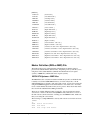
<L/R> means either Left or Right side In general, the three markers on each Knee Alignment Device are identified
markers.
internally by VICON Clinical Manager through the Marker group in the CFG file as
<L/R>KAX or KNE, <L/R>KD1, and <L/R>KD2. Each Knee Alignment Device
marker in the C3D file should have a unique marker label assigned to it. However, as
there are no knee markers present during a Knee Alignment Device static trial, the
same label can be used for both the knee markers, <L/R>KNE, and the Knee
Alignment Device stem markers, <L/R>KAX. Both assignments must be present in
the Marker group in the CFG file.
When the VICON Clinical Manager software detects the presence of the Knee
Alignment Device markers in a three-dimensional data file, it recognizes the
presence of Knee Alignment Device(s). As knee markers cannot be present at the
same time as Knee Alignment Device s, the program assigns the shared labels to the
Knee Alignment Device stem marker(s).
Clearly, it is important that the labels assigned to the other Knee Alignment Device
markers, <L/R>KD1 and <L/R>KD2, are not shared by any other markers.
User Manual – MLS Knee Alignment Device
Editing the Appropriate Files • 6