1
Shining Utilities Installation and Instruction Manual
Partition Type
Once the proper partition schema is determined and selected, a hard drive can be
partitioned to the following partition types:
•
Standard –This is the old 16 bit that was used with low drive capacity for system
from 6 to 7.6.1. It is also known as HFS.
•
Extended–The Extended File system was first introduced in Mac OS 8.1. It
addresses the HFS size limitations.
•
File Exchange( DOS ) – Windows compatible partitions from Windows
95/98/2000/XP.
Limit on Number of Total Partitions
Please note that this application allows only a maximum of 8 partitions to be created in a
drive. It was done this way to be compatible with Apple’s Drive set-up.
Partitioning Rules
There is no maximum of partitions that we are aware of. The partitioning application sets
the limit. We don’t know of any limitation by Apple about how many volumes can be
mounted on the desktop.
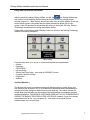
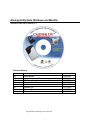
Using the Shining Drive Setup
Since all Mac OS systems come with a Drive Setup application, why does one need the
Shining Drive Setup? In classic Mac OS (System 9), the Apple application does not
support external and third party drives.
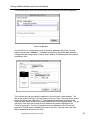
The Shining Drive Setup lets you partition drives in Shining enclosures. The Shining Drive
Setup application works like the Apple one, so it can be used right away.
This application doesn’t support boot partitions yet, and it has only been tested with Apple
and Shining drivers.
This application relies on the respective drivers to support certain services that have been
defined by Apple. Since partitioning was never a big issue because Apple offered it for the
internal drive, many driver writers ignored this support and hence this application may not be
able to work on all drives. Shining, however, tries to support all the calls for their products.
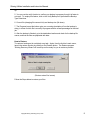
So, if the application fails to format a third party drive, you will have to format it in the Finder.
Copyright Shining Technology 2001, 2002 ?
35