1
RouterBOARD 333 Series User's Manual
Hardware Guide
Memory and Storage Devices
Onboard Memory
The boards are equipped with 64 MB DDR SDRAM onboard memory.
Onboard NAND Storage Device
The boards are equipped with one 64MB NAND nonvolatile memory chip.
Extension Slots
MiniPCI Slots
The board has three MiniPCI Type IIIA slots with 3.3V only power signaling. They also accept MiniPCI Type
IIIB standard cards. The board has been tested to operate with 3 Ubiquity SR2 high power cards if ambient
temperature and adequate cooling is ensured.
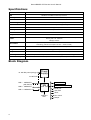
Supplied power for the extension cards (excluding CPU and onboard Ethernet ports):
+3.3V: 5.5A max
Input/Output Ports
LAN1 Port with PoE
This Fast Ethernet port is recognized as the first LAN interface. It is compatible with passive (non-standard)
Power over Ethernet. The board accepts voltage input from 12 to 28 V DC. It is suggested to use the higher
voltage for power over long cables because of better efficiency (less power is lost in the cable itself and
power supply is more efficient).
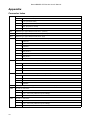
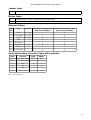
See Connector Index for pinout of the standard cable required for PoE. All cables made to EIA/TIA 568A/B
cable specifications will work correctly with PoE. Note that this port supports automatic cross/straight cable
correction (Auto MDI/X), so you can use either straight or cross-over cable for connecting to other network
devices.
LAN2 Port
This Fast Ethernet port is recognized as the second LAN interface. This port does not support Power over
Ethernet.
All cables made to EIA/TIA 568A/B cable specifications will work correctly (see Connector Index for
pinout). Note that this port supports automatic cross/straight cable correction (Auto MDI/X), so you can use
either straight or cross-over cable for connecting to other network devices.
LAN3 Port
This Fast Ethernet port is recognized as the third LAN interface. This port does not support Power over
Ethernet.
All cables made to EIA/TIA 568A/B cable specifications will work correctly (see Connector Index for
pinout). Note that this port supports automatic cross/straight cable correction (Auto MDI/X), so you can use
either straight or cross-over cable for connecting to other network devices.
DB9 Serial Port
The RS232C standard male DB9 asynchronous serial port may be used for initial configuration, or for
attaching a modem or any other RS232 serial device. TxD (pin 3) of this port has -5V DC power when idle.
Some signals are not connected, so this implementation may not be considered to support full hardware
flow-control, so software flow-control (XON/XOFF) or none at all should be used.
Fan Connectors
You can connect up to two fans to the RouterBOARD, but only one of them will work at a time. They will
receive the same voltage as the board itself (CAUTION: you may damage the fans if the input voltage of
5