1
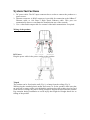
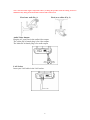
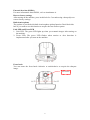
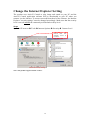
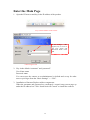
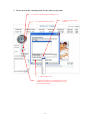
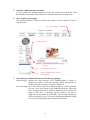
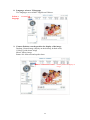
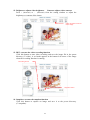
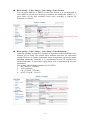
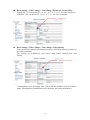
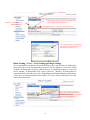
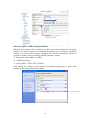
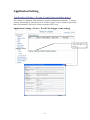
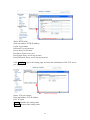
MPEG4 /3GPP Professional Revolving PT Network Camera User’s Manual Version 1.0 1 Content Content...........................................................................................................................2 Packaging Contents........................................................................................................4 System requirements......................................................................................................5 Introduction....................................................................................................................6 Features and Advantages................................................................................................6 System Instructions........................................................................................................7 Hardware Installation...................................................................................................10 Camera Setting............................................................................................................. 11 Camera Setting from a Router .....................................................................................13 Change the Internet Explorer Setting...........................................................................14 Enter the Main Page.....................................................................................................15 Camera Main Page.......................................................................................................17 System setting ..............................................................................................................27 Basic Setting ................................................................................................................27 System .................................................................................................................27 Video/Image ........................................................................................................28 Audio ...................................................................................................................35 User......................................................................................................................36 Network...............................................................................................................38 Network........................................................................................................38 Wireless........................................................................................................39 Streaming .....................................................................................................44 PPPoE ..........................................................................................................45 DDNS...........................................................................................................47 UPnP ............................................................................................................48 SMTP Server................................................................................................50 Samba...........................................................................................................51 Date/Time............................................................................................................54 IP Filter ...............................................................................................................55 Application Setting ......................................................................................................56 Event....................................................................................................................56 2 Motion Detection................................................................................................62 Firmware upgrade .............................................................................................63 Factory Default...................................................................................................65 Reboot .................................................................................................................67 Attachment A: External Alarm.....................................................................................68 Attachment B: Bandwidth Estimation .........................................................................70 Attachment C: Troubleshooting and FAQs..................................................................71 3 Packaging Contents The MPEG4 PT Internet Camera is provided with the following accessories. Please contact your dealer if any one of the following is missing. 1. The PT Internet Camera 2. 12V DC power cable 3. Tripod 4. AV Y cable 5. Quick guide 6. CD 4 System requirements MPEG4 PT Internet Camera Internet Environment LAN 10/100M Ethernet Wireless LAN 802.11b or 802.11g Monitor System Requirements OS support Browser support Hardware Windows 2000 Professional SP4, XP Home SP2 Internet Explorer 6.x or later CPU: Pentium 4 2.4 GHz or later Memory: 256 MB (512 MB recommended) VGA card resolution: 800 x 600 or higher 5 Introduction The MPEG4 3GPP Professional Revolving PT Internet Camera is a multi-functional stand-alone PT Internet Camera that can connect to Ethernet, LAN, or any broad-band networks. Unlike traditional CCTV cameras, the MPEG4 PT Internet Camera has a built-in CPU and webpage server to provide users with a mechanism for home security or remote office monitoring applications. The MPEG4 PT Internet Camera supports 3GPP real-time video streams that allow you to control the home or office environment using a 3G mobile phone. The MPEG4 PT Internet Camera is easy to install and use. The built-in webpage server enables you to control the security and property of your home easily when you go abroad. Features and Advantages The MPEG4 3GPP Professional Revolving PT Internet Camera is a stand-alone PT Internet Camera. It can operate smoothly without the need to install additional software or hardware. All you need is a PC that is equipped with IE browser (6.0 or above) and connect the Internet Camera to the network to monitor the pre-set places remotely. The MPEG4 3GPP Professional Revolving PT Internet Camera provides you with protection of your personal, home, and property security. The MPEG4 3GPP Professional Revolving Internet Camera features: z 1/3"CCD color image sensor to ensure clear and vivid imaging effect; z MPEG4/MJPEG dual video compression mode and dual coding mechanism for multiple applications; z Support of 3GPP real-time video streams that allow you to control home or office environment using a 3G mobile phone; z Auto-pan camera with 270° (horizontal) and 135° (vertical) rotation angles and a maximum of 16 pre-set scan points; z Built-in smart motion detection to monitor abnormal situations automatically and transmit real-time trigger command actively as preset; z Built-in webpage server that allows easy control via the Internet; z Dynamic IP domain name support for use of the product at locations where fixed IP is not available; z Access setting by level to ensure security and protection of life and properties; z Elegant style suitable for homes, studios, offices, clinics, and retail shops; and 6 System Instructions 1. DC power cable: The DC input connector has a socket to connect the product to a power source. 2. Ethernet connector: A RJ-45 connector is provided for connection to the 10Base-T Ethernet cable or 100 Base-T High Speed Ethernet cable. This port can automatically detect or coordinate the transmission rate of the network. 3. Use a video/audio output cable for external video/audio transmission if required. Wiring of the product MIC External alert bus Reset Power LAN socket Video/audio output DC Power Plug the power cable in the power socket on the product. Plug the power cable Tripod The product can be fixed on the wall (Fig. 1) or hung from the ceiling (Fig. 2). When using the attached plastic anchor and screws to fix the product, make sure that no steel bars or power cables exist behind the position where the product is to be fixed. Some walls or ceilings may not be strong enough to support the tripod and the product. Pay attention during installation to avoid injury that might be brought about due to falling of the product. 7 Note: The horizontal angle is important when you hang the product from the ceiling. Excessive inclination may bring about abnormal rotation of the camera lens. Fixed on a wall (Fig. 1) Fixed on a ceiling (Fig. 2) Audio/Video Output Plug the AV converter in the audio/video output. The yellow RCA female plug is for video output. The white RCA female plug is for audio output. Video output LAN Socket Insert your LAN cable in the LAN socket. LAN socket 8 Audio output External alert bus (DI/DO) For more information about DI/DO, refer to Attachment A. Reset to factory settings After turning on the machine, press in this hole for 5 seconds using a sharp object to reset to factory settings. Built-in microphone The product is provided with built-in microphone pickup function. Don't block this hole if you want to use this function to acquire the best audio response. Link LED and Event LED 1. Link LED: The green LED lights up when you transmit images after turning on the machine. 2. Event LED: The green LED flashes when motion or alert detection is implemented after you turn on the machine. MIC External alert bus Reset Focus knob You can rotate the focus knob clockwise or anticlockwise to acquire the sharpest image. Focus knob 9 Hardware Installation You can install the product on your desk or use the attached tripod to hang it from the wall or ceiling. (The product is provided with image flip function. Refer to the “Control Panel” for more information.) Confirm the position for installation of the camera 1. Connect to the LAN cable Plug one end of your LAN cable in the LAN socket on the back of the camera and connect the other end to the network that you want to access to. Pluck in LAN socket 2. Connect to the power source Plug one end of the attached power cable in the power socket of the product and connect the other end to the AC power source. When the product has been connected and turned on, the Pan/Tile camera turns to the original point automatically and the LED: Event status lights green. When any link to the network is detected, the LED: Link status flashes green. Connect to the power supply and check that the LED functions normally. Note 1: You can install the product quickly with reference to the quick guide attached to the product. You can specify three LED statuses by setting: 1.ON; 2.OFF; 3.Flash. For more information about setting of LED status, refer to the “System Setting”. Note 2: Don't install the camera at an oblique angle to avoid disrupted operation of the machine. 10 Camera Setting After the hardware has been installed, insert the attached CD in the computer and execute IP FINDER.EX following the steps below to search and change the IP address of the camera. 1. Start the machine. Execute the IP Finder.exe from the attached CD. 2. Search the camera (Search) Search the product from your LAN. The factory IP setting 192.168.0.20 appears on the screen. 1. Click Search to find the IPCAM on the LAN. 3. Changing the IP address and related settings for the network environment When you find the camera, click it and the settings appear on the right side. Change the settings for the new network environment you need. 2. Enter the settings for the new network environment you need. ※ You must enter new settings in the IP, Netmask and Gateway fields and keep the settings in other fields unchanged. 4. Submit data (Submit) Click Submit to validate new settings. 11 3. Click Submit to validate new settings. 5. Confirmation When all changes have been confirmed, click Exit to quit. 4. When all changes have been confirmed, click Exit to quit. Notes: 1. The IP FINDER can only find the IP addresses of the cameras that share the same hub on the LAN. For information about finding IP addresses on the Internet, refer to the “DDNS Setting”, or “UpnP Setting”. 2. All camera/network server products can be found and changed using the IP FINDER software. 3. When the IP FINDER software cannot be executed, check your antivirus software or firewall to remove the block. 4. Field description: You can give a name to your camera (such as “PT_IP” or “PT-IP”). No spaces allowed (such as “PI IP”). You can change the settings for IP, Gateway Address and Network Mask to meet the requirements of your network environment. The product uses HTTP Port1 and does not support Port2 settings. MAC: Factory default network identity of the machine. 12 Camera Setting from a Router You can use DHCP when you want to use the camera on the Intranet (LAN). However, the IP must be set to fixed when you want to use the camera on a WAN. For this application, it is required to set up the function of the virtual server on the ADSL router. Follow the steps below to complete the setting: 1. Enter the camera setting page to set a fixed IP. (Refer to the “Network Setting”.) Ex.: 192.168.0.49 2. Enter the ADSL router main setting page. 3. Enter the Virtual Server setting page. a. Set “mapping of HTTP Port (80) to 192.168.0.49 ”. b. Restart ADSL router. When completing the setting, you can operate the camera from the WAN IP Address via the ADSL router. The Virtual Server setting screen Note: The virtual server setting screen is not the same for all ADSL routers. Refer to the manual of the ADSL router you purchased for more information about the setting. 13 Change the Internet Explorer Setting The product uses ActiveX Control to play image and sound on your PC and the ActiveX Control application software will be downloaded to your PC when you connect it to the Internet. To ensure successful download of the software, the Internet Explorer "security settings" must be changed accordingly. Make sure that the security level is set to Level II, the commonly used default security level. Steps: Open the IE browser Î Tools Î Internet Options Î Security Î Custom Level Check that the security level is Level II. Check the security setting Note: This product supports IE 6.0 or above. 14 Enter the Main Page 1. Open the IE browser and key in the IP address of the product. Key in the IP address of the camera When the login screen appears, key in "root" in the User Name and Password fields. Click OK. Camera login screen 2. Key in the default “username” and “password”. User Name: root Password: root You can access the camera as an administrator by default and set up for other users or privileges from the “Basic Settings” -> “User”. 3. Installation of Internet Explorer ad-hoc components When the username and password are confirmed, a control setup screen pops up under the IE address bar. Click “Install ActiveX Control” to install the controls. 15 Click “Install ActiveX Control”. Setup prompt screen 4. The security of warning screen appears. Click "Install". Click “Install”. 5. When ActiveX Control is installed successfully, you can see the camera image and interface. Camera main page and image 16 Camera Main Page Descriptions: Source: Information bar 1. Format: resolution of the current video stream 2. FPS: FPS of the current video stream 3. BitRate: bandwidth per second of the current video stream Product name Image area Attention: Please change the streaming setting to HTTP if nothing appears in the image area. 17 Control panel 1. Camera direction: controls the direction of the camera (up, down, left, right, home position). Direction control. 2. Camera speed: controls the rotation speed of the camera from “1” (lowest) to “7” (highest). Rotation speed. Speed Angle/Sec. 1 3 2 20 3 40 4 60 18 5 80 6 100 7 120 3. Preset: presets the rotation points for the camera (16 points) 1. Click Set to enter the Preset Setting screen. 3. Control the camera direction. 2. Enter the name of the location. 4. Click Update to exit. 5. Select the number you need and click Go. The camera moves to the area automatically as set up by the selected number. 19 4. Tour: enables/disables the tour mode of the camera. The rotation points of the camera must be set up in advance. 1. Click Set to enter the Tour Setting screen. 2. Name the tour. You can set up 5 tour groups at maximum. 3. Dwelling time (sec.) at each tour point. 5. Click Update to Exit. 4. Select a preset location for the camera. 6. Click Enable to activate the tour function. 20 5. AutoPan: enables/disables AutoPan. You can enable the AutoPan function to make the camera move back and forth horizontally and automatically. Disable the AutoPan function to stop the scan. 6. Alert: displays alert trigger This indicator flashes to warn you when a movement or alert is detected. Click to stop the flash. Alert trigger display AutoPan function Enable/ disable the alert message display Alert message display area Enable/ disable the alert message Save function 7. Alert Message: enables/disables the alert message display. Alert Message: displays the alert message. Press Enable/Disable to enable or disable the display of the alert message. When this function is disabled, the alert message will not be displayed. Save AlertImg: saves the alert message. Press Enable/disable to enable or disable the save of the alert image in the Snapshot directory. When the Save AlertImg function is enabled, double-click it to show the image of the alert. A message appears whenever an alert is triggered (50 messages at maximum). The message disappears when you quit the screen. (For more information about the setting, refer to the Setting/Application Setting/Event/Event.) 21 8. Language: selects a UI language Two languages are available: English and Chinese. Selects a language 9. Camera Position: sets the position for display of the image Desktop: Normal image (display on the desktop; default value) Ceiling: Upside-down image Mirror: Mirror image Rotate 180: Mirrored and upside-down. Set the position for display of image. 22 10. View Size: selects the size of the image Select the size of the image from 0.5 to 4 times. Select an image size 11. Streaming: sets the video stream protocol (HTTP is recommended) The product provides three different video streaming protocols: UDP, TCP, and HTTP. HTTP is the most recommended because it allows the video stream to go through the firewall. (Refer to Setting/Basic Setting/Network/Streaming for more information). UDP: It provides the fastest but unreliable transmission service. Video steams are transmitted thought UDP Port (50000~60000 by default) to ensure the fastest image transmission. However, video fragment or mosaics may occur due to poor transmission quality. TCP: It provides reliable data transmission. Video steams are transmitted through RTSP Port (554 by default) to avoid video fragment or mosaics due to poor transmission quality. HTTP: Video streams are transmitted through HTTP Port (80 by default) to ensure going through firewalls. 23 Select a video stream protocol 24 12. Brightness: adjusts video brightness Contrast: adjusts video contrast Press + (increase) or ﹣ (decrease) from the setting window to adjust the brightness or contrast of the image. Adjust brightness/contrast of the image 13. REC: executes the video recording function Click this button to start video recording and save the image file in the preset directory (C:\video). A red mark appears at the bottom left corner of the image when the recording function is running. Recording button Snapshot button 14. Snapshot: executes the snapshot function Click this button to capture an image and save it to the preset directory. (C:\snapshot). 25 15. Path: sets the save path and name for recorded images and snapshots. The filename is the recording date by default. You can identify the file by prefix of the filename. Click the Path field to select the folder to save the file. Save the path Pickup function Automatic Noise Suppression system 16. Audio On/Off: turns on/off the pickup function Click the button to mute the sound from the built-in microphone. A cross-out mark appears on the speaker icon to indicate the mute status. 17. ANS: Automatic Noise Suppression system. (The ANS function is enabled by default and it is recommended to keep this function enabled.) This function can suppress noise around the camera such as regular fan noise. Click the button to disable the ANS function. A cross-out mark appears on the ANS icon to indicate the noise suppression status. 26 System setting System setting contains basic and application settings. The basic setting is executed for basic system information, transmission speed, audio/video code, user authorization, date/time, and IP filter, while the application setting is executed for event triggering definition and other relevant settings, definition of the motion detection area, firmware update, reset to factory default, and reboot of the machine. Basic Setting Click Setting to enter the setting page Basic Setting > System (System info) Basic Setting > System > System Info Device Name: You can set the name for your camera here. Click Set to complete the setting. MAC Address, IP Address, Network Mask, Gateway: Network information. Firmware: Firmware version information. Current Viewers: The number of viewers who are currently accessing the video stream. LED: Event status: You can set the LED display mode (ON, OFF, Flash) here. ON: The LED flashes when any motion detection or alert trigger is identified. OFF: LED is turned off. Flash: LED flashes according to the user-defined interval. LED: Link status: You can set the LED display mode (ON, OFF, Flash) here ON: The LED lights up green when a video stream is detected. Otherwise, it does not activated. OFF: LED is turned off. Flash: LED flashes according t o the user-defined interval. Basic Setting > System > System Log The administrator can view all login information of this camera, including boot record, video streaming mode, login IP, changes, and the date/time information. You can copy the entries to a Word document and save them manually. Please note that all information are deleted when you turn off the machine. 27 Basic Setting >Video/Image Basic Setting > Video Image > Video Image Basic Setting > Video / Image > Video Image > 3GPP To view the camera image using a 3G cellular phone, click Enable to enable the 3GPP mode. (Note: When the 3GPP mode has been activated, all relevant parameters are set automatically and cannot be changed for the sake of compatibility). 3GPP mode To use the 3GPP function, the following requirements must be met. Contact your telecom company to learn more about the connection conditions): 1. 3G phone: Your cellular phone functions properly and supports 3G service. The compatible cellular phones that have passed our test are: Nokia 6630, Nokia N73, Wibo WinII, Nokia E61, Nokia N70, Nokia N93 2. 3G phone number is available. 3. The 3G wireless networking service is available. 4. The camera has a fixed IP address. 5. The 3GPP mode is activated. Ex: Nokia N71 2. Select a streaming link 1.Enter multimedia data from the main screen. 28 4. Enter the link name. 3. Add a new link. 6. Select OK to save the setting. 7. Select this stream name to proceed with linking. 8. Select “Yes” to connect. 10. Loading the image. 9. Connecting. 29 5. Enter the IP address of the camera, e.g. rtsp://xxx.xxx.xxx.xxx:554/cam1/3gpp 11. Video stream screen . 30 Basic Setting > Video / Image > Video Image >Video Format You can select MPEG4 or MJPEG as the video format. It is recommended to select MPEG4 for real-time browsing to optimize the bandwidth. MJPEG is a good choice for the best resolution when video recording is required for collection of evidence. Select a video streaming format Basic Setting > Video / Image > Video Image >Video Resolution Generally speaking, selection of resolution is dependent on the bandwidth of the network you are using. The product offers different selections for video/audio settings. However, to ensure undisrupted image transmission, you need a higher uploading bandwidth. Generally, it is recommended to use CIF resolution for normal bandwidth. To meet other requirements, refer to Attachment B for more information. The product offers 4 image resolutions (PAL/NTSC): 1. D1 (704x576 / 704x480) 2. VGA (640x480) 3. CIF (352x288 / 352x240) 4. QCIF (176x144 / 176x112) Select an image resolution 31 Basic Setting > Video / Image > Video Image >Frame per Second (FPS): With NTSC, you can choose 30, 15, 10, 7, 6, 5, 4, 3, 2, or 1 for video resolution With PAL, you can choose 25, 12, 6, 5, 4, 3, 2, 1 for video resolution. Select a FPS Basic Setting > Video / Image > Video Image >Video Quality You can select Fix Quality (resolution priority) or Fix Bitrate (fluency priority) at the same bandwidth. Five options are available for your choice: Best, Better, Normal, Fast, and Fastest. Select a video quality 16 transmission speeds ranging from 32K to 4M are available in the Fix Bitrate mode. The higher the transmission speed, the better the quality and fluency. 32 Select GOP to update the speed. GOP provides users with the function to set the pages of the I Frame and P Frame to be transmitted in the MPEG4 mode. Basically, the I Frame page contains the entire picture and needs higher bandwidth, while the P Frame page only contains the parts that are different from the I Frame and needs lower bandwidth. Hence, when you need to transmit the pages without disruption in a normal network environment, you can set up a higher GOP. For example, if GOP 25 is selected, 24 P Frame pages will follow 1 I Frame page, and so forth. However, packets may be lost when they are transmitted in a congested network environment. In this case, the following P Frame pages may bring about disruption of the transmission because they lose the reference upon which the difference from the I Frame is identified. You may change GOP to 10 with this concern to avoid disruption of the transmission. The GOP is 15 by default. Basic Setting > Video Image > OSD You can set to display the date, camera name and other information on the screen. Basic Setting > Video Image > OSD > Display Mode You can select to display the date (Date), time (Time) or text (Text). Basic Setting > Video Image > OSD > Display Text You can key in the text to be displayed on the screen (Ex.: Lobby IP Cam) Basic Setting > Video Image > OSD > Display Color 256 colors and tones from 0 (deepest black) to 255 (lightest white) are available for display of the text. Basic Setting > Video Image > Sensor (brightness/contrast adjustment) You can adjust the brightness and contrast here. Basic Setting > Video Image > Sensor > Brightness You can adjust the brightness from 0 (darkest black) to 100 (brightest white). Basic Setting > Video Image > Sensor > Contrast You can adjust the contrast from 0 (max. contrast) to 100 (min. contrast) 33 OSD setting Brightness/contract adjustment Date, time, and text display 34 Basic Setting > Audio (Sound) Basic Setting > Audio > Audio (sound setting) Basic Setting > Audio > Audio > Audio Raw Format You can select No Audio or PCM. When you select No Audio, the sound transmission from the built-in microphone pauses. When you select PCM, the sound transmission resumes. The factory default is PCM. Sound transmission format 35 Basic Setting > User(User) The administration of the camera can set up access privileges by administrator, operator, and viewer to ensure the security and control of the camera. The access privileges and setting steps are described as below. Basic Setting > User > User List (access privilege list) The access privileges of the administrator, operator, and viewer are listed as follows. The administrator has the right to define the privilege for each user depending on requirements. User Live View System Setting Video Setting 3GPP Audio Setting Date / Time Setting User Setting Network Setting Wireless DDNS setting PPPoE setting Streaming UPnP SMTP SAMBA Notification IP Filter setting Event Setting schedule setting event server trigger setting Motion Setting Firmware Upgrade Factory default Reboot Setting PTZ Control Administrator Operator Viewer v v v v v v root v v v v v v v v v v v v v v v root v v v v v v v v v v v v v v User with PTZ privilege Steps: Click Add (to add a new user), Update (to change the privilege or password of a user on the list), or Delete (to delete a user from the list) and complete required fields. Then Click "Save" to complete the setting. Options: Add: Add a new user and set up a different privilege. Update: Change the privilege or password of a user. You cannot change the name of the user. Delete: Delete a user from the list. 36 User setting Change the privilege or password of a user. You cannot change the name of the user. Add a new user and set up a different privilege. Delete a user from the list. Log in the username, password and privilege as required. You can also define the PTZ control here. Basic Setting > User > User Setting (privilege setting) For special business situations, the product allows you to log in to browse without the need of keying in your username and password. For this purpose, you need to check “Enable” at Anonymous Login. To allow the user to control the camera, you need to check “Enable” at Anonymous PTZ Control. However, “Disable” for both options is recommended for the sake of security. Depending on the bandwidth and requirements, a limit up to 10 can be defined for the number of viewers who are allowed to view the camera simultaneously. Activate the anonymous view and camera rotation functions; define the number of viewers who are allowed for on-line review simultaneously. 37 Basic Setting > Network (Network setting) Basic Setting > Network > Network (cable network setting page) Basic Setting > Network > Network > IP Assignment Cable network setting page DHCP setting: DHCP(Dynamic Host Configuration Protocol) is a protocol that enables automatic assignment of TCP/IP information to the client. Each DHCP client connects to the DHCP server to access its network setting information, including IP address, gateway, and DNS server. The IP address of the camera is 192.168.0.20 by default when DHCP is "OFF". When you select "DHCP ON" and access to the DHCP network environment, the camera will automatically send a DHCP packet to request an IP address. This IP address is assigned automatically from the DHCP server on the network. No additional settings are required for this page unless you need to change the network configuration. The DHCP status of the camera is "OFF" by default. Other settings: For IP address, Subnet mask, Default gateway, DNS 1, and DNS 2, the DHCP server will assign these values automatically when DHCP is in "ON" status; otherwise, you need to key in the values manually. Note: Where no IP address is assigned from the DHCP server, the system will set the Link-Local Address automatically. Chunghwa Telecom DNS: 168.95.1.1 38 Basic Setting > Network > Wireless (wireless network setting page) Note: Only the wireless model provides the wireless networking function. The standard and PoE model do not provide this function. The cable network setting procedure shall apply where the LAN socket is connected to the network cable. Where wireless network is required, you need to remove the network cable after completing the wireless network setting and restart the machine. Wireless network setting page Basic Setting > Network > Wireless > Wireless Wireless networking mode 39 Mode: Selection of the wireless networking mode 1. Infrastructure: Infrastructure networking mode The camera uses the wireless Access Point (AP) as the hub when it is in the infrastructure networking mode and connects to the network via the wireless AP. 2. AdHoc: Point-to-point networking mode The camera connects to other wireless devices via a wireless network when it is in the AdHoc point-to-point networking mode; i.e. the product connects to other devices equipped with built-in wireless connection function without the need to access from any AP. Note: Where no IP address is assigned from the DHCP server, the system will set the Link-Local Address automatically. 40 Network authentication type Authentication Type: Network authentication type 1. Open System: No encryption. 2. Shared Key: Security of data is highly protected by encryption during transmission. Note: Refer to the user setting instructions of your wireless IP sharer for more information. Base station SSID name Base station encryption settings SSID: Service Set Identifier Enter the name of the base station (AP) to which you want to access. 41 Encryption options IP setting in the wireless networking mode WEP Encryption: WEP encryption function When the base station (AP) to which you want to access has enabled the encryption function, you need to acquire the following information by accessing its encryption settings. You can use the computer equipped with wireless networking function to view the available wireless networks from the Windows system. ① Encryption mode (64Bit or 128Bit) ② Authentication type ③ Group (KEY1, KEY2, KEY3, KEY4) Then change the settings on the wireless networking setting page to make them conform to the settings of the base station. Base station with enabled encryption function 42 Encryption mode Encryption authentication type Encryption group WEP security mode: Select an encryption mode from the list. The format is “None” by default, indicating that the security function is disabled. Authentication mode: One of the following authentication modes is required when you select a WEP encryption mode from the security list. 1. 64 Bit (10 Hex chars) 2. 64 Bit (5 ASCII chars) 3. 128 Bit (26 Hex chars) 4. 128 Bit (26 ASCII chars) WEP key password encryption mode: You can set up 64 Bit or 128 Bit WEP key password encryption mode. A set of 64 Bit encryptions is equivalent to 10 sets of hexadecimal digits or 5 sets of ASCII characters. A set of 128 Bit encryptions is equivalent to 26 sets of hexadecimal digits or 13 sets of ASCII characters. Encoding HEX ASCII Available characters 0~9, a~f, A~F 0~9, a~f, A~Z 64 Bit 10 5 128 Bit 26 13 Ex.: Wireless mode setting (applicable to most situations) Selection: 1. Mode: Select Infrastructure to connect the camera to a wireless base station. 2. Authentication Type: Select Shared Key. 43 3. SSID: Enter the server name of the base station. 4. WEP Encryption: Select the encrypted key that is the same as the base station. 5. KEY: Select a group that is the same as the wireless base station. You must select KEY1 for base stations that only have a set of keys. 6. DHCP ON/OFF: DHCP ON is recommended. 7. Save the settings. 8. Restart the machine. Basic Setting > Network > Wireless > Wireless IP Assignment (IP setting in the wireless networking mode) DHCP setting: DHCP (Dynamic Host Configuration Protocol) is a protocol that enables automatic assignment of TCP/IP information to the client. Each DHCP client connects to the DHCP server to access its network setting information, including IP address, gateway, and DNS server. The IP address of the camera is 192.168.0.20 by default when DHCP is “OFF”. When you select “DHCP ON” and access to the DHCP network environment, the camera will automatically send a DHCP packet to request an IP address. This IP address is assigned automatically from the DHCP server on the network. No additional settings are required for this page unless you need to change the network configuration. The DHCP status of the camera is “OFF” by default. Other settings: For IP address, Subnet mask, Default gateway, DNS 1, and DNS 2, the DHCP server will assign these values automatically when DHCP is in "ON" status; otherwise, you need to key in the values manually. Basic Setting > Network > Streaming (steaming setting) Setting of the video steaming port (HTTP and factory default are recommended) 1. HTTP: Port 80 can pass through most firewalls. Video streams are transmitted through HTTP Port (80 by default) to ensure passing through firewalls. 2. RTSP: Port 554 uses a fixed port (i.e. TCP) or can be defined by users to ensure reliable data transmission. Video streams are transmitted through RTSP Port (554 by default) to avoid video fragment or mosaics due to poor transmission quality. 3. RTP: Port 50000 to 60000 are UDP ports and can be defined by users. They provide the fastest but unreliable transmission service. Video streams are transmitted thought UDP Port (50000~60000 by default) to ensure the fastest image transmission. However, video fragment or mosaics may occur due to poor transmission quality. 44 Streaming port setting Basic Setting > Network > PPPoE (dial-up networking setting) PPPoE: Point-to-Point Protocol over Ethernet is a protocol that supports access to a high-speed wideband network using a PC and a wideband modem (such as xDSL, Cable, Wireless modem). The user need only to equip the PC with an Ethernet card and apply to ISP (such as HiNet) and ADSL provider (such as Chunghwa Telecom) for ADSL service to roam the Internet through ordinary twisted copper wires. PPPoE: Point to Point Protocol over Ethernet is applicable to networking via a xDSL or cable modem. PPPoE setting must be executed in the LAN environment for your PC to connect to ADSL. Follow the steps below to complete the setting: 1. Dial: You can select whether or not to dial when you boot the machine. 2. Use DHCP or fixed IP for connection to the LAN environment. 45 3. Key in the IP address of the camera and enter "PPPoE Setting" following the route Setting Î Basic Setting Î NetworkÎ PPPoE. 4. Key in the xDSL "Username" and "Password" acquired from your ISP. Click Save to confirm the setting. 5. Where the ADSL modem and the camera is connected via a switch-hub, you can press “Reboot” or restart the machine manually to try PPPoE dialing when the setting of the camera has been completed. 6. To know the new IP address acquired when the PPPoE dialing has been executed successful, follow the route Setting Î Basic Setting Î NetworkÎNotification for the IP information. You can acquire the new IP address via SMTP, FTP, and HTTP. Refer to the “Notification Setting” page for more information. Note: You can use the DDNS function to access the camera. Refer to the “DDNS Setting” page for more information. PPPoE setting Basic Setting > Network > PPPoE > PPPoE Dial: You can select whether or not to dial when you boot the machine (On Boot or Off). Username: Enter the username provided by your ISP. Password: Enter the password. Basic Setting > Network > PPPoE > PPPoE Information IP Address: The IP address acquired when the dialing has been executed successfully. Subnet Mask: The subnet mask information acquired when the dialing has been executed successfully. Default Gateway: The gateway information acquired when the dialing has been executed successfully. DNS: The ISP domain name acquired when the dialing has been executed successfully. 46 Basic Setting > Network > DDNS (Dynamic Domain Name Server Setting) The IP address (Ex. 210.168.0.22) is like a telephone number, while the website address is like a name in an address book. The DDNS allows the user to access the website by entering the name of the website without memorizing a bunch of cold numbers. When you apply for an Internet service, you will have at least one IP address from your ISP, which is either a fixed or dynamic one. Most of the ADSL service providers will give you a dynamic one for the ADSL environment, which means your IP address will constantly change each time you connect to the Internet, and as a result users from WAN will have much difficulty finding your correct IP address. The DDNS (Dynamic DNS service) is created for exactly this kind of moment. By updating your WAN IP address each time you connect to the Internet, the DDNS helps you locate your website and access your website easily. You can find a lot of free DDNS service providers on the Internet, such as www.no-ip.com and www.DynDNS.org. Some gateway-routers can directly communicate with DDNS. In this case, you may directly enter your DDNS account on the setting page in the Internet router, then the router will update your WAN IP status whenever it is changed and report to the DDNS. If your router does not support direct communication with the DDNS, you can download a small application program on the DDNS service page to help you update your WAN IP. Item Description: Active: enables/disables DDNS DDNS Server: currently we only support http://dyndns.org. This is a free domain name server provided by DynDNS. You may log on this website for relevant information and apply for free domain names. Username: your account for the domain name you applied for Password: your password for the domain name you applied for Domain Name: the domain name you applied for. DDNS setting 47 Basic Setting > Network > UPnP (Universal Plug and Play) If you connect your camera to a router, IP allocator, or wireless AP, your camera will possibly be blocked by the NAT and can’t be located on the Internet. To penetrate into the firewall, activate the supportive item- UPnP. The Link URL shows the external IP address and the port of the router. Enter the IP address in the Internet Explorer to penetrate the NAT. Basic Setting > Network > UPnP > UPnP Device Active: yes (enable)/no (disable) Device Name: the name of the UPnP device Basic Setting > Network > UPnP > UPnP Traversal Active: yes (enable)/no (disable) Port Range: the range of the usable ports, from 32768 to 65535 as default Link URL: Uniform Resource Locator, the web address Click “Save” to confirm when you finish. Web address UPnP setting 48 To activate the UPnP function in Windows OS: Ex: Windows XP: 1. Windows component installation. 1. Click Control Panel 2. Click Add/Remove Programs 4. Click Networking Services 6. Check UPuP User Interface 5. Click Detail 3. Click Add/Remove Windows Components 2. Open Windows firewall option 2. Click Exceptions 1. Click Windows Firewall in the Control Panel 3. Check UPnP Configuration. 49 3. View the connection device using Network Neighborhood 1. Open Network Neighborhood 2. The LAN camera appears. Double-click to access the main page. Basic Setting > Network > SMTP Server (mail server setting) The camera is able to transmit images to a particular email address when a motion detection event occurs or a sensor is triggered. To use this function, a mail server setting of the camera is required. Enter the following information in sequential order to complete the setting: z SMTP server: the SMTP server IP address. z SMTP From: the email of the sender, i.e. [email protected] z SMTP Authentication: enables/disables z User name: the SMTP server username. z Password: the password of the SMTP server. z Select “SAVE” to save the setting. 50 Basic Setting > Network > Samba The camera is able to upload the snapshots to a specified shared folder when an event is triggered. To use this function, the setting of Samba setting is required. Options: Active: Enable/Disable Samba Authentication: Enable/Disable Username: the username Password: the password Path: specify the IP address of the computer you want to share with and the file name, i.e. 192.168.0.X/xxx Shared Folder Size (MB): the total capacity of the folder. Always remember to set the size of the folder to avoid exhaustion of disk capacity. Max Record File Size (MB): the upper limit of the record file size. The size should not exceed the total capacity of the folder. Samba setting 51 Basic Setting > Network > Notification Of IP Address Change (IP address change notice) This setting is not necessary for a fixed IP. For a dynamic IP, you need to update the IP address every time you connect to the Internet to access the camera. This setting allows you to update the IP address by the automatic notification of IP address change. Choose one of the following three notice options to update the IP address: 1. Notification via SMTP mail server Basic Setting > Network > Notification of IP Address Change > SMTP Notification SMTP Notification: notification via SMTP mail server SMTP SendTo: the recipient, i.e. [email protected] SMTP Subject: mail subject Select Save to complete and activate your settings. 2. Notification via FTP server Basic Setting > Network > Notification of IP Address Change > FTP Notification FTP Server: FTP Server name. FTP Port: FTP port. The default setting is 21 (recommended). FTP Upload path: the path to upload files. FTP Login name: the name to log in the FTP. FTP Login Password: the password to log in the FTP. Select Save to complete and activate your settings. 3. Notification via HTTP server Basic Setting > Network > Notification of IP Address Change > HTTP Notification Server: the address of the server, i.e. http://. Port: the port to access HTTP. The default setting is 80 (recommended). Parameter: the setting of the parameters, refer to the installation setting of your HTTP server. Refer to the installation setting of your HTTP server for the setting of the parameters (such as Username, Password, and Proxy). Select Save to complete and activate your settings. 52 Notification setting 53 Basic Setting > Date/Time (date/time setting) Date/Time setting Basic Setting > Date/Time > Server Time (the date/time of the server) Basic Setting > Date/Time > PC Time (the date/time of your PC) Basic Setting > Date/Time > Time Setting (date/time setting) There are three ways to synchronize the time. 1. Synchronize the time with PC’s time: The preset method of time synchronization of the camera time with your PC time. 2. Get Time from an NTP server: synchronize the time with the NTP (Network Time Protocol) z Click on the “NTP” Button z Enter the NTP server’s IP address. z Press “SAVE” to activate it. The camera will update its time once obtaining the NTP time. Note: The default NTP servers are: A. NTP Server 1: 198.123.30.132 B. NTP Server 2: 192.43.244.18 C. NTP Server 3: 133.100.9.2 3. Change the time manually: z Click the “User Input”. z Select the format of date display, i.e. “yyyy/mm/dd” format. z Select the format of date display, “hh:mm:ss” by 24 hours format. z Select the time zone. z Select “Adjust” to adjust time. 54 Basic Setting > IP Filter This function filters IP addresses and is able to allow and deny visits from particular addresses/target addresses. IP filter setting Basic Setting > IP Filter > General IP Filtering: enables/disables the IP filter Policy: allows/denies access Basic Setting > IP Filter > Filter IP Address (Overview of the set IPs) Add: enter the IP address you want to allow or deny the access of in the front field. Remove: removes a set IP addresses Remove All: removes all the set IP address Special Attention Setting rules: 1. Actions that may cause a limited connection are to be denied. 2. Improper use of this function may cause disconnection from Internet. You might need to use hardware reset to reset to the factory default. Please refer to the “Factory Default” for details. 55 Application Setting Application Setting > Event (event trigger setting page) This camera is equipped with intelligent security management functions. It ensures security monitoring by allowing user to define “trigger events” based on particular times and situations, and set the camera response to the event. Application Setting > Event > Event List (trigger event setting) Click Add Event to enter the trigger event setting 56 Add Event : Add Event setting page Options: • General: Name: Name the trigger event here. • Response to event trigger: the time setting of the trigger event Always: Always monitoring During time: Check the date you want to monitor (Sun~Sat) and the duration of monitoring here. For example, if you want to set the camera to monitor from 7 pm after work to 7 am next morning from Monday to Friday, check the boxes from Monday to Friday, enter “19:00” in the “Start From” field, and enter “12:00” in the “Duration” field. Never: Do not set the time. • Trigger by: sources of trigger events (Note: You can only set one trigger event once.) Alarm input: The alarm is triggered by the security equipment connected from the DI terminals behind the machine, such as door/window detectors, infrared sensors. Motion The alarm is triggered when motion is detected. The camera will Detection: send an alarm when any objects appear in the set detection area. Video Loss: The alarm is triggered by video loss. The camera will send an alarm when there is no video transmission due to camera sabotage or other reasons. On boot: The alarm is triggered by reboot. The camera will send an alarm when the system is rebooted due to power shortage, sabotage, or other reasons. • Response process: trigger event response (Note: Multiple selections are available) Active alarm An event is responded by the security equipment connected from the out: DI terminal behind the machine, such as high-decibel alarms, light projectors. You can set the alarm duration in the “Duration” field. Send mail: The alarm will be sent to you by email. Send HTTP The alarm will be sent to the HTTP server you specified. To use this notification: function, set the coordinative HTTP server in the Event Server setting page in advance. Send TCP The alarm will be sent to the TCP Server you specified. To use this notification: function, set the coordinative TCP server in the Event Server setting page in advance. Go to preset The camera will move to the location you specified when a trigger location: event occurs. To use this function, set the present location of the camera in the main page in advance. Return to The camera will move back to the home position (center) home after event: Click Save to save and activate your settings when you completed setting. 57 Add Schedule: Add Schedule setting page The Add Event setting page and the Add Schedule setting page is basically the same except that the Add Schedule setting page does not have the option “Trigger by” to indicate the sources of the trigger event. Click Save to save and activate your settings when you complete setting. Delete: delete the event cluster setting. Modify: modify the event cluster setting. Application Setting > Event > Trigger (manual test of trigger response) Whenever the camera detects abnormal events during the scheduled time, it will automatically respond by performing trigger response. There are 3 types of trigger responses: alarm sending, LED status indicator flash, emailing the alarm or recorded image to the specified server. To use this function, enter the server information by accessing Application Setting > Event > Event Server. You may perform manual test as specified in this section once you complete the setting to ensure that all functions are working properly. 58 The default status of the digital input pin is set as “Normal Open”, but users can change it to “Normal grounded” by setting the page “Setting->Application->Event->Trigger”: 1. When alarm input is set to be “Normal Open”, then the external device connected to alarm input pin should be in open status. So when the external device is triggered to close status, the alarm input pin will be triggered. 2. On the contrary, when alarm input pin is set to be “Normal Grounded”(see the figure below), then the external device connected to alarm input pin should be in close status. So when the external device is triggered to open status, the alarm input pin will be triggered. Note: It is recommended to set up the Trigger Setting page( Setting-> Application Setting-> Event-> Trigger) before install the hardware alarm I/O.! Trigger Alarm output: Alarm output Click “Set” to trigger the alarm. Click “Clear” to stop the alarm. Trigger LED: LED indicator display LED: Event status: click “Set” to turn on the LED event status indicator. Click ”Clear” to turnoff the indicator. LED: Link status : click “Set” to turn on the LED Link status indicator. Click “Clear” to turnoff the indicator. Trigger mail: Sending mail Click “Set” after you enter the email address and subject to test the integrity of the sent mail. Trigger FTP: Sending AVI file to FTP Server Upload AVI files to FTP server to test the file integrity. HTTP Server: Sending message to HTTP Server Upload message to HTTP server to test the message integrity. Enter the message in the “Message” field. You may go to Application Setting > Event > Event Server to make a complete custom parameters settings. TCP Server: Sending message to TCP Server Enter the message in the “Message” field. Trigger SAMBA: Sending message to Samba shared folder Path: Enter the path of the shared folder in your PC. Application Setting > Event > Event Servers (setting for uploading trigger event file to the server) Here you can perform a complete setting for uploading files to the server. Please set servers (SMTP, FTP, SAMBA…etc) in the Event Server setting by the instructions below: 59 Click Add Ftp to go to the setting page and enter the information of the FTP server you specified. Add FTP setting page Name: the name of the FTP Network Address: IP address of the FTP Login: Log-in name Password: Log-in password Upload Path: Uploading path Port: Port Passive: Check to set the FTP status as passive Click Add Http to go to the setting page and enter the information of the HTTP server you specified. 60 Add HTTP setting page Name: HTTP name Network Address: HTTP IP address Login: Log-in name Password: Log-in password Proxy: Proxy server name ProxyPort: Proxy server port ProxyLogin: Proxy server log-in name Proxy Password: Proxy server log-in password Click Add Tcp to go to the setting page and enter the information of the TCP server you specified. Add TCP setting page Name: TCP server name Network Address: TCP IP address Port: TCP port Modify: Modifies the setting value Remove: Removes the setting value 61 Application Setting > Motion Detection You can open the setting frame by clicking on the area to monitor. To move area to monitor, drag the area with your mouse; to adjust the size of the frame, drag the arrow to adjust after you move the mouse to the edge of the area and left-click; There are 3 frames available for setting. You may adjust the sensitivity of the area by entering the sensitive degree in the “Sensitive” field. “1” is least sensitive, ”100” is extremely sensitive. Select Save to complete and activate your settings. Motion detection setting Area setting Setting frame 62 Application Setting > Firmware upgrade Firmware upgrade page Contact your dealer for more information about firmware upgrade. The sales representative will transmit the latest version to you via e-mail. When you receive the firmware, decompress the file (uImage.gz) to your PC and follow the steps below to execute the upgrade. Important! Read Carefully!! 1. Close all active applications on your PC. 2. Select “Firmware Upgrade” 3. The Firmware Upgrade Setting page appears. 63 Click Browse… to select the location where the firmware file is stored. 4. Click submit. 5. The auto upgrade runs. The Upgrade Status shows the progress of the upgrade. When the firmware upgrade has been completed, the machine reboots automatically. Reconnect to the server after 60 seconds. Note: The new firmware is burned into the Flash ROM during the upgrade, so you must take care during the process and make sure it is not interrupted during the operation. The system may be damaged seriously and need to be returned to the factory for repair if the power cable is removed or becomes loose during the upgrade. Firmware upgrading in wireless network environment is not recommended because unstable packet transmission may bring about loss of data. When the firmware upgrade has been completed, you don't need to restart the camera manually. The camera will reboot automatically after 60 seconds (Reboot OK). Then open the IE browser and key in the IP address (The original IP address remains undeleted). 64 Application Setting > Factory Default You can use this function to reset to factory default, but all changes, including the IP address, you have made are deleted. Reset to factory default Factory Default: Reset to factory default. Warning dialog for rest to factory default Resets all parameters, except the IP parameters: You can use this function to reset to factory default. All changes you have made are deleted but the IP address and all settings relevant to networking remain valid, including cable and wireless network settings. Click Set to complete the reset. Resets all parameters: You can use this function to reset to factory default. All changes, including the IP address, you have made are deleted. Click Set and a warning window appears to ask if you really want to reset to factory default. Click “OK” to complete the reset. 65 Backup: Data backup Back all parameters: Back up all changes you have made. When you click Backup, a file download window appears. Back up the file named param.bin (Attention: Don't change the file name; otherwise, the backup may fail.) File backup Restore backup parameters: You can select this function to restore the changes you have made. To do this, click Browse… to select a backup file and click submit to confirm the restoration. 66 Application Setting > Reboot You can enable this function for the camera to reboot automatically. 67 Attachment A: External Alarm In addition to the motion detection executed by the internal software application, the product can connect to external infrared detectors, beepers, and smoke detectors. For more information about these external devices, contact to your local retailer, dealer or installation service provider. This product provides a standard Alarm I/O for you. This product is provided with 2 sets of digital inputs and 1 set of digital outputs. Pin 1 and Pin 2 of the terminal are used for external sensor 1, while Pin 2 and Pin 3 are used for external sensors 2. Please DO NOT connect with any device providing power for these three Pins to avoid burning. Pin 4, 5, and 6 are relays to control the normal open/normal close of external devices. These three Pins are relay output contains no power output. Pin Function 1 Alarm Input #1 (A) Dry Contact 2 Alarm Input #1/2 (K) Dry Contact 3 Alarm Input #2 (A) Dry Contact 4 Alarm Output #1 (NC) Dry Contact 5 Alarm Output #1 (COM) Dry Contact 6 Alarm Output #1 (NO) Dry Contact 68 External Alarm I/O Circuit Diagram Pin 1 Warning! The alarm will be triggered when alarm pin 1 & 2 are formed as a short circuit. Please do not connect the electric voltage or current into alarm input pin for the electronic current might burn the product. Pin 2 Warning! The alarm will be triggered when alarm pin 2 & 3 are formed as a short circuit. Please do not connect the electric voltage or current into alarm input pin for the electronic current might burn the product. Pin 3 Warning! • Where connecting of a low or high current loop to the external alarm input/output of the product is required, the wiring and connection shall be conducted by a qualified electrician. Incorrect wiring may bring about damage to the product fatal electric shock. • Direct connection of the external alarm input/output terminal to high-current equipment is not allowed and a customized repeat circuit might be required (provided by the customer) for some cases to isolate the terminal and the high-current equipment. Where the voltage/current of an external device exceeds the loading capability (5V) of the Alarm I/O, the product would be damaged seriously. 69 Attachment B: Bandwidth Estimation Since the FPS is dependent on the bandwidth of the camera, the relation between the size of an image file and the bandwidth is always the major concern of the system construction engineer. The table below shows the relation between the resolution and size of an MJPEG file in the NTSC system. Please note that the values in the table are for reference only, because the size of an image file is closely related to the complexity of the environment and the actual situation of the place being monitored. Image Resolution Average range of Data Sizes 176 x 122 (QCIF) 352 x 240 (CIF) 640 x 480 (VGA) 704 x 480 (D1) 20 – 40k bit 40– 200k bit 180 – 400k bit 200 – 530k bit Ex.: The transmission speed on the Internet is 2fps under 352 x 240, i.e. 40k*2=80k to 200*2=400k per second. It is suggested to apply for a 512K "upload" bandwidth. Note 1: What the camera needs at the client end is the “upload” bandwidth. However, most ISPs in Taiwan provide download bandwidth that is wider than the upload bandwidth. Therefore, symmetrical bandwidth is a good choice for users who need wider upload bandwidth. Ex. download/upload = 521K/512K Note 2: 32 kbps to 64kbps are required for transmission of audit signals. 70 Attachment C: Troubleshooting and FAQs Question Answer and Solution Function What encoder and decoder The camera uses MJPEG or MPEG4 compression technology to are used by the camera for provide quality images. MJPEG is a standard image compression sounds and images? technology applicable to different browsers without the need to install additional software. MPEG4 is a next-generation image compression standard and can provide high image quality at low bandwidth. The sound decoder uses PCM (Stereo, 16bit, 8kHz) compression technology. How many users are The maximum number of viewers depends on the bandwidth of the allowed to view the camera client accessing the camera. About 5~6Mbps are used to process simultaneously? data of the camera, so the maximum number of viewers changes in proportion to FPS and the resolution of the image. Obviously, the higher the number of viewers, the lower the performance at each client end. Is it possible to catch the Yes, you can use the snapshot function from the main control page. image from the camera in a real-time manner? Camera Installation Can the camera be used The camera is not waterproof, so a special waterproof cover must outdoors? be available for outdoor use. Please note that the waterproof cover may affect the built-in pickup function of the camera. Link LED does not light • Check that the attached standard transformer is not damaged. up. Plug the power cable and reboot the machine. • If the problem remains, contact your dealer for help. What network cable is used The camera uses a 10 or 100 Base-T Category 5 UTP network for the camera? cable. How to install and operate If you have a firewall in your network environment, please select the camera behind a HTTP mode (Port80). Generally the port 80 is always open for the firewall? browser to access the Internet. What are the username and Username = root password for the first use Password=root. and after reset to factory Please change your password immediately after entering the system to ensure information security. default? I forgot the username and Please proceed as follows: password I used for the 1. Hold the Reset button for 4 seconds after booting to reset the setting. What should I do? password to preset. 2. Change the username and the password. I forgot the IP address of Use IP Finder to locate the IP address of the camera. Please connect the camera and the PC on which the IP finder is the camera. What should I executed to the same hub. do? IP Finder cannot find the • When the camera still can’t be located over 1 minute, re-activate camera. the camera. • Do not connect the camera to more than one router. The IP Finder will not be able to detect the camera. • If the IP of PC on which the IP Finder is executed is not correctly set, the IP Finder will not be able to locate the camera. Please confirm that the IP address has been properly set. 71 Internet Explorer does not display the camera screen correctly. • The anti-virus applications on the PC or the firewall might block the IP Finder from execution. If you can not execute the IP Finder, please disable your anti-virus applications or firewall. Please be sure that the version of your Internet Explorer is 6.0 or later. Should you have any difficulties, please log on the Microsoft website to update your browser. Microsoft website: http://www.microsoft.com/windows/ie. IP Finder cannot store network parameters. • Do not use spaces. Use underline “_” or dash “-“. • Your connection might have problems. Please ensure that the network parameters and the camera connection are correctly set. Access to Camera I cannot enter the login screen and camera page from Internet Explorer. What should I do? • The IP address of the camera is possibly being used by another PC or device. Please disconnect the network cable from the camera and execute PING to confirm if the IP address has been used. • It is possibly due to the network cable. Please use the cross-line network cable to connect the PC and the camera, and see if the log-in screen appears. • Be sure that the network connection and the settings are properly configured. • Be sure to enter correct IP address in the Internet Explorer. If you use dynamic IP address, the address might have been changed after your last check. • Internet traffic might slow down the webpage access. Please wait. • Be sure that you are using http port. The default setting is Port 80. It will be converted to the private camera IP address. • The port assigned for your camera might not able to access the Internet. Contact your ISP to acquire a usable port. • The proxy server might be blocking you from connecting to the camera. Do not set the proxy server. • Please be sure that the default gateway address is correct. • Your router might need Port conversion. Refer to the user manual of your router for details. • The package filtering function of the router might have blocked the access to the external Internet. Refer to the user manual of your router for details. • If you are using DDNS, please remember to set the default gateway and server address. • If none of the procedures above is working, please reset to the factory default values and re-install. • If the problem still persists, there might be some problems with the product. Contact the dealer who sold you the product for more help. • When using PC to connect to the camera for the first time, a security warning window will tell you that you need to download the ActiveX control. When you are using Windows 2000 or Windows XP, you might need a properly- authorized user account to install the application • Network traffic might slow down the video streams. If the video is extremely slow, select a lower resolution for a lower bandwidth requirement. Select C:\Windows\Downloaded Program Files to check if the file “Media Viewer Class” is registered. The status bar should indicate the file has been installed. If you do not see this file, be No image appears on the main control screen. Check whether the Active X control of the camera has been installed in your 72 computer. sure that your Internet Explorer security is properly set (the default value is moderate). Re-connect to the camera main page and download the file again. Incomplete download or installation of the camera ActiveX control is the major reason for this problem. Check the security setting of your Internet Explorer. Close and re-open Internet Explorer, and enter the main page to see if you can log in. Change the IE security setting to allow downloading unsigned ActiveX control. IE→Tools→Internet Options→Security→Custom Level. Change Internet Explorer displays the following message: Downloading the ActiveX control is prohibited under "Inactive" to "Tips" for the ActiveX control if required. the current security setting." The camera can operate • A firewall mechanism might have been activated. Check the only in the LAN rather in setting of your system or ask your network administrator. To the Internet environment. access the camera from the Internet, you may need to change the setting of the firewall. • Make sure that your camera does not conflict with other servers on the same LAN. • Check the router and make sure that its setting allows it to access your camera from the Internet. The number of frames • Congestion of the network or objects of the image may affect the transmitted are less than number of frames transmitted. The number of frames may be less the defined value. than the defined value when they are transmitted via a congested network. • The number of frames transmitted may become less when multiple users are viewing the video stream. • The network hub might be another reason for this problem, especially when multiple camera video streams are viewed simultaneously. • When you connect your PC to the camera, no sufficient When the audit function is bandwidth is available to support more frames with the current activated, the video resolution of video streams. Reduce the resolution to streaming area becomes QCIF(176x144) or CIF (320x240) and deactivate the audio black or the transmission function. becomes slower. • The audio signal needs 32 to 64 kbps of your bandwidth. You can deactivate the audio function to improve the image quality. Your Internet service may have not sufficient bandwidth to support audio transmission. Images cannot be • Make sure the IP address of the gateway and domain server transmitted via e-mail or (DNS) have been defined correctly. FTP. • Where FTP still fails, contact your ISP or network administrator to check the FTP server. I can't control the camera • When communication to the camera stops, click "Refresh" on to move up, down, right, your IE browser to refresh the transmission. left or to the center or • It might be that other users are controlling the movement of the preset point. camera. • The horizontal/vertical movement of the camera has reached its limit. • The horizontal/vertical remote control option of the camera might have been deselected. 73 I can't control the camera to move up, down, right, or left smoothly. Delay might occur when you are accessing a video stream and remotely moving the camera horizontally. Where significant delay is identified when you move the camera horizontally or vertically deactivate the audio streams and/or reduce the size of the video stream... Camera Image Quality Camera has a problem focusing. • The lens might be contaminated with dust, fingerprints, or other dirt. Use a special cleaning cloth to clean the lens or adjust the focus manually. • Focusing might be impossible in some cases. If the object is too close to the lens, more it away from your camera. • Please confirm that the image your are watching has the best quality. Adjust the setting of your display card (color quality) to at least 16 bits (24 bits or more are recommended). • Incorrect camera video setting. You may need to adjust some parameters, such as brightness, contrast, color, and saturation. • Incorrect power cord frequency may cause flashing of the image. Confirm that your camera uses NTSC or PAL system. • The image flashes if the objects are black. In this case, adjust the illumination brighter around your camera. Noise may be produced if you install your camera at a very dark place. Adjust the illumination around your camera. Color of the video stream is too deep or light. Video stream flashes. This is noise problem during transmission of the image. How to reboot my camera? I can't replay recorded files. Others If you only need to re-boot the system and don't want to change any setting, enter the Setting page and select the Reboot option at the bottom of the screen. The system will reboot automatically. Confirm that you have installed Microsoft®’s DirectX 9.0 or above and use Windows Media Player 9 or above. NOTE : This equipment has been tested and found to comply with the limits for a Class B digital device, pursuant to part 15 of the FCC Rules. These limits are designed to provide reasonable protection against harmful interference in a residential installation. This equipment generates, uses and can radiate radio frequency energy and, if not installed and used in accordance with the instructions, may cause harmful interference to radio communications. However, there is no guarantee that interference will not occur in a particular installation. If this equipment does cause harmful interference to radio or television reception, which can be determined by turning the equipment off and on, the user is encouraged to try to correct the interference by one or more of the following measures: —Reorient or relocate the receiving antenna. —Increase the separation between the equipment and receiver. —Connect the equipment into an outlet on a circuit different from that to which the receiver is connected. —Consult the dealer or an experienced radio/ TV technician for help. You are cautioned that any change or modifications to the equipment not expressly approve by the party responsible for compliance could void your authority to operate such equipment. 74