1
RouterBOARD 333 Series User's Manual
process, or you have set some incorrect settings that render it unusable, you can load the Primary boot
loader by holding the Software Reset 1 button (S1) or jumper (JP301), connecting the power, and then
releasing the button/jumper. The Primary boot loader has the default settings, which can not be changed. It
is also not possible to upgrade it.
RouterOS on RouterBOARD 333
Health monitor
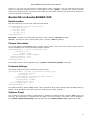
This menu shows the current input voltage and fan status.
[admin@MikroTik] > system health print
fan-mode: manual
use-fan: main
active-fan: main
voltage: 18.8
[admin@MikroTik] >
fan-mode – whether to use automatic fan failover (auto | manual; manual by default).
use-fan – which fan to use in manual mode (main | auxiliary; main by default).
Firware information
This menu displays RouterBOARD model number, serial number, the current boot loader version and the
version available in the current software packages installed.
[admin@MikroTik] > system routerboard print
routerboard: yes
model: "333"
serial-number: "154201C1DD3C"
current-firmware: "2.9"
upgrade-firmware: "2.9"
[admin@MikroTik] >
The firmware version can be upgraded using “/system routerboard upgrade” command.
Firmware Settings
Boot loader settings are also accessible through this menu.
[admin@MikroTik] > system routerboard settings print
baud-rate: 115200
boot-delay: 2s
boot-device: nand-if-fail-then-ethernet
enter-setup-on: any-key
cpu-frequency: 333MHz
boot-protocol: bootp
enable-jumper-reset: yes
[admin@MikroTik] >
The Software Reset 2 button (TP2) button, which resets both boot loader settings and RouterOS setting by
default, can be disabled in this menu (it will still reset the boot loader settings).
Software Reset
It is possible to reset all software configuration by holding the Software Reset 2 button (TP2) during the
power-up. No confirmation or passwords will be asked, so use with caution. This feature can be disabled in
the “system routerboard settings” menu by switching the “enable-jumper-reset” parameter to “no”.
9