1
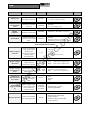
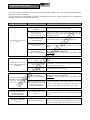
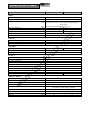
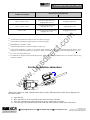
PROBLEM SOLVING
PROBLEM
POSSIBLE CAUSE
THE BUZZER SOUNDS
CONTINUOUSLY AND THE
DISPLAY POSTS ONE OF
THE CODES: A54, F50, F51,
F52, F55, L50, L51, L52
SOLUTION
THE LOAD APPLIED TO THE Lower the load to inside the 100% threshold (or user
UPS IS TOO HIGH
threshold in case of code A54).
BATTERIES NEED TO BE
REPLACED
Replace the battery pack with a new one (as indicated in
the chapter BATTERY PACK).
THE DISPLAY SHOWS
CODE: A62
BATTERY PACK MISSING
OR NOT CONNECTED
Check that the battery pack is inserted and connected
correctly (see the chapter BATTERY PACK).
THE DISPLAY SHOWS
CODE: A63
BATTERIES ARE
DISCHARGED; THE UPS IS
WAITING FOR THE
BATTERY VOLTAGE TO
EXCEED THE SET
THRESHOLD
Wait for the batteries to recharge or manually force
switching-on by holding the “ON” button down for at
least 2 sec.
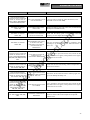
THE BUZZER SOUNDS
CONTINUOUSLY AND THE
DISPLAY POSTS ONE OF
THE CODES: F03, F05, F07,
F10, F13, F21, F40, F41, F42,
F43
A UPS MALFUNCTION IS
TAKING PLACE;
SHUTDOWN IMMINENT
THE BUZZER SOUNDS
CONTINUOUSLY AND THE
DISPLAY POSTS ONE OF
THE CODES: F04, L04
TEMPERATURE OF THE
HEAT SINKS INSIDE THE
UPS IS TOO HIGH
re
ct
.c
om
THE DISPLAY SHOWS
CODE: A61
.u
ps
di
If it is possible to power down the load, switch off the
UPS and switch it on again; if the problem occurs again,
contact the service centre.
Check that the UPS surrounding ambient temperature is
not in excess of 40°C.
w
w
THE BUZZER SOUNDS
FAULT DETECTED ON ONE
Disconnect all the loads and connect them up again one
CONTINUOUSLY AND THE
OR MORE LOADS POWERED
DISPLAY POSTS ONE OF
by one to identify the faulty one.
BY THE UPS
THE CODES: F53, L53
A UPS MALFUNCTION HAS
OCCURRED
THE DISPLAY SHOWS ONE
OF THE CODES: C01, C02,
C03
A REMOTE COMMAND IN
PROGRESS
w
THE BUZZER SOUNDS
CONTINUOUSLY AND THE
DISPLAY POSTS ONE OF
THE CODES: F60, L03, L05,
L07, L10, L13, L20, L21,
L40, L41, L42, L43
If it is possible to power down the load, switch off the
UPS and switch it on again; if the problem occurs again,
contact the service centre.
If undesired, check the position of the manual bypass
switch or status of the control inputs of an optional
contacts card.
23