1
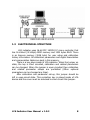
load cell, then a junction box is used for gathering the load cell
outputs to the LCA device.
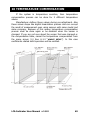
• COMPUTER (PC): If a computer will be used for monitoring
the measured value as indicator (in LCA-X model) or both PC and
LCA device (in LCA-D model) will display the measured value, then a
computer with standard configuration will be required.
Minimum Configuration: P100MHz processor, 8Mb RAM, 500Mb
hard-disc and at least an RS232 port.
And also if there is a network system, a Network adapter is required
to work with the Network workgroup.
(NOTE: According to the selected PC Software, minimum
configuration can be changed. If there is only measurement transfer
to the PC or user operations (Tare, Zero etc.) from LCA devices with
PC program, minimum configuration and operation system is enough
to execute. Otherwise if there is a data record, computer should work
on power-on state continuously and automatically records the
weighing data. For this reason, the PC should have the qualifications
that can work with safety operating systems WinNT, Win2000 or
similar and enough hard-disc capability.)
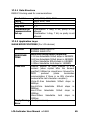
• RS232/485 CONVERTER: If RS-485 communication base
will be used for communication an RS232/485 Converter must be
used between PC and device(s) to adapt device(s) and computer.
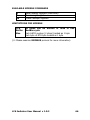
(NOTE: To communicate with more than one device at the same
bus, RS-485 Communication must be used. Furthermore, because of
long distance between devices and PC, RS-485 communication must
be used. For 0-50 meters RS-232, more than 50 meters RS-485
communication must be preferred)
LCA Indicator User Manual v 1.0.2
7