1
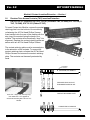
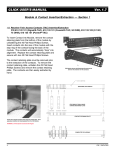
Ver. 2.0 MIT USERS MANUAL Module & Contact Insertion/Extraction Section 1 3.0 Wiring Contact Insertion/Extraction P/N 610 127 110 (Signal Crimp/Solder Contact), 610 127 111 (Signal Wire-Wrap Contact), 610 134 101/102/103/104/105 (Coaxial Contacts), 610 136 101/102 (Power Contacts) To insert Contact into Module, first terminate contact by crimping, soldering, wire-wrapping (see termination instructions in Section 4) or using SMB/SSMB connectors. Insert terminal into module until top of contact is flush with module. When installing Wiring Contacts in the Receiver Wiring Module (P/N 510 130 161, 510 130 162, 510 130 174, 510 130 181), insert the contacts in from the screened side of the module. When installing Wiring Contacts in the ID Wiring Module (P/N 510 131 138, 510 131 139, 510 131 144, 510 131 145), insert the contacts from the screened side of the module as well. To remove the Wiring Contacts, place the appropriate Extraction Tool (Signal - P/N 910 110 110, Coaxial/Power - P/N 910 112 112, Coaxial/75 OHM - 910 112 116), over the contact into the counter bore on the mating side of the module. Press into the contact until the retaining ring is released and contact begins to emerge from the rear of the module. Remove the contact by hand. Insertion ID WIRING MODULE SHOWN Extraction ID WIRING MODULE SHOWN CAUTION TWIST POWER/COAXIAL AND SIGNAL EXTRACTION TOOLS SLIGHTLY TO ENSURE THAT RETAINING CLIP EARS HAVE FULLY COLLAPSED BEFORE APPLYING PRESSURE TO HANDLE TO AVOID DAMAGE TO CONTACTS, ALWAYS ENSURE THAT TOOL IS PERPENDICULAR TO MODULE FACE Virginia Panel Corporation 5