1
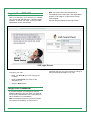
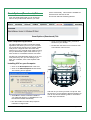
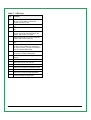
Table 7 - VSP Keys
Key
A
B
C
D
E
F
G
Function
Click here to get a dial tone or to make a
call if you have already entered the
number you wish to call.
Click here to use line one out of a possible
two.
Click here to use line two out of a possible
two.
Click here to adjust the microphone
volume. This is the volume at which the
outside caller hears you speak.
Click here to mute your voice so that the
outside caller cannot hear you.
Click here to dial numbers, and the * and #
keys.
Click here to turn off either your computer
speakers or the USB phone speakers. If
you use this option, you will not be able to
hear the outside caller speak.
H
Click here to adjust the volume at which
you hear the outside caller speak.
I
Click here to show and configure device
settings.
J
Click here to launch the VCP.
K
Click here to show your call list.
L
Click here to end the call.
M
Click here to redial the last dialed number.
N
Click here to clear the last dialed digit.
O
Click here to close the VSP application.
P
Click here to display version information
about the Softphone application.
IP-PBX User Manual
Page 18 of 20