1
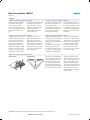
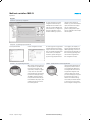
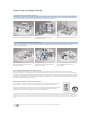
Multi-axis controllers CMXR-C1 Key features At a glance Convenient – quick and easy configuration The main requirements for product configuration software are speed, reliability and user-friendliness. The multi-axis controller CMXR, like other products from Festo, is configured via the Festo Configuration Tool (FCT). Electrical variables (e.g. inputs and outputs) as well as mechanical variables (e.g. choice of the kinematic system) are defined in the configur ation. The sophisticated user guidance system guarantees quick and easy configuration of the complex multi-axis system. The motion programs are programmed using the text-based macro program ming tool of the Festo Teach Language (FTL). This powerful programming tool contains macros, for example for movements, dynamic settings up to I/O processing of peripheral devices such as grippers, for example, and has been specially developed for the CMXR. Programming can be done on line via the teach pendant CDSA or of fline via the FTL programming editor. The FTL editor is integrated in the Festo Configuration Tool (FCT). Transparent – programming in plain text with FTL Via teach pendant CDSA Via Festo Configuration Tool (FCT) Convenient – easy programming via teach-in Flexible – mobile operation and monitoring with CDSA When creating a motion program, the motion sequence is very often known but not the precise position to be approached, for example of a gripper or a tray. These can only be deter mined directly during commissioning by means of accurate approaching. The CMXR in combination with the teach pendant CDSA offers dialoguebased software for this purpose, thus enabling quick and easy teach-in of the necessary positions. 2016/03 – Subject to change The teach pendant CDSA features an emergency stop switch as well as a 3-stage enabling key. Both devices are designed with two channels and are prepared for integration in the customer’s safety circuits. The pur pose of the enabling key is to approve the drive power during set-up. In addition to the hardware and ergo nomic handle, the CDSA also features a colour touch screen as an alterna tive to the keypad for starting actions. è Internet: www.festo.com/catalog/... 3