1
Operation
Battery Warning, Installation and Replacement
1.
low battery icon appears in the display the batteries are weak and should be
When the
replaced. However, in-spec. measurement may still be made for several hours after low battery
indicator appears before the instrument become inaccurate.
2.
To replace or install batteries, remove the Philips head screw that secures the rear battery
cover and lift off the cover.
3.
Replace the six AAA batteries (use alkaline heavy duty type), observing polarity
4.
Replace and secure the cover.
Datalogging
1.
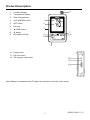
Open the left side door and insert a formatted SD card
Note: The SD card should be at least 1GB in capacity
Note: Do not use memory cards formatted by other meters or cameras. Use the SD card
formatting procedure under the advanced features section of this manual to correctly
format the card
Note: The internal clock must be set to the correct time See the advanced features section of
this manual to set the clock.
Note: The default data structure uses a decimal point “.” as the numeric decimal indicator. See
the advanced features section of this manual to change this to a comma “,”.
Note: If the SD memory card is not installed, “EMPTY” will appear in the display
Note: Displayed error messages:
CHCArd
The memory card is full or there is a problem with the card
LobAt
The battery is low and datalogging is disabled
No
CArd
The SD card is not inserted
2.
Press the LOGGER button for >2 seconds to begin logging. “DATALOGGER” will appear in the
display and the meter will beep each time the data is recorded (if the beeper is enabled).
3.
To stop datalogging, press the LOGGER button for >2 seconds. “DATALOGGER” will change
to “DATA” and the meter will count down through the recorded data.
NOTE: To avoid corrupting data, do not remove the memory card without properly ending the
record function.
Time/Date/Sample Rate Check
Press and Hold the TIME button for >2 seconds and the display will cycle through the date, time and
sample rate information.
4
SD500-EU-EN-V1.3 7/11