1
GMW
USER’S MANUAL
MODEL: LVMCTRLLABVIEW MAGNET CONTROL
LabVIEW Driver V2.0
For LabVIEW Ver 8.2 [or later version]
Date Sold:____________
Serial number: ________
PROPRIETARY
THIS DOCUMENT CONTAINS CONFIDENTIAL INFORMATION PROPRIETARY
TO GMW ASSOCIATES. IT MUST NOT BE REPRODUCED OR DISCLOSED TO
OTHERS OR USED IN ANY WAY EXCECPT FOR THE INSTALLATION,
OPERATION OR MAINTENANCE OF GMW ASSOCIATES PRODUCTS.
File No: MLVMCTRL GMW Magnet Control Software manual v2.0.doc
Revision Date: Jan 11, 2008
_________________________________________________________________________________
GMW
955 Industrial Road, San Carlos, CA 94070 Tel: (650) 802-8292 Fax: (650) 802-8298
Email: [email protected] Web site: www.gmw.com
TABLE OF CONTENTS
MAGNET CONTROL SYSTEM SPECIFICATIONS
Section 1
Magnet Control System Overview
Magnet Control System Basic Requirements
WARNINGS
[Refer to this section before operation of Electromagnet System]
MAGNET CONTROL SYSTEM SETUP
Hardware:
Section 2
Section 3
Supported field meters
Supported power supplies
Typical system configurations
Digital Teslameter Setup
Power Supply Setup
Analog Device Interface Setup
Software:
Install GPIB-USB driver
Install NI-DAQmx software for DAQPad
Verify hardware software installation
Install magnet control software from GMW
MAGNET CONTROL SYSTEM OPERATION
Section 4
The main operation screen
Software block diagram
Starting and Stopping the Software
Operation Menu
Chart Control
Log to File.
PID Setup.
PID CONTROL OPERATION
PID Controller Overview
PID Control Operation Warning
Loading an Open Loop Characterization Plot
Making an Open Loop Characterization Plot
Tuning the PID Controller
PID Controller Operation
PID Controller Initial Settings Tables
Open Loop File.
Setup Status
HW Setup.
Wave Form Mode.
Table Mode.
MAINTENANCE
Section 5
EXCITATION CURVES
Section 6
TEST DATA
Sorensen power supply stability test
Kepco power supply stability test
Section 7
APPENDIX
Section 8
Section 1
MAGNET CONTROL SYSTEM SPECIFICATIONS
Magnet Control System Overview
The Magnet Control System is a special application driver written for using with LabVIEW for Windows version 8.2 or later.
This driver provides the user with a GUI [Graphical User Interface] between LabVIEW and the Magnet Control System
hardware. It enables operator control of up to two magnet systems comprising Electromagnet, Teslameter and Power Supply
in four control modes:
- Open Loop Current Control mode.
- Open Loop Field Control mode.
- Closed Loop Field Control Simple mode.
- Closed Loop Field Control Hybrid mode.
It also supports magnet system without Teslameter in Open Loop Current Control mode or Open Loop Field control mode.
Magnet Control System Basic Requirements
A magnetic field meter from one of the following supported model [Note 1].
- Group3 DTM model: DTM-132/133-DG or DTM-141/151-DG.
- Senis Magnetic Field Transducer YM/3M [Note 2]
- MetroLab NMR 2020/2025 with GPIB
A suitable Power Supply which can be either controlled using analog signal [Note 3] or one of the following
supported power supplies.
- Danfysik 853/858 power supply with GPIB interface.
- Sorensen SGA with GPIB interface
- Kepco BOP with GPIB interface
- GMW 231HC with NI DAQPad digital control option
A suitable computer system. At the time of printing this manual, suggested computer configuration:
1GB RAM, 1GB available hard drive space, Pentium 4 or equivalent CPU, 2 GHz or above.
Operating system Windows XP, SP2
One available USB 2.0 port for GPIB-USB controller if required
One available USB 2.0 port for NI DAQPad if required
A CD drive for installing software
LabVIEW for Windows version 8.2 or later. [Note4]
NI DAQPad 6015/6251.
Required only if using either Senis transducer, GMW 231HC or analog controlled power supply.
USB 2.0 interface.
Two analog output channels.
Output Range: +/-10V.
Output Resolution: 16bit.
Output impedance: 0.1 Ohm.
Table Mode.
Note:
1. Field (Closed Loop) Control mode cannot be used without a Teslameter installed on the Magnet Control System.
2. Senis Transducer is read through NI DAQ. 3M model is supported but only one field axis is read.
3. Power supply can be bipolar or unipolar. The analog programming range is -10DCV to +10DCV, 16bit resolution.
4. Both source VI and version of stand alone executable program file provided with the CD. The stand alone executable
version cannot be altered by the end user. The stand alone executable version does not require LabVIEW.
1-1
Section 2
WARNINGS
REFER TO WARNINGS BELOW BEFORE OPERATING ELECTROMAGNET SYSTEM
1
Personnel Safety
If during operation the magnet fringing field is in excess of 0.5mT (5G), it can cause malfunctioning of sensitive
electronic and magnetic components. We recommend that warning signs are posted in areas where the fringing field
may exceed 0.5mT indicating that a magnetic field may be present.
2
Ferromagnetic Objects
During operation the magnet exerts magnetic attraction towards ferromagnetic objects in the near vicinity of its pole
faces. Keep ferromagnetic items clear!
3
Arcing
Magnet stores energy in its field during operation. Do not disconnect any current lead while under load or the magnetic
field energy will be discharged across the interruption causing arcing and possible damage to electronic circuits.
4
Coil Hot Resistance
Do not exceed the maximum coil hot resistance for the Electromagnet(s) given in the specifications or coil overheating
and possible damage may occur
5
Watches, Credit Cards, and Magnetic Disks
Do not move magnetically sensitive items into the close vicinity of the magnet pole gap. Even some anti-magnetic
watches can be damaged when placed in close proximity to the pole gaps during operation. Credit cards, and magnetic
disks are affected by magnetic fields as low as 0.5mT (5G). Depending on the previous operating field and the pole gap,
the remanent field in the gap can be in excess of 0.5mT (5G) with the magnet power supply off or disconnected.
6
Power off Power Supply
Switch off power supply before performing any hardware setup task around magnet or power supply. The current leads
of magnet are isolated from ground. There is an electrical potential difference between the current leads and ground,
even when the output current is zero. It could be a safety hazard for personnel or instruments if accidentally contacted to
the current leads.
2-1
Section 3
MAGNET CONTROL SYSTEM SETUP
3.1 Hardware.
The Magnet Control System software can be used with different combination of supported field meter and power supply.
Some typical combinations of field meter and power supply are listed as below.
-Supported field meter:
Group3 DTM 133/151 with GPIB interface.
Senis magnetic field transducer 0.2T/1T/2T/5T with analog output, must be used with NI DAQPad, USB 2.0 interface
MetroLab NMR teslameter 2025, GPIB interface.
-Supported power supply:
GMW 231HC, with NI DAQPad, USB 2.0 interface.
DANFYSIK 853/858, GPIB/RS232 interface.
Kepco BOP, GPIB interface.
Sorensen SGA GPIB interface
Sorensen SGA analog with NI DAQPad
Sorensen SGA analog with GMW Reversal switch, GPIB interface with ADI, USB 2.0 interface with new version of GMW
Reversal Switch.
Custom power supply with analog programming +/-10V.
Computer interface:
USB 2.0 port.
GPIB: NI PCI GPIB board
NI USB to GPIB controller, using one USB 2.0 port.
RS232: USB to RS232 converter.
-Typical system configurations:
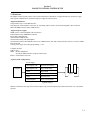
Power Supply:
Computer
NI DAQPad, USB
Sorenson SGA analog
NI DAQPad, USB
Kepco BOP analog
GPIB
Kepco BOP
NI DAQPad, USB
GMW 231 HC
GPIB
Sorenson SGA
GPIB/DAQPad
SGA /reversal switch
Magne
t
System setup 1
Without a field meter, this setup can be used for Open Loop Current and Open Loop Field control mode. Low cost and fast
response.
3-1
Section 3
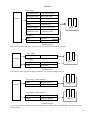
Power Supply:
Computer
NI DAQPad, USB
Sorenson SGA analog
NI DAQPad, USB
Kepco BOP analog
GPIB
Kepco BOP
NI DAQPad, USB
GMW 231 HC
GPIB
Sorenson SGA
GPIB/NI DAQPad
SGA/reversal switch
NI DAQPad, USB
Custum Power supply
with analog control
Magne
t
Field Meter:
GPIB
DTM 133
NI DAQPad
Senis 0.2T/2T/5T
System setup 2
Basic setup used for Closed Loop Control. Low cost, low resolution and can be fast response.
Power Supply:
GPIB
Computer
Danfysik 853/858
Field Meter:
GPIB
DTM 151
GPIB
NMR 2025
Magne
t
System setup 3
Closed Loop Control setup used for high field stability. Slow response and high resolution.
Power Supply 1 and Field Meter 1:
Computer
GPIB
Danfysik 853/858
GPIB
DTM151/NMR2025
Magnet 1
Power Supply 2 and Field Meter 2:
GPIB
Danfysik 853/858
GPIB
DTM151/NMR2025
Magnet 2
System setup 4
Two systems control are supported for low speed system setup. Analog control (using NI DAQ) is not supported for two
channel control.
3-2
Section 3
Power Supply 1 and Field Meter 1:
Computer 1
Main
Computer
Power Supply 1
Field Meter 1
Ethernet
Magnet 1
Power Supply 2 and Field Meter 2:
Computer 2
Power Supply 2
Field Meter 2
Ethernet
Magnet 2
System setup 5
3.2 Field meter setup
3.2.1 Digital Teslameter [ DTM -151/132/133-DG] setup
1. Power down the Digital Teslameter.
2. Remove the bottom cover by undoing the cover securing screw in the center of the cover.
3. The DIP switches located under the bottom cover must be set as detailed in the following table.
4. Replace the bottom cover.
5. Connect the GPIB cable to the GPIB connector located on the rear panel of the Digital Teslameter.
6. Connect the GPIB cable to the GPIB interface board installed in the computer.
7. Connect the Hall Probe.
8. Power up the Digital Teslameter.
Digital Teslameter
DIP Switch Settings
SW 1-1 OFF
SW 1-2 ON
SW 1-3 OFF
SW 1-4 OFF
GPIB address
GPIB address
GPIB address
GPIB address
(Note 1)
Section 3
SW 1-5 OFF
SW 1-6 OFF
SW 1-7 OFF
SW 1-8 OFF
GPIB address
dual primary addressing disabled
talker/listener
not used
SW 2-1 ON
SW 2-2 ON
SW 2-3 ON
SW 2-4 OFF
SW 2-5 OFF
SW 2-6 OFF
SW 2-7 ON
SW 2-8 OFF
serviced requests enabled
EOI asserted
terminator carriage return
double terminator disabled
field units tesla
no units symbol
digital filtering ON
defaults no action
Note 1: Each DTM requires an unique GPIB address.
3-3
Section 3
3.2.2 MetroLAB NMR 2025 setup
1. Power down the Digital Teslameter.
2. Set Micro-switch on the rear panel.
1 to 5: GPIB address.
6: Set to 0
7: Set to 0. Listener/Talker mode
8: Set to 1. Send <CR><LF> to terminate messages
9: Set to 1. select GPIB (IEE 488) interface.
3. Connect all the cables.
3.3 Power Supply Setup
Below are brief descriptions for setting up powe supply for computer control. For details of how to setup either power supply,
please refer to power supply documentation.
3.3.1 GMW 231HC
GMW 231HC has two versions of control. External Analog Control uses a customer provided programming source,
such as a Waveform Function Genarator. Internal Analog Control uses a NI DAQ as programming source.
- Ensure the power switch is OFF
- Switch the Control Mode toggle Switch on the back of the GMW 231HC to Internal.
- Connect USB cable from NI DAQPad to computer USB port
- Install all software before power up the DAQPad.
3.3.2 Kepco
- Ensure the power switch is OFF
- Ensure the GPIB Interface board model setup matches power supply model. All new Kepco GPIB boards are set to
200V, 5A model. User needs to change the model on the GPIB board either using a DIP switch (model BIT4882F)
or through computer (model BIT4886).
- Set the GPIB address. GMW Control Software uses 1 as default GPIB address. Power supply shipped from GMW
will all set GPIB address to 1. If GPIB address needs to be changed, refer to the power supply user manual. Each
instrument on the same GPIB bus must have a unique GPIB address.
- Ensure the AC line voltage is correct.
- Connect the currnt cable to magnet. Connect AC cord to power supply.
- Set Kepco power supply front control: Mode to Current, Voltage Control to OFF, Current Control to OFF.
3.3.3 Sorenson
- Ensure the power switch is OFF
- Set the rear panel switch S1-1 to ON to set the unit to remote mode.
- Set the rear panel switch S1-2 to OFF to set the power supply to no SRQ upon power-on.
- Set the rear panel switch S1-3 to ON to set the power supply to be the master device.
- Set the GPIB address. The rear panel switch S1-4 to S1-8 is GPIB address. Power supply shipped from GMW will
all set GPIB address to 1. If GPIB address needs to be changed, refer to the power supply user manual. Each
instrument on the same GPIB bus must have a unique GPIB address.
- Ensure the AC line voltage is correct.
- Connect the currnt cable to magnet. Connect AC cord to power supply.
3-4
Section 3
3.3.4 Danfysik
- Ensure the power switch is OFF
- Set the GPIB address. If using NI GPIB-232CV-A, the following needs to be check/set.
1. Danfysik power supply main control board:
- Remote Line needs to be set to RS232: Jumper on ST9. ST10 and ST11 must be left open without jumper.
- Remote Line communication parameters are as Danfysik power supply defult: 9600 BAUD, No Parity, 8
Data bit, 1 Stop bit.
2. Cable between main control board and GPIB-232CV-A must be null modem cable, DB25 Male/DB9 Female.
3. NI GPIB-232CV-A.
- Mode: D
- Config:SRQ Disabled, small serial buffer
- GPIB address: 1
- Hand Shake:XON/OFF disabled
- Data formate: 8 Data bit/No Parity/1 Stop bit
- Baud: 9600
Power supply shipped from GMW will all set GPIB address to 1. If GPIB address needs to be changed, refer to the power
supply user manual. Each instrument on the same GPIB bus must have a unique GPIB address.
- Ensure the AC line voltage is correct.
- Connect the currnt cable to magnet. Connect AC cord to power supply.
- Power on the Danfysik power supply. From front panel, change the Local/Remote control to REMote.
3.4 Analog Device Interface Setup for NI DAQPad [ 6015]
1.
2.
3.
4.
Ensure the power switch is OFF
Connect NI DAQPad analog output (BNC, male) to power supply analog control input.
Connect USB cable from NI DAQPad to computer USB port.
Install all software before power up the DAQPad.
3-5
Section 3
3.5 Software Installation
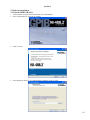
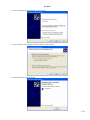
3.5.1 Install GPIB-USB driver
1.
2.
Insert NI-488.2 CD from National Instruments into CD-ROM drive.
Select “Install Software” from pop-up window.
3.
Click on “Next”.
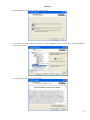
4.
Select destination directory. Use default setting recommend. Click on “Next”.
3-6
Section 3
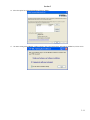
5.
Select Installation option. Select “Custom”. Click on “Next”.
6.
Select Features to install. Click on “NI-VISA 3.2”. Select “Install this feature to a local drive” from the drop-down
menu. Click on “Next”.
7.
Accept the License Agreements. Click on “Next”.
3-7
Section 3
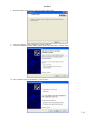
8.
Start Installation. Click on “Next”.
9.
Wait until the installation complete. Click on “Next”.
3-8
Section 3
10. Select GPIB device: GPIB-USB-HS. Click on “Next”
11. Select “Restart. Click on “Finish”.
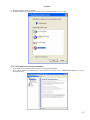
12. After restart computer, connect GPIB-USB controller to computer USB port. Found New Hardware Wizard window
appears. Select “No, not this time.” Click on “Next”
3-9
Section 3
13. Select “Install software automatically”. Click on “Next”
14. Select “Search for the best driver in these locations”. Click on “Next”.
15. Wait until finished. Click on “Finish”.
3-10
Section 3
16. Select the option for registration hardware. Click on “Finish”.
17. “NI 488.2 Getting Started Wizard” window appears. After verifying hardware and software installation, click on “Exit”.
3-11
Section 3
3.5.2 Install NI-DAQmx software for DAQPad.
Following steps are for NI-DAQmx 8.0.1. Actual step and screen may vary depend on version of DAQmx
1. Insert DAQmx CD from National Instruments. From the pop-up window, select “Install NI-DAQmx/VI Logger”.
2.
Product Information window appears. Click on “Next”.5
3.
Select destination directory. Recommend using default directory setting. Click on “Next”
3-12
Section 3
4.
Select features to install. Do not change default settings. Click on “Next”.
5.
Accept the License Agreements. Click on “Next”.
6.
Start Installation.
3-13
Section 3
7.
Wait until finished. Click on Next”. Click on “Restart” when prompt.
8.
9.
After restart computer, connect DAQPad to computer USB port.
“Found New Hardware Wizard” window appears. Select “No, not this time.” Click on “Next”.
10. Select “Install the software automatically”. Click on “Next”.
3-14
Section 3
11. Wait until finished. Click on “Finish”.
12. NI-Max will detect new data acquisition device. Select “Take No Action”. Click on “OK”.
3.5.3 Verify hardware software installation
1.
2.
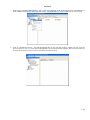
Open “Measurement and Automation Explorer” from National Instruments.
Go to “My System/Device and Interfaces”. There should be two entries, one as “GPIB0(GPIB-USB-HS)”, one as “NIDAQmx Devices”
3-15
Section 3
3.
Right click on “GPIB0 (GPIB-USB-HS)”. Select “Scan for Instruments” from the drop down menu. All GPIB devices
on the GPIB bus should appear in the right side window. The GPIB addresses will be needed later for software setup.
4.
Click on “NI-DAQmx Devices”. The DAQPad should show on the right side window, without red cross. Note the
device reference is “Dev1”. If more than one DAQPad have been connected to this computer, there will be more devices
showing. This reference for device will be needed later for software setup.
3-16
Section 3
3.5.4 Install magnet control software from GMW.
1.
2.
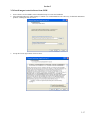
Insert software CD from GMW. Select D:\Installer\Setup.exe to start the installation.
Select destination directory. Make changes if wanted. It is recommended leave the “Directory for National Instruments
products” unchanged. Click on ”Next”
3.
Accept the License Agreements. Click on “Next”
3-17
Section 3
4.
Start Installation. Click on “Next”.
5.
Wait until finished. Click on “Finish”.
6.
Restart computer when prompted.
3-18
Section 4
OPERATION
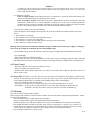
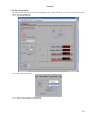
4.1 The main operation screen
- Shows Field readings from the field meter if connected and configured correctly.
- Window control for selecting Window Sub Panels, Operation, PID, Chart, Wave Form, Table Mode and Ramp Mode
- Shows the system status.
- Access to Hardware setup menu. (HW Setup button)
- Controller Mode selects from one out of four control modes: Open Loop Current, Open Loop Field, Closed Loop Field
Simple or Closed Loop Field Hybrid.
- STOP button programs the power supply to zero current and stops the program exection.
- System Parameters Strip chart shows system parameters on a strip chart under Chart tab. More details later.
4-1
Section 4
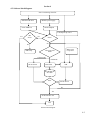
4.2. Software block diagram.
Start. Load Settings from file.
Initialize field meter.
Initialize power supply.
Check GPIB bus.
Check DAQPad.
Load Open Loop Curve
Yes
Bus
errors?
Yes
Error?
No
No
HW Setup.
Make Open
Loop Curve
Current or field
mode?
Current mode
Field mode
Set PS current.
Read field.
PID.
Save data
Exit?
Set PS current.
No
Yes
Set PS current to 0A.
Exit
Software block diagram
4-2
Section 4
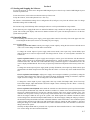
4.3. Starting and Stopping the Software
To open the program, go from Start>>Program>GMW Magnet System Closed Loop Control>GMW Magnet System
Closed Loop Control V2.
To start the software, click on the arrow button on the top of the screen.
To stop the software, click on Stop button or use <Esc> key.
The software will load default settings from a configuration file (Config.txt) every time the software starts. To change
the default settings click on HW Setup.
For first time setup, click HW Setup before starting the software. It will open the hardware setup window.
If more than one power supply/field meter are enabled in hardware setup, another tab will appear to show the second
system. The second system display and control is identical with the first system. The description below is for the first
system unless specified.
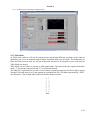
4.4. Operation Menu.
4.4.1 If controlling more than one power supply, power supply under control is selected by click on the proper tab. If no
second magnet tab shown, the software is controlling one power supply.
4.4.2 Operation Mode:
Open Loop Current Control. Controls power supply current output by setting the Set Current to desired current
value. User can not change Set Field under Current mode.
To change the current output of power supply under current mode, select Open Loop Current Mode, input
desired current at Set Current. Output current will change after hit <Enter> or click anywhere outside the Set
Current box.
Open Loop Field Control. Set power supply current output to reach a given field. Software will determine the
output current from the given field through a predefined Field vs. Current excitation curve, (OLC, Open Loop
Characterization file). The OLC file can be made either using a field meter support or a simulation file. OLC file
in use is displayed under PID tab. The accuracy of Open Loop Field Control depends on the accuracy of the OLC
file.
To change the current output of power supply under open loop field mode, select Open Loop Field Control, input
desired field at Set Field. Output current will change after hit <Enter> or click on any where outside the Set Field
box.
Close Loop Field Control Simple. Adjust power supply current output to maintain a given field by setting the
Set Field to desired field value. Software will compare the desire field and the reading of field meter, adjust the
output current accordingly. User can not change Set Current under Field mode.
To change the current output of power supply under close loop control field simple mode, select Close Loop
Field Control Simple, input desired field at Set Field. Output current will change after hit <Enter> or click any
where outside the Set Field box.
Close Loop Field Control Hybrid. In this mode the controller uses data from the Open Loop Characterization
File and operates in PID mode only when the controller is within a 5% window of the desired Field Setpoint. The
Open Loop Characterization File provides the controller with the field versus current excitation curve. The
controller will not operate correctly if an Open Loop Characterization file is not loaded or the file has incorrect
data for the magnet. When the user gives the system a new Field Setpoint the controller calculates an initial
current setting for the desired Field Setpoint and transmits it to the Power Supply. During the ramp up or down to
the desired Field Setpoint the PID Controller is disabled. When the actual field reaches a value within the Hybrid
control window (defined in the HW setup and loaded when software started) the PID controller is activated.
During the change over to PID control the Derivative control is disabled to allow the controller to settle before
taking control of the system.
Generally the Hybrid PID mode is preferred since it provides the fastest transition time to a new Field Setpoint.
User can not change Set Current under Field mode.
4-3
Section 4
To change the current output of power supply under close loop field control mode, select Close Loop Field
Control Hybrid, input desired field at Set Field. Output current will change after hit <Enter> or click on any
where outside the Set Field box.
4.4.3 Field Probe Location:
Probe at Sample Position. Field reading from probe is used directly to control the field without change. The
software is controlling the field at the point the probe is located.
Probe at Secondary Position. Field reading from probe is modified before used for controlling the field. The
modification is made either by a constant multiplier or looking into two OLC files at Sample position and
Secondary position. This allows controlling field indirectly if the probe cannot be placed at the intend controlling
location. The constant multiplier and the two OLC files are defined in HW Setup window.
4.4.4 Closed Loop Field Control Operation Warning
Before attempted to run the Magnet Control System in the Closed Loop Field control mode check the items listed
below.
1 The Teslameter is powered up.
2 The Teslameter probe is inserted in the magnet gap securely.
3 The Teslameter is set to the correct field range.
4 The Teslameter is connected to the GPIB bus and is returning correct field readings.
5. The Teslameter is reading the field correctly.
Running close loop field control without the field meter properly installed will cause the power supply to ramp up to
max current. It is dangerous for both the operator and equipment setup.
4.4.5. Field Meter Range. Select the field meter full-scale range to be higher than the maximum possible field.
4.4.6. Field Reading.
- Probe Field. Shows the field meter reading.
- Sample Field. Shows the field at sample position. If the probe is located at sample position, the Probe and Field
and Sample Field are the same. If the probe is located at secondary location, the Sample Field is calculated field.
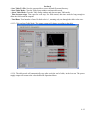
4.5. Chart Control.
- Auto Scale ON/OFF: Turn on/off auto scaling for Y-axis.
- Time Axis: Set the time span for X-axis.
- Channel Select: Select/deselect which trace to be shown on the chart. This setting also determines if the trace
will be saved to a file.
4.6. Log to File. Save data to a text file. The traces to be saved are selected from the Chart display, Channel Select.
If a trace is unselected, that trace will not be saved to file. After Log to File is started, Select/unselect trace will
cause software misplace data. User should avoid changing Change Select during logging.
- Log To File: Shows the data file name/path.
- Start Log: Click on Start Log. A window will prompt user for file name/directory to be saved.
- Auto/Manual: If Auto is selected, data will be saved every time interval defined by Sample Interval.
If Manual is selected, data will be saved every time the user clicks on Manual Log.
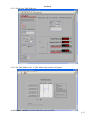
4.7. PID Setup.
This menu is used for tuning the PID Controller
Before using the PID controller for the first time the controller will need to be tuned to obtain optimum performance. Follow
the instructions listed below.
1. Select the PID Setup tab. The PID control panel will appear.
2. Set the Controller Mode required, either Hybrid PID or Simple PID control.
3. Enable the display of the field on the stripchart by selecting it on the Channel Select on the side of the stripchart.
4. Set the PID and Lead Lag controls to the initial values. Set the Lead Lag gain to 1, lag time to 0.2, lead time to 0.
5. Check that the correct Open Loop Characterization file is loaded. If no Open Loop Characterization file is found, a
Default.olc will be loaded. [See Section 4.10 for Loading an Open Loop Characterization Plot.]
6. Set the Integral and Derivative controls to 0.00.
4-4
Section 4
7. Enter a Field Setpoint value of 0.100000 Tesla. Retry with a Field Setpoint of 0.200000Tesla.
8. Increase lag time until the field can reach the target field quickly and does not have overshot.
9. Observe the trace of the field for the controller response on the System Parameter chart. It should not oscillate.
10. Increase the PID Gain a small increment.
11. Repeat steps 9 and step 10.
12. Continue repeating steps 10 and 11 until the controller oscillates in a steady state. Steady state oscillations mean the
oscillations neither decrease or increase over a period of time.
13. Reduce the PID Gain a small increment, repeat steps 8 and step 9. If the controller does not oscillate then the system
is set at maximum gain.
14. Reset the PID Integral and Derivative controls to the initial values given in Section 9 of this manual.
15. Repeat step 8 and step 9. If the system oscillates then decrease both the Integral and Derivative controls. If the
systems overshoot the Field Setpoint then increase both the Integral and Derivative controls.
Note:
1. Integral and Derivative controls should have an approximate ratio of 4 to 1 between their settings.
[e.g. If the Integral control is set to 6.00 then the Derivative should be set to 1.50].
2. All the PID tuning control settings are saved only at HW Setup.
4.8 Open Loop File.
4.8.1 Load Open Loop File
Before the PID controller is run, a B v I Open Loop Characterization File must first be loaded that matches the magnet
and gap being used. This B v I Open Loop Characterization file (OLC file) can be generated either using a field meter
or using a simulated field vs. current curves. An example OLC file below shows the file format. Current and Field
columns is TAB delimited.
Current (Amps) Field (Tesla)
0.0000E+0
-3.0350E-4
8.3333E-1
6.4058E-2
1.6667E+0
1.2882E-1
2.5000E+0
1.9346E-1
3.3333E+0
2.5757E-1
4.1667E+0
3.2085E-1
5.0000E+0
3.8263E-1
If the appropriate OLC file exists in the system, the OLC file can be loaded as detailed below. If the appropriate file
does not exist the user will need to make the Open Loop Characterization File, [see Section 4.8.2 “Making an Open
Loop Characterization Plot”]. To make the OLC to be loaded every time the software starts, making the OLC file in
use as default file in the HW Setup window. [see Section 4.10 “HW Setup”]
1. Click on the LabVIEW Run arrow to start the Magnet Control software [if not already running].
4-5
Section 4
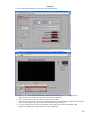
2. Click on the PID tab and then click on Open Loop Characterization.
3.
The Open Loop Characterization screen will appear, click on the Load button.
4.
Select an Open Loop Characterization file by clicking on the desired file name. [A valid Open Loop
Characterization file will have .olc extension on the end of the filename].
Click on OK or press the Enter key. The selected file will be loaded.
Check the selected file name is shown in the Loaded Open Loop Characterization File indicator. If correct then
click on the Done button. The Open Loop Characterization Plot panel will close.
To use the selected OLC file each time the software starts, input the OLC file name and path in HW
Setup>Power Supply>Open Loop File Path. Save the configuration.
5.
6.
7.
4-6
Section 4
4.8.2 Making an Open Loop Characterization Plot.
Follow the previous steps to open the Open Loop Characterization screen.
1. Set the Max and Min current for the intend power supply operating range. It is not necessary the Max and Min
current match the output range of the power supply.
2. Set the Steps. More steps will generate more accurate Open Loop Characterization Plot.
3. Click on Begin button.
4. The system will start taking data and report status in the status indicator. When the system reports it is Idle then
click on the Save Button. Name the plot file using the correct format in the Filename box and click on OK or press
the Enter key. [See next Section 4.8.3 for description of Open Loop Characterization filename format].
4.8.3 Open Loop Characterization filename format
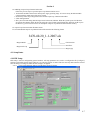
It is recommended the Open Loop Characterization File name has the following format.
3470-40-20_1-1-2007.olc
Magnet Model
Magnet Pole Cap
File Extension
Date/Time
Magnet gap
4.9. Setup Status.
4.10. HW Setup.
HW Setup is used for configurating system hardware. All setup parameters are saved to a configuration file [Config.txt].
Software will load the settings from Config.txt every time the software is started. The user must stop and restart the software
after the change of settings to enable the new settings to be applied.
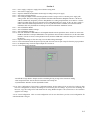
4.10.1. Click on the HW Setup button. The HW Setup menu will appear.
4-7
Section 4
4.10.2.
4.10.3.
4.10.4.
4.10.5.
4.10.6.
4.10.7.
4.10.8.
4.10.9.
4.10.10.
4.10.11.
4.10.12.
4.10.13.
4.10.14.
Power supply 1 and power supply 2 have identical setup panels.
Select Power supply Type.
Input the minimum and maximum current range according to the power supply.
Select Power Supply Interface.
Select DAQmx Output Channel from the pull-down menu if using 231 HC or customer power supply with
analog control. This is the analog output channel from National Instruments DAQPad. The Dev is the device
address automatically assigned by software. DAQPad has two analog output channels, AO 0 and AO 1. Set the
channel according to the physical connection between DAQPad and power supply. If only one power supply is
under control, the default output channel is AO 0. If no pull-down menu is available, check the NI software
installation and verify the hardware according to the Software/Hardware Installation section.
Select Field Meter Brand.
Select Field Meter Model or Range.
Select Field Meter interface.
Select the Field Meter GPIB addresses or DAQPad Channel from the pull-down menu. All devices on the same
GPIB bus must have an unique GPIB address. The pull-down menu will show all the devices on the same GPIB
interface. If no device shows on the pull-down menu, check the GPIB cable connection and power connection to
the devices.
Input the PID settings. If first time setup, leave the PID settings unchanged.
Click on the button beside the Open Loop File path. Select the correct Open Loop File from the pop-up window.
On DAQPad setup, ensure the output sample rate is below 30.
Click on the System Setup tab.
- Read Field average number: Samples used for calculating moving average of the field meter reading.
- Max Output Slew Rate: Sets the limit for maximum current ramp rate.
- Hybrid Window: Window used for Hybrid PID control.
4.10.15. Save Configuration. Click on Save Configuration button. All the settings will be saved to file Config.txt. Each
time Save Configuration is clicked, old settings are overwritten by the new settings. To preserve the old settings for
latter use, copy the Config.txt file and rename the file using Window Explorer. The software has to be restarted to
apply the new settings.
4.10.16. Load Configuration. Click on Load Configuration will let user load from a previous saved configuration file
other than default Config.txt.
4-8
Section 4
4.11. Wave Form Mode.
Wave Form mode will generate a wave form according to user settings and use the wave form to set the output current.
Operate on current mode only.
4.11.1. Select Ramp Mode tab.
4.11.2. Select desired waveform.
4.11.3. Select Offset, Frequency, and Amplitude.
4.11.4. Select if Continue Ramp or Single Ramp.
4-9
Section 4
4.11.5. Set Ramp to ON. The ramp of output will start.
4.12. Table Mode.
At Table mode, software will set the output current step through different set points at time interval
defined by user. User can manually input a table or load table from a pre-saved file. The total number of
Runs and Time between steps are not part of the table and need to be inputted by user each time the
Table Mode was started.
Table Mode can run either on current or field control mode. The letter before the setpoint determines
mode, “I” for current control mode and “F” for field control mode.
The table file is a plain txt file. It can be viewed, edited, or generated using an ASCII text editor, such as
Notepad. The mode letter (I or F) and setpoint are separated with Tab. The table needs ended by “END”,
case insensitive. The example table used below has the format as below:
I 1
I 2
I 3
I 4
I 3
I 2
I 1
End
4-10
Section 4
4.12.1. Select from Table Mode tab.
4.12.2. Set Table Mode to ON. A Table Mode Setup window will appear.
- Load Table From File. Load the table from a pre-saved file.
4-11
Section 4
- Save Table To File. Save the current table to a user defined file name/directory.
- Start Table Mode. Close the Table Setup window and start table mode.
- Abort Table Mode. Close the Table Setup window and does not start Table mode.
- Time between steps. Time span for each step. For field control, this time needs be long enough to
allow the field reach the setpoint.
- Total Runs. Total number of runs. Default value is 1, meaning only run through the table value once.
4.12.3. Click on Start Table Mode. The output current will change according to the table.
4.12.4. The table mode will automatically stop after reach the end of table, in the last run. The power
supply output will return to the value defined in Operation Menu.
4-12
Section 5
MAINTENANCE
5-1
Section 6
EXCITATION CURVES
6-1
Section 7
TEST DATA
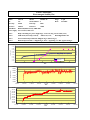
1. Sorensen power supply stability test.
2. Kepco power supply stability test.
GMW Associates
Electromagnet Stability Plot
Model:
3473-70
Model:
5403EG-50
SN:
127
Serial Number: 2
Pole Gap:
25mm
Pole Gap:
5mm
Pole Face:
150mm
Pole Face:
76mm
Field Meter:
DTM-151(MPT-141-7S), NMR 2025
Engr:
Y.Qin
Date:
4/13/2007
Power supply: Two Kepco BOP 20-20
Note 1:
DAQ controlling two power suppl mag 1 set at 1.2T, mag 2 set at 0.3T(~18A)
Note 2:
Field mode (closed loop control),
Note 3:
Kepco PS Temp Coefficient: 200ppm/ deg C, 8-hour drift: 200ppm
Note 4:
DTM Temp Coeffcient: +/-10ppm/deg C; Zero +/-3ppm/deg C; Cable -3ppm*7m/deg C
~8 hour test, 1.1T,
DTM digital filter ON
24
1.10480
1.10479
23
1.10478
22
1.10476
1.10475
21
1.10474
Temperature(C)
NMR Field (T)
1.10477
1.10473
NMR Field Reading
1.10472
20
Series3
1.10471
Temperature
1.10470
19
10:00:00
11:00:00
12:00:00
13:00:00
14:00:00
15:00:00
16:00:00
17:00:00
18:00:00
19:00:00
20:00:00
15:00:00
Time
16:00:00
17:00:00
18:00:00
19:00:00
20:00:00
15:00:00
Time
16:00:00
17:00:00
18:00:00
19:00:00
20:00:00
DTM Field (T)
Time
1.10008
1.10007
1.10006
1.10005
1.10004
1.10003
1.10002
1.10001
1.10000
1.09999
1.09998
1.09997
1.09996
1.09995
1.09994
1.09993
10:00:00
11:00:00
12:00:00
13:00:00
14:00:00
18.108
I Programming(A)
18.108
18.107
18.107
18.106
18.106
18.105
18.105
10:00:00
11:00:00
12:00:00
13:00:00
14:00:00
GMW Associates
Electromagnet Stability Plot
Model:
3473-70
Model:
5403EG-50
SN:
127
Serial Number: 2
Pole Gap:
25mm
Pole Gap:
5mm
Pole Face:
150mm
Pole Face:
76mm
Field Meter:
DTM-151(MPT-141-7S), NMR 2025
Engr:
Y.Qin
Date:
4/13/2007
Power supply: Two sorensen, 160V/31A
Note 1:
DAQ controlling two power suppl mag 1 set at 1.2T, mag 2 set at 0.25T(~15A)
Note 2:
Field mode (closed loop control),
Note 3:
Sorensen PS Temp Coefficient: 300ppm/ deg C (0.03%/deg C)
Note 4:
DTM Temp Coeffcient: +/-10ppm/deg C; Zero +/-3ppm/deg C; Cable -3ppm*7m/deg C
~8 hour test, 1.2T,
DTM digital filter ON
27
1.20620
1.20610
26
1.20600
25
1.20580
1.20570
24
1.20560
Temperature(C)
NMR Field (T)
1.20590
1.20550
1.20540
23
NMR Field Reading
1.20530
Temperature
1.20520
22
9:00:00
10:12:00
11:24:00
12:36:00
13:48:00
15:00:00
16:12:00
Time
1.20004
DTM Field (T)
1.20002
1.20000
1.19998
1.19996
1.19994
1.19992
1.19990
I Programming(A)
9:00:00
10:00:00
11:00:00
12:00:00
13:00:00
Time
14:00:00
15:00:00
16:00:00
17:00:00
13:00:00
Time
14:00:00
15:00:00
16:00:00
17:00:00
30.320
30.310
30.300
30.290
30.280
30.270
30.260
30.250
30.240
30.230
9:00:00
10:00:00
11:00:00
12:00:00
Section 8
APPENDIX
APPENDIX 1. NATIONAL INSTRUMENTS DAQPad 6015/6016 DATA SHEET
APPENDIX 2. NATIONAL INSTRUMENTS USB-DAQ 6251 DATA SHEET
APPENDIX 3. SORENSEN SG SERIES POWER SUPPLY DATA SHEET
APPENDIX 4. KEPCO BOP SERIES POWER SUPPLY DATA SHEET
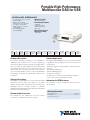
Portable High-Performance
Multifunction DAQ for USB
NI DAQPad-6015, NI DAQPad-6016
Operating Systems
• 16 analog inputs at up to 200 kS/s,
16-bit resolution
• Built-in screw terminal
connectors for easier and more
cost-effective connectivity
• 2 analog outputs for accurate
output signals
• 8 or 32 digital I/O lines
(5 V TTL/CMOS)
• Windows 2000/XP
Recommended Software
• LabVIEW
• LabWindows/CVI
• Measurement Studio
• VI Logger
Measurement Services
Software (included)
• NI-DAQmx
Product
Bus
Analog Inputs1 Input Resolution
NI 6015
USB
16 SE/8 DI
16 bits
NI 6016
USB
16 SE/8 DI
16 bits
1SE – single ended, DI – differential 2System dependent
Sampling Rate
200 kS/s
200 kS/s
Input Range Analog Outputs Output Resolution
±0.05 to ±10 V
2
16 bits
±0.05 to ±10 V
2
16 bits
Output Rate2
300 S/s
300 S/s
Output Range
±10 V
±10 V
Digital I/O
8
32
Counter/Timers
2
2
Triggers
Digital
Digital
Hardware Description
Common Applications
The National Instruments DAQPad-6015 and DAQPad-6016
multifunction data acquisition devices provide plug-and-play
connectivity via USB for acquiring, generating, and logging data in a
variety of portable and desktop applications. They include built-in
screw terminal connectivity so you can easily connect sensors and
signals without extra cost. Both devices feature 16-bit accuracy at
up to 200 kS/s. The DAQPad-6016 also provides 32 digital I/O lines
for applications requiring an extended interface to digital sensors
and actuators.
The DAQPad-6015 and DAQPad-6016 devices are ideal for a number
of applications where portability and accurate measurements are
essential, such as:
• Portable data logging – log environmental or voltage data quickly
and easily
• Field monitoring applications
• Embedded OEM applications
• In-vehicle data acquisition
• Academic lab use – academic discounts available for quantities
of five or more. Visit ni.com/academic for details.
Software Description
NI DAQPad-6015 and DAQPad-6016 devices include NI-DAQmx
Measurement Services software with which you can quickly
configure and begin taking measurements with your DAQ device.
NI-DAQmx provides a seamless interface to LabVIEW,
LabWindows/CVI, and Measurement Studio development environments
with features such as DAQ Assistant.
Information for OEM Customers
For information on special configurations and pricing, please
visit ni.com/oem.
Ordering Information
Recommended Accessories
The DAQPad-6015 and DAQPad-6016 both have built-in
connectivity, so no additional accessories are required.
NI DAQPad-6015 ..........................................................779047-01
NI DAQPad-6016 ..........................................................779025-01
Includes NI-DAQmx software
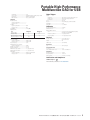
Portable High-Performance
Multifunction DAQ for USB
Specifications
These specifications are typical at 25 °C unless otherwise stated.
Analog Input
Accuracy Specifications
Nominal Range (V)
± 10
±5
± 0.5
± 0.05
Percent of Reading
24 hours
1 year
0.0658
0.0700
0.0158
0.0200
0.0658
0.0700
0.0658
0.0700
Offset (mV)
1.8798
0.9598
0.1158
0.0314
Absolute Accuracy
Noise + Quantization (mV)
Single Point
Averaged
0.9330
0.0824
0.4665
0.0412
0.0562
0.0050
0.0314
0.0031
Input Characteristics
Number of channels......................................... 16 single-ended or 8 differential (software-selectable
per channel)
Type of ADC...................................................... Successive approximation
Resolution......................................................... 16 bits, 1 in 65,536
Maximum sampling rate .................................. 200 kS/s
Input signal ranges (bipolar only)
Device Gain (Software-Selectable)
0.5
1
10
100
Range
±10 V
±5 V
±500 mV
±50 mV
Overvoltage protection
Powered Off (V)
±15
±15
Powered On (V)
±25
±25
FIFO buffer size................................................. 4,096 samples
Data transfers .................................................. Interrupts, programmed I/O
Configuration memory size .............................. 512 words
Transfer Characteristics
Relative accuracy ............................................. ±1.5 LSB typical, ±3.0 LSB maximum
DNL................................................................... ±0.5 LSB typical, ±1.0 LSB maximum
No missing codes............................................. 16 bits, guaranteed
Amplifier Characteristics
Input impedance
Normal powered........................................
Powered off ...............................................
Overload.....................................................
Input bias current .............................................
Input offset current ..........................................
CMRR (DC to 60 Hz)
Range ± 10 V, ± 5 V ...................................
Range ± 500 mV, ± 50 mV .........................
100 GΩ in parallel with 100 pF
820 Ω
820 Ω
±200 pA
±100 pA
85 dB
96 dB
Relative Accuracy
Resolution (mV)
Single Point
Averaged
1.0849
0.1085
0.5425
0.0542
0.0663
0.0066
0.04038
0.0040
Analog Output
Accuracy Specifications
Nominal Range (V)
± 10
Percent of Reading
24 hours
1 year
0.0154
0.0196
Absolute Accuracy
Absolute Accuracy
Offset (mV) at Full Scale (mV)
1.5680
3.530
Temperature
Drift (%/°C)
0.0005
Number of channels.........................................
Resolution.........................................................
Maximum update rate......................................
Type of DAC......................................................
FIFO buffer size.................................................
Data transfers ..................................................
2 voltage outputs
16 bits, 1 in 65,536
300 S/s, system dependent
Double-buffered, multiplying
None
Interrupts, programmed I/O
Transfer Characteristics
Relative accuracy (INL)..................................... ±3 LSB, typical
DNL................................................................... ±2 LSB, typical
Monotonicity .................................................... 15 bits
Voltage Output
Range................................................................
Output coupling ................................................
Output impedance ............................................
Current drive.....................................................
Protection .........................................................
Power-on state .................................................
±10 V
DC
0.1 Ω , maximum
±5 mA, maximum
Short-circuit to ground
±250 mV
Dynamic Characteristics
Settling time to full-scale step ........................
Slew rate ..........................................................
Noise ................................................................
Glitch energy at mid-scale transition
Magnitude .................................................
Duration .....................................................
8 µs to ±1 LSB accuracy
4 V/µs
360 µVrms, DC to 400 kHz
±100 mV
4.0 µs
Digital I/O
Number of channels......................................... 8 input/output
Compatibility .................................................... 5 V TTL/CMOS
P0.<0..7>
Digital logic levels
Dynamic Characteristics
Small signal (-3 dB) bandwidth........................ 425 kHz
Large signal (17. THD) bandwidth ................... 450 kHz
System noise (LSBrms, including quantization)
Range
± 10 V, ± 5 V
± 500 mV
± 50 mV
Temperature
Drift (%/°C)
0.0010
0.0005
0.0010
0.0010
Output Characteristics
Input coupling................................................... DC
Maximum working voltage
(signal + common mode) .................................. Each input should remain within ± 11 V of ground
Signal Name
AI<0..15>
AI SENSE
Absolute Accuracy
at Full Scale (mV)
8.984
2.003
0.471
0.069
LSBrms
0.9
1.1
6.7
Settling time to full scale step
Level
Input low voltage
Input high voltage
Output low voltage (Iout = 2.5 µA)
Output high voltage (Iout = -2.5 µA)
Minimum (V)
0
2.0
–
4.35
Maximum (V)
0.8
5.0
0.4
–
Power-on state .......................................... Input (high impedance), 1.5 kΩ pull down to D GND
Data transfers............................................ Programmed I/O
Max transfer rate ...................................... 250 S/s, system dependent
P1.<0..7>, P2.<0..7>, P3.<0..7> (NI 6016 only)
Range
± 10 V
±5V
± 50 mV, ± 500 mV
Accuracy
±4 LSB, 5µs typical
±2 LSB, 5µs maximum
±2 LSB, 5µs typical
Crosstalk (DC to 100 kHz)
Adjacent channels ..................................... -75 dB
All other channels ..................................... -90 dB
2
Digital logic levels
Level
Input low voltage
Input high voltage
Output low voltage (Iout = 24 mA)
Output high voltage (Iout = -13 mA)
National Instruments • Tel: (800) 433-3488 • Fax: (512) 683-9300 • [email protected] • ni.com
Minimum (V)
0
2.2
–
3.7
Maximum (V)
0.8
5.0
0.4
–
Portable High-Performance
Multifunction DAQ for USB
Handshaking ..............................................
Power-on state ..........................................
Data transfers............................................
Max transfer rate ......................................
2-wire
Input (high impedance), 100 kΩ pull up to +5 VDC
Interrupts, programmed I/O
250 S/s, system dependent
Timing I/O
Number of channels
Up/down counter/timers ...........................
Frequency scaler........................................
Resolution
Up/down counter/timers ...........................
Frequency scaler........................................
Compatibility ....................................................
Digital logic levels
Level
Input low voltage
Input high voltage
Output low voltage (Iout = 5 mA)
Output high voltage (Iout = -3.5 mA)
Base clocks available
Up/down counter/timers ...........................
Frequency scaler........................................
Base clock accuracy .........................................
Maximum external source frequency
Up/down counter/timers ...........................
External source selections ...............................
External gate selections...................................
Minimum source pulse duration ......................
Minimum gate pulse duration..........................
Data transfers
Up/down counter/timer.............................
Frequency scaler........................................
2
1
24 bits
4 bits
5 V TTL/CMOS
Minimum (V)
0
2.0
–
4.35
20 MHz, 100 kHz
10 MHz, 100 kHz
±0.01%
Digital Triggers
Purpose
Analog input ..............................................
Analog output ............................................
Counter/timers...........................................
Source ............................................................
Response ..........................................................
Compatibility ....................................................
Pulse width.......................................................
Start, reference, and pause trigger, sample clock
Start and pause trigger, sample clock
Source, gate
PFI <0..9>
Rising or falling edge, software-selectable
5 V TTL
10 ns minimum
Calibration
Maximum (V)
0.8
5.0
0.4
–
Recommended warm-up time.......................... 15 minutes
Calibration interval........................................... 1 year
Onboard calibration reference
Level........................................................... 5.000 V (± 3.5 mV) over full operating temperature,
actual value stored in EEPROM
Temperature coefficient ............................ ± 5.0 ppm/°C maximum
Long-term stability .................................... ± 15.0 ppm/sqrt (1000 hours)
Physical
Enclosure dimensions ...................................... 17.60 x 14.85 x 3.08 cm
(8.00 x 6.75 x 1.40 in.)
Weight ............................................................ 2 lb
I/O Connectors ................................................. Screw terminals
Bus Interface
20 MHz
PFI <0..9>
PFI <0..9>
10 ns, edge-detect mode
10 ns, edge-detect mode
Type .................................................................. USB 2.0, full speed
Power Requirement
9 to 25 V ........................................................... 12 W
Power available at I/O connector .................... +4.65 to + 5.25 VDC at 1 A
Environment
Interrupts, programmed I/O
Programmed I/O
Operating temperature..................................... 0 to 55 °C
Storage temperature ........................................ -20 to 70 °C
Relative humidity ............................................. 10 to 90%, noncondensing
Certifications and Compliances
CE Mark Compliance
View additional specifications at ni.com/manuals .
National Instruments • Tel: (800) 433-3488 • Fax: (512) 683-9300 • [email protected] • ni.com
3
NI Services and Support
NI has the services and support to meet your
needs around the globe and through the
application life cycle – from planning
and development through deployment
and ongoing maintenance. We offer
services and service levels to meet
customer requirements in research,
design, validation, and manufacturing.
Visit ni.com/services.
Local Sales and Technical Support
SERVICE
NEEDS
In offices worldwide, our staff is local to the country, giving you
access to engineers who speak your language. NI delivers industryleading technical support through online knowledge bases, our
applications engineers, and access to 14,000 measurement and
automation professionals within NI Developer Exchange forums.
Find immediate answers to your questions at ni.com/support.
We also offer service programs that provide automatic upgrades to
your application development environment and higher levels of
technical support. Visit ni.com/ssp.
Training and Certification
NI training is the fastest, most certain route to productivity with our
products. NI training can shorten your learning curve, save
development time, and reduce maintenance costs over the
application life cycle. We schedule instructor-led courses in cities
worldwide, or we can hold a course at your facility. We also offer a
professional certification program that identifies individuals who
have high levels of skill and knowledge on using NI products.
Visit ni.com/training.
Hardware Services
NI Factory Installation Services
NI Factory Installation Services (FIS) is the fastest and easiest way to
use your PXI or PXI/SCXI™ combination systems right out of the
box. Trained NI technicians install the software and hardware and
configure the system to your specifications. NI extends the standard
warranty by one year on hardware components (controllers, chassis,
modules) purchased with FIS. To use FIS, simply configure your
system online with ni.com/pxiadvisor.
Professional Services
Our Professional Services Team is comprised of NI applications
engineers, NI Consulting Services, and a worldwide NI Alliance
Partner Program of more than 600 independent consultants and
integrators. Services range
from start-up assistance to
turnkey system integration.
Visit ni.com/alliance.
Calibration Services
NI recognizes the need to maintain properly calibrated devices for
high-accuracy measurements. We provide manual calibration
procedures, services to recalibrate your products, and automated
calibration software specifically designed for use by metrology
laboratories. Visit ni.com/calibration.
Repair and Extended Warranty
OEM Support
We offer design-in consulting and product integration assistance
if you want to use our products for OEM applications. For
information about special pricing and services for OEM customers,
visit ni.com/oem.
NI provides complete repair services for our products. Express repair
and advance replacement services are also available. We offer
extended warranties to help you meet project life-cycle requirements.
Visit ni.com/services.
ni.com • (800) 433-3488
National Instruments • Tel: (512) 683-0100 • Fax: (512) 683-9300 • [email protected]
© 2004 National Instruments Corporation. All rights reserved. LabVIEW, LabWindows, CVI, Measurement Studio, and ni.com are
trademarks of National Instruments. Other product and company names listed are trademarks or trade names of their respective companies.
High-Performance M Series Multifunction DAQ for USB –
16-Bit, up to 1.25 MS/s, up to 80 Analog Inputs
NI USB-6221, NI USB-6225, NI USB-6229,
NI USB-6251, NI USB-6255, NI USB-6259
• Up to 80 analog inputs at 16 bits,
1.25 MS/s (1 MS/s or 750 KS/s
scanning)
• Up to 4 analog outputs at 16 bits,
2.8 MS/s (2 µs full-scale settling)
• Up to 48 TTL/CMOS digital I/O lines
(up to 32 hardware-timed at up to
1 MHz)
• Two 32-bit, 80 MHz counter/timers
• Analog and digital triggering
• NI-PGIA 2 and NI-MCal
calibration technology for improved
measurement accuracy
• NI signal streaming for 4 high-speed
data streams on USB
• Power supply included
• 1-year warranty
• Additional warranty and calibration
services available
Family
NI 6251
NI 6255
NI 6259
NI 6221
NI 6225
NI 6229
1Correlated
Bus
USB
USB
USB
USB
USB
USB
Analog
Inputs
16
80
32
16
80
32
Resolution
(bits)
16
16
16
16
16
16
Operating Systems
• Windows Vista (32- and 64-bit)/XP/2000
Recommended Software
•
•
•
•
LabVIEW
LabVIEW SignalExpress
LabWindows™/CVI
Measurement Studio
Other Compatible Software
• Visual Studio .NET
• C/C++/C#
Measurement Services
Software (included)
• NI-DAQmx driver software
• Measurement & Automation Explorer
configuration utility
• LabVIEW SignalExpress LE
Max Rate
(S/s)
1.25 M
1.25 M
1.25 M
250 k
250 k
250 k
Analog
Outputs
2
2
4
2
2
4
Analog Output
Resolution (bits)
16
16
16
16
16
16
Max Rate
(S/s)
2.86 M
2.86 M
2.86 M
833 k
833 k
833 k
Range (V)
±10
±10
±10
±10
±10
±10
Digital I/O
24
24
48
24
24
48
Clocked
DIO1
8, up to 1 MHz1
8, up to 1 MHz1
32, up to 1 MHz1
8, up to 1 MHz1
8, up to 1 MHz1
32, up to 1 MHz1
Counter
2
2
2
2
2
2
Resolution
(bits)
32
32
32
32
32
32
DIO can be clocked at up to 1 MHz across the USB bus and up to 10 MHz using onboard regeneration.
Table 1. Selection Guide for High-Performance M Series Multifunction DAQ for USB
Overview and Applications
With recent bandwidth improvements and new innovations from
National Instruments, USB has evolved into a core bus of choice
for measurement and automation applications. National Instruments
M Series devices for USB deliver high-performance data acquisition in
an easy-to-use and portable form factor through USB ports on laptop
computers and other portable computing platforms. NI designed a
new and innovative patent-pending NI signal streaming technology
that enables sustained bidirectional high-speed data streams on USB.
The new technology, combined with advanced external synchronization
and isolation, helps engineers and scientists achieve high-performance
applications on USB.
NI M Series high-performance multifunction data acquisition (DAQ)
modules for USB are optimized for superior accuracy at fast sampling
rates. They provide an onboard NI-PGIA 2 amplifier designed for
fast settling times at high scanning rates, ensuring 16-bit accuracy
even when measuring all available channels at maximum speed.
All high-performance devices have a minimum of 16 analog inputs,
24 digital I/O lines, seven programmable input ranges, analog and
digital triggering, and two counter/timers. High-speed NI USB-625x
and NI USB-622x M Series devices have two-year and one-year
calibration intervals, respectively. USB M Series devices are ideal
for test, control, and design applications including:
• Portable data logging – log environmental or voltage data
quickly and easily
• Field-monitoring applications
• Embedded OEM applications
• In-vehicle data acquisition
• Academic lab use – academic discounts available
NI Signal Streaming
To optimize the use of the Universal Serial Bus (USB) and deliver
high-performance data acquisition, National Instruments created several
key technologies to push the limits of USB throughput and latency.
NI signal streaming combines three innovative hardware- and softwarelevel design elements to enable sustained high-speed and bidirectional
data streams over USB. For more information, visit ni.com/usb.
High-Performance M Series Multifunction DAQ for USB –
16-Bit, up to 1.25 MS/s, up to 80 Analog Inputs
USB M Series for Test
USB M Series for OEMs
For test, you can use the M Series high-speed analog inputs and
10 MHz digital lines with NI signal conditioning for applications
including test, component characterization, and sensor measurement.
High-speed USB-625x M Series devices are compatible with the
NI SCC signal conditioning platform, providing amplification filtering and
power for virtually every type of sensor. This platform is also compliant
with IEEE 1451.4 smart transducer electronic data sheet (TEDS) sensors,
which offer digital storage for sensor data sheet information.
USB M Series multifunction DAQ devices also complement existing
test systems that need additional measurement channels. For higherchannel-count signal conditioning on USB, consider the NI CompactDAQ
or SCXI platforms.
Shorten your time to market by integrating National Instruments
OEM products in your design. Board-only versions of USB M Series
DAQ devices are available for OEM applications, with competitive
quantity pricing and software customization. The NI OEM Elite Program
offers free 30-day trial kits for qualified customers. Visit ni.com/oem
for more information.
USB M Series for Control
USB M Series digital lines can drive 24 mA for relay and actuator
control. By clocking the digital lines as fast as 10 MHz (with onboard
regeneration), you can use these lines for pulse-width modulation
(PWM) to control valves, motors, fans, lamps, and pumps. With four
waveform analog outputs, two 80 MHz counter/timers, and four highspeed data streams on USB, M Series devices can execute multiple
control loops simultaneously. High-speed USB-625x M Series devices
also offer direct support for encoder measurements, protected digital
lines, and digital debounce filters. With up to 80 analog inputs,
32 clocked digital lines, and four analog outputs, you can execute
multiple control loops with a single device.
You can also create a complete custom motion controller by combining
USB M Series devices with the NI SoftMotion Development Module.
USB M Series for Design
For design applications, you can use a wide range of I/O – from
80 analog inputs to 48 digital lines – to measure and verify prototype
designs. USB M Series devices and National Instruments LabVIEW
SignalExpress interactive measurement software bring benchtop
measurements to the PC. With NI LabVIEW SignalExpress, you
can quickly create design verification tests. The fast acquisition and
generation rates of high-performance USB M Series high-speed
devices along with LabVIEW SignalExpress provide fast design analysis.
You can convert your tested and verified LabVIEW SignalExpress projects
to LabVIEW applications for immediate M Series DAQ use, and bridge
the gap between test, control, and design applications.
Recommended Training and Services
All M Series devices are available with additional warranty and
calibration services. For new data acquisition programmers,
NI recommends the “Data Acquisition: 7 Steps to Success” tutorial kit.
This tutorial kit helps shorten development time for data acquisition
applications by describing the various stages of getting started with DAQ
including system definition, setup, test, and application programming.
Recommended Software
National Instruments measurement services software, built around
NI-DAQmx driver software, includes intuitive application programming
interfaces, configuration tools, I/O assistants, and other tools designed to
reduce system setup, configuration, and development time. National
Instruments recommends using the latest version of NI-DAQmx driver
software for application development in National Instruments LabVIEW,
LabVIEW SignalExpress, LabWindows/CVI, and Measurement Studio. To
obtain the latest version of NI-DAQmx, visit ni.com/support/daq/versions.
NI measurement services software speeds up your development with
features including:
• A guide to create fast and accurate measurements with no programming
using DAQ Assistant
• Automatic code generation to create your application in LabVIEW;
LabWindows/CVI; LabVIEW SignalExpress; and Visual Studio .NET,
C/C++/C#, or Visual Basic using Measurement Studio
• Multithreaded streaming technology for 1,000 times performance
improvements
• Automatic timing, triggering, and synchronization routing to make
advanced applications easy
• More than 3,000 free software downloads to jump-start your project
available at ni.com/zone
• Software configuration of all digital I/O features without hardware
switches/jumpers
• Single programming interface for analog input, analog output, digital
I/O, and counters on hundreds of multifunction DAQ hardware devices
M Series devices are compatible with the following versions (or later) of
NI application software – LabVIEW, LabWindows/CVI, or Measurement
Studio versions 7.x or LabVIEW SignalExpress 2.x.
BUY ONLINE at ni.com or CALL 800 813 3693 (U.S.)
2
High-Performance M Series Multifunction DAQ for USB –
16-Bit, up to 1.25 MS/s, up to 80 Analog Inputs
Recommended Accessories
(Mass-Termination Versions)
Ordering Information
Signal conditioning is required for sensor measurements or voltage
inputs greater than 10 V. NI SCC products, which are designed to
increase the performance and reliability of your data acquisition system,
are up to 10 times more accurate than using terminal blocks alone.
Refer to Table 2 for more information or visit ni.com/sigcon.
Sensor/Signals (>10 V)
System Description
SCC Signal Conditioning
Sensor/Signals (<10 V)
System Description
Screw Terminal (Shielded) 2
BNC Connectivity
Screw Terminal (Nonshielded) 2
Screw Terminal (Shielded) 2, 3
1 Includes
Carrier
SCC
Cable
SH68-68-EP
SH68-68-EP
R68-68
SH68-68-S
Terminal Block
SCC-68 1
BNC-2110
SCC-681
SCB-68
SCC signal conditioning.
the integrated screw termination version of the USB DAQ device.
use with Connector 1 on USB-6225 and USB-6255 devices.
2 Consider
3For
Cable
SH68-68-EP
Table 2. Recommended Accessories
NI USB-6221
Screw terminal ................................................................779808-0P1
NI USB-6225
Screw terminal ................................................................779973-0P1
Mass terminal..................................................................779974-0P1
NI USB-6229
Screw terminal ................................................................779810-0P1
NI USB-6251
Screw terminal ................................................................779627-0P1
Mass terminal..................................................................779694-0P1
NI USB-6255
Screw terminal ................................................................779958-0P1
Mass terminal..................................................................779959-0P1
NI USB-6259
Screw terminal ................................................................779628-0P1
Mass terminal..................................................................779695-0P1
Includes NI-DAQmx software.
1 P is 1 (U.S. 120 VAC); 2 (Swiss 220 VAC); 3 (Australian 240 VAC);
4 (Universal Euro 240 VAC); 6 (United Kingdom 240 VAC); 7 (Japanese 100 VAC)
Includes data acquisition driver software, 1 m USB cable, and AC adapter.
Board-Only Devices for OEM
NI USB-6221 OEM (qty 1)......................................................195959-02
NI USB-6225 OEM (qty 1)......................................................197294-01
NI USB-6229 OEM (qty 1)......................................................195959-01
NI USB-6251 OEM (qty 1)......................................................194929-03
NI USB-6255 OEM (qty 1)......................................................197201-01
NI USB-6259 OEM (qty 1)......................................................194929-01
Accessories
Cables
SH68-68-EP (shielded) ......................................................184749-01
SH68-68-S (for USB-62x5) ................................................185262-01
R6868 (unshielded ribbon) ................................................182482-01
Terminal Blocks and Signal Conditioning Carrier
SCC-2345 carrier ..............................................................777458-01
SCC-68 screw-terminal block for mass termination ........779475-01
SCB-68 screw-terminal block for mass termination ........776844-01
BNC-2110 BNC terminal block for mass termination ......777643-01
Data Acquisition Services
Data Acquisition: 7 Steps to Success ..................................779489-01
BUY NOW!
For complete product specifications, pricing, and accessory
information, call 800 813 3693 (U.S.) or go to ni.com/usb.
BUY ONLINE at ni.com or CALL 800 813 3693 (U.S.)
3
High-Performance M Series Multifunction DAQ for USB –
16-Bit, up to 1.25 MS/s, up to 80 Analog Inputs
NI 625x Specifications manuals at ni.com/manuals.
Modes ................................................ Analog edge triggering, analog
edge triggering with hysteresis,
and analog window triggering
Resolution ........................................... 10 bits, 1 in 1,024
Specifications listed below are typical at 25 ˚C unless otherwise noted.
Analog Output
Analog Input
Number of channels
USB-6221/6225/6251/6255 ...........
USB-6229/6259 .............................
DAC resolution....................................
Maximum update rate
USB-6221/6225/6229
1 channel ....................................
2 channels ..................................
3 channels ..................................
4 channels ..................................
USB-6251/6255/6259
1 channel ....................................
2 channels ..................................
3 channels ..................................
4 channels ..................................
Timing accuracy ..................................
Timing resolution ................................
Output range
USB-6221/6225/6229.....................
USB-6251/6255/6259.....................
Specifications
>> For complete specifications, see the NI 622x Specifications and the
Number of channels
USB-6221/6251 .........................
USB-6229/6259 ...........................
USB-6225/6255 ...........................
ADC resolution....................................
Maximum sampling rate
USB-6221/6225/6229.....................
8 differential or 16 single ended
16 differential or 32 single ended
40 differential or 80 single ended
16 bits
250 kS/s single channel,
250 kS/s multichannel
(aggregate)
USB-6251/6259 ............................. 1.25 MS/s single channel,
1.00 MS/s multichannel
(aggregate)
USB-6255 ....................................... 1.25 MS/s single channel,
750 kS/s multichannel
(aggregate)
Input coupling ..................................... DC
Input range
USB-6221/6225/6229..................... ±10, ±5, ±1, ±0.2 V
USB-6251/6255/6259..................... ±10, ±5, ±2, ±1,
±0.5, ±0.2, ±0.1 V
Maximum working voltage for analog inputs
(signal + common mode)..................... ±11 V of AI GND
Input impedance
Device on
AI+ to AI GND................................. >10 GΩ in parallel with 100 pF
AI– to AI GND................................. >10 GΩ in parallel with 100 pF
Device off
AI+ to AI GND................................. 820 Ω
AI– to AI GND................................. 820 Ω
Input bias current................................ ±100 pA
Crosstalk (at 100 kHz)
Adjacent channels .......................... -75 dB
Nonadjacent channels
USB-6221/6225/6229................. -90 dB
USB-6251/6255/6259................. -95 dB
Input FIFO size..................................... 4,095 samples
Scan list memory ................................ 4,095 entries
Data transfers ..................................... NI signal streaming on USB,
programmed I/O
Analog Triggers (USB-625x Devices Only)
Functions ............................................. Start Trigger
Reference Trigger
Pause Trigger
Sample Clock
Convert Clock
Sample Clock Timebase
Output coupling...................................
Output impedance...............................
Output current drive............................
Output FIFO size ..................................
Data transfers .....................................
2
4
16 bits
833 kS/s
740 kS/s per channel
666 kS/s per channel
625 kS/s per channel
2.86 MS/s
2.00 MS/s per channel
1.54 MS/s per channel
1.25 MS/s per channel
50 ppm of sample rate
50 ns
±10 V
±10 V, ±5 V, ±external reference
on APFI <0..1>
DC
0.2 Ω
±5 mA
8,191 samples shared
among channels used
NI signal streaming,
programmed I/O
Calibration (AI and AO)
Recommended warm-up time............. 15 minutes
Calibration interval
USB-6221/6225/6229..................... 1 year
USB-6251/6255/6259..................... 2 years
Digital I/O/PFI
Static Characteristics
Number of channels
USB-6221/6225/6251/6255 ........... 24 total, 8 (P0.<0..7>),
16 (PFI <0..7>/P1,
PFI <8..15>/P2)
USB-6229/6259 .............................. 48 total, 32 (P0.<0..31>),
16 (PFI <0..7>/P1,
PFI <8..15>/P2)
Ground reference ................................ D GND
Direction control ................................. Each terminal individually
programmable as input or output
Pull-down resistor............................... 50 kΩ typical, 20 kΩ minimum
BUY ONLINE at ni.com or CALL 800 813 3693 (U.S.)
4
High-Performance M Series Multifunction DAQ for USB –
16-Bit, up to 1.25 MS/s, up to 80 Analog Inputs
Waveform Characteristics (Port 0 Only)
Phase-Locked Loop (PLL)
Terminals used
USB-6221/6225/6251/6255 ...........
USB-6229/6259 .............................
Port/sample size
USB-6221/6225/6251/6255 ...........
USB-6229/6259 ..............................
Waveform generation (DO) FIFO.........
Waveform acquisition (DI) FIFO ..........
DI sample clock frequency..................
DO sample clock frequency
Regenerate from FIFO.....................
Streaming from memory.................
Data transfers .....................................
Number of PLLs................................... 1
Reference signal ................................. PXI_STAR,
PXI_CLK10,
RTSI <0..7>
Output of PLL....................................... 80 MHz timebase; other signals
derived from 80 MHz timebase
including 20 MHz and 100 kHz
timebases
Port 0 (P0.<0..7>)
Port 0 (P0.<0..31>)
Up to 8 bits
Up to 32 bits
2,047 samples
2,047 samples
0 to 1 MHz, system dependent
0 to 10 MHz
0 to 1 MHz, system dependent
NI signal streaming,
programmed I/O
PFI/Port 1/Port 2 Functionality
Functionality........................................ Static digital input,
static digital output,
timing input, timing output
Timing output sources......................... Many AI, AO, counter, DI,
DO timing signals
Debounce filter settings ..................... 125 ns, 6.425 µs, 2.56 ms,
disable; high and low transitions;
selectable per input
General-Purpose Counter/Timers
Number of counter/timers .................. 2
Counter measurements....................... Edge counting, pulse, semiperiod,
period, two-edge separation
Position measurements ...................... X1, X2, X4 quadrature encoding
with Channel Z reloading;
two-pulse encoding
Output applications............................. Pulse, pulse train with dynamic
updates, frequency division,
equivalent time sampling
Internal base clocks ............................ 80 MHz
20 MHz
0.1 MHz
Base clock accuracy............................ 50 ppm
Inputs................................................... Gate, Source, HW_Arm, Aux, A,
B, Z, Up_Down
Data transfers ..................................... NI signal streaming,
programmed I/O
Frequency Generator
Number of channels............................ 1
Base clocks ......................................... 10 MHz, 100 kHz
Divisors................................................ 1 to 16
Base clock accuracy............................ 50 ppm
Output can be available on any PFI or RTSI terminal
External Digital Triggers
Source ................................................. Any PFI, RTSI, PXI_TRIG,
PXI_STAR
Polarity ................................................ Software-selectable for
most signals
Analog input function ......................... Start Trigger
Reference Trigger
Pause Trigger
Sample Clock
Convert Clock
Sample Clock Timebase
Analog output function ....................... Start Trigger
Pause Trigger
Sample Clock
Sample Clock Timebase
Counter/timer functions...................... Gate, Source, HW_Arm, Aux, A,
B, Z, Up_Down
Digital waveform generation
(DO) function ....................................... Sample Clock
Digital waveform acquisition
(DI) function......................................... Sample Clock
Bus Interface
USB .................................................... Hi-Speed USB or full-speed USB
NI signal streaming............................. 4 high-speed data streams;
can be used for analog input,
analog output, digital input,
digital output, counter/timer 0,
counter/timer 1
Power Requirements
USB power supply requirements ........ 11 to 30 VDC, 20 W
Power Limits
+5 V terminal....................................... 1 A max
P0/PFI/P1/P2 and
+5 V terminals combined .................... 2 A max
Power supply fuse............................... 2 A, 250 V
Physical Requirements
Enclosure dimensions (includes connectors)
Screw termination .......................... 26.67 by 17.09 by 4.45 cm
(10.5 by 6.73 by 1.75 in.)
Mass termination ........................... 18.8 by 17.09 by 4.45 cm
(7.4 by 6.73 by 1.75 in.)
BUY ONLINE at ni.com or CALL 800 813 3693 (U.S.)
5
High-Performance M Series Multifunction DAQ for USB –
16-Bit, up to 1.25 MS/s, up to 80 Analog Inputs
Environmental
Operating temperature .......................
Storage temperature...........................
Humidity ..............................................
Maximum altitude...............................
Pollution degree (indoor use only)......
CE Compliance
0 to 45 ºC
-20 to 70 ºC
10 to 90% RH, noncondensing
2,000 m
2
Safety
This product is designed to meet the requirements of the following
standards of safety for electrical equipment for measurement, control,
and laboratory use:
• IEC 61010-1, EN 61010-1
• UL 61010-1, CSA 61010-1
Note: For UL and other safety certifications, refer to the product label
or visit ni.com/certification, search by model number or product line,
and click the appropriate link in the Certification column.
Electromagnetic Compatibility
This product is designed to meet the requirements of the following
standards of EMC for electrical equipment for measurement, control,
and laboratory use:
• EN 61326 EMC requirements; Minimum Immunity
• EN 55011 Emissions; Group 1, Class A
• CE, C-Tick, ICES, and FCC Part 15 Emissions; Class A
Note: For EMC compliance, operate this device according to
product documentation.
This product meets the essential requirements of applicable European
Directives, as amended for CE marking, as follows:
• 2006/95/EC; Low-Voltage Directive (safety)
• 2004/108/EC; Electromagnetic Compatibility Directive (EMC)
Note: Refer to the Declaration of Conformity (DoC) for this product for
any additional regulatory compliance information. To obtain the DoC
for this product, visit ni.com/certification, search by model number or
product line, and click the appropriate link in the Certification column.
Waste Electrical and Electronic Equipment (WEEE)
EU Customers: At the end of their life cycle, all products must be
sent to a WEEE recycling center. For more information about WEEE
recycling centers and National Instruments WEEE initiatives, visit
ni.com/environment/weee.htm.
Environmental Management
NI is committed to designing and manufacturing products in an
environmentally responsible manner. NI recognizes that eliminating
certain hazardous substances from our products is beneficial not only
to the environment but also to NI customers.
For additional environmental information, refer to the NI and the
Environment Web page at ni.com/environment. This page contains
the environmental regulations and directives with which NI complies,
as well as any other environmental information not included in
this document.
Management Methods for Controlling Pollution Caused by
Electronic Information Products Regulation (China RoHS)
BUY ONLINE at ni.com or CALL 800 813 3693 (U.S.)
6
NI Services and Support
NI has the services and support to meet
your needs around the globe and through
the application life cycle – from planning
and development through deployment
and ongoing maintenance. We offer
services and service levels to meet
customer requirements in research,
design, validation, and manufacturing.
Visit ni.com/services.
Training and Certification
NI training is the fastest, most certain route to productivity with our
products. NI training can shorten your learning curve, save development
time, and reduce maintenance costs over the application life cycle. We
schedule instructor-led courses in cities worldwide, or we can hold a
course at your facility. We also offer a professional certification program
that identifies individuals who have high levels of skill and knowledge on
using NI products. Visit ni.com/training.
Professional Services
Our NI Professional Services team is composed of NI applications
and systems engineers and a worldwide National Instruments Alliance
Partner program of more than 600 independent consultants and
integrators. Services range
from start-up assistance to
turnkey system integration.
Visit ni.com/alliance.
OEM Support
We offer design-in consulting and product integration assistance if you
want to use our products for OEM applications. For information about
special pricing and services for OEM customers, visit ni.com/oem.
ni.com • 800 813 3693
National Instruments • [email protected]
Local Sales and Technical Support
In offices worldwide, our staff is local to the country, giving you access
to engineers who speak your language. NI delivers industry-leading
technical support through online knowledge bases, our applications
engineers, and access to 14,000 measurement and automation
professionals within NI Developer Exchange forums. Find immediate
answers to your questions at ni.com/support.
We also offer service programs that provide automatic upgrades to
your application development environment and higher levels of technical
support. Visit ni.com/ssp.
Hardware Services
NI Factory Installation Services
NI Factory Installation Services (FIS) is the fastest and easiest way to
use your PXI or PXI/SCXI combination systems right out of the box.
Trained NI technicians install the software and hardware and configure
the system to your specifications. NI extends the standard warranty by
one year on hardware components (controllers, chassis, modules)
purchased with FIS. To use FIS, simply configure your system online
with ni.com/pxiadvisor.
Calibration Services
NI recognizes the need to maintain properly calibrated devices for
high-accuracy measurements. We provide manual calibration
procedures, services to recalibrate your products, and automated
calibration software specifically designed for use by metrology
laboratories. Visit ni.com/calibration.
Repair and Extended Warranty
NI provides complete repair services for our products. Express repair
and advance replacement services are also available. We offer
extended warranties to help you meet project life-cycle requirements.
Visit ni.com/services.
*351497B-01*
351497B-01
2007-9287-301-101-D
© 2007 National Instruments Corporation. All rights reserved. CVI, LabVIEW, Measurement Studio, National Instruments, National Instruments Alliance Partner, NI, ni.com,
NI CompactDAQ, NI SoftMotion, RTSI, SCXI, and SignalExpress are trademarks of National Instruments. The mark LabWindows is used under a license from Microsoft Corporation.
Other product and company names listed are trademarks or trade names of their respective companies. A National Instruments Alliance Partner is a business entity independent from
National Instruments and has no agency, partnership, or joint-venture relationship with National Instruments.
SG Series
Programmable Precision DC Power Supply
5 kW - 150 kW // 40 V - 600 V
Product Validation
Production ATE
Burn-In
DC Bus Power
Ethernet
For Further Information or Sales Support
Contact Elgar Electronics Corporation
www.Elgar.com 858.450.0085
Overview
Advanced Power Simulation
The SG series represents the next generation of high power
programmable DC power supplies. Designed for exceptional load
transient response, low noise and the highest power density in the
industry. The industry leading power density is enhanced by a stylish
front air intake allowing supplies to be stacked without any required
clearance between units.
At the heart of the SG series is a 5 kW power module. Depending on
the output voltage, one to six modules can be configured in a single
chassis to deliver 5 kW to 30 kW of power. Combinations of these
chassis can then be easily paralleled to achieve power levels up to
150 kW. Paralleled units operate like one single supply providing total
system current. Available in two control versions, the SGA has basic
analog controls, while the SGI provides intelligent control features
SGI: Advanced Intelligent Control
(Sorensen General purpose Intelligent) The SGI combines
onboard intelligent controls with the outstanding power electronics
common to all SG family supplies. These controls enable
sophisticated sequencing, constant power mode and save/recall
of instrument settings. Looping of sequences makes the SGI idea for
repetitive testing. An impressive vacuum fluorescent graphical display
in eight languages, context sensitive “soft” keys and front panel
keyboard simplify programming of the SGI.
SGA: Outstanding Value - Analog Control
(Sorensen General purpose Analog) The SGA, with its industry
leading price performance, is available for customers requiring
simple front panel analog controls or external control. With the
same high performance power electronics as the SGI, the SGA
provides essential features like 10- turn potentiometers for setting
voltage and current, 3 ½ digit LED readout plus front panel
over-voltage protection (OVP) preview/adjustment and reset.
SGI
Modular Design
•
•
Fast Load Transient
•
•
Parallelable
•
•
Optional
•
Direct Front Panel V/I Control
•
•
3½ Digit LED Readout
•
Graphics Display
•
Sequencing
•
Save/Recall Setups
•
System Power Readouts
•
Constant Power Mode
IEEE-488.2/RS-232C
Optional
LXI Compliant Ethernet
Optional
A 100 / 100
C -
1A AA
Control Designation
SGA
Analog & Digital Summing
SGI / SGA Model Number Description
SG
SGI / SGA Comparison Chart
Feature
SGI model provides
constant power mode allowing
independent setting of the max
voltage, current and power
•
RS-232C Std
IEEE-488.2
Optional
Optional
Compliant Ethernet
A = Analog
I = Intelligent
Process Options
Voltage
Remote Control Options
Current
Input Voltage Options
Options and Accessories
Control Options:
A: Analog
I: Intelligent
Input Options:
C: Input Voltage 187 / 242VAC, 3 Phase
D: Input Voltage 342 / 440VAC, 3 Phase
E: Input Voltage 396 / 528VAC, 3 Phase
Remote Control Options:
0A: No Option
1A: IEEE-488.2 + RS-232C
1C: Ethernet + RS-232C
1D: Isolated Analog Control
1E: Shaft Locks (SGA series only)
Contact factory for other combinations
Process Options:
AA: No option
AB: Certificate of Calibration (includes Test Data)
Accessories:
890-453-03: Paralleling Cable (for up to 5 units, requires one cable
per unit placed in parallel)
K550212-01: 3U Rack Slides (for 5kW, 10kW and 15kW models)
K550213-01: 6U Rack Slides (for 20kW, 25kW and 30kW models)
Applications
Process Control
Whether you are controlling ion beams for the manufacture of
semiconductors, or driving a current through electrolyte for precise
control in a plating process, the SG series is an ideal choice with it’s
small size, reliable modular design and standard analog programmability. Direct control of V and I along with monitoring of the actual
voltage and current, provides a simple interface for your PLC or
other type of analog controller.
Product Development
Testing & Burn-in of DC-DC converters, laser diodes, automotive and
semiconductor components and aircraft flight hardware are just a few
of the items being tested using the SG product family. From simple
front panel control to complex test sequences for compliance testing,
the SG series will keep pace with your changing application needs.
Research
A research environment presents some of the most demanding
requirements on your test instrumentation. Equipment that is
sufficient today, may not meet the needs of the next project. With
the SG series this is no longer a problem. The modular design
allows you to easily upgrade to higher power levels in the future,
or parallel units to achieve up to 150 kW. With the sophisticated
sequencing capability of the SGI model, you can build an infinite
variety of test or diagnostic programs and have them execute
directly from the power supply.
Automotive Component Test
The 16-bit resolution and Ethernet enabled hardware triggering
allows for detailed sequencing associated with battery fluctuation
simulation. The tight load regulation capability of the SG series
makes it a superior source for validation and acceptance testing
and burn-in of automotive components. The 40V models, in
particular, provide a full range of testing to simulate battery
conditions. Margin testing of components, such as electronic control
units (ECU) and electromechanical components, is easily achieved.
Rackmount ATE Systems
The high power density of the SG series makes it ideal for
ATE System integration. The wide variety of voltage and current
combinations in 3U and 6U heights allows multiple voltage outputs
in a small amount of space. The wide variety of control methods
possible, allows easy integration into legacy systems as well as high
speed systems.
Battery Charging
The SG series provides high accuracy voltage output to optimize
battery charging. Battery charging requires high accuracy voltage and
stable current output. With the remote interface options, the charging
process can easily be automated for volume production.
Applications
Burn-In
Compliance Testing
Materials Research
Process Control
Product Validation
Automotive Electronics
Rackmount ATE Systems
Battery Charging
See the SFA product brochure for very high current slew
rate and low stored energy applications.
Key Features
• High Power Density: Up to 15 kW in a 3U / 30 kW
in a 6U chassis
• Wide Voltage Range: 0-40V up to 0-600V, in
increments of 5 kW from 5 to 30 kW
• Fast Load Transient Response: Protection from
undesired voltage excursions
• Low Ripple and Noise: Suitable for the most
sensitive applications
• Parallelable up to 150 kW: Expandable as your
requirement grows
• Modular Design: Upgradeable for the ultimate in
investment protection.
• Sequencing: Program custom waveforms
• Easy-to-read Fluorescent Display: SGI supports
English, French, German, Italian, Spanish, Chinese,
Japanese, and Korean languages
• 16-bit Resolution: Optional IEEE-488.2 + RS-232C
or Ethernet provides precise control
• Ethernet Control: LXI Class C compliant
communication with integrated web server
• Direct Relay Control: Control output and sense
isolation relays, along with polarity relays. (Ethernet
Option Only)
• Hardware Trigger: Ethernet Option Only
• 5 Year Warranty
Product Specifications
Common
Output: Voltage and Current Ranges
Load-line loss compensation for models <= 100 V
is 10% above full scale voltage total (5% per
load-line), and models > 100 V is 4% above full
scale voltage total (2% per load-line).
Remote Sense
Parallel Operation
Series Operation
Up to 5 units may be paralleled for additional current within the power supply single-unit specifications, with exception of the DC output current set
accuracy. Additional paralleled SG units will add
0.3% inaccuracy per unit. To parallel more than 5
units, contact factory.
Up to 2 units (see Output Float Voltage)
Input
Nominal Voltage
3 phase, 3 wire + ground
208/220 VAC (operating range 187 - 242 VAC)
380/400 VAC (operating range 342 - 440 VAC)
440/480 VAC (operating range 396 - 528 VAC)*
*Optional
Frequency
47 – 63Hz
Power Factor
>0.9 typical at 208/220 VAC input
>0.78 typical at 380/400 VAC input
>0.69 typical at 440/480 VAC input
Protection
½ cycle ride-though on all three phases, 3 cycle ride
through on single phase; missing phase shutdown
3U
6U
5
kW
10
kW
15
kW
40
125
250
375
500*
Power
Voltage
20
kW
Ripple & Noise
25
kW
30
kW
625*
rms
p-p
(20 Hz300 kHz)
(20 Hz20 MHz)
750*
20 mV
75 mV
Current
60
83
167
250
333
417
500
20 mV
75 mV
80
63
125
188
250
313
375
20 mV
100 mV
100
50
100
150
200
250
300
20 mV
100 mV
160
31
63
94
125
156
188
25 mV
150 mV
200
25
50
75
100
125
150
25 mV
175 mV
250
20
40
60
80
100
120
30 mV
200 mV
330
15
30
45
61
76
91
30 mV
200 mV
400
12
25
38
50
63
75
30 mV
300 mV
600
8
17
25
33
42
50
60 mV
350 mV
* By way of paralleling 5 kW, 10 kW & 15 kW supplies
Output
Environmental
Ripple & Noise
(Voltage Mode)
Ripple and noise, typical, measured at full load, nominal
AC input. Noise measured with 6 ft. cable, 1µf at load.
Ripple (Current Mode)
<+/- 0.04% of full scale rms current
DC Voltage Slew Rate
100 ms 5-95% of full scale typical
(Contact factory for model specific slew rates)
Operating Temperature
0 to 50º C
Storage Temperature
-25º C to 65º C
DC Current Slew Rate
45A / ms typical
Humidity Range
Relative humidity up to 95% non-condensing, 0º C – 50º C
Line Regulation
Altitude
Operating full power available up to 5,000 ft.
(~1,500 m), derate 10% of full power for every 1,000
feet higher; non-operating to 40,000 ft. (~12,000 m)
(±10% of nominal AC input, constant load)
Voltage Mode: +/- 0.01% of full scale
Current Mode: +/- 0.05% of full scale
Load Regulation
(no load to full load, nominal AC input)
Voltage Mode: +/- 0.02% of full scale
Current Mode: +/- 0.1% of full scale
Load Transient
Response
Recovers within 1ms to +/-0.75% of steadystate
output for a 50% to 100% or 100% to 50% load change
Efficiency
87% typical at nominal line and max load
Stability
±0.05% of set point after 8 hrs. warm-up at fixed line,
load and temperature
Temperature Coefficient
0.02%/ C of maximum output voltage rating for voltage set point
0.03%/ C of maximum output current rating for current set point
Output Float Voltage
Negative terminal within +/- 150 V
of chassis potential.
Cooling
Front and side air inlet, rear exhaust.
Units may be stacked without spacing.
Regulatory
Certified to UL/CSA 61010 and IEC/EN 61010-1, CE
Compliant, Semi-F47 Compliant
Physical
Dimensions
Width: 19.00” (48.3 cm), Depth 25.0” (63.5 cm)
Height:
5-15 kW units: 3U – 5.25” rack mount (13.34 cm)
20-30 kW units: 6U – 10.5” rack mount (26.67 cm)
Weight
3U < 80 lbs. (36 kg) 6U <160 lbs. (73 kg)
Shipping Weight
See web site for more product & shipping weights.
Programming & Read-back Specifications
Programming
Read-Back / Monitoring
Accuracy
Resolution
Accuracy
Resolution
Front panel
Display
SGA: +/- (0.5%fs + 1 digit)
SGI, Voltage: +/- 0.1% of full scale
SGI, Current: +/- 0.4% of full scale
SGA: 3.5 digits
SGI: 4.0 digits
SGA: +/- (0.5%fs + 1 digit)
SGI, Voltage: +/- 0.1% of full scale
SGI, Current: +/- 0.4% of full scale
SGA: 3.5 digits
SGI: 4.0 digits
Remote
Analog
Interface
Voltage: +/-0.25% of full scale for
0-5 V range, +/-0.5% of full scale
for 0-10 V range
Current: 0.8% of full scale
NA
+/-1.0% of full scale
(0 - 10V)
NA
Remote
Digital
Interface
Voltage: +/- 0.1% of full scale,
Current: +/- 0.4% of full scale
+/-0.002% of
full scale
OVP
+/- 1% of full scale
+/-0.002% of
full scale
User I/O
Disconnect & Polarity-reversal relay control ( Only available with Ethernet Option )
Software
IVI & CVI drivers available under SUPPORT at: www.Elgar.com
Voltage: +/- 0.15% of full scale,
Current: +/- 0.4% of full scale
+/-0.002% of
full scale
Knob control & Display read-back
25-pin D-sub connector (0~5 V or 0~10 V)
RS-232C (Standard on SGI), Optional IEEE488.2 and Optional LXI Compliant 10/100
base-T Ethernet (see Options)
Programming range: 5-110% Configured
from front panel, remote analog or via
optional digital inputs
Digital 10-pin Molex type connector
See www.elgar.com/go/pinouts
Elgar Electronics Corp. • 9250 Brown Deer Road, San Diego, CA 92121. • 858.450.0085 • 858.458.0267 • [email protected] • www.Elgar.com
EEC032907
SERIES BOP
Analog Meters
Model BOP 50-2M (top) and BOP 100-4M (bottom)
100, 200 and 400 Watt Linear High-Speed Amplifiers
Digital Meters
Model BOP 20-5D (top) and BOP 72-6D (bottom)
100, 200 and 400 Watt Linear High-Speed Amplifiers
BOP, while fully rated power supplies, are
also high-powered operational amplifiers
with full 4-quadrant, bipolar operation. Their
output is capable of both sustained d-c and the
replication of arbitrary a-c waveforms.
In Kepco’s BOP, the voltage and current outputs can be controlled smoothly and linearly through the entire rated plus and minus
ranges, passing smoothly through zero with
no polarity switching.
50
BOP are high speed power operational amplifiers that can be used to
provide dynamically agile voltage for test and simulation. They are
not general purpose power supplies. By the nature of the bipolar high
speed design, they do not have any energy-storage noise discriminating output capacitors. To realize the full high speed potential of
BOP, the load characteristics should be mainly resistive. If the load
is capacitive, (>0.1 microfarad), the BOP must be slowed to avoid
oscillation. This is accomplished in voltage mode by increasing the
value of the feedback capacitance. Special terminals on the user port
are available to slow the BOP for optimum current-mode stability
into inductive loading.
KEPCO, INC. • 131-38 Sanford Avenue • Flushing, NY 11352 USA • Tel: (718) 461-7000 • Fax: (718) 767-1102
Email: [email protected] • www.kepcopower.com/bop.htm
BOP MODEL TABLE
MODEL(1) (5)
d-c OUTPUT RANGE
Eo max.
Io max.
CLOSED LOOP GAIN
VOLTAGE
CURRENT
CHANNEL
CHANNEL
GV
GI
(V/V)
(A/V)
OUTPUT IMPEDANCE
VOLTAGE MODE
CURRENT MODE
SERIES R
SERIES L(2)
SHUNT R
SHUNT C (3)
100 WATT
BOP 20-5M
± 20V
± 5A
2.0
0.5
80µΩ
20µH
40kΩ
0.05µF
BOP 50-2M
± 50V
± 2A
5.0
0.2
0.5mΩ
100µH
50kΩ
0.05µF
BOP 100-1M
± 100V
± 1A
10.0
0.1
2.0mΩ
200µH
100kΩ
0.05µF
BOP 20-10M
± 20V
± 10A
2.0
1.0
40µΩ
50µH
20kΩ
0.1µF
BOP 36-6M
± 36V
± 6A
3.6
0.6
120µΩ
50µH
36kΩ
0.1µF
BOP 50-4M
± 50V
± 4A
5.0
0.4
0.25mΩ
100µH
50kΩ
0.05µF
BOP 72-3M
± 72V
± 3A
7.2
0.3
0.48mΩ
200µH
72kΩ
0.05µF
BOP 100-2M
± 100V
± 2A
10.0
0.2
1.0mΩ
200µH
100kΩ
0.05µF
BOP 200-1M(4)
± 200V
± 1A
20.0
0.1
4.0mΩ
1.2mH
200kΩ
0.03µF
BOP 20-20M
± 20V
± 20A
2.0
2.0
20µΩ
50µH
20kΩ
0.2µF
BOP 36-12M
± 36V
± 12A
3.6
1.2
60µΩ
50µH
36kΩ
0.2µF
BOP 50-8M
± 50V
± 8A
5.0
0.8
125µΩ
100µH
50kΩ
0.15µF
200 WATT
400 WATT
BOP 72-6M
± 72V
± 6A
7.2
0.6
240µΩ
200µH
72kΩ
0.1µF
BOP 100-4M
± 100V
± 4A
10.0
0.4
500µΩ
200µH
100kΩ
0.1µF
(1) For factory installed digital interfaces add appropriate suffix. See page 55.
(2) For determining dynamic impedance in voltage mode.
(3) For determining dynamic impedance in current mode.
(4) Same size as 400W models.
(5) To specify digital display, substitute the suffix letter “D” for the suffix letter “M.”
FEATURES
• Source and sink 100% of their current rating. See Figure 1.
• Separate control circuits for voltage and current with automatic
crossover to current and voltage limits.
• All controls and flag signals accessible through a 50-terminal userport at the rear.
• Zeroable preamplifier available for scaling and summing external
signals.
• Optional digital displays. Specify by substituting the suffix “D” in
place of the “M.”
The tabulation of the effective series resistance
and inductance in voltage mode, and the
effective shunt resistance and shunt capacitance
in current mode, is done to allow a calculation
of the output impedance versus frequency.
BOP accept plug-in cards for remote
digital control
• BIT 4882 provides 12-bit IEEE 488.2 talklisten control with SCPI support.
• BIT 4886 provides 16-bit IEEE 488.2 talklisten control with SCPI support.
• BIT TMA-27 connect BOP to Kepco’s
single-address multiple instrument serial
bus for long range (>300m) control from
IEEE 488.2, RS 232 or VXI-based hosts.
For high power bipolar power supplies, see Series BOP High
Power, page 44.
For high voltage bipolar power supplies, see Series BOP-HV,
page 56.
• BIT 488B or BIT 488D offer listen-only
GPIB support in binary or Hex format.
Cards may be factory installed. See page
55 for appropriate suffix designations.
AN ISO 9001 COMPANY
KEPCO, INC. • 131-38 Sanford Avenue • Flushing, NY 11352 USA • Tel: (718) 461-7000 • Fax: (718) 767-1102
Email: [email protected] • www.kepcopower.com/bop.htm
51
BOP GENERAL SPECIFICATIONS
SPECIFICATI0N
INPUT
a-c Voltage
TM
4-QUADRANT
FIGURE 1
Output Source-Sink plot
TABLE 1
Source current measured worst case, 125V a-c.
MODEL
BOP
BOP
BOP
BOP
BOP
BOP
BOP
BOP
BOP
BOP
BOP
BOP
BOP
BOP
CURRENT
(Amps)
20-5M
20-10M
20-20M
36-6M
36-12M
50-2M
50-4M
50-8M
72-3M
72-6M
100-1M
100-2M
100-4M
200-1M
2.6
5.5
11.0
5.1
10.6
2.6
4.8
9.5
5.0
10.8
2.6
4.8
9.2
5.5
BOP are CE marked per the Low Voltage
Directive (LVD), EN61010-1.
AN ISO 9001 COMPANY
52
RATING/DESCRIPTION
CONDITION
95-113, 105-125,
190-226, 210-250V a-c
See Table 1
47-65Hz
User selectable
Front signal /output
Rear user port
Rear output
Two 21⁄2˝ horiz.,
2% zero center analog
Binding posts
50-terminal connector
Barrier strip
Front panel
Four LEDs
Use RA 37 rack adapter
Mounting “ears” supplied
Forced air
5 7⁄32 x 12 17⁄32 x 17 9⁄64
132.6 x 318.3 x 435.4
5 7⁄32 x 19 x 20 5⁄64
132.6 x 482.6 x 510
Light gray, color 26440
47lb (21.4Kg)
53lb (24.1Kg)
76lb (34.5Kg)
Voltage/Current/Bounding
3⁄4 rack size
Full rack size
Exhaust to rear
3⁄4 rack size
Current
Max load, 115V a-c
Frequency
Range
OUTPUT
d-c Output
Bi-direction, series pass
Transistor (1)
Type of stabilizer
Automatic crossover
Voltage/current
Voltage
0 to 100% of rating (bipolar)
Adjustment range
for temp 0-55°C
Current
0 to 100% of rating (bipolar)
Sink
See source/sink plot
Duty cycle
Error Sense
0.5V per load wire
Voltage allowance
Isolation Voltage
500V d-c or peak
Output to ground
Leakage Current
<5 microamperes
rms at 115V a-c 60Hz
Output to Ground
<50 microamperes
p-p at 115V a-c 60Hz
Series Connection
500V
Max voltage off ground
Parallel Connection
Current sharing
Use master-slave connection
OVP
Not available
CONTROL
Type
Voltage
Variable input, fixed gain
Current
Voltage/ Current
Local
10-turn zero-center pot
Remote Analog
-10V to +10V
Local Digital Serial bus or GPIB or VXI
Optional internal BIT card
Remote Digital Use SN or SNR interface
Bounding
±Volt/current local
Four screwdriver trimmers
±Volt/current remote
0 to 10 volts
Dynamics
See dynamic spec table
Fast only
User Amplifiers
Uncommitted gain 20K
Two provided
References
±10 volts, 1mA
Two provided
Options (built-in)
GPIB hex card
Suffix -488B
For user added
GPIB BCD card
Suffix -488D
card refer to “BIT”
Long range serial card/VXI
Suffix -TMA
models page 55
Talk-listen 4882 card (SCPI)
Suffix -4882
Talk-listen 4886 card (SCPI)
Suffix -4886
Serial RS 232
Suffix -232
MECHANICAL
Input Connection
Detachable IEC type 3-wire
All models
Output
Connections
Meters
Indicators
Mounting
(in std 19" racks)
Cooling
Dimensions
inches
mm
(HxWxD) add
21⁄2˝ to rear
inches
for connector
mm
Finish; Fed Std 595
Weight
(packed for
shipment)
Full rack size
Front panel
⁄ rack size (100W)
3⁄4 rack size (200W)
Full rack size
34
(1) 200V model uses FET.
KEPCO, INC. • 131-38 Sanford Avenue • Flushing, NY 11352 USA • Tel: (718) 461-7000 • Fax: (718) 767-1102
Email: [email protected] • www.kepcopower.com/bop.htm
BOP DYNAMIC SPECIFICATIONS
BANDWIDTH
(d-c to f-3dB)
KHz (minimum)
Mode
MODEL
RISE & FALL TIME
10%-90%
µsec (maximum)
Mode
V
I
LARGE SIGNAL
FREQUENCY (min)
RESPONSE, KHz
Mode
V
I
V
I
BOP 20-5M
18
12
20
30
17
13
BOP 50-2M
18
12
20
30
17
BOP 100-1M
18
11
17
22
18
SLEWING RATE
(minimum)
RECOVERY
STEP LOAD
µsec (maximum)
Mode
V
I
Mode
V
I
100 WATT
5V/µsec
0.15A/µsec
25
10
13
5V/µsec
0.15A/µsec
25
10
11
11V/µsec
70mA/µsec
40
25
200 WATT
BOP 20-10M
18
6
20
60
17
7
2V/µsec
0.4A/µsec
80
20
BOP 36-6M
16
13
20
27
15
14
3V/µsec
0.5A/µsec
50
35
BOP 50-4M
23
14
14
25
15
11
4.5V/µsec
0.25A/µsec
40
30
BOP 72-3M
20
15
18
26
17
12
10V/µsec
0.15A/µsec
30
30
BOP 100-2M
22
15
18
26
17
12
10V/µsec
0.15A/µsec
30
30
BOP 200-1M
4.0
2.5
110
150
4.0
2.5
5V/µsec
15mA/µsec
150
120
400 WATT
BOP 20-20M
9.5
10
35
35
8
10
1V/µsec
1.25A/µsec
100
75
BOP 36-12M
20
10
16
30
19
10
4V/µsec
0.75A/µsec
50
30
BOP 50-8M
24
10
14
35
24
11
7.5V/µsec
0.5A/µsec
40
30
BOP 72-6M
19
9.5
18
40
20
11
9V/µsec
0.4A/µsec
50
20
BOP 100-4M
18
14
22
30
16
10
10V/µsec
0.25A/µsec
40
30
BOP STATIC SPECIFICATIONS
INFLUENCE QUANTITY
OUTPUT EFFECTS(1)
VOLTAGE MODE
CURRENT MODE
TYPICAL
MAXIMUM
TYPICAL
MAXIMUM
PREAMPLIFIER(4)
OFFSETS
∆Eio
∆Iio
REFERENCE
± 10V
Source (min.-max.)
<0.0005%
0.001%
<0.002%
0.005%
<5µV
<1nA
<0.0005%
Load (NL-FL)
<0.001%
0.002%
<0.5mA
1mA
—
—
<0.0005%
Time (8-hour drift)
<0.005%
0.01%
<0.01%
0.02%
<20µV
<1nA
<0.005%
Temp., per °C
<0.005%
0.01%
<0.01%
0.02%
<20µV
<1nA
<0.005%
<1mV
3mV(5)
30mV(5)
<0.01%
0.03%
—
—
—
<0.1%
0.3%
—
—
—
Ripple and
Noise (2)
rms
p-p(3)
<10mV
(1) Output effects, expressed as a percentage, are referred to the maximum rated output
voltage or current.
(2) Measured with the common terminal grounded so that the common mode current
does not flow through the load.
(3) Peak-to-peak ripple is measured over a 20Hz to 10MHz bandwidth.
(4) The output effect can be calculated by the relationship:
∆Eo = ±∆Er (Rf/Ri) ± ∆Eio(1+Rf/Ri)±∆Iio(Rf) where Rf is the feedback resistor,
and Ri is the input resistor from the reference, Er.
(5) For BOP 200-1M the maximum ripple and noise is 5mV rms and 50mV p-p.
The tabulated offsets, more particularly their
change as a function of source, time and
temperature, allow a user to calculate
performance of the uncommitted amplifier(s)
with user specified input and feedback
components. The formula for this is given in
the static specifications table footnote.
AN ISO 9001 COMPANY
KEPCO, INC. • 131-38 Sanford Avenue • Flushing, NY 11352 USA • Tel: (718) 461-7000 • Fax: (718) 767-1102
Email: [email protected] • www.kepcopower.com/bop.htm
53
OUTLINE DIMENSIONAL DRAWINGS
Fractional dimensions in light face type are in inches,dimensions in bold face type are in millimeters.
Tolerance: ± 1/64" (0.4) between mounting holes
± 1/32" (0.8) other dimensions
100 & 200 WATT MODELS
(THREE-QUARTER RACK)
400 WATT MODELS (FULL RACK)
AND BOP 200-1M
FRONT VIEW
FRONT VIEW
BOTTOM VIEW
BOTTOM VIEW
REAR VIEW
REAR VIEW
SIDE VIEW
SIDE VIEW
BOP 3/4 rack width power supplies can be rack mounted using RA 37. See page 77.
54
KEPCO, INC. • 131-38 Sanford Avenue • Flushing, NY 11352 USA • Tel: (718) 461-7000 • Fax: (718) 767-1102
Email: [email protected] • www.kepcopower.com/bop.htm