1
Display Errors
This menu option displays current errors in a descriptive 32-character text field.
To DISPLAY ERRORS:
1.
Press the Menu button to unlock the menu system or to move back up the system
to the top level menus.
2.
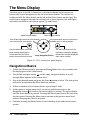
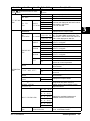
Use the left and right arrows on the Navigation button to scroll to the
INFORMATION MENU and press the Enter button to select.
3.
Use the left and right arrows on the Navigation button to scroll to the DISPLAY
ERRORS menu option and press the Enter button to select.
4.
Use the up and down arrows on the Navigation button to view the list of current
errors.
DL.1 User Manual
Fixture Operation 3-19
3