1
Section 2
Description
2-1 Operating modes
Starting and stopping
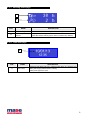
Press the On/off pushbutton. Display turns on and indicates that the controller is operating. Controller starts every time
in manual mode.
Keep pressed On/Off button to stop.
If buttons are not pressed during 2 minutes when engine is stopped, the controller will turn off itself automatically.
THERE IS BACKUP BATTERY THAT MANTAIN HOUR AND DATE MEMORY.
NOTE: Battery is not covered by warranty
Manual procedure:
- Starting is possible in one of the following way:
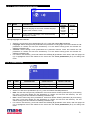
1. Press and keep pressed the START button, the glow-plug preheating starts, and then the engine starts-up, as
long as they key is pressed or until the generator is detected as running.
2. Press the remote START (if equipped with remote control), that controls the starter in the same mode as the
start button on board module.
- Turning off is possible in one of the following way:
1. Press the STOP button.
2. Press STOP on the remote panel (if equipped with remote control).
2- 2
Features
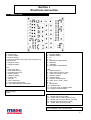
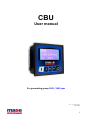
A
C
E
F
B
D
POS.
NAME
DESCRIPTION
A
Display
B
ON-OFF/STOP
C
OK
D
E
F
START
Arrow up
Arrow down
Backlit, show all functions, values, and alarms from generator
Pushbutton for turn on/turn off the module. If module is on, pressing this button
will turn off the generator (if generator is running).
If keep pressed, module will be turned off.
Pushbutton for selection of parameters inside menu.
In display page, will reset possible alarms.
In main page, pressing for 2 seconds will change the operating mode.
Pushbutton for manual starting of generator.
Scroll up the menu pages and increase the parameters value.
Scroll down the menu pages and decrease the parameters value.
To enter the programming user menu, press at the same time both arrows buttons.
Digit password “0000” to access to user paramenters.
4