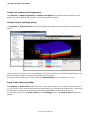
1
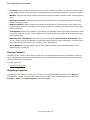
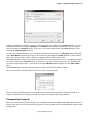
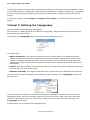
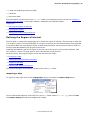
|1
Contents
Part 1: Introduction
6
About this Manual
6
Tutorial Files
6
Conventions Used
6
System Requirements
7
Getting Support
7
Part 2: Getting Started
9
Installing Leapfrog Hydro
9
Activating the License
9
Starting Leapfrog
9
Running the Graphics Test
9
Troubleshooting Video Card Issues
13
Updating Your Video Card Driver
13
Checking Your 3D/OpenGL Settings
14
Part 3: Working with Leapfrog
15
The Leapfrog Hydro Main Window
15
Changing the Appearance of the Main Window
17
Project Tree (Settings Menu)
17
Shape List (Settings Menu)
17
Shape List Location (Settings Menu)
18
Detach Viewer (Settings Menu)
18
Scale Z Axis (Settings Menu)
18
Navigating in the Scene Window
19
Changing Scene Window Navigation
19
Slicer Settings (Scene Menu)
20
Camera Settings (Scene Menu)
21
Rotation Settings (Scene Menu)
22
Grid Settings (Scene Menu)
22
Colour Scheme (Scene Menu)
22
Quality (Scene Menu)
23
Lighting (Scene Menu)
23
Font Size (Scene Menu)
24
Rotate Button Options (Scene Menu)
24
Render Image (Scene Menu)
25
Working with the Project Tree
25
Viewing Object Properties
27
Working with Objects in the Scene
28
© 2010 ARANZ Geo Ltd
2 | Leapfrog Hydro User Manual
Changing the Appearance of Objects in the Scene Window
29
Shape List Controls
30
Changing an Object's Display Colour
30
Changing a Colour Gradient
31
Viewing Data in the Scene
32
The Typical Leapfrog Hydro Workflow
34
Step 1 – Create Project
34
Step 2 – Collect and Analyse Data
35
Step 3 – Define Topography
35
Step 4 – Add Borehole Data
35
Step 5 – Refine Borehole Data
35
Step 6 – Create Models
35
Step 7 – Refine Models
35
Step 8 – Report
35
Other Workflows
36
Part 4: Leapfrog HydroTutorials
37
Tutorial 1: Working with Projects
37
Creating a New Project
37
Project Files
38
The Parts of a New Project
38
Saving Projects
40
Opening Projects
40
Compacting Projects
41
Tutorial 2: Defining the Topography
42
Defining the Region of Interest
43
Importing a Map
43
Adding Georeference Data to the Map
44
Displaying the Map
45
Adjusting the Region of Interest
46
Defining the Terrain
47
Adding Information About Land Use
48
Importing GIS Data
49
Viewing GIS Data
50
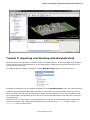
Tutorial 3: Importing and Working with Borehole Data
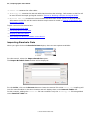
Importing Borehole Data
53
54
Importing the Collar File
56
Importing the Lithology Interval Table
56
Importing the Nitrates Interval Table
57
Correcting Errors in the Data
58
© 2010 ARANZ Geo Ltd
|3
Displaying Borehole Data
61
Interacting with Borehole Tables via the Scene
63
Tutorial 4: Building a Simple Geological Model
65
Creating a New Geological Model
66
Refining the Model Extents
68
Using the Terrain to Define the Top of the Model
69
Refining the Model’s Lateral Extents
69
Creating a New Lateral Extent from a Polyline
70
Creating a New Lateral Extent from GIS Vector Data
74
Refining the Model’s Base
77
Defining the Internal Structure
79
Viewing Lithologies
79
Viewing the Surface Chronology
80
Creating the Contact Surfaces
81
Viewing the Geological Model Volumes
83
Tutorial 5: Building a Simple Numeric Model
86
Creating a New Numeric Model
86
Viewing the Numeric Model
87
Setting Interpolation and Surfaces Parameters
88
Part 5: Reference
91
The Topography Object
92
The Region of Interest Object
92
The Terrain Object
94
Building the Terrain from Points Data
95
Building the Terrain from GIS Vector Data
95
Building the Terrain from an Elevation Grid
96
Building the Terrain from a Surface
96
The GIS Data and Maps Object
97
Importing Vector Data
97
Importing Maps
98
Creating Contour Lines from a Surface
Displaying Topography in the Scene Window
Creating Custom Topography Views
Georeferencing in Leapfrog
101
102
103
106
The Borehole Data Object
107
Viewing Borehole Data Object Properties
108
Using the Borehole Data Object to Import Borehole Data
110
Expected Borehole Data Format
110
Importing Borehole Data
111
© 2010 ARANZ Geo Ltd
4 | Leapfrog Hydro User Manual
Importing Borehole Data via ODBC
114
Appending Boreholes
115
Importing Columns
116
117
Correcting Borehole Data Errors
Exporting All Borehole Data Errors
118
Exporting Errors from a Single Borehole Data Table
118
Correcting Errors in Leapfrog
118
Checking for Missing Files
119
Ignoring Errors
119
Modifying Data
119
Fixing Collar Maxdepths
120
Replacing All
120
Displaying Borehole Data Tables
120
Using Query Filters to Display Borehole Data
121
Reloading Borehole Data
122
Deleting Borehole Data
122
Exporting Borehole Data
122
Exporting All Borehole Data
123
Exporting a Single Borehole Data Table
123
The Geological Model Object
124
New Geological Model Window
124
The Boundary Object
125
The Geological Model Extents Object
127
Creating New Lateral Extents
127
New Lateral Extent From Polyline
128
New Lateral Extent From GIS Vector Data
129
New Lateral Extent From Points
130
New Lateral Extent From Surface
131
Modifying Lateral Extents
131
Creating a New Base
132
New Base From Polyline
133
New Base From GIS Vector Data
134
New Base From Points
134
New Base From Lithology Contacts
135
New Base From Surface
135
Modifying the Base
136
Exporting a Lateral Extent or the Base as a Mesh
136
Exporting the Base as an Elevation Grid
137
The Terrain Object (Geological Model)
137
© 2010 ARANZ Geo Ltd
|5
The Lithologies Object
138
The Surface Chronology Object
138
Creating New Depositional Contacts
140
New Deposit From Lithology Contacts
140
New Deposit From GIS Vector Data
141
New Deposit From Points
142
New Deposit From Polyline
143
New Deposit From Surface
144
Creating New Erosional Contacts
145
Creating New Intrusional Contacts
146
New Intrusion From Lithology Contacts
147
Output Volumes Object
147
The Cross Sections Object
148
Creating a New Cross Section from an Image
148
Creating a New Blank Cross Section
150
Creating a New Cross Section from the Slicer
151
Editing a Cross Section
153
Evaluating a Geological Model
154
Exporting a Lithology Cross Section
154
The Saved Scenes and Movies Object
156
Saving a Scene
156
Editing a Saved Scene
156
Creating a Movie
157
Exporting a Scene
158
© 2010 ARANZ Geo Ltd
6 | Leapfrog Hydro User Manual
Part 1: Introduction
Leapfrog Hydro allows rapid construction of 3D hydrogeological meshes directly from scattered borehole data without the need for manual digitisation. Leapfrog uses implicit modelling to generate geological models in hours rather than days. Leapfrog Hydro uses a rapid 3D interpolation technique,
FastRBF™, to construct 3D boundary models from borehole data. Leapfrog was designed especially
for geologists and environmental scientists. Its streamlined workflow is easy to learn and use, and
basic modelling techniques can be learned in as few as four hours.
About this Manual
This manual is divided into:
l
l
l
l
l
Part 1: Introduction. This part introduces Leapfrog Hydro, outlines system requirements and provides information on getting technical support.
Part 2: Getting Started. This part describes how to install Leapfrog Hydro, start the application,
activate the licence and run a graphics test to ensure your computer can accurately display geological 3D models.
Part 3: Working with Leapfrog. This part describes the Leapfrog workspace. Topics include navigation in 3D, drawing in 3D and customising the workspace to suit your work environment.
Part 4: Leapfrog HydroTutorials. A series of tutorials based on a small data set will introduce you
to basic concepts in Leapfrog Hydroand get you to the point where you can start processing your
own data. The tutorials take two to four hours to complete.
Part 5: Reference. This part describes Leapfrog Hydro features in greater detailed than described
in the tutorials.
To get the most out of the information in this manual, you should be familiar with Microsoft Windows™ XP, Windows™ Vista or Windows™ 7 operating systems and with basic hydrogeological terminology. Experience with geological modelling software is not necessary.
Tutorial Files
Tutorial files are copied to your computer's hard drive when Leapfrog Hydro is installed. [more info
required about a specific location, or at least sufficient information for the user to find the files
readily]
Conventions Used
The following conventions are used throughout this manual:
l
Keys on the keyboard are in bold monospace text. For example, press N.
l
Menu options and dialog items are in bold normal text. For example, select Project > Save.
l
Buttons to be pressed are in bold normal text. For example, press the Cancel button.
© 2010 ARANZ Geo Ltd
System Requirements | 7
l
Text to be entered from the keyboard are in monospace text. For example, type Hello.
l
File and directory paths are in monospace text. For example, C:\Program Files\Leapfrog.
System Requirements
While a system that meets the minimum requirements will be sufficient for running the small tutorial
data set, real-world data is typically large and takes more time to process. More modern systems
will be more capable of processing data sets in a reasonable amount of time than older computers
with less memory. Minimum system requirements are:
l
Windows™ XP (service pack 3) 32-bit/64-bit, Windows™ Vista or Windows™ 7
l
1.5 GHz or higher processor
l
2GB system RAM
l
Video card supporting OpenGL 1.3:
o
NVIDIA: GeForce FX series or better, including GeForce 6000~8000, Quadro FX 500~5600
series. GeForce 4 and earlier are not supported.
o
ATI: Radeon 9000 series or better, including Radeon X300~X1950, HD 2400~HD2900 series
o
Intel GMA3100 graphics or better
To ensure efficient processing of real-world data sets, a system that meets the following requirements is recommended:
l
Windows™ Vista or Windows™ 7 64-bit
l
2 GHz dual core or higher processor
l
2GB system RAM
l
Video card supporting OpenGL 2.0:
o
ATI HD4000 series or mobile versions
o
NVIDA GeForce 8000, GT220, GTX275
o
Intel X4500
Ensure that the correct graphics driver is installed to achieve hardware acceleration for OpenGL. The
use of recently released video cards is not recommended as their drivers can be unstable until some
time after their commercial release.
Once Leapfrog is installed, run the graphics test (Help > Test Graphics) to ensure that the video
card is operating correctly. See Running the Graphics Test for more information.
Getting Support
Technical support is available by emailing the address supplied when you purchased Leapfrog Hydro.
When contacting technical support, please include your license number and a full description of the
problem or query, including any information provided in system or error messages.
© 2010 ARANZ Geo Ltd
8 | Leapfrog Hydro User Manual
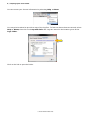
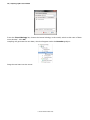
You can access your license information by selecting Help > About:
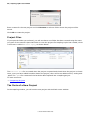
You may also be asked to provide a copy of the log files. To find out where these are stored, select
Help > About, then click on the System Info. tab. Logs are stored in the location given as the
Logs folder.
Click on the link to open the folder.
© 2010 ARANZ Geo Ltd
Installing Leapfrog Hydro | 9
Part 2: Getting Started
This part describes how to install Leapfrog Hydro, activate the product license and ensure the application will run correctly on your computer.
Installing Leapfrog Hydro
Before starting the installation, make sure the dongle is not yet connected. You should also disconnect any other dongles you might have.
To install Leapfrog Hydro, double-click on the file LeapfrogHydroSetup.exe and follow the installation
wizard.
Once the installation is complete, insert the dongle. Your computer will install drivers for the dongle.
Once the drivers have been installed, you will need to activate your license, which is described in Activating the License.
Activating the License
To run Leapfrog Hydro, you must have a dongle connected to one of your computer’s USB ports and a
valid Leapfrog Hydrolicense.
When your license is issued, you will receive an email containing your license information and instructions on updating the dongle with your new license. To activate the license:
1. Ensure your computer is connected to the internet.
2. Insert the dongle into one of your computer’s USB ports.
3. On your computer, select Start > All Programs > Leapfrog Hydro > License Manager.
4. Follow the instructions in the email.
If you have not received an email, contact [email protected].
Once the license is activated, you can start Leapfrog Hydro.
Starting Leapfrog
To start Leapfrog Hydro, you can double-click the Leapfrog Hydro icon on your desktop or select
Start > Programs or All Programs > Leapfrog > Leapfrog Hydro.
Running the Graphics Test
When you first run Leapfrog Hydro, run the graphics test to test the capability of your computer’s
video card.
To start the test, open Leapfrog and select Help > Test Graphics:
© 2010 ARANZ Geo Ltd
10 | Leapfrog Hydro User Manual
The graphics test displays a series of image pairs that test the capabilities of your video card.
For each pair, click on either the Images match button or the Images do not match button, then on
Next to proceed to the next step.
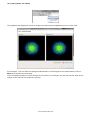
There are different ways in which images do not match. For example, for the pairs below, part of the
image on the left has not rendered correctly:
© 2010 ARANZ Geo Ltd
Running the Graphics Test | 11
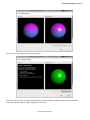
For this pair, the images clearly do not match:
However, for this pair, the difference between the two images is subtle, with two small squares
along the bottom of each image displayed incorrectly:
© 2010 ARANZ Geo Ltd
12 | Leapfrog Hydro User Manual
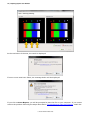
At the conclusion of the test, the result is displayed:
If one or more tests have failed, the message below will be displayed:
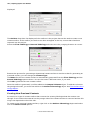
If you click on Save Report, you will be prompted to save the file on your computer. If you cannot
resolve the problem following the steps described in Troubleshooting Video Card Issues, email this
© 2010 ARANZ Geo Ltd
Running the Graphics Test | 13
file to the supplied email address, together with information about your system copied from the Help
> About > System Info tab.
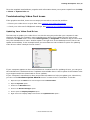
Troubleshooting Video Card Issues
If the graphics test fails, there are two steps you can take to correct the problem:
l
Ensure your video driver is up-to-date. See Updating Your Video Card Driver.
l
Check your video card’s 3D/OpenGL settings. See Checking Your 3D/OpenGL Settings.
Updating Your Video Card Driver
The best way to update your video driver is to do this using any tools that your computer’s manufacturer provides. For example, some manufacturers allow you to update drivers using a tool
installed in the Start menu. Look under All Programs (or Programs in Windows XP) for items that
carry the manufacturer’s name. Another option is to right-click on the desktop to see if there is an
update tool available. In the example below, the manufacturer has included an option for updating
video drivers called “Catalyst Control Center”:
If your computer appears to have no manufacturer-installed tools for updating drivers, you can go to
the manufacturer’s website and see if updates are available there. Look for parts of the website relating to support and driver downloads or driver updates.
If your computer’s manufacturer does not provide information to help you update your video driver,
you can run the Hardware Update Wizard to see if a newer driver is available. To do this:
1. Open the open the Start menu and navigate to the Control Panel.
2. Open the System option.
3. Switch to the Hardware tab.
4. Click on the Device Manager option.
5. Click to open the Display adapters option.
6. Right-click on the display adapter and choose the Update Driver option:
© 2010 ARANZ Geo Ltd
14 | Leapfrog Hydro User Manual
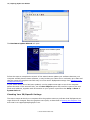
The Hardware Update Wizard will open:
Follow the steps to complete the wizard. If the wizard cannot update your software because your
computer already has the latest software, it may be that your video driver is already up-to-date and
that the reason the graphics test fails may lie in the card’s 3D/OpenGL settings. See Checking Your
3D/OpenGL Settings.
If your video card’s driver has been updated, run the graphics test again to see if the computer
passes the tests. If the test still fails, use the Save Report option and email the report to the supplied email address, together with information on your system copied from the Help > About >
System Info tab.
Checking Your 3D/OpenGL Settings
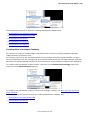
The step or steps at which your computer fails the graphics test may indicate what 3D/OpenGL settings need to be changed. Save the graphics test report, as described in Running the Graphics Test
and email it to [email protected].
© 2010 ARANZ Geo Ltd
The Leapfrog Hydro Main Window | 15
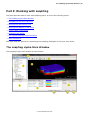
Part 3: Working with Leapfrog
This part describes how to work with Leapfrog Hydro. It covers the following topics:
l
The Leapfrog Hydro Main Window
l
Navigating in the Scene Window
l
Working with the Project Tree
l
Working with Objects in the Scene
l
Viewing Data in the Scene
l
Drawing in the Scene
l
The Typical Leapfrog Hydro Workflow
l
Other Workflows
Also described are options for customising the Leapfrog workspace to suit your own needs.
The Leapfrog Hydro Main Window
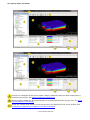
The Leapfrog Hydro main window is shown below:
© 2010 ARANZ Geo Ltd
16 | Leapfrog Hydro User Manual
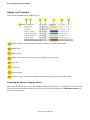
Project tree. Displays all the items (maps, images, data sets) that have been imported to or
created in the project. See Working with the Project Tree.
Scene window. Displays a 3D representation of selected data from the project tree. See Working with Objects in the Scene.
Shape list. Shows what items from the project tree are displayed in the scene window. See
Changing the Appearance of Objects in the Scene Window.
© 2010 ARANZ Geo Ltd
The Leapfrog Hydro Main Window | 17
Shape property frame. Shows parameters of the shape currently selected in the shape list.
Processing frame. Shows what items are currently being processed or are in the processing
queue.
Main menu
Scene toolbar
Coordinates of the mouse in the scene window
Current z-axis setting. See Scale Z Axis (Settings Menu).
Current frames per second setting. See Quality (Scene Menu).
Changing the Appearance of the Main Window
The Settings menu contains options that let you change the layout of the Leapfrogmain window to
suit the way you work:
These settings are described below.
Project Tree (Settings Menu)
The Settings > Project Tree option determines whether or not the project tree is displayed in the
Leapfrog main window.
If your screen space is limited and you are primarily working viewing and editing data, you may wish
to hide the project tree from view. To do so, tick the box or press the F8 key.
Shape List (Settings Menu)
The Settings > Shape List option determines whether or not the shape list is displayed in the Leapfrog main window.
If your screen space is limited and you are primarily working with objects in the project tree, you
may wish to hide the shape list from view. To do so, tick the box or press the F9 key.
© 2010 ARANZ Geo Ltd
18 | Leapfrog Hydro User Manual
Shape List Location (Settings Menu)
The Settings > Shape List Below and Shape List Right options determine the position of the
shape list in the Leapfrog main window. Select the option you prefer.
Detach Viewer (Settings Menu)
The Settings > Detach Viewer option lets you split the Leapfrog main window into two separate
parts:
This is useful if you have two or more displays. You could have the scene window maximized on one
screen and the project tree and processing frame on the other.
To restore the original layout, select untick the Detach Viewer box or press the Esc key.
Scale Z Axis (Settings Menu)
The Settings > Scale Z Axis option lets set a value greater than 1.0 for the Z-axis relative to the
X- and Y-axes. This is useful when the area under study is very planar and extends over a wide area.
In such cases, scaling the Z-axis can accentuate the distribution of data along the Z-axis.
To scale the Z-axis, select Scale Z Axis from the Settings menu. The Scale Z Axis window will
appear:
© 2010 ARANZ Geo Ltd
Navigating in the Scene Window | 19
Enter a value greater than or equal to 1. The contents of the scene will be automatically scaled, so
you can experiment with different values before choosing one that best accentuates the distribution
of data. Click the Close button to dismiss the window.
Navigating in the Scene Window
The best way to navigate the scene in Leapfrog is using the mouse:
l
l
Rotate the scene by clicking and dragging.
Zoom in and out using the scroll wheel or by holding the right mouse button and moving the
mouse.
l
Pan the scene by clicking and holding both mouse buttons, then dragging.
l
View more information about any object in the scene by clicking on it.
You can also navigate in the scene using keyboard shortcuts:
l
l
l
Rotate the scene using the arrow keys. For smaller steps, hold down the shift key while pressing
the arrow keys.
Zoom in and out using the Page Up and Page Down keys. For smaller steps, hold down the Shift
key.
Pan the scene by holding down the Alt key, then using the arrow keys.
You can also switch to a specific views using keyboard keys:
l
Press the Home key to view from the northeast
l
Press the N key to view from the north
l
Press the E key to view from the east
l
Press the W key to view from the west
l
Press the S key to view from the south
l
Press the D key to view down from the top
l
Press the U key to view up from the bottom
The current viewing angle and scale are displayed in the lower righthand corner of the scene window.
Changing Scene Window Navigation
The Scene menu contains options that let you change how you navigate and view objects in the
scene window:
© 2010 ARANZ Geo Ltd
20 | Leapfrog Hydro User Manual
These settings are described below.
Slicer Settings (Scene Menu)
The Scene > Slicer menu contains options that let you change the properties of slices made through
the model with the slicer tool:
The slicer tool must be active for these settings to have any effect.
The Thick Slice, Remove Front and Remove Back options determine how the model is cut away
from the slice.
The Lock to Camera option locks the slice to the current view, so that moving the scene changes
the direction of the slice.
Other options in the Scene > Slicer menu slice the scene in specific directions, and the Step Forward and Step Backward options allow you to undo and redo slices.
The options in the Scene > Slicer menu can also be selected from the shape list:
© 2010 ARANZ Geo Ltd
Navigating in the Scene Window | 21
The icons displayed for the Slicer object correspond to the different menu options in the Scene >
Slicer menu. Finer controls over the slice properties are also available in the properties frame.
Camera Settings (Scene Menu)
The Scene > Camera > Perspective and Orthographic options determine the view of the model
in the scene window. Select the option you prefer. If Perspective is chosen, you can change the Perspective angle in the Advanced Camera Settings window, which is described below.
Other options in the Scene > Camera menu allow you to switch between various views of the
scene.
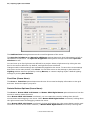
Advanced camera options are set by selecting Scene > Camera > Advanced. The Advanced
Camera Settings window will appear:
The Perspective Angle sets the camera when Perspective is chosen as the Scene > Camera
option. This is similar to adjusting the zoom setting on a camera.
The Stereo options can be used when you have special stereoscopic accessories, such as red-blue
glasses or special 3D viewing glasses. Pick the option for your accessory type.
The Parallax setting can be adjusted for the best 3D effect for your eyes.
If the 3D effect is not apparent, it may be that the 3D projection settings are opposite to those for
your glasses. If this seems to be the case, tick the Swap Eyes option to see if this is corrected.
© 2010 ARANZ Geo Ltd
22 | Leapfrog Hydro User Manual
Changes made to these settings are automatically applied to the scene. To save the current settings
and return to the main window, click Close. You can also return to the settings in place when the
Advanced Camera Settings window was first opened by clicking Defaults.
Rotation Settings (Scene Menu)
The Scene > Geographic Rotation and Free Rotation options determine whether or not the
model displayed in the scene window can be “rolled”.
With the Geographic Rotation option, the azimuth and elevation can be varied, but the Z axis is
constrained to be vertical. With the Free Rotation option, however, the rotation of the model is not
fixed to any axis and the model can be freely rolled.
Select the option you prefer.
Grid Settings (Scene Menu)
The Scene > Grid options determine how the model grid is displayed in the scene window.
The Show Grid option determines whether or not the model grid is displayed. Select the option you
prefer.
The Loose Spacing, Normal Spacing and Fine Spacing options determine the spacing of the grid.
The Show Axis Lines option determines whether or not the X, Y, Z coordinates are displayed in the
scene. Tick the box to show East (red), North (green) and Elevation (blue) and extents of the data in
the scene.
The Numbers on Axes option determines whether or not scale ticks are shown along the grid.
These are automatically adjusted to fit the extent of the data and the current zoom setting. This
option cannot be enabled if Show Axis Lines is disabled.
The Show Axis Box option determines whether or not the axes box that encloses the current data
set is displayed. This option cannot be enabled if Show Axis Line is disabled.
Colour Scheme (Scene Menu)
The Scene > Colour Scheme options determine the colour scheme used in the scene window.
There are two options in the menu, Black Background and White Background. Black Background is the default setting for new Leapfrog projects.
You can also create custom colour schemes by selecting Scene > Colour Scheme > Edit. The Edit
Colourschemes window will appear:
© 2010 ARANZ Geo Ltd
Navigating in the Scene Window | 23
In this window, you can define new colour schemes and set how they appear in the menu. The colour
scheme that is placed at the top of the list will automatically be applied to the currently open project
and will be applied by default for any new projects.
Quality (Scene Menu)
The Scene > Quality options determine how the data is displayed. If rotation and zooming seems
sluggish, try selecting either the Fast or Fastest settings. If you have a good graphics card, try
either the High or Highest settings to use the card's capabilities to provide better quality imaging.
The Lower When Moving option reduces the quality of the scene displayed when it is being moved.
If you notice display problems when moving the scene, tick the box for this option.
Lighting (Scene Menu)
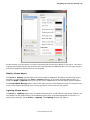
The Scene > Lighting options let you adjust preferences for visual effects in the scene window. You
may be able to use these settings to emphasise significance in the data displayed in the scene. To
adjust these settings, select Scene > Lighting. The Lighting window will appear:
© 2010 ARANZ Geo Ltd
24 | Leapfrog Hydro User Manual
The Ambient level setting determines the overall brightness of the scene.
The Specular brightness and Specular shininess settings determine how light appears to fall on
the surfaces in the scene. The Specular brightness setting has a stronger effect when Specular
shininess is soft.
You can have up to four light sources defined for a project. Select a light source by ticking the tick
box for the source definition. By default, two light sources are defined.
Changes made to these settings are automatically applied to the scene. To save the current settings
and return to the main window, click Close. You can also return to the settings in place when the
Lighting window was first opened by clicking Revert, or restore Leapfrog Hydro's default lighting
settings by clicking Use Defaults.
Font Size (Scene Menu)
The Scene > Font Size options determine the size of text used to display information on the grid
and axes. Select the option you prefer.
Rotate Button Options (Scene Menu)
The Scene > Rotate With Left Button and Rotate With Right Button options determine how the
mouse is used to rotate the scene.
When Rotate With Left Button is selected, you can rotate the scene by holding down the left
mouse button and dragging in the scene. When Rotate With Right Button is selected, holding down
the right mouse button and dragging rotates the scene.
When Rotate With Left Button is selected, clicking and holding the right mouse button can be used
to zoom in and out of the scene. However, if Rotate With Right Button is selected, zooming and
© 2010 ARANZ Geo Ltd
Working with the Project Tree | 25
rotating functions are not swapped. Instead, the left mouse button can only be used for clicking on different objects in the scene.
If you find that you tend to accidentally move the scene when you intend to click, consider selecting
Rotate With Right Button.
Select the option you prefer.
Render Image (Scene Menu)
The Scene > Render Image option lets you save a copy of the current scene window on your computer.
To save an image, select Scene > Render Image. Leapfrog Hydro renders an image from the current scene window using current settings, then displays it in the Render Image window:
Use the zoom tools at the bottom of the window to view the rendered image. You can change settings, then render a new image by clicking Render. Once you are satisifed with the rendered image,
click Save. You will be prompted to enter a filename and location.
Working with the Project Tree
When a project is created, a series of objects is added to the project tree. These objects are used to
organize imported items such as maps, images and data sets into categories. These objects also provide tools that let you import information into the project and generate models.
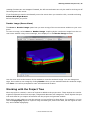
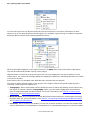
Right-click on each object to view the actions you can perform for that object. For example, you can
use the Topography object to import a map, elevation grid, and vector data, set the region of interest, and evaluate topography:
© 2010 ARANZ Geo Ltd
26 | Leapfrog Hydro User Manual
You can also right-click on objects within the top-level objects to view more information on that
object or carry out actions specific to that object. For example, right-clicking on a table of imported
borehole data reveals a menu showing possible actions:
When a bold option appears in the right-click menu, as Open does in the menu above, that option
can also be selected by double-clicking on the object.
Objects shown in bold text in the project tree are currently displayed in the scene window. In the
image above, the collar and lithology tables are displayed in bold text, indicating that they are visible
in the scene window.
Some actions are not available until data has been imported into the project.
The order in which objects appear in the project tree roughly reflects the typical Leapfrog Hydro
workflow. These high-level objects are:
l
l
l
Topography. Stores information used to define the area in which calculations will be carried out,
the region of interest. With the Topography object, you can import topography and elevation
such as maps and digital elevation models. For more information, see Tutorial 2: Defining the
Topography and The Topography Object.
Borehole Data. Stores imported borehole data and provides options for viewing and correcting
borehole data. For more information, see Tutorial 3: Importing and Working with Borehole Data
and The Borehole Data Object.
Locations. Stores location information you can use to define surfaces. You can also import data,
such as distribution of contaminants or temperature, for interpolation as part of a numeric model.
© 2010 ARANZ Geo Ltd
Working with the Project Tree | 27
l
l
l
l
l
l
Meshes. Imports and stores meshes and digital elevation models created in other modeling packages.
Geological Models. Builds geological models of a defined area. Geological models are usually
based on borehole data.
Numeric Models. Builds models of the physical properties of an area built up from either borehole data that contains information about those properties or location information associated with
those properties.
Flow Models. Builds flow models for calculating groundwater flow and/or water distribution. Models can be exported for use in other applications. Leapfrog can also import flow models built using
other applications.
Saved Scenes and Movies. Stores saved scenes. With the Saved Scenes and Movies object,
you can create scenes to highlight an important observations for later comparison, create movies,
and export scenes and movies for viewing in other applications.
Cross Sections. Creates cross sections from imported images, georeferenced data or from
shapes drawn in Leapfrog.
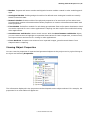
Viewing Object Properties
You can view the properties of imported and generated objects in the project tree by right-clicking on
an object and selecting Properties:
The information displayed in the properties window depends on the object selected. For example, the
properties for a collar table will appear as:
© 2010 ARANZ Geo Ltd
28 | Leapfrog Hydro User Manual
The Processing tab shows the current status of processing (queued to process, processing, finished). The Errors tab shows any errors that occurred while processing the object.
In the Comments tab, you can enter information on the object, which can be helpful when the
project contains many objects or when several different people are working on a model.
Some objects may display other tabs in the Properties window. For example, table objects will
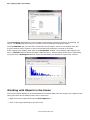
have a General tab that shows the table’s data structure. Interval tables and numeric data tables
may also have a Histogram tab that shows the distribution of the data in a particular column:
Working with Objects in the Scene
The scene window displays a 3D representation of selected data from the project tree. Objects from
the project tree can be added to the scene in two ways:
l
Right-click on the object and tick the View Object box.
l
Click on the object and drag it into the scene.
© 2010 ARANZ Geo Ltd
Working with Objects in the Scene | 29
Once objects have added to the scene window, you can use the shape list and the shape properties
frame to change the way those objects appear in the scene. See Changing the Appearance of Objects
in the Scene Window.
Changing the Appearance of Objects in the Scene Window
Once objects have beenadded to the scene window, you can use controls in the shape list and the
shape properties frame to change the way objects are displayed. This is useful in making important
data more apparent in the scene.
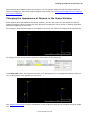
For example, when borehole data is first added to a scene, the collars are displayed as small points:
To change the size of the collars, select the collar object in the shape list:
The Point size field in the properties window is 2. Increasing it to 10 changes the display of the collars, making them more apparent in the scene:
See Shape List Controls for more information on the properties that can be changed using the shape
list.
© 2010 ARANZ Geo Ltd
30 | Leapfrog Hydro User Manual
Shape List Controls
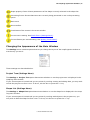
The controls available in the shape list are:
Object visibility. Click to make the object visible or invisible in the scene.
Object type
Object name
Delete control. Click this to remove the object from the scene.
View list
Colour list
Opacity slider
Property icons. The icons that appear depend on the type of object in the scene.
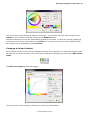
Changing an Object's Display Colour
Many objects viewed in the scene are displayed using a single colour. To change the colour, add the
object to the scene window, then click on the colour chip in the shape list. An Edit Set Colour window will be displayed:
© 2010 ARANZ Geo Ltd
Working with Objects in the Scene | 31
Use the controls in the window to choose a new colour. You can also choose a colour chip from the
Palette or set a random colour by clicking on the Random button.
Changes made to the colour are automatically applied to the scene. To save the currently displayed
colour and return to the main window, click Close. You can also revert to the colour assigned when
the window was first opened by clicking Revert.
Changing a Colour Gradient
Some objects viewed in the scene are displayed using a colour gradient. To change the gradient, add
the object to the scene window. Click on the colour gradient in the shape list, then select Edit Colourmaps:
The Edit Colourmaps window will appear:
Use the controls in the window to choose new colours for the gradient.
© 2010 ARANZ Geo Ltd
32 | Leapfrog Hydro User Manual
Changes made to the gradient are automatically applied to the scene. To save the currently displayed
gradient and return to the main window, click Close. You can also revert to the original gradient by
clicking Revert.
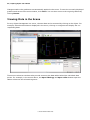
Viewing Data in the Scene
For any object that appears in a scene, relevant data can be accessed by clicking on the object. For
example, when borehole data is displayed in the scene, clicking on a segment will display the corresponding data:
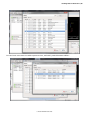
These scene selection windows also provide access to the data tables behind the individual data
points. For example, in the screen above, the Open lithology and Open collar buttons open the
tables relevant to the selected segment:
© 2010 ARANZ Geo Ltd
Viewing Data in the Scene | 33
You can have more than one table open at a time, and easily switch between tables:
© 2010 ARANZ Geo Ltd
34 | Leapfrog Hydro User Manual
The Typical Leapfrog Hydro Workflow
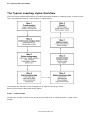
There are many possible approaches to creating geological models in Leapfrog Hydro. A typical workflow, using borehole data to create models, is shown below:
These steps are reflected in the arrangement of objects in the project tree.
Each of these steps is described briefly below.
Step 1 – Create Project
In this step, choose a folder to use as the project folder and, in Leapfrog Hydro, create a new
project.
© 2010 ARANZ Geo Ltd
The Typical Leapfrog Hydro Workflow | 35
Step 2 – Collect and Analyse Data
In this step, select what data to use in the project and do any processing necessary to ensure the
validity of the data sources.
Although the validity of data is important in creating geological models, it is not necessary to ensure
that data is perfectly valid before importing it, as Leapfrog has tools and techniques for correcting
and working with errors in imported data. Information corrected in Leapfrog can also be exported.
Step 3 – Define Topography
In this step, define the topography for the geological model. The topography represents the ground
surface and all data associated with it.
Maps and other images, elevation grids and GIS can be used to define the topography.
Step 4 – Add Borehole Data
Borehole data forms the basis of models created in Leapfrog.
Leapfrog expects borehole data that is stored in a collar table and interval tables. Each project can
have only one collar file, but multiple interval tables can be imported. It is also possible to append
data from various sources to make up the project’s collar table and interval tables.
Step 5 – Refine Borehole Data
As borehole data often contains errors that prevent the computation of an accurate model, Leapfrog
also has tools that help you to correct errors in the data. You can also export data corrected in Leapfrog.
Step 6 – Create Models
In this step, geological models, numeric models and flow models are created using imported data
and images.
Step 7 – Refine Models
Once a basic model has been created, refine the model by adjusting surfaces.
Step 8 – Report
Leapfrog has several tools for reporting the results of modeling. You can render images, create and
annotate specific scenes and add a number of scenes together to create a movie.
Images, scenes and movies can be exported for use in other applications, including the stand-alone
Hydro Scene Viewer.
© 2010 ARANZ Geo Ltd
36 | Leapfrog Hydro User Manual
Other Workflows
Leapfrog Hydro supports many possible workflows, and it is not strictly necessary to begin building a
model by building the topography, then importing borehole data. For example, you may wish to build
a geological model from a series of meshes. If this was the case, you could use the Meshes object
to import the meshes, then work down through the project tree to build a geological model, create
cross sections and export scenes and movies.
© 2010 ARANZ Geo Ltd
Tutorial 1: Working with Projects | 37
Part 4: Leapfrog HydroTutorials
In this part, a series of tutorials based on a small data set will introduce you to basic concepts in
Leapfrog Hydro and get you to the point where you can start processing your own data. The tutorials
take two to four hours to complete.
Tutorial files are copied to your computer's hard drive when Leapfrog Hydro is installed. [more info
required about a specific location, or at least sufficient information for the user to find the files
readily]
The tutorials are:
l
Tutorial 1: Working with Projects
l
Tutorial 2: Defining the Topography
l
Tutorial 3: Importing and Working with Borehole Data
l
Tutorial 4: Building a Simple Geological Model
l
Tutorial 5: Building a Simple Numeric Model
Tutorial 1: Working with Projects
In this tutorial, you will create a new project and learn about project files and opening existing
projects.
Topics are:
l
Creating a New Project
l
Project Files
l
The Parts of a New Project
l
Saving Projects
l
Opening Projects
l
Compacting Projects
You will need a copy of the tutorial files that were copied to your computer when Leapfrog Hydro was
installed. To do this:
l
Go to the location where Leapfrog Hydro was installed.
l
Copy the Tutorials folder to your My Documents folder.
Creating a New Project
To create a new project, start Leapfrog Hydro and select Project > New. The Create Project window will appear.
© 2010 ARANZ Geo Ltd
38 | Leapfrog Hydro User Manual
Enter a name for the new project and click Browse to select a folder where the project will be
saved.
Click OK to create the project.
Project Files
If you open the folder you selected, you will see that a new folder has been created using the name
you gave for the tutorial. Open that folder to view the project file Leapfrog Hydro has created, which
in this case is called Tutorial.aproj, as shown below:
The Tutorial.lock file is created when the project is opened and closed when the project is closed.
Later, once you have added borehole data to the project, there will be an additional file, ending with
.apbd. The .apbd file contains all the borehole data imported into a Leapfrogproject.
To learn more see:
l
Compacting Projects
The Parts of a New Project
In the Leapfrog window, you will see the new project with its blank scene window:
© 2010 ARANZ Geo Ltd
Tutorial 1: Working with Projects | 39
A series of objects have been added to the project tree. These objects are used to organize items
such as maps, images and data sets into categories. These objects also provide tools that let you
import information into the project and generate models. Right-click on each object to view the
actions you can perform for that object. For example, from the Topography object, you can import
a map, elevation grid, and vector data, set the region of interest, and evaluate topography:
The order in which the objects appear in the project tree roughly reflects the typical Leapfrog workflow. See The Typical Leapfrog Hydro Workflow for more information.
These objects are:
l
l
Topography. Stores information used to define the area in which calculations will be carried out,
the region of interest. With the Topography object, you can import topography and elevation
such as maps and digital elevation models.
Borehole Data. Stores imported borehole data and provides options for viewing and correcting
borehole data.
© 2010 ARANZ Geo Ltd
40 | Leapfrog Hydro User Manual
l
l
l
l
l
l
l
Locations. Stores location information you can use to define surfaces. You can also import data,
such as distribution of contaminants or temperature, for interpolation as part of a numeric model.
Meshes. Imports and stores meshes and digital elevation models created in other modeling packages.
Geological Models. Builds geological models of a defined area. Geological models are usually
based on borehole data.
Numeric Models. Builds models of the physical properties of an area built up from either borehole data that contains information about those properties or location information associated with
those properties.
Flow Models. Builds flow models for calculating groundwater flow and/or water distribution. Models can be exported for use in other applications. Leapfrog can also import flow models built using
other applications.
Saved Scenes and Movies. Stores saved scenes. With the Saved Scenes and Movies object,
you can create scenes to highlight an important observations for later comparison, create movies,
and export scenes and movies for viewing in other applications.
Cross Sections. Creates cross sections from imported images, georeferenced data or from
shapes drawn in Leapfrog.
Saving Projects
Leapfrog Hydro saves an open project each time a processing task has been completed or settings
have changed. Projects are also saved when they are closed so that scene settings can be restored
when the project is next opened.
To learn more see:
l
Compacting Projects
Opening Projects
If Leapfrog is not already running, you can open a project by doubling clicking on the .aproj file.
If Leapfrog is already running and another project is open, open a different project by selecting
Project > Open. The Open Project window will appear:
© 2010 ARANZ Geo Ltd
Tutorial 1: Working with Projects | 41
Leapfrog automatically displays a list of all the projects in the folders in the Look in folder. You can
change this folder by clicking on Browse. The Search button simply refreshes the list of projects
that are found in the Look in folder. Click on it if you have copied files to the Look in folder since
opening the Open Project window.
You can also navigate directly to the required project file by clicking on the Browse button adjacent
to the File Name. Choosing a project in this way does not change the Look in folder, which means
that next time you want to open a project, Leapfrog will first look in that folder.
The Look in folder is useful if you have one folder in which you keep most of your Leapfrog projects.
You can set that as the Look in folder. If, however, you have copied a project to your desktop and
you wish to open that project, you can do so using the Browse button adjacent to the File name
field.
The Look in folder is also the default folder in which new projects will be created.
You can also choose a project from the list of recently open projects:
Only one copy of Leapfrog can be running at a time, which is the reason why double-clicking on a
project when another is already open will not result in the new project being opened.
Compacting Projects
When you delete objects from a project file, Leapfrog retains those objects but notes that they are no
longer used. Over time, the project file will grow in size and data stored in the database may become
fragmented.
© 2010 ARANZ Geo Ltd
42 | Leapfrog Hydro User Manual
Compacting a project removes these unused objects and any unused space from the database. When
you compact a project, Leapfrog will close the project and back it up before compacting it. Depending
on the size of the project, compacting it may take several minutes. Leapfrog will then reopen the
project.
To compact a project, select Project > Compact This Project. You will be asked to confirm your
choice.
Tutorial 2: Defining the Topography
[pic of workflow with Topography highlighted]
The first step in creating a model is to define the topography, which represents the ground surface
and all data associated with it.
In Leapfrog, the Topography object is the first object in the project tree:
It is made up of:
l
l
l
Region of Interest. This object represents the area in which data will be added and models
created. The Region of Interest is important in limiting what data Leapfrog uses to perform calculations. Leapfrog automatically sets a region of interest, but for models with large data sets,
adjusting the region of interest will reduce the amount of time Leapfrog requires for performing
calculations.
Terrain. This object defines the height of the data. The Terrain can be derived from a single DTM,
but a variety of sources can be used.
GIS Data and Maps. This object contains all maps, photos and vector data that define land use.
All tools for defining the topography are accessed by right-clicking on the Topography object and
the items in it:
Imported objects and objects created while building the topography are also stored as part of the
topography object, and more complex functions can be carried out by right-clicking on individual
objects. In this tutorial, however, all functions required can be accessed by right-clicking on the
Topography object itself.
In this tutorial, you will define the topography from:
© 2010 ARANZ Geo Ltd
Tutorial 2: Defining the Topography | 43
l
a map and related georeference data
l
a DTM file
l
GIS vector data
This information can be found in the Tutorial folder you started a project in as part of Tutorial 1:
Working with Projects, in the folders “Maps”, “GIS data” and “Elevation data”.
Topics are:
l
Defining the Region of Interest
l
Defining the Terrain
l
Adding Information About Land Use
Defining the Region of Interest
The first step in creating the topography is to define the region of interest. The best way to start this
is to import a map or aerial photograph. The region of interest can also be defined by importing GIS
or borehole data, but importing an image is faster and provides a visual reference that is helpful in
working with data added to the project in the future.
Leapfrog automatically defines a region of interest, which will grow to fit any data imported. This
can, however, result in a large area in which calculations are performed.
For this tutorial, defining the region of interest requires four steps:
l
Importing a Map
l
Adding Georeference Data to the Map
l
Displaying the Map
l
Adjusting the Region of Interest
The files for this part of the tutorial can be found in the Maps folder.
Importing a Map
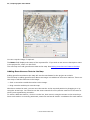
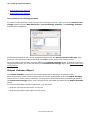
To import a map, right-click on the Topography object and select the Import Map option:
In the window that appears, select the file in the Maps folder called Area map.jpg, then click OK.
The Import Image window then displays the image:
© 2010 ARANZ Geo Ltd
44 | Leapfrog Hydro User Manual
You can crop the image, if required.
The Name field displays the name of the imported file. If you wish to use a more descriptive name
in the project file, enter it in this field.
The next step is to add georeference data to the map. See Adding Georeference Data to the Map.
Adding Georeference Data to the Map
Adding georeference data to the map will set the coordinates for the project as a whole.
The first step in adding georeference data to an image is to add three reference markers. There are
two ways to add the markers to the image:
l
Click on a marker to add the marker to the image.
l
Drag a marker and drop it onto the map.
Whichever method is used, you can move the marker to the required position by dragging it or by
using the arrow keys. You can also use the zoom controls for more precise control over the area in
which you are positioning a marker.
To select a different marker, click on it in the list, then move it using the mouse or the arrow keys.
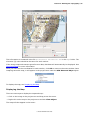
Once each marker is correctly positioned, enter the real-world X and Y coordinates for each marker:
© 2010 ARANZ Geo Ltd
Tutorial 2: Defining the Topography | 45
This information is contained in the file Georeference Information.txt in the Maps folder. The
elevation (Z) value should be the same for each marker.
If the image imported contains georeference data, that data will automatically be displayed. See
Importing Maps for more information.
Once you have set the coordinates for each marker, click OK to return to the main window. Once
Leapfrog saves the map, it will appear in the project tree under the GIS Data and Maps object:
To display the map, see Displaying the Map.
Displaying the Map
There are two ways to display the imported map:
l
Click on the image in the project tree and drag it into the scene.
l
Right-click on the map in the project tree and tick View Object.
The map will then appear in the scene:
© 2010 ARANZ Geo Ltd
46 | Leapfrog Hydro User Manual
Notice, also, that the image is now listed in the shape list.
The next step is to adjust the region of interest. See Adjusting the Region of Interest.
Adjusting the Region of Interest
When a project is created, Leapfrog automatically sets a region of interest. As data is added to the
project, the Region of Interest changes to fit that data. For models with large data sets, adjusting the
region of interest will reduce the amount of time Leapfrog requires for performing calculations.
To adjust the region of interest, double-click on the Region of Interest object in the project tree or
right-click and select Open:
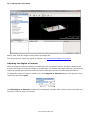
The Edit Region of Interest window will be displayed, together with controls in the scene that will
help you to set the region of interest:
© 2010 ARANZ Geo Ltd
Tutorial 2: Defining the Topography | 47
There are three ways to define the rectangular volume of interest:
l
l
l
Enter the coordinates.
Select Enclose Object and choose from the list of objects in the project. The region of interest
will be updated to the size of the selected object.
Use the controls that appear in the scene. The orange handle adjusts the center of the plane and
the red handle adjust the size.
When you have finished adjusting the region of interest, click OK.
The next step is to define the terrain. See Defining the Terrain.
Defining the Terrain
In Leapfrog, the Terrain object is used to define the elevation of the ground's surface. The terrain
will often be defined by a single digital terrain model (DTM), but there may be circumstances in
which data from several sources is combined to ensure the data is consistent.
The terrain is used to bound geological models and to position GIS data onto the topography. As a
result, changing the terrain will cause geological models to be recomputed and GIS data to be repositioned. This can be time-consuming, which is why the terrain should be defined before GIS data is
added to the project and before any models are created.
For this tutorial, a single DTM file will be used to define the terrain. It is called Tekapo DTM.asc and
can be found in the Elevation data folder.
To import an elevation grid, right-click on the Topography object in the project tree and select
Import Elevation Grid. Navigate to the folder that contains the Tekapo DTM.asc file and open the
file. The Import Elevation Grid window will be displayed:
© 2010 ARANZ Geo Ltd
48 | Leapfrog Hydro User Manual
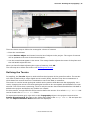
Click Import. The topography is displayed in three dimensions:
Now that the terrain is defined, maps will be automatically draped over the topography.
The imported mesh is stored under the Terrain object. A copy is also stored in the Meshes folder.
The next step is to add information about land use. See Adding Information About Land Use.
Adding Information About Land Use
In Leapfrog, vector data can be imported to define land use in two dimensions.
For this tutorial, vector data can be found in the GIS data folder.
See:
© 2010 ARANZ Geo Ltd
Tutorial 2: Defining the Topography | 49
l
Importing GIS Data
l
Viewing GIS Data
Importing GIS Data
To import vector data, right-click on the GIS Data and Maps object and select Import Vector
Data:
Navigate to the folder that contains GIS data files and import the files, one at a time. For each file,
the Import GIS Vector Data window will be displayed:
The options in this window are discussed further in Importing Vector Data. Click OK to import the
file.
The imported objects are stored under the GIS Data and Maps object:
© 2010 ARANZ Geo Ltd
50 | Leapfrog Hydro User Manual
Different icons indicate point, line and polygon data.
Viewing GIS Data
There are two ways to view imported GIS data. The first is to view them independently of the topography.
To view data in this way, either drag and drop the object into the scene or right-click on the object
and select View Object. In the scene below, only the lake_bdy object is visible in the scene:
© 2010 ARANZ Geo Ltd
Tutorial 2: Defining the Topography | 51
The second way to view GIS data is in combination with selected items of the topography. To do this,
add a GIS data object to the scene by dragging and dropping it into the scene or by right-clicking on
the object and selecting View Object.
Add the Topography object to the scene by dragging and dropping it into the scene or by right-clicking on it and selecting View Object:
Both the Topography and the GIS data object will appear in the shape list:
From the GIS data drop-down list, select New View. The New GIS View window will appear:
Enter a name for the new view or keep the default name, then click Create. The Edit GIS Views
window will appear.
© 2010 ARANZ Geo Ltd
52 | Leapfrog Hydro User Manual
Add the required layers to the Current layers box and use the Raise and Lower arrows to arrange
the layers.
You can also change the opacity and colour of the different layers. Click Close. The new view is displayed:
© 2010 ARANZ Geo Ltd
Tutorial 3: Importing and Working with Borehole Data | 53
Tutorial 3: Importing and Working with Borehole Data
Borehole data forms the basis of models created in Leapfrog Hydro. As borehole data often contains
errors that prevent the computation of an accurate model, Leapfrog also has tools that help you to
correct errors in the data.
In Leapfrog, borehole data is managed using the Borehole Data object in the project tree:
Until data is imported, the only options available from the Borehole Data object are import options.
Leapfrog expects borehole data that is stored in a collar table and interval tables. Each project can
have only one collar file, but multiple interval tables can be imported. For the interval tables, Leapfrog expects data corresponding to the hole ID, the start and end depths and at least one column of
measurements.
In this tutorial, you will import, correct and display a small set of borehole data that includes information on nitrate levels. The borehole data files can be found in the Tutorial folder, under Borehole data. There are three files:
© 2010 ARANZ Geo Ltd
54 | Leapfrog Hydro User Manual
l
l
l
Collar.csv contains the collar table.
Lithology.csv contains the interval table that describes the lithology. Information in this file will
be used to build a simple geological model in Tutorial 4: Building a Simple Geological Model.
Nitrates test.csv contains the interval table that describes nitrate levels for each borehole.
Information in this file will be used to build a simple numeric model in Tutorial 5: Building a Simple Numeric Model.
Topics covered in this tutorial are:
l
Importing Borehole Data
l
Correcting Errors in the Data
l
Displaying Borehole Data
l
Interacting with Borehole Tables via the Scene
Importing Borehole Data
When you right-click on the Borehole Data object, there are two options available:
For this tutorial, select the Import Boreholes option.
The Import Borehole Data window will be displayed:
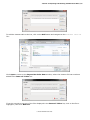
For the Collar, click on the Browse button to locate the tutorial file called Collar.csv. Leapfrog will
look for interval tables in the same location and will display them in the Interval Tables list.
In this example, adding the Collar.csv file has resulted in only the Lithology.csv file being added
to the Interval Table list:
© 2010 ARANZ Geo Ltd
Tutorial 3: Importing and Working with Borehole Data | 55
To add the nitrates table to the list, click on the Add button and navigate to the Nitrates test.csv
file:
Click Open to return to the Import Borehole Data window, where the nitrates file has now been
added to the Interval Tables list:
If you do not wish to use any of the files displayed in the Interval Tables list, click on the file to
highlight it, then click Remove.
© 2010 ARANZ Geo Ltd
56 | Leapfrog Hydro User Manual
Once you click on Import, Leapfrog will start the process of importing data.
Importing the Collar File
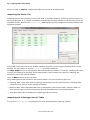
Leapfrog expects four columns for the collar data, a borehole identifier (Hole ID) and the location of
the top of the well, in X, Y and Z coordinates. It attempts to match the data in the imported file to the
expected format. With the file Collars.csv, Leapfrog has correctly mapped the imported data to the
expected formats:
The breadcrumb at the top of the window indicates progress in importing the borehole files. In this
window, the information in the file Collar.csv is being considered.
The Max Depth column is not required, but because the information is in the file, Leapfrog will use it
to verify the integrity of the data. If that information is not included in a collar file, Leapfrog will
determine it from the interval tables.
Click on Next to move to the next step.
Many data types can be included in the interval tables. The most common types are:
l
l
l
Lithology data, which describes the geology encountered in drilling the borehole. Lithology data
columns can be used to create geological models.
Numeric data, which describes data such as temperature and concentration. Numeric data columns can be used to model continuously varying distributions by way of interpolations.
Text data, which can be displayed in Leapfrog as part of a scene.
Importing the Lithology Interval Table
For the file Lithology.csv, Leapfrog has correctly determined the lithology column:
© 2010 ARANZ Geo Ltd
Tutorial 3: Importing and Working with Borehole Data | 57
Click Next to move on to the next file.
Importing the Nitrates Interval Table
For the file Nitrates test.csv, Leapfrog has not marked the Nitrate column for importation:
To select it for importation, you can either:
l
Select the “Nitrate” Numeric option from the Not Imported drop-down list. This identifies the
data as numeric data and uses the column title from the file.
© 2010 ARANZ Geo Ltd
58 | Leapfrog Hydro User Manual
l
Click on Import All Columns, in which case, Leapfrog will determine the type of data from the
properties of the information each column.
When the Import All Columns button is clicked on, the Column Summary list on the righthand
side of the window indicates that the Nitrate column will be imported as numeric data:
Click on Finish complete the process.
Once Leapfrog has imported the data, it will appear in the project tree under the Borehole Data
object:
The Nitrates_test object has an X across is because there are errors in the data. See Correcting
Errors in the Data.
Correcting Errors in the Data
When conflicts or errors are detected in imported borehole data, Leapfrog marks the table containing
that data with a red X:
© 2010 ARANZ Geo Ltd
Tutorial 3: Importing and Working with Borehole Data | 59
To correct the data, right-click on the incorrect object and select Fix Errors.
The Database Errors window will appear:
This error has occurred because the collar depth data in one table conflicts with that in another. Click
on the arrows to expand the list and view more information about the error:
© 2010 ARANZ Geo Ltd
60 | Leapfrog Hydro User Manual
The location of the error is marked in the table by a red box.
While the Database Errors window is open, right-click on the collar table to view the collar data
that row 195 conflicts with:
© 2010 ARANZ Geo Ltd
Tutorial 3: Importing and Working with Borehole Data | 61
The maximum collar depth specified for Bore 4 is 332.18, which conflicts with the nitrate data collected for Bore 4.
Click Cancel to close the collar table. In the Database Errors window, click the Fix Collar Maxdepths button. This will increase the maximum collar depth value in the collar table to match the
depth values in the Nitrates_test interval table.
Click OK to close the Database Errors window. Notice that the red X has been removed from the
Nitrates_test object:
Displaying Borehole Data
At this point, the project contains corrected borehole data, but nothing is visible in the scene.
There are two ways to display the borehole data objects:
l
Click on each table in the project tree and drag it into the scene.
l
Right-click on each table in the project tree and tick View Object.
In the image below, the collar, lithology and nitrates test tables have been added to the scene window:
© 2010 ARANZ Geo Ltd
62 | Leapfrog Hydro User Manual
The appearance of the displayed data can be changed by changing the properties of the object in the
shape list. For example, when the data is first add to the scene, the collars are displayed as small
points:
To change the size of the collars, select the collar object in the shape list:
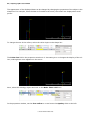
The Point size field in the properties window is 2. Increasing it to 10 changes the display of the collars, making them more apparent in the scene:
Next, select the lithology object and click on the Make lines solid icon:
In the properties window, set the Line radius to 10 and move the Opacity slider to the left:
© 2010 ARANZ Geo Ltd
Tutorial 3: Importing and Working with Borehole Data | 63
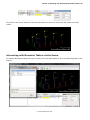
The effect in the scene window is that the boreholes are shown as wells with the nitrate intervals
inside:
Interacting with Borehole Tables via the Scene
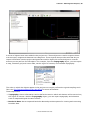
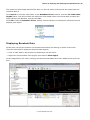
To display data tables using the scene, simply click on a data segment. The corresponding data is displayed:
© 2010 ARANZ Geo Ltd
64 | Leapfrog Hydro User Manual
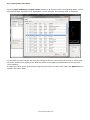
Click the Open lithology and Open collar buttons to go directly to the corresponding tables, where
the selected data segment will be highlighted. In this example, the lithology table is displayed:
In this table, you can change any entry by clicking on the row, then on the value. This is useful when
the three-dimensional display of the data has made errors apparent. Edited data can be exported
from Leapfrog.
A suspicious value can be ignored by ticking the Ignored box for that value. When the Ignored box is
ticked in the collar table:
© 2010 ARANZ Geo Ltd
Tutorial 4: Building a Simple Geological Model | 65
the entire borehole will be removed from the scene and no further processing will be performed on
it.
Tutorial 4: Building a Simple Geological Model
A geological model is the fundamental method for describing lithological units in Leapfrog Hydro. A
geological model consists of a number of non-intersecting volumes that fit together to exactly fill a
set of defined model extents.
Building a geological model is a process of successive refinement made up of two key steps:
l
l
Defining the model extents. These usually correspond to the ground surface and known flow
boundaries.
Defining the internal structure. This involves generating contact surfaces that define the internal
divisions within the model boundaries. These internal divisions correspond to the contacts
between lithological units.
In Leapfrog, boundaries between lithological units are specified in terms of geological processes such
as deposition, intrusion and erosion. Erosions are not actually the geological process of erosion but
rather are a surface hierarchy.
In this tutorial, you will create a simple geological model using the borehole data imported for Tutorial 3: Importing and Working with Borehole Data. You will:
l
Create a new geological model
l
Define the model extents using different methods
l
Define the internal structure of the model from borehole data
© 2010 ARANZ Geo Ltd
66 | Leapfrog Hydro User Manual
Some of the model extents will be created from imported data. Files for this part of the tutorial can
be found in the Tutorial folder, under Boundary data.
Topics covered in this tutorial are:
l
Creating a New Geological Model
l
Refining the Model Extents
l
Defining the Internal Structure
Creating a New Geological Model
Open the tutorial project from Tutorial 3: Importing and Working with Borehole Data and click on the
Clear scene button to clear any objects from the scene window. Drag the area map imported in
Tutorial 2: Defining the Topography into the scene and press D to view it from above.
Right-click on the Geological Models object and select New Geological Model:
The New Geological Model window is displayed, together with controls in the scene that will help
you to set the model extents:
This window lets you set a basic rectangular set of model extents aligned with the south/north and
east/west axes. It is possible to describe irregular-shaped model extents, which is discussed further
© 2010 ARANZ Geo Ltd
Tutorial 4: Building a Simple Geological Model | 67
in Refining the Model’s Lateral Extents. When creating the geological model, however, it is sufficient
to set a rectangle that is similar in size to the final model extents.
There are three ways to define the rectangular volume of interest:
l
l
l
Enter the coordinates.
Select Enclose Object and choose from the list of objects in the project. The model extents will
be updated to the size of the selected object.
Use the controls that appear in the scene. The orange handle adjusts the center of the plane and
the red handle adjust the size.
Experiment with the different methods to see how the controls work.
The Enclose Object list can be used to set the size of the rectangular extents to fit the data that will
be used to generate the model. In this tutorial, borehole data will be used as the basis of the model,
so select “lithology segments” from the list. The model extents will be updated to fit the selected
data:
The Surface resolution is also set in this window. A lower value will produce more detail, but calculations will take longer. The advantage of Leapfrog over many other geological modeling products
is that the surface resolution can be easily changed.
When borehole data is used as the basis of a model, the Lithology column determines what column in
the imported borehole data will be used. If more than one column of lithology data is available for
creating models, be sure to choose the correct one at this point as it cannot be changed once the initial model has been created.
Click OK to create the new model.
Once Leapfrog has generated the new geological model, it will appear in the project tree under the
Geological Models object:
© 2010 ARANZ Geo Ltd
68 | Leapfrog Hydro User Manual
The major elements of the new geological model are:
l
l
l
l
The Boundary object. This includes the geological model extents and the terrain.
The Lithologies object. This is the lithology information that describes the different volumes that
will make up the internal structure of the geological model. The information included as part of
the Lithologies object has been generated from the lithology table in the Borehole Data object.
The Surface Chronology object. This defines the chronological order of the volumes of the geological model. When the model is first created, the Surface Chronology object will contain no
data.
The Output Volumes object. This includes the generated volumes that make up the geological
model. Initially, it only contains a volume called Unknown.
Although the geological model extents were defined while creating the new model, the first step in
working on the model is to further refining those extents. See Refining the Model’s Lateral Extents.
Refining the Model Extents
When a new model is created, Leapfrog defines a basic rectangular set of model extents that define
the top, base and lateral extents of the model’s external boundaries.
A number of different techniques can be used to modify the external boundaries so that they better
represent the area being.
l
The terrain can be used as the model’s upper surface.
l
A polyline can be drawn and used to create a new lateral extent or base.
l
l
GIS vector data, points data or surface meshes can be imported and used to create a new lateral
extent or base.
Lithology contacts can be used to create the model’s base.
When a geological model’s boundaries are changed, the model is recomputed, which can make changing a model’s boundaries time-consuming and frustrating. For this reason, Leapfrog allows you to
create new lateral extents and refine them before they are applied to the model.
© 2010 ARANZ Geo Ltd
Tutorial 4: Building a Simple Geological Model | 69
To view the model’s extents, double-click on the Boundary object or right-click and choose Open.
The Geological Model - Boundary window will be displayed:
The Lateral Extents list will remain empty until new extents are defined. For now, click OK to close
the window.
See Using the Terrain to Define the Top of the Model.
Using the Terrain to Define the Top of the Model
In Leapfrog, the Terrain object is used to define the elevation of the ground’s surface. It is, therefore, the most obvious source of information about the top surface of a geological model, which is
why terrain information that makes up the Topography object is automatically included in new geological models created in Leapfrog.
Refining the Model’s Lateral Extents
In Leapfrog, it is possible to generate a surface by merging several different data sources, but this
tutorial only considers using a single data source. There are several methods for creating a new lateral extent, but in each case, the lateral extent is created in isolation before being applied to the
model. This saves time as it does not require that the model be recalculated upon every change to its
boundaries.
You can create multiple lateral extents and easily switch between them using the Geological Model
- Boundary window.
For this tutorial:
l
A new southern boundary will be created from a drawn polyline
l
A new northern boundary will be created from imported GIS vector data.
A new lateral extent can only reduce the volume of a geological model defined by the initial rectangular model extents.
© 2010 ARANZ Geo Ltd
70 | Leapfrog Hydro User Manual
See Creating a New Lateral Extent from a Polyline.
Creating a New Lateral Extent from a Polyline
In this part of the tutorial, a new southern boundary will be created from a polyline.
To start, click on the Clear scene button. Add the geological model to the scene by either dragging
and dropping the model into the scene or by right-clicking on the model and selecting View Object.
Then press the D key on your keyboard to view the model from above.
To create a new lateral extent, right-click on the Boundary object and select New Lateral Extent
> From Polyline. The New Lateral Extent window will be displayed:
Make sure New Drawing and Vertical Wall are selected, then click OK.
Click on the Draw lines icon, then on the Slicer tool in the shape list.
© 2010 ARANZ Geo Ltd
Tutorial 4: Building a Simple Geological Model | 71
Ensure the Slice elevation (z) axis icon is selected by clicking on it:
Then click on the Remove front icon:
Start drawing from east to west by clicking to add points.
© 2010 ARANZ Geo Ltd
72 | Leapfrog Hydro User Manual
Right-click to end the polyline, then click the Save icon:
Leapfrog will then generate the new boundary, which will be displayed in the scene and in the project
tree as part of the Boundary object:
© 2010 ARANZ Geo Ltd
Tutorial 4: Building a Simple Geological Model | 73
However, the polyline object remains in the scene. Remove it and the Slicer from the scene by clicking the X next to each object in the shape list:
The new lateral extent now appears in the scene.
© 2010 ARANZ Geo Ltd
74 | Leapfrog Hydro User Manual
Creating a New Lateral Extent from GIS Vector Data
In this part of the tutorial, a new northern boundary will be created from imported GIS vector data.
The file required is called North boundary.dbf and can be found in the Boundary data folder.
To start, reset the view by pressing the Home key on your keyboard.
Before a new extent can be added, the data to build it must be imported into the project. From the
Topography object, select Import Vector Data:
Navigate to the file containing the North boundary.shp file and click Open. The Import GIS Vector Data window will be displayed:
© 2010 ARANZ Geo Ltd
Tutorial 4: Building a Simple Geological Model | 75
Click OK.
Right-click on the Boundary object and select New Lateral Extent > From GIS Vector Data.
The Select Vector GIS To Add window will be displayed:
Select North_boundary and click OK.
Once the new boundary has been generated, it will appear in the scene:
If the wrong side of the boundary has been cut, as it has in the scene above, right-click on the lateral
extent in the project tree and select Swap Inside:
© 2010 ARANZ Geo Ltd
76 | Leapfrog Hydro User Manual
The boundary will then be recalculated and displayed:
Now that two new extents have been created, double-click on the Boundary object to open the Geological Model Boundary window. The two lateral extents now appear in the Lateral Extents list
and can be added to or removed from the model by ticking the box.
© 2010 ARANZ Geo Ltd
Tutorial 4: Building a Simple Geological Model | 77
Refining the Model’s Base
The model’s base can be defined:
l
Using a polyline
l
From imported GIS vector data, points data or surface meshes
l
From lithology contacts
The process for creating a new base is similar to that for creating lateral extents. Right-click on the
Boundary object and select New Base and the option required:
For this part of the tutorial, the base of the model will be defined from lithology contacts.
To start, right-click on the Boundary object and select New Base > From Lithology Contacts.
The Lithology Contacts window will appear:
© 2010 ARANZ Geo Ltd
78 | Leapfrog Hydro User Manual
From the First Lithology list, choose the lowest lithology in the model, which in this case is “Basement Granite”. Click OK.
Leapfrog will generate the new base, which will appear under the Boundary object:
Drag the new base into the scene:
© 2010 ARANZ Geo Ltd
Tutorial 4: Building a Simple Geological Model | 79
Defining the Internal Structure
Lithology columns from imported borehole data form the basis of the internal structure of a geological model.
For this part of the tutorial, the volumes that make up the internal structure of the geological model
will be generated from a series of contact surfaces derived from imported borehole data. These contact surfaces are then added in chronological order to the Surface Chronology.
Viewing Lithologies
When the geological model was first created, the Lithology Column field specified what data is
used to build the model.
To view the different lithologies identified in the data, open the Lithologies object in the geological
model. The Lithology Column window will be displayed:
© 2010 ARANZ Geo Ltd
80 | Leapfrog Hydro User Manual
All the lithologies found in the specified column in the borehole data have been assigned colors. An
additional lithology also appears in the list, called “Unknown”. This is automatically added to the list
of lithologies so that any unknown volumes generated when the geological model is built can be highlighted as this lithology.
Viewing the Surface Chronology
To view the surface chronology, open the Surface Chronology object in the geological model. The
Contact Surface Chronology window will be displayed:
© 2010 ARANZ Geo Ltd
Tutorial 4: Building a Simple Geological Model | 81
At this point, there is no information in this window as no contact surfaces have been generated and
added to the chronology.
Creating the Contact Surfaces
The first step in building the volumes that make up the model is to create the contact surfaces. For
this tutorial, the order of contact surfaces, from bottom to top, is:
l
Lower Gravel – Glacial Till
l
Glacial Till – Gravel
l
Gravel – Alluvium
l
Alluvium – Coarse Sand
Best practice is to build the geological model from top to bottom.
To do this, right-click on the Surface Chronology object and select New Deposit > From Lithology Contacts:
The Lithology Contacts window will be displayed:
Best practice is to build the geological model from top to bottom, so for this tutorial, build the “Lower
Gravel – Glacial Till” contact surface first. To do this in one of two ways:
l
Select “Lower Gravel” from the First Lithology list and then click the Contacts Above button:
© 2010 ARANZ Geo Ltd
82 | Leapfrog Hydro User Manual
l
Select “Glacial Till” from the First Lithology list and then click the Contacts Below button:
Leapfrog automatically assigns a name for the contact surface that will be created. Click OK.
When Leapfrog has finished generating the contact surface, double-click on the Surface Chronology object. The Contact Surface Chronology window will be displayed:
© 2010 ARANZ Geo Ltd
Tutorial 4: Building a Simple Geological Model | 83
Tick the box to add the Lower Gravel – Glacial Till contact surface to the chronology, then click OK.
This results in Leapfrog generating the first two volumes, which are added to the Output Volumes
object:
At this point, the geological model is not yet visible in the scene. See Viewing the Geological Model
Volumes.
Viewing the Geological Model Volumes
Once this is complete, drag the geological model into the scene to view the volumes:
© 2010 ARANZ Geo Ltd
84 | Leapfrog Hydro User Manual
Continue creating contact surfaces and adding them to the Contact Surface Chronology table.
After creating each contact surface, drag the model into the scene to check the order of the processed volumes. Leapfrog will usually orient a surface correctly, but if this is not the case, you can correct the orientation by right-clicking on the surface and selecting Swap Young Side:
When all the surfaces have been generated, they should appear in the Contact Surface Chronology window as shown:
© 2010 ARANZ Geo Ltd
Tutorial 4: Building a Simple Geological Model | 85
Once all volumes have been generated and displayed, the model should appear similar to the one
below:
© 2010 ARANZ Geo Ltd
86 | Leapfrog Hydro User Manual
Tutorial 5: Building a Simple Numeric Model
A numeric model describes how a real, numerical quantity such as nitrate concentration or temperature varies in three-dimensional space.
Leapfrog Hydro contains a powerful 3D interpolation engine that can be used to interpolate any
numeric data (e.g. piezometric head measurements) and build a numeric models. Numeric models
are built from either:
l
Columns of borehole data imported as numeric values
l
Location arrays loaded with associated numeric values
In this tutorial, you will create a simple numeric model using nitrate concentation data imported for
Tutorial 3: Importing and Working with Borehole Data. You will:
l
Create a new numeric model
l
View the model
l
Change interpolation and surface parameters
Topics covered in this tutorial are:
l
Creating a New Numeric Model
l
Viewing the Numeric Model
l
Setting Interpolation and Surfaces Parameters
Creating a New Numeric Model
Open the tutorial project from Tutorial 4: Building a Simple Geological Model and click on the Clear
scene button to clear any objects from the scene window. The data that will be used to create the
model was loaded as part of Tutorial 3: Importing and Working with Borehole Data, so the first step
is to right-click on the Numeric Models object and select New Interpolation:
The New Interpolation window will appear:
© 2010 ARANZ Geo Ltd
Tutorial 5: Building a Simple Numeric Model | 87
If more than one column of numeric data has been imported, the different columns can be selected
from the Values To Interpolate dropdown list.
All data available can be used, or the selection can be limited to data inside specific boundaries
selected from the dropdown list:
Select Use All Data and click OK to create the new model.
Hydro automatically generates a bounding box (Nitrate Extents) and and interpolates three isosurfaces within that bounding box. These appear in the project tree under the Numeric Models
object:
Viewing the Numeric Model
To view the model, add it to the scene by either dragging and dropping the model into the scene or by
right-clicking on the model and selecting View Object.
© 2010 ARANZ Geo Ltd
88 | Leapfrog Hydro User Manual
A default trend is used when generating the model. This can be adjusted in the Numeric Model
Parameters window, which is described in Setting Interpolation and Surfaces Parameters.
Setting Interpolation and Surfaces Parameters
The surfaces Leapfrog generated can be adjusted by double-clicking the numeric model in the project
tree to open the Numeric Model Parameters window:
In the Interpolant tab, you can define the directional trend (anisotropy) and set the accuracy of the
interpolation. For example, if the resulting surfaces weren’t as faithful to the data as required, the
accuracy could be reduced.
© 2010 ARANZ Geo Ltd
Tutorial 5: Building a Simple Numeric Model | 89
The Set to list contains a number of different options Leapfrog has generated based on the data
used to build the model:
For the tutorial model, select the 3.51, 20.01, 67.63; 3:3:1 option. The Trend values will be
updated to reflect the new setting:
Click OK to regenerate the model and view changes:
© 2010 ARANZ Geo Ltd
90 | Leapfrog Hydro User Manual
© 2010 ARANZ Geo Ltd
Tutorial 5: Building a Simple Numeric Model | 91
Part 5: Reference
This part describes Leapfrog Hydro features in greater detail than described in Part 3: Working with
Leapfrog and in the tutorials. It is intended to help you get more out of Leapfrog once you have
learned the basics.
Topics are organised according to the objects in the project tree:
l
The Topography Object
l
The Borehole Data Object
l
The Geological Model Object
© 2010 ARANZ Geo Ltd
The Topography Object | 92
The Topography Object
This topic describes the Topography object and the objects that are added to it in the process of
building a Leapfrog Hydro project.
In Leapfrog, the Topography object represents the ground surface and all data associated with it.
The Topography object is the first object in the project tree:
It contains three other objects:
l
l
l
Region of Interest. This object represents the area in which data will be added and models
created. The region of interest is important in limiting what data Leapfrog uses to perform calculations. Leapfrog automatically sets a region of interest, but for models with large data sets,
adjusting the region of interest will reduce the amount of time Leapfrog requires for performing
calculations.
Terrain. This object defines the height of the data. The terrain can be derived from a single DTM,
but a variety of sources can be used.
GIS Data and Maps. This object contains all maps, photos and vector data that define land use.
All tools for defining the topography are accessed by right-clicking on the Topography object and
the items in it:
Imported objects and objects created while building the topography are also stored as part of the
Topography object, and more complex functions can be carried out by right-clicking on individual
objects.
Tutorial 2: Defining the Topography describes how to use these objects to define the topography for a
small set of data.
The Region of Interest Object
The Region of Interest object is used to define the area in which models will be built.
When a project is created, Leapfrog automatically sets the region of interest to a default size. As
data is added to the project, the region of interest changes to fit that data. For models with large
data sets, adjusting the region of interest will reduce the amount of time Leapfrog requires for performing calculations.
© 2010 ARANZ Geo Ltd
93 | Leapfrog Hydro User Manual
Although the region of interest automatically grows to fit any data that is imported, it can be set manually. To do this, double-click on the Region of Interest object in the project tree or right-click and
select Open:
The Edit Region of Interest window will be displayed, together with controls in the scene that will
help you to set the region of interest:
In the scene shown above, there is no data in the project, so the region of interest is set to default
values. Once data has been added to the project, can be used as the basis for the region of interest,
as shown below, where a map has been imported:
© 2010 ARANZ Geo Ltd
The Topography Object | 94
There are three ways to define the rectangular volume of interest:
l
l
l
Enter the coordinates.
Select Enclose Object and choose from the list of objects in the project. The region of interest
will be updated to the size of the selected object.
Use the controls that appear in the scene. The orange handle adjusts the center of the plane and
the red handle adjust the size.
When you have finished adjusting the region of interest, click OK.
The Terrain Object
The Terrain object is used to define the elevation of the ground surface. The terrain will often be
defined by a single digital terrain model (DTM), but there may be circumstances in which data from
several sources is combined to ensure the data is consistent.
The terrain is used to bound geological models and to position GIS data onto the topography. As a
result, changing the terrain will cause geological models to be recomputed and GIS data to be repositioned. This can be time-consuming, which is why the terrain should be defined before GIS data is
added to the project and before any models are created.
The terrain can be built from:
l
Points data. See Building the Terrain from Points Data.
l
A surface. See Building the Terrain from a Surface.
l
GIS vector data. See Building the Terrain from GIS Vector Data.
l
An elevation grid. See Building the Terrain from an Elevation Grid.
Once the terrain is defined, maps will be automatically draped over the topography.
© 2010 ARANZ Geo Ltd
95 | Leapfrog Hydro User Manual
See Tutorial 2: Defining the Topography for an example of how a single DTM file can be used to build
the terrain.
Building the Terrain from Points Data
To build the terrain from points data, that data must first be imported into the project.
Once the points data you wish to use has been imported, right-click on the Terrain object and select
Add Height Data > Points. The Select Points to Add window will be displayed, showing points
data available in the project:
Select the information you wish to use and click OK.
The points data will appear in the project tree under the Terrain object.
Building the Terrain from GIS Vector Data
To build the terrain from GIS vector data, that data must first be imported into the project. See
Importing Vector Data for more information.
Once the data you wish to use has been imported, right-click on the Terrain object and select Add
Height Data > GIS Vector Data. The Select Vector GIS Data to Add window will be displayed,
showing vector data in the project that contains elevation information:
Select the information you wish to use and click OK.
The vector data will appear in the project tree under the Terrain object.
© 2010 ARANZ Geo Ltd
The Topography Object | 96
Building the Terrain from an Elevation Grid
Elevation grid formats Hydro supports include:
l
Arc/Info ASCII Grid files (*.asc, *.txt)
l
Arc/Info Binary Grid files (*.adf)
l
ESRI.hdr Labelled Image files (*.img, *.bil)
l
GeoTIFF Image files (*.tiff, *.tif)
l
Surfer ASCII or Binary Grid files (*.grd)
l
Digital Elevation Model files (*.dem)
To build the terrain from an elevation grid, right-click on the Terrain object and select Add Height
Data > Import Elevation Grid. Navigate to the folder that contains the elevation grid file and
open the file. The Import Elevation Grid window will be displayed:
Leapfrog automatically sets a Surface Resolution based on the information in the file, but you can
change the value if you wish. A lower value will produce more detail, but calculations will take
longer.
Data is automatically clipped to the region of interest, but you can change how the data is filtered to
suit any bounding box that exists in the project. If you do not wish to clip the data, untick Clip data
to bounding box.
The Margin value determines how far outside the selected Bounding box the terrain will extend.
Select the information you wish to use and click Import.
The mesh will be added to the Meshes object and will also appear in the project tree under the Terrain object.
Building the Terrain from a Surface
To build the terrain from a surface, right-click on the Terrain object and select Add Height Data >
Surface. The Select Mesh to Add window will be displayed, showing the meshes available in the
project:
© 2010 ARANZ Geo Ltd
97 | Leapfrog Hydro User Manual
Select the surface you wish to use and click OK.
The surface will appear in the project tree under the Terrain object.
The GIS Data and Maps Object
The GIS Data and Maps object is used to import and manage maps, images and vector data that
define land use in two dimensions.
Using the GIS Data and Maps object, you can:
l
Import vector data. See Importing Vector Data.
l
Import maps. See Importing Maps.
l
Create contour lines from a surface. See Creating Contour Lines from a Surface.
Importing Vector Data
Vector data formats Leapfrog supports include:
l
ESRI Shape files (*.shp)
l
MapInfo files (*.tab, *.mif)
l
ESRI Personal GeoDatabase files (*.mdb)
To import vector data, right-click on the GIS Data and Maps object and select Import Vector
Data. Navigate to the folder that contains GIS data file and select the file. The Import GIS Vector
Data window will be displayed:
© 2010 ARANZ Geo Ltd
The Topography Object | 98
A summary of the data is displayed.
You can choose what field in the data to use for the Elevation Field from the dropdown list.
Data is automatically clipped to the region of interest, but you can change how the data is filtered to
suit any bounding box that exists in the project. For example, for the file being imported below, the
bounding box options available include the extents of several models:
If you do not wish to clip the data, untick the Filter Data box.
Click OK to add the data to the project. The object will appear in the project tree under the GIS Data
and Maps object.
Importing Maps
Image formats Leapfrog supports include:
l
PNG files (*.png)
l
JPEG files (*.jpg, *.jpeg)
© 2010 ARANZ Geo Ltd
99 | Leapfrog Hydro User Manual
l
TIFF and GeoTIFF files (*.tiff, *.tif)
If the file contains georeference information, it too will be imported.
To import a map, right-click on the GIS Data and Maps object and select Import Map. Navigate to
the folder that contains GIS data file and select the file. The Import Image window will be displayed:
You can crop the image, if required.
The Name field displays the name of the imported file. If you wish to use a more descriptive name
in the project file, enter it in this field.
If the image contains georeference data, it will automatically be added to the map and displayed:
© 2010 ARANZ Geo Ltd
The Topography Object | 100
You can edit the imported georeference data by ticking the Override image’s georeference data
box, then editing the information.
If the image does not contain georeference information, you will need to add it manually by adding
three reference markers. To add georeference data to the map, start adding markers to the image.
There are two ways to do this:
l
Click on a marker to add the marker to the image.
l
Drag a marker and drop it onto the map.
Whichever method is used, you can move the marker to the required position by dragging it or by
using the arrow keys. You can also use the zoom controls for more precise control over the area in
which you are positioning a marker.
To select a different marker, click on it in the list, then move it using the mouse or the arrow keys.
Once each marker is correctly positioned, enter the real-world X and Y coordinates for each marker:
© 2010 ARANZ Geo Ltd
101 | Leapfrog Hydro User Manual
The Elev (Z) value can be set to zero, as height information is added to the project as part of creating the terrain. See Georeferencing in Leapfrog.
Once you have set the coordinates for each marker, click OK to return to the main window. Once
Leapfrog saves the map, it will appear in the project tree under the GIS Data and Maps object:
Creating Contour Lines from a Surface
To create contour lines from a surface, right-click on the GIS Data and Maps object and select Contour Lines From Surface.
© 2010 ARANZ Geo Ltd
The Topography Object | 102
The Surface to Contour dropdown list contains all the surfaces in the project. Select the surface to
use for the new contour and adjust the Contour Spacing, if required. Click OK to generate the surface.
The new contours will appear in the project tree under the GIS Data and Maps object.
Displaying Topography in the Scene Window
To display the topography in the scene window, either:
l
Right-click on the Topography object and select View Object.
l
Click on the Topography object and drag it into the scene.
The topography will be displayed in the scene window and in the shape list:
The Topography object in the shape list provides additional controls that can be used to change the
way the topography is displayed and highlight features of interest. For example, selecting an
imported map from the dropdown list results in it being displayed draped onto the terrain:
© 2010 ARANZ Geo Ltd
103 | Leapfrog Hydro User Manual
GIS data objects can also be displayed in this manner by selecting them from the GIS data list.
You can also create custom views combining multiple GIS data and map objects. See Creating Custom Topography Views for more information.
Creating Custom Topography Views
In Leapfrog, you can create custom views of the topography to change the way the topography is displayed and highlight features of interest. To do this, drag the Topography object into the scene. The
topography will appear in the shape list with a GIS data dropdown list.
Select New View from the GIS data list:
The Edit GIS Views window will appear with a prompt asking you to enter a name for the new
view:
© 2010 ARANZ Geo Ltd
The Topography Object | 104
Enter a name for the view and click Create. The new view will be created in the Edit GIS Views
window, together with a list of Available layers:
To add a layer to the view, click on it, then click the Add button. You can change how the different
layers are displayed using the controls in the Current layers list and change the order of layers
using the Raise and Lower buttons.
© 2010 ARANZ Geo Ltd
105 | Leapfrog Hydro User Manual
When you have added and arranged all the required layers, click Close.
In the main window, the topography displayed in the scene window will be updated to reflect the new
view:
© 2010 ARANZ Geo Ltd
The Topography Object | 106
Georeferencing in Leapfrog
Leapfrog imports georeference information as X, Y, Z coordinates. It is not necessary to specify what
georeferencing standard is being used.
If the data you are importing uses, for example, latitude and longitude for X and Y, but feet for
elevation, you can scale the Z axis to a value that provides a better picture of the information being
displayed. See Scale Z Axis (Settings Menu) for more information.
If you are importing data that uses different coordinate systems, you will need to process the data so
that it is using the same coordinate system.
© 2010 ARANZ Geo Ltd
The Borehole Data Object | 107
The Borehole Data Object
This topic describes the Borehole Data object and the objects that are added to it in the process of
building a Leapfrog project.
In Leapfrog, borehole data defines the physical 3D shape of boreholes. It is made up of:
l
l
A collar table, containing information on the location of the borehole.
At least one interval table, containing information on measurements such as lithology, date or any
numeric or textual values. An interval table must also include collar IDs that correspond to those
in the collar table and sample start and end depth.
When a project is first created, the Borehole Data object is empty and the only options available
are for importing data:
See Importing Borehole Data and Importing Borehole Data via ODBC for more information on these
options.
Once data has been added to the project, each table imported appears under the Borehole Data
object:
When there are errors in the data, the relevant table will be marked with a red X. See Correcting
Borehole Data Errors for more information on fixing data errors.
The objects included as part of the collar and lithology tables are the legend for those tables. Doubleclick on a legend to open it:
You can change the colours used by clicking on the colour chips and selecting a new colour.
© 2010 ARANZ Geo Ltd
108 | Leapfrog Hydro User Manual
The object included as part of the nitrate table indicates that it contains numeric data.
You can open each table by double-clicking on the table icon. The table will be displayed and you can
make changes:
Add the tables to the scene by dragging them into it or by right-clicking on them in the project tree
and selecting View Object.
Viewing Borehole Data Object Properties
You can also view the properties of each imported object by right-clicking and selecting Properties
or by pressing Alt+Enter on the keyboard:
The information displayed in the Properties window depends on the object selected. For example,
the properties for the collar table appear as:
© 2010 ARANZ Geo Ltd
The Borehole Data Object | 109
Some objects have tabs for information unique to that object, but generally, there are three tabs:
l
The Processing tab shows the current status of the processing.
l
In the Comments tab, you can enter information about the object.
l
The Errors tab shows errors that have occurred while processing the table.
Information entered in the Comments tab are saved when the Properties window is closed.
For table objects, the General tab shows the table’s data structure.
Interval tables and numeric data tables may also have a Histogram tab that shows the distribution
of the data in a particular column:
If the table contains several columns, you can display histograms for each column. If so, you will be
able to choose the other columns from the dropdown box. You can also:
l
Adjust the number of intervals in the histogram by changing the Bin count.
l
Remove values less than zero by ticking the Semilog X box.
Changes made to the way the histogram is displayed are not saved when the Properties window is
closed.
© 2010 ARANZ Geo Ltd
110 | Leapfrog Hydro User Manual
Using the Borehole Data Object to Import Borehole Data
This section describes how to use the Borehole Data object to import borehole data. Topics are:
l
Expected Borehole Data Format
l
Importing Borehole Data
l
Importing Borehole Data via ODBC
l
Appending Boreholes
l
Importing Columns
Expected Borehole Data Format
Hydro expects borehole data that is stored in a collar table and at least one interval table. Each
project can have only one collar file, but multiple interval tables can be imported.
The collar table should contain five columns:
l
A borehole identifier
l
The location of the borehole in X, Y and Z coordinates
l
The maximum depth of the borehole
The maximum depth value is used to validate the data imported for the interval tables.
For interval tables, Leapfrog expects, at minimum, four columns:
l
A borehole identifier
l
Start and end depths
l
A column of measurements
If a borehole ID in an interval table does not correspond to one in the collar file, the interval table
will contain errors.
Supported column types are:
l
l
l
l
l
Lithology column containing lithologic data, which can be used for geological modelling.
Numeric column containing numeric values, which can be used for numeric modeling. Numeric
data columns are not validated when imported.
Category column, which is text representing categories such as company, geologist, or mineralization.
Text column containing text data that is not categorical, such as comments. Text columns are not
validated when imported.
Date column containing date data. Custom date and timestamps formats are supported.
Leapfrog imports tables from CSV and text files.
© 2010 ARANZ Geo Ltd
The Borehole Data Object | 111
Importing Borehole Data
See Tutorial 3: Importing and Working with Borehole Data for an example of importing borehole
data.
To import borehole data, right-click on the Borehole Data object and select Import Boreholes.
The Import Borehole Data window will appear:
For the Collar, click on the Browse button to locate the collar file. Leapfrog will then look for interval tables in the same location and will display them in the Interval Tables list. If a table you wish
to import does not appear, you can add it manually by clicking on the Interval Tables – Browse
button.
You can also add any screens to import by clicking on the Screens – Browse button.
Interval table files can also be removed from the list by clicking on the file to highlight it, then on the
Remove button.
In the screen below, a collar file and two interval tables have been selected for import:
Clicking on Import starts the process of importing data. Leapfrog will display a series of windows,
one for each file, and will attempt to match the data found in the files with the columns expected,
based on the header row in each file.
For the collar table, a window similar to that shown below will be displayed:
© 2010 ARANZ Geo Ltd
112 | Leapfrog Hydro User Manual
The breadcrumb at the top of the window indicates progress in importing the borehole files.
The series of dropdown lists along the top of the table indicates the label Leapfrog will assign to the
imported data. If Leapfrog has incorrectly identified a column, choose the correct assignment from
the dropdown list. You can also assign a data type using this dropdown list.
If Leapfrog has marked a column as “Not Imported” and you wish to import that column, select a
label and data type for that column from the dropdown list. If you wish to import all columns, click on
the Import All Columns button.
If you choose not to import a column then wish to do so later, you can add it later using the Import
Column option. See Importing Columns.
The Max Depth column is not required, but because the information is in the file, Leapfrog will use it
to verify the integrity of the data. If that information is not included in a collar file, Leapfrog will
determine it from the interval tables.
If the data contains date and time information, click on Date and Time Formats to reveal more
information and modify the format, if necessary:
© 2010 ARANZ Geo Ltd
The Borehole Data Object | 113
If the date and time format you wish to use is not among the options, you can create a custom format.
Once you are satisfied with the assigned column names, click Next to proceed to the next step. If
any of the information Leapfrog expects is missing, an error message will appear:
Return to the table and correct the problem described.
Next, the interval table data will be displayed:
© 2010 ARANZ Geo Ltd
114 | Leapfrog Hydro User Manual
Again, Leapfrog attempts to match the data found in the file with the columns expected. Ensure that
the columns have been correctly identified, then click Next to move on to the next file.
Once you have checked the last file, click on Finish complete the process. Once Leapfrog has
imported the data, it will appear in the project tree under the Borehole Data object, with tables containing incorrect data marked with a red X:
Importing Borehole Data via ODBC
To import borehole data directly from any database that uses an ODBC interface, right-click on the
Borehole Data object and select Import Borehole Data via ODBC. The Select ODBC Data
Source window will appear:
© 2010 ARANZ Geo Ltd
The Borehole Data Object | 115
Enter the information supplied by your database administrator and click OK.
Once the data source is selected, the importation process is similar to that described in Importing
Borehole Data.
Appending Boreholes
If borehole data is stored in multiple files, you can import other files into the project and add them to
the existing borehole data. To do this, right-click on the Borehole Data object and select Append
Boreholes:
The Append Boreholes window is displayed:
Appending borehole data is similar to importing the original collar and interval tables (see Importing
Borehole Data). Leapfrog will ask you to specify the file location, and then will display the data in the
file in the Import Tables for Appending window.
Step through the files, checking the Column Summary for each file to ensure that the correct information will be imported, then click Finish to add the new files.
© 2010 ARANZ Geo Ltd
116 | Leapfrog Hydro User Manual
Importing Columns
Columns of an interval table that have not been imported during the borehole data import can be
added to the table at any time. To do this, right-click on the interval table in the project tree and
select Import Column:
Importing a column is similar to importing interval tables themselves. Leapfrog will ask you to specify the file location, and then will display the data in the file in the Add Column To Table window:
Select as many columns to import as required and assign the appropriate data type. Before finishing,
check the Column Summary to ensure that the correct information will be imported:
© 2010 ARANZ Geo Ltd
The Borehole Data Object | 117
It is not necessary to re-import any columns that are already part of the project. The borehole ID
and To and From data columns, however, will be used to check the validity of the new column against
existing data.
Click Finish to import the new column.
Correcting Borehole Data Errors
Because borehole data often contains errors that prevent the computation of an accurate model,
Leapfrog also has tools that help you to correct errors in the data, which can then be exported. In
addition, when errors will be corrected in the primary data source, Leapfrog can export a list of
errors.
Until errors are corrected, the rows that contain those errors are excluded for all processing that
uses the table, including viewing in the scene. For example, if the ID for a collar position contains an
invalid coordinate, that collar will not be displayed in the scene as its location is not known. Likewise,
any processing will ignore data associated with this borehole.
When conflicts or errors are detected in borehole data, Leapfrog marks the table containing error
with a red X.
Although errors in borehole data can be fixed in Leapfrog, fixing errors sometimes need to be carried
out on the primary data source. If this is the case, you can export a list of all the errors in the borehole data.
The Export Errors option only exports errors currently present in the database. Once errors have
been fixed in Leapfrog, they cannot be exported, as they no longer exist. For this reason, it is recommended that if you are going to fix a large number of errors in Leapfrog you first export a list of
those errors.
All the errors in borehole data tables can be exported at once or the errors in a single table can be
exported. See:
© 2010 ARANZ Geo Ltd
118 | Leapfrog Hydro User Manual
l
Exporting All Borehole Data Errors
l
Exporting Errors from a Single Borehole Data Table
Exporting All Borehole Data Errors
To export all errors in the borehole data, right-click on the Borehole Data object and select Export
Errors. The Export Borehole Data Errors window will appear:
The list shows the files that will be created, one for each table that contains errors. Choose a folder
where the files will be saved, then enter a Base file name, which will be added to the front of each
file name. For example, entering “errors” for the Base file name results in two files called errors_
lithology.csv and errors_Nitrates_test.csv:
Click Export to export the error files.
Exporting Errors from a Single Borehole Data Table
To export errors from a single table, right-click on that table and select Export Errors. Choose a
location where the file will be saved and click Save.
Correcting Errors in Leapfrog
If you require a list of errors, select the Export Errors option before fixing them. Once errors have
been fixed in Leapfrog, they cannot be exported as they no longer exist.
To correct errors in borehole data, right-click on the affected table and select Fix Errors. The Database Errors window will appear. Expand the list to view the details of the selected error:
© 2010 ARANZ Geo Ltd
The Borehole Data Object | 119
Errors are automatically grouped by Type when the Database Errors window is opened. If there
are many errors, you may find it useful to view them grouped by Table or HoleID.
The red box shows the location of the error, which occurs because the value conflicts with the maximum depth value in the collar file. The data displayed is the tutorial data, which is intended to be virtually free of error, but illustrates how error conditions appear in the Database Errors window.
You can change the size of the Database Errors window and the columns in the table to view more
information easily. When you have finished fixing errors, click the OK button. Leapfrog will then
update the database.
There are many possible sources of errors. Some useful techniques for fixing errors are described
below.
Checking for Missing Files
Sometimes collar and interval table data is spread across several files and not all files have been
imported. When you have many errors in freshly imported data, make sure that all necessary files
have been imported.
Ignoring Errors
Ticking the Ignored box for a row results in that row being omitted from all processing, as though it
has been deleted.
Modifying Data
You can double click on any cell to edit its content, except for the id column. If the cell you wish to
edit is already selected, press the space bar to start editing.
Changes made to data in this way are immediately saved to the database.
© 2010 ARANZ Geo Ltd
120 | Leapfrog Hydro User Manual
Fixing Collar Maxdepths
If there is a borehole segment falls beyond the maxdepth defined in the collar table, a Collar maxdepth exceeded error will be reported. To fix this error, click on the Fix Collar Maxdepths button.
This results in the collar table being updated with a maxdepth value that reflects the data in the interval tables.
Replacing All
If you know that a certain data value is incorrect and this value occurs multiple times in the data that
is currently displayed, click the Replace All button. The Replace All window will appear:
Enter the column to search in, then the Find and Replace with values. Click OK to make the
change.
Displaying Borehole Data Tables
You can open borehole data tables by double-clicking on the table icon in the project tree. The table
will be displayed:
© 2010 ARANZ Geo Ltd
The Borehole Data Object | 121
You can also open a data table by clicking on a segment displayed in the scene. For example, clicking
on a borehole segment in the scene will display the Scene Selection window and detailed information about the segment clicked on:
You can open the relevant lithology and collar tables by clicking on the Open lithology and Open
collar buttons, with the selected segment highlighted. This is useful when, for example, displaying
borehole data in the scene makes it apparent that the data for that borehole is incorrect.
Using Query Filters to Display Borehole Data
Query filters can be used to control what intervals or boreholes are displayed in the scene window.
© 2010 ARANZ Geo Ltd
122 | Leapfrog Hydro User Manual
To apply a query filter to the scene, select the object in the shape list, then select the filter from the
Query filter dropdown list in the property frame:
Reloading Borehole Data
Reloading data is necessary when the imported data is modified externally. All borehole data can be
reloaded by right-clicking on the Borehole Data object and selecting Reload Data:
The process is similar to that for importing borehole data.
If you only need to reload a single table, right-click on that table and select Reload Data.
When you reload data, Leapfrog retains the table structure and refreshes the data contained in the
tables. This ensures that you do not need to reassign the data type for each column and select the columns to be imported.
Deleting Borehole Data
To delete a lithology or numeric data table, right-click on the table in the project tree and select
Delete. You will be asked to confirm your choice.
When you right-click on the borehole table and select Delete, the resulting action will also remove
any lithology and numeric data tables from the project. You will be asked to confirm your choice.
Exporting Borehole Data
Changes made to the borehole data in Leapfrog only affect the Leapfrog database, not the original
data files. You can export Leapfrog borehole data, which is useful if you wish to keep a copy of borehole data outside the project.
You can:
l
Export all data. See Exporting All Borehole Data.
l
Export only a single data table. See Exporting a Single Borehole Data Table.
© 2010 ARANZ Geo Ltd
The Borehole Data Object | 123
Exporting All Borehole Data
To export all borehole data, right-click on the Borehole Data object and select Export. The Export
Borehole Data window will appear:
The list shows the files that will be created, one for each data table. Choose a folder where the files
will be saved, then enter a Base file name, which will be added to the front of each file name. For
example, entering “Updated” for the Base file name results in files called Updated _collar.csv,
Updated _lithology.csv and Updated_Nitrates_test.csv.
Choose the Folder in which to save the files. Select the Export Options required, then click
Export.
Exporting a Single Borehole Data Table
To export a single borehole data table, right-click on that table and select Export.
Choose a File name and location. Select the Export Options required, then click Export.
© 2010 ARANZ Geo Ltd
The Geological Model Object | 124
The Geological Model Object
This topic describes the Geological Model object and the objects that are added to it in the process
of building a geological model.
When a geological model is been created, the object representing that model contains four other
objects:
l
l
l
l
Boundary. This object defines the limits of the geological model.
Lithologies. This object describes all the lithological units to be modelled in the geological model
and the colours that are used to display them on the screen. It is generated automatically from all
the lithologies identified in the borehole data.
Surface Chronology. This object is a collection of contact surfaces that are combined in a chronological order to produce the volumes of the geological model.
Output Volumes. This object contains all the volumes generated in building the geological
model.
All tools for building a geological model are accessed by right-clicking on the Geological Model
object and the items in it:
Imported objects and objects created while building a model are also stored as part of the Geological Model object, and more complex functions can be carried out by right-clicking on individual
objects.
Tutorial 4: Building a Simple Geological Model describes how to use these objects to build a geological model from a small set of data.
New Geological Model Window
In the New Geological Model window, you can define the basic properties of a geological model,
including the data used to create the model, the surface resolution and the basic model extents.
When defining a new geological model, it is a good idea to add the topography to the scene so you
have some idea of where to set the geological model extents.
To define a new geological model, right-click on the Geological Model object and select New Geological Model. The New Geological Model window will open, together with a set of controls in
the scene that help in defining the model extents:
© 2010 ARANZ Geo Ltd
125 | Leapfrog Hydro User Manual
This window lets you set a basic rectangular set of model extents aligned with the south/north and
east/west axes. There are three ways to do this:
l
l
l
Enter the coordinates.
Select Enclose Object and choose from the list of objects in the project. The model extents will
be updated to the size of the selected object.
Use the controls that appear in the scene. The orange handle adjusts the centre of the plane and
the red handle adjust the size.
The Enclose Object list can be used to set the size of the rectangular extents to fit the data that will
be used to generate the model.
The Surface resolution is also set in this window. A lower value will produce more detail, but calculations will take longer. The advantage of Leapfrog over many other geological modelling products
is that the surface resolution can be easily changed.
When borehole data is used as the basis of a model, the Lithology column determines what column
in the imported borehole data will be used. If more than one column of lithology data is available for
creating models, be sure to choose the correct one at this point as it cannot be changed once the initial model has been created.
The Name you assign for the model should describe the purpose of the model. This Name will be
used in naming the objects that will be added to the model.
Click OK to create the new model.
The Boundary Object
The Boundary object defines the limits of a geological model.
© 2010 ARANZ Geo Ltd
The Geological Model Object | 126
When a new geological model is first created, the only item under the Boundary object will be an
object for the model's basic extents, which will be named according to the name you assigned for the
model:
Double-click on the Boundary object to open the Geological Model - Boundary window:
In this window, you can change the boundaries you set when you first created the model.
You can also:
l
l
Select different objects to use as lateral extents. See Creating New Lateral Extents for more information.
Use a custom base. See Creating a New Base for more information.
© 2010 ARANZ Geo Ltd
127 | Leapfrog Hydro User Manual
The Geological Model Extents Object
For each geological model created in a project, an object will appear under the Boundary object
describing the model extents:
Double-clicking on this object accesses the same information accessed by double-clicking on the
Boundary object itself. See The Boundary Object for more information.
Creating New Lateral Extents
To create a new lateral extent, right-click on the Boundary object for the geological model you are
working on:
There are four options:
l
New Lateral Extent From Polyline
l
New Lateral Extent From GIS Vector Data
l
New Lateral Extent From Points
l
New Lateral Extent From Surface
Once a new lateral extent has been created, you can add it to the model by double-clicking on the
Boundary object. The lateral extents available will be shown in the Lateral Extents list:
© 2010 ARANZ Geo Ltd
The Geological Model Object | 128
Tick the box next to the lateral extent required.
New Lateral Extent From Polyline
To create a new lateral extent from a polyline you draw or import from a file, right-click on the
Boundary object for the geological model you are working on and select New Lateral Extent >
From Polyline. The New Lateral Extent window will appear:
You can draw the polyline in the scene directly by selecting the New Drawing option. You can also
import the polyline from a file by selecting the File on Disk option. You will then be prompted for
the file location:
© 2010 ARANZ Geo Ltd
129 | Leapfrog Hydro User Manual
Leapfrog Hydro supports the following polyline formats for lateral extents:
l
Datamine Polylines (*.asc)
l
Surpac String Polylines (*.str)
l
Gemcom Polylines (*.asc)
l
Micromine Polylines (*.asc, *.str)
l
MineSight Polylines (*.srg)
l
Gocad Polylines (*.pl, *.ts)
l
Drawing Interchange Polylines (*.dxf)
l
Leapfrog Hydro 3D Polylines (*.csv, *.txt)
Select whether you wish to create a new Vertical Wall or Surface.
If you have chosen to create a New Drawing, the drawing controls will appear in the scene and you
can begin drawing. If you have chosen to import a file, the new polyline will be imported and added
to the geological model. In both cases, you can add the new lateral extent to the scene by doubleclicking on the Boundary object and selecting the lateral extents required from the Lateral Extents
list, as described in Creating New Lateral Extents.
New Lateral Extent From GIS Vector Data
To create a new lateral extent from GIS vector data, that data must first be imported into the
project.
Once the data you wish to use has been imported, right-click on the Boundary object for the geological model you are working on and select New Lateral Extent > From GIS Vector Data. The
Select Vector GIS Data to Add window will be displayed, showing vector data available in the
project:
© 2010 ARANZ Geo Ltd
The Geological Model Object | 130
Select the information you wish to use and click OK.
The selected vector data object will appear in the project tree under the Boundary object. Add the
new lateral extent to the scene by double-clicking on the Boundary object as described in Creating
New Lateral Extents.
New Lateral Extent From Points
To create a new lateral extent from points, that data must first be imported into the project.
Once the points data you wish to use has been imported, right-click on the Boundary object for the
geological model you are working on and select New Lateral Extent > From Points. The Select
Points to Add window will be displayed, showing points data available in the project:
Select the information you wish to use and click OK.
The selected points data object will appear in the project tree under the Boundary object:
© 2010 ARANZ Geo Ltd
131 | Leapfrog Hydro User Manual
Add the new lateral extent to the scene by double-clicking on the Boundary object as described in
Creating New Lateral Extents.
New Lateral Extent From Surface
To create a new lateral extent from a surface, the surface must first be imported into the project.
Once the surface you wish to use has been imported, right-click on the Boundary object and select
New Lateral Extent > From Surface. The Select Mesh to Add window will be displayed, showing the meshes available in the project:
Select the surface you wish to use and click OK.
The surface will appear in the project tree under the Boundary object. Add the new lateral extent to
the scene by double-clicking on the Boundary object as described in Creating New Lateral Extents.
Modifying Lateral Extents
When you have created a lateral extent from a polyline, GIS vector data, points data or surface
meshes, you can modify these lateral extents in several ways, which are shown below:
© 2010 ARANZ Geo Ltd
The Geological Model Object | 132
You can add points data, meshes and GIS vector data to any lateral extent. Select the required option
and Leapfrog Hydro will display a list of the data that can be used for the lateral extent.
You can also:
l
Edit the lateral extent
l
Adjust the surface of GIS data and points data lateral extents
l
Swap the inside of the lateral extent
You can also export any lateral extent as a mesh. See Exporting a Lateral Extent as a Mesh.
Creating a New Base
To create a new base, right-click on the Boundary object for the geological model you are working
on:
There are five options:
l
New Base From Polyline
l
New Base From GIS Vector Data
l
New Base From Points
l
New Base From Lithology Contacts
l
New Base From Surface
Each geological model can have only one base defined, so if you wish to define a new base, you must
first delete the existing base from the model. Do this by right-clicking on the Base object and selecting Delete.
© 2010 ARANZ Geo Ltd
133 | Leapfrog Hydro User Manual
You can also choose not to use the base you have defined. Do this by double-clicking on the Boundary object and unticking the Use Base option:
New Base From Polyline
To create a new base from a polyline you draw or import from a file, right-click on the Boundary
object for the geological model you are working on and select New Base > From Polyline. The
New Base window will appear:
You can draw the polyline in the scene directly by selecting the New Drawing option. You can also
import the polyline from a file by selecting the File on Disk option. You will then be prompted for
the file location:
© 2010 ARANZ Geo Ltd
The Geological Model Object | 134
Leapfrog Hydro supports the following polyline formats for the base:
l
Datamine Polylines (*.asc)
l
Surpac String Polylines (*.str)
l
Gemcom Polylines (*.asc)
l
Micromine Polylines (*.asc, *.str)
l
MineSight Polylines (*.srg)
l
Gocad Polylines (*.pl, *.ts)
l
Drawing Interchange Polylines (*.dxf)
l
Leapfrog Hydro 3D Polylines (*.csv, *.txt)
If you have chosen to create a New Drawing, the drawing controls will appear in the scene and you
can begin drawing. If you have chosen to import a file, the new polyline will be imported and added
to the geological model. In both cases, the base will automatically be added to the model.
New Base From GIS Vector Data
To create a new base from GIS vector data, that data must first be imported into the project.
Once the data you wish to use has been imported, right-click on the Boundary object for the geological model you are working on and select New Base > From GIS Vector Data The Select Vector GIS Data to Add window will be displayed, showing vector data in the project:
Select the information you wish to use and click OK.
The selected vector data object will appear in the project tree under the Boundary object. The new
base will automatically be added to the model.
New Base From Points
To create a new base from points, that data must first be imported into the project.
Once the points data you wish to use has been imported, right-click on the Boundary object for the
geological model you are working on and select New Base > From Points. The Select Points to
Add window will be displayed, showing points data available in the project:
© 2010 ARANZ Geo Ltd
135 | Leapfrog Hydro User Manual
Select the information you wish to use and click OK.
The selected points data object will appear in the project tree under the Boundary object. The new
base will automatically be added to the model.
New Base From Lithology Contacts
To create a new base from lithology contacts, right-click on the Boundary object for the geological
model you are working on and select New Base > From Lithology Contacts. The Lithology Contacts window will appear:
Choose the lithology you wish to use as the base and click OK.
Leapfrog Hydro will generate the new base, which will appear under the Boundary object. The new
base will automatically be added to the model.
New Base From Surface
To create a new base from a surface, the surface must first be imported into the project.
Once the surface you wish to use has been imported, right-click on the Boundary object and select
New Base > From Surface. The Select Mesh to Add window will be displayed, showing the
meshes available in the project:
© 2010 ARANZ Geo Ltd
The Geological Model Object | 136
Select the surface you wish to use and click OK.
The surface will appear in the project tree under the Boundary object. The new base will automatically be added to the model.
Modifying the Base
When you have created a new base from a polyline, GIS vector data, points data, surface meshes or
lithology contacts, you can modify the base in several ways, which are shown below:
You can add points data, meshes, lithology contacts and GIS vector data to the base. Select the
required option and Leapfrog Hydro will display a list of the data that can be used for the base.
You can edit the base and adjust the surface.
You can also:
l
Export the base as a mesh. See Exporting a Lateral Extent or the Base as a Mesh.
l
Export the base as an elevation grid. See Exporting the Base as an Elevation Grid.
Exporting a Lateral Extent or the Base as a Mesh
To export a lateral extent or the base as a mesh, right-click on the object in the project tree and
select Export. The File Selection window will appear:
© 2010 ARANZ Geo Ltd
137 | Leapfrog Hydro User Manual
Enter a name for the new mesh file and click Browse to choose a location. You can select from a
number File Type options and choose which parts of the lateral extent to export. Click OK to save
the mesh.
Exporting the Base as an Elevation Grid
To export the base as an elevation grid, right-click on the Base object in the project tree and select
Export Elevation Grid. The Export Grid window will appear:
Enter a name for the new elevation grid file and click Browse to choose a location. Choose the Grid
Spacing and Covering properties, then click OK to save the grid.
The Terrain Object (Geological Model)
When a new geological model is created, the Terrain object that is part of the Topography object is
used to define the elevation of the ground surface. See The Terrain Object for more information on
the properties of the Topography > Terrain object.
© 2010 ARANZ Geo Ltd
The Geological Model Object | 138
The Lithologies Object
The Lithologies object describes all the different units to be modelled in the geological model and
the colours that are used to display them on the screen. When a new geological model is created, the
information in the Lithologies object is generated automatically from all the lithologies defined in
the borehole data.
To view the properties of the Lithologies object, double-click on it. The Lithology Column window
will be displayed:
You can:
l
l
l
Change the colour used to display a lithology. To do so, click on the colour chip and choose a new
colour.
Add a lithology. This is useful in cases where it is known that a lithology has not yet been sampled. To add a lithology, click on the Add button, enter a name for the lithology and choose a
colour.
Remove a lithology. To do so, click on the lithology you wish to remove, then click the Remove
button.
The Surface Chronology Object
The Surface Chronology object represents the collection of contact surfaces that are combined in
chronological order to produce the volumes of the geological model.
All contact surface have a younger and older side, each with a separate lithological classification. The
younging direction determines how contact surfaces cut against each other, so it is important to
check that the younging direction is correct. Leapfrog Hydro will by default put the younger side up,
but you can change this if, for example, you know the geology is overturned.
© 2010 ARANZ Geo Ltd
139 | Leapfrog Hydro User Manual
Once the volumes are produced they are labelled according to the adjacent contact surfaces. If Leapfrog Hydro is unable to determine the lithology of a volume it will be labelled as "Unknown".
To create contact surfaces, right-click on the Surface Chronology object and select from the
options:
Three types of contact surfaces can be created. See:
l
Creating New Depositional Contacts
l
Creating New Erosional Contacts
l
Creating New Intrusional Contacts
Once a contact surface has been generated, you can add it to the surface chronology by double-clicking on the Surface Chronology object. The Contact Surface Chronology window will be displayed:
The Contact surface chronology list displays all the contact surfaces that have been generated.
To add a surface to the surface chronology, tick the box for it. Use the Younger and Older buttons
to change the order in which surfaces appear in the chronology.
© 2010 ARANZ Geo Ltd
The Geological Model Object | 140
When you click OK, Leapfrog Hydro will use the contact surface information to generate the model
volumes, which will then appear under the Output Volumes object. To view the volumes, you can
either:
l
Drag the volumes into the scene, one by one.
l
Drag the geological model object into the scene.
Creating New Depositional Contacts
A deposit is a type of contact surface that defines a depositional type process. As in a real depositional process the new deposit will appear conformably on top of the underlying older volume(s).
This effectively means deposits will not occur in regions defined by older deposits.
To create a new depositional contact surface, right-click on the Surface Chronology object and
select one of the New Deposit options:
See:
l
New Deposit From Lithology Contacts
l
New Deposit From GIS Vector Data
l
New Deposit From Points
l
New Deposit From Polyline
l
New Deposit From Surface
New Deposit From Lithology Contacts
To create a new depositional contact surface from lithology contacts, right-click on the Surface
Chronology object and select New Deposit > From Lithology Contacts. The Lithology Contacts window will be displayed:
© 2010 ARANZ Geo Ltd
141 | Leapfrog Hydro User Manual
The Contacts Above and Contacts Below lists display the number of contacts that exist in the
borehole data between the First Lithology and those it comes into contact with.
Select the First Lithology from the list, then choose whether you wish to define a surface for the
Contacts Above or Contacts Below the selected lithology.
The Name for the new contact surface is automatically generated from the First Lithology and the
Contacts Above or Contacts Below options chosen. You can also enter a different name, if you
wish.
To create the surface, click OK.
Once the surface is generated, it will be added to the Output Volumes object. To add the volume to
the geological model, you must first add it to the Surface Chronology object. See The Surface Chronology Object.
See Tutorial 4: Building a Simple Geological Model for an example of how to generate contact surfaces from lithology contacts.
New Deposit From GIS Vector Data
To create a new depositional contact surface from GIS vector data, right-click on the Surface Chronology object and select New Deposit > From GIS Vector Data. The New Depositional Contact window will be displayed:
© 2010 ARANZ Geo Ltd
The Geological Model Object | 142
The GIS Vector Data drop-down list displays all vector data in the project that can be used to
create a new contact surface. If the data you wish to use does not appear in the list, ensure that it
has been imported into the project.
Select the First Lithology and Second Lithology and make sure the younging direction is correct.
Because the process for generating a depositional contact surface is similar to that for generating an
erosional surface, you can change the Contact Type.
The Name for the new contact surface is automatically generated from the First Lithology and the
Second Lithology options chosen. You can also enter a different name, if you wish.
Click OK to generate the new contact surface.
Once the surface is generated, it will be added to the Output Volumes object. To add the volume to
the geological model, you must first add it to the Surface Chronology object. See The Surface Chronology Object.
New Deposit From Points
To create a new depositional contact surface from points data, right-click on the Surface Chronology object and select New Deposit > From Points. The New Depositional Contact window
will be displayed:
The Points drop-down list displays all points data in the project that can be used to create a new contact surface. If the data you wish to use does not appear in the list, ensure that it has been imported
into the project.
© 2010 ARANZ Geo Ltd
143 | Leapfrog Hydro User Manual
Select the First Lithology and Second Lithology and make sure the younging direction is correct.
Because the process for generating a depositional contact surface is similar to that for generating an
erosional surface, you can change the Contact Type.
The Name for the new contact surface is automatically generated from the First Lithology and the
Second Lithology options chosen. You can also enter a different name, if you wish.
Click OK to generate the new contact surface.
Once the surface is generated, it will be added to the Output Volumes object. To add the volume to
the geological model, you must first add it to the Surface Chronology object. See The Surface Chronology Object.
New Deposit From Polyline
To create a new depositional contact surface from a polyline, right-click on the Surface Chronology
object and select New Deposit > From Polyline. The New Depositional Contact window will be
displayed:
The Points drop-down list displays all points data in the project that can be used to create a new contact surface. If the data you wish to use does not appear in the list, ensure that it has been imported
into the project.
Select the First Lithology and Second Lithology and make sure the younging direction is correct.
© 2010 ARANZ Geo Ltd
The Geological Model Object | 144
Because the process for generating a depositional contact surface is similar to that for generating an
erosional surface, you can change the Contact Type.
The Name for the new contact surface is automatically generated from the First Lithology and the
Second Lithology options chosen. You can also enter a different name, if you wish.
Click OK. The New Polyline window will be displayed:
You can draw the polyline in the scene directly by selecting the New Drawing option. You can also
import the polyline from a file by selecting the File on Disk option. You will then be prompted for
the file location:
If you have chosen to create a New Drawing, the drawing controls will appear in the scene and you
can begin drawing. If you have chosen to import a file, the new polyline will be imported and the contact surface generated.
Once the surface is generated, it will be added to the Output Volumes object. To add the volume to
the geological model, you must first add it to the Surface Chronology object. See The Surface Chronology Object.
New Deposit From Surface
To create a new depositional contact surface from a surface, right-click on the Surface Chronology
object and select New Deposit > From Surface. The New Depositional Contact window will be
© 2010 ARANZ Geo Ltd
145 | Leapfrog Hydro User Manual
displayed:
The Surface drop-down list displays all the surfaces in the project that can be used to create a new
contact surface. If the surface you wish to use does not appear in the list, ensure that it has been
imported into the project.
Select the First Lithology and Second Lithology and make sure the younging direction is correct.
Because the process for generating a depositional contact surface is similar to that for generating an
erosional surface, you can change the Contact Type.
The Name for the new contact surface is automatically generated from the First Lithology and the
Second Lithology options chosen. You can also enter a different name, if you wish.
Click OK to generate the new contact surface.
Once the surface is generated, it will be added to the Output Volumes object. To add the volume to
the geological model, you must first add it to the Surface Chronology object. See The Surface Chronology Object.
Creating New Erosional Contacts
An erosion is a type of contact surface that removes the existing lithologies that the erosion cuts
through. In an erosion the material on the younger side of the contact surface is removed and the lithologic unit deposited on the older side.
To create a new erosional contact surface, right-click on the Surface Chronology object and select
one of the New Erosion options:
© 2010 ARANZ Geo Ltd
The Geological Model Object | 146
These options are similar to those for creating depositional contacts. See:
l
New Deposit From Lithology Contacts
l
New Deposit From GIS Vector Data
l
New Deposit From Points
l
New Deposit From Polyline
l
New Deposit From Surface
Creating New Intrusional Contacts
An intrusion is a type of contact surface that defines the removal of existing lithologies and their
replacement by an intrusive rock.
An intrusion removes all the existing material on the younger side of the contact surface. An intrusion should always have the younger side of its surface labelled with the intruded material. Typically
the older side will be labelled unknown as an intrusion will usually displace multiple older lithologies.
To create a new intrustional contact surface, right-click on the Surface Chronology object and
select one of the New Intrusion options:
To create a new intrustional contact surface from lithology contacts, see New Intrusion From Lithology Contacts.
The other options are similar to those for creating depositional contacts. See:
l
New Deposit From GIS Vector Data
l
New Deposit From Points
© 2010 ARANZ Geo Ltd
147 | Leapfrog Hydro User Manual
l
New Deposit From Polyline
l
New Deposit From Surface
New Intrusion From Lithology Contacts
To create a new intrusional contact surface from lithology contacts, right-click on the Surface Chronology object and select New Intrusion > From Lithology Contacts. The Lithology Contacts
window will be displayed:
Select the lithology that will remove existing materials from the Select intrusion lithology dropdown box, then select the options required. Click OK to generate the new contact surface.
Once the surface is generated, it will be added to the Output Volumes object. To add the volume to
the geological model, you must first add it to the Surface Chronology object. See The Surface Chronology Object.
Output Volumes Object
The Output Volumes contains all the volumes generated in building a geological model.
When a geological model is first created, the only volume that appears under the Output Volumes
object will be a volume called "Unknown". Once contact surfaces have been generated and added to
the Surface Chronology object, new volumes will be generated and added to the Output Volumes
object.
To view the generated volumes in the scene, you can either:
l
Drag the volumes into the scene, one by one.
l
Drag the geological model object into the scene.
© 2010 ARANZ Geo Ltd
The Cross Sections Object | 148
The Cross Sections Object
This topic describes the Cross Sections object and the tools available for creating and modifying
cross sections.
A cross section is typically a vertical plane with an image or geologic cross section applied to it. A section is positioned in a scene using a plane or by georeferencing a section image. Geological models
can be evaluated and images can be loaded on a section.
Options available for the Cross Sections object are:
l
Creating a New Cross Section from an Image
l
Creating a New Blank Cross Section
l
Creating a New Cross Section from the Slicer
Once a cross section has been created, it can be applied to a specific geological model, then exported
as a lithology cross section. For more information, see:
l
Editing a Cross Section
l
Evaluating a Geological Model
l
Exporting a Lithology Cross Section
Creating a New Cross Section from an Image
To create a new cross section from an image, right-click on the Cross Sections object and select
New Cross Section From Image. You will be prompted to select an image.
Next, the Import Image window will be displayed:
© 2010 ARANZ Geo Ltd
149 | Leapfrog Hydro User Manual
If the image contains georeference data, it will automatically be added to the map and displayed.
You can edit the imported georeference data by ticking the Override image’s georeference data
box, then editing the information.
If the image does not contain georeference information, you will need to add it manually by adding
reference markers. For an image marked as a Vertical Section, only two reference points are
required.
Add the markers to the image and enter the coordinates. Note that selecting either East Facing Section or North Facing Section constrain the points. For example, for an east-facing image, you will
only need to enter the East (X) coordinates once.
Once you have set the coordinates for each marker, click OK. The new cross section will be created
and added to the Cross Sections object. Display it by dragging it into the scene or by right-clicking
on the cross section and selecting View Object. The cross section will appear in the scene:
© 2010 ARANZ Geo Ltd
The Cross Sections Object | 150
Once you have created a cross section, you can edit it or use it to evaluate a geological model. See:
l
Editing a Cross Section
l
Evaluating a Geological Model
Creating a New Blank Cross Section
To create a new blank cross section, right-click on the Cross Sections object and select New Blank
Cross Section. The New Cross Section window will be displayed, together with a set of controls in
the scene that will help you to create the cross section:
The back of the cross section is marked with the letters B, while the front of the cross section is
marked with Fs.
© 2010 ARANZ Geo Ltd
151 | Leapfrog Hydro User Manual
Use the controls to make the changes required, then click OK. The new cross section will be created
and added to the Cross Sections object. Display it by dragging it into the scene or by right-clicking
on the cross section and selecting View Object. The cross section will appear in the scene:
Once you have created a cross section, you can edit it or use it to evaluate a geological model. See:
l
Editing a Cross Section
l
Evaluating a Geological Model
Creating a New Cross Section from the Slicer
To create a new cross section from the slicer, drag a geological model into the scene and orient it in
a suitable direction for the cross section you wish to create. Use the Draw slicer line tool to draw
the new cross section. In the image below, the geological model is displayed from above and a line
has been drawn across it to create a vertical cross section:
© 2010 ARANZ Geo Ltd
The Cross Sections Object | 152
Next, right-click on the Cross Sections object and select New Cross Section From Slicer. The
New Geology Section window will be displayed:
A list of the geological models created in the project is displayed in the Geological Model To Evaluate list. Select the model required, enter a Section Name and click OK. The new cross section will
be created and added to the Cross Sections object. Display it by clearing the scene, then adding the
cross section to the scene. The cross section will appear in the scene:
© 2010 ARANZ Geo Ltd
153 | Leapfrog Hydro User Manual
You can then edit the cross section, use it to evaluate a different geological model or export an evaluation as a lithology cross section. See:
l
Editing a Cross Section
l
Evaluating a Geological Model
l
Exporting a Lithology Cross Section
Editing a Cross Section
To edit a cross section, you can either double-click on the cross section in the Cross Sections object
or right-click and select Open. The Edit Cross Section window will be displayed, together with a
set of controls in the scene that will help you to edit the cross section:
© 2010 ARANZ Geo Ltd
The Cross Sections Object | 154
Use the controls to make the changes required, then click OK. The cross section will be updated.
Evaluating a Geological Model
To display a geological model on a cross section, right-click on the cross section in the Cross Sections object and select Evaluate Geological Model. The Geological models to evaluate window will be displayed, with a list of geological models available in the project:
Only one geological model can be evaluated at a time. Move the geological model you wish to display
on the cross section into the Selected list and click OK.
Exporting a Lithology Cross Section
Once you have evaluated a geological model on a cross section (see Evaluating a Geological Model),
you can export a lithology cross section. To do this, right-click on the cross section in the Cross Sections object and select object and select Export Lithology Cross Section. The Select Geological
Model Evaluation window will be displayed:
Select the evaluation you wish to export, then click OK.
The Export Lithology Cross Section window will be displayed:
© 2010 ARANZ Geo Ltd
155 | Leapfrog Hydro User Manual
Enter the information required and select the File type. Options are:
l
Scalable Vector Graphic (*.svg)
l
Encapsulated PostScript (*.eps)
Click OK to create the file.
© 2010 ARANZ Geo Ltd
The Saved Scenes and Movies Object | 156
The Saved Scenes and Movies Object
This topic describes the Saved Scenes and Movies object and the tools available in Leapfrog for
creating and exporting scenes and movies.
Options available for the Saved Scenes and Movies object are:
Once a scene has been saved, you can display it by dragging it into the scene or by right-clicking on it
and selecting Display. You can also edit the scene and combine a series of scenes to create a movie.
For more information, see:
l
Saving a Scene
l
Editing a Saved Scene
l
Creating a Movie
l
Exporting a Scene
Saving a Scene
To save the current scene, right-click on the Saved Scenes and Movies object and select Save
Scene. The Save Scene window will be displayed:
Enter a name and description for the scene and click OK. The scene will be saved and added to the
Saved Scenes and Movies object.
Editing a Saved Scene
To edit a scene you have saved, right-click on the scene saved in the Saved Scenes and Movies
object and select Open. The Edit Saved Scene window will be displayed:
© 2010 ARANZ Geo Ltd
157 | Leapfrog Hydro User Manual
Update the information and click OK.
Creating a Movie
To create a new movie, right-click on the Saved Scenes and Movies object and select Create
Movie. The New Movie window will be displayed:
Select the saved scenes you wish to add to the movie by clicking on them in the list, then clicking
Add To Storyboard. You can also add a scene to the storyboard by double-clicking on it in the scene
in the list. Adding a scene to the storyboard in this manner also adds a transition after the scene.
You can add the scene currently displayed in the scene window to the movie by clicking the Add Current Scene button.
Once you have added scenes to the storyboard, you can click on a scene to change how it will appear
in the movie:
© 2010 ARANZ Geo Ltd
The Saved Scenes and Movies Object | 158
You can also change the transitions by clicking on them.
Enter a name and description for the movie and click OK. The movie will be saved and added to the
Saved Scenes and Movies object.
Exporting a Scene
To export a scene, right-click on the Saved Scenes and Movies object and select Export Scenes.
The Export Scenes window will be displayed, together with the Select Scenes To Export window:
Select the scene you wish to export by clicking on it. If you wish to export more than one, hold down
the Shift key while clicking on scenes. Click OK to close the scene list.
The Export Scenes window will be displayed with the selected scenes listed:
© 2010 ARANZ Geo Ltd
159 | Leapfrog Hydro User Manual
You can add more scenes to the list, if you wish, and change the order in which scenes will appear in
the exported file. Enter a Filename and click Browse to choose a location, then click Export. Leapfrog will then export the scenes and return to the main window.
© 2010 ARANZ Geo Ltd