1
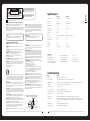
RISK OF ELECTRIC SHOCK
DO NOT OPEN
WARNING: TO REDUCE THE RISK OF ELECTRIC SHOCK DO NOT
REMOVE COVER OR BACK. NO USER-SERVICEABLE PARTS INSIDE.
REFER SERVICING TO QUALIFIED SERVICE PERSONNEL.
The lightning flash with arrowhead symbol, within an
equilateral triangle, is intended to alert the user to the
presence of uninsulated “dangerous voltage” within the
product’s enclosure that may be of sufficient magnitude
to constitute a risk of electric shock to persons.
Specifications
The exclamation point within an equilateral triangle is
intended to alert the user to the presence of important
operating and maintenance (servicing) instructions in
the literature accompanying the appliance.
MS-TV190LEDMS-TV220LED
Screen size, visible
19” Wide Screen LED
22” Wide Screen LED
Screen Format
16:9
16:9
Resolution
1366 x 768 Pixel
1920 x 1080 Pixel
Max. contrast ratio
1000:1
1000:1
Brightness (Typical)
250 cd/m2
250 cd/m2
Response Time (Typical)
5ms
5ms
Display Colours
16.7M
16.7M
Power Supply
110-240V AC, 12V DC 5 metre cable
110-240V AC, 12V DC 5 metre cable
Power Consumption
36W
48W
Standby Power Dissipation
≤1W
≤1W
Colour System
PAL
PAL
or electric shock.
Sound System
BG/DK/I
BG/DK/I
16. OBJECT AND LIQUID ENTRY - Do not push objects through any openings in this unit as they may
touch dangerous voltage points or short out parts that could result in fire or electric shock. Never
spill or spray any type of liquid into the unit.
AV Playback
PAL/SECAM/NTSC
PAL/SECAM/NTSC
Double insulation this is class II apparatus.
The mains plug used as the disconnect device. The disconnect device shall remain readily operable.
WARNING: To reduce the risk of electric shock do not expose this apparatus to rain or moisture and
objects filled with liquids, such as vases, should not be placed on this apparatus.
WARNING: According to the industrial standards, there are a certain number of defective pixels both
bright and dark that are acceptable. Although we produce panel with more than 99.99 percent active
cells, there still may be some cells that do not produce light or remain lit. For more information, please
contact sales or the technical support.
CAUTION
Changes or modifications not expressly approved by the party responsible for compliance
with the FCC Rules could void the use’s authority to operate this equipment.
WARNING: Do not leave any stationary images, patterns, PIP box, or letterbox images on the screen
for an extended period of time. Also, do not display the same stationary patterns frequently. This
may result in permanent ghost images on the display unit. This type of damage is not covered under
warranty. Examples of this type of situation can be but not limited to the following: side bar images,
stock market report bars, video game patterns, closed captioning, shopping channel logo, price
display, and letterbox black bars. To prevent this type of damage, display constant moving images
that fill the screen as often as possible.
TV/CATV MODE SELECTION
When shipped from the factory, the TV/CATV menu option is set to the “TV” mode.
If using CATV, set the menu option to “CATV” (Cable Television)
Important Safety Instructions
1. READ INSTRUCTIONS - All the safety and operating instructions should be read before the unit is
operated.
2. RETAIN INSTRUCTIONS - The safety and operating instructions should be retained for future
reference.
3. HEED WARNINGS - All warnings on the unit and in the operating instructions should be adhered to.
4. FOLLOW INSTRUCTIONS - All operating and use instructions should be followed.
5. CLEANING - Unplug this unit from the wall outlet before cleaning. Do not use liquid cleaners or
aerosol cleaners. Use a damp cloth for cleaning the exterior cabinet only.
6. ATTACHMENTS - The manufacturer of this unit does not make any recommendations for
attachments, as they may cause hazards.
7. WATER AND MOISTURE - Do not use this unit near water. For example, near a bathtub, washbowl,
kitchen sink, laundry tub, in a wet basement, or near a swimming pool.
8. ACCESSORIES - Do not place this unit on an unstable cart, stand, tripod, bracket, or table. The unit
may fall, causing serious injury, and serious damage to the unit. An appliance and cart combination
should be moved with care. Quick stops, excessive force, and uneven surfaces may cause the
appliance and cart combination to overturn.
PORTABLE CART WARNING
S3126A
9. VENTILATION - Slots and openings in the cabinet back or bottom are provided for ventilation, to
ensure reliable operation of the unit and to protect it from overheating. These openings should never
be blocked by placing the unit on a bed, sofa, rug, or other similar surface. This unit should never be
placed near or over a radiator or heat source. This unit should not be placed in a built-in installation,
such as a bookcase, or rack unless proper ventilation is provided or the manufacture’s instructions
have been adhered to.
10. POWER SOURCE - This unit should be operated only from the type of power source indicated on the
rating plate. If you are not sure of the type of power supply to your home, consult your appliance
dealer or local power company. For units intended to operate from battery power, or other sources,
refer to the operating instructions.
11. POLARIZATION - This unit is equipped with a polarized alternating current line plug (a plug having
one blade wider than the other). This plug will fit into the power outlet only one way. This is a safety
feature. If you are unable to insert the plug fully into the outlet, try reversing the plug. If the plug still
fails to fit, contact your electrician to replace your obsolete outlet. Do not defeat the safety purpose
of the polarized plug.
12. POWER-CORD PROTECTION - Power supply cords should be routed so that they are not likely to be
walked on or pinched by items placed upon or against them, paying particular attention to cords at
plugs, convenience receptacles, and the point where they exit from the appliance.
13. LIGHTNING - To protect your unit during a lightning storm, or when it is left unattended and unused
for long periods of time, unplug it from the wall outlet and disconnect the antenna or cable system.
This will prevent damage to the unit due to lightning and power line surges.
14. POWER LINES - An outside antenna system should not be located in the vicinity of overhead power
lines, or other electric light or power circuits, or where it can fall into such power lines or circuits.
When installing an outside antenna system, extreme care should be taken to keep from touching
such power lines or circuits as contact with them might be fatal.
15. OVERLOADING - Do not overload wall outlets and extension cords as this can result in a risk of fire
013
WARNING
17. OUTDOOR ANTENNA GROUNDING - If an outside antenna or cable system is connected to the unit,
be sure the antenna or cable system is grounded to provide some protection against voltage surges
and built-up static charges. Section 810 of the National Electrical Code, ANSI/NFPA 70, provides
information with respect to proper grounding of the mast and supporting structure, grounding of
the lead-in wire to an antenna discharge unit, size of grounding conductors, location of antenna
discharge unit, connection to grounding electrodes, and requirements for the grounding electrode.
All Models Feature:
» Conformal coated PCB
» PVR functionality (record digital TV)**
» Parental Lock
18. SERVICING - Do not attempt to service this unit yourself as opening or removing covers may expose
you to dangerous voltage or other hazards. Refer all servicing to qualified service personnel.
» Built-in DVD/CD mechanism
» Component and Composite video inputs
» Sleep Timer
» Built in DVB-T digital tuner
» VGA port for connection to a PC
» Built in speakers (4W x 2)
19 .DAMAGE REQUIRING SERVICE - Unplug this unit from the wall outlet and refer servicing to qualified
service personnel under the following conditions:
A. When the power-supply cord or plug is damaged.
B. If liquid has been spilled, or objects have fallen into the unit.
C. If the unit has been exposed to rain or water.
D. If the unit does not operate normally by following the operating instructions. Adjust only those controls that are covered by the operating instructions, as an improper adjustment of other controls may result in damage and will often require extensive work by a qualified technician to restore the unit to Its normal operation.
E. If the unit has been dropped or the cabinet has been damaged.
F. When the unit exhibits a distinct change in performance, this indicates a need for service.
» HDMI input for true digital connection
» Multi-language On-screen display
» Wall mounting bracket included
20. REPLACEMENT PARTS - When replacement parts are required, be sure the service technician uses
replacement parts specified by the manufacturer or those that have the same characteristics as the
original part. Unauthorized substitutions may result in fire, electric shock or other hazards.
PROBLEMSOLUTION
» USB connection for digital media playback
Troubleshooting
No picture or sound
Check the power supply is plugged in and turned on.
21. SAFETY CHECK - Upon completion of any service or repairs to this unit, ask the service technician to
perform safety checks to determine that the unit is in proper operating condition.
Picture is OK but no sound
Make sure the volume is not set to minimum or mute. Turn off the TV and turn back on.
22. HEAT - The product should be situated away from heat sources such as radiators, heat registers,
stoves, or other products (including amplifiers) that produce heat.
Remote control doesn’t work
Check the battery connection is correct. Check the batteries. Make sure no obstacles are between the sensor of the remote and TV
23. NOTE TO CATV SYSTEM INSTALLER - This reminder is provided to call the CATV system installer’s
attention to Article 820-40 of the NEC that provides guidelines for proper grounding and, In particular,
specifies that the cable ground shall be connected to the grounding system of the building, as close
to the point of cable entry as practical.
No TV Signal
Check the source is set to ATV or DTV. Check the antenna signal status.
No external video signal
Check the source is set to AV
Picture lacks colour or is to dark
Check colour, brightness and contrast settings
All channels lose colour intermittently
Check the antenna in case it is broken, disconnected or damaged.
Poor reception, loss of colour
Check channel is tuned correctly
Diagonal stripes on picture
Receiver may be affected by interference. e.g. nearby radio broadcasting transmitter or from another TV receiver.
Ghost images appear
Antenna direction may have been changed by a storm or strong wind. Ghost images are caused from both the signal travelling directly from the transmitter and a signal reflected from a hill or large building. Direction of the antenna should be chosen to avoid this situation.
USB media files don’t work
FAT 32 formatted flash drive required. Reformat if required.
Time Shift and PVR don’t work
FAT 32 formatted flash drive required. Reformat if required.
EXAMPLE OF ANTENNA GROUNDING AS PER
NATIONAL ELECTRICAL CODE S2898A
ANTENNA LEAD
IN WIRE
GROUND
CLAMP
ELECTRIC
SERVICE
EQUIPMENT
NEC - NATIONAL ELECTRIC CODE
ANTENNA DISCHARGE UNIT
(NEC SECTION 810-20)
GROUNDING CONDUCTORS
(NEC SECTION 810-21)
GROUND CLAMPS
POWER SERVICE GROUNDING
ELECTRODE SYSTEM
(NEC ART 250. PART H)