1
RSP Overview
The Report Server Platform (RSP) enables PIC users to configure, generate, view, and store reports and
analytic documents. RSP uses a combination of PIC components and a dedicated Report Server for report
processing.
RSP includes three Web-based applications, all of which are accessible through the NSP Portal:
• Report InfoView (for scheduling queries and viewing reports)
• Report Administrator (for configuring KPI sessions used for reporting)
• Reference Data Application (for configuring analytic reference data)
The Centralized Configuration Manager (CCM) application of NSP is also used to configure certain components
of RSP (for example, registering the report server).
Internet Explorer 7 is the recommended browser for use with the RSP.
For tasks performed in the administration of RSP, see Summary of Tasks and Access Privileges.
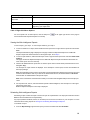
Note: For the reports, NSPBusinessUsers have View privileges and NSPBusinessPowerUsers have View and
Schedule privileges. For configuration access privileges, see Chapter 4: Administering the Report Server
Platform.
RSP Components
The Report Server Platform includes the following applications:
• Report InfoView
• Report Administrator
• Reference Data Application
The Report InfoView application uses the Business Objects Enterprise Web Intelligence interface. This help text
addresses the following:
• Viewing, scheduling and configuration of analytics packages
• Report administration
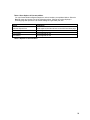
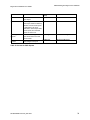
Acronyms
Acronym
Definition
BOE
Business Objects Enterprise
CDR
Call Detail Record
CCM
Centralized Configuration Management
13