1
Configuration • Presets tab
Default Presets
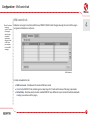
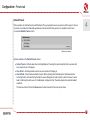
D16 provides a set of default presets with Redoptor. They are applied to every new instance of the plug-in. If a bank
of presets is created which should be applied every time instead of factory presets, it is possible to select such
an on option Default Presets section:
4
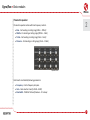
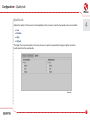
Default presets selection
Options available in the Default Presets section:
• F
actory Presets – Default value after installing Redoptor. Choosing this option loads the factory presets with
every new instance of the plug-in.
• C
lear Preset – Zeroed parameters with every new instance of the plug-in.
• U
ser Defined – Preset bank selected by the user. When choosing User Defined option, the Browse button
on the right side is activated. Using this button opens a dialog box in order to select a path to the user’s preset
bank. Confirming the path saves it in the Redoptor configuration file. The selected preset bank will be loaded
as default.
The text box on the left from the Browse button shows the path to the user’s preset bank.
20