1
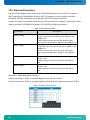
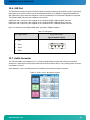
OmniClient HMI-OC215/-OC185/-OC156 User’s Guide (Version 1.02) 0-0096-3678 If it’s embedded, it’s Kontron OmniClient –User’s Guide (V1.02) 1. Table of Contents Contents 1. Table of Contents ...........................................................1 1.1. Table of Figures ..........................................................2 2. Introduction ................................................................3 2.1. Symbols used in this Guide ................................................4 3. Important Instructions ......................................................5 3.1. Note on the Warranty ......................................................5 3.2. Exclusion of Accident Liability Obligation ................................5 3.3. Liability Limitation / Exemption from the Warranty Obligation .............5 4. General Safety Instructions for IT Equipment ................................6 4.1. Electrostatic Discharge (ESD) .............................................8 4.1.1. Grounding Methods .....................................................8 4.2. Instructions for the Lithium Battery ......................................9 5. Electromagnetic Compatibility (Class A Device) .............................10 5.1. Electromagnetic Compatibility (EU) .......................................10 5.2. FCC Statement (USA) ......................................................10 5.3. EMC Compliance (Canada) ..................................................10 6. Scope of Delivery ..........................................................11 6.1. Optional Parts ...........................................................12 6.2. Type Label and Product Identification ....................................13 7. Product Description ........................................................14 7.1. OmniClient Touch Monitor Base ............................................15 7.2. OmniClient Compter Base ..................................................17 7.3. Product Images OmniClient 21.5” AC PSU (other units similar) .............18 7.4. Front View ...............................................................19 7.4.1. Display with Touch Screen ............................................20 7.4.2. Front Plate ..........................................................20 7.4.3. Calibrating the Touch Screen .........................................20 7.5. Bottom Side (with Interfaces) ............................................21 7.5.1. Power and Grounding ..................................................22 7.5.2. Interfaces ...........................................................24 7.6. Left and Right Side View .................................................25 7.7. Top Side .................................................................26 7.8. Rear Side ................................................................27 7.9. PCIe Riser Card ..........................................................27 8. Accessing Internal Components ..............................................28 8.1. Installing/Removing the Expansion Cards ..................................29 8.2. Replacing the Removable HDD Tray .........................................30 8.3. Replacing the Lithium Battery ............................................31 9. Installation Instructions ..................................................32 9.1. Operating System and Hardware Component Drivers ..........................35 10. Maintenance and Prevention.................................................36 10.1. Touch Screen Care and Cleaning ..........................................36 www.kontron.com 1 OmniClient – User’s Guide (V1.01) 11. Technical Data ............................................................ 11.1. Electrical Specifications .............................................. 11.2. Mechanical Specifications .............................................. 11.3. Environmental Specifications ........................................... 11.4. CE Directives and Standards ............................................ 37 38 38 39 40 12. Technical Appendix - Interfaces ........................................... 12.1. Power Connector – DC Power Supply Option ............................... 12.2. Power Connector – AC Power Supply Option ............................... 12.3. DVI Connector (DVI-I) .................................................. 12.4. DP Connectors (DP0/DP1) ................................................ 12.5. Ethernet Connectors .................................................... 12.6. USB Port ............................................................... 12.7. Audio Connector ........................................................ 12.8. Serial Port RS232 (Option) ............................................. 12.9. Serial Port RS422 (Option) ............................................. 12.10. Serial Port RS485 (Option) ............................................ 41 41 41 42 43 44 45 45 46 46 47 13. Technical Support ......................................................... 48 13.1. Returning Defective Merchandise ........................................ 48 Table of Figures Fig. 1: Bottom view .......................................................... 18 Fig. 2: Right view ........................................................... 18 Fig. 3: Front view ........................................................... 18 Fig. 4: Left view ............................................................ 18 Fig. 5: Top view ............................................................. 18 Fig. 6: Rear view ............................................................ 18 Fig. 7: Front view of the OmniClient ......................................... 19 Fig. 8: OmniClient Bottom Side (interface side) .............................. 21 Fig. 13: OmniClient (right side) ............................................. 25 Fig. 14: Top side of OmniClient .............................................. 26 Fig. 15: Rear side of OmniClient ............................................. 27 2 www.kontron.com OmniClient –User’s Guide (V1.02) 2. Introduction The information contained in this manual may be subject to technical alteration, particularly as a result of the constant upgrading of Kontron products. The attached documentation does not entail any guarantee on the part of Kontron with respect to technical processes described in the manual or any product characteristics set out in the manual. Kontron does not accept liability for printing errors or other inaccuracies in the manual unless it can be proven that Kontron is aware of such errors or inaccuracies or that Kontron is unaware of these as a result of gross negligence and Kontron has failed to eliminate these errors or inaccuracies for this reason. Kontron expressly informs the user that this manual only contains a general description of technical processes and instructions which may not be applicable in every individual case. In cases of doubt, please contact Kontron. This manual is protected by copyright. All rights are reserved by Kontron. Copies of all or part of this manual or translations into a different language may only be made with the prior written consent of Kontron. Kontron points out that the information contained in this manual is constantly being updated in line with the technical alterations and improvements made by Kontron to the products and thus this manual only reflects the technical status of the products by Kontron at the time of printing. © 2014 by Kontron Printing and duplication, even of sections, is only permissible with the express approval of Kontron. Kontron 14118 Stowe Drive Poway, CA 92064-7147 www.kontron.com 3 OmniClient – User’s Guide (V1.01) 2.1. Symbols used in this Guide Symbol Meaning This symbol indicates the danger of injury to the user or the risk of damage to the product if the corresponding warning notices are not observed. This symbol indicates that the product or parts thereof may be damaged if the corresponding warning notices are not observed. This symbol indicates general information about the product and the user manual. This symbol indicates detailed information about the specific product configuration. This symbol precedes helpful hints and tips for daily use. ® Microsoft, MS-DOS, Windows 7, Windows 8 and Windows NT are registered trademarks of the Microsoft Corporation. ® IBM, PC-AT, OS/2 and PS/2 are registered trademarks of the International Business Machines Corporation. ® Intel and Pentium are registered trademarks of Intel Corporation. ® AMI is a registered trademark of American Megatrends, Inc. Other product names cited in this manual may also be trademarks and are used here solely for identification purposes. 4 www.kontron.com OmniClient –User’s Guide (V1.02) 3. Important Instructions This chapter contains safety instructions which must be observed when using the OmniClient. The manufacturer’s instructions provide useful information on your OmniClient. 3.1. Note on the Warranty Due to their limited service life, parts which by their nature are subject to a particularly high degree of wear (wearing parts) are excluded from the warranty beyond that provided by law. This applies to batteries and to the display backlighting, for example. 3.2. Exclusion of Accident Liability Obligation Kontron shall be exempted from the statutory accident liability obligation if the user fails to observe the safety instructions. 3.3. Liability Limitation / Exemption from the Warranty Obligation In the event of damage to the device caused by failure to observe the hints in this manual and eventually on the device (especially the safety instructions included in the chapter “General Safety Instructions for IT Equipment”), Kontron shall not be required to honor the warranty even during the warranty period and shall be exempted from the statutory accident liability obligation. www.kontron.com 5 OmniClient – User’s Guide (V1.01) 4. General Safety Instructions for IT Equipment Please read this chapter carefully and observe the instructions for your own safety and to ensure correct use of the device. The chapter also contains information on approval and interference suppression of your device. The device has been built and tested by Kontron in accordance with EN 60950-1 and left the premises in a perfectly safe condition. In order to maintain the safe condition and ensure safe operation, the user must observe the instructions and warnings on the device and in the manual. The device must be used in accordance with the instructions for use. The electrical installations in the room must correspond to the requirements of the local (country-specific) regulations. Take care that there are no cables, particularly power cables, in areas where persons can trip over them. Do not use a power cable in sockets shared by a number of other power consumers. Do not use an extension cable. The unit is only completely disconnected from the electrical power source when the electrical power cord is disconnected either from the power source or the unit. Therefore, the electrical power cord and its connectors must always remain easily accessible. The system is not completely disconnected from the mains power supply by turning off via the power button. When the system is turned off via the power switch, there a standby-voltage of 5 V remains on the baseboard. For DC power connection: The DC power source should be able to be switched off and on via an isolating switch. The unit is only completely disconnected from the DC main power source, when the DC power cord is disconnected either from the power source or the unit. Therefore, the DC power cord and its connectors must always remain easily accessible. For AC power connection: The AC power cord is considered the mains disconnect for the device and must be readily accessible when installed. If the individual power cord will not be readily accessible for disconnection then you must install an AC power disconnect for the device. This main disconnect must be readily accessible, and it must be labeled as controlling power to the device. Do not place the device in direct sunlight, near heat sources, or in a damp place. Make sure the device has adequate ventilation. Only devices and components which fulfill the requirements of an SELV circuit (safety extra low voltage) in accordance with EN60950-1 may be connected to the interfaces of the system. 6 www.kontron.com OmniClient –User’s Guide (V1.02) All plugs on the connection cables must be screwed or locked to the housing. The device is designed to be mounted and operated only in the position described in this document. The proper mounting is a vertical position with the interfaces downwards. This device generates heat during operation. Make sure it is adequately ventilated. Do not cover the air intake and exhaust openings of the device. Repairs may only be carried out by a person authorized by Kontron. Maintenance or repair on the open device may only be done by qualified personnel authorized by Kontron, who is aware of the associated dangers. The device may only be opened in accordance with the description in this user’s guide for the following: Replacing the Lithium battery Installing the PCIe board Configuration of the RS232/RS422/RS485 interface These procedures have to be carried-out only by qualified specialist personnel. When accessing internal components the device must be switched off and disconnected from the power source. Only approved original accessories (optional parts) approved by Kontron may be used. The DC-input must fulfill SELV requirements of EN60950-1 standard. Safe operation is no longer possible when: o the device has visible damage o the device no longer functions In these cases the device must be shut down and secured against unintentional operation. www.kontron.com 7 OmniClient – User’s Guide (V1.01) 4.1. Electrostatic Discharge (ESD) A sudden discharge of electrostatic electricity can destroy static-sensitive devices or microcircuitry. Therefore proper packaging and grounding techniques are necessary precautions to prevent damage. Always take the following precautions: 1. Transport boards in ESD-safe containers such as boxes or bags. 2. Keep electrostatic sensitive parts in their containers until they arrive at the ESD-safe workplace. 3. Always be properly grounded when touching a sensitive board, component, or assembly. 4. Store electrostatic-sensitive boards in protective packaging or on antistatic mats. 4.1.1. Grounding Methods By adhering to the guidelines below, electrostatic damage to the device can be avoided: 1. Cover workstations with approved antistatic material. Always wear a wrist strap connected to workplace. Always use properly grounded tools and equipment. 2. Use antistatic mats, heel straps, or air ionizers for more protection. 3. Always handle electrostatically sensitive components by their edge or by their casing. 4. Avoid contact with pins, leads, or circuitry. 5. Turn off power and input signals before inserting and removing connectors or connecting test equipment. 6. Keep work area free of non-conductive materials such as ordinary plastic assembly aids and Styrofoam. 7. Use only field service tools which are conductive, such as cutters, screwdrivers, and vacuum cleaners. 8. Always place drives and boards PCB-assembly-side down on the foam. 8 www.kontron.com OmniClient –User’s Guide (V1.02) 4.2. Instructions for the Lithium Battery The embedded mITX motherboard is equipped with a Lithium battery. When replacing this battery please observe the instructions described in the section 8.3 “ www.kontron.com 9 OmniClient – User’s Guide (V1.01) Replacing the Lithium Battery”. Caution Danger of explosion when replacing with wrong type of battery. Replace only with the same or equivalent type recommended by the manufacturer. The lithium battery type must be UL recognized. Do not dispose of lithium batteries in general trash collection. Dispose of the battery according to the local regulations dealing with the disposal of these special materials, (e.g., collecting points for battery disposal). 10 www.kontron.com OmniClient –User’s Guide (V1.02) 5. Electromagnetic Compatibility (Class A Device) 5.1. Electromagnetic Compatibility (EU) This product is in conformity with the protection requirements of EU Council Directive 2004/108/EC on the approximation of the laws of the Member States relating to electromagnetic compatibility. If the user modifies and/or adds to the equipment (e.g., installation of add-on cards) the prerequisites for the CE conformity declaration (safety requirements) may no longer apply. Generic standards - Emission standard for residential, commercial and light-industrial environments (Emission): EN 61000-6-3 Emission of Information technology equipment – Radio disturbance characteristics – Limits and methods of measurement: EN 55022/B ITE - Immunity characteristics - Limits and methods of measurement: EN 55024. 5.2. FCC Statement (USA) This equipment has been tested and found to comply with the limits for a Class A digital device, pursuant to Part 15 of the FCC Rules. These limits are designed to provide reasonable protection against harmful interference when the equipment is operated in commercial environment. This equipment generates, uses, and can radiate radio frequency energy and, if not installed and used in accordance with the instruction manual, may cause harmful interference to radio communications. Operation of this equipment in a residential area is likely to cause harmful interference, in which case the user will be required to correct the interference at his own expense. 5.3. EMC Compliance (Canada) The method of compliance is self-declaration to Canadian standard ICES-003: (English): This Class A digital apparatus complies with the Canadian ICES-003. (French): Cet appareil numérique de la class A est conforme à la norme NMB-003 du Canada. www.kontron.com 11 OmniClient – User’s Guide (V1.01) 6. Scope of Delivery Please check that your package is complete, and contains the items below (according to the ordered unit configuration). If you discover damaged or missing items, please contact your dealer. OmniClient system in the configuration ordered: OmniClient 156 (15.6”) OmniClient 185 (18.5”) OmniClient 215 (21.5”) 6x Mounting Clamp with Screws General Safety Instruction for IT Equipment 12 www.kontron.com OmniClient –User’s Guide (V1.02) 6.1. Optional Parts Depending on the configuration ordered, your OmniClient system may include one or more of the following optional accessories. Depending on the accessory, it may have already been installed in the system for you. HDD or SDD (2.5” SATA internal). Up to two, 2.5” SATA drives maybe ordered and preinstalled with your OmniClient system. AC Power cable depending on the configuration ordered. AC(US) AC(EU) RS232 cable (pre-installed) RS422/485 Module (configuration via DIP switch) (preinstalled) Mounting Plate VESA® 100 compliant www.kontron.com 13 OmniClient – User’s Guide (V1.01) 6.2. Type Label and Product Identification The type label with the corresponding Kontron product part and serial number is located on the rear side of the display bezel. Figure 1 depicts the type of label for a DC supply OmniClient. There are three primary model numbers of the OmniClient based on the screen size. The “-xxxx” suffix in the model number identifies the ordered system configuration. System Type Model No. Product Identification OmniClient 156 HMI-OC156-xxxx 15.6” display OmniClient OmniClient 185 HMI-OC185-xxxx 18.5” display OmniClient OmniClient 215 HMI-OC215-xxxx 21.5” display OmniClient Figure 1. OmniClient Type Label (DC Version) 14 www.kontron.com OmniClient –User’s Guide (V1.02) 7. Product Description Before you begin using your OmniClient system, you should take a few minutes to learn about the various ports, bays, connectors and indicators that are part of your OmniClient system. The OmniClient is a Human-Machine-Interface (HMI) system designed for demanding industrial applications. The OmniClient integrates a workstation system with an integrated touch screen display. The system is designed to be mounted in the user’s application by either of the following methods: Installation in an instrument panel or other cabinets (preferred mounting method) Installation by a heavy duty VESA® 100 compliant mounting system All versions are suitable for installation in an instrument panel or other cabinet. OmniClient systems must be mounted in an instrument panel or other cabinets using the corresponding supplied mounting clamps. Installation using the VESA® 100 mounting system must be properly designed to support the heavy load of the OmniClient system. The OmniClient system is very flexible and can be customized to meet the requirements of many demanding applications. The rugged design offers excellent mechanical stability suitable for operation in harsh industrial environments. Two components comprise an OmniClient system: The touch monitor and computer base. The touch monitor base includes a display and touch screen. The computer base provides the computer board and power supply for the system. The connection between these two components is standardized and can be swapped between various touch monitor bases and computer bases of different sizes and types. This provides a very adaptable framework to configure a system that meets the requirements of many different applications. The following sections detail each of these components and their function in the OmniClient system. www.kontron.com 15 OmniClient – User’s Guide (V1.01) 7.1. OmniClient Touch Monitor Base The touch-monitor base is configurable during ordering as a 15.6”, 18.5” or 21.5” display size. Each touch-monitor base is equipped with a color TFT-LCD screen and multi-point projective capacitive touch screen (PCAP). Other optional features available in the display base and configured during ordering are a 5MP, USB camera and/or a WiFi USB module. The display base is fanless; cooling of the display is through the surface of the display bezel and air openings located on the top and bottom on the rear of the display bezel. The tables below detail the technical specifications of the touch-monitor available options. When operating the OmniClient, make sure the air openings on the rear of the display bezel are unobstructed. The OmniClient Touch Monitor is designed to comply with IP65 protection class at the front side. Table 1. Display Specifications Specification / Model HMI-OC156-xxxx HMI-OC185-xxxx Viewable image size (diagonal) HMI-OC215-xxxx 54.6cm (21.5”) Active Area 476.64mm (H) x 268.11mm (V) Maximum Resolution 1920 x 1080 Pixel Pitch 0.248 x 0.248mm Brightness 300 cd/m2 (typical) Color Depth 16.7 million colors Contrast Ratio 5,000:1 (typical) Response Time 16ms (typical) Panel Backlight LED Table 2. Touch Specifications Specification / Model HMI-OC156-xxxx HMI-OC185-xxxx HMI-OC215-xxxx Projected capacitive system Projected capacitive system Projected capacitive system Sensor stack thickness 1.1mm 1.1mm 1.1mm Cover glass thickness 1.1 +/-0.2mm 1.1 +/-0.2mm 1.1 +/-0.2mm Fingers and thin gloves Fingers and thin gloves Fingers and thin gloves 6 touches 6 touches 6 touches 25ms 25ms 25ms USB 2.0 USB 2.0 USB 2.0 Touch Technology Touch Method Touch Point Response Time Interface 16 www.kontron.com OmniClient –User’s Guide (V1.02) Table 3. Camera Specifications Specification Type Color Focus Adjustment Automatic Maximum Resolution 5M pixel Audio Support No Max Digital Video Resolution Interface 2MP (HD 1080P) 1920 x 1080 (16:9) (30 FPS) USB 2.0 Table 4. WiFi Specifications Specification IEEE WLAN Standard Interface www.kontron.com 802.11a, 802.11b, 802.11g, 802.11n USB 2.0 17 OmniClient – User’s Guide (V1.01) 7.2. OmniClient Computer Base The computer base is designed around an embedded Mini-ITX motherboard. The computer base is highly customizable to fit the requirements of its application. Table xxx details the options available in the OmniClient computer base. The OmniClient system can be powered by +24VDC (+/-20%) or an AC (115-220VAC, 50-60Hz) power source. The OmniClient Computer Base is a fan cooled system. The cooling of the unit is performed by two system fans, power supply fan and an internal CPU cooler. The air-flow direction through the computer base is upward from the IO panel to the top of the computer base. Airflow Direction When powering the OmniClient system, make sure that the air intake and exhaust openings are not obstructed. All computer base fans are controlled by on-board thermal sensors. It is normal for the fans to speed up and slow down depending on ambient thermal conditions and on processor/power loading. Table 5. Configration Capability Power Supply Motherboard Specification Configurable Capability 90-260VAC Manufacturer Only +24VDC (+/- 20%) Manufacturer Only Kontron KTQM67/mITX Manufacture Only CPU Option Manufacturer or User (must use approved CPU cooler) Memory Manufacturer or User (must use approved Memory modules) HDD / SDD 2x Internal 2.5” HDD/SDD (SATA) slots Manufacturer or User PCIe Expansion Port PCIe x16. The system can be equipped with an installed PCIe riser card allowing expansion for one PCIe card Manufacturer Only DB9 cutouts 2x DB9 cutouts are available and can be equipped with additional RS232/RS422/RS485 interfaces Manufacturer or User 18 www.kontron.com OmniClient –User’s Guide (V1.02) 7.3. Product Images OmniClient 21.5” AC PSU (other units similar) Fig. 1: Bottom view Fig. 2: Right view Fig. 3: Front view Fig. 4: Left view Fig. 5: Top view Fig. 6: Rear view www.kontron.com 19 OmniClient – User’s Guide (V1.01) 7.4. Front View 1 2 3 4 Fig. 7: Front view of the OmniClient 20 1 Camera (optional) 3 Front border 2 TFT display with touch screen 4 RFID reader (optional) www.kontron.com OmniClient –User’s Guide (V1.02) 7.4.1. Display with Touch Screen Depending on the OmniClient system ordered, the built-in display is a 15.6”/18.5”/21.5” size TFT display with corresponding Projected Capacitive touch screen. The touch screen is USB connected. For technical specification of the built-in display refer to chapter 11 “Technical ”. The display is equipped with a Projected Capacitive touch screen. The touch screen offers the same degree of user comfort as the mouse buttons. The surface of the display is also mechanically protected through the touch screen. The touch screen (USB connected) registers contacts of a finger and allows moving the mouse pointer. This functions only under integration of the necessary software. The corresponding touch screen driver for your operating system is installed on your OmniClient system (refer to section 9.1 “ www.kontron.com 21 OmniClient – User’s Guide (V1.01) Operating System and Hardware Component Drivers”). For recalibration of the touch if necessary, please observe the subsection Error! Reference source not found. “Error! Reference source not found.”. Do not use a hard or a pointed object (like screw drivers) to operate the touch screen, since it can damage the touch screen surface. The touch screen is covered with a glass panel and care should be taken when cleaning it (see the section 10.1 “Touch Screen Care and Cleaning”). 7.4.2. Front Plate The OmniClient system is suitable for installation in an instrument panel or other cabinet. At the front side of the system, an aluminum front plate (bezel) with integrated anti-glare glass plate and capacitive touch is located. For the outline dimensions of the touch monitor base refer to 11.2 “Mechanical Specifications.” 7.4.3. Calibrating the Touch Screen Unlike resistive touch displays, the capacitive touch screen needs no further calibration after factory calibration. Only special, conductive styluses (not included) work with capacitive touch screens. The capacitive touch screen is factory-calibrated and needs no recalibration. When using a stylus, make sure to use a special conductive stylus that works with capacitive touch screens. 22 www.kontron.com OmniClient –User’s Guide (V1.02) 7.5. Bottom Side (with Interfaces) 1 2 2 3 7 8 13 5 4 9 10 6 11 12 Fig. 8: OmniClient Bottom Side (interface side) 1 3x Ethernet connectors – RJ45 (1000Mbps) 7 2x Display Ports (DP) 2 6x USB (2.0) port connectors 8 DVI-D connector 3 Computer base air intake 9 4 Power supply unit (PSU) cooling fan DB9 Punch outs for RS232/422/485 interfaces (optional) 10 AC power cable securing clip Expansion slot for PCIe (2.0) x16 cards. Maximum power 25W, Full-height, half-length 11 AC power connector (IEC 60320 C14) slot. 12 Power ON/OFF switch 6 Retaining bracket for PCIe card 13 Audio Ports (Line-out/Line-In/Mic-In) 5 www.kontron.com 23 OmniClient – User’s Guide (V1.01) 7.5.1. Power and Grounding 7.5.1.1. If AC power supplies are installed Mains AC power disconnect: The AC power cord(s) is considered the mains disconnect for the server and must be readily accessible when installed. If the individual server power cord(s) will not be readily accessible for disconnection then you must install an AC power disconnect for the entire rack unit. This main disconnect must be readily accessible, and it must be labeled as controlling power to the entire rack, not just to the server(s). Grounding the system: To avoid an electrical shock hazard, you must ensure the system has proper grounding. The OmniClient power cord includes the safety ground conductor and provides proper grounding only for the OmniClient. You must ensure proper grounding is provided for the entire system into which the OmniClient is embedded. You must provide additional, proper grounding for the OmniClient and the host equipment. Overcurrent protection: The OmniClient is designed for an AC line voltage source with up to 10 amperes of overcurrent protection per cord feed. If the power system for the equipment rack is installed on a branch circuit with more than 10 amperes of protection, you must provide supplemental protection for the OmniClient. The overall current rating of a configured system is typically less than 4 amperes. WARNING: Do not attempt to modify or use an AC power cord set that is not the exact type required. You must use a power cord set that meets the following criteria: Rating: In the U.S. and Canada, cords must be UL (Underwriters Laboratories, Inc.) Listed/CSA (Canadian Standards Organization) Certified type SJT, 18-3 AWG (American Wire Gauge). Outside of the U.S. and Canada, cords must be flexible harmonized (<HAR>) or VDE (Verbena Deutscher Electrotechniker, German Institute of Electrical Engineers) certified cord with 3x 0.75 mm conductors rated 250 VAC. Connector, wall outlet end: Cords must be terminated in grounding-type male plug designed for use in your region. The connector must have certification marks showing certification by an agency acceptable in your region and for U.S. must be listed and rated for 125% of the overall current rating of the server. Connector, server end: The connectors that plug into the AC receptacle on the server must be an approved IEC (International Electrotechnical Commission) 320, sheet C13, type female connector. Cord length and flexibility: Cords must be less than 4.5 meters (14.8 feet) long. Even when the system is turned off via the power switch there is still a standbyvoltage of 5 V on the baseboard. The system is not completely disconnected from the main power supply by turning off via the power switch. 24 www.kontron.com OmniClient –User’s Guide (V1.02) 7.5.1.2. If DC power supplies are installed Connection with a DC (Direct Current) source should only be performed by trained service personnel. The OmniClient with DC input is to be installed in a Restricted Access Location in accordance with articles 110-26 and 110-27 of the National Electric Code, ANSI/NFPA 70. The DC source must be electrically isolated from any hazardous AC source by double or reinforced insulation. The DC source must be capable of providing up to 300 watts of continuous power per feed pair. Mains DC power disconnect: You are responsible for installing a properly rated DC power disconnect for the server system. This mains disconnect must be readily accessible, and it must be labeled as controlling power to the server. The UL listed circuit breaker of a centralized DC power system may be used as a disconnect device when easily accessible and should be rated no more than 10 amps. Grounding the server: This server is intended for installation with an isolated DC return (DC-I and is to be installed in a Common Bonding Network (CBN) per NEBS GR-1089). To avoid an electrical shock hazard, you must reliably connect an earth grounding conductor to the server. The earth grounding conductor must be a minimum of 16 AWG connected to the earth ground stud(s) on the rear of the server. The safety ground conductor should be connected to the chassis stud with a Listed closed two-hole crimp terminal having 5/8-inch pitch. The input connector on the DC power supply is a 2-pin terminal block (barrier strip). This connector is rated at 16A/pin. Figure 61, the input connector mechanical drawing and table, show the DC input power connector and pin-out. Please note that the terminal block is polarity is identified by a “+” for the DC Positive and a “-“ for the DC Negative (RTN). WARNING: DO NOT CONNECT THE POSITIVE TO THE “-“ OR THE RTN TO THE ”+” Figure11. DC Power Supply Input Connector (Terminal Block) Table 4. DC power supply connections Pin # www.kontron.com Description - RTN + +24VDC (18-36VDC) 25 OmniClient – User’s Guide (V1.01) 7.5.2. Interfaces 7.5.2.1. USB 2.0 Connectors The system is equipped at the bottom side with 6x USB 2.0 interface connectors. These connectors provide connections for USB-compatible devices. 7.5.2.2. DVI-D Video Connector The DVI-D supports both digital and analog connections. Digital devices can be connected directly to this interface of the OmniClient. Analog devices should be connected to this interface via a DVI to VGA adapter (not included). 7.5.2.3. DisplayPort Video Connectors Two DisplayPort (DP) connectors comply with DisplayPort 1.1a specification. 7.5.2.4. DB9 Punchouts Two DB9 (D-sub 9 pin) punch-out’s are available on the bottom side and can optionally be fitted with a RS-232/422 or 485 serial interface adapter. 7.5.2.5. Ethernet Interfaces The OmniClient computer base provides 3x RJ45 sockets all of which support 10/100/1000Mbps data transfer rates. 26 www.kontron.com OmniClient –User’s Guide (V1.02) 7.6. Left and Right Side View 3 3 7 2 1 7 4 6 1 2 5 5 Fig. 9: OmniClient (left side) Fig. 10: OmniClient (right side) Legend for Fig. 9 and Fig. 10: 1 Computer Base 5 Interface side (bottom) 2 Computer Base access cover secured with two screws 6 Mounting slots with installed mounting clamp and Screws 3 Touch Monitor Base 7 Mounting clamp 4 Air intake openings www.kontron.com 27 OmniClient – User’s Guide (V1.01) 7.7. Top Side 1 4 5 3 4 2 5 Fig. 11: Top side of OmniClient 1 Touch Monitor Base 2 Computer Base 3 System fans air exhaust openings 4 Mounting slots with installed mounting clamp and Screws 5 Mounting clamp When powering on the OmniClient, make sure that the air intake and exhaust openings are not obstructed. 28 www.kontron.com OmniClient –User’s Guide (V1.02) 7.8. Rear Side 2 1 1 3 6 5 2 1 1 2 4 1 2 1 3 Fig. 12: Rear side of OmniClient 1 Screws for securing the system with mounting clamps to a Instrument panel (12x screws) 2 Mounting clamps (6x) 3 Touch Monitor Base air vents 4 Product Identification label 5 Windows (if applicable) Key label 6 WiFi/RFiD controller access cover. Note for mounting clamps: The OmniClient 15.6”/18.5”/21.5” system will be secured into an instrument panel or cabinet with two mounting clamps on the top and bottom surfaces and one on each the left and right surfaces as shown in fig15, position 2. 7.9. PCIe Riser Card The OmniClient can be extended with one PCI-Express slot, depending on the system configuration ordered. You can expand your system with extension cards that are full-height/halflength size. The PCIe slot is 2.0 compliant and provides x16 channels. The power consumption of the PCIe card must not exceed 25W maximum. www.kontron.com 29 OmniClient – User’s Guide (V1.01) 8. Accessing Internal Components This section contains important information that you must read before accessing the internal components. You must follow these procedures properly when installing, removing or handling any board. Please consider following instruction when you install (or remove) expansion cards. The HDD, the expansion cards, and the Lithium battery are located in an “OPERATOR ACCESS AREA”. The area behind the access door designed as “OPERATOR ACCESS AREA” may only be opened for installing/removing of HDDs, expansion cards, or replacing the Lithium battery by qualified specialist personnel according to the description in this user’s guide. The PC Box may only be opened in accordance with the description in this user’s manual for: Installation and removal of HDDs Installation and removal of PCI/PCIe expansion cards Replacing of the Lithium battery These procedures have to be carried-out only by qualified specialist personnel. To expand your system with additional cards, please take care that each additional card should not exceed a power consumption of 25W. The access door and HDD drive tray must be secured by the included screws during operation. Please consult the documentation provided by the manufacturer of the expansion card for instructions before attempting to install/remove an expansion card into/from the OmniClient. Please observe the safety instruction for handling assemblies with static sensitive device. Failure to take heed of this warning instruction can result in damage to the device. 30 www.kontron.com OmniClient –User’s Guide (V1.02) 8.1. Installing/Removing the Expansion Cards The expansion cards for the performance extension of your system can be installed into the free slot of the riser card. Please consider following instruction when you install (or remove) expansion cards. It is recommended to expand your system with additional PCIe cards before it is installed on a panel or into an industrial cabinet. 1. Close all applications; shut down the system properly and disconnect the power cord from the power source. Disconnect all peripherals. 2. The OmniClient system should lay on a flat, clean surface with the front panel downwards. (Make sure that the display surface is protected against scratching and damage). 3. Loosen the two computer base cover screws that secure cover to the computer base (refer to figure 12, position 2) and slide the access door away from the computer base to open. 4. To remove/install an expansion card, you have to remove the corresponding expansion card/slot retaining bracket (refer to figure 8, position 6). Loosen the corresponding fastening screw, which secures the slot bracket and remove it. Retain the screws and retaining bracket for later use. 5. Insert/remove the PCIe card from the riser card. 6. If you are removing a PCIe expansion card, re-insert a slot blank plate. 7. Secure the PCIe bracket to the chassis by reattaching the retaining bracket with the fastening screw from step 4. 8. Slide the access door onto the computer base and secure it with the two cover screws. www.kontron.com 31 OmniClient – User’s Guide (V1.01) 8.2. Replacing the Removable HDD Tray The HDD, the expansion cards, and the Lithium battery are located in an “OPERATOR ACCESS AREA”. The area behind the access door (Error! Reference source not found., pos. 2) designed as “OPERATOR ACCESS AREA” may only be opened for installing/removing of HDDs, expansion cards, or replacing the Lithium battery by qualified specialist personnel according to the description in this user’s guide. Fit the “SATA 0” drive location always first if your system has to be operating with one HDD drive only (refer to Error! Reference source not found., pos. 4)! Perform the following procedure if you are replacing (removing/installing) the SATA HDD: 1. Close all applications; shut down the system properly and disconnect the power cord from the power source. 2. Lay down the hard disk tray on a clean and ESD protected workplace. 3. Loosen the knurled screw on the left side of the unit that secures the access door (refer to Error! Reference source not found., pos. 1 and pos. 2) and open access door. 4. Disconnect the SATA cable and the SATA power connector (Error! Reference source not found., pos. 7) from the rear side of the installed HDD (refer to Error! Reference source not found., pos. 3). 5. Loosen the captive knurled screws (Error! Reference source not found., pos. 2) that secure the drive tray to the chassis and pull-out the HDD tray (Error! Reference source not found., pos 1) from the system (see Fig. 8, pos. 10). 6. Remove the four screws (two screws on each side) that secure the HDD to the drive tray (refer to Error! Reference source not found., pos. 6) and Error! Reference source not found., pos. 10). Retain the screws for later use! 7. 32 Slide the drive(s) out of the tray. www.kontron.com OmniClient –User’s Guide (V1.02) 8.3. Replacing the Lithium Battery The HDD, the expansion cards, the fuse and the Lithium battery are located in an “OPERATOR ACCESS AREA”. The area behind the access door (Error! Reference source not found., pos. 2) designed as “OPERATOR ACCESS AREA” may only be opened for installing/removing of HDD’s, expansion cards, or checking/replacing the fuse, or replacing the Lithium battery by qualified specialist personnel according to the description in this user’s guide. Before replacing the Lithium battery, the system has to be shut down properly, switched off and disconnected from the power source. The ETX baseboard is equipped with a Lithium battery. To replace this battery, please proceed as follows: 1. Open the unit as described in the 8.1 “ www.kontron.com 33 OmniClient – User’s Guide (V1.01) Installing/Removing the Expansion Cards” section (steps 1-3). 2. Pull the battery (Error! Reference source not found., pos. 6) outwards. 3. Position the Lithium battery in the Lithium battery holder (Error! Reference source not found., pos. 4) with the positive (+) terminal face-up. Gently push the battery into the holder in as far as it goes. 4. Make sure that you insert the battery correctly. The plus pole must be on top! 5. Close the Unit as described in the section 8.1 “ 34 www.kontron.com OmniClient –User’s Guide (V1.02) Installing/Removing the Expansion Cards” (step 8). The lithium battery must be replaced with an identical battery or a battery type recommended by Kontron (Lithium battery 3.0 V for RTC, type: CR2032). The Lithium battery type must be UL recognized. Do not dispose of lithium batteries in domestic waste. Dispose of the battery according to the local regulations dealing with the disposal of these special materials (e.g. to the collecting points for the disposal of batteries). www.kontron.com 35 OmniClient – User’s Guide (V1.01) 9. Installation Instructions The OmniClient has to be installed and operated only by trained and qualified personal. The mounting and operation of the OmniClient is only the vertical position with the interfaces downwards. The unit must be placed such that there is sufficient space for connecting the cables to the I/O interface connectors and for operating the power switch. Leave at least 5 cm (approx. 2") of free space around the unit to prevent the device from possibly overheating! Do not obstruct the air intake and exhaust openings. The voltage feeds must not be overloaded. Adjust the cabling and the external overload protection to correspond with the rated voltage range indicated on the type label. The type label is located on the right side of the system. The rear access panel must be secured by the supplied screws during operation. 36 www.kontron.com OmniClient –User’s Guide (V1.02) The mount clamps with screws (supplied), allow the easy and fast mounting of the OmniClient156/185/215. Refer to the appropriate unit outline and mounting drawing for the correct dimensions of cut-outs and air gap clearances required for mounting the unit into a wall or panel. The OmniClient outline and mounting drawing can be found on our web site www.kontron.com Dimension for: OmniClient Cut-Out for Mounting into a Panel [mm] (W x H) Requirements for Mounting Metal mounting panel thickness for proper mounting 156 185 215 394 x 245 462 x 283 527 x 325 1.5 – 6 1.5 – 6 1.5 – 9 6x 8x Used clamps with screws for mounting the OmniClient to a panel Required Tool Proper Torque Mounting Position #2 Phillips Screw Driver Tighten the screws with a torque of 0.5 Nm Ensure the vertical and horizontal alignment of the system/display box. Table 2: Requirements for OmniClient mounting into a subframe/panel In order to ensure IP65 front sealing against dust and water, mount the system on a non-textured surface. Before you install the OmniClient system into a panel or a subframe for industrial cabinet, verify the perfect condition of the seal at the rear of the front plate. The seal has to be in place without surface imperfections/defects and dirt. www.kontron.com 37 OmniClient – User’s Guide (V1.01) To mount the system to a wall or to a panel, follow these steps: 1. Depending on the dimension of the display enclosure of your system, cut a hole in the panel/wall (refer to the outline and mounting drawing that is correct for your unit type for the panel cut-out dimensions. The OmniClient outline and mounting drawing can be found on our web site www.kontron.com). The panel where you intend to attach the system must be accessible from both front and rear side. 2. The system must be turned off and disconnected from the power source and peripherals. 3. Insert the system into the panel cut-out from the panel/wall front. 4. In order to ensure the protection class IP65 on the front side in the installed condition, the contact surface with the seal must be clean and flush. 5. Hook the mounting clamps with screws (Error! Reference source not found.15, pos. 1 and 2) from the rear side of the panel into the corresponding pairs of slots of the Display enclosure (Fig. 12 and 13 item 6, and Fig 14 item 4 with matching slots on the bottom side as seen in Fig 15). 6. When mounting clamps are assembled correctly in the correct quantities and locations, the unit must look like Fig. 15. 7. The system must be attached firmly with the screws (refer to Error! Reference source not found.2 for the mounting requirements). 38 www.kontron.com OmniClient –User’s Guide (V1.02) 9.1. Operating System and Hardware Component Drivers Your OmniClient system can be supplied either with or without a pre-installed operating system. If you have ordered your system with a pre-installed operating system, all drivers are installed in accordance with the system configuration ordered (optional hardware components). Your system is fully operational at the first start-up. If you have ordered a OmniClient system without a pre-installed operating system, because you want to install it yourself, please pay attention to the following instructions: You can download the relevant drivers for the installed hardware from our web site at www.kontron.com by selecting the product name (designation). The corresponding driver (depending on the installed operating system) for the touch screen controller is available on our web site by selecting the “Downloads” tab of the OmniClient product site. www.kontron.com 39 OmniClient – User’s Guide (V1.01) 10. Maintenance and Prevention Kontron systems require minimal maintenance and care to keep them operating correctly. o Occasionally wipe the system with a soft dry cloth. o You should only remove persistent dirt by use of a soft, slightly damp cloth (use only a mild detergent). 10.1. Touch Screen Care and Cleaning The front panel and the touch screen are covered by a plastic overlay and care should be taken when cleaning it. Mild detergent and water is recommended for cleaning. Use of strong solvents, which could attack paint or plastic, should be avoided. The plastic overlay or the touch screen surface is subject to burning and scaring from direct heat sources such as cigarettes. The display front is sealed against dust, liquids, etc. The front surface of the touch screen is a flexible plastic foil, so care should be used to avoid using sharp objects such as knife, pen or pencil tips. Sharp objects can permanently damage the functionality of the touch screen. 40 www.kontron.com OmniClient –User’s Guide (V1.02) 11. Technical Data Table 15: Technical specifications OmniClient TFT LCD Screen size Display Active area (H x V) [mm] Resolution (H x V) [pixel] Pixel Pitch (H x V) [mm] Colour depth Backlight Brightness cd/m2 Control signal Viewing angle (°) (r / l / u / d) Contrast ratio Touch Screen Processor Lithium Battery External Interfaces (accessible at the front side) External Interfaces (accessible from the bottom side) Free Expansion Slots Removable HDD drive tray CF Drive (external accessible) Operating Elements (on bottom side) www.kontron.com OmniClient 156 15.6" 246.0 x 184.5 OmniClient 185 18.5" 304.1 x 228.1 OmniClient 215 21.5" 376.3 x 301.1 1366 x 768 (SVGA) 1366 x 768 (XGA) 1920 x 1080 (SXGA) 0.3075x0.3075 0.297 x 0.297 0.294 x 0.294 262k 2x CCFL 400 1x 6bit LVDS 16.2 M 2x CCFL 350 1x 6bit LVDS 16.7 M 4x CCFL 300 2x 8bit LVDS 70/70/50/60 70/70/65/60 89/89/89/89 500:1 700:1 1300:1 Projected Capacitive Projected Capacitive Projected Capacitive Up to Intel® Core™ Duo T2500 Type: CR2032; 3.0 V; 0.22Ah; 1x USB 2.0 1x DVI-I (single Link) or 1x external DVI to VGA Adapter 4x USB (2.0/1.0) 2x Serial Port (RS232) (COM1 and COM2) 1x LAN2 10/100/1000 Mbps 1x LAN1 (10/100 Mbps for config. with ETXexpress-PM) or 1x LAN1 (10/100/1000 Mbps for config. with ETXexpress-CD) 1x LAN1 (10/100/1000 Mbps for config. with ETXexpress-PC) 1x COM3 (RS232) (Option) 1x COM4 (Option; can be only factory configured as RS232/RS422/RS485) 2x PCI 32 bit @ 33MHz (for half size cards) or 2x PCIe x1 (for half size cards) for up to 2x SATA 2x CompactFlash™ slot for CF cards type I Power button Reset button 41 OmniClient – User’s Guide (V1.01) Table 15: Technical specifications (cont.) LED Indicators (on the bottom side) DC IN Power Plug Power VESA 75/100 compliant Protection Class Operating System Power LED HDD LED On the bottom side DC: external 24 V power source (limited power source) AC: via the optional external AC/DC adapter (limited power source; not included) Rear side IP65 Please refer to the actually data sheet on our web site: www.kontron.com Search for the product name. 11.1. Electrical Specifications Table 15: Electrical specifications System Type Input voltage Input current OmniClient DC 24 VDC +/- 20% A: max. 8.0 A OmniClient AC 115-220 VAC +/- 20% A: max. 6.3 A Hint for DC power connection: The OmniClient must be connected only to a LPS (Limited Power Supply) DC mains power supply complying with the requirements of EN 60950-1. Hint for AC power connection: Use only a LPS (Limited Power Supply) power supply complying with the requirements of EN 60950-1 to connect the OmniClient to an AC power source. 11.2. Mechanical Specifications Table 15: Mechanical specifications OmniClient Height Width Depth (total) Depth (from rear surface of display) Weight Front Panel Housing 42 156 312 mm (12.283") 380 mm (14.961") 169.25 mm (6.663") 164,25 mm (6.467") 185 354 mm (13.937") 449,4 mm (17.693") 162,25mm (6.388") 157,25 mm (6.191") 7.9 kg (17.416 lbs.) 8.9 kg (19.621 lbs) Aluminum front plate with polyester front foil Zinc-coated steel 215 426 mm (16.772") 516 mm (20.315") 170 mm (6.693") 165 mm (6.496") 13.3 kg (29.321 lbs) www.kontron.com OmniClient –User’s Guide (V1.02) 11.3. Environmental Specifications Thermal Management passive cooling (for CPU and system) Operating Temperature 0 … +50 °C Storage / Transit Temp. -20 … +60 °C Relative Humidity Operating: 20 % to 85 % non condensing Storage / transit: 5 % to 95 % non-condensing Max. Operating Altitude up to 3.048 m (10.000 ft) Max. Storage / Transit Altitude up to 10.000 m (32814 ft) Operating Shock 15 G, 11 ms duration, half sine Storage / Transit Shock 30 G, 11 ms duration, half sine Operating Vibration 10 – 500 Hz, 1.0 G Storage / Transit Vibration 10 – 500 Hz, 2.0 G Protection class IP20 (rear section) Front IP65 www.kontron.com 43 OmniClient – User’s Guide (V1.01) 11.4. CE Directives and Standards CE Directives Low Voltage Directive 2006/95/EC (Electrical Safety) EMC Directive 2004/108/EC Electrical Safety Standards EUROPE EN 60950-1: 2006 USA UL 60950-1:2006 cULus Listed CB Scheme IEC 60950-1:2005 CB Certificate EMC Standards EUROPE Limits - Limits for harmonic current emissions (equipment input current <= 16 A per phase): EN 61000-3-2:2006 Limitation of voltage changes, voltage fluctuations and flicker in public low-voltage supply systems, for equipment with rated current <=16 A per phase and not subjected to conditional connection: EN 61000-3-3:1995+A1:2001+A2:2003 Generic standards - Emission standard for industrial environments (Emission): EN 61000-6-4: 2007 Emission of Information technology equipment Radio disturbance characteristics Limits and methods of measurement: EN 55022: 2006 +A1:2007 ITE - Immunity characteristics - Limits and methods of measurement EN 55024:1998 +A1:2001 +A2:2003 Generic standards - Immunity for industrial environments (Immunity): EN 61000-6-2: 2005 U.S.A. FCC 47 CFR Part 15, Class A Canada ICES-003 class A 44 www.kontron.com OmniClient –User’s Guide (V1.02) 12. Technical Appendix - Interfaces The following tables contain the plug assignments for the external connections of the OmniClient. Low-active signals are indicated by a minus sign. 12.1. Power Connector – DC Power Supply Option Pin Signal Name 1 Ground (-) 2 +24V DC IN (+) 3-pin Power Connector (male) 12.2. Power Connector – AC Power Supply Option The AC Power supply uses a standard IEC-60320-C13 power cord. WARNING: Do not attempt to modify or use an AC power cord set that is not the exact type required. You must use a power cord set that meets the following criteria: Rating: In the U.S. and Canada, cords must be UL (Underwriters Laboratories, Inc.) Listed/CSA (Canadian Standards Organization) Certified type SJT, 18-3 AWG (American Wire Gauge). Outside of the U.S. and Canada, cords must be flexible harmonized (<HAR>) or VDE (Verbena Deutscher Electrotechniker, German Institute of Electrical Engineers) certified cord with 3x 0.75 mm conductors rated 250 VAC. Connector, wall outlet end: Cords must be terminated in grounding-type male plug designed for use in your region. The connector must have certification marks showing certification by an agency acceptable in your region and for U.S. must be listed and rated for 125% of the overall current rating of the server. Connector, server end: The connectors that plug into the AC receptacle on the server must be an approved IEC (International Electrotechnical Commission) 320, sheet C13, type female connector. Cord length and flexibility: Cords must be less than 4.5 meters (14.8 feet) long. Pin Signal Name 1 Live 2 Earth Ground 3 Neutral www.kontron.com 3-pin Power Connector (male) 45 OmniClient – User’s Guide (V1.01) 12.3. DVI Connector (DVI-I) The DVI-I connector support DVI Digital output and DVI analog output. Figure 2. DVI-I Female socket, front view Table 12: Signal Description – DVI-I connector Pin Signal Description Type 1 TMDS Data 2- Digital Red – (Link 1) LVDS OUT 2 Digital Red + (Link 1) LVDS OUT 4 TMDS Data 2+ TMDS Data 2/4 Shield NC 5 NC 6 DDC Clock DDC Clock IO 2K2 7 DDC Data DDC Data IO 2K2 8 NC 9 TMDS Data 1- Digital Green – (Link 1) LVDS OUT 10 Digital Green + (Link 1) LVDS OUT 12 TMDS Data 1+ TMDS Data 1/3 Shield NC 13 NC 14 +5V 15 GND 16 Hot Plug Detect Hot Plug Detect I 17 TMDS Data 0- Digital Blue – (Link 1) / Digital sync LVDS OUT 18 Digital Blue + (Link 1) / Digital sync LVDS OUT 20 TMDS Data 0+ TMDS Data 0/5 Shield NC 21 NC NC 22 TMDS Clock Shield PWR 23 TMDS Clock+ Digital clock + (Link 1) LVDS OUT 24 TMDS Clock- Digital clock - (Link 1) LVDS OUT C1 ANALOG RED Analog output carrying the red color signal O /75R C2 ANALOG GREEN Analog output carrying the green color signal O /75R C3 ANALOG BLUE Analog output carrying the blue color signal O /75R C4 ANALOG HSYNC CRT horizontal synchronization output. O C5 ANALOG GND Ground reference for RED, GREEN, and BLUE PWR C6 ANALOG GND Ground reference for RED, GREEN, and BLUE PWR 3 11 19 46 Pull U/D PWR NC NC NC PWR NC NC Power for monitor when in standby PWR PWR PWR NC www.kontron.com OmniClient –User’s Guide (V1.02) 12.4. DP Connectors (DP0/DP1) The DP (Display Port) are based on standard DP type Foxconn 3VD51203-H7JJ-7H or Similiar. Figure 3. DP Connector, front view Table 13: DP Connector Pin Signal Description Type Note 1 Lane 0 (p) LVDS 2 GND PWR 3 Lane 0 (n) LVDS 4 Lane 1 (p) LVDS 5 GND PWR 6 Lane 1 (n) LVDS 7 Lane 2 (p) LVDS 8 GND PWR 9 Lane 2 (n) LVDS 10 Lane 3 (p) LVDS 11 GND PWR 12 Lane 3 (n) LVDS 13 Config1 Aux or DDC selection I 14 Config2 (Not used) O 15 Aux Ch (p) Aux Channel (+) or DDC Clk 16 GND 17 Aux Ch (n) 18 Hot Plug 19 Return PWR Same as GND 20 3.3V PWR Fused by 1.5A resetable PTC fuse, common for DP0 and DP1 AUX (+) channel used by DP DDC Clk used by HDMI PWR AUX (-) channel used by DP Aux Channel (-) or DDC Data www.kontron.com DDC Data used by HDMI I Internally pull down (100Kohm). 47 OmniClient – User’s Guide (V1.01) 12.5. Ethernet Connectors The OmniClient supports three channels of 10/100/1000Mb Ethernet, one (ETH1) is based on Intel® Lewisville 82579LM Gigabit PHY with AMT 7.0 support and the two other controllers (ETHER2 & ETHER3) are based on Intel® Hartwell 82574L PCI Express controller. In order to achieve the specified performance of the Ethernet port, Category 5 twisted pair cables must be used with 10/100MB and Category 5E, 6 or 6E with 1Gb LAN networks. Table 15: Ethernet port signals Signal Name Description MDI[0]+ / MDI[0]- In MDI mode, this is the first pair in 1000Base-T, i.e. the BI_DA+/- pair, and is the transmit pair in 10Base-T and 100Base-TX. In MDI crossover mode, this pair acts as the BI_DB+/pair, and is the receive pair in 10Base-T and 100Base-TX. MDI[1]+ / MDI[1]- In MDI mode, this is the second pair in 1000Base-T, i.e. the BI_DB+/- pair, and is the receive pair in 10Base-T and 100Base-TX. In MDI crossover mode, this pair acts as the BI_DA+/pair, and is the transmit pair in 10Base-T and 100BaseTX. MDI[2]+ / MDI[2]- In MDI mode, this is the third pair in 1000Base-T, i.e. the BI_DC+/- pair. In MDI crossover mode, this pair acts as the BI_DD+/pair. MDI[3]+ / MDI[3]- In MDI mode, this is the fourth pair in 1000Base-T, i.e. the BI_DD+/- pair. In MDI crossover mode, this pair acts as the BI_DC+/pair. Note: MDI = Media Dependent Interface. Ethernet connector 1 (ETH1) is mounted together with USB Ports 4 and 5. Ethernet connector 2 (ETH2) is mounted together with and above Ethernet connector 3 (ETH3). Table 15: RJ45 connectors Pinou 48 www.kontron.com OmniClient –User’s Guide (V1.02) 12.6. USB Port The OmniClient contains two EHCI (Enhanced Host Controller Interface) host controllers (EHCI1 and EHCI2) that support up to fourteen USB 2.0 ports allowing data transfers up to 480Mb/s. Legacy Keyboard/Mouse and wakeup from sleep states are supported. Over-current detection on all fourteen USB ports is supported. The following USB connectors are available in the IO Area. USB Port 0 and 1 (via EHCI1) are supplied on the combined USB0, USB1 and DP0 connector. USB Port 2 and 3 (via EHCI1) are supplied on the combined USB2, USB3 and DP1 connector. USB Port 4 and 5 (via EHCI1) are supplied on the combined ETH1, USB4 and USB5 connector. Note: It is required to use HiSpeed USB cable, specified in USB2.0 standard. Table 15: USB pinout Pin Signal Name 1 VCC 2 Data- 3 Data+ 4 GND 4-pin USB Socket Type A Version 2.0/1.1 12.7. Audio Connector The on-board Audio circuit implements 7.1+2 Channel High Definition Audio with UAA (Universal Audio Architecture), featuring five 24-bit stereo DACs and three 20-bit stereo ADCs. The Following Audio connector is available in IO Area. Audio Speakers, Line-in and Microphone are available in the stacked audiojack connector. Table 15: Audio, Line-in, Microphone signals www.kontron.com 49 OmniClient – User’s Guide (V1.01) 12.8. Serial Port RS232 (Option) Table 15: Serial port RS232 pinout Pin Signal Name 9-pin D-SUB Plug (male) 1 DCD (Data Carrier Detect) 2 RXD (Receive Data) 3 TXD (Transmit Data) 4 DTR (Data Terminal Ready) 5 GND (Signal Ground) 6 DSR (Data Set Ready) 7 RTS (Request to Send) 8 CTS (Clear to Send) 9 RI (Ring Indicator) 12.9. Serial Port RS422 (Option) Table 15: Serial Port RS422 Pinout Pin Signal Name 50 1 TXD- (Transmit Data -) 2 RXD+ (Receive Data +) 3 TXD+ (Transmit Data +) 4 RXD- (Receive Data -) 5 GND (Signal Ground) 6 RTS- (Request to Send -) 7 RTS+ (Request to Send +) 8 CTS+ (Clear to Send +) 9 CTS- (Clear to Send -) 9-pin D-SUB Plug (optional male or female) www.kontron.com OmniClient –User’s Guide (V1.02) 12.10. Serial Port RS485 (Option) Table 15: Serial Port RS485 Pinout Pin Signal Name Pin Signal Name (RS485 full duplex) (RS485 half duplex) 1 TXD- (Transmit Data -) 1 Data- 2 RXD+ (Receive Data +) NC 3 TXD+ (Transmit Data +) 3 Data+ 4 RXD- (Receive Data -) 4 NC 5 GND (Signal Ground) 5 GND (Signal Ground) 6 NC 6 NC 7 NC 7 NC 8 NC 8 NC 9 NC 9 NC www.kontron.com 2 9-pin D-SUB Plug (optional male or female) 51 OmniClient – User’s Guide (V1.01) 13. Technical Support For technical support, please contact our Technical Support department: Tel: +49 (8341) 803-333 e-mail: [email protected] Web: http://www.kontron.com/support Make sure you have the following information on hand when you call: the unit part id number (PN), the serial number (SN) of the unit; the serial number can be found on the type label, placed on the right side of the system. Be ready to explain the nature of your problem to the service technician. If you have questions about Kontron or our products and services, you can reach us by the abovementioned telephone number and on e-mail address or at: www.kontron.com . 13.1. Returning Defective Merchandise Please follow these steps before you return any merchandise to Kontron: 1. Download the corresponding form for returning a device with an RMA No. [RMA (Return of Material Authorization)] from our website www.kontron.com / Support / RMA Information. You also can contact our Customer Service department to obtain an RMA No.: e-Mail: [email protected] 2. Ensure that you have received an RMA number from Kontron Customer Services before returning any device. Write this number clearly on the outside of the package. 3. Describe the fault that has occurred. 4. Please provide the name and telephone number of a person we can contact to obtain more information, where necessary. Where possible, please enclose all the necessary customs documents and invoices. 5. When returning a device: Pack it securely in its original box. Enclose a copy of the RMA form with the consignment. 52 www.kontron.com OmniClient –User’s Guide (V1.02) Corporate Offices Europe, Middle East & Africa Oskar-von-Miller-Str. 1 85386 Eching/Munich Germany Tel.: +49 (0)8165/ 77 777 Fax: +49 (0)8165/ 77 219 [email protected] www.kontron.com North America Asia Pacific 14118 Stowe Drive Poway, CA 92064-7147 USA Tel.: +1 888 294 4558 Fax: +1 858 677 0898 [email protected] 17 Building,Block #1,ABP. 188 Southern West 4th Ring Beijing 100070, P.R.China Tel.: + 86 10 63751188 Fax: + 86 10 83682438 [email protected] 53