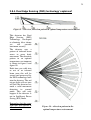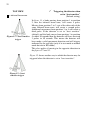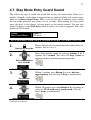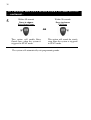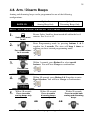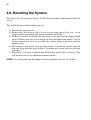
1
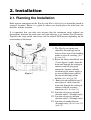
Watchguard Fire and Theft Home Alarm System N517 Document: Watchguard FT V2.doc Release: 8 July 2008 Instructions Designed in Australia and Manufactured in Taiwan by 2 Contents Contents...........................................................................................................................2 1. Introduction .................................................................................................................4 1.1. The Passive Infrared Detector..............................................................................5 1.2. What You Get.......................................................................................................6 2. Installation ...................................................................................................................7 2.1. Planning the Installation.......................................................................................7 2.2. The Main Unit ......................................................................................................8 2.3. The Screamer........................................................................................................9 2.4. The Power Supply ..............................................................................................10 2.5. The Passive Infrared Detectors ..........................................................................10 2.5.1. Tips for positioning .....................................................................................11 2.5.2. Powering the detector..................................................................................12 2.5.3. Warm up period...........................................................................................12 2.6. The Smoke Detector...........................................................................................13 2.6.1. Recommended Locations of Smoke Alarms...............................................13 2.6.2. Mobile Home Installation ...........................................................................14 2.6.3. Avoid these locations ..................................................................................14 2.6.4. False Alarms................................................................................................14 2.6.5. Installation...................................................................................................14 3.0. Master Keyswitch...............................................................................................16 3.1. Remote Control Functions .................................................................................16 3.2. AWAY Mode .....................................................................................................17 3.3. STAY Mode .......................................................................................................17 3.4. DISARMING .....................................................................................................17 3.5. PANIC Mode......................................................................................................18 3.6. Low Battery Reporting.......................................................................................18 3.7. Supervision Reporting........................................................................................19 3.8. The Passive Infrared Detectors ..........................................................................19 3.8.1. Test Mode for the Passive Infrared detectors..............................................19 3.8.2. Intelligent Power Saving and Normal Operation........................................20 3.8.3. Adjusting the sensitivity..............................................................................20 3.8.4. Dual Edge Sensing (DES) technology ‘explained’.....................................21 3.8.5. The Tamper Switch .....................................................................................23 3.8.6. Low Battery Warning..................................................................................24 3.8.7. Supervision..................................................................................................24 3.9. The Smoke Detectors .........................................................................................25 3.9.1. Features .......................................................................................................25 3.9.2. SPECIFICATIONS .....................................................................................26 PRODUCT ORDER CODE: SMODETW ................................................26 3 3.9.3. OPERATION .............................................................................................. 27 3.9.4. LOW BATTERY WARNING.................................................................... 27 3.9.5. SUPERVISION........................................................................................... 27 3.9.6. Operation, Testing and Maintenance .......................................................... 28 3.9.7. Repairs and Services ................................................................................... 28 WARNING: DO NOT TAMPER WITH RADIOACTIVE SOURCE ................ 28 3.9.8. Good Safety Habits ..................................................................................... 28 3.9.9. The Limitations of Smoke Alarms.............................................................. 28 3.9.10. Operating Principles of Ionisation Smoke Alarms ................................... 29 3.9.11. Develop and Practice a Plan of Escape..................................................... 29 3.9.12. What to do when the Alarm Sounds ......................................................... 29 4. Programming......................................................................................................... 29 4.1. Adding New Remotes ........................................................................................ 30 4.2. Safety Lock ........................................................................................................ 31 4.3. Adding a Detector .............................................................................................. 32 4.4. Deleting a Detector ............................................................................................ 34 4.5. Walk Test Mode................................................................................................. 35 4.6. Alarm Memory................................................................................................... 36 4.7. Stay Mode Entry Guard Sound .......................................................................... 37 4.8. Arm / Disarm Beeps........................................................................................... 39 4.9. Resetting the System.......................................... Error! Bookmark not defined. 5. Maintenance .............................................................................................................. 41 5.1. The Backup Battery ........................................................................................... 41 5.2. The Remote Control........................................................................................... 42 5.3. The Detector....................................................................................................... 42 5.3.1. Replacing the batteries ................................................................................ 42 5.3.2. Cleaning the pyro detector .......................................................................... 43 5.3.3. Cleaning the case and lense ........................................................................ 43 6. Warranty.................................................................................................................... 44 6.1. Warning Limitations & Warranty...................................................................... 44 4 1. Introduction Your Watchguard Fire and Theft Home Alarm System is a state-of-the-art wireless security system, specifically designed for simple DIY installation (Do It Yourself). It is suitable for use in homes or offices where the owner wishes an external & internal siren to trigger if there is unauthorized entry into the premises. Main Features include: • Simple Installation • Code Hopping Remote Control Technology (remotes can not be copied by scanning or code grabbing). • Remote Functions include arm, disarm, stay mode and panic. • Ability to add or erase detectors from your system. • 8 Wireless detector zones available • Low Battery Warning & Supervision • Detector 24 hour Tamper Alarm • Protects your family and property against both theft and fire. • Suitable for home and office • Powerful external siren with flashing blue strobe • Back up battery and main power adaptor • High frequency internal siren to repel intruders • Latest technology • Wireless detectors available include Passive Infrared detectors, Reed Switches, Shock detectors & Smoke detectors 5 1.1. The Passive Infrared Detector The detector is a high quality infrared body movement detector, which is battery operated and communicates with the Watchguard Home Alarm System via radio frequency (RF) transmission. This detector is easy to install, provides excellent detection sensitivity and has a long battery life (approximately 3 years). This detector transmits four different codes to the main unit: • • • • Alarm – sent when a valid movement is detected Tamper – sent when the detector case is opened Supervision – sent every 2.5 hours to the main unit Low Battery – sent when the batteries need replacing IMPORTANT NOTES • NEVER touch the pyro detector with your fingers • During the warm up period, (first 3 minutes after installing the batteries) the detector will not respond to the tamper switch or to movement in front of the detector. You must wait 3 minutes before it will respond properly. • This detector has Intelligent Power Saving (IPS). This means that in normal operation the lights will not flash every time you move in front of the detector. When the red light flashes on for 1 second, this means that the detector has picked up and validated body movement (or an intruder) and an alarm code is transmitted. The detector will now go into IPS mode for approximately 3 minutes. During this time the detector will not trigger and no lights will turn on (see section 3.8.2. for more information). • The wire, which runs around the edge of the detector, is the antenna. Do not touch, remove or cut this wire 6 1.2. What You Get Below is a list of parts included with system. Item Description 1. Main control unit The unit incorporates a powerful siren, flashing blue strobe & backup battery to run the system in case of mains power failure. There is also a tamper button. The system has mains connection via a low voltage plug pack that is supplied with the unit. For manual override of the system there is a keyswitch on the main unit. 2. 2 1 NEED PIC FOR HERE High Security – Override keys Used for manually overriding the system if both remote controls are lost and also when the system is not being used (in storage). 8. 1 Smoke Detectors Designed to detect the presence of smoke. These intelligent devices allow simple installation, as no cable is required between the main unit and the detectors. The long life lithium batteries will last for up to 3 years, and the system will automatically let you know when the batteries need replacing 7. 1 Passive Infrared Detectors Designed to detect the body movement of an intruder inside your premises. These intelligent devices allow simple installation, as no cable is required between the main unit and the detectors. The long life lithium batteries will last for up to 3 years, and the system will automatically let you know when the batteries need replacing 6. 2 Screamer This high frequency siren generates an intolerable noise to the human ear, and is designed to help repel intruders from within your home. It mounts easily to the roof of one of your rooms, and is simply cabled back to the main control unit (10m of cable is provided). 5. 1 Power Supply (plug pack) The main unit requires a regular mains power supply. The Watchguard is supplied with a 9V AC plug pack that connects to the main unit. 4. Image Remote controls 2 x High Security Code Hopping Remote Controls. These allow you to easily arm & disarm the system from anywhere in your home. In case of duress, you can trigger the alarm at any time from the remote control. 3. Quantity Mounting Material & Screws 4 large pan head screws, 4 green star plugs (for main unit), 4 medium counter sunk gyprock screws (for screamer), 2 wall plugs, 2 small counter sunk self tapping screws and mounting brackets (for detectors). 2 7 2. Installation 2.1. Planning the Installation Each separate component of the Watchguard Home Alarm System should be placed in strategic locations. Below is a guide to where you should place the main unit, the detectors and the screamer. It is important that you take into account that the maximum range without any obstructions between the main unit and each detector is no further than 50 metres. Typically the range inside your house will be around 20-50 metres depending on the construction of the house. Planning and Wire Routing Figure 1 1- The Watchguard main unit should be located high on the front or front side of the building under an eave of covering. (See Section 2.2) 2- Route the white-white/black wire (2 core-figure 8 cable) from the main unit through the ceiling to connect with the plug pack connector. Another suitable location for the power supply is on an available power point at the rear of the fridge in the kitchen. (See Section 2.4) 3- Route the red-red/black wire (2 core-figure 8 cable) from the main unit through the ceiling to connect with the screamer connector. (See Section 2.3) P1- Location of passive infrared detector zone 1. (Example only) P2- Location of passive infrared detector zone 2. (Example only) P3- Location of smoke detector. (Example only) (See Section 2.6 and 3.9) 8 2.2. The Main Unit Mount the Watchguard main unit at the front or front side of the building. The mounting position should be under an eave or out of direct contact with rain or other water sources. The position should allow line of sight viewing from both the street (for visual deterrent) and from your main point of entry (for visual confirmation of arming/disarming). Use the wall plugs and screws provided if suitable for your particular building construction. Installing the main unit Figure 2 1. Drill mounting holes (7mm diameter, 25mm minimum in depth) into the chosen wall. 2. Use the green star plug. Press each one into the 4 main mounting holes. 3. Make a hole and push the wires through the wall and up into the ceiling. 4. Screw the top 2 screws half way in. 5. Place the unit to support itself from the top 2 screws through the key shape holes at the top of the main unit 6. Screw in and tighten the bottom two mounting screws then tighten the top two screws. Figure 3 9 2.3. The Screamer Inside Roof Mounting the Screamer Ceiling Figure 4 1. Drill a hole (15mm diameter) into the ceiling where you want to mount the screamer. Pick a position where there is no stud/framework above the ceiling, preferably in a corridor or hallway. 2. Feed the wire coming from the screamer up through the 15mm hole into the ceiling where it will join the wire from the main unit. 3. Push the screamer on to the ceiling aligning the hole with the wire coming out of the screamer. 4. Place the self-tapping screws into the mounting holes on the screamer then screw them into the ceiling. 5. Connect the (red) female RCA plug into the (red) male RCA plug. 10 2.4. The Power Supply Inside Roof Power Supply Mounting 1. Drill a small hole (15mm diameter) into the ceiling where the wire can go through to be connected to the wire from the main unit. 2. Feed the wire through the hole in the ceiling and up to where it will join the wire from the main unit. 3. Connect the (black) female RCA connector from the power supply into the (black) male RCA plug from the main unit. Please note that the female RCA connector and the male RCA plug set may be supplied as a (black) inline DC socket and plug set as shown below. Wall Figure 5 For a truly secure and professional looking installation have a power point installed in the ceiling by a qualified electrician so that the power supply (plug pack) is hidden and unable to be accessed easily. Another location for the power supply would be on an available power point at the rear of the fridge in the kitchen. 2.5. The Passive Infrared Detectors Firstly, the mounting bracket must be fixed to the wall using the self-tapping screw and other accessories supplied. Mounting must be at a minimum height of 1.2 metres and maximum of 2.1 metres (lower is better). Drill a 5mm diameter hole (at least 30mm deep) into the gyprock for mounting the detector bracket/socket base. Push the wall plug into the hole then screw in the mounting bracket. It will clip into the base. The detector can now be slid onto the swivel bracket. See diagram below. Approx mounting angle at 2.1m 11 Figure 6 2.5.1. Tips for positioning • This detector utilises the very latest in detection processing technology to reduce the possibility of false alarms. However, correct mounting of the detector is critical to ensure best detection or "catch" performance. You cannot just screw the detector directly to a wall up high in a corner and expect best performance. Thoroughly walk test each detector, and if detection is not acceptable in the location you have chosen, adjust the angle of the detector slightly & re-test. You will find that a slight up/down angle change may improve catch performance significantly. • Mount the detector on your wall using the swivel mount provided at a minimum height of 1.2 metres and maximum of 2.1 metres (lower is better). Make sure the detector is a minimum of 5 metres away from your main unit so it doesn’t swamp the receiver with a signal that is too strong to decode. • Always mount your PIRW so that an intruder has to walk across its zones, i.e. walk past the detector, not towards it. • DON’T mount detectors facing glass doors or windows. Always mount above windows and doors to look inside. • DON’T mount detector facing hot areas or areas where the temperature may change suddenly, e.g. open fire places, direct sunlight or air conditioning vents. • Select a location where the detector can provide the best detecting range. Always ensure that you do not cover an area with multiple detectors, so as to avoid 12 simultaneous transmission back to the receiver in your Watchguard Home Alarm System. The receiver can only decode one coded signal at any given time. • If the unit is mounted close to metal frames or doors, this may reduce the radio transmitting range. • The detector is not waterproof and is designed for indoor use only. 2.5.2. Powering the detector When you first remove the detector from the box it is not powered, although the batteries are in place. To turn the detector on, pull the piece of plastic from beneath one of the battery terminals (in the direction indicated in figure 8). As soon as the plastic is removed the red and green lights will flash for a few seconds. If they do not flash, the plastic has not been removed properly. You may need to clear any excess plastic from under the battery terminal. If all plastic has been cleared and the detector is still not responding then remove the batteries, which the plastic was covering. Lift the bottom terminals and push down the top terminals for tighter battery connections. Slide the batteries back into their original position. If after this you still don’t have any response from the detector then the batteries may be flat. I M P O R T A N T Figure 7 Unclip the front cover as shown 2.5.3. Warm up period You must wait approximately 3 minutes for the detector to warm up after connecting the batteries. This time starts from when the detector starts flashing both red and green lights after removing the piece of plastic from under one of the battery terminals. During this period the detector will not respond and should be left untouched until the 3 minute period is up. 3 minutes after power up, the green and red lights will flash together 6 times to indicate the detector is exiting test mode. The detector will now automatically enter Intelligent Power Saving (IPS) mode (see section 3.8.2). Figure 8 13 2.6. The Smoke Detector IMPORTANT: READ ALL INSTRUCTIONS BEFORE INSTALLATION. Do not repair the smoke alarm yourself. WARNING: UNLESS A 9VDC BATTERY IS INSTALLED IN THIS SMOKE ALARM, IT WILL NOT OPERATE. The smoke alarm uses an extremely small amount of a radioactive element in the dual ionisation chamber. 2.6.1. Recommended Locations of Smoke Alarms 1. 2. 3. 4. 5. 6. 7. 8. 9. 10. 11. 12. 13. Locate an alarm for each separate sleeping area in the immediate vicinity of the bedrooms. Try to protect the exit path as the bedrooms are usually farthest from an exit. If more than one sleeping area exit, locate additional alarms in each sleeping area in the immediate vicinity bedrooms. (refer to drawings overleaf) Locate additional alarms to PROTECT any stairway as stairways act like chimneys for smoke and heat. Locate at least one alarm on every floor level. Locate an alarm in every room where a smoker sleeps. Locate an alarm in every room where electrical appliances are operated (i.e. portable heaters or humidifiers). Locate an alarm in every room where someone sleeps with the door closed. The closed door may prevent the alarm from waking the sleeper. Smoke, heat and other combustion products rise to the ceiling and spread horizontally. Mounting the alarm on the ceiling in the center of the home places it closest to all points in the room. Ceiling mounting is preferred in ordinary residential construction. For mobile home installation select location carefully to avoid thermal barrier that may form at the ceiling. For more details see Mobile Home installation overleaf. When mounting alarms on the ceiling locate it at a minimum of 300mm from the side wall and 300mm from any corner. When mounting alarms on a wall, use an inside wall with the alarm of a maximum of 300mm below the ceiling but not exceeding 600mm. NOTE: The performance of smoke alarms mounted on walls is unpredictable and that this mounting is not recommended when ceiling mounting can be implemented. When mounting the alarm at the apex of a sloping ceiling it should be located a minimum of 500mm from the apex but not exceeding 1500mm. (See diagram). Locate smoke alarm at both ends of a bedroom hallway if the hallway is more than 9m long. We do not recommend installation in areas of high condensation such as bathrooms due to potential for false alarms. INSTALLATION OF SMOKE ALARM: IMPORTANT: INCORRECT ORIENTATION OF SMOKE ALARMS MAY DECREASE OPERATIVE EFFECTIVENESS 14 2.6.2. Mobile Home Installation 1. 2. 3. Mobile homes built in the past five to seven years have been designed and insulated to be energy efficient. Install smoke alarms as recommended (refer to recommended locations). In mobile homes that are not well insulated compared to present standards, extreme heat or cold can be transferred from the outside through poorly insulated walls and roof. This may create a thermal barrier which can prevent smoke from reaching a smoke alarm mounted on the ceiling. In such units, install smoke alarm on inside partition between 300mm and 600mm from the ceiling. If you are not sure about the insulation in your mobile home, or if you notice the walls and ceilings are either hot or cold, install alarm on an inside wall. For minimum protection, install one alarm close to the bedrooms. For additional protection, see SINGLE FLOOR PLAN. 2.6.3. Avoid these locations Do not locate your alarm in: 1. the garage - products of combustion are present when you start your automobile. 2. in front of forced air ducts used for heating and air conditioning and other high air flow areas. 3. in the peak of an “A” frame type of ceiling. 4. in areas where temperatures may fall below 5°C or above 45°C. 5. in dusty areas, dust particles may cause smoke alarm to false alarm or fail to alarm. 6. in very humid areas or near a bathroom, moisture can cause false alarm. 2.6.4. False Alarms 1. 2. 3. 4. 5. This smoke alarm is designed to minimize false alarms. Smoking will not normally set off the alarm unless smoke is blown directly into the alarm. Combustion particles from cooking may set off the alarm if the alarm is located close to the kitchen cooking surface. Large quantities of combustion particles are generated from spills or broiling. An alarm with a Hush Control device is preferable near a kitchen environment for this reason. If the alarm does sound, check for fire first. If a fire is discovered, escape quickly and call the Fire Brigade. If no fire is present, check to see if one of the reasons listed above may have caused the alarm. 2.6.5. Installation 1. 2. 3. CAUTION: THIS UNIT IS SEALED. THE COVER IS NOT REMOVABLE! A mounting plate is provided on the back of alarm. Remove the mounting plate from the back of the alarm by holding the mounting plate and twisting the alarm in the direction indicated by the “OFF” arrow on the alarm cover. 4. To insure aesthetic alignment of the alarm with the hallway or wall, the “A” line on the mounting plate must be parallel with the hallway when ceiling mounting or horizontal when wall mounting. 5. Alter selecting the proper smoke alarm location as described in Section 1, attach the mounting plate to the ceiling as shown in Figure 1. For wall mounting see Figure 2. Place mounting plate on the wall. Be sure the “UP FOR WALL MOUNTING” text and arrow are facing up. Use the screws and anchors provided to secure the mounting plate. 6. Battery compartment markings are provided on the inside of the battery door. To ensure proper installation of the SMOKE ALARM battery follow the instructions. 7. When installing the battery, press the battery reminder finger down into the battery compartment and install the battery (see Figure 3). CAUTION! IF THE BATTERY REMINDER FINGER IS NOT HELD DOWN IN THE BATTERY COMPARTMENT BY THE BATTERY, THE BATTERY DOOR WILL NOT CLOSE AND THE UNIT WILL NOT ATTACH TO THE MOUNTING PLATE. 8. Alignment marks are provided on the edge of the mounting plate and the alarm. After installing the mounting plate, place the alarm on the mounting plate with the alignment marks line up. Twist the alarm in the direction indicated by the “ON” arrow on the alarm cover (see Figure 4) until lock in place. 9. USING TAMPER RESIST LOCKING PIN: To make your smoke alarm somewhat tamper resistant, a locking pin has been provide in the bag with the screws and anchors. Using this pin will the alarm from the mounting plate. To use the pin, insert it into the hole in the side of the alarm after the alarm has been installed on the mounting plate (see Figure 5). 10. After installation, test your alarm by depressing and holding down the test button for several seconds. This should sound the alarm (See section 6.2). 15 NOTE: THE TAMPER RESIST PIN WILL HAVE TO BE REMOVED IN ORDER TO CHANGE THE BATTERY. USE A LONG NOSE PLIERS TO PULL THE PIN OUT OF THE HOLE. IT IS NOW POSSIBLE TO REMOVE THE ALARM FROM THE MOUNTING PLATE. CAUTION! EARLY WARNING FIRE DETECTION IS BEST ACHIEVED BY THE INSTALLATION OF FIRE DETECTION EQUIPMENT IN ALL ROOMS AND AREAS OF THE HOUSEHOLD AS FOLLOWS; SMOKE ALARMS INSTALLED IN EACH SEPARATE SLEEPING AREA (IN THE VICINITY OF-BUT OUTSIDE OF THE BEDROOM) AND HEATOR SMOKE ALARMS IN THE LIVING ROOM, DINING ROOM, KITCHEN, HALLWAYS, ATTIC, FURNACE ROOMS, CLOSETS, UTILITY STORAGE ROOMS, BASEMENTS AND ATTACHED GARAGES. 16 3. Operation 3.0. Master Keyswitch To operate the system, turn the key switch located beside the strobe light, to the on position. To override the system turn the key switch to the off position (you may require this if you are unable to use the remote controls). Use one of the 2 high security keys provided with the system. OFF ON Location (near strobe) 3.1. Remote Control Functions Press Button 1 AWAY mode Press once to arm the system in normal AWAY mode. The siren will beep once. The strobe will flash for 2 seconds. STAY mode Press twice within 3 seconds to arm in the system in STAY mode. The siren will beep on each press. The second beep will be a low tone. PANIC mode Press and hold (approximately 3 seconds) to activate PANIC mode. Press Button 2 DISARMING Press once to disarm the system. The siren will beep twice. The strobe will flash for 5 seconds. LEARN NEW REMOTE mode Press and hold (approximately 3 seconds) to activate learn new remote mode. Press Button 1 & 2 QUIET ARMING and DISARMING For quiet AWAY arming or DISARMING press both buttons together, once to arm the system in AWAY mode or to disarm the system without any sound. For quiet STAY arming press both buttons together, twice. PROGRAMMING mode Press and hold (approximately 3 seconds) to activate PROGRAMMING mode after turning Safety Lock off. See section 4 (Programming). 17 3.2. AWAY Mode When to use This mode is used when leaving the building or premise, i.e. AWAY from premises. Arming the system in this mode will activate all detectors. Indications The siren will beep once and the strobe will flash for 2 seconds. There will be a 20 second delay before the system is fully armed. During this delay only the 24 hour detectors (e.g. smoke detectors) and tamper signals will trigger the alarm. If any extra beeps are heard, see section 3.7 (Supervision Reporting). Triggering If a detector is triggered, when the system is fully armed, the alarm will sound for 5 minutes or until the system is disarmed (which ever occurs first). Each detector zone can only trigger the siren once, in one arming period. 3.3. STAY Mode When to use This mode is used for protecting only a selected area(s) of the building while you (and others) are on the premises or someone is STAYING home. Commonly used at night while sleeping. Indications The siren will beep once on the first press and will then make a low tone beep the on the second press. There will be a 20 second delay before the system is armed in STAY mode. If any extra beeps are heard, see section 3.7 (Supervision Reporting). Triggering Arming the system in this mode will enable zone 1 (default), and other extra detectors that have been set to trigger the alarm in STAY mode. When any stay mode detector is triggered in this mode after the 20 second exit delay the siren will beep 5 times. 3.4. DISARMING When to use The system should be disarmed before entering the building or premise. Indications The siren will beep twice and the strobe will flash for 5 seconds. The siren will beep 4 times instead of twice, if the alarm has been triggered while the system was armed. If any extra beeps are heard, see section 3.6 (Low Battery Reporting). 18 3.5. PANIC Mode When to use This mode should be used when the user is distressed or in an emergency situation. What happens The outside siren will sound to alert people in the area but the screamer will not sound. 3.6. Low Battery Reporting When you disarm the system, you will normally hear 2 beeps and or the strobe will flash for 5 seconds. If the unit continues a sequence of beeping immediately after the disarm beeps, this means that there is a flat battery in one or more of the following: 1 beep 2 beeps 3 beeps 4 beeps 5 beeps - Zone 1 has a low battery Zone 2 has a low battery Zone 3 has a low battery Zone 4 has a low battery Zone 5 has a low battery 6 beeps - Zone 6 has a low battery 7 beeps - Zone 7 has a low battery 8 beeps - Zone 8 has a low battery 9 beeps - Not Used 10 beeps - Main Unit has a flat backup battery The siren will beep the number of times corresponding to the zone location with a low battery or 10 times if the main unit has a flat back up battery. If for example, the system had a low battery in the detectors on zone 1 and zone 2 after disarming the system the main unit will beep once then pause, then beep twice. 19 3.7. Supervision Reporting When you arm the system, you will normally hear 1 beep. If the unit continues a sequence of beeping immediately after the arming beep, this means that a supervised detector has failed to report in the last 24 hours. The supervision feature ensures that a user can be confident of the systems operational status – that is, all detectors are present & working correctly. 1 beep 2 beeps 3 beeps 4 beeps - Zone 1 has failed to report Zone 2 has failed to report Zone 3 has failed to report Zone 4 has failed to report 5 beeps 6 beeps 7 beeps 8 beeps - Zone 5 has failed to report Zone 6 has failed to report Zone 7 has failed to report Zone 8 has failed to report If for example, if the system had Zone 3 and Zone 5 detectors missing, after arming (1 beep), the main unit will beep another 3 times then pause, then beep 5 times. 3.8. The Passive Infrared Detectors It is vital that the detector is tested carefully for each installation. Placing the unit into test mode (see below) is the best way of checking the detector. At 25°Celsius, the detector should have a detection range of approximately 10 metres and a scope angle of 90°, i.e. 45° either side of the center position straight ahead of the lens. 3.8.1. Test Mode for the Passive Infrared detectors Test mode, as its name implies, is used for testing the detection range and testing the radio transmission back to the main unit. At this time you should place the main unit in walk test mode (see section 4.5). To place the detector in test mode do the following: • Remove the front cover off the detector via the clip at the top. • The green and red lights will flash together, 6 times, to indicate that the detector has entered test mode. • Replace the front cover. • The detector will stay in test mode for 3 minutes. • The green and red lights will flash together, 6 times, to indicate that the detector is exiting test mode. The Green Light During test mode the detector will flash the green light when you move into an infrared beam zone or move out of the other side of that infrared beam zone (see section 3.8.4. for more information on how the detector detects movement). Each time the green light flashes this is called a pulse. 20 The Red Light If the detector is set to 2 pulse counts (most sensitive) then the red light will flash if there are 2 green flashes within 10 seconds. If the detector is set to 3 pulse counts (least sensitive) then the red light will flash if there are 3 green flashes within 10 seconds. The red light turning on indicates that the detector has sensed valid movement and that the alarm code signal has been sent to the main unit. 3.8.2. Intelligent Power Saving and Normal Operation This detector has Intelligent Power Saving (IPS). This means that in normal operation or normal mode the red light will indicate valid movement detection but the green light will not turn on at all. Lights will not flash every time you move in front of the detector. When the red light flashes on for 1 second, this means that the detector has picked up and validated body movement (or an intruder). The detector will now go into IPS mode for approximately 3 minutes. During this time the detector will not trigger and no lights will turn on. After this 3 minutes of IPS the detector will again be ready to sense for any movement in the room. If the detector detects another valid body movement anytime after the 3 minutes of IPS then it will go back into IPS mode again for 3 minutes and so on. There is no need for the detector to trigger more than once every 3 minutes as your alarm system should be set to sound your siren for 5 minutes after being triggered. In summary, the detector will only trigger and flash the red light once every 3 minutes in its normal operation to save battery life. The green light will stay off and only operate when the detector is put into test mode. 3.8.3. Adjusting the sensitivity PULSE COUNT SELECT Jumper Least sensitive – 3 pulse counts ON Most sensitive – 2 pulse counts OFF The sensitivity of the detector can be changed by either removing the ‘Pulse Count Select’ jumper or by placing it across both pins. When the jumper is placed across both pins (default), then the detector is set to 3 pulse counts (least sensitive). When the jumper is removed or only attached to 1 of the pins, then the detector is set to 2 pulse counts (most sensitive). Once you have set the jumper, you must press the tamper switch in for 1 second then release it for the setting to become active. Now you can place the front cover back on the detector. Pulse count jumper 21 3.8.4. Dual Edge Sensing (DES) technology ‘explained’ Figure 9 – side view, detection pattern in optimal temperature environment This detector has Dual Edge Sensing (DES) Technology, developed to eliminate false alarms yet still provide maximum security. The detector uses a pattern of infrared beam zones to sense body movement. The detection pattern in an optimal temperature environment is shown in figure 9 and figure 10. Each time you walk into or out of an infrared beam zone this will be sensed and processed by the DES technology built into the detector. The red trigger light will not turn on until the detector has made a valid movement detection in normal mode. This will only happen if the detector is not in Intelligent Power Saving (IPS) mode. Remember that the green light does not operate in normal mode. Figure 10 – detection pattern in the optimal temperature environment 22 TOP VIEW = infrared beam zone Triggering the detector when set to “least sensitive” (Default setting) In figure 11, a body moving from position 1 to position 2, into the infrared beam zone, will create a pulse. Moving from position 2 to 3, out of the other side of the same infrared beam zone, will create a second pulse. Additional movement from position 3 to 4 will create a third pulse. If the detector is set to “least sensitive” (default) and the body moves from position 1 to position Figure 11 – least sensitive 4 within 10 seconds then the detector will have received 3 pulses in 10 seconds. This means the detector will trigger have made a valid movement detection and will trigger, indicated by the red light (only if in test mode or normal mode but not in IPS mode). This also applies if moving in the opposite direction to the figures 11 and 12. Figure 12 shows another way in which the detector may be triggered when the detector is set to “least sensitive”. Figure 12 – least sensitive trigger 23 Figure 13 – most sensitive trigger Triggering the detector when set to “most sensitive” In figure 13, a body moving from position 1 to position 2, into the infrared beam zone, will create a pulse. Moving from position 2 to 3, out of the other side of the same infrared beam zone, will create another pulse. If the detector is set to “most sensitive” and the body moves from position 1 to position 3 within 10 seconds then the detector will have received 2 pulses in 10 seconds. This means the detector will have made a valid movement detection and will trigger, indicated by the red light (only if in test mode or normal mode but not in IPS mode). This also applies if the body moves in the opposite direction. No trigger body movements No trigger body movements are body movements which are too small to be recognized as valid body movements to trigger the detector. Figure 14 – no trigger In the example, shown by figure 14, a body walking into one side of the infrared beam zone, then back out the same side of the infrared beam zone will not trigger the detector. A body moving from position 1 to 2, into the infrared beam zone, will only create pulsing. A body moving from position 2 back to position 1 or from position 2 to position 3 (out of the same side of the infrared beam zone) may create further pulses but will not trigger the detector. This also applies if the body is moving in and out of the infrared beam zone from the other side. 3.8.5. The Tamper Switch The tamper switch will open whenever the front cover of the detector is removed. A tamper signal is automatically transmitted as well as a normal trigger signal. Each time this occurs the detector will also automatically enter test mode. Tamper switch 24 3.8.6. Low Battery Warning If the detector has near flat batteries, then on a valid movement detection the red light will flash 6 times in a row instead of once. The detector will also send a low battery radio transmission at this time. The batteries should be replaced immediately. Another way of testing for low battery is by removing the front cover to release the tamper switch. When the cover is opened and the tamper switch is released, the detector will enter test mode. Both red & green lights flash 6 times. If the detector has low battery voltage then the red light will flash an additional 6 times in a row. The detector will send a low battery radio transmission to your Watchguard main unit. The batteries should be replaced immediately. The detector constantly monitors for low battery and will send a low battery transmission within 2.5 hours of identifying a low battery. 3.8.7. Supervision Every 2.5 hours (approximately) the detector will send a supervision transmission. This is used as a security measure to alert the user(s) of the system if a detector is no longer functioning or if the detector has been taken out of receiving range of the wireless system. 25 3.9. The Smoke Detectors IMPORTANT: READ ALL INSTRUCTIONS BEFORE INSTALLATION. Do not repair the smoke alarm yourself. WARNING: UNLESS A 9VDC BATTERY IS INSTALLED IN THIS SMOKE ALARM, IT WILL NOT OPERATE. The smoke alarm uses an extremely small amount of a radioactive element in the dual ionisation chamber. 3.9.1. Features 9 Volt Alkaline battery operation TEST button for circuitry and horn testing. Auto-test feature with red LED indication. Rapid flashing red LED alarm light indication. Twist on twist off mounting base for easy installation and maintenance. Suitable for wall and ceiling mount. Loud 85dB pulsating alarm. Tamper resistant Battery "chirp" indication when battery is low. 26 3.9.2. SPECIFICATIONS Detection Method Dual ionisation chamber. Circuitry Complementary MOS integrated circuit providing maximum stability and minimum power consumption. Sensitivity Preset to normal 1% obscuration level. Operating temperature range 5°C to 45°C Humidity range 5 - 95% R.H. Alarm Sound level at 85dB at 3 metres. Low battery indicator Sounds a "chirp" at 30 - 40 second interval for minimum of 7 days to a maximum of 30 days to signal a low battery. Alarm Duration As long as smoke is present. Automatically resets when smoke is clear. Power Requirement 9 Volt dc battery Transmission Not above 25mW Range Approximately 50m line of sight (subject to area and conditions) Transmitting frequency 433.925MHz Compliance Tested and passed to AS 3786-1993 EMC EN 500811 (smoke sensor only without transmitter module) Dimension 36mm(D) x 125mm(Diam) P R O D U C T O R D E R S M O D E T W C O D E : 27 3.9.3. OPERATION The SMODETW is a high quality Gas Ionisation Smoke Detector, which is battery operated and communicates with a receiver via radio transmission (RF). The detector is easy to install, provides excellent detection sensitivity and has a long battery life (approximately 3 years). The SMODETW can transmit three different codes to your RXPRO Receiver: 1. Alarm 2. Supervision 3. Low Battery Whenever the smoke detector sounds, (i.e when a fire is detected or when you push & hold the test button on the detector), the alarm code signal will be transmitted to your RXPRO receiver. 3.9.4. LOW BATTERY WARNING This Smoke Detector has an automatic low battery warning system. When the battery is getting low, the detector will emit a warning chirp every 40 seconds (approx.) for a minimum of 7 days. Replace the battery as soon as possible. Replacement Battery: Use only a good quality 9 Volt Alkaline Battery. The Watchguard Fire and Theft Alarm System receives "low battery" signals and goes into alarm on such an event. 3.9.5. SUPERVISION All of your individual wireless detectors (PIR's, Reeds or Smoke Detectors) can send a supervision report to your RXPRO receiver to confirm that they are fully functional. If supervision mode is enabled for a particular channel, the receiver will be expecting to receive the supervision code from the detector learnt into that respective channel every 2.4 hours i.e. at least 10 reports per day, per detector. The RXPRO only requires one report from each detector during the 24 hour period to satisfy the supervision criteria. An extra 9 reports are still given to ensure that the supervision report is received. If all 10 supervision reports are missed from one detector during the 24 hour time frame, then the supervision output will be activated. NOTE: If you remove a detector, you must disable the supervision report for that channel, otherwise the supervision output will be activated as detailed below. Please refer to your RXPRO Instruction Manual. 28 3.9.6. Operation, Testing and Maintenance 1. OPERATION: The smoke alarm is operating once the battery is connected. When products of combustion are sensed, the unit sounds a loud pulsating alarm until the air is cleared. 2. TESTING: We recommend a periodic WEEKLY battery test. Test by pushing test button on cover and holding button down for a minimum of 2 seconds. This will sound alarm if all electronic circuitry, horn and battery are working. If no alarm sounds the unit has a defective battery or other failure. WARNING: Test smoke alarm operation in Mobile Home/Caravan after vehicle has been in storage, before each trip and at least once per week during use. 3. MAINTENANCE: The smoke alarm is virtually maintenance free. However, periodically, vacuum hose should be used to clear the sensing chamber of dust. Do not remove smoke alarm cover when vacuum is used. 4. BATTERY REPLACEMENT: The smoke alarm is powered by one 9V Alkaline battery. The battery should provide operation for at least 2-3 years under normal operating conditions. The smoke alarm has a low battery monitoring indicator which will ‘chirp’ at approximately 40 second interval for a minimum of 7 days. Replace battery when chirping occurs. WARNING: Use only the battery specified. Use of different batteries may cause a malfunction of the smoke alarm. 3.9.7. Repairs and Services 1. If the smoke alarm is defective in any way, do not tamper with the unit. Return the unit to your supplier. (See warranty for instructions on in-warranty returns.) There will be a service charge for repairing units out of warranty. Please note: It is illegal to send radioactive material through Australia Post. Check for similar conditions with any forwarding agency before sending this article. Return the unit to: Rhino Electronic Security 9 Hannabus Place McGraths Hill NSW 2756 AUSTRALIA WARNING: DO NOT TAMPER WITH RADIOACTIVE SOURCE 3.9.8. Good Safety Habits The use of this product should not be seen as a substitute for basic safety precautions in the prevention of FIRE. There are situations where a smoke alarm may not be effective in protecting against fire risks such as: 1. smoking in bed; 2. leaving children home alone; and 3. cleaning with flammable liquids, such as petrol. 3.9.9. The Limitations of Smoke Alarms 1. 2. 3. 4. 5. 6. 7. 8. 9. Smoke alarms are devices that can provide early warning of possible developing fires at reasonable cost. Alarms have sensing limitations. Ionisation type alarms offer a broad range of fire sensing capability but are better at detecting fast flaming fires than slow smouldering fires. Photo-electric type alarms sense smouldering fires better than flaming fires. Home fires develop in different ways and are often unpredictable. Neither type of alarm (photo-electric/ionisation) is always best and a given alarm may not always provide warning of a fire. Smoke alarms have certain limitations. For battery powered smoke alarms, the battery must be in good condition and installed properly. Smoke alarms must be tested regularly to make sure the batteries and alarm circuit are in good operating condition. Smoke alarms cannot provide an alarm if smoke does not reach the alarm. Therefore, smoke alarm may not sense fires starting in chimneys, walls, on roofs, on the other side of a closed door, or on a different floor. If the alarm is located outside the bedrooms, or on a different floor, it may not wake up a sound sleeper. A smoke alarm in the bedroom, therefore, is also recommended. Smoke alarms have been significant in saving lives in many parts of the world. However, U.S. Government research indicates that they may not give early enough warning in up to 35% of fires. Hence, the use of this product does not substitute for basic prevention and total protection. Although smoke alarms can help save lives by providing early warnings of a fire, they are not a substitute for an insurance policy. 29 3.9.10. Operating Principles of Ionisation Smoke Alarms IONISATION CHAMBER A man-made radio-active element, Americium 241 is used in this design. This element ionises the air round it and as a result, excellent conductivity is possible (refer to illustration showing ‘Clear Air’). Current supplied by either the mains power (where applicable), or the battery would pass through the gap with ease without causing any alarm. However, in the event of particles arising from combustion or dust particles (refer illustration showing ‘Smoke’) entering the Sensing Chamber, it encapsulates the ionised air. This interaction causes an increased resistance to conductivity. When this occurs, the alarm is activated. 3.9.11. Develop and Practice a Plan of Escape Basics of an escape plan: 1. Make a floor plan indicating all doors and windows and at least two escape routes from each room. Second story windows may need a rope or chain ladder. 2. Have a family meeting and discuss your escape plan, showing everyone what to do in case of fire. 3. Determine a place outside your home where all of you can meet, if a fire occurs. 4. Familiarize everyone with the sound of the smoke alarm and practice leaving your home when they hear it. 5. Practice a fire drill at least every six months. Practice allows you to test your plan before an emergency. You may not be able to reach your children. It is important that they know what to do! 3.9.12. What to do when the Alarm Sounds 1. 2. 3. 4. 5. 6. Leave immediately by your plan of escape. Every second counts, so don’t waste time getting dressed or picking up valuables. In leaving, don’t open any inside door without first feeling its surface. If hot, or if you see smoke seeping through cracks, don’t open that door! Instead, use your alternate exist. If inside door is cool, place your shoulder against it, open it slightly and be ready to slam it shut if heat and smoke rush in. Stay close to the floor if air is smoky. Breathe shallowly through a wet cloth if possible. Once outside, go to your selected meeting place and make sure everyone is there. Call the Fire Brigade from your neighbour’s home - not from yours! Don’t return to your home until officials say that it is all right to do so. For Further information on fire safety contact your local Fire Brigade 4. Programming Ensure that before any programming, each step should be well rehearsed. This will eliminate becoming confused and making mistakes. If at any stage you become lost or forget where you are up to stop and wait for the 3 low toned beeps that tell you that the alarm timed out of programming mode and no changes will be saved. For ease of programming ensure that there is no movement in front of any of the detectors unless otherwise required. 30 4.1. Adding New Remotes + TO ADD A NEW REMOTE Disarm the system (if it is not already disarmed) with an original remote control by pressing Button 2. You do not need to enter programming mode. 1. Press 1 time 2. Press and hold Button 2 (for approximately 3 seconds) on the original working remote control until the siren starts to beep continuously, then release the button. 3. The main unit will beep 9 times to confirm you are adding a new remote control. Siren beeps 9 times As soon as the beeps finish, press and hold down button 2 on the new remote control for 3 seconds. 4. Press new remote control for 3 secs. The new remote control is now programmed into the alarm. To confirm this press Button 1 on the new remote to ensure it arms the system. 5. Press new remote control to test If this new remote doesn’t work restart this procedure from the start. Your Watchguard Home Alarm System can only store a maximum of SEVEN (7) remotes in its memory. If you learn in an 8th remote, the 1st remote control will be erased. If you loose a remote control, or have one stolen, simply repeat the procedure above with your remaining remotes at least 10 times. This will ensure that you have erased the lost remote from the memory of your Watchguard Home Alarm System. 31 4.2. Safety Lock Safety lock is a feature, which prevents accidental changes to the programming of the system. Safety Lock must be turned off to allow programming. You will only be able to enter programming mode within 5 minutes of following the procedure, HOW TO TURN OFF SAFETY LOCK. HOW TO TURN OFF SAFETY LOCK Ensure the alarm is disarmed by pressing Button 2 once. 1. Press 1 time Arm the system in STAY mode. Do this by pressing Button 1, twice. On the first press you will hear a beep. On the second press you will hear a low tone beep. 2. Press 2 times (within 3 secs.) Within 3 seconds of STAY arming, press Button 1, another 7 times within 8 seconds. 3. Press 7 times (within 8 secs.) For confirmation that safety lock is off, you will hear 5 beeps from the main unit after you have completed the steps above. 4. Siren beeps 5 times (low tones) 5. If you don’t hear these beeps, then try this procedure again from step 1. SAFETY LOCK IS NOW OFF for 5 minutes. You can now enter programming mode within this time. NOTE: If you cannot enter programming mode, this is because safety lock is on. If you cannot turn off safety lock, this would mean safety lock is already off. 32 4.3. Adding a Detector + TO ADD A DETECTOR 1. Safety Lock must be off Ensure Safety Lock has been turned off within the last 5 minutes. See Section 4.2. Enter Programming mode by pressing buttons 1 & 2 together for 3 seconds. The siren will beep 3 times to confirm you have entered programming mode. 2. Press both buttons for 3 seconds Within 3 seconds, press Button 1 to select detector programming. You will hear 1 beep as confirmation. 3. Press 1 time Within 30 seconds, press Button 1 to ADD a detector. You will hear 1 beep as confirmation. 4. Press 1 time 5. Open the detector you wish to add Continued on next page… Trigger the detector to be added. If you are learning a Passive Infrared detector remove the front cover or press the tamper switch then release. Learning mode will timeout in 60 seconds. When the system has successfully received the code from the detector, the siren will beep the number of times of the zone that the detector has to learn into and will do so whenever any unlearnt detector transmits. 33 TO ADD A DETECTOR …continued… 6. Within 60 seconds Within 60 seconds Within 60 seconds Press to add in STAY & AWAY modes Press to add in AWAY mode only Press to add in 24 hour mode OR OR This option will enable the detector in both STAY and AWAY modes. This option will disable the detector in STAY mode Use this option if you are adding a smoke detector. The siren will beep 1 time as confirmation of learning the last triggered detector. The siren will beep 2 times as confirmation of learning the last triggered detector. The siren will beep 3 times as confirmation of learning the last triggered detector. 7. Walk Test mode The system will automatically enter Walk Test mode. During this time, the siren will beep the number of times of the zone which has been triggered. Label the detector with its zone number for future reference. Detectors which have been set to 24 hour mode will still trigger the alarm. If a tamper switch is pressed on the main unit or a wireless detector the siren will sound a low tone beep. When you press Button 2, the system will exit programming and walk test mode. You have now completed adding a new detector. 8. Press to exit NOTE: Refer to (5) If you trigger a detector that is already learnt in you will hear one low tone beep, simply trigger the correct detector until you hear the siren give the normal zone confirmation beeps. You need to do step (6) after the correct detector has been acknowledged, as it will keep accepting any unlearnt detector until step (6) is done or it times out (60 seconds). 34 4.4. Deleting a Detector TO DELETE A DETECTOR 1. Safety Lock must be off Ensure Safety Lock has been turned off within the last 5 minutes. See Section 4.2. Enter Programming mode by pressing buttons 1 & 2 together for 3 seconds. The siren will beep 3 times to confirm you have entered programming mode. 2. Press both buttons for 3 seconds Within 3 seconds, press Button 1 to select detector programming. You will hear 1 beep as confirmation. 3. Press 1 time Within 30 seconds, press Button 2 to DELETE a detector. You will hear 2 beeps as confirmation. 4. Press 1 time 5. Within 5 seconds, press Button 1. The first beep you hear indicates zone 1. Each additional press of Button 1 will increment the zone you wish to delete and you will Press the number of hear 1 beep each time. For example, if you push Button times of the zone you 1, five times then this would select zone 5 to be deleted. want to delete 6. Press to delete & exit Within 5 seconds press Button 2. The selected zone will be deleted. The system will beep the number of times of the zone that has been deleted (if you hear 3 low tone beeps, you have passed zone 8, or no valid zone was selected). You have now completed deleting a detector. The system will exit programming mode. 35 4.5. Walk Test Mode - Walk test mode should be used when testing the system or after a new detector has been learnt into the system. TO ENTER WALK TEST MODE 1. Safety Lock must be off Ensure Safety Lock has been turned off within the last 5 minutes. See Section 4.2. Enter Programming mode by pressing buttons 1 & 2 together for 3 seconds. The siren will beep 3 times to confirm you have entered programming mode. 2. Press both buttons for 3 seconds Within 3 seconds, press Button 2 to select special features. You will hear 2 beeps as confirmation. 3. Press 1 time Within 30 seconds, press Button 2 to enter Walk Test mode. You will hear 2 beeps as confirmation. 4. Press 1 time 5. Walk Test mode The system will enter Walk Test mode. During this time, the siren will beep the number of times of the zone which has been triggered. Detectors which have been set to 24 hour mode will still trigger the alarm. If the tamper switch is pressed the siren will beep once. Press Button 2 to exit Walk Test mode. 6. Press 1 time to exit 36 4.6. Alarm Memory This feature is used after the alarm has been triggered. It recalls the last 10 zones which have triggered the alarm. TO HEAR THE ALARM MEMORY 1. Safety Lock must be off Ensure Safety Lock has been turned off within the last 5 minutes. See Section 4.2. Enter Programming mode by pressing buttons 1 & 2 together for 3 seconds. The siren will beep 3 times to confirm you have entered programming mode. 2. Press both buttons for 3 seconds Within 3 seconds, press Button 2 to select special features. You will hear 2 beeps as confirmation. 3. Press 1 time Within 30 seconds, press Button 1 to hear the Alarm Memory. 4. Press 1 time 5. Alarm Memory The system will begin to beep the Alarm Memory. During this time, the siren will beep the number of times of the last 10 zones which have been triggered. The last memory heard is the most recent zone triggered. If two previous alarms were recorded i.e. from zone 1 and zone 3 the siren will beep once for Zone 1, there will be a 1 second pause then 3 beeps for Zone 3. The system will automatically exit programming mode. 37 4.7. Stay Mode Entry Guard Sound This selects the type of sound you would like for the stay mode alarm. There are 2 options. Normally, if the alarm is triggered in stay mode the alarm will sound 6 tones when set to Entry Guard Tones. This is used to alert you if someone enters within the stay mode protected area while you are at home. After hearing the entry guard tones you may, if you choose, activate panic via the remote control. You can also choose to have it sound Full Siren when an active stay zone is triggered. This only applies to STAY mode. Default Entry Guard Tones Option 1 Full Siren TO CHANGE THE STAY MODE ENTRY GUARD SOUND 1. Safety Lock must be off Ensure Safety Lock has been turned off within the last 5 minutes. See Section 4.2. Enter Programming mode by pressing buttons 1 & 2 together for 3 seconds. The siren will beep 3 times to confirm you have entered programming mode. 2. Press both buttons for 3 seconds Within 3 seconds, press Button 1 to select detector programming. You will hear 1 beep as confirmation. 3. Press 1 time 4. Press 1 time Continued on next page… Within 30 seconds, press both Button 1 & 2 together to select the STAY mode entry guard sound. You will hear 3 beeps as confirmation. 38 TO CHANGE THE STAY MODE ENTRY GUARD SOUND …continued… 5. Within 30 seconds Within 30 seconds Press to choose Entry Guard Tones Press to choose Full Siren OR Thes option will enable Entry Guard tones when the system is triggered in STAY mode. This option will sound the steady siren when the system is triggered in STAY mode. The system will automatically exit programming mode. 39 4.8. Arm / Disarm Beeps Arming and disarming beeps can be programmed in one of the following configurations. Default BOTH ON Option 1 Arming Beep Only Option 2 Disarming Beeps Only HOW TO CHANGE ARMING / DISARMING BEEPS 1. Safety Lock must be off Ensure Safety Lock has been turned off within the last 5 minutes. See Section 4.2. Enter Programming mode by pressing buttons 1 & 2 together for 3 seconds. The siren will beep 3 times to confirm you have entered programming mode. 2. Press both buttons for 3 seconds Within 3 seconds, press Button 2 to select special features. You will hear 2 beeps as confirmation. 3. Press 1 time Within 30 seconds, press Button 1 & 2 together to enter Beep Selection. You will hear 3 beeps as confirmation. 4. Press 1 time 5. Within 30 seconds Within 30 seconds Within 30 seconds Press to enable arming beeps only Press to enable disarming beeps only Press to enable both arming and disarming beeps OR OR The system will automatically exit programming mode. 40 4.9. Resetting the System This will restore all settings to default. It will delete all remotes and detectors from the system. This should be done if both remotes are lost. a) Turn the key switch to off b) Remove the Watchguard Home Alarm System from the wall or eve, so the tamper switch is not depressed, then turn the key switch on . c) Within 15 seconds of turning the keyswitch to on, press in the tamper switch about 20 times until the system begins to beep hold down the button 2 on the remote control you wish to use with the system. Keep it pressed until the beeping stops. d) This remote is now learnt in by pressing button 1 to arm the system, you will hear one beep and then press button 2 to disarm the system and you will hear two beeps. e) Everything is set back to default and all detectors need to be re learnt in. You will need to learn in any additional remote controls. NOTE: On system power up the tamper will not respond for the first 15 seconds 41 5. Maintenance The complete system should be tested at regular intervals. We suggest testing it once every fortnight or at least once per month. 5.1. The Backup Battery The back up battery charges automatically (when necessary) while the power supply (plug pack) is connected. The system has a self-test function and will report a low back up battery on disarming. See Section 2.6. To test manually: Disconnect the Power Supply and ensure the system will arm and disarm from back up battery power only. WARNING: DO NOT OPEN THE SIREN COVER. HIGH VOLTAGE INSIDE. DO NOT ATTEMPT TO REPLACE THE BACKUP BATTERY. Backup Battery Specifications Battery Type Capacity Voltage Sealed Lead Acid Battery 1.2Ah 12 Volts 42 5.2. The Remote Control The batteries in the remote control will need to be replaced every 1 to 3 years, depending on usage. You are able to recognise when the batteries are low from when the range on the remote control reduces. Below describes how to replace the batteries in the remote control. Battery Specifications Battery Type 2 x Lithium button cells CR1616 Model 3 Volts Voltage 5.3. The Detector 5.3.1. Replacing the batteries The batteries can be removed by sliding them out from the plastic battery holders. The new batteries must be handled only by the edges as the chemicals in your skin may cause a poor battery connection. Fingerprints can be cleaned off the batteries with a soft cloth and some alcohol solution. The new batteries can now be slid into the battery holders making sure that the top terminal is pressing down firmly on top of each battery. Just after each battery is replaced the lights will begin flashing 6 times to confirm the detector is now powered. The warm up period now applies (see section 2.5.3). Detector Battery Specifications Battery Type Model Voltage 2 x Lithium button cells CR2450 3 Volts When replacing the batteries you must take the following into consideration: • You must replace both batteries at the same time. Don’t just replace one of them. • Be sure not to touch the pyro detector on the removal or replacement of the batteries. • Carry out a walk test to ensure the detector is operating correctly. 43 5.3.2. Cleaning the pyro detector The pyro detector must be clean at all times for optimum performance. If the pyro detector appears to have any dust, dirt or fingerprints on it, then it should be cleaned. To clean the pyro, use a soft cotton cloth (not a tissue), which has been dampened with Metholated Spirits (Alcohol). Gently wipe across the window of the pyro detector with the dampened cloth. Be sure not to touch the pyro detector with you fingers. 5.3.3. Cleaning the case and lense Detectors are often left in position for long periods and spiders or other pests might stay around the detector. It is important that the lens, especially, is kept clean of any spider webs or pests from being in front of it. It is recommended to keep the whole case clean by wiping over it with a soft cloth to remove dust, pests or other obstructions as required. This will also reduce the risk of a false alarm due to pests. Do not spray on or near the lens with insect/repellent spray. Remember not to move the position or angle of the detector as it may affect the performance of the detector. If in doubt, carry out a walk test to ensure the detector is operating correctly. 44 6. Warranty 6.1. Warning Limitations & Warranty While this system is an advanced design security system, it does not offer guaranteed protection against burglary, fire or any other emergency. Any alarm system, whether commercial or residential, is subject to compromise or failure to warn for a variety of reasons. For example: • Intruders may gain access through unprotected openings, or have the technical sophistication to bypass an alarm detector or disconnect an alarm warning device. • Intrusion detectors (e.g., passive infrared detectors), smoke detectors, and many other sensing devices will not work without power. Battery operated devices will not work without batteries, with dead batteries or if the batteries are not put in properly. Devices powered solely by AC will not work if their AC power supply is cut off for any reason, however briefly. • Signals sent by wireless transmitters may be blocked or reflected by metal before they reach the alarm receiver. Even if the signal path has been recently checked during a weekly test, blockage can occur if a metal object is moved into the path. A user may not be able to reach a panic or emergency button quickly enough. • While smoke detectors have played a key role in reducing residential fire deaths, they may not activate or provide early warning in as many as 35% of all fires, for a variety of reasons, according to data published by the US Federal Emergency Management Agency (Figures from USA Statistics only). Some of the reasons smoke detectors used in conjunction with this system may not work are as follows: Smoke detectors may have been improperly installed and positioned. Smoke detectors may not sense fires that start where smoke cannot reach the detectors, such as in chimneys, in walls, or roofs, or on the other side of closed doors. Smoke detectors may not sense a fire on another level of a residence or building. A second floor detector, for example, may not sense a first floor or garage fire. Moreover, smoke detectors have sensing limitations. No smoke detector can sense every kind of fire. In general, detectors may not always warn about fires caused by carelessness and safety hazards like smoking in bed, violent explosions, escaping gas, improper storage of flammable materials, overloaded electrical circuits, children playing with matches, or arson. Depending on the nature of the fire and/or the location of the smoke detectors, the detector, even if it operates as anticipated, may not provide sufficient warning to allow all occupants to escape in time to prevent injury or death. • Passive Infrared Motion Detectors can only detect intrusion within the designed ranges as diagrammed in their installation manual. Passive Infrared Detectors do not provide volumetric area protection. They do create multiple beams of protection, and intrusion can only be detected in unobstructed areas covered by the beams. They cannot detect motion or intrusion that takes place behind walls, ceilings, floors, closed doors, glass partitions, glass doors, or window. Mechanical tampering, masking, painting, or spraying of any material on the mirrors, windows or any part of the optical system can reduce their detection ability. Passive Infrared Detectors sense changes in temperature; however, as the ambient temperature of the protected area approaches the temperature range of 32°c to 65°c, the detection performance can decrease. • Alarm warning devices such as sirens, bells or horns may not alert people or wake up sleepers who are located on the other side of closed or partly open doors. If warning devices sound on a different level of the residence from the bedrooms, then they are less likely to waken or alert people inside the bedrooms. Even persons who are awake may not hear the warning if the alarm 45 is muffled by noise from a stereo, radio, air conditioner or other appliances, or by passing traffic. Finally, alarm warning devices, however loud, may not warn hearing-impaired people or waken deep sleepers. • Telephone lines needed to transmit alarm signals from a premise to a central monitoring station may be out of service or temporarily out of service. Telephone lines are also subject to compromise by sophisticated intruders. • Even if the system responds to the emergency as intended, however, occupants may have insufficient time to protect themselves from the emergency situation. In the case of a monitored alarm system, authorities may not respond appropriately. • This equipment, like other electrical devices, is subject to component failure. Even though this equipment is designed to last as long as 10 years, the electronic components could fail at any time. • The most common cause of an alarm system not functioning when an intrusion or fire occurs is inadequate maintenance. This alarm system should be tested weekly to make sure all detectors are working properly. • Installing an alarm system may make one eligible for lower insurance rates, but an alarm system is not a substitute for insurance. Homeowners, property owners and renters should continue to act prudently in protecting themselves and continue to insure their lives and property. We continue to develop new and improved protection devices. Users of alarm systems owe it to themselves and their loved ones to learn about these developments. LIMITED WARRANTY Cornick Pty Ltd (ABN 74 001 621 610) (Seller), warrants its products to be in conformance with its own plans and specifications and to be free from defects in materials and workmanship under normal use and service for twelve months from the date of original purchase. Sellers obligation shall be limited to repairing or replacing, at its option, free of charge for materials or labor, any part which is proved not in compliance with Sellers specifications or proves defective in materials or workmanship under normal use and service. Seller shall have no obligation under this Limited Warranty or otherwise if the product is altered or improperly repaired or serviced by anyone other than Seller. For warranty service, return transportation prepaid, to 9 Hannabus Place Mulgrave NSW 2756. Seller has no obligation to attend the buyer’s location to retrieve the goods or make repairs onsite. There are no warranties, expressed or implied, of merchant ability, or fitness for a particular purpose or otherwise, which extend beyond the description on the face hereof. In no case shall seller be liable to anyone for any consequential or incidental damages for breach of this or any other warranty, express or implied, or upon any other basis of liability whatsoever, even the loss or damage is caused by its own negligence or fault. Seller does not represent that the products it sells may not be compromised or circumvented; that the products will prevent any personal injury or property loss by burglary, robbery, fire or otherwise; or that the products will in all cases provide adequate warning or protection. Customer understands that a properly installed and maintained alarm system may only reduce the risk of a burglary, robbery, or fire without warning, but it is not insurance or a guarantee that such will not occur or that there will be no personal injury or property loss as a result. Consequently, seller shall have no liability for any personal injury; property damage or other loss based on a claim the product failed to give any warning. However, if seller is held liable, whether directly or indirectly, for any loss or damage arising under this limited warranty or otherwise, regard less of cause or origin, seller's maximum liability shall not in any case exceed the purchase price of the product, which shall be the complete and exclusive remedy against seller. This warranty replaces any previous warranties and is the only warranty made by Seller on this product. No increase or alteration, written or verbal, of the obligations of this Limited Warranty is authorised. 46 NOTE: In addition to the warranty conditions, warranty will not be given where a product has been immersed in water under any circumstances, or where damage has been caused by hosing the main unit, without all due care taken by the owner to protect the main unit by covering with some sort of plastic sheeting. 47 PLEASE CUT OUT & RETURN THIS INFORMATION WITHIN 14 DAYS OF PURCHASE TO: RhinoCo Pty. Ltd. 9 Hannabus Place McGraths Hill NSW 2756 Watchguard Home Alarm System Warranty Card Name Address Suburb State Email Date of Purchase Invoice Number Daytime Phone Where did you purchase your Watchguard System? Store Location Postcode Who installed your Watchguard System? This information will only be used by the manufacturer and will not be not be sold to any third parties. Dear Customer, We appreciate your confidence in our product, and you can be certain that we will do everything possible to ensure that you are happy with your decision and that you have years of satisfaction from your Watchguard System. We take extreme care in the research, design and development of our products to ensure they meet your needs. Additionally, we keep in close contact with our dealers Australia wide, and should any problem occur, we will work closely with your local dealer to see that it is resolved quickly. As a leading designer and manufacturer, we are continually endeavouring to exceed the expectations of our customers. Furthermore, we appreciate your input regarding potential design improvements, issues regarding our service and support, and any other ideas you may have which could help us to serve you better. Please make any comments you have here: