1
3. Notice the computer plots of the voltage, current and power generated as the
light is moved. Capture several images by clicking on the Screen Capture icon.
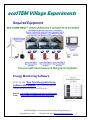
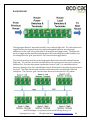
4. Switch ON the House Roof solar panels on the other house connected to the
first house. Don’t switch on anymore LEDs yet.
5. Shine another light on the solar panels of the second house and view how the
left and right LED groups on the first house get brighter.
6. Notice the computer plots of the voltage, current and power generated as the
light is moved. Capture several images by clicking on the Screen Capture icon.
7. Now switch ON the LEDs on the second house.
8. Notice how all the first house LEDs get dimmer. This is an example of a brownout
because the solar power has to be shared between both houses to light all the LEDs –
and there isn’t enough solar power to light all the LEDs to full brightness.
9. Finally, turn ON a fan on either house – the first or second – it doesn’t matter.
10. Notice that the fan doesn’t spin AND that the LEDs in both house go OUT.
This is an example of a blackout, because there is not enough power to supply
both the LEDs and the fan.
11. Capture a screen image by clicking on the Screen Capture icon.
12. You can repeat this experiment with more than two houses. Just hook up as
many houses as you have and see what happens.
Outdoors
Note: Make sure that the houses are in bright sun --- or if it’s overcast, that an even
amount of sunlight is shining on the solar panels of all the houses.
1. On the house connected to the USB Module, switch ON the House Roof solar
panels ((Input #3 & Input #4)) and the left and Right LED groups.
2. Clear the computer screen by clicking on the Trash can icon.
ecoSTEM Village tm is a product of the ecoCAD Design Group, LLC
Copyright 2012 -2014
All rights reserved www.ecoStemHouse.com
7