1
IDENTIFICATION OF CONTROLS
ENGLISH
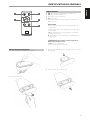
11DOCK
• Applicable for direct playback only of iOS device. Using applicable
Apple USB connector, connect your iOS device to this input.
• Allow direct charging of smartphone or android devices using
applicable connector (not supplied)
FRANÇAIS
12COMPUTER
• Asynchronous USB 24 bit/96 kHz input assures lowest jitter for best
musical performance.
• Using Type A to Type B cable connector (not supplied), interface
computer audio to this asynchronous Type B USB input to directly
stream 24/96 PCM content from your PC or MAC.
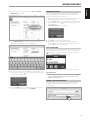
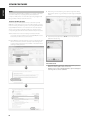
• Ensure that the Sound or Audio device setting of your computer is
set to “NAD USB Audio”.
ESPAÑOL
MINIMUM PC SYSTEM REQUIREMENT
Microsoft Windows XP Service Pack 2 or higher, Microsoft Windows 7
FOR MAC USERS
Minimum Mac OS X Snow Leopard (version 10.6) and later versions
PORTUGUÊS
NOTE
Download and install to your PC the NAD USB Audio driver from the
Manuals/Downloads tab of the NAD web address http://nadelectronics.
com/products/digital-music/D-7050-Direct-Digital-Network-Amplifier.
ITALIANO
13 DIGITAL AUDIO INPUT
(COAXIAL1, COAXIAL 2, OPTICAL1, OPTICAL 2)
• Connect to the corresponding optical or coaxial digital output of
sources such as CD or BD/DVD players, digital cable box, digital
tuners and other applicable components.
IMPORTANT NOTE
The digital audio input is 24/96 capable and can accept PCM audio
signal only. Ensure that the digital audio output of your source is set to
PCM before connecting to the digital audio input of D 7050.
DEUTSCH
NEDERLANDS
14SPEAKERS
• Connect the right speaker to the terminals marked “R +” and “R-”
ensuring that the “R+” is connected to the “+” terminal on your
loudspeaker and the “R-” is connected to the loudspeaker’s “-”
terminal. Connect the left speaker to the terminals marked “L +”
and “L-” ensuring that the “L+” is connected to the “+” terminal on
your loudspeaker and the “L-” is connected to the loudspeaker’s “-”
terminal.
SVENSKA
15 AC MAINS INPUT
• The D 7050 comes supplied with a separate detachable mains
power cord. Before connecting the plug to the mains power source,
ensure that it is firmly connected to the D 7050’s AC Mains input
socket first.
• Always disconnect the mains power plug from the mains power
source first, before disconnecting the cable from the D 7050’s AC
Mains input socket.
РУССКИЙ
6