1
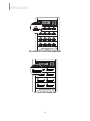
Function Overview
Function Overview
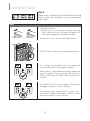
1.Copy
Before executing this function, users can go to 7.Setup to set the copy area and
copy mode. After finishing these two settings, go back to function 1.Copy and
press , and the system will start copying.
Depending on the content data size on your master storage, if the onboard memory
buffer can accommodate, asynchronous copy can be performed; otherwise,
synchronous copy will be adopted.
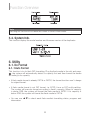
Copy area setting ➡ 7.2.Copy Area.
Select System and File or Whole Media.
Copy mode setting ➡ 7.5.Asynchronous.
Select Enable or Disable asynchronous.
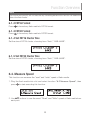
2. Compare
Verify bit-for-bit to ensure correct copying. After finishing copying, go to function 2
to start executing comparing process.
and press
3. Copy&Compare
Automatically start comparing once done copying. Function 3.Copy&Compare will
automatically run the compare function after finishing copying to make sure if the
copied result is correct.
20