1
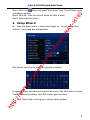
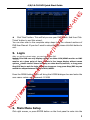
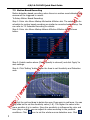
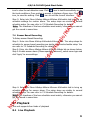
io /N AV -H 16 S 4/8/16-CH DVR Quick Start Guide r/ Na va Click „Next‟ button. This will let you see your DVR status. And then Click „Finish‟ button to end this wizard. You can also refer to the complete setup steps from the relevant sections of DVR User Manual. If you don‟t want to setup Wizard, please click Exit button to exit. dv 5. Login o/ After you exit the wizard setup, you can login to the DVR. Notice: This DVR can only display options on either VGA/HDMI monitor or BNC e.r monitor at a given point of time, if there is live image display without menu options,please check if there is display on other device/monitor, or long press er Stop/ESC key to wait for login dialog box to appear. Long press Stop/ESC key can m switch the output between BNC and VGA/HDMI. ht tp :// ww w. e- ca Press the MENU button which will bring the LOGIN dialogue box and enter the user name: admin and password: 123456 6. Main Menu Setup Click right mouse, or press ENTER button on the front panel to enter into the 6