1
AV
-H
16
S
4/8/16-CH DVR Quick Start Guide
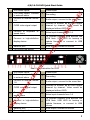
Rear Panel Instruction for 16-CH
2
Power input
4
Grounding
6
Audio output, connect to the sound box
7
CVBS video signal output
8
Connect to monitor as an AUX output
channel by channel. Video would be
displayed without OSD.
9
Connect to keyboard or
speed dome
10
Video input channels from 1-16
11
Connect to high-definition
display device
13
Network port
For cooling the device
io
Na
va
r/
14
er
15
12
To connect external USB devices like
USB flash, USB HDD for backup or
update firmware; or connect to USB
mouse
VGA output, connect to monitor
dv
5
o/
3
/N
4-ch audio inputs
1-ch relay output. Connect
to external alarm.
Connect
to
external
sensor1-16
e.r
1
Connect to cameras and monitor.
Connect with the source power.
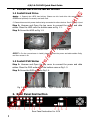
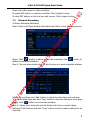
The device will boot and the power indicator will turn blue.
A WIZZARD window will pop up.
ww
w.
e-
Step1:
Step2:
Step3:
Step4:
ca
3.1 Startup
m
3. Startup & Shutdown
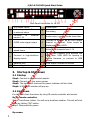
3.2 Shutdown
://
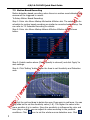
You can shut down the device by using IR remote controller and mouse.
By IR remote controller:
ht
tp
Step1: Press Power button. You will see a shutdown window. The unit will shut
down by clicking “OK” button.
Step2: Disconnect the power.
By mouse:
3