1
partitions. Using this option provides an easy way to wipe a drive and copy to it in a
single operation.
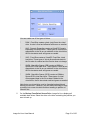
Omit Page File Data – Selected by default, this option eliminates page file data
from the copy process.
Omit Hibernation Data – Selected by default, this option eliminates hibernation
data from the copy process.
Remove Gaps on Copy – Select this option to remove any gaps (free space)
between partitions. Partitions will be copied adjacent to each other.
Assume Original HD – If you select this option, which mainly applies to Linux
partitions, Image for Linux will keep references to the source hard drive number
intact within the partitions that have been copied to the target location. If you do not
select this option and the target drive number differs from that of the source drive,
applicable drive references residing within the restored partitions will be updated to
reflect the new hard drive number.
This option has no effect if you are copying to a target drive whose number
matches that of the source drive. If you are copying to a target drive whose number
differs from that of the source drive, but you plan to subsequently move the target
drive so that its number matches the source drive again, enabling this option can be
beneficial.
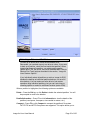
Scale to Target – If you use this option when copying a disk or partition, Image for
Linux copies the image proportionally to the target drive. For example, suppose that
you want to copy a 250 GB hard drive to a 500 GB hard drive. If you use this option,
you allow Image for Linux to double the size of the copy. This option only works for
FAT, FAT32, NTFS, and EXT 2/3/4 file systems and has no effect on copies made
to hard drives using other file systems. You cannot use this option in conjunction
with the Scale to Fit option. If you inadvertently enable both options, Scale to Fit
will take precedence.
Ignore IO Errors – Under ordinary circumstances, if Image for Linux encounters a
bad sector on the target drive while copying, Image for Linux will notify you
concerning the write error and give you the option to continue or abort. If you select
the Ignore IO Errors option, Image for Linux will ignore the error and continue.
Generally, you should select this option only if you need to copy to a target drive
that contains known bad sectors. On some systems, if you select this setting and
Image for Linux encounters bad sectors, there will be a significant delay as the
internal retry/recovery routine of the drive attempts to handle the bad sector(s).
Reboot When Completed – Selecting this option tells Image for Linux to reboot the
computer after completing the Copy operation.
Shutdown When Completed - Selecting this option tells Image for Linux to shut
down the computer after completing the Copy operation.
Log Results to File – Select this option to make Image for Linux log the details of
the copy operation. Image for Linux saves the log as ifl.log in the imagel
Image for Linux User Manual
Page 69 of 150